Domo AI pricing looks straightforward until you start comparing credits, monthly versus annual billing, and Fast versus Relax Mode. A cheaper plan can work well for occasional generations, but frequent AI video creation can burn through credits much faster than expected.
There is another source of confusion: DomoAI and Domo AI Pro are different products. This guide focuses primarily on DomoAI, the creative platform for generating and transforming AI videos and images.
Domo AI pricing plans: At a glance
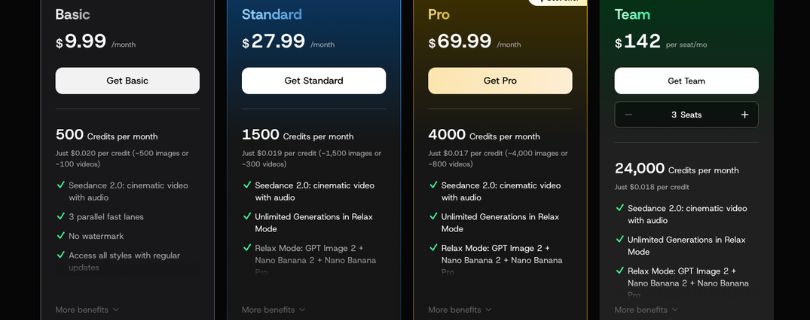
DomoAI currently has a free trial plus three paid plans: Basic, Standard, and Pro. Paying annually cuts the advertised monthly cost, while higher tiers increase your monthly credits and unlock unlimited generations through Relax Mode.
| Plan | Monthly billing | Annual price equivalent | Monthly credits | Best for |
| Free Trial | $0 | — | 15 credits | Testing DomoAI |
| Basic | $9.99/month | $6.99/month | 500 | Occasional creators |
| Standard | $27.99/month | $19.59/month | 1,500 | Regular content creators |
| Pro | $69.99/month | $48.99/month | 4,000 | Professionals and heavy users |
DomoAI’s public pricing page currently advertises the $6.99, $19.59, and $48.99 rates when billed yearly. Its help center lists monthly billing at $9.99, $27.99, and $69.99 respectively.
For most regular creators, the Standard plan looks like the strongest value. You get three times the Basic plan’s credits while also unlocking Relax Mode, which can generate supported content without spending credits.
Still comparing your options? See my guide to the best Domo AI alternatives before committing to a subscription.
DomoAI vs Domo AI Pro: What’s the difference?
This distinction matters because searching for Domo AI pricing can produce information about two completely different platforms.
DomoAI is the creative tool covered in this guide. It focuses on AI video generation, image generation, video-to-video transformations, character animation, talking avatars, upscaling, and other creator-focused features.
Domo AI Pro, on the other hand, belongs to Domo’s enterprise business intelligence platform. Domo uses consumption-based pricing with custom contracts, unlimited users, and credits consumed by activities such as data processing, workflows, and AI operations.
So if you’re looking for a $6.99 or $19.59 creator subscription, you want DomoAI—not enterprise Domo AI Pro.
If you’re new to the platform itself, my complete Domo AI guide explains what the tool does before you spend anything.
Domo AI pricing plans breakdown
The headline prices only tell part of the story. What matters more is how many Domo AI credits you receive, whether Relax Mode is included, and which generation features are available at each level.
Free Trial: $0
DomoAI gives new users 15 credits to explore the platform before paying. That’s useful for checking the interface and running a few generations, but it isn’t enough for ongoing video production.
What’s included:
- 15 starter credits
- Access to DomoAI’s generation tools
- No paid subscription required to test the platform
Best for: First-time users who want to check DomoAI’s output quality and workflow before choosing a paid plan.
Pros:
- Costs nothing to try
- Useful for testing whether the style fits your content
Cons:
- Very limited generation capacity
- Not practical for regular content creation
If you’re mainly exploring AI video tools rather than committing to one platform yet, my roundup of the best AI video generator tools gives you a wider comparison.
Basic plan: $9.99/month
Basic is DomoAI’s cheapest paid subscription. It includes 500 credits per month, three parallel Fast lanes, watermark-free exports, access to all styles, and the option to buy additional credits.
If you pay annually, DomoAI currently advertises Basic at $6.99 per month billed yearly, with an estimated cost of about $0.014 per included credit.
What’s included:
- 500 credits per month
- 3 parallel Fast lanes
- No watermark
- Access to all available styles
- Seedance 2.0 access
- Optional credit top-ups
Best for: Hobbyists and occasional creators who want watermark-free AI videos without paying for a higher-volume subscription.
Pros:
- Lowest-cost paid Domo AI plan
- 500 monthly credits are enough for lighter use
- Includes the core creative tools
Cons:
- No unlimited Relax Mode
- Credits can run out quickly if you repeatedly regenerate videos
- Less attractive for high-volume creators
The missing Relax Mode is the biggest limitation here. Basic users rely much more heavily on their monthly credit balance, while Standard and Pro subscribers can move supported, non-urgent generations into Relax Mode instead.
If Basic feels too restrictive, you can also compare it with tools in my Krea AI review before moving to DomoAI’s more expensive tiers.
Standard plan: $27.99/month
The Standard plan is where Domo AI pricing starts making more sense for regular creators. You get 1,500 monthly credits plus unlimited generations in Relax Mode, which significantly reduces how quickly you burn through credits.
DomoAI currently advertises Standard at $19.59 per month when billed yearly. That works out to roughly $0.013 per included credit before considering anything you generate through Relax Mode.
What’s included:
- 1,500 credits per month
- Unlimited generations in Relax Mode
- 3 parallel Fast lanes
- No watermark
- Access to all styles
- Seedance 2.0
- Optional credit top-ups
Best for: Regular creators who generate AI images or videos every week and don’t need every job processed at maximum speed.
Pros:
- Much more flexible than Basic
- Unlimited Relax Mode improves the overall value
- Three times the monthly credits of Basic
Cons:
- Relax Mode can take longer during busy periods
- Fast Mode and certain advanced features still consume credits
For me, Standard is the Domo AI plan most people should start with if they already know they’ll use the platform regularly. Relax Mode makes the jump from Basic easier to justify.
If you’re comparing creator-focused platforms at a similar level, my Deevid AI review covers another option for AI video creation.
Pro plan: $69.99/month
Pro is built for users generating content at a much higher volume. It increases your allowance to 4,000 monthly credits, keeps unlimited Relax Mode, and gives you six parallel Fast lanes instead of three.
The current annual offer brings the advertised Domo AI cost down to $48.99 per month billed yearly, or roughly $0.012 per included credit.
What’s included:
- 4,000 monthly credits
- Unlimited Relax Mode
- 6 parallel Fast lanes
- No watermark
- Access to all styles
- Longer Character-to-Video generations
- Longer Talking Avatar options
- Higher-volume upscaling and generation limits
Best for: Professionals, freelancers, agencies, and creators who regularly produce large amounts of AI-generated video.
Pros:
- Largest monthly credit allowance
- Lowest included cost per credit on annual billing
- Six Fast lanes help with heavier workflows
- Access to longer advanced generations
Cons:
- Expensive for occasional use
- Some advanced tasks still require Fast Mode and credits
- You may waste value if you don’t use the monthly allowance
The Pro plan makes sense when generation speed and volume directly affect your work. Otherwise, Standard gives most creators enough room without jumping to nearly $70 on monthly billing.
Before paying for the highest DomoAI tier, I’d also compare Runway pricing if professional AI video production is your main priority.
How Domo AI credits work
DomoAI uses credits mainly to pay for priority generation. The important thing isn’t just how many Domo AI credits your plan includes, but which generation mode you choose.
Fast Mode vs Relax Mode
Fast Mode gives your job priority access to GPU resources, so results arrive faster. The trade-off is that Fast Mode consumes credits each time you use it.
Relax Mode works differently. It uses available computing capacity and doesn’t consume credits, but generations can sit in a queue and take longer when demand is high.
Standard and Pro include unlimited Relax Mode. Basic does not.
That distinction is why comparing plans purely by credit count can be misleading. A Standard subscriber willing to wait for non-urgent generations may get considerably more practical usage than 1,500 credits suggest.
If you’re comparing how other credit-based video generators charge for usage, my Hailuo AI pricing guide is worth checking too.
Do unused Domo AI credits roll over?
No. Subscription credits don’t roll over. Your included monthly credits reset on your renewal date, and anything you haven’t used from the previous billing cycle expires.
Extra credits purchased separately work differently. DomoAI says paid credits don’t expire and stay in your account until you use them. They’re consumed after your subscription credits are gone.
Can you buy extra Domo AI credits?
Yes. Paid subscribers can purchase additional credits whenever their included allowance isn’t enough.
You’ll need an active paid subscription to buy them, but previously purchased credits remain in your account until used.
Which Domo AI plan should you choose?
The right Domo AI subscription mostly comes down to how frequently you generate and whether you’re comfortable waiting for Relax Mode.
Choose the Free Trial if you:
- Haven’t used DomoAI before
- Want to test its output before paying
Choose Basic if you:
- Generate content occasionally
- Want watermark-free exports
- Can stay within 500 monthly credits
- Don’t need Relax Mode
Choose Standard if you:
- Generate content every week
- Want unlimited Relax Mode
- Need more credits without paying Pro prices
- Want the best overall balance of cost and usage
Choose Pro if you:
- Generate AI videos frequently
- Need multiple Fast jobs running at once
- Use longer Character-to-Video or Talking Avatar options
- Can actually take advantage of 4,000 monthly credits
For most regular creators, I’d pick Standard. Basic makes sense for lighter use, while Pro becomes worthwhile only when higher output and faster parallel generation are part of your normal workflow.
If DomoAI’s credit system still feels restrictive, compare LTX Studio pricing before deciding which platform fits your workflow better.
Is Domo AI worth the cost?
DomoAI is worth paying for if you regularly create AI videos, stylized animations, or image-based content. The value improves considerably once you reach Standard because Relax Mode lets you keep generating supported content without constantly watching your credit balance.
DomoAI is worth it if you:
- Create AI videos or images every week
- Can use Relax Mode for non-urgent generations
- Like anime and stylized video transformations
- Want image, video, avatar, and upscaling tools in one platform
- Can use most of your monthly credit allowance
Skip DomoAI if you:
- Only generate a few videos each month
- Don’t want to manage monthly credits
- Need every generation processed immediately
- Primarily need advanced professional video editing rather than AI generation
If you’re still unsure whether DomoAI offers enough value, my Pollo AI review covers another platform that combines multiple AI video models and creative tools in one place.
Domo AI alternatives & pricing comparison
DomoAI isn’t the only credit-based AI video generator. The better choice depends on whether you care most about stylization, realistic video, model variety, generation speed, or unlimited slower generations.
| Tool | Starting paid price | Best for | Pricing advantage |
| DomoAI | $6.99/month billed yearly | Stylized video and animation | Relax Mode on Standard and Pro |
| Krea AI | $9/month | Multiple image and video models | Free daily compute plus flexible paid tiers |
| Pika | $8/month billed yearly | Short creative videos | Low-cost entry plan |
| Hailuo AI | $14.99/month | AI video generation | 1,000 credits on Standard |
| Runway | $15/month | Professional AI video workflows | Broad model and editing ecosystem |
DomoAI’s current public pricing starts at $6.99 per month when Basic is billed yearly. Krea lists Basic at $9 monthly, Pika lists its paid Standard tier at $8 monthly with annual billing, and Hailuo’s Standard plan is $14.99 monthly.
Runway’s Standard plan is around $15 per month, but its pricing model is also becoming more credit-focused, including the newer Max tier for high-volume generation.
If realistic or cinematic video matters more than DomoAI’s stylized workflow, compare Kling AI pricing before subscribing.
You can also check my Pika AI pricing guide if you mainly create shorter social and experimental videos.
For another credit-based option with more cinematic workflows, see my Luma Dream Machine pricing breakdown.
And if you want a broader creative suite instead of a DomoAI-style focused workflow, my Krea AI pricing guide compares its compute-based plans.
My bottom line on Domo AI pricing
The Basic plan is fine for occasional creators, but its lack of Relax Mode makes the 500-credit limit more noticeable.
For most regular users, I’d choose Standard. You get 1,500 monthly credits and unlimited Relax Mode without paying Pro prices. Pro makes more sense when faster parallel generation, longer videos, and higher monthly output directly matter to your work.
The main thing is not to choose a Domo AI plan based only on the headline price. Think about how quickly you’ll use credits and how often you’re willing to wait for Relax Mode.
Frequently asked questions
Is Domo AI free?
Yes, but only for limited testing. DomoAI currently gives new users 15 free credits before they subscribe. That’s enough to explore the platform, but not enough for regular video production.
How much is Domo AI per month?
Monthly billing currently costs $9.99 for Basic, $27.99 for Standard, and $69.99 for Pro. DomoAI’s public pricing page advertises lower equivalent monthly rates when you commit to annual billing.
Does Domo AI offer unlimited generations?
Yes, but there is an important catch. Standard and Pro include unlimited Relax Mode, where supported generations don’t consume credits but may take longer. Fast Mode continues to use your credits.
Do Domo AI credits expire?
Subscription credits do. They reset every billing cycle and unused credits don’t roll over. Extra paid credits don’t expire and remain available until you use them.
Does DomoAI have a Team plan?
DomoAI’s current public subscription lineup does not list a separate Team plan. The available consumer options are the free trial, Basic, Standard, and Pro, so be careful with older pricing information that mentions Team pricing.
How much does the DomoAI API cost?
DomoAI’s Enterprise API uses separate pay-as-you-go credits priced at $0.02 per credit. Actual generation costs vary by model; for example, its faster text-to-video model currently uses two credits per second.