Luma Dream Machine is one of the most talked-about AI video generators right now.
And at first glance, its pricing looks simple enough.
But does Luma stay affordable once you start creating more videos, testing prompts, and using higher-quality settings?
Want my full hands-on experience before comparing plans?
Luma Dream Machine Review
That is exactly what this breakdown will help you figure out.
In this guide, I will:
Explain every Luma Dream Machine pricing plan in detail
Show you the credits, limits, and extra costs many creators miss at first
Compare Luma’s pricing with similar AI video tools
Let’s see whether Luma Dream Machine is actually worth your money!
How Much Does Luma Dream Machine Cost? (Quick Overview)
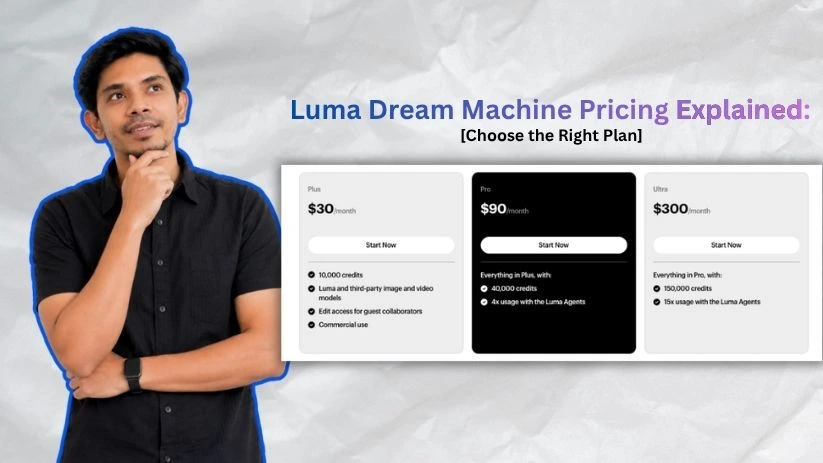
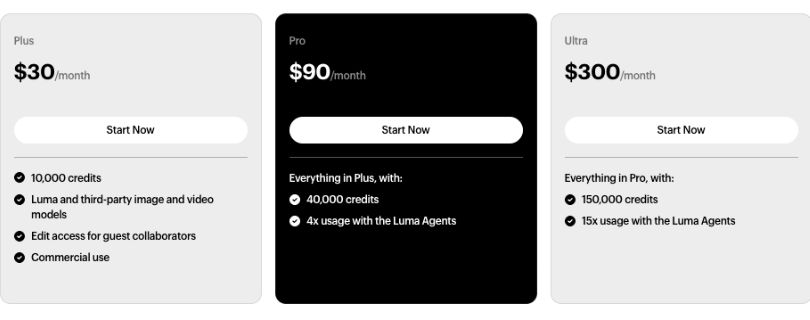
Before diving into the details, here’s a quick look at the main Luma Dream Machine pricing plans side by side.
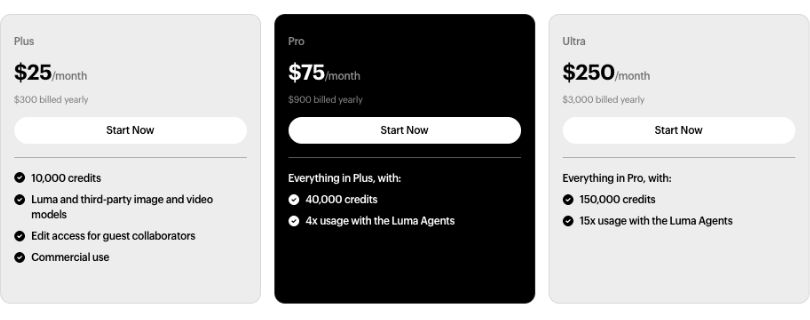
| Plan | Monthly Billing | Annual Billing | Usage Included | Best For |
| Free / Trial | $0 | $0 | Limited free usage | Testing the platform |
| Plus | $30/mo | $300/year | Standard creator usage | Solo creators and freelancers |
| Pro | $90/mo | $900/year | 4x more usage with Luma Agents | Regular creators and small teams |
| Ultra | $300/mo | $3,000/year | 15x more usage with Luma Agents | Agencies and heavy video users |
If you choose annual billing, you can save up to 20% across paid plans.
That said, Luma’s real cost isn’t just the subscription — it’s the credits and generation settings underneath.
Let me walk you through each plan so you know exactly what you’re getting.
Still comparing AI video tools before paying?
Best Luma Dream Machine Alternatives
Luma Dream Machine Pricing Plans — Full Breakdown
1. Free / Trial Plan
Luma’s free option is mainly there so you can test the platform before paying. It’s useful if you want to see how the AI video generator handles prompts, image-to-video clips, and basic creative ideas.
Luma Dream Machine free plan breakdown
✅ What you get:
- Limited free usage to test the platform
- Access to basic AI image and video generation
- A simple way to try text-to-video and image-to-video prompts
- Good enough for checking output quality before upgrading
- No upfront payment required
❌ Where it falls short:
The free plan is not built for serious video creation.
You’ll run into limits quickly, especially if you test multiple prompts or try to create polished videos for YouTube, Instagram Reels, TikTok, ads, or client work.
Free usage may also come with restrictions like lower priority processing, limited quality, watermarks, and non-commercial use. So while it’s fine for experimenting, it’s not the plan you want for branded content or paid projects.
My take: Use the free plan to test whether Luma’s AI video style fits your workflow. But if you want clean exports, commercial rights, or regular video creation, you’ll need a paid plan.
2. Plus Plan — $30/month or $300/year
The Plus plan is Luma’s entry-level paid plan. This is where Luma starts to make sense for solo creators, freelancers, marketers, and small business owners who want to create AI videos for real projects.
Luma Plus plan in-depth breakdown
✅ What you get:
- Access to Luma and third-party image and video models
- Commercial use rights
- Edit access for guest collaborators
- Better fit for regular AI video generation
- Useful for social videos, product visuals, ad concepts, and creative tests
- Annual billing at $300/year instead of paying month to month
❌ Where it falls short:
Plus looks affordable at first, but the real cost depends on how you use it.
If you generate lots of versions, test prompts repeatedly, or use higher-quality video settings, your usage can disappear faster than expected. This matters because AI video creation is rarely one-and-done. You may need five or ten attempts before you get one clip that feels usable.
It also doesn’t include the higher usage capacity of Pro or Ultra. So if you’re making videos every day, Plus may start to feel tight.
My take: Plus is the best starting point for most individual creators. It gives you commercial use without jumping straight into a high monthly bill. Just be careful with high-resolution generations, because that’s where Luma can get expensive.
3. Pro Plan — $90/month or $900/year
The Pro plan is for creators who use Luma more often and need more room to experiment. If Plus feels too limited, Pro gives you 4x usage with Luma Agents.
Luma Pro plan breakdown
✅ What you get:
- Everything included in Plus
- 4x usage with Luma Agents
- Better fit for frequent AI video creation
- More room for prompt testing and creative variations
- Useful for YouTubers, content marketers, agencies, and small creative teams
- Annual billing at $900/year
❌ Where it falls short:
Pro is much more comfortable than Plus, but it still isn’t unlimited.
If you’re generating high-quality clips, using video-to-video, creating multiple aspect ratios, or testing several versions for every project, you can still burn through usage quickly.
The other thing to consider is price. At $90/month, Pro only makes sense if Luma is part of your regular workflow. If you only create a few AI videos per month, Plus will usually be the smarter choice.
Quick math for Pro:
$90/month = $1,080/year if paid monthly
$900/year if paid annually
That annual plan saves money, but only if you’re sure you’ll keep using Luma throughout the year.
My take: Pro is the most practical plan for regular creators. If you make AI videos every week for YouTube, social media, ads, or client content, Pro gives you more breathing room than Plus.
4. Ultra Plan — $300/month or $3,000/year
Ultra is Luma’s highest individual plan. It’s made for heavy users who create a lot of AI video content and need much more capacity than Pro.
Luma Ultra plan breakdown
✅ What you get:
- Everything included in Pro
- 15x usage with Luma Agents
- Best fit for high-volume AI video workflows
- More space for testing, editing, and generating final clips
- Useful for agencies, production teams, ad creatives, and studios
- Annual billing at $3,000/year
❌ Where it falls short:
Ultra is powerful, but it’s expensive for a solo creator.
At $300/month, you really need to be using Luma often enough to justify the cost. If you’re only making occasional clips for social media, this plan is probably more than you need.
It’s also worth remembering that Ultra is still different from a proper team or enterprise setup. If multiple people need shared credits, usage tracking, SSO, and team management, the Team plan may be a better fit.
Quick math for Ultra:
$300/month = $3,600/year if paid monthly
$3,000/year if paid annually
That’s a serious commitment, so it only makes sense if Luma is helping you produce content at scale.
My take: Ultra is best for agencies, studios, and creators who use AI video generation almost daily. Most beginners and casual creators should start with Plus or Pro before even thinking about Ultra.
5. Team Plan — Custom Pricing
The Team plan is built for businesses that need shared access instead of one person managing everything from a single account.
Luma Team plan breakdown
✅ What you get:
- Everything in the regular plans
- Team member management
- Projects and team organization
- Team-wide sharing
- Usage analytics
- Shared team credits
- SSO access
❌ Where it falls short:
The biggest downside is that pricing is not public. You need to contact Luma to get a quote.
That makes it harder to compare Team pricing with other AI video tools like Runway, Kling, Pika, or Veo-based platforms. It also means small teams may not know whether Team is worth it until they speak with sales.
Still, the shared credit setup can be helpful if several people are creating videos, testing prompts, or working on client campaigns.
My take: Team makes sense if Luma is part of your company’s creative workflow. If only one person is using it, Pro or Ultra may be easier to manage.
6. Enterprise Plan — Custom Pricing
The Enterprise plan is for larger companies that need more control, support, and custom setup.
Luma Enterprise plan breakdown
✅ What you get:
- Everything included in the Team plan
- Enterprise commitments
- Dedicated education and training
- Custom fine-tuning
- More support for large creative teams
- Better fit for brands, agencies, and production companies with bigger needs
❌ Where it falls short:
Enterprise is not designed for casual creators or small teams testing AI video for the first time.
You’ll likely need a bigger budget, a clear production workflow, and enough team usage to justify the plan. It’s also not something you can compare easily by looking at a public price table, because the cost depends on your needs.
My take: Enterprise is worth considering only if your team needs security, training, custom workflows, and high-volume AI video production. For everyone else, Plus, Pro, or Ultra will be easier to understand and manage.
Quick note on older Dream Machine plan names:
You may still see older Dream Machine pricing terms like Lite, Plus, Unlimited, Web plans, and iOS plans mentioned in support docs or older reviews.
That’s why Luma Dream Machine pricing can feel confusing. The current pricing page focuses on Plus, Pro, Ultra, Team, and Enterprise, while older Dream Machine materials may show different plan names and credit amounts.
My take: Before you subscribe, always check the live Luma pricing page from your own account. Then use this breakdown to understand what each plan actually means in real-world video creation.
Not sure Luma is the right AI video tool for your budget?
Best Luma Dream Machine Alternatives
How Luma’s Credit System Actually Works
This is the part of Luma Dream Machine pricing that catches most creators off guard. The monthly plan is just your starting point. The credit system is what decides how many videos you can actually create inside the platform.
Here’s how credits get consumed:
| Action | Credit Cost |
| Ray3.2 draft text-to-video or image-to-video | 20 credits / 5 sec |
| Ray3.2 720p text-to-video or image-to-video | 100 credits / 5 sec |
| Ray3.2 1080p text-to-video or image-to-video | 400 credits / 5 sec |
| Ray3.2 1080p 10-second video | 1,200 credits |
| Ray3.2 1080p video-to-video | 144 credits / sec |
| Ray3.2 1080p reframe | 120 credits / sec |
Now, let’s do some math that actually matters.
On a 3,200-credit monthly allowance:
- If you only create draft 5-second videos → you get about 160 videos
- If you only create 720p 5-second videos → you get about 32 videos
- If you only create 1080p 5-second videos → you get about 8 videos
- In practice, most creators test prompts, redo clips, and upscale favorites — so the usable number is usually lower
On a 10,000-credit monthly allowance:
- Draft 5-second videos only → about 500 videos
- 720p 5-second videos only → about 100 videos
- 1080p 5-second videos only → about 25 videos
- 1080p 10-second videos only → about 8 videos
The biggest catch with Luma Dream Machine pricing?
Credits can disappear fast when you move from testing to final-quality videos. A simple draft clip may feel cheap, but once you start using 1080p, longer durations, video-to-video, reframe, HDR, or multiple prompt attempts, the same credit pool gets much smaller.
Monthly subscription credits also do not roll over. So if you don’t use them before your billing cycle ends, they expire. And if you run out early during a busy project, you’ll either need to wait for the next reset or buy top-up credits.
Hidden Costs in Luma Dream Machine Pricing You Should Know
The sticker price is only the beginning. Here are the extra costs that can quietly eat through your Luma credits faster than expected.
High-Quality Video Uses More Credits
Luma’s video generation cost changes based on resolution, duration, and the model you use. Here’s a simple breakdown:
| Video Type | Credit Cost |
| Ray3.2 Draft, 5 seconds | 20 credits |
| Ray3.2 720p, 5 seconds | 100 credits |
| Ray3.2 1080p, 5 seconds | 400 credits |
| Ray3.2 1080p, 10 seconds | 1,200 credits |
| Ray3.2 1080p video-to-video | 144 credits/sec |
That means one polished 10-second 1080p clip can cost as much as 60 draft clips.
For creators making YouTube videos, Instagram Reels, TikToks, product ads, or client visuals, this matters a lot. You may start with cheap drafts, but final-quality exports can shrink your credit balance quickly.
Prompt Testing Adds Up Fast
AI video generation usually takes a few tries.
You may need to test different camera movements, styles, characters, product angles, lighting, or aspect ratios before the result looks right.
Here’s what that can look like:
| Workflow | Approx Credit Use |
| 5 draft tests | 100 credits |
| 3 final 720p versions | 300 credits |
| 2 final 1080p versions | 800 credits |
| 1 final 10-second 1080p clip | 1,200 credits |
So a single “simple” video idea can easily use 2,000+ credits once you include testing and final renders.
Top-Up Credits Cost Extra
If you run out of credits before your billing cycle resets, you can buy top-up credits.
Luma’s top-up credits start at $4 for 1,200 credits. They last for 12 months and are used after your monthly subscription credits.
| Credit Type | How It Works |
| Monthly credits | Reset each billing cycle |
| Unused monthly credits | Do not roll over |
| Top-up credits | Paid extra |
| Top-up credit validity | 12 months |
| Top-up availability | Active paid plans only |
The catch is simple: if you keep buying top-ups every month, your “cheap” plan may not be cheap anymore.
API Credits Are Separate
Luma’s app subscription and API billing are separate. Your Dream Machine subscription credits do not transfer to the API.
API pricing also changes based on resolution and output type.
| API Task | 540p | 720p | 1080p |
| Text-to-video / image-to-video, 5 sec | $0.15 | $0.30 | $1.20 |
| Text-to-video / image-to-video, 10 sec | $0.45 | $0.90 | $3.60 |
| Video-to-video, 5 sec | $0.72 | $1.44 | $2.16 |
| Reframe, per second | $0.06 | $0.12 | $0.36 |
HDR output costs 2x, and HDR + EXR costs 3x.
Real-world scenario: A creator on Plus may pay $30/month, but if they generate lots of 1080p clips, test multiple prompts, buy top-up credits, or use the API separately, the real monthly cost can climb much higher than the advertised plan price.
Luma Dream Machine vs Runway, Kling, Pika, Veo and Sora Pricing
Luma is not the only AI video generator worth comparing. Tools like Runway, Kling, Pika, Veo, and Sora all approach pricing a little differently.
| Tool | Entry Price | Credit Transparency | Best For |
| Luma | $30/mo | Clear credit costs by model and resolution | Fast cinematic motion and creative workflows |
| Runway | $12/mo billed yearly | Clear monthly credits | Editing, video control, and team workflows |
| Kling | Around $10/mo | Credit-based, varies by plan and region | Longer, cinematic AI video clips |
| Pika | $8/mo billed yearly | Clear video credits | Quick stylized social videos |
| Veo | API pricing varies by seconds and resolution | Clear API pricing | High-quality realistic video generation |
| Sora | Availability/pricing may change | Not a stable self-serve comparison right now | High-end creative video when available |
If you want simple, fast AI video generation, Luma is a strong choice. If you need more editing control, Runway may feel better. If you want social-style effects, Pika is easier to play with.
Comparing cheaper social-video tools too?
Pika AI Pricing Explained
Kling is worth checking if you want longer cinematic clips.
If Kling is on your shortlist, check its real credit cost here:
Kling Pricing Explained
Veo is better for high-end output, but pricing depends heavily on how you access it.
Related reads: Best AI video generators and Luma vs Runway vs Kling.
Which Luma Plan Should You Choose?
The best Luma plan depends on how often you create videos and how many final clips you actually need.
| User Type | Best Plan | Why |
| Curious beginner | Free / trial | Test quality without paying |
| Hobby creator | Plus | Cheapest professional entry |
| Freelancer | Plus or Pro | Depends on client revisions |
| Weekly YouTuber | Pro | More room for iteration |
| Social media manager | Pro | Multiple posts and variations |
| Marketing team | Pro or Ultra | Campaign variations need volume |
| Agency | Ultra / Team | Shared production workload |
| Enterprise brand | Enterprise | Security, support, fine-tuning |
My take: For most professional individual creators, start with Plus. Upgrade to Pro only when you keep running out of usage. Consider Ultra or Team only if Luma is part of your daily content workflow.
Common Pricing Mistakes to Avoid
The biggest mistake is choosing a plan based only on the monthly price.
Before paying, watch out for these:
- Ignoring commercial-use rights
- Forgetting about watermarks on lower or free plans
- Generating every test video in high resolution
- Assuming every AI generation will be usable
- Confusing older Dream Machine plans with current Luma plans
- Mixing up official API pricing with third-party API wrappers
- Buying through iOS when web pricing may be lower
- Ignoring Fast Mode vs Relaxed Mode speed differences
- Not tracking credits per project
A cheap plan can become expensive fast if you keep re-generating, upscaling, reframing, or buying top-up credits.
Final Verdict: Is Luma Dream Machine Worth the Price?
Luma Dream Machine is worth it if you need realistic motion, cinematic clips, commercial use, and regular AI video generation.
The $30 Plus plan is a fair starting point for solo creators, freelancers, and marketers. But the real cost rises when you create many variations, use high-resolution settings, or need videos every day.
For occasional testing, use the free option. For regular creators, Plus or Pro is usually the safest starting point. For agencies and teams, Ultra, Team, or Enterprise makes more sense.
Still not sure Luma is worth the price?
Best Luma Dream Machine Alternatives
FAQs About Luma Dream Machine Pricing
How much does Luma Dream Machine cost?
Luma’s current individual plans start with Plus at $30/month, Pro at $90/month, and Ultra at $300/month.
You may also see older Dream Machine pricing like Lite, Plus, and Unlimited in support docs or older reviews, which is why the pricing can look confusing.
Is Luma Dream Machine free?
Yes, Luma offers free or trial access so you can test the platform before paying.
The free option is best for checking video quality, prompt results, and the basic workflow. It’s not ideal for commercial projects or regular content creation.
What is the cheapest paid Luma plan?
The cheapest current paid plan is Plus at $30/month.
It’s the best starting point if you want commercial use, better access, and a more serious AI video generation workflow.
Why do some websites show different Luma prices?
Because Luma’s pricing has changed over time.
Some pages still mention older Dream Machine plans like:
- Lite
- Plus
- Unlimited
- Web pricing
- iOS pricing
Always check Luma’s live pricing page before subscribing.
Does Luma Dream Machine use credits?
Yes, Luma uses credits for video, image, audio, and other creative generations.
The number of credits you spend depends on the model, resolution, duration, and type of generation you choose.
How many credits does one Luma video use?
It depends on the settings.
A short draft video may use far fewer credits, while a 1080p or longer video can use much more. Reframes, video-to-video, HDR, and high-quality exports also increase credit usage.
Do Luma credits roll over?
Monthly subscription credits usually do not roll over.
So if you don’t use them before your billing cycle ends, they expire. Top-up credits are different and may last longer.
What are Luma top-up credits?
Top-up credits are extra credits you can buy when you run out during your billing cycle.
They’re useful for busy months, client projects, or campaign work. But if you buy them every month, upgrading your plan may be smarter.
Can I use Luma Dream Machine videos commercially?
Yes, but only on plans that include commercial use.
The current Plus, Pro, and Ultra plans include commercial use. Free or lower legacy plans may have restrictions, so check before using outputs in ads, client work, or monetized content.
Does Luma add watermarks?
Free and some older lower-tier plans may include watermarks.
Paid commercial plans generally remove watermarks, which matters if you’re creating YouTube videos, product ads, social media campaigns, or client content.
Is Luma Plus enough for most creators?
For many solo creators, yes.
Plus is a good fit if you create AI videos occasionally, test product visuals, make social content, or need a professional entry point without paying too much.
When should I upgrade to Luma Pro?
Upgrade to Pro when Plus starts feeling tight.
That usually happens when you:
- Create videos every week
- Test many prompt variations
- Work with client revisions
- Need more room for final-quality renders
Is Luma Ultra worth it?
Ultra is worth it only if you use Luma heavily.
For most beginners and casual creators, it’s too much. But for agencies, studios, and daily AI video workflows, the extra usage can make sense.
Is Luma more expensive on iOS?
Older Dream Machine docs show higher iOS pricing than web pricing.
That’s why it’s worth checking the web version before subscribing through the app. You may get better pricing depending on your account and location.
What is Relaxed Mode in Luma?
Relaxed Mode is a slower generation mode available on some legacy or higher-tier setups.
It can help you keep generating after fast credits are used, but it may not be ideal when you’re working on tight deadlines.
Is Luma API pricing included with my subscription?
No, Luma app subscriptions and API pricing are separate.
If you use Luma through the API or a third-party wrapper, check those costs separately. Don’t assume your app credits will cover API usage.
Why does Luma feel expensive after a while?
Because AI video usually takes multiple tries.
You might test prompts, change camera movement, fix weird results, upscale clips, reframe for Shorts or Reels, and generate final versions. All of that uses credits.
Is Luma better than Runway, Kling, Pika, Veo, or Sora?
Luma is strong for fast, cinematic motion and creative video generation.
Runway is better if you want more editing control. Pika is good for quick stylized clips. Kling can be useful for cinematic videos, while Veo and Sora are higher-end options where access and pricing may vary.
Which Luma plan should I choose?
Start with Plus if you’re a solo creator, freelancer, or marketer.
Move to Pro if you create every week or run out of usage often. Choose Ultra, Team, or Enterprise only if Luma is part of your daily production workflow.