There are a lot of AI video generators. They are taking over the creative landscape, choosing the right tool can shape both your workflow and your wallet. So Pika AI might be the one you may consider for your project, because its one of the best. But what is its actual pricing and are there any hidden charges?
I put this guide together to break down Pika AI’s pricing in a way that actually answers everything, so you can see what you’re paying for, when each plan shines, and how to get the most value for the kind of videos you want to create.
What is Pika AI?
It’s a creative video platform that turns your ideas, prompts, and edits into polished animations or live-action clips without needing a studio setup or years of editing experience. Think of it as a place where you can sketch an idea in words and watch it come to life in seconds, whether you’re shaping short social videos, refining shots for a bigger project, or experimenting with styles just to see what sparks. It’s built for creators who want speed, flexibility, and high-quality output without getting tangled in complex software.
Pika AI Plans and Pricing
Pika AI has a pricing system that works in two parts. Your subscription is the first piece, giving you access to the platform and a monthly bundle of video credits. The second piece is how those credits get used each time you generate a clip. The length, quality, and model you choose all pull from that credit pool, so the plan you pick directly affects how far your monthly credits stretch.
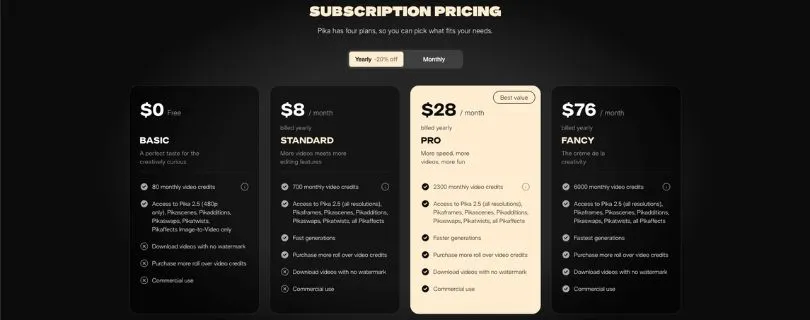
Let’s walk through the subscription plans first.
Pika AI subscription tiers (Monthly)
Here’s how the plans compare when you pay month to month.
| Feature | Free | Basic | Standard | Pro | Fancy |
| Monthly Cost | $0 | $8/mo | $28/mo | $76/mo | $190/mo |
| Monthly Video Credits | 80 | 80 | 700 | 2,300 | 6,000 |
| Access to Models and Tools | Core models only | Full models and tools | Full models and tools | Full models and tools | Full models and tools |
| Watermark-Free Downloads | Yes | Yes | Yes | Yes | Yes |
| Commercial Use | Yes | Yes | Yes | Yes | Yes |
| Fast Generation | No | Yes | Yes | Faster | Fastest |
The Free plan is the easiest way to experiment and get a feel for the platform. Basic unlocks all tools but keeps a lighter credit pool, making it good for casual creators. Standard is where you start to feel comfortable with regular output. Pro and Fancy focus on volume, speed, and reliability for people creating a lot of content or working with clients.
Pika AI subscription tiers (Yearly)
If you already know you’ll be using Pika often, the yearly plans give you a meaningful discount. Credits and features stay the same as the monthly plans.
| Feature | Free | Basic Yearly | Standard Yearly | Pro Yearly | Fancy Yearly |
| Monthly Cost (equivalent) | $0 | $8/mo | $28/mo | $76/mo | $190/mo |
| Annual Savings | Not applicable | Lower annual rate | Lower annual rate | Lower annual rate | Lower annual rate |
| Monthly Video Credits | 80 | 80 | 700 | 2,300 | 6,000 |
| Access to Models and Tools | Core models only | Full models and tools | Full models and tools | Full models and tools | Full models and tools |
| Watermark-Free Downloads | Yes | Yes | Yes | Yes | Yes |
| Commercial Use | Yes | Yes | Yes | Yes | Yes |
The yearly billing option helps steady creators spend less over time without giving up features or credit amounts.
How Pika AI credits actually work across tools, models, and video types
Once you dive into Pika AI, you’ll notice that every feature inside the platform has its own credit cost. This is where most creators start paying closer attention, because the credit system isn’t one-size-fits-all. Different tools, resolutions, models, and durations all have their own pricing. The more complex or higher-quality the output, the more credits you’ll spend.
Here’s a clear breakdown of how those credit costs work so you can plan your workflow without burning through your monthly balance by accident.
PikaAffects
This category covers image-to-video and video-to-video transformations.
A simple 5-second image-to-video clip costs 15 credits, while a 5-second video-to-video edit uses 18 credits. If you’re doing quick stylization or enhancing existing footage, this is where you’ll feel those credit pulls most often.
PikaScenes
Scenes scale by resolution even if duration stays short.
A 5-second clip costs
- 20 credits at 480p
- 35 credits at 720p
- 65 credits at 1080p
The jump from 480p to 1080p is significant, so creators working at full HD should plan their credits with this in mind.
PikaTwists
This is where you reimagine or restyle clips using Pika’s more advanced models.
For a 5-second clip:
- Turbo model: 60 credits
- Pro model: 80 credits
These models give you noticeably stronger creative control, but they’re also some of the most credit-heavy options.
PikaAdditions and PikaSwaps
Great for small enhancements like overlays, swaps, or detail tweaks.
A 5-second edit costs:
- 20 credits at 480p
- 35 credits at 720p
- 65 credits at 1080p
Even though these feel like “simple” edits, bumping the resolution still increases your credit usage.
Text-to-Video and Image-to-Video
These are some of the most commonly used features.
For Model 2.5 at 5 seconds:
- 12 credits at 480p
- 20 credits at 720p
- 40 credits at 1080p
Double the duration, and you’ll roughly double the cost too. This adds up fast if you’re experimenting with multiple versions of the same scene.
PikaFrames
Frames allow you to generate longer continuous sequences, which means credits scale quickly.
At 480p:
- 5 seconds: 12 credits
- 10–15 seconds: 36 credits
- 20–25 seconds: 60 credits
At higher resolutions (720p and 1080p), the credit usage increases significantly. This is where longer narrative clips start to draw from your credit pool at a faster pace.
PikaFormance
If you’re generating audio-driven animations, credits are calculated per second.
- 3 credits per second for audio durations up to 30 seconds
This is one of the more predictable parts of the credit system because it scales linearly.
What all of this means for your workflow
Each feature inside Pika has its own credit rhythm. Short clips, low resolution, and basic models barely dent your balance. Once you bump up the resolution, switch to Pro-level models, or stretch your clips into longer sequences, your credit usage rises noticeably.
If you’re planning a heavy creative session, it helps to map out which tools you’ll rely on the most. That way you’re not surprised by how quickly credits disappear when you start rendering 1080p scenes or experimenting with advanced models.
Credit rollovers and daily credits
Pika keeps things interesting by giving you more than one way to manage your credits. Depending on the plan you’re on, you’ll get a mix of monthly credits and small daily boosts that can help you squeeze in quick experiments without dipping into your main balance.
Here’s how it works:
- Paid plans come with monthly credits that roll over, as long as your subscription stays active. If you don’t use everything in a month, those leftover credits stack into the next one.
- Free and paid users both get daily credits, which are perfect for quick tests or small edits.
- Daily credits don’t roll over, so it’s a use-them-today or lose-them-today setup.
- Monthly credits stay predictable, daily credits keep things flexible, but juggling both means you’ll want to keep an eye on your balance to avoid running out mid-project.
Also Read:
I tried 10 Pika alternatives to find the best AI video Tool
Are there any hidden costs in Pika AI?
Pika doesn’t hit you with surprise fees after you subscribe, but there are a few places where the costs can feel higher than expected once you actually start creating. Most of these aren’t true “hidden charges,” but they are things newer users often overlook.
Here’s what typically catches creators off guard:
- Credits can disappear faster than planned when you work in higher resolutions or use advanced models. Longer clips cost more, so heavy workflows tend to push you toward larger plans sooner than expected.
- If you run out of credits mid-project, you may need to buy additional credits, which effectively adds to your monthly spending.
- Some features that matter for professional work, like commercial usage rights or watermark-free downloads, are locked behind higher-tier plans. Upgrading becomes less of a choice and more of a requirement once you start using Pika for client work or brand content.
- Signing up through different platforms or app stores can sometimes change available pricing or plan features, which can feel like an unexpected cost if you weren’t aware of the differences.
So while there aren’t hidden fees buried inside the platform, the way credits scale and the features tied to specific plans can make the actual cost of using Pika higher than what you first budget for.
Optimal use cases for each pricing plan
Free plan: A great fit if you’re just getting to know Pika AI and want to experiment with short clips, basic models, or light creative tests before spending money.
Basic plan: Works well for casual creators who need watermark-free downloads and full tool access but don’t generate enough videos each month to justify a bigger credit bundle.
Standard plan: Ideal for solo creators, content makers, and early-stage freelancers who produce videos regularly and want a more comfortable monthly credit pool.
Pro plan: Best for professionals and small teams creating multiple assets per week, especially when working in higher resolutions or using advanced models that consume more credits.
Fancy plan: Suited for agencies, heavy video producers, and anyone running high-volume workflows where credit limits, slower generation speeds, or restricted features would get in the way.
Comparative Analysis: Pika AI Pricing vs. Competitors
To give you a clearer sense of where Pika AI sits in the market, here’s how its pricing and feature set compare with other popular AI video tools like Runway, Luma AI, and Kapwing AI Video.
| Feature / Tool | Pika AI | Runway | Luma AI | Kapwing AI Video |
| Pricing | Free; Paid plans from $8/month | Free; Paid plans from around $15/month | Free; Paid plans begin higher for advanced tools | Free; Paid plans from $16/month |
| Core Features | Text-to-video, image-to-video, restyling, advanced models, high-speed generation | Video editing, Gen-2 text-to-video, AI effects, editing suite | AI video generation, 3D reconstruction, real-world scene capture | AI video editing, text-to-video, social content creation |
| Best For | Creators wanting fast, flexible video generation with strong model options | Users who want AI generation plus a full editing suite | Filmmakers and creators needing realistic 3D or lifelike motion | Social media creators and teams producing quick branded content |
| Export Quality | Up to 1080p depending on credits | Up to 4K on higher tiers | High-quality 3D outputs and cinematic visuals | 1080p on most plans |
| Workflow Speed | Fast, faster, and fastest depending on plan | Generally fast but tied to model processing time | High processing time for advanced 3D tasks | Fast for short-form projects |
| Collaboration | Higher plans support team workflows | Team seats available on higher tiers | Limited team features | Team plans and shared workspaces |
Is Pika Labs AI pricing worth it for your project?
If your workflow relies on generating short clips, experimenting with styles, or producing quick creative drafts, Pika’s lower-tier plans give you plenty of room to work without stretching your budget. The credit system feels manageable when your projects stay short, and the speed of the platform makes it easy to iterate until you land on something you like.
For creators producing longer videos or working with clients who expect high-resolution, polished results, the value really shows up in the mid to higher tiers. The extra credits and faster generation speeds keep your momentum going, and the tools feel built for people who create often. If video is a core part of what you do, the investment usually pays for itself quickly.
FAQs
What is the cheapest way to start using Pika AI?
The Free plan lets you experiment with core features and generate short clips without paying anything. It’s enough to understand the workflow before choosing a paid tier.
Do Pika AI credits expire each month?
Monthly credits from paid plans roll over as long as your subscription stays active. Daily credits do not roll over and reset every day.
How many credits do I need for a typical video?
A simple 5-second clip can cost anywhere from 12 to 40 credits depending on the model and resolution. Longer or higher-quality videos use more.
Can I use Pika AI videos commercially?
Yes, but you need to be on a paid plan. Commercial use is allowed on Basic, Standard, Pro, and Fancy tiers.
What happens if I run out of credits mid-project?
You can either wait for your monthly refresh or buy additional credits if you’re on a higher plan. Many creators upgrade when they start producing more frequently.
Is Pika AI good for long videos?
It can handle longer clips, but credits scale quickly. High-volume creators usually find the Pro or Fancy plans more practical.
Is there any contract or long-term commitment?
No contracts are required. You can pay month to month or choose yearly billing if you want the discounted rate.
Does Pika AI add watermarks to videos?
Only the Free plan includes watermarks. All paid plans allow watermark-free exports.