If you’re comparing Clay pricing in 2026, as of October 2026, Clay has a free plan, Launch starts at $185 monthly, Growth starts at $495 monthly, and Enterprise uses custom pricing. But I wouldn’t choose a plan based on those numbers alone. Clay charges for two types of usage, and your workflow determines how quickly you consume them. I’ll walk you through the plans, show you how to estimate costs, and explain when a Clay alternative might make more sense.
How Much Does Clay Cost in 2026?
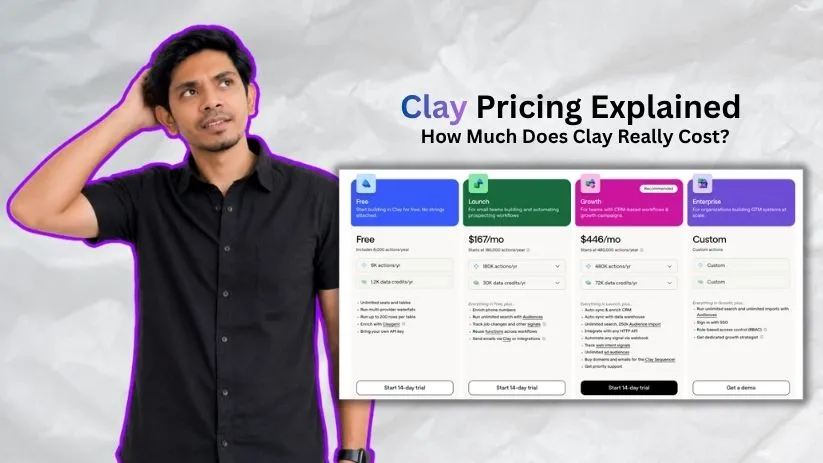
Clay offers four plans: Free, Launch, Growth, and Enterprise. Annual billing saves approximately 10%, while additional usage allowances can increase the final subscription cost.
Here’s how the starting plans compare.
| Plan | Monthly price | Annual billing equivalent | Data Credits/month | Actions/month |
| Free | $0 | $0 | 100 | 500 |
| Launch | $185 | ~$167/month | 2,500 | 15,000 |
| Growth | $495 | ~$446/month | 6,000 | 40,000 |
| Enterprise | Custom | Custom | Custom | Custom |
All plans include unlimited seats, so Clay pricing depends primarily on features and usage rather than team size.
Not sure Clay is the right fit for your workflow? Check my guide to the best Clay alternatives before choosing a plan.
Clay Free Plan: $0/Month
The Free plan is a reasonable starting point if you want to understand Clay before investing.
You get:
- 100 Data Credits and 500 Actions monthly
- Unlimited users and tables
- Waterfall enrichment across providers
- Claygent AI research
- Bring-your-own API key support
- Up to 200 rows per table
The main limitation is scale. Phone number enrichment isn’t included, and the credit allowance can disappear quickly when testing multiple data sources.
Mainly looking for business emails and phone numbers without a complex enrichment workflow? Check out my comparison of the Best ContactOut Alternatives.
I’d use this plan to build a small workflow, understand the interface, and identify which enrichments actually matter.
Best for: Beginners, individuals, and small proof-of-concept projects.
Clay Launch Plan: Starting at $185/Month
Launch is Clay’s entry-level paid plan, offering 2,500 Data Credits and 15,000 Actions monthly.
It unlocks phone enrichment, job-change tracking, reusable functions, larger tables, and email campaign capabilities through Clay’s native sequencer or supported integrations.
More focused on cold email than enrichment? I’ve compared the best GMass alternatives for outreach and campaign management.
The important limitation? Native CRM synchronization and general HTTP API integrations require Growth.
If you’re primarily collecting prospect information, enriching contacts, and preparing outbound campaigns, Launch could be sufficient.
However, if your workflow depends on automatically updating Salesforce or HubSpot, I’d examine Growth before committing.
Best for: Small sales teams and prospecting operations building automated enrichment workflows.
Clay Growth Plan: Starting at $495/Month
Growth includes 6,000 Data Credits and 40,000 Actions monthly.
Its biggest advantage isn’t simply more credits.
You also get:
- CRM synchronization and enrichment
- HTTP API integrations and webhooks
- Web intent signals
- Data warehouse synchronization
- Advertising audience integrations
- Priority support
These capabilities matter when enrichment becomes part of an ongoing revenue operations process.
For example, automatically enriching incoming leads and sending updated information back to your CRM is substantially different from occasionally building prospect lists.
Need automation beyond sales enrichment and CRM updates? I’ve compared the Best n8n Alternatives for building flexible workflows across different applications.
I’d choose Growth when those integrations are necessary, not merely because the team has more employees.
Best for: Growing revenue operations teams and businesses running CRM-connected automation.
Clay Enterprise Plan: Custom Pricing
Enterprise is designed for organizations managing larger volumes, complex workflows, and stricter administration requirements.
It offers negotiated usage allowances, single sign-on, role-based permissions, advanced bulk operations, and dedicated customer guidance.
Because pricing depends on your requirements, I’d request a quote with estimated enrichment volumes and integration needs already documented.
Best for: Enterprises requiring extensive automation, security controls, and tailored support.
How Does Clay’s Credit-Based Pricing Work?
Clay’s credit system can be confusing at first because not every enrichment costs the same. In March 2026, Clay introduced two separate usage categories: Data Credits and Actions.
Data Credits vs. Actions
Data Credits pay for contact information, company details, phone numbers, and AI services from Clay’s marketplace. Costs vary by provider and data type, generally ranging from 0.5 to 10+ credits per enrichment.
Actions cover work performed within Clay, such as running enrichments, AI research, and sending data to other tools. Each enrichment typically consumes one Action.
For example, finding someone’s business email may use Data Credits plus one Action. Phone numbers can cost more because they’re harder to source.
You can check the estimated credit cost before running an enrichment. Basic tasks like data formatting, formulas, and filtering don’t consume Actions.
If finding verified business emails and mobile numbers is your main requirement, you may also want to compare the contact-data providers covered in my ContactOut alternatives guide.
Clay’s waterfall enrichment also checks multiple providers sequentially, helping avoid unnecessary data purchases.
If you bring your own API keys, you can avoid Clay’s marketplace Data Credit charges, although Actions and external provider fees still apply.
For a broader introduction to workflows that connect APIs, transform data, and move information between apps, see my n8n automation guide.
Do Clay Credits Roll Over?
On monthly Launch and Growth plans, unused Data Credits roll over up to twice your monthly allowance. Actions reset every billing cycle.
Additional Data Credit top-ups carry a 30% premium.
I’d recommend testing 10–50 records before scaling your workflow to understand your actual credit consumption.
What Is the Real Cost of Using Clay?
The subscription price is only the starting point.
I’d consider four possible expenses before choosing a plan.
- Additional Data Credits: Higher enrichment volumes may require larger credit packages or paid top-ups.
- Action capacity: Multi-step workflows can consume substantial Actions, particularly when operating across thousands of records.
- External tools: Third-party data subscriptions, API services, email infrastructure, and other integrations may generate separate bills.
- Workflow management: Building automations, diagnosing failures, and optimizing enrichments require time and expertise.
Example: Calculating Your Monthly Clay Budget
Let’s assume you enrich 500 prospects monthly.
Each prospect requires approximately 10 Data Credits and six Actions.
Your estimated usage becomes:
| Calculation | Monthly usage |
| 500 × 10 Data Credits | 5,000 Data Credits |
| 500 × 6 Actions | 3,000 Actions |
Launch includes enough Actions but only 2,500 baseline Data Credits.
Growth includes enough of both, although upgrading isn’t automatically the cheapest option.
I’d first compare Launch with an expanded Data Credit package against Growth’s total cost, especially if you don’t need CRM integrations.
These numbers are illustrative. Actual consumption depends on your providers, enrichment steps, and AI usage.
The useful metric is cost per successfully enriched, usable contact, not simply cost per credit.a
Best Clay Alternatives in 2026
Clay is a flexible platform for data enrichment and sales automation, but its credit-based pricing and learning curve won’t suit every team.
If you’re primarily looking for verified contacts, easier prospecting, or sales intelligence, I’d consider these three Clay alternatives.
| Alternative | Best for | Key advantage |
| Apollo.io | B2B prospecting and outreach | Contact database and sales engagement in one platform |
| UpLead | Verified B2B contact data | Real-time email verification |
| Cognism | Phone-based prospecting and sales intelligence | Phone-verified mobile numbers and European market coverage |
1. Apollo.io
Best for: Sales teams wanting prospecting data and outreach capabilities together.
Apollo.io combines B2B contact discovery, data enrichment, and sales engagement in one platform. You can find prospects, build targeted lists, and manage outreach sequences without creating complicated enrichment workflows.
I’d consider Apollo if your main goal is finding and contacting prospects rather than connecting multiple data providers.
However, Clay offers greater flexibility for customized research and enrichment automation.
Still comparing Apollo.io with other prospecting tools? Read my full Apollo.io alternatives guide before deciding.
2. UpLead
Best for: Teams prioritizing contact accuracy and straightforward lead generation.
UpLead focuses on helping businesses find accurate B2B contact information. It offers advanced search filters, company details, direct-dial numbers, and real-time email verification.
What stands out to me is its straightforward approach to prospecting. Instead of building enrichment workflows, you can search for relevant decision-makers and access their contact details.
If you mainly need verified prospect lists, UpLead may be simpler than Clay.
3. Cognism
Best for: B2B sales teams focused on phone outreach, verified decision-maker data, and European markets.
Cognism is a B2B sales intelligence platform offering verified contact information, buying signals, and CRM integrations.
Its phone-verified mobile numbers are particularly relevant for teams relying on cold calling. Cognism also emphasizes European contact coverage and compliance-focused prospecting.
I’d consider Cognism if reaching decision-makers by phone is more important than building custom enrichment workflows.
However, you’ll need to request pricing based on your business requirements.
Considering Cognism for verified contact data? I’ve compared the best Cognism alternatives to help you evaluate other B2B sales intelligence tools.
Is Clay Worth the Price in 2026?
I think Clay can justify its price when your business needs flexible enrichment across multiple providers, automated research, or sophisticated CRM-connected workflows.
It becomes harder to justify when you’re only looking for a straightforward contact database.
There’s also a learning curve. Clay gives you substantial control, but that flexibility requires understanding how tables, enrichments, integrations, and usage limits interact.
Before subscribing, I’d answer three questions:
- How many usable contacts do I need monthly?
- Which enrichment and integration capabilities are essential?
- How much time will automation actually save?
If Clay reduces repetitive research and improves your data quality enough to justify the complete cost, it’s worth considering.
Otherwise, a simpler alternative may deliver better value.
Clay Pricing FAQs
Does Clay have a free plan?
Yes. Clay’s ongoing Free plan includes 100 Data Credits and 500 Actions monthly, with a 200-row limit per table. Clay also advertises a 14-day trial, which is separate from the Free plan.
How much does Clay cost per month?
Launch starts at $185 with monthly billing, Growth at $495, and Enterprise is custom-priced. Annual equivalents begin at approximately $167 and $446 monthly. Additional usage tiers can change your bill.
Does Clay charge per user?
Clay advertises unlimited seats, including on its Free plan. Rather than charging primarily by seat, its modern pricing centers on plan features and the Data Credits and Actions your workspace consumes.
What changed in Clay pricing in 2026?
In March 2026, Clay introduced Launch and Growth and separated marketplace spending into Data Credits and platform work into Actions. Existing customers may retain eligible legacy plans; new buyers should compare the current lineup.