I’ve been using Runway for the past month, and the more I create with it, the more it feels like I’m budgeting every second of video. Watching credits disappear pushed me to unpack the pricing plans so I could see exactly how credits work, what each tier includes, and which plan actually makes sense.
How Much Does Runway Cost? (Quick Overview)
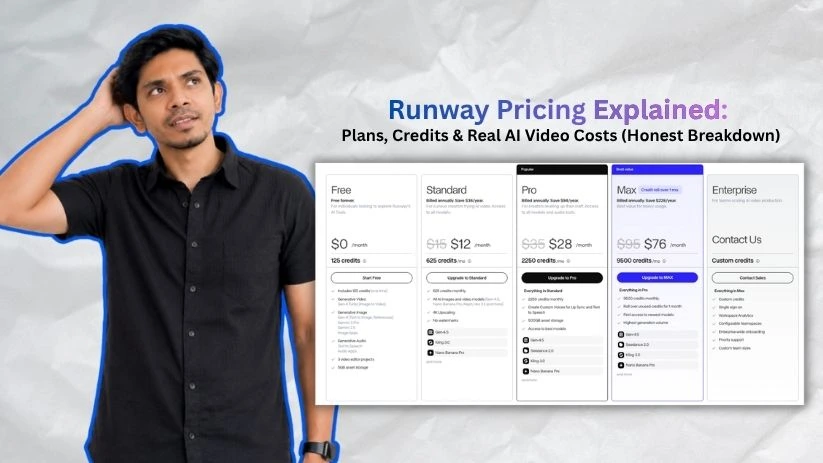
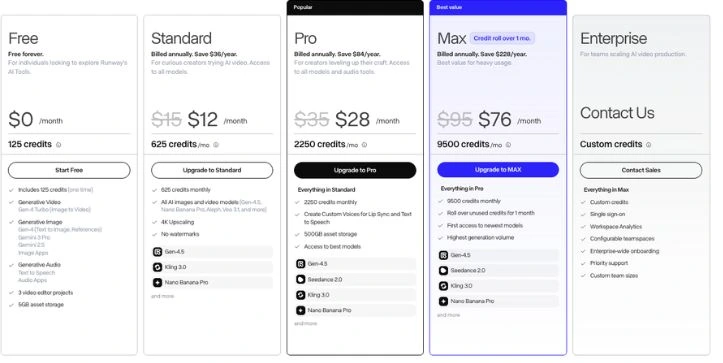
Before diving into the details, here’s a quick look at all five Runway pricing plans side by side.
| Plan | Monthly Billing | Annual Billing | Credits Included | Best For |
| Free | $0 | $0 | 125 one-time credits | Testing the platform |
| Standard | $15/user/mo | $12/user/mo | 625/month | Light creators and hobbyists |
| Pro | $35/user/mo | $28/user/mo | 2,250/month | Active creators and small teams |
| Max | $95/user/mo | $76/user/mo | 9,500/month | Heavy usage and production work |
| Enterprise | Custom | Custom | Custom | Large teams needing security and support |
If you choose annual billing, you save roughly 20% across all paid plans.
That said, Runway’s real cost isn’t just the subscription — it’s the credit usage behind every video generation.
Let me walk you through each plan so you know exactly what you’re getting.
Runway Pricing Plans — Full Breakdown
1. Free Plan
Runway’s free plan gives you a small taste of the platform. It’s enough to test the interface, try a few creative tools, and see how AI video generation tool feels before you pay.
Runway free pricing plan breakdown
✅ What you get:
- 125 one-time credits
- Gen-4 Turbo Image to Video access
- Gen-4 image generation
- Text to Speech and basic audio tools
- 3 video editor projects
- 5GB asset storage
- Free forever access
❌ Where it falls short:
The biggest limit is obvious: 125 credits don’t go very far.
If you use Gen-4 Turbo, that gives you about 25 seconds of video. That sounds decent at first, but once you start testing prompts, changing angles, fixing weird motion, or trying a few different styles, those credits can disappear quickly.
You also don’t get access to the full Runway experience. The Free plan has limited model access, limited storage, and fewer export options. It’s more of a hands-on trial than a real production plan.
My take:
If you just want to see how Runway works, the Free plan is useful. But if you’re planning to make polished YouTube clips, client videos, product visuals, or social media content, you’ll hit the limits fast.
2. Standard Plan — $12/user/mo (Annual)
This is where Runway starts to feel like a usable AI video generator. The Standard plan unlocks more models, removes watermarks, and gives you enough credits to experiment without being stuck after a few generations.
Runway Standard Plan indepth breakdown
✅ What you get:
- 625 monthly credits
- Up to 5 users per workspace
- Access to all Apps
- Ability to run Workflows
- Gen-4.5 Text and Image to Video
- Gen-4 Image to Video
- Act-Two Performance Capture
- Aleph video editing
- Veo 3 and Veo 3.1 access
Read My: Kling vs Veo Comparison - Third-party video and image models
- Upscale resolution for all video models
- Watermark removal
- 100GB asset storage
- Unlimited video editor projects
- Option to buy more credits
❌ Where it falls short:
625 credits can feel generous until you start working with video.
For example, Gen-4.5 uses credits by the second. On this plan, your monthly allowance gives you around 52 seconds of Gen-4.5 video, or about 125 seconds of Gen-4 Turbo.
That’s fine if you’re making short tests, moodboard clips, or occasional social videos. But it gets tight if you’re generating multiple versions of the same shot. And with AI video, you usually are.
Also, credits don’t roll over on Standard. If you don’t use them before your billing cycle resets, they’re gone.
My take:
The Standard plan is a good fit for beginners, hobbyists, and light creators who want watermark-free exports. But if you’re making videos every week, testing multiple concepts, or using Runway for client work, this plan may start feeling small pretty quickly.
3. Pro Plan — $28/user/mo (Annual)
This is the plan most serious creators should look at first. Pro gives you a much bigger credit pool, more storage, and extra creative features without jumping straight into the high-cost Max plan.
Runway Pro Plan breakdown
✅ What you get:
- 2,250 monthly credits
- Up to 10 users per workspace
- Everything in Standard
- Gen-4.5, Gen-4, Gen-4 Turbo, Act-Two, Aleph, and third-party model access
- 500GB asset storage
- Custom voice creation for Lip Sync and Text to Speech
- Watermark removal
- Upscaling access
- Unlimited video editor projects
- Option to buy more credits
❌ Where it falls short:
Pro gives you a lot more room, but it’s still not unlimited.
Your 2,250 monthly credits equal around 187 seconds of Gen-4.5 video or 450 seconds of Gen-4 Turbo. That’s much better than Standard, but it can still run out fast if you’re building longer videos from several short shots.
Let’s say you create ten 10-second Gen-4.5 clips. That alone can use around 1,200 credits before retries, edits, upscaling, or extra generations.
And here’s the part teams need to watch: credits are shared inside the workspace. Adding more editors does not give each person their own separate credit pool.
My take:
For freelancers, YouTubers, marketers, and small creative teams, Pro is probably the safest starting point. It gives you enough credits to actually use Runway without feeling trapped after every test. Just track your usage if more than one person is generating videos.
Quick math for a small team on Pro:
3 users × $28/mo = $84/month = $1,008/year — and that’s before any extra credit purchases.
4. Max Plan — $76/user/mo (Annual)
Max is Runway’s heavy-usage plan. It’s built for creators and teams who generate a lot of AI video and don’t want to keep stopping mid-project because the credit pool is too small.
Runway Max Plan breakdown
✅ What you get:
- 9,500 monthly credits
- Up to 10 users per workspace
- Everything in Pro
- Access to all Runway models
- Access to third-party models
- Highest generation volume
- First access to newest models
- One month of unused credit rollover
- Fast, on-demand generation
- 500GB asset storage
- Custom voices for Lip Sync and Text to Speech
- Option to buy more credits
❌ Where it falls short:
The main catch is that Max is still credit-based.
You get a much larger allowance, but it’s not the same as the older Unlimited plan. Max gives you 9,500 monthly credits, which equals around 791 seconds of Gen-4.5 video or 1,900 seconds of Gen-4 Turbo.
That’s a lot more breathing room, but high-end models, longer clips, failed generations, and repeated revisions can still eat into the budget.
Also, Max costs $76 per user per month on annual billing. If you have a team of five people, that becomes a serious monthly commitment.
My take:
Max makes sense if Runway is part of your actual production workflow. If you’re making client videos, short films, ad concepts, product visuals, or weekly creative campaigns, the larger credit pool can save a lot of frustration. But casual users probably don’t need to start here.
Quick math for a 5-person team on Max:
5 users × $76/mo = $380/month = $4,560/year — before any extra credits.
5. Enterprise Plan — Custom Pricing
Runway’s Enterprise plan is built for larger teams that need more control, stronger security, and custom support. This is less about casual AI video creation and more about using Runway inside a company workflow.
Runway Enterprise Plan breakdown
✅ What you get:
- Custom pricing
- Custom credit amounts
- All Pro plan features
- Single sign-on
- Configurable organization and team spaces
- Advanced security and compliance
- Enterprise-wide onboarding
- Ongoing success program
- Priority support
- Internal tool integrations
- Workspace analytics
- Scalable setup for large teams
❌ Where it falls short:
The biggest downside is that pricing is not public.
You’ll need to contact Runway’s sales team, explain your team size and usage needs, and get a custom quote. That can be annoying if you just want to compare costs quickly.
Enterprise also only makes sense if your team actually needs the extra controls. If you’re a solo creator or small agency, Pro or Max will usually be easier to manage.
Another thing to check is how credits are assigned. Enterprise credits are usually planned around your team’s needs, so you’ll want to ask how many credits you get, how often they refresh, and what happens if you need more mid-contract.
My take:
The Enterprise plan is best for studios, agencies, media companies, and larger organizations that need security, admin control, analytics, and hands-on support. For everyone else, Max is usually the highest plan worth considering before talking to sales.
How Runway’s Credit System Actually Works
This is the part of Runway AI pricing that catches most creators off guard. The subscription fee is just your entry ticket. The credit system is what decides how many videos, images, edits, and experiments you can actually create inside Runway.
Here’s how credits get consumed:
| Action | Credit Cost |
| Generate with Gen-4.5 | 12 credits per second |
| Generate with Gen-4 | 12 credits per second |
| Generate with Gen-4 Turbo | 5 credits per second |
| Generate a Gen-4 Image | 5 credits at 720p / 8 credits at 1080p |
| Use Aleph video editing | 15 credits per second |
Now, let’s do some math that actually matters.
On the Standard plan (625 credits/month):
- If you only use Gen-4.5 → you get about 52 seconds of video per month
- If you only use Gen-4 Turbo → you get about 125 seconds of video per month
- If you only make 1080p Gen-4 images → you get about 78 images per month
- In practice, most creators mix video, images, edits, retries, and upscales — so the usable output is usually lower
On the Pro plan (2,250 credits/month):
- Gen-4.5 only → about 187 seconds of video per month
- Gen-4 Turbo only → about 450 seconds of video per month
- For a team of 3, that’s roughly 62 seconds of Gen-4.5 video per person if everyone shares credits evenly
The biggest catch with Runway pricing?
Most monthly credits do not roll over. Whatever credits remain at the end of your billing cycle usually expire. The Max plan is the exception, because it allows one month of unused credits to roll over.
So if you have a quiet month and don’t use your credits, that value can disappear. And if you have a busy month with lots of client revisions, prompt testing, or failed generations, you may need to buy extra credits before the month ends.
Hidden Costs in Runway Pricing You Should Know
The sticker price is only the beginning. Here are the extra costs and usage limits that can quietly make your Runway bill feel higher than expected.
Monthly Credits Don’t Always Roll Over
Runway’s monthly credits are tied to your billing cycle. If you don’t use them in time, most of them simply disappear.
| Plan | Monthly Credits | Rollover |
| Standard | 625 credits | No |
| Pro | 2,250 credits | No |
| Max | 9,500 credits | Up to 1 month |
| Enterprise | Custom | Custom |
That means if you’re on Pro and only use 1,000 out of 2,250 credits in a slow month, the leftover credits don’t stack up for your next project.
For creators with uneven workloads, this can feel frustrating fast.
Extra Credits Add Up Quickly
If you run out of credits, you can buy more on paid plans. Runway’s purchased credits start at $10, with 1 credit costing $0.01.
| Extra Credits | Cost | Rough Gen-4.5 Video Time |
| 1,000 | $10 | About 83 seconds |
| 2,500 | $25 | About 208 seconds |
| 5,000 | $50 | About 416 seconds |
| 10,000 | $100 | About 833 seconds |
That doesn’t sound too bad until you start generating multiple versions of the same shot.
A 10-second Gen-4.5 clip uses about 120 credits. Try five versions of that clip, and you’ve already used around 600 credits before editing, upscaling, or moving to the next scene.
Per-Seat Pricing Multiplies Fast
Runway charges per editor, so your subscription cost grows as your team grows.
| Team Setup | Annual Billing Cost | Shared Monthly Credits |
| 5 users on Standard | $60/mo | 625 credits |
| 5 users on Pro | $140/mo | 2,250 credits |
| 5 users on Max | $380/mo | 9,500 credits |
| 10 users on Max | $760/mo | 9,500 credits |
Here’s the catch: adding more editors does not automatically give your workspace more monthly credits.
So a 5-person team on Pro still shares the same 2,250 credits. If everyone is generating clips, testing prompts, and making client revisions, that pool can run dry much faster than expected.
Bad Outputs Still Cost Credits
This is the part many new users miss.
If a generation finishes successfully, Runway usually consumes the credits even if the video looks weird, misses your prompt, or isn’t usable for your project.
So the real cost of Runway AI video generation is not just the final clip. It’s the drafts, retries, prompt tests, and almost-good results you create along the way.
Web App Credits and API Credits Are Separate
If you use Runway inside the web app, those credits don’t carry over to the API.
That matters for developers, agencies, and automation-heavy teams. You may need to budget separately if you’re using Runway both as a creative tool and as part of a product or workflow.
Real-world scenario: A 5-person creative team on the Pro plan might pay $140/month on annual billing, but if they keep buying extra credits for client revisions, the real monthly spend can easily climb to $190–$250 or more.
How to Spend Fewer Runway Credits
Runway credits can disappear fast, especially when you’re testing ideas instead of creating final clips. The trick is to treat credits like a production budget, not like unlimited playground tokens.
Start With 5-Second Tests
Don’t begin with 15-second clips unless you’re already confident in the prompt, camera movement, and visual style.
A 5-second test lets you check the scene, motion, character consistency, and overall vibe without burning through a huge chunk of your monthly credits. Once the shot looks right, then you can create a longer version.
Use Gen-4 Turbo for Drafts
Gen-4 Turbo is better for rough testing because it costs fewer credits per second than higher-end models.
Use it when you’re checking composition, pacing, prompt direction, or whether an idea even works. Think of it like a sketch before the final painting.
Save Gen-4.5 for Final Shots
Gen-4.5 is the model you’ll want when quality matters most. It’s better for polished visuals, cinematic shots, and important scenes, but it also costs more than Turbo.
So don’t use it for every random idea. Use it when the prompt is already refined and you’re closer to your final output.
Use Image-to-Video When Possible
Image-to-video can help you control the starting frame before motion is added.
This is helpful if you already have a product image, character design, logo scene, thumbnail concept, or AI-generated image that looks close to what you want. You’re not asking Runway to invent everything from scratch, so you often get more predictable results.
Create a Storyboard Before Generating
Before you spend credits, write down the shots you actually need.
For example:
- Shot 1: product close-up
- Shot 2: person using the product
- Shot 3: cinematic reveal
- Shot 4: final brand scene
This keeps you from generating random clips that look cool but don’t fit the final video.
Write Prompts Outside Runway First
Don’t use Runway as your notebook.
Draft your prompts in Google Docs, Notion, or any notes app first. Clean them up, remove vague wording, and decide what you want before you hit generate.
A messy prompt can cost the same as a good one, which is annoying but true.
Test Motion Before Final Render
If the shot needs a camera push-in, slow pan, character walk, or product rotation, test that movement early.
A clip can look beautiful as a still frame but fall apart once motion starts. Check the movement before spending credits on longer or higher-quality versions.
Avoid Upscaling Every Draft
Upscaling is useful for final exports, but you don’t need it on every test.
If you’re still deciding between prompt versions, keep things simple. Upscale only the clips you’re actually planning to use.
Track Credits Per Project
If you’re using Runway for client work, track how many credits each project consumes.
This helps you price your work better. If a client keeps asking for revisions, you’ll know whether the project is still profitable or quietly eating your margin.
Upgrade Only When Top-Ups Become Frequent
Buying extra credits once in a while is fine.
But if you’re topping up every month, you may be on the wrong plan. At that point, moving from Standard to Pro, or from Pro to Max, might be cheaper and less stressful than constantly buying more credits mid-project.
Runway Pricing vs Alternatives
Runway is strong, but it’s not the only AI video generator worth looking at. The right choice depends on what kind of videos you make and how much control you need.
| Tool | Best For | Where It Makes Sense |
| Runway | Cinematic control, editing, creative workflows | Creators who want strong AI video tools plus editing features in one place |
| Kling | Motion, physics, and generation-first workflows | Users who care most about realistic movement and text-to-video results |
| Pika | Social video experiments and playful edits | Creators making short-form clips, memes, effects, and quick visual ideas |
| Luma | Casual AI video creation and lower entry point | Beginners who want a simpler way to test AI video without a big setup |
| Magic Hour | Social-first creator workflows | Marketers, influencers, and small teams making quick branded visuals |
| HeyGen / Synthesia | Avatar videos and corporate training | Teams making talking-head videos, onboarding content, or explainer videos |
| Veo / Sora | Premium AI video model comparison | Users comparing high-end AI video quality across major model providers |
Runway is usually the better pick when you care about creative control, cinematic quality, editing depth, and production workflow.
If you just want the cheapest possible seconds of AI video, you may find cheaper options elsewhere.
But if you want to build scenes, edit clips, test different models, upscale outputs, and use AI video as part of a real creative process, Runway makes more sense.
Is Runway Worth It?
Runway can be worth it, but not for everyone. It depends on how often you create, how polished your videos need to be, and whether credits will slow you down.
Casual Hobbyists
Free or Standard is enough.
If you only want to test AI video, make a few fun clips, or experiment on weekends, don’t overpay. The Free plan helps you understand the platform, and Standard gives you more room without a huge commitment.
Solo Creators
Standard can work, but Pro is safer if you post weekly.
If you’re making YouTube Shorts, Instagram Reels, TikTok videos, ad concepts, or faceless video content, you’ll probably want more room to test prompts. Standard is fine for light use, but Pro feels much more comfortable once Runway becomes part of your regular content workflow.
Professional Creators
Pro is the best starting point.
It gives you enough credits to create, test, revise, and still have room for final outputs. It’s a good fit for freelancers, designers, video editors, marketers, and creators who use AI video for real projects instead of casual experiments.
Agencies
Max is usually better.
Client work comes with revisions. Sometimes a client wants a different style, a new opening shot, a product variation, or five versions of the same concept. That’s where Standard and Pro can start feeling tight.
If multiple people are using Runway and projects are moving every week, Max gives your team more breathing room.
Enterprises
Enterprise is the right path when security, support, and governance matter.
Larger companies usually need more than credits. They need admin control, team spaces, analytics, onboarding, compliance, and support. If Runway is being used across departments or inside a serious production pipeline, Enterprise is the plan to discuss.
Best Runway Plan by Use Case
| Use Case | Best Plan |
| Testing Runway | Free |
| Occasional social clips | Standard |
| Weekly creator output | Pro |
| Client work | Pro or Max |
| Daily AI video production | Max |
| Multi-person agency | Max or Enterprise |
| Large organization | Enterprise |
| API product integration | API pricing, separate from app credits |
The easiest way to choose is to think about how often you’ll generate.
If you’re only testing, stay free. If you create occasionally, start with Standard. If Runway is becoming part of your weekly workflow, Pro is the safer pick. If credits are constantly blocking real work, Max is probably the plan you’ll end up on.
Final Verdict
Runway is not the cheapest AI video generator, but it is one of the stronger options for creators who care about cinematic control, model access, and a real production workflow.
The Standard plan is enough to test serious features and create occasional watermark-free clips. Pro is the best fit for most active creators because it gives you more room to experiment without jumping into a bigger monthly bill. Max makes sense when credits are slowing down client work, team projects, or regular content production.
My advice is simple: don’t choose Runway based only on the monthly price. Choose it based on how many videos you actually need to generate, how many retries your workflow requires, and how painful it would be if your credits ran out mid-project.
Runway Pricing FAQs
How much does Runway cost?
Runway has a Free plan, then paid plans starting at $12 per user/month when billed annually.
The main paid plans are Standard, Pro, and Max. Enterprise pricing is custom, so larger teams need to contact Runway for a quote.
Is Runway free to use?
Yes, Runway has a free plan, but it’s limited.
You get 125 one-time credits, which is enough to test the platform but not enough for regular AI video creation.
How do Runway credits work?
Runway credits are like usage tokens. Every time you generate a video, create an image, upscale, or use certain AI tools, credits are deducted from your account.
The cost depends on what model you use and how long your output is.
How many credits does Gen-4.5 use?
Gen-4.5 uses 12 credits per second of video.
So a 5-second Gen-4.5 clip costs around 60 credits, and a 10-second clip costs around 120 credits before retries or extra edits.
How many seconds of video can I make with the Standard plan?
The Standard plan includes 625 monthly credits.
That gives you roughly:
- 52 seconds of Gen-4.5 video
- 125 seconds of Gen-4 Turbo video
- Less in real use if you create multiple versions or use extra tools
Why do Runway credits run out so fast?
Because AI video usually takes trial and error.
You may generate the same shot several times to fix motion, lighting, camera movement, character details, or prompt mistakes. Those “almost good” clips still use credits.
Do Runway credits roll over?
Most monthly credits do not roll over.
Standard and Pro credits reset each billing cycle. Max is different because it allows unused credits to roll over for one month.
Can I buy extra Runway credits?
Yes, paid users can buy additional credits when they run out.
Free plan users can’t buy extra credits directly. They need to upgrade to a paid plan first.
Is Runway Max the same as the old Unlimited plan?
No, Max is not the same as the older Unlimited plan.
Max gives you a much larger monthly credit pool, but it is still credit-based. That means you still need to watch how many credits your projects use.
Which Runway plan is best for beginners?
The Free plan is best if you only want to test Runway.
If you want watermark-free exports and enough room to experiment, Standard is the better beginner-friendly paid plan.
Is Runway Standard enough?
Standard is enough for light use.
It works well for hobbyists, occasional social clips, short experiments, and creators who don’t generate videos every day. If you post weekly, Pro is usually safer.
Is Runway Pro worth it?
Yes, Pro is worth it for most active creators.
It gives you 2,250 monthly credits, more storage, and enough breathing room to test prompts, create drafts, and produce finished clips without upgrading all the way to Max.
Who should choose Runway Max?
Choose Max if Runway is part of your real production workflow.
It makes sense for agencies, video teams, client projects, weekly campaigns, ad concepts, short films, and creators who constantly run out of credits on Pro.
Does Runway charge for failed or bad generations?
If a generation completes, it can still use credits even if you don’t like the result.
That’s why the real cost of Runway is usually higher than one perfect final clip. You’re also paying for tests, retries, and experiments.
Does Runway remove watermarks on paid plans?
Yes, paid plans remove Runway watermarks from exports.
The Free plan is mainly for testing, so it comes with more limits around output and professional use.
Can I use Runway videos commercially?
Runway allows users on its plans to use Runway-made work for commercial projects.
That can include YouTube videos, social posts, ads, client work, and other monetized content, but you should still review Runway’s current usage terms for your exact case.
Are Runway API credits the same as app credits?
No, Runway web app credits and API credits are separate.
This matters if you’re a developer, agency, or team using Runway both inside the browser and inside a product or automation workflow.
Is Runway cheaper than Kling, Pika, or Luma?
Not always.
Runway is usually better when you care about cinematic control, editing tools, and a full creative workflow. If you only want the lowest-cost AI video experiments, some alternatives may feel cheaper.
What is the best Runway plan for YouTubers?
For casual YouTube experiments, Standard can work.
For weekly YouTube Shorts, faceless video content, product visuals, or channel branding clips, Pro is usually the better pick because you’ll need more room for retries.
What is the best Runway plan for agencies?
Most agencies should look at Pro or Max.
Pro works for smaller client projects, but Max is safer if multiple people are generating videos, testing concepts, and handling frequent revisions.
Should I pay monthly or annually for Runway?
Annual billing is cheaper if you already know you’ll use Runway regularly.
Monthly billing is safer if you’re still testing the platform or only need it for one short project.
What happens when I run out of Runway credits?
You’ll need to wait for your next billing cycle or buy extra credits if you’re on a paid plan.
If you’re running out every month, that’s usually a sign you should compare the next plan up against your usual top-up cost.
Is Runway worth it for social media creators?
Yes, if you want better-looking AI video clips for Reels, TikTok, Shorts, ads, or brand content.
But if you only make quick meme-style videos or occasional experiments, start with Free or Standard before paying for Pro or Max.
What is the biggest thing to know about Runway pricing?
Runway pricing is not just about the monthly subscription.
The real cost depends on how many seconds you generate, which model you choose, how many retries you need, and whether you’re working alone or sharing credits with a team.