

I tested Runway Gen 4 and found that it works well for cinematic AI video clips, but not for every serious production workflow. This Runway Gen 4 review explains what it does well, where it struggles, and who it’s best for in 2026.
Quick verdict
Best for: Runway Gen-4 is best for creators, filmmakers, and marketers who want cinematic AI video clips with strong image-to-video quality and more consistent characters or scenes.
Falls short for: People who need long, fully reliable videos, perfect physics, low-cost unlimited testing, or detailed control over every frame.
Bottom line: Runway Gen-4 is one of the strongest AI video generators I’ve tested for short creative clips. But it still feels better for concept videos, social media visuals, and polished experiments than complete production-ready filmmaking. Runway says Gen-4 focuses on consistent subjects, locations, and styles from visual references, while newer Gen-4.5 has also been positioned as a step up in prompt accuracy and physical realism.
What is Runway Gen-4?
Runway Gen-4 is an AI video generator that turns text prompts and reference images into short video clips. In simple terms, you describe the scene you want, upload an image if needed, and Runway tries to create a moving version with realistic motion, camera movement, lighting, and style.

The big focus with Gen-4 is consistency. Runway built it to keep characters, objects, and locations looking more stable across different shots, which has always been one of the hardest parts of AI video generation. That makes it useful for creators who want cinematic clips, product visuals, concept scenes, social media videos, or early story ideas without shooting everything from scratch.
You will like reading this:
Kling Review and Pricing Explained: Plans, Credits, Costs & Best Value
Key features of Runway Gen-4
Below are the main features of Runway Gen-4:
- Text-to-video generation: Describe your scene, and Runway Gen-4 creates a short AI video clip from your prompt.
- Image-to-video generation: Upload a reference image, and Gen-4 turns it into a moving video while keeping the subject and style mostly consistent.
- Character consistency: Gen-4 is built to keep people, objects, and locations more stable across different shots.
- Cinematic camera movement: You can prompt for push-ins, zooms, tracking shots, or handheld-style motion to make clips feel more realistic.
- AI editing workflow: Runway includes extra tools for extending, refining, and editing clips, which helps with social media videos, concept scenes, and creative experiments.
Runway Gen-4 pricing
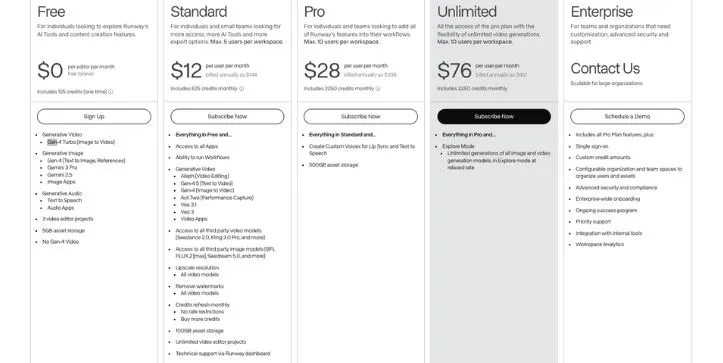
Runway uses a credit-based pricing model, where each video generation uses credits based on the model and video length.
- Monthly credits: Paid plans give you a set number of credits every month. Gen-4 uses more credits than Gen-4 Turbo, so your plan runs out faster if you use the higher-quality model.
- Generation limits: Your available seconds depend on which model you choose. For example, 625 credits equals around 52 seconds of Gen-4 or 125 seconds of Gen-4 Turbo.
You pay a monthly fee, but the real value depends on how much testing you do. AI video usually takes a few tries, so failed prompts, awkward motion, or unusable clips can burn credits quickly.
The Free plan is only good for testing because it includes one-time credits and does not include full Gen-4 Video access. Paid plans add Gen-4, watermark removal, higher export options, and more storage.
Below is what you get with each plan:
| Plan | Monthly cost | Credit limits | Gen-4 access | Key features |
| Free | $0/month | 125 credits one time | No full Gen-4 Video | Gen-4 Turbo, Gen-4 image tools, 3 video editor projects, 5GB storage |
| Standard | $12/user/month | 625/month | Yes | Gen-4 image-to-video, Gen-4.5 text-to-video, watermark removal, upscaling, 100GB storage |
| Pro | $28/user/month | 2,250/month | Yes | Everything in Standard, custom voices, 500GB storage, more room for regular creators |
| Unlimited | $76/user/month | 2,250/month + Explore Mode | Yes | Unlimited image and video generations in Explore Mode at relaxed rate |
| Enterprise | Custom | Custom | Yes | SSO, custom credits, team spaces, advanced security, onboarding, priority support |
Runway Gen-4 reviews
Most reviews say Runway Gen-4 is impressive for short cinematic AI clips, but frustrating when you need predictable results, low-cost testing, or production-level control.
What users like
- Strong image-to-video quality: Users on Reddit say Gen-4 feels better than older Runway models for turning still images into usable motion. It works best for concept shots, mood videos, cinematic b-roll, and short social media clips.
- Useful creative toolkit: Product Hunt reviewers describe Runway as a promising tool for text-to-video, abstract b-roll, concepting, and low-budget creative work. Users also like that it offers several AI tools in one place instead of only video generation.
- Beginner-friendly interface: G2 reviews often praise Runway for being easy to use. The interface feels simple enough for beginners, but still useful for creators who want to test AI video ideas quickly.
What frustrates users
- Prompt accuracy can be hit or miss: Some Reddit users say Gen-4 still ignores parts of prompts, adds strange motion, or changes details that should stay consistent. This makes it hard when you need a very specific scene.
- Credits disappear quickly: Trustpilot reviewers often complain that credits run out fast, especially when clips fail or need several retries. This is a big issue because AI video testing usually takes multiple generations before you get one usable result.
- Results can feel expensive for the quality: G2 users mention that pricing can feel high when the output doesn’t match expectations. A few bad generations can make the tool feel costly, even before you finish one scene.
- Support and refunds feel inconsistent: Many Trustpilot reviews mention slow support, refund frustration, failed renders, or poor value for money. For casual testing, this is annoying. For paid client work, it can become a real problem.
My experience: Creating a cinematic product video
I tested Runway Gen-4 by creating a short cinematic product video for a skincare bottle. After uploading a reference image and describing the scene, Gen-4 generated a clean-looking clip with soft lighting, smooth camera movement, and a premium ad-style feel. At first glance, it looked polished enough for a social media concept.
Problems started when I tried to control the details. The bottle shape changed slightly between generations, the label was not always readable, and a few clips added strange motion that I didn’t ask for.
What this experience makes clear is the tradeoff you’re signing up for. Runway Gen-4 is very good at turning a still image into a stylish short video, but it still needs several retries when accuracy matters.
If you’re making mood shots, concept videos, or quick AI ad creative tests, Gen-4 can save a lot of time. But if you need exact branding, readable packaging text, or frame-by-frame control, you should expect to spend more credits and clean up the final result elsewhere.
Is Runway Gen-4 right for you?
Runway Gen-4 is a good fit if you need short, cinematic AI video clips and don’t expect every generation to be perfect on the first try.
Who might find it useful:
- Creators making social media videos who need eye-catching visuals, cinematic b-roll, or quick concept clips for TikTok, Instagram, YouTube Shorts, and ads.
- Marketers testing AI ad creatives who want to turn product images into premium-looking video concepts before spending money on a full shoot.
- Filmmakers and designers experimenting with ideas who want to test scenes, moods, camera movement, or visual styles without building a full production setup.
Who should skip it:
- Teams that need exact brand control because product labels, logos, faces, and small details can still shift between generations.
- Editors making long-form videos who need reliable continuity, dialogue scenes, or frame-by-frame control. Gen-4 works better for short clips than complete films.
- Creators on a tight budget who don’t want to spend credits on failed prompts, retries, or clips that look good but still aren’t usable.
My Final Verdict: Is Runway Gen 4 Worth It?
Runway Gen-4 is worth testing if you want short, cinematic AI video clips and you’re comfortable experimenting. It can turn a simple image or prompt into something that feels polished, stylish, and surprisingly close to real production footage. For creators, marketers, filmmakers, and designers, that makes it one of the more serious AI video generators available right now.
But it is not a magic button. You still need a good prompt, a clear visual direction, and some patience. The best results usually come after a few tries, and even then, you may need to edit, trim, upscale, or fix parts of the clip somewhere else.
My honest take: Runway Gen-4 is great for concept videos, cinematic b-roll, social media visuals, mood shots, and AI ad creative testing. It is not the best choice if you need long videos, perfect continuity, exact brand details, or cheap bulk production.
So yes, Runway Gen-4 is worth it — but only if you know what you’re paying for. Use it as a creative video tool, not as a full replacement for filming, editing, or production planning.
FAQ
What is Runway Gen-4 used for?
Runway Gen-4 is used for creating short AI-generated videos from text prompts and reference images. It is especially useful for cinematic clips, image-to-video scenes, concept visuals, product shots, social media videos, and creative experiments. Runway says Gen-4 is designed to keep styles, subjects, characters, and locations more consistent across generations.
Is Runway Gen-4 free?
Runway has a free plan, but it is limited. For serious Gen-4 video testing, you’ll likely need a paid plan because AI video generation uses credits quickly. Runway’s paid plans start with monthly credits, and higher plans give you more storage, more credits, and broader access to video generation features.
Is Runway Gen-4 good for beginners?
Yes, Runway Gen-4 is beginner-friendly, but the best results still require good prompting. You don’t need editing experience to generate a clip, but you do need to describe the scene clearly, choose strong reference images, and be ready to test a few versions before getting a usable result.
Can Runway Gen-4 create long videos?
Runway Gen-4 works better for short clips than long-form videos. It is great for cinematic shots, b-roll, ad concepts, and mood scenes, but it is not ideal if you need a full YouTube video, a complete short film, or long scenes with perfect continuity.
Does Runway Gen-4 keep characters consistent?
That is one of Gen-4’s main selling points. It can keep characters, locations, objects, and visual styles more stable than older AI video models, especially when you use strong reference images. Still, it is not perfect. Faces, logos, clothing, hands, and small details can shift between generations.
Is Runway Gen-4 worth it for marketers?
Yes, if you use it for short ad concepts, product visuals, social media videos, and creative testing. It can help marketers create quick AI ad creative ideas before paying for a full production shoot. But if you need exact product labels, brand-safe logo placement, or large batches of videos every day, the credit cost and retry process may become frustrating.
Is Runway Gen-4 better than Google Stitch?
They are built for different jobs. Runway Gen-4 is an AI video generator, while Google Stitch is an AI UI design tool for creating mobile and web app interfaces from natural language prompts. Stitch is more useful for app screens, prototypes, and UI design, while Runway Gen-4 is better for cinematic video generation and image-to-video workflows.
Can I use Google Stitch and Runway Gen-4 together?
Yes, but not inside one single workflow by default. You could use Google Stitch to design a web or mobile app interface, then use Runway Gen-4 to create promo videos, product walkthrough visuals, launch teasers, or cinematic social media clips for that app. Stitch helps with the interface idea; Runway helps with the video presentation. Google says Stitch can generate UI for mobile and web apps, while Runway focuses on AI video and visual generation.
Is Runway Gen-4 good for YouTube Shorts and Instagram Reels?
Yes, it can work well for YouTube Shorts, Instagram Reels, TikTok clips, and short-form ad creatives. It is strongest when you use it for visual hooks, background scenes, cinematic transitions, and stylized b-roll. You’ll still need editing tools if you want captions, voiceover, music, pacing, and final formatting.
What are the biggest problems with Runway Gen-4?
The biggest problems are credit usage, inconsistent prompt accuracy, occasional strange motion, and limited control over fine details. Gen-4 can produce beautiful clips, but you may need several attempts to get one that looks right. That is why it feels more practical for creative testing than guaranteed production work.



