
I reviewed MagicLight AI to see whether it can really turn long scripts into watchable videos without forcing you to generate every scene separately. Its biggest strength is clear: MagicLight is built around complete stories, not just short AI clips.
But the convenience comes with tradeoffs. Character consistency is useful, the workflow is approachable, and long-form generation is unusual. However, credits, regenerations, and mixed user feedback make it worth testing before paying.
Quick verdict
Best for: MagicLight AI is a good fit for YouTube creators, storytellers, educators, and kids’ content creators who want to turn scripts into longer animated videos with recurring characters.
Falls short for: Filmmakers who need precise control over every shot, creators who want predictable generation costs, or anyone expecting every AI-generated scene to work perfectly on the first attempt.
Bottom line: My MagicLight AI review found a tool that makes long-form AI storytelling much easier than building a video clip by clip. But you should expect to edit scenes, regenerate weak outputs, and keep an eye on credit usage.
Still comparing AI storytelling tools? Check out the best MagicLight AI alternatives before choosing a paid plan.
What is MagicLight AI?
MagicLight AI is an AI video generator designed to turn ideas, stories, and scripts into complete videos. Instead of generating one short clip, it builds characters, divides the story into scenes, creates a storyboard, and turns those scenes into video.
The web version currently supports scripts up to 12,000 characters and advertises long-form videos of up to 50 minutes. MagicLight’s Android app still describes support for videos up to 30 minutes, so the exact limit can depend on where you’re using it.
That makes the MagicLight AI video generator different from tools focused mainly on isolated five- or ten-second clips. It is closer to a story-production workflow where the script, characters, visuals, narration, and final scenes stay connected.
If your main goal is broader AI video creation rather than storytelling alone, I’ve also compared the best AI video generator tools.
Want to experiment before paying for another platform? See my guide to the best free AI animation tools.
Key features of MagicLight AI
Below are the main MagicLight AI features that matter most:
- Long-form Story to Video: You can give MagicLight a story or script of up to 12,000 characters and have it break the content into scenes. Its web tools currently advertise videos up to 50 minutes long.
- Character consistency: You define characters before generating the full story, which helps keep names, appearances, clothing, and identities more consistent from one scene to another. This is one of the biggest reasons to consider MagicLight for character-led videos.
- Nano scene editing: You don’t have to accept every storyboard image as-is. MagicLight’s Nano tools let you adjust details such as poses, outfits, expressions, body type, and timing before moving further into production.
- Voiceovers, subtitles, and music: MagicLight keeps more of the production process inside one workflow. Its script-to-video tools include subtitles, music, aspect-ratio controls, voice features, and final output settings.
- Multiple AI models: Paid plans provide access to several underlying models, with the current pricing page listing options from OpenAI and Google alongside video models such as Veo, Sora, and Kling on selected tiers.
That combination makes MagicLight AI long-form video creation more practical for stories, educational content, and recurring YouTube formats than manually generating dozens of unrelated clips.
If repurposing written content is your priority, I also tested the wider category of AI tools for turning blog posts into videos.
And if you care more about animation than cinematic AI video, compare MagicLight with my list of Vyond alternatives.
MagicLight AI pricing
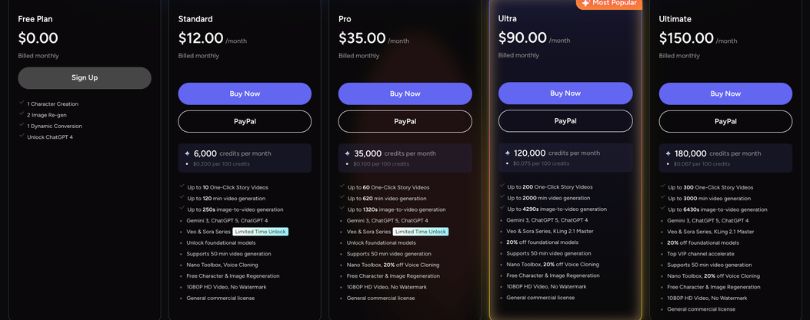
MagicLight AI uses a credit-based pricing model. Credits are consumed when you generate videos and use certain AI features, so the real cost depends heavily on how often you need to regenerate scenes.
At the time of this MagicLight AI review, the official pricing page shows these annual-billing promotional rates:
| Plan | Price shown | Credits shown on plan card | Best for |
| Free | $0 | Limited free features | Testing MagicLight |
| Standard | $6/month | 7,000/month | Light creators |
| Pro | $17.50/month | 45,000/month | Regular video creation |
| Ultra | $45/month | 150,000/month | Heavy creators |
| Ultimate | $75/month | 280,000/month | High-volume production |
Standard and above currently include 1080p output, no watermark, commercial usage rights, long-video generation, and access to additional AI models.
There is one pricing detail worth watching. MagicLight’s own page currently shows different monthly credit totals in its plan cards and comparison table. For example, the Standard card lists 7,000 credits while the comparison section lists 8,000. I would check the checkout page before subscribing rather than relying only on the headline numbers.
The bigger question isn’t simply whether MagicLight AI pricing looks affordable. It’s how many credits a finished video costs after you fix characters, regenerate movement, change voices, or replace scenes that don’t work.
For comparison, see how another credit-heavy video platform handles costs in my Runway pricing breakdown. You can also compare it with Luma Dream Machine pricing if you’re deciding between different AI video workflows.
MagicLight AI reviews
Public MagicLight AI reviews are mixed, which is important because the polished examples on the product website don’t tell you what happens after dozens of real generations.
Google Play currently gives the app around 4.0 stars from roughly 2.4K reviews and shows more than one million downloads. Trustpilot presents a much less positive picture, with a score around 2.5/5 from more than 100 reviews at the time I checked.
What users like
- Simple workflow: Positive reviewers often mention that the interface is clean and that moving from a script into scenes and video doesn’t require a complicated editing setup.
- Useful for story videos: Some users specifically praise MagicLight for story-based and YouTube visuals, where generating multiple connected scenes can save time compared with assembling everything manually.
- All-in-one approach: The ability to handle characters, visuals, animation, narration, and longer scripts in one place is the main appeal of the MagicLight AI video generator.
If YouTube presentation videos matter more than animated storytelling, my Synthesia AI review covers a very different approach to AI video creation.
What frustrates users
- Credits can disappear quickly: Several reviews complain that fixing or regenerating scenes can consume far more credits than expected, particularly when the first output is unusable.
- Character consistency isn’t guaranteed: Although MagicLight AI character consistency is a major selling point, some reviewers still report characters changing appearance between shots or animations producing incorrect visual details.
- Outputs don’t always follow the script: Google Play reviewers mention stories being interpreted differently than intended, weak prompt accuracy, and generated scenes that require additional work.
- Support and subscription complaints: Trustpilot contains repeated complaints involving billing, cancellation, account issues, and slow or ineffective support, although there are also recent positive reviews describing helpful responses.
This is the biggest tradeoff I found while preparing this MagicLight AI review: the platform can remove a lot of manual production work, but AI automation doesn’t remove the need to inspect and sometimes rebuild individual scenes.
If the credit system or inconsistent generations concern you, compare the best MagicLight AI alternatives before spending money on a larger plan.
What using MagicLight AI is like
MagicLight’s workflow starts with a story or idea, then moves through characters, scenes, storyboard adjustments, voice, music, and final generation. The advantage is that you are working on one connected project instead of stitching together unrelated AI clips.
The storyboard stage is where MagicLight becomes more useful than a simple text-to-video generator. You can review scenes before the final render and use Nano Storyboard controls to adjust things such as camera angle, pose, and expression.
The tradeoff is that automation does not guarantee a finished result. Recent Google Play reviews report incorrect characters, unrealistic movement, slow generations, and outputs that do not always follow the original prompt closely.
So the best way to approach MagicLight is to treat the first generation as a draft. Review the storyboard carefully before spending more credits on scenes you already know need changes.
If you prefer a more production-focused storyboard workflow, my LTX Studio review covers another approach to AI filmmaking.
Is MagicLight AI right for you?
MagicLight is a good fit if your priority is turning a complete story into video without manually creating every individual shot. Its strongest use cases are narrative formats where recurring characters and multiple connected scenes matter.
Who might find it useful
- Faceless YouTube creators producing story channels, educational videos, or recurring narrative content.
- Kids’ story creators who need the same characters to appear throughout multiple scenes.
- Educators and storytellers who want script, storyboard, visuals, narration, and subtitles inside one workflow.
If animated storytelling is your main goal, you may also want to compare the latest Synthesia alternatives and Vyond alternatives.
Who should skip it
- Filmmakers needing precise shot control over every movement, camera decision, and visual detail.
- Creators who dislike credit-based workflows, especially if they tend to regenerate scenes repeatedly.
- Anyone expecting perfect character consistency without reviewing and correcting AI-generated shots.
For shorter cinematic clips, my Runway Gen-4 review and Vidu AI review cover tools built around a different type of AI video workflow.
The best MagicLight AI alternative: LTX Studio
I would look at LTX Studio first if MagicLight feels too automated and you want more control over how individual scenes are planned.
LTX combines AI generation with a dynamic storyboard, timeline editor, camera controls, keyframes, visual references, and reusable characters, objects, and locations. That makes it better suited to creators who want to direct a project rather than mostly letting AI assemble the story for them.
Where LTX Studio has an advantage:
- Storyboard control: Plan and rearrange shots more deliberately.
- Timeline editing: Work with scenes inside a more traditional editing structure.
- Camera and motion controls: Direct individual shots with greater precision.
- Reusable elements: Keep characters, locations, and objects organized across scenes.
MagicLight is still simpler if your goal is to paste in a story and quickly build a long video. LTX makes more sense when creative control matters more than one-click automation.
You can explore more options in my LTX Studio alternatives.
Trying to choose between more cinematic AI workflows? Read my LTX Studio vs Runway comparison before deciding.
Runway is another option if you mainly want individual high-quality AI shots rather than MagicLight-style long-form storytelling. Its current Gen-4.5 workflow generates clips from 2 to 10 seconds and provides more prompt-level control over individual scenes.
Final verdict
MagicLight AI solves a real problem: creating longer, character-driven videos without generating and organizing every clip yourself. Its story workflow and character tools make it especially interesting for YouTube storytelling, kids’ content, and explainers.
But the mixed feedback around credits, generation quality, and reliability means I would use the MagicLight AI free trial before committing to a larger subscription.
Not convinced it fits your workflow? Compare the best MagicLight AI alternatives before spending your credits.
Frequently Asked Questions
Is MagicLight AI worth it?
MagicLight AI is worth considering if you regularly make story-driven or character-based videos and value automation more than detailed shot control. Heavy regeneration can make the credit system less attractive for demanding workflows.
Is MagicLight AI free?
Yes. MagicLight currently offers a free way to try its video-generation workflow without entering a credit card, although paid plans unlock higher usage and additional features.
How long can MagicLight AI videos be?
MagicLight’s current web tools advertise videos up to 50 minutes, depending on the plan. The platform is specifically positioning itself as a long-form AI video generator rather than only a short-clip tool.
Does MagicLight AI keep characters consistent?
Character continuity is one of MagicLight’s main features. Saved characters are designed to preserve faces and outfits across scenes, although real outputs may still need corrections or regeneration.
What is the best MagicLight AI alternative?
LTX Studio is a strong alternative when you want more storyboard and shot-level control. Runway is better suited to creators focused on generating and refining individual AI video clips.
For a broader comparison, see my complete guide to the best MagicLight AI alternatives.