

When it comes to AI video tools, they love to make big promises like
“turn ideas into films,” “create videos in minutes,” or “go from script to final cut with AI.”
But honestly, many of them still feel better in demos than in real projects.
So, if LTX Studio is what you have shortlisted for your AI video workflow,
This review will be of big help to you.
I tried LTX Studio and created multiple test projects
to see how it performs when it comes to visual quality, motion, character consistency, editing control, usability, pricing, and whether it justifies the cost or not.
Here’s my quick rating after testing it:
| Category | Score |
| Ease of use | 8/10 |
| Storyboarding | 9/10 |
| Image quality | 8/10 |
| Motion realism | 6/10 |
| Character consistency | 7/10 |
| Pricing transparency | 5/10 |
| Value for beginners | 6/10 |
| Value for agencies/filmmakers | 8/10 |
In this review, you will find:
- My experience with its features
- What LTX Studio does well
- Where it falls short
- Real user feedback from G2, Trustpilot, and Reddit
By the end, you will know if LTX Studio fits your video creation goals.
And I will also share a few alternatives worth considering
If you are looking for something more flexible, scalable, or budget-friendly 😉
What Is LTX Studio?
LTX Studio is an AI video production platform that helps you turn ideas, scripts, or images into visual scenes, storyboards, short videos, pitch decks, and controlled shot sequences.
But I would not call it a full “AI movie generator.”
A better way to describe it is an AI pre-production suite.
It helps you plan the look, feel, characters, camera angles, and scene structure of a video before you move into final editing or production.
Who owns LTX Studio?

LTX Studio is owned by Lightricks, the creative technology company behind tools like Facetune and Videoleap.
So, it is not some random AI video tool that appeared overnight.
Lightricks has been building creative apps for years, and LTX Studio feels like its bigger move into AI video production and visual storytelling.
What can LTX Studio create?
With LTX Studio, you can create:
- Text-to-video clips
- Image-to-video clips
- Video-to-video variations
- AI storyboards
- Consistent characters and elements
- Camera-controlled shots
- Keyframe-based motion
- Shot-level edits
- Sound design
- Timeline-based video edits
- Pitch decks
- Team projects and collaborations
So, instead of using it only as a video generator, I think LTX Studio works best as an AI pre-production suite for creators, filmmakers, marketers, and agencies who want to plan and visualize video ideas faster.
LTX Studio Review 2026: Quick Pros and Cons
Pros
Include:
- Excellent for storyboarding and visualizing scripts
- Strong concept-to-scene workflow
- Good visual fidelity in simple or controlled shots
- Useful camera, angle, style, lighting, and composition controls
- Better workflow depth than many simple AI video generators
- Helpful for agencies, indie filmmakers, music video creators, marketers, and pitch decks
- Integrates multiple video/image models in one place
Cons
Include:
- Credit usage can become expensive quickly
- Motion can look unnatural in complex scenes
- Human hands, objects, physics, crowds, and interactions can break
- Prompt adherence is inconsistent with emotional or highly specific scenes
- Learning curve can waste credits
- Some users complain about billing, refunds, and subscription clarity
- Not a full replacement for Premiere Pro, DaVinci Resolve, Runway, Veo, or real production yet
In-depth Review of LTX Studio’s Features
In this section, we will take a closer look at LTX Studio’s primary features and see
How they work, where they might fall short, and how they can help you create storyboards, AI videos, pitch decks, and visual concepts faster.
- LTX Studio’s AI Storyboard Generator
- LTX Studio’s Script-to-Video Workflow
- LTX Studio’s Image-to-Video Generation
- LTX Studio’s Character and Element Consistency
- LTX Studio’s Camera Controls and Shot Editing
- LTX Studio’s Timeline Editor, Audio, and Exports
- LTX Studio’s Credits and Pricing System
- LTX Studio’s Collaboration and Team Features
Let’s find out!
1. LTX Studio’s AI Storyboard Generator
One of the best things about LTX Studio is its storyboard generator.
And honestly, this is where the platform feels the most useful.
I started by adding a short video idea and then tried turning it into a proper shot-by-shot storyboard.
The experience was pretty smooth.
LTX Studio did not just create random AI images.
It broke the idea into scenes, added visual direction, created frames, and gave me something that actually looked like a starting point for a real video project.
You can use the storyboard tool for things like:
- Ad concepts → product videos, brand promos, campaign ideas
- Short films → scene breakdowns, character shots, mood boards
- Music videos → visual direction, frames, camera style
- YouTube videos → intro scenes, B-roll planning, visual hooks
- Client pitches → storyboard frames and pitch deck-style visuals
What I liked most was that LTX Studio gives you control at different levels.
You can edit the whole project, a single storyboard, or even one frame if something looks off.
That matters because AI video tools often give you nice-looking results but very little control.
Here, I could adjust the prompt, regenerate a frame, change the visual direction, and try to get closer to the idea I had in mind.
The official LTX Studio page also says you can turn concepts or scripts into storyboards, create frames through prompts, sketches, or uploaded images, and export storyboards as MP4 files or PDF pitch decks.
That said, the storyboard feature is not perfect.
When I gave it a simple concept, it worked well.
But when I tried a more detailed scene with multiple people, specific emotions, and a very particular camera angle,
The output needed more editing.
Sometimes the frame looked good, but the emotion was wrong.
Sometimes the character looked close, but not exactly the same.
And sometimes the scene had that “AI-generated” feel where everything looks polished, but not fully natural.
Still, for planning a video before spending credits on motion,
This feature is genuinely useful.
Note 👇🏼
AI-generated storyboards are not fully available on every plan. LTX Studio says free users can create and build storyboards, but AI-generated storyboards require the Standard plan. Also, LTX Studio is currently available through desktop browsers, not mobile.
2. LTX Studio’s Script-to-Video Workflow
Next, I tried the feature that makes LTX Studio sound really exciting,
Its script-to-video workflow.
And I will say this clearly:
LTX Studio is better at turning scripts into visual plans than instantly creating a polished final video.
There is a big difference.
I tested it by giving the platform a short script for a cinematic product-style scene.
The tool created a structure around it,
scene by scene,
shot by shot,
with characters, visuals, and prompts attached.
That was helpful because I did not have to manually build every frame from scratch.
For creators, marketers, and small teams, this can save a lot of time.
Instead of opening five different tools for scriptwriting, storyboarding, image generation, and video testing,
You can keep most of the early creative work inside one workspace.
The workflow usually looks something like this:
- Add your idea or script
- Let LTX Studio break it into scenes
- Review the storyboard
- Edit characters, shots, and visual style
- Generate images or motion clips
- Arrange everything in the timeline
- Export or use the assets somewhere else
I liked this because it feels closer to a creative planning tool than a basic text-to-video generator.
A lot of AI video tools make you type one prompt and hope for the best.
LTX Studio gives you more steps, more control, and more room to fix things before spending too many credits.
But here is the problem.
The more specific your script gets, the more hands-on work you need to do.
If your script says,
“A tired woman in her late 40s walks through a rainy street, holding a broken umbrella, while trying not to cry,”
LTX Studio may understand the street, rain, and umbrella.
But the emotion?
The age?
The natural walking motion?
That part can be hit or miss.
So yes, the script-to-video workflow is useful.
But I would not call it a one-click movie maker.
It is better for building a first visual draft, planning your scenes, and creating a strong direction before final editing.
Note 👇🏼
If your goal is social media video creation, ad storyboards, or a client pitch, LTX Studio can be very helpful.
But if your goal is a perfect final-cut film with realistic acting, dialogue, and complex movement,
You will still need editing, retakes, and probably other tools.
3. LTX Studio’s Image-to-Video Generation
After testing the storyboard and script workflow, I moved to image-to-video.
This is one of the features I was most curious about.
Because image-to-video quality is where many AI video generators either shine or completely fall apart.
I uploaded a few test images and tried adding motion to them.
For simple shots, LTX Studio did a decent job.
A slow camera push-in,
a slight subject movement,
a soft cinematic motion,
or a basic product-style animation worked better than I expected.
The results looked clean when the scene was simple and controlled.
For example, a still image of a person sitting in a room worked better than a scene where multiple people were walking, turning, and interacting with objects.
And that is the pattern I noticed again and again.
LTX Studio handles controlled motion much better than complicated action.
Good use cases include:
- Turning product images into short promo clips
- Creating moving storyboard frames
- Adding light motion to concept art
- Making cinematic visual references
- Testing ad creative ideas
- Building mood-board style video clips
Where it struggles is with scenes that require real-world logic.
Things like hands holding objects,
people walking naturally,
crowds moving together,
characters dancing,
or fast camera movement can still look strange.
Sometimes the motion gets blurry.
Sometimes the subject changes slightly.
Sometimes the background bends in a way that reminds you, very quickly, that this is still AI.
LTX Studio currently lists access to several video and image generation models depending on the plan, including LTX models and partner models like Veo, Kling, Seedance, FLUX, Nano Banana, and others. But LTX also notes that model availability can change over time.
Also Read:
Kling Pricing Explained
That is actually one of the better things about the platform.
You are not locked into only one model.
You can test different models depending on the kind of output you want.
But again,
More testing means more credits.
And more credits means more cost.
Note 👇🏼
My biggest advice is simple:
Do not start with long video generations.
Start with short clips.
Test one frame.
Check the motion.
Then spend credits on longer outputs only when the base image looks right.
4. LTX Studio’s Character and Element Consistency
Character consistency is a big deal in AI video.
Because if your main character changes face, outfit, hairstyle, or age every two scenes,
The whole project starts to look messy.
LTX Studio tries to solve this with saved characters, elements, and project-level consistency.
And I liked the idea a lot.
Instead of treating every prompt like a separate generation,
You can create and reuse elements across your project.
This is helpful when you are building:
- A brand mascot
- A recurring product scene
- A short film character
- A campaign visual style
- A consistent location
- A repeated object or prop
When I tested this, the consistency was better than what I usually see in basic AI video generators.
A character could stay somewhat similar across multiple frames,
Especially when the pose and angle were not too extreme.
But it was not flawless.
The face could still shift.
Hair could change slightly.
Clothing details could move around.
And if I asked for a very different camera angle, the character sometimes looked like a cousin of the original character,
not the exact same person.
This matches what I found in user reviews too.
Some G2 users praise LTX Studio for helping them create characters, scenes, camera angles, and lighting faster, while others mention that consistent quality becomes harder when creating longer videos or more complex scenes.
And honestly, that feels accurate.
LTX Studio is good for maintaining direction.
But it is not yet perfect at maintaining identity in every shot.
The best way to use it is to keep your scenes controlled.
Use fewer characters.
Avoid too many outfit changes.
And keep your prompt language consistent across scenes.
If you keep changing everything,
The AI will also start changing everything.
Note 👇🏼
For storyboards and pitch visuals, LTX Studio’s consistency is good enough for many projects.
For professional character-driven films, it still needs manual review, retakes, and editing.
5. LTX Studio’s Camera Controls and Shot Editing
Now, this is where LTX Studio feels more serious than many simple AI video tools.
You get camera controls.
And that makes a real difference.
Instead of typing a vague prompt like,
“make it cinematic,”
You can be more specific with the shot.
For example:
- Slow push-in
- Wide establishing shot
- Low-angle close-up
- Over-the-shoulder shot
- Tracking shot
- Orbit around the subject
- Static tripod-style shot
- Dolly movement
This helped me get better outputs because the AI had clearer direction.
And with AI video, clear direction matters a lot.
If you only say “cinematic,” the tool may create something pretty,
But not necessarily what you need.
When I used direct camera language, the results were much better.
LTX Studio’s pricing page lists advanced camera controls as part of its plans, and the platform also includes video-to-video control, shot editing, and automation features depending on the plan.
I also liked the shot-level control.
You do not have to regenerate the whole project every time something looks wrong.
You can work on a specific shot,
adjust it,
try again,
and then fit it back into the bigger sequence.
That makes LTX Studio feel more like an AI video production workspace,
not just another prompt box.
But there is still a learning curve.
If you are new to video language, terms like “dolly,” “tracking,” “orbit,” or “wide shot” may take time to understand.
And if you do not describe the camera movement clearly,
The output can go in a weird direction.
Sometimes I asked for a subtle camera move,
And the result felt too dramatic.
Other times, the camera stayed almost still.
So yes, the control is useful,
But you still need patience.
Note 👇🏼
If you are not familiar with camera terms, keep it simple.
Write prompts like:
“Static close-up shot, soft lighting, no camera movement.”
Or,
“Slow push-in toward the subject, realistic motion, steady camera.”
Simple prompts usually perform better than overpacked prompts.
6. LTX Studio’s Timeline Editor, Audio, and Exports
After generating scenes and clips, I tested how LTX Studio handles editing.
And this part is interesting.
LTX Studio does include a timeline-style workflow,
But you should not expect it to replace Premiere Pro, Final Cut Pro, or DaVinci Resolve.
It is more like a lightweight AI video editor built for arranging generated shots.
You can use it to:
- Sequence clips
- Set clip duration
- Add transitions
- Add voiceover, music, or sound effects
- Preview the full cut before export
LTX Studio’s own tutorial says the storyboard area lets users sequence clips, set duration and transition style, add audio layers, and preview the full cut before exporting.
I liked this for rough cuts.
If I wanted to create a quick concept video,
Or show a client how a campaign might look,
The editor was enough.
It helped me take separate shots and turn them into something more watchable.
But for detailed editing,
It still feels limited.
You will not get the same level of control you get in a dedicated editor.
Color grading, precise audio mixing, advanced transitions, motion graphics, detailed captions, and final polish are still better handled in proper editing software.
The audio tools are useful,
But I would treat them as a starting point.
Not the final layer.
For pitch decks and early video concepts, this is fine.
For a polished brand video, I would still export and finish the project somewhere else.
And that is not necessarily a bad thing.
LTX Studio is strongest in the planning and generation stage.
It helps you create the raw idea faster.
Then you can polish the final version in another editor.
Note 👇🏼
Use LTX Studio for concept creation, storyboards, AI-generated scenes, and first drafts.
Use a proper editor for final delivery if the project needs professional polish.
7. LTX Studio’s Credits and Pricing System
Now let’s talk about the part that many users care about the most,
Pricing.
LTX Studio uses a credit-based system.
That means your subscription gives you a set number of credits,
And different actions use different amounts of credits.
Generating videos, rendering shots, changing characters, creating new scenes, or using different models can all consume credits. LTX Studio says your credit balance updates in real time inside the app.
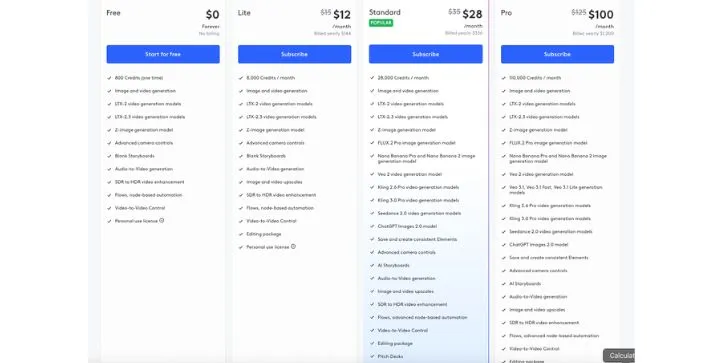
Here is the current pricing structure I found:
- Free → $0, 800 one-time credits
- Lite → $15/month, 8,000 credits/month
- Standard → $35/month, 28,000 credits/month
- Pro → $125/month, 110,000 credits/month
- Enterprise → custom billing and custom credit volume
Yearly billing lowers the monthly price to $12/month for Lite, $28/month for Standard, and $100/month for Pro.
At first, this sounds simple.
But once you start generating videos,
You realize credits can disappear quickly.
Especially when you are experimenting.
And AI video is all about experimenting.
You try one prompt.
The hand looks weird.
You regenerate.
The face changes.
You regenerate again.
The motion is better, but the background bends.
You try another model.
And just like that,
You have spent a lot of credits before getting one usable clip.
This is where LTX Studio can feel expensive.
Not because the base plan is impossible to afford,
But because the real cost depends on how many attempts it takes to get a result you like.
I also found many user complaints around this.
Trustpilot currently shows a very negative rating for LTX Studio, with many reviewers complaining about product quality, confusing user experience, subscriptions, refunds, pricing, and fast credit usage.
And honestly, I understand why people get frustrated.
If someone joins expecting “type a prompt and get a perfect video,”
They may feel disappointed very quickly.
Because that is not how AI video tools work right now.
Note 👇🏼
The Free and Lite plans are for personal use only.
If you want to use LTX Studio for business, marketing, client work, paid content, or commercial projects, you need a plan with a commercial use license, such as Standard, Pro, or Enterprise.
8. LTX Studio’s Collaboration and Team Features
Finally, I checked how LTX Studio works for teams.
Because if you are using it for client work, agency projects, or brand campaigns,
Collaboration matters.
LTX Studio does offer team-focused features,
But the better collaboration features sit on higher plans.
For example, the Pro plan includes 3 collaborators per project,
While Enterprise gives unlimited collaborators, organization-level roles and permissions, multiple Brand Kits, SSO login, onboarding, priority support, and custom legal terms.
This makes sense for agencies and bigger teams.
If you are working with clients,
You may need different people to review storyboards, check visuals, approve scenes, or manage brand assets.
Having everything in one workspace can make the workflow cleaner.
And I do like that LTX Studio is thinking beyond solo creators.
It is not only trying to be a fun AI video generator.
It is trying to become a creative workspace for teams that need storyboards, pitch decks, AI visuals, video drafts, and brand assets in one place.
But again,
The cost goes up.
If you are a solo creator, you may not care about Brand Kits, SSO, custom legal terms, or unlimited collaborators.
But if you are an agency, these features are useful.
The question is whether you are producing enough work to justify the price.
For small teams, Standard may be enough to start.
For agencies handling multiple clients, Pro or Enterprise makes more sense.
But I would not jump straight into the highest plan unless you already know how LTX Studio fits into your workflow.
Note 👇🏼
If you are testing LTX Studio for your team, start with one real project first.
Not a random demo.
Use an actual client-style brief,
Create a storyboard,
Generate a few clips,
Track the credits,
And see how much editing is needed before the output becomes usable.
That will tell you more than any feature list.
LTX Studio Pricing: Is It Worth It?
We have covered LTX Studio’s core features,
Now it is time to understand how much it will cost you.
Here’s a breakdown of its pricing tiers…
LTX Studio Pricing Plans 💰
Free Plan
- Price: $0
- Credits: 800 one-time credits
Lite Plan
- Monthly: $15/mo
- Annual: $12/mo
Standard Plan
- Monthly: $35/mo
- Annual: $28/mo
Pro Plan
- Monthly: $125/mo
- Annual: $100/mo
Enterprise Plan
- Custom pricing
- Custom credit volume
LTX Studio pricing plans breakdown.
PS: LTX Studio does offer a free plan, but it is mostly useful for testing the platform before you pay.
LTX Studio’s pricing looks reasonable at first, but the credit-based system can get expensive once you start generating multiple videos, fixing bad outputs, or testing different models.
Get the detailed breakdown of LTX Studio’s pricing to see what each plan offers and which plan is suitable for whom.
LTX Studio Output Quality: How Good Are the Videos?
LTX Studio can create some really impressive visuals,
But the quality depends a lot on what you are trying to generate.
For simple scenes, product-style shots, cinematic frames, and storyboard visuals,
The results can look clean and polished.
But once you add complex movement, multiple characters, or detailed actions,
You start to see the limits.
Visual Fidelity
LTX Studio, especially with LTX 2, can produce clean, sharp, and visually strong frames.
When I tested simple and controlled scenes,
The images looked polished,
the lighting felt cinematic,
and the overall composition was better than what I expected from a browser-based AI video tool.
It works best when the scene is clear, like:
- One person in a room
- A product on a table
- A car on a road
- A cinematic landscape
- A simple close-up shot
So yes, for visual planning, mood boards, and AI storyboards,
LTX Studio does a solid job.
Motion Quality
Motion is where things become less consistent.
Simple movement works fine.
For example, a slow push-in, light camera pan, subtle facial movement, or basic product motion can look good.
But complex motion is still tricky.
LTX Studio can struggle with:
- Walking naturally
- Dancing
- Fighting scenes
- Hand and object interaction
- Crowds
- Fast camera movement
- Realistic physics
Sometimes the motion gets blurry.
Sometimes the body movement feels stiff.
And sometimes objects or backgrounds shift in strange ways.
So, the still-frame quality is stronger than the motion quality.
Prompt Adherence
LTX Studio often follows concrete visual instructions better than emotional or abstract direction.
Prompts like “slow push-in shot” or “low-angle close-up” are usually safer than vague instructions like “make it feel heartbreaking and cinematic.”
I got better results when I described the scene clearly:
- Camera angle
- Lighting
- Subject position
- Background
- Action
- Mood
The more specific and visual your prompt is,
The better the output usually gets.
Character Consistency
Character consistency is one of LTX Studio’s stronger points compared with basic text-to-video tools.
It can keep characters, outfits, and visual elements more consistent across scenes,
Especially if you use clear references and avoid too many changes.
But it is not perfect.
Faces can shift slightly.
Hair and clothing details may change.
And if you move from a close-up to a wide shot,
The character may not always look exactly the same.
For storyboards and pitch visuals, it is good.
For final character-driven films, you will still need manual checking.
Audio and Lip Sync
Do not subscribe assuming audio and lip sync will be flawless.
This is especially important if you are creating:
- Dialogue-heavy videos
- Music videos
- Character conversations
- Talking-head content
- Brand videos with voiceover timing
Test your exact use case first.
LTX Studio can help you build the visual side of a project,
But for polished audio, clean lip sync, and final editing,
You may still need another tool in your workflow.
Real User Reviews: What People Love and Hate
User reviews around LTX Studio are mixed.
On one side, G2 users generally like the creative workflow, storyboarding, and ease of use. G2 currently shows LTX at 4.3/5 from 122 reviews, with many reviews coming from small-business users.
On the other side, Trustpilot looks much more negative. LTX Studio currently has a 1.5 TrustScore from 73 reviews, with 88% 1-star reviews.
So, yeah,
This is one of those tools where the review platform really changes the story.
Positive User Feedback
A lot of positive reviews focus on the same few things:
- Easy setup
- Faster creative workflow
- Good for AI storyboarding
- Helpful for visualizing ideas
- Useful for ads, promos, and social content
- Good all-in-one workspace
- Better character and scene consistency than basic text-to-video tools
One G2 user said:
“The initial setup was easy”
Source: https://www.g2.com/products/ltx/reviews
Another user on LTX Studio’s official review page said:
“It lets me quickly story board, visualize, and edit a sequence”
Source: https://ltx.studio/reviews
And honestly, this matches my experience too.
LTX Studio feels strongest when you use it as an AI pre-production suite.
Not when you expect it to create a perfect final video from one prompt.
Negative User Feedback
Now, the negative reviews are also worth taking seriously.
Most complaints are around:
- Refund issues
- Subscription confusion
- Fast credit usage
- Confusing UI
- Inconsistent output quality
- Failed exports
- Broken hands or fingers
- Weak support experience
- Audio or lip sync problems
One Trustpilot reviewer wrote:
“Ui is really bad!”
Source: https://www.trustpilot.com/review/ltx.studio
Another Trustpilot reviewer complained:
“Voices never consistent. Models never consistent.”
Source: https://www.trustpilot.com/review/ltx.studio
A Reddit user also shared a harsh experience and said:
“The video export doesn’t work”
Source: https://www.reddit.com/r/AI_VideoGenerator/comments/1lmv7oc/ltx_studio_is_a_scam_watch_out/
The biggest pattern I noticed is this:
People who use LTX Studio for storyboards, concepts, and planning are usually more forgiving.
People who expect clean final videos, perfect exports, and low-cost experimentation often get frustrated.
Why Are G2 and Trustpilot So Different?
This is important.
G2 and Trustpilot are showing two very different sides of the same product.
G2 reviews seem to come mostly from business and creative users, especially small-business users testing LTX for content creation, storyboarding, and visual workflows. G2 also says it validates reviewer identity through its moderation process.
Trustpilot, on the other hand, often captures frustrated customers who had billing, refund, support, or subscription problems. Trustpilot also says reviews are individual user opinions, not Trustpilot’s own claims.
So, I would not cherry-pick only one side.
The balanced view is this:
LTX Studio can be useful,
but it can also become expensive and frustrating if your expectations are too high or your project needs perfect final output.
Is LTX Studio Legit or a Scam?
LTX Studio appears to be a legitimate AI video platform from Lightricks.
It has real product features, real users, public reviews, active pricing, AI storyboarding, video generation, timeline editing, and collaboration features.
So, I would not simply call it a scam.
But I also understand why some users use that word.
Many complaints are not about whether the tool exists.
They are about billing, refunds, credit usage, failed outputs, and results not matching the marketing promise.
So, my honest advice is simple:
Test the free plan first,
read the current terms carefully,
and avoid annual billing until you know the tool actually fits your workflow.
Why Some Users Call It a Scam
Some users call LTX Studio a scam because of issues like:
- Unexpected charges
- Annual-vs-monthly billing confusion
- Refund denials
- Credits used during failed generations
- Output not matching the marketing videos
- Exports not working properly
- Support not solving billing problems fast enough
One Trustpilot reviewer said they were charged while on the free plan:
“they refuse to refund my money”
Source: https://www.trustpilot.com/review/ltx.studio
Another Reddit post claimed:
“They have a refund policy that rejects refund requests”
Source: https://www.reddit.com/r/AI_VideoGenerator/comments/1lmv7oc/ltx_studio_is_a_scam_watch_out/
Now, that does not automatically make the company a scam.
But it does mean you should be careful before putting your card in.
Why Others Recommend It
At the same time,
many users recommend LTX Studio because it does solve a real creative problem.
It helps people move faster from idea to visual direction.
Users like it for:
- Strong storyboarding
- Impressive visuals
- Fast ideation
- Camera angles and lighting control
- Better workflow than single-purpose AI video tools
- Useful pre-production for agencies, filmmakers, and creators
One official review says:
“Clear and easy-to-use interface.”
Source: https://ltx.studio/reviews
This is where LTX Studio makes the most sense.
Use it to plan, visualize, and pitch your video idea.
Do not expect it to replace your full editing workflow overnight.
Safe Buying Checklist
Before you pay for LTX Studio, I would suggest doing this:
- Start with the free plan first
- Avoid the annual plan in the beginning
- Screenshot pricing and plan terms before subscribing
- Track how many credits each test uses
- Test your hardest use case first
- Try one real project, not just a random demo
- Cancel before the renewal date if you are unsure
- Contact support early if credits, exports, or billing look wrong
- Do not spend too many credits trying to “fix” one broken output
That last point is important.
With AI video tools, one bad clip can easily turn into five regenerations,
and five regenerations can quickly turn into wasted credits.
Final Verdict: Should You Choose LTX Studio in 2026?
LTX Studio is a strong tool for creators, filmmakers, marketers, and agencies.
It has great AI storyboarding, visual planning, character consistency features, and a solid concept-to-video workflow.
But is LTX Studio right for you?
Well, you should choose LTX Studio if you are
- A filmmaker or creator who wants to turn scripts into storyboards and visual concepts faster.
- A marketer or agency looking to create ad concepts, pitch decks, and campaign visuals.
- Someone who can manage the credit-based pricing and does not expect perfect final videos in one click.
But if you do not fit into any of those categories,
You should definitely look for an alternative like
Runway, Kling, Pika, or Canva, depending on what you need.
Runway is better for advanced AI video workflows, Kling is strong for realistic motion, Pika is easier for quick creative clips, and Canva is better if you mainly need simple social media videos and design assets.
Also Read:
Top Kling Alternatives
Best Pika Alternatives
Canva alternatives for better design
FAQs About LTX Studio
1. What is LTX Studio?
LTX Studio is an AI video production platform that helps you create storyboards, scenes, videos, pitch decks, and controlled shot sequences.
I would describe it more as an AI pre-production suite than a simple AI movie generator.
It is best for planning, visualizing, and building video concepts faster.
2. Is LTX Studio legit?
Yes, LTX Studio is a legit AI video platform.
It is owned by Lightricks, a creative technology company known for apps like Facetune and Videoleap.
That said, you should still test it carefully before paying for a higher plan, especially because AI video generation can use credits quickly.
3. Is LTX Studio a scam?
I would not call LTX Studio a scam.
It is a real product with real AI video, storyboard, editing, and collaboration features.
But some users may feel disappointed if they expect perfect videos from one prompt.
The main complaints are usually around:
- Fast credit usage
- Pricing
- Output inconsistency
- Refund or billing expectations
- Motion quality
So, try the free plan first before upgrading.
4. How much does LTX Studio cost?
LTX Studio has a free plan and paid plans.
At the time of writing, the pricing is:
- Free: $0 with 800 one-time credits
- Lite: $15/month or $12/month yearly
- Standard: $35/month or $28/month yearly
- Pro: $125/month or $100/month yearly
- Enterprise: Custom pricing
Pricing can change, so always check the official pricing page before subscribing.
5. Does LTX Studio have a free plan?
Yes, LTX Studio has a free plan.
But it is mostly useful for testing the platform.
You can use it to understand the interface, try basic generation, and see if the workflow fits you before paying.
6. How do LTX Studio credits work?
LTX Studio uses credits for generation tasks.
Credits may be used when you:
- Generate videos or images
- Render shots
- Change character appearance
- Create new shots
- Test different models
- Regenerate outputs
This is why credits can run out fast if you keep testing prompts or fixing bad results.
7. Can LTX Studio create a full movie?
Technically, you can use LTX Studio to plan and build longer video projects.
But I would not depend on it to create a complete professional movie from start to finish.
It is much better for:
- Storyboards
- Short scenes
- Concept videos
- Ad creatives
- Pitch decks
- Pre-production planning
For final editing, you may still need tools like Premiere Pro, DaVinci Resolve, Final Cut Pro, or CapCut.
8. Is LTX Studio good for beginners?
Yes, but with one warning.
The interface is easier than many professional video tools, but the credit system can be risky for beginners.
If you are new to AI video, start with short clips and simple prompts.
Do not jump straight into long, complex scenes.
9. What is LTX Studio best used for?
LTX Studio is best for:
- AI storyboards
- Script-to-video planning
- Image-to-video tests
- Pitch decks
- Ad concepts
- Music video concepts
- Short film previsualization
- Client presentations
- Social media video ideas
Its strongest use case is visual planning, not perfect final rendering.
10. Can I use LTX Studio for commercial work?
Yes, but it depends on your plan.
LTX Studio says commercial use is available on paid plans that include a commercial use license.
The free and personal-use plans may not be suitable for business, marketing, client work, or paid content.
11. Does LTX Studio support text-to-video?
Yes, LTX Studio supports text-to-video workflows.
You can enter an idea, prompt, or script and turn it into scenes, shots, and video concepts.
But the quality depends heavily on your prompt, model choice, and how complex the scene is.
12. Does LTX Studio support image-to-video?
Yes, LTX Studio supports image-to-video generation.
This is useful when you already have a visual and want to add motion, camera movement, or a cinematic feel.
Simple motion usually works better than complex action.
13. Does LTX Studio support video-to-video?
Yes, LTX Studio lists video-to-video control among its features.
This can help when you want to guide the output using an existing video instead of starting only from text.
14. Is LTX Studio good for character consistency?
LTX Studio is better than many basic AI video tools for character and element consistency.
But it is not perfect.
You may still see changes in:
- Face shape
- Clothing details
- Hair
- Hands
- Expressions
- Body movement
It works best when you keep characters, lighting, and camera angles simple.
15. Why does LTX Studio use credits so quickly?
Because AI video usually takes multiple attempts.
You may need to regenerate a clip because:
- The motion looks unnatural
- The face changes
- The camera movement is wrong
- The hands look strange
- The scene does not match your prompt
- The output is good but not usable yet
That trial-and-error process is where credits disappear fast.
16. Is LTX Studio better than Runway?
It depends on your workflow.
Choose LTX Studio if you care more about storyboards, shot planning, pitch decks, and an AI pre-production suite.
Choose Runway if you want a more mature AI video generation and editing workflow.
For many creators, both tools can fit different stages of the same project.
17. Is LTX Studio better than Kling or Pika?
LTX Studio feels more structured for planning and production.
Kling and Pika are often used more for direct AI video generation.
So the simple answer is:
- LTX Studio: better for storyboards and production planning
- Kling: better for realistic AI motion tests
- Pika: better for quick creative clips
18. Can LTX Studio export videos?
Yes, LTX Studio allows video exports.
For some use cases, LTX Studio mentions exporting as MP4, and its music video workflow also mentions MP4 and XML export options.
19. Is LTX Studio worth it?
LTX Studio is worth it if you need an AI pre-production suite for storyboards, pitch decks, visual concepts, and short AI-generated clips.
It may not be worth it if you want:
- Unlimited cheap video generation
- Perfect final videos from one prompt
- Long-form films without editing
- Highly realistic human motion every time
20. Who should avoid LTX Studio?
You should avoid LTX Studio if you:
- Have a very tight budget
- Hate credit-based tools
- Need perfect lip sync or acting
- Want long videos with no manual editing
- Expect every generation to be usable
- Do not want to spend time learning prompts and camera controls
For those users, a simpler AI video tool or a traditional editor may be a better fit.



