

Kling’s pricing page looks simple at first.
Five plans. A few prices. A lot of credits.
But here’s what most people don’t realise until they start generating videos.
The price isn’t the only thing that matters.
Your real cost depends on how fast you use credits, how many times you regenerate a clip, and whether you’re making basic videos or using higher-quality features.
And a few details, like renewal pricing and credit limits, are easy to miss when you’re just comparing plans.
In this blog, I’ll break down exactly what each Kling plan costs, how the credit system works, what you actually get, what to watch out for, and which plan makes the most sense for creators, marketers, and small teams.
TL;DR: Kling Pricing at a Glance
- Base Plans: $0/month on Basic, then paid plans start at $6.99/month for Standard and go up to $127.99/month for Ultra.
- The Catch: Kling pricing is credit-based. The more videos you generate, regenerate, upscale, or create in higher-quality modes, the faster your credits disappear.
- Monthly Credits: Standard gives 660 credits, Pro gives 3,000 credits, Premier gives 8,000 credits, and Ultra gives 26,000 credits per month.
- What Costs More: Advanced video generation, 4K output, longer clips, higher-quality models, and repeated prompt testing can use more credits than beginners expect.
- Biggest Hidden Cost: The first price you see may be a special offer. Renewal pricing can be higher, so check the “next renewal” amount before subscribing.
- Best For: AI video creators, marketers, YouTubers, social media teams, ad creatives, and small agencies that need a reliable text-to-video workflow.
- Not For: Users who only need one or two quick videos and don’t want to manage credits, retries, or subscription limits.
- Best Value Plan: Pro is the safest pick for most creators because it gives 3,000 monthly credits without jumping into Premier or Ultra pricing.
How Much Does Kling Cost?
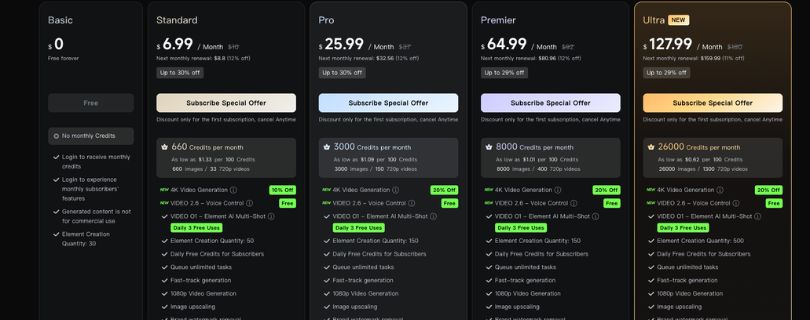
Kling has five membership plans.
| Plan | Base Price | Monthly Credits | Best For |
| Basic | $0 | No monthly credits | Testing Kling casually |
| Standard | $6.99/mo | 660 | Light video creation |
| Pro | $25.99/mo | 3,000 | Regular creators |
| Premier | $64.99/mo | 8,000 | Heavy video workflows |
| Ultra | $127.99/mo | 26,000 | Agencies and high-volume teams |
Before we go into each plan, here is the one thing you need to understand.
These are the starting offer prices.
Kling’s real cost depends on how many credits you use and which video features you choose.
So what you pay for a few simple generations is very different from what you pay if you keep regenerating clips, testing prompts, using image-to-video, or working in higher-quality modes.
Let me walk you through each plan in detail.
Kling Pricing Plans Breakdown
Let’s break down each Kling pricing plan and see what you actually get, who it’s useful for, and when it starts to feel limiting.
- Basic Plan
- Standard Plan
- Pro Plan
- Premier Plan
- Ultra Plan
1. Basic Plan
Price: $0
Kling’s Basic plan is the free plan.
It’s mainly there so you can try the platform, explore the interface, and get a feel for how Kling handles AI video generation before paying.
Here is what you get:
- Free forever access
- No monthly credits included
- Login-based free usage
- Access to limited features
- Element creation quantity: 30
- Generated content is not for commercial use
In practice, the Basic plan is fine for curiosity.
You can test a prompt, see how the text-to-video workflow feels, and check whether Kling’s motion quality fits your style.
But it’s not built for serious content production.
No monthly credits means you don’t have much room to experiment. And with AI video, experimentation matters. One prompt rarely gives you the perfect clip on the first try.
You’ll usually test different prompts, regenerate scenes, adjust camera movement, or switch from text-to-video to image-to-video.
That’s where the free plan starts to feel tight.
Who Should Choose This Plan?
Someone who is trying Kling for the first time and only wants to test the tool casually.
If you’re creating videos for YouTube, TikTok, ads, product visuals, or client work, you’ll outgrow Basic very quickly.
2. Standard Plan
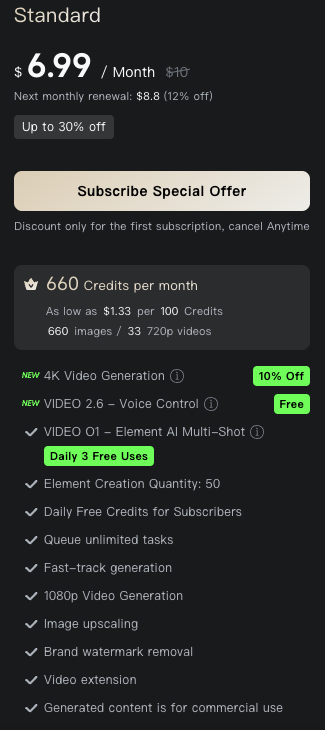
Price: $6.99/month
Yearly Price: $79.20/year
Credits: 660 credits per month
Standard is Kling’s entry-level paid plan.
This is the first plan where Kling starts to feel useful for light AI video creation.
You get 660 credits per month. According to the pricing page, that can be used for around 660 images or 33 720p videos, depending on what you generate.
Here is what is included:
- 660 credits per month
- 4K video generation discount: 10% off
- Kling Video 2.6 Voice Control
- Kling Video O1 Element AI Multi-Shot
- Daily 3 free uses
- Element creation quantity: 50
- Daily free credits for subscribers
- Queue unlimited tasks
- Fast-track generation
- 1080p video generation
- Image upscaling
The important thing to remember is that 660 credits can disappear faster than you expect.
If you only make a few short clips each month, Standard is manageable. But if you’re testing prompts, regenerating scenes, or trying to get one polished social media video, you may burn through credits quickly.
That’s the catch with Kling pricing.
The plan looks cheap, but AI video creation is rarely one-and-done.
You might generate five versions just to get one usable clip.
Key Limitation:
Standard is not ideal for regular creators.
It gives you enough room to test paid features, but not enough room for a full content workflow.
If you’re planning to create weekly videos, ad creatives, YouTube visuals, or client content, 660 credits can feel restrictive.
Who Should Choose This Plan?
Individual creators, beginners, and casual users who want to make a few AI videos per month without spending much.
It’s a good starter plan, but not the best long-term plan for active creators.
3. Pro Plan
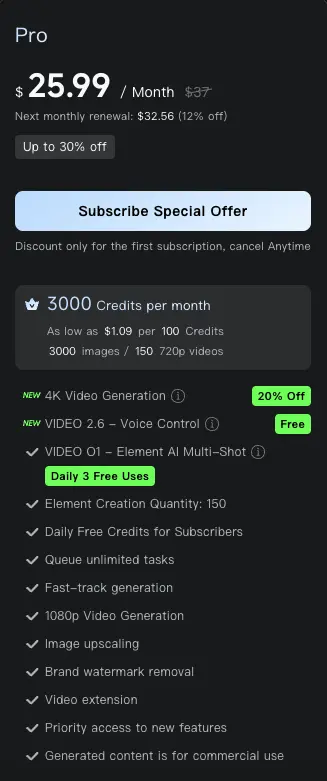
Price: $25.99/month
Yearly Price: $293.04/year
Credits: 3,000 credits per month
The Pro plan is where Kling becomes much more practical.
It gives you 3,000 credits per month, which is a big jump from Standard.
According to Kling’s pricing page, that equals around 3,000 images or 150 720p videos.
For most creators, this is the plan that makes the most sense.
Here is what you get:
- 3,000 credits per month
- 4K video generation discount: 20% off
- Kling Video 2.6 Voice Control
- Kling Video O1 Element AI Multi-Shot
- Daily 3 free uses
- Element creation quantity: 150
- Daily free credits for subscribers
- Queue unlimited tasks
- Fast-track generation
- 1080p video generation
- Image upscaling
The biggest upgrade here is breathing room.
With 3,000 credits, you can actually test prompts properly. You can create a few variations, compare outputs, regenerate clips that look off, and still have credits left for real projects.
That matters a lot if you’re using Kling as a social media video creation tool or an AI ad creative generator.
A creator making product videos, faceless YouTube scenes, short-form clips, or visual hooks for ads will probably feel much more comfortable on Pro than Standard.
Key Limitation:
Pro is still not unlimited.
If you create daily videos, work with clients, or use higher-quality modes often, you can still run into the credit ceiling.
But for most solo creators, it gives the best balance between cost and usable output.
Who Should Choose This Plan?
Creators, marketers, YouTubers, freelancers, and small business owners who use Kling regularly.
If you want the safest plan without jumping into agency-level pricing, Pro is probably the best pick.
4. Premier Plan
Price: $64.99/month
Yearly Price: $728.64/year
Credits: 8,000 credits per month
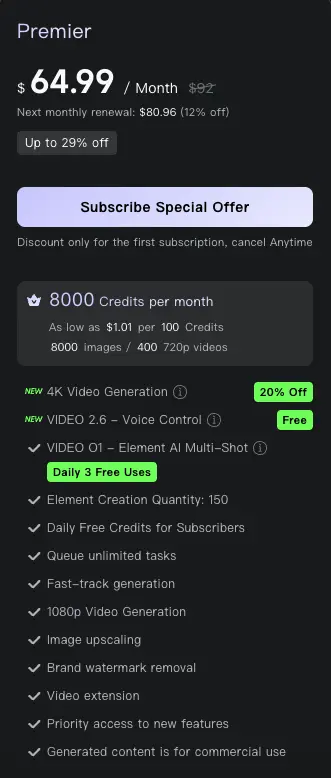
Premier is built for heavier video workflows.
You get 8,000 credits per month, which Kling estimates as around 8,000 images or 400 720p videos.
That’s a lot more room to create, test, and refine.
Here is what is included:
- 8,000 credits per month
- 4K video generation discount: 20% off
- Kling Video 2.6 Voice Control
- Kling Video O1 Element AI Multi-Shot
- Daily 3 free uses
- Element creation quantity: 150
- Daily free credits for subscribers
- Queue unlimited tasks
- Fast-track generation
- 1080p video generation
- Image upscaling
Premier makes sense when Kling becomes part of your weekly or daily creative workflow.
For example, if you’re producing ad variations, making social content for multiple brands, building AI video scenes for YouTube, or testing different image-to-video quality settings, the extra credits help.
This is also where Kling starts to make more sense for small teams.
Not because the features suddenly change dramatically, but because the credit pool is large enough to support more frequent production.
Honest Take:
Premier is useful, but the jump from Pro to Premier is mostly about volume.
If you’re not regularly running out of 3,000 credits, you probably don’t need Premier yet.
But if Pro starts forcing you to slow down or wait until next month, Premier becomes the cleaner upgrade.
Who Should Choose This Plan?
Heavy creators, small agencies, social media teams, and marketers producing multiple AI videos every week.
If Kling is part of your actual content pipeline, not just something you test occasionally, Premier gives you more room to work.
5. Ultra Plan
Price: $127.99/month
Yearly Price: $1,429.99/year
Credits: 26,000 credits per month
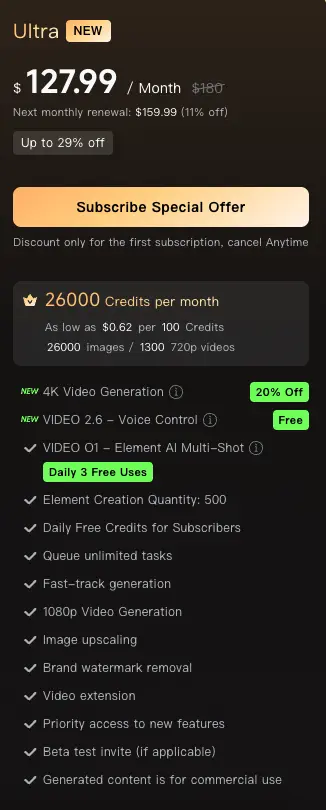
Ultra is Kling’s highest individual plan.
This is not really for casual users.
It gives you 26,000 credits per month, which Kling estimates as around 26,000 images or 1,300 720p videos.
That’s a serious amount of generation capacity.
Here is what you get:
- 26,000 credits per month
- 4K video generation discount: 20% off
- Kling Video 2.6 Voice Control
- Kling Video O1 Element AI Multi-Shot
- Daily 3 free uses
- Element creation quantity: 500
- Daily free credits for subscribers
- Queue unlimited tasks
- Fast-track generation
- 1080p video generation
- Image upscaling
Ultra is for people who already know they need volume.
Think agencies creating ad creatives, teams testing dozens of hooks, e-commerce brands making product videos, or studios using AI video as part of a bigger production workflow.
The main advantage is credit efficiency.
Ultra gives you the lowest cost per 100 credits based on the pricing shown, so it becomes attractive if you’re generating at scale.
But it only makes sense if you’ll actually use the credits.
Paying for Ultra and only making a few clips per month would be overkill.
Key Limitation:
Ultra is expensive for individual creators.
The value is there for high-volume users, but not for someone who only needs a few polished videos each month.
You should also check your renewal price carefully before subscribing, because the first price shown may be a special offer.
Who Should Choose This Plan?
Agencies, production teams, high-volume creators, ad teams, and businesses using Kling heavily every month.
If you need a large credit pool and want the best cost-per-credit value, Ultra is the strongest plan.
Kling Monthly vs Yearly Pricing: Which Is Cheaper?
Kling gives you both monthly and yearly billing options.
The yearly plans are cheaper overall because you pay upfront and get a lower effective monthly price.
Here is the simple breakdown:
| Plan | Monthly Offer | Yearly Total | Effective Monthly Cost | Main Benefit |
| Standard | $6.99 | $79.20 | $6.60/month | Small annual saving |
| Pro | $25.99 | $293.04 | $24.42/month | Better for consistent creators |
| Premier | $64.99 | $728.64 | $60.72/month | Better for teams |
| Ultra | $127.99 | $1,429.99 | $119.17/month | Best high-volume value |
On paper, yearly billing is the better deal.
But I wouldn’t recommend jumping into the yearly plan on day one.
AI video tools can be unpredictable. You might love Kling’s image-to-video quality for product shots, but find that your text-to-video workflow needs more prompt testing than expected. Or you may realise that the plan you picked does not give you enough credits for the number of clips you want to make each month.
That’s why monthly billing is safer when you’re just starting.
Choose monthly if you’re testing Kling for the first time, comparing it with tools like Runway or Pika, or still figuring out how many credits your workflow actually needs.
Choose yearly only after you know two things clearly:
- How many credits you use in a normal month
- Whether Kling’s output quality fits your niche, style, and content goals
For most creators, the smartest move is to start monthly on Standard or Pro, test real projects for a few weeks, then switch to yearly once you’re confident you’ll keep using it.
Kling Credits Explained: What Do You Actually Get?
Kling pricing is built around credits.
That means you are not only paying for access to the tool. You are paying for how much you can generate inside it.
Every time you create a video, test a prompt, generate an image, upscale something, or use certain advanced features, Kling uses credits. The exact credit cost can change depending on what you’re making, but the basic idea is simple:
More credits = more room to create.
Less credits = fewer attempts before you hit your limit.
Credits per Month by Plan
Here is how many monthly credits you get with each paid Kling plan:
| Plan | Monthly Credits |
| Standard | 660 |
| Pro | 3,000 |
| Premier | 8,000 |
| Ultra | 26,000 |
The Basic plan does not include monthly credits, so it is better for testing than regular production.
Standard gives you enough credits for light use. Pro gives you much more room to experiment. Premier is built for heavier content workflows. Ultra is the high-volume option for teams, agencies, or creators generating at scale.
Cost per 100 Credits
This is where Kling pricing gets more interesting.
The monthly price tells you what you pay upfront, but the cost per 100 credits shows how much value you’re actually getting from each plan.
| Plan | Monthly Cost per 100 Credits | Yearly Cost per 100 Credits |
| Standard | About $1.00 | About $1.00 |
| Pro | About $1.09 | About $0.81 |
| Premier | About $1.01 | About $0.76 |
| Ultra | About $0.62 | About $0.46 |
Ultra clearly gives you the cheapest credits.
But that does not automatically make it the best plan for everyone.
If you only create a few videos each month, Ultra is probably too much. You would be paying for a huge credit pool you may not fully use.
For most creators, Pro is still the more sensible starting point because it gives you enough credits to work properly without the bigger monthly commitment.
Why Credit Math Matters
AI video is not like exporting a normal edited video from CapCut or Premiere Pro.
You don’t always get the perfect result on the first try.
A text-to-video prompt might create the right scene but get the camera movement wrong. An image-to-video generation might look sharp but add strange motion. A product clip might need five or six attempts before the object stays clean, the lighting looks right, and the movement feels natural.
That trial-and-error process is where credits disappear.
So the real cost of Kling is not just the cost of one generation. It is the cost of getting one usable video after a few failed or average attempts.
That’s why the cheapest plan is not always the best value.
If Standard gives you 660 credits but you need multiple generations for each finished clip, it can feel limited fast. Pro gives you more breathing room. Premier and Ultra make more sense when you are producing videos often and need space to test ideas without constantly watching your credit balance.
How Many Videos Can You Make With Each Kling Plan?
Kling shows rough video estimates based on 720p generation.
This is helpful because credits can feel abstract until you connect them to actual output.
Here is what each paid plan gives you:
| Plan | Credits/Month | Approx. 720p Videos Shown |
| Standard | 660 | 33 |
| Pro | 3,000 | 150 |
| Premier | 8,000 | 400 |
| Ultra | 26,000 | 1,300 |
On paper, Standard gives you around 33 720p videos per month.
But treat that as a best-case estimate.
In real use, you’ll often regenerate clips to fix motion, lighting, faces, camera movement, or prompt mistakes. Higher-quality modes, 4K, voice control, extensions, and multi-shot generation can also use more credits.
So your actual video count may be lower, especially if you’re creating polished content for YouTube, ads, or client work.
Which Kling Plan Should You Choose?
Choose Basic if…
You only want to test Kling and see how the tool works.
It is fine for casual exploring, but not for consistent AI video production.
Choose Standard if…
You are a beginner and only need a few videos per month.
It is the cheapest paid plan and works well for occasional social clips or simple text-to-video tests.
Choose Pro if…
You create videos regularly and need more room for trial and error.
For most creators, Pro is the best overall plan because 3,000 credits gives you enough space to test prompts, regenerate clips, and build a real workflow.
Choose Premier if…
You produce multiple videos every week or create content for clients.
It gives you more credits and works better for heavier social media, YouTube, or marketing workflows.
Choose Ultra if…
You create at scale and want the lowest cost per credit.
Ultra makes the most sense for agencies, e-commerce brands, ad teams, and high-volume social media creators.
Is Kling Worth the Price?
Pros ✅:
- Strong AI video quality, especially for realistic motion and cinematic clips
- Good option for text-to-video and image-to-video workflows
- Paid plans include monthly credits instead of only pay-as-you-go usage
- Pro plan gives a solid balance of price and usable credits for most creators
- Higher plans work well for agencies, ad teams, and high-volume social media production
- Features like 1080p generation, image upscaling, fast-track generation, and 4K discounts add useful value
Cons ❌:
- Credit-based pricing can feel confusing at first
- Credits can run out quickly if you regenerate clips often
- Basic plan is too limited for serious video creation
- Renewal pricing may be higher than the first offer price
- Advanced features, higher-quality modes, 4K, and multi-shot generation can reduce your real output
- Not ideal if you only need one or two simple videos and do not want to manage credits
Kling Pricing vs Competitors
Kling is not the only AI video tool worth looking at.
The better question is not “Which tool is best?” It is “Which tool fits the way you actually create?”
Some tools are better for editing. Some are better for cinematic shots. Some are easier for fast social clips. Kling’s main strength is that it gives creators a clear subscription-and-credit system with strong video output for the price.
| Tool | Best For | Pricing Model | Kling Advantage | Kling Disadvantage |
| Kling | Realistic AI video, motion, and value | Subscription + credits | Strong credit packages and good entry-level access | Credit system can feel confusing at first |
| Wan | AI video generation and creative motion tests | Subscription/credits | Kling may feel more beginner-friendly for creators comparing plan limits | Wan may appeal more to users testing newer video models |
| HailuoAI | Fast AI video clips and social content | Credits/subscription | Kling can offer stronger value for users who need more monthly generation volume | HailuoAI may feel simpler for quick one-off clips |
| Google Flow | Cinematic AI filmmaking and story-driven video creation | Platform/subscription access | Kling is easier to compare by plan, credits, and monthly output | Google Flow may be better for users already working inside Google’s AI video ecosystem |
| Seedance | Multimodal and reference-heavy video workflows | API/platform pricing | Kling has strong output quality and accessible paid plans | Seedance may offer better control for advanced reference-based workflows |
For most users, I would compare them this way:
Choose Kling if you want a balanced mix of price, credits, and video quality.
Choose Wan if you like testing newer AI video models and creative motion styles.
Choose HailuoAI if you want quick social clips without overthinking the workflow.
Choose Google Flow if you care more about cinematic storytelling and structured AI filmmaking.
Choose Seedance if you need stronger reference control or more advanced multimodal workflows.
Hidden Costs and Limitations to Know Before Paying
Credits can run out faster than expected
AI video usually takes a few tries.
If you regenerate clips often to fix motion, faces, lighting, or prompt mistakes, your credits can disappear quickly.
Higher-quality generations may cost more
Basic 720p clips are not the same as advanced outputs.
Longer videos, better models, 4K generation, voice control, extensions, and multi-shot tools may reduce the number of videos you can make each month.
Free or Basic usage is not enough for professional work
The Basic plan is useful for testing, not serious production.
If you need videos for YouTube, ads, client work, product visuals, or regular social media content, you will likely need a paid plan.
Renewal pricing may be higher than the first offer
The first price you see may be a discounted offer.
Always check the next renewal price before subscribing, especially if you are choosing a monthly plan.
Commercial-use rules should be checked before client work
Do not assume every plan allows commercial use in the same way.
Before using Kling videos for ads, paid client projects, or brand campaigns, check the latest usage rights inside Kling.
Queue times and fast-track generation matter
Speed matters when you are testing multiple prompts.
Fast-track generation helps you move quicker, especially if you create content often and need to compare several versions before choosing the final clip.
Is Kling Worth Paying For?
Yes, Kling is worth paying for if you create AI videos regularly.
The free Basic plan is fine for testing, but it is too limited for a real content workflow. Once you start making videos for YouTube, ads, product visuals, social media, or client projects, you need enough credits to test prompts, regenerate clips, and use better-quality features.
Standard is enough if you only make a few casual videos each month.
Pro is the best starting point for serious creators because it gives you 3,000 credits and more room for trial and error.
Premier makes sense if you produce multiple videos every week or manage content for clients.
Ultra is best for agencies, ad teams, and high-volume creators who care about the lowest cost per credit.
So, the short answer is this: Kling is worth it if AI video is part of your regular creative workflow. If you only need one or two simple clips, the paid plans may feel like more than you need.
Recommended Plan by User Type
The best Kling plan depends on how often you create and how much room you need for retries.
| User Type | Recommended Plan | Reason |
| Beginner testing Kling | Basic or Standard | Lowest risk |
| TikTok/Reels creator | Pro | Enough credits for weekly output |
| YouTuber | Pro or Premier | More room for retries |
| Freelancer | Pro | Balanced cost and volume |
| Small agency | Premier | More credits and faster workflow |
| High-volume ad team | Ultra | Best credit efficiency |
| Developer/API user | Separate API research needed | Subscription pricing may not match API needs |
If you are just exploring Kling, start with Basic or Standard.
If you are creating regularly, Pro is the safest choice.
For teams, agencies, or ad workflows where output volume matters, Premier or Ultra will make more sense.
FAQs About Kling Pricing
Is Kling free?
Yes. Kling has a free Basic plan, but it is mainly for testing. It does not give you the same monthly credit allowance or production flexibility as the paid plans.
How much is Kling AI per month?
Kling paid plans start at $6.99/month for Standard and go up to $127.99/month for Ultra, based on the offer pricing shown on the pricing page.
What is the cheapest Kling paid plan?
The cheapest paid Kling plan is Standard, which costs $6.99/month and includes 660 monthly credits.
Which Kling plan is best?
For most creators, Pro is the best plan. It gives you 3,000 monthly credits, which is enough room to test prompts, regenerate clips, and create videos more consistently.
How many credits does Kling give per month?
Kling gives:
| Plan | Monthly Credits |
| Standard | 660 |
| Pro | 3,000 |
| Premier | 8,000 |
| Ultra | 26,000 |
The Basic plan does not include monthly credits.
Do Kling credits expire?
Kling credits are usually tied to your billing cycle, so you should check the latest credit rules inside your Kling account before subscribing. Do not assume unused monthly credits will roll over unless Kling clearly says so.
Is Kling Standard worth it?
Kling Standard is worth it if you only need a few AI videos per month. It is good for beginners, but the 660-credit limit can feel tight if you regenerate clips often.
Is Kling Pro worth it?
Yes, Pro is worth it for most regular creators. It gives 3,000 credits per month, which makes it much better for social videos, YouTube visuals, ad tests, and image-to-video workflows.
What is the difference between Kling Pro and Premier?
The main difference is credits. Pro gives 3,000 credits per month, while Premier gives 8,000 credits per month. Premier is better if you create multiple videos every week or work with client content.
What is the difference between Kling Premier and Ultra?
Premier gives 8,000 monthly credits, while Ultra gives 26,000 monthly credits. Ultra is better for agencies, ad teams, and high-volume creators who want the lowest cost per credit.
Does Kling support 4K video generation?
Yes. Kling supports 4K video generation discounts on paid plans. Standard gets a smaller 4K discount, while Pro, Premier, and Ultra get a larger discount.
Can I use Kling for commercial videos?
Paid plans may offer more commercial flexibility than the Basic plan, but you should always check Kling’s latest usage rights before using videos in ads, client work, or brand campaigns.
Is yearly Kling pricing cheaper than monthly?
Yes. Yearly billing gives a lower effective monthly price. But it is better to start monthly first if you are still testing Kling’s quality, credit usage, and workflow fit.
How many videos can I make with 660, 3,000, 8,000, or 26,000 credits?
Based on Kling’s 720p estimates:
| Credits | Approx. 720p Videos |
| 660 | 33 videos |
| 3,000 | 150 videos |
| 8,000 | 400 videos |
| 26,000 | 1,300 videos |
Your real number may be lower if you use higher-quality modes, 4K, extensions, voice control, multi-shot generation, or multiple retries.
Is Kling pricing based on credits?
Yes. Kling pricing is credit-based. Your plan gives you a monthly credit allowance, and different generation features use credits.
Why does Kling use credits?
Credits help Kling measure usage across different tools, such as text-to-video, image-to-video, image generation, upscaling, and advanced video features.
What happens when I run out of Kling credits?
If you run out of credits, you may need to wait for your next billing cycle or buy more credits if Kling offers that option in your account.
Is Kling good for YouTube videos?
Yes, Kling can be useful for YouTube visuals, cinematic clips, B-roll, faceless video scenes, and creative storytelling. Pro or Premier is usually better than Standard for YouTubers because you get more room for retries.
Is Kling good for TikTok and Instagram Reels?
Yes. Kling works well for short-form video ideas, visual hooks, product clips, and social media video creation. Pro is usually the safest plan for regular TikTok or Reels creators.
Is Kling better than Runway, Wan, HailuoAI, or Google Flow?
It depends on your workflow. Kling is strong for realistic AI video and credit value. Other tools may be better for editing, cinematic workflows, speed, or specific model styles. The best choice depends on what kind of videos you create most often.



