If you’re checking LTX Studio AI pricing right now, the plans may look easy at first.
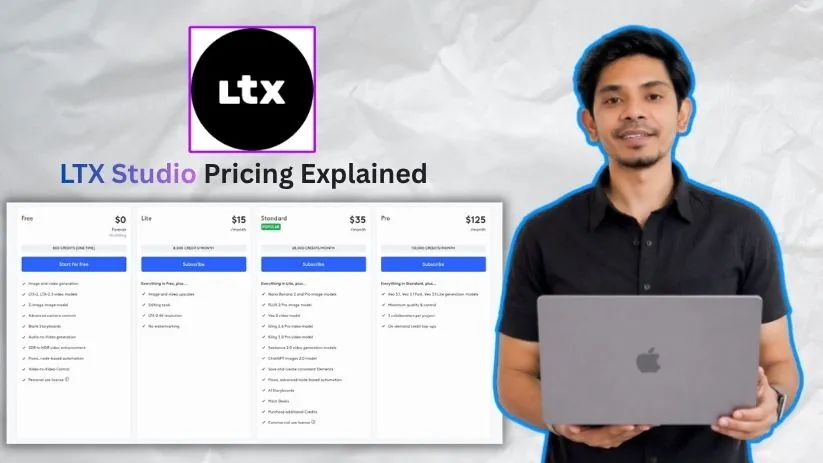
Free, Lite, Standard, Pro, and Enterprise.
But the real cost depends on more than the monthly price.
LTX Studio uses credits, and those credits can run down faster when you generate videos, upscale outputs, test different scenes, or use advanced AI models.
This LTX Studio pricing explained guide breaks down what each plan includes, who it’s best for, and where the cost can quietly increase before you upgrade.
Quick Answer: How Much Does LTX Studio Cost?
LTX Studio pricing starts with a Free plan at $0. Paid plans start from $15 per month for Lite, $35 per month for Standard, and $125 per month for Pro. Enterprise pricing is custom. Annual billing gives 20 percent lower monthly pricing. For commercial use, you’ll need the Standard plan or higher.
| LTX Studio Plan | Monthly Price | Annual Billing Price | Best For | Commercial Use |
| Free | $0 | No billing | Testing LTX Studio for personal projects | No |
| Lite | $15/month | $12/month | Personal creators who need more credits | No |
| Standard | $35/month | $28/month | Freelancers, marketers, and paid projects | Yes |
| Pro | $125/month | $100/month | Agencies, studios, and high-volume creators | Yes |
| Enterprise | Custom | Custom | Large teams with custom needs | Yes |
LTX Studio AI Pricing Plans — Full Breakdown
1. Free Plan
LTX Studio’s free plan gives you basic access to the platform. It works well if you want to explore the interface, test AI video generation, and see how the creative workflow feels before upgrading.
LTX Studio Free plan breakdown
✅ What you get:
- $0 forever
- 800 one-time credits
- Image and video generation
- LTX-2 and LTX-2.3 video models
- Z-image image model
- Advanced camera controls
- Blank Storyboards
- Audio-to-Video generation
- SDR to HDR video enhancement
- Flows and Video-to-Video Control
- Personal use license
❌ Where it falls short:
- The 800 credits are one-time credits, not monthly credits.
- You can’t use this plan for business, marketing, client work, paid projects, or sponsored content.
- It’s not enough for regular AI video production.
- You may run out of credits quickly if you test multiple prompts, scenes, or video styles.
LTX clearly mentions that the Free plan is for personal projects only and cannot be used for business, marketing, or paid work like AAMAX.
My take: The Free plan is useful if you just want to test LTX Studio AI before paying. But treat it like a trial, not a real production plan.
2. Lite Plan — $15/month or $12/month annually
The Lite plan is where LTX Studio becomes more useful for personal creators. You get monthly credits, no watermarking, editing tools, and upscaling support, which makes it better than the Free plan for regular experimentation.
LTX Studio Lite plan breakdown
✅ What you get:
- $15 per month on monthly billing
- $12 per month with annual billing
- 8,000 credits per month
- Everything in the Free plan
- Image and video upscales
- Editing tools
- LTX-2 4K resolution
- No watermarking
❌ Where it falls short:
- Lite is still for personal use only.
- You don’t get a commercial use license.
- It’s not ideal for client videos, paid ads, brand campaigns, or monetized content.
- Credits can run down quickly if you create multiple versions of the same video.
- You don’t get advanced features like AI Storyboards, saved Elements, or premium commercial workflows.
LTX lists Lite at $15 monthly or $12 per month with annual billing, with 8,000 credits per month and features like upscales, editing tools, 4K support, and no watermarking.
My take: Lite is a good fit for personal creators who want cleaner AI video outputs without jumping into a business plan. But if you’re making content for money, skip this and look at Standard.
3. Standard Plan — $35/month or $28/month annually
The Standard plan is the real starting point for commercial users. It gives you more credits, commercial rights, AI Storyboards, Pitch Decks, saved Elements, and access to more advanced image and video models.
LTX Studio Standard plan breakdown
✅ What you get:
- $35 per month on monthly billing
- $28 per month with annual billing
- 28,000 credits per month
- Everything in Lite
- Commercial use license
- Nano Banana 2 and Pro image models
- FLUX.2 Pro image model
- Veo 2 video model
- Kling 2.6 Pro and Kling 3.0 Pro video models
- Seedance 2.0 video generation models
- ChatGPT Images 2.0 model
- Save and create consistent Elements
- Advanced Flows
- AI Storyboards
- Pitch Decks
- Option to purchase additional credits
❌ Where it falls short:
- 28,000 credits may still feel limited for heavy video production.
- You may need extra credits if you create many ad variations, product videos, or client revisions.
- It does not include Veo 3.1 access.
- Team collaboration is still limited compared with Pro and Enterprise.
- You’ll need to plan your prompts and scenes carefully to avoid wasting credits.
LTX lists Standard at $35 monthly or $28 per month annually, with 28,000 credits per month, commercial use, AI Storyboards, Pitch Decks, saved Elements, and additional credit purchases.
My take: Standard is the best LTX Studio plan for freelancers, marketers, YouTubers, small businesses, and creators doing paid work. This is where LTX Studio pricing starts to make practical sense.
Quick math for Standard on annual billing:
$28/month × 12 months = $336/year
4. Pro Plan — $125/month or $100/month annually
The Pro plan is made for high-volume creators and small teams. It gives you a much larger credit allowance, access to Veo 3.1 models, better control, and project collaboration for up to 3 collaborators.
LTX Studio Pro plan breakdown
✅ What you get:
- $125 per month on monthly billing
- $100 per month with annual billing
- 110,000 credits per month
- Everything in Standard
- Veo 3.1 generation models
- Veo 3.1 Fast video model
- Veo 3.1 Lite video model
- Maximum quality and control
- 3 collaborators per project
- On-demand credit top-ups
❌ Where it falls short:
- The price is high for casual creators.
- It only makes sense if you create videos often.
- You still don’t get unlimited collaborators.
- You don’t get custom model training, SSO, centralized billing, or advanced compliance features.
- Smaller creators may not use enough credits to justify the monthly cost.
LTX lists Pro at $125 monthly or $100 per month annually, with 110,000 credits per month, Veo 3.1 model access, maximum quality and control, 3 collaborators per project, and on-demand credit top-ups.
My take: Pro is best for agencies, studios, content teams, and creators who use AI video generation every week. If LTX Studio is part of your regular production workflow, Pro can be worth it.
Quick math for Pro on annual billing:
$100/month × 12 months = $1,200/year
5. Enterprise Plan — Custom Pricing
The Enterprise plan is built for large teams, agencies, media businesses, and brands that need custom control, team access, privacy, onboarding, and support. LTX Studio does not show a fixed public price for this plan.
LTX Studio Enterprise plan breakdown
✅ What you get:
- Custom credit volume
- Custom billing
- Everything in Pro
- Custom LTX-2 model training
- Centralized brand management and controls
- Org-wide credit allocation and usage reports
- Multi-language video versioning
- Access to AI creative strategists
- Unlimited collaborators across teams
- SSO login
- Org-wide onboarding and training
- Dedicated account manager
- SLA support and priority support
- SOC2, ISO, and GDPR compliance support
- Centralized billing and flexible payments
- Enhanced data privacy
❌ Where it falls short:
- There is no fixed public price.
- You need to contact sales for a custom quote.
- It may be too much for solo creators or small teams.
- Setup may take more planning than a self-serve plan.
- You’ll need a clear estimate of credit usage before choosing this plan.
LTX describes Enterprise as a custom plan with custom credit volume, unlimited collaborators, SSO, onboarding, priority support, compliance support, centralized billing, and enhanced data privacy.
My take: Enterprise makes sense for large agencies, brand teams, and production businesses that need AI video generation at scale. If you only need social media clips or occasional AI videos, Standard or Pro will usually be enough.
How LTX Studio’s Credit System Actually Works
This is the part of LTX Studio pricing that most people need to understand before choosing a plan. The subscription price is only the starting point. Credits decide how much you can actually create inside the platform.
LTX Studio says credits are used when you generate videos and images. Different actions, such as rendering videos, changing character appearance, or creating new shots, can use different amounts of credits.
Here’s how credits usually get consumed:
| Action | Credit Usage |
| Generate an AI video | Uses credits based on the generation type |
| Generate an AI image | Uses credits from your plan balance |
| Render new shots | Uses credits for each generation |
| Change character appearance | Uses credits depending on the action |
| Upscale image or video output | Uses credits from your monthly balance |
| Use advanced or partner models | May consume more credits than basic actions |
Now, let’s do some math that actually matters.
On the Lite plan, you get 8,000 credits per month:
- Good for personal creators testing ideas
- Useful for short AI video experiments
- Can run out quickly if you keep regenerating scenes
- Not allowed for commercial use
On the Standard plan, you get 28,000 credits per month:
- Better for freelancers, marketers, and business videos
- Includes commercial use
- Gives more room for retakes, edits, and storyboard work
- Still needs careful planning if you create many video versions
On the Pro plan, you get 110,000 credits per month:
- Better for agencies, teams, and high-volume creators
- Gives access to Veo 3.1 models
- Supports more serious AI video production workflows
- Still not unlimited, so credit tracking matters
The biggest catch with LTX Studio pricing?
Not every creative action uses credits the same way. A simple image test, a video render, an upscale, and a premium model generation won’t feel equal in real usage.
So if you’re creating one or two simple videos, your credits may last longer. But if you’re testing prompts, changing scenes, fixing characters, upscaling outputs, and creating multiple client versions, your monthly credit balance can drop much faster than expected.
Hidden Costs in LTX Studio Pricing You Should Know
The monthly plan price is only one part of LTX Studio pricing. The real cost depends on how fast you use credits, which models you choose, how many times you regenerate scenes, and whether you need commercial rights.
Credit Limits Are Capped
LTX Studio does not give unlimited generations on its self-serve plans. Each plan comes with a fixed credit allowance, and those credits control how much image and video generation you can actually do inside the platform. LTX says different actions, such as rendering videos, changing character appearance, or creating new shots, consume different amounts of credits.
| Plan | Credits Included | What to Watch |
| Free | 800 one-time credits | Credits do not refresh monthly |
| Lite | 8,000 credits/month | Good for personal use, but limited for frequent video testing |
| Standard | 28,000 credits/month | Better for paid work, but heavy retakes can drain credits |
| Pro | 110,000 credits/month | Higher limit, but still not unlimited |
| Enterprise | Custom credit volume | Custom pricing required |
That means the $15 Lite plan may look affordable, but it can feel tight if you keep testing prompts, changing scenes, upscaling videos, or creating multiple versions of the same idea.
Commercial Use Starts at Standard
This is one of the biggest pricing details people miss. Free and Lite are for personal use only. LTX says these plans cannot be used for business, marketing, paid work, sponsored content, or commercial projects. Standard, Pro, and Enterprise include commercial use rights.
| Use Case | Free | Lite | Standard | Pro |
| Personal video experiments | Yes | Yes | Yes | Yes |
| Social content for fun | Yes | Yes | Yes | Yes |
| Client videos | No | No | Yes | Yes |
| Paid ads | No | No | Yes | Yes |
| Sponsored content | No | No | Yes | Yes |
| Business marketing videos | No | No | Yes | Yes |
So if you’re a freelancer, marketer, agency, YouTuber, or business owner, the real starting price is not $15 per month. It’s $35 per month for Standard, or $28 per month if billed yearly.
Credit Top-Ups Can Add to the Bill
LTX Studio allows additional credit purchases on higher plans. The Standard plan lists “Purchase additional Credits,” while the Pro plan includes “On-demand credit top-ups.” But the public pricing page does not show a simple top-up pricing table, so you should check the current cost inside your account before depending on extra credits for production work.
| Plan | Additional Credits |
| Free | Not positioned for top-ups |
| Lite | Not clearly positioned for top-ups |
| Standard | Purchase additional credits |
| Pro | On-demand credit top-ups |
| Enterprise | Custom credit volume |
This matters if you’re working on client videos or ad creatives with deadlines. One round of poor outputs, missed character consistency, or repeated scene changes can push you toward buying more credits faster than expected.
Advanced Models Can Burn Credits Faster
LTX Studio gives access to different image and video models depending on your plan. Standard includes models like Veo 2, Kling, Seedance, FLUX.2 Pro, Nano Banana, and ChatGPT Images. Pro adds Veo 3.1, Veo 3.1 Fast, and Veo 3.1 Lite models.
| Pricing Factor | Why It Can Increase Cost |
| Premium video models | May use more credits than basic generation |
| Video retakes | Every new attempt can consume more credits |
| Upscaling | Improves quality but uses credits |
| Longer scenes | Usually require more generation resources |
| Multiple versions | Useful for testing, but expensive over time |
| Character changes | Can consume credits when regenerating assets |
For simple image tests, your credits may last longer. For polished AI video ads, YouTube clips, pitch visuals, or product promos, the usage can climb quickly.
Team Collaboration Can Push You to Pro or Enterprise
If you’re working alone, Standard may be enough. But once you need team collaboration, review cycles, shared projects, or agency-level control, you may need Pro or Enterprise.
| Need | Best-Fit Plan |
| Solo creator testing ideas | Free or Lite |
| Freelancer doing paid work | Standard |
| Small team creating videos weekly | Pro |
| Agency with multiple users | Pro or Enterprise |
| Large brand with privacy and compliance needs | Enterprise |
Pro includes 3 collaborators per project, while Enterprise offers unlimited collaborators, organization-wide credit allocation, SSO, onboarding, compliance support, and enhanced data privacy.
Real-world scenario: A freelancer may start with Standard at $35 per month, but if they create several client video concepts, run multiple retakes, upscale final videos, and need extra credits, the actual monthly cost can move beyond the advertised plan price. For casual use, that may not matter. For paid production, it definitely does.
What LTX Studio Pricing Plan Is Best for You?
The right LTX Studio pricing plan depends on how often you create videos, whether you need commercial rights, and how much room you need for testing prompts, scenes, characters, and final exports. Here’s a practical guide:
- Solo creator or beginner testing AI video tools → The Free plan is enough to explore the interface. You get 800 one-time credits, so it works for trying LTX Studio, but you’ll likely outgrow it once you start creating more than a few test videos.
- Personal creator making videos for fun → The Lite plan at $15/month works well if you want more credits, no watermarking, upscaling, and editing tools. Just remember, it’s still for personal use only, not client work or brand content.
- Freelancer, marketer, or YouTuber creating paid content → The Standard plan at $35/month is the safest starting point. You get 28,000 credits per month, commercial use rights, AI Storyboards, Pitch Decks, saved Elements, and access to more advanced models.
- Small agency or content team with regular video projects → The Pro plan at $125/month makes more sense if you create videos every week. You get 110,000 credits per month, Veo 3.1 model access, better control, and 3 collaborators per project.
- Large business, media team, or enterprise agency → Enterprise is the better fit if you need custom credit volume, unlimited collaborators, SSO, onboarding, compliance support, enhanced data privacy, and centralized billing. Pricing is custom, so you’ll need to talk to sales.
If you’re wondering about LTX Studio commercial use specifically, here’s the quick answer: Free and Lite are personal-use plans. Standard, Pro, and Enterprise include commercial use rights. So if you’re creating ads, brand videos, client projects, sponsored content, or monetized creative work, Standard is the real entry point.
Is LTX Studio Pricing Worth It in 2026?
After breaking down every plan, credit limit, commercial license, and model access, here’s my honest take.
What LTX Studio does well:
- It gives a Free plan, so you can test the AI video workflow before paying.
- The Lite plan is affordable for personal creators who want no watermarking, upscaling, and editing tools.
- The Standard plan makes sense for freelancers, marketers, YouTubers, and small businesses because it includes commercial use.
- Pro gives serious creators more room with 110,000 monthly credits and access to advanced models like Veo 3.1.
- Enterprise adds team controls, custom credit volume, privacy support, SSO, onboarding, and compliance features for larger businesses.
Where LTX Studio falls short:
- Credits can run out quickly if you keep regenerating scenes, testing prompts, or upscaling outputs.
- Free and Lite plans are not suitable for commercial projects.
- The real starting price for paid work is Standard, not Lite.
- Advanced models and repeated video renders can increase credit usage faster than beginners expect.
- Pro may feel expensive if you only create AI videos occasionally.
- Enterprise pricing is not public, so larger teams need to contact sales for a clear quote.
Bottom line: LTX Studio is worth it if you need a creative AI video tool for storyboards, ads, pitch visuals, product videos, or social media content.
But don’t choose a plan only by price. Choose it by how often you create, whether you need commercial rights, and how much testing your workflow needs.
For personal use, Lite is enough. For paid work, Standard is the real starting point. For agencies and high-volume creators, Pro gives more breathing room.
Still comparing AI video production tools? Check my guide to the best [LTX Studio alternatives] before choosing a plan.
FAQs About LTX Studio Pricing
How much does LTX Studio cost?
LTX Studio has a Free plan at $0. Paid plans start at $15/month for Lite, $35/month for Standard, and $125/month for Pro. Enterprise pricing is custom. Annual billing lowers the monthly price by 20 percent.
Is LTX Studio free?
Yes, LTX Studio has a Free plan. It gives 800 one-time credits, which you can use to test image and video generation. It’s good for exploring the platform, but it’s not built for regular video production.
What do you get in the LTX Studio Free plan?
The Free plan includes:
- 800 one-time credits
- Image and video generation
- LTX-2 and LTX-2.3 video models
- Advanced camera controls
- Blank Storyboards
- Audio-to-Video generation
- Personal use license
You can use it for personal projects only, not business or paid work.
Is LTX Studio Lite worth it?
LTX Studio Lite is worth it if you create personal videos and want more room to test ideas. It includes 8,000 credits per month, upscaling, editing tools, 4K support for LTX-2, and no watermarking. But it still doesn’t include commercial use.
Can I use LTX Studio Lite for commercial projects?
No. Lite is for personal use only. If you’re creating client videos, ads, branded content, sponsored posts, or monetized content, you need Standard, Pro, or Enterprise.
Which LTX Studio plan includes commercial use?
Commercial use starts with the Standard plan. Standard, Pro, and Enterprise include commercial rights. Free and Lite are personal-use plans only.
What is the best LTX Studio plan for freelancers?
The Standard plan is the best starting point for freelancers. It gives 28,000 credits per month, commercial use, AI Storyboards, Pitch Decks, saved Elements, and access to more advanced models.
What is the best LTX Studio plan for YouTubers?
It depends on the type of channel.
- For personal testing, Lite can work.
- For monetized YouTube content, Standard is safer because it includes commercial use.
- For frequent video production, Pro gives more credits and better model access.
What is the best LTX Studio plan for agencies?
Pro is a better fit for small agencies because it includes 110,000 credits per month, Veo 3.1 access, and 3 collaborators per project. Large agencies may need Enterprise for custom credits, unlimited collaborators, SSO, privacy, and compliance support.
What are LTX Studio credits?
Credits are the resources you use when creating images and videos inside LTX Studio. Different actions use different credit amounts, such as rendering videos, changing character appearance, or creating new shots.
Why does LTX Studio use credits instead of computing seconds?
LTX says it renamed computing seconds to credits to make usage easier to understand. The balance works in a similar way, but the name is now clearer for users who generate videos, images, scenes, and edits.
How many credits do I get with each LTX Studio plan?
LTX Studio currently includes:
- Free: 800 one-time credits
- Lite: 8,000 credits per month
- Standard: 28,000 credits per month
- Pro: 110,000 credits per month
- Enterprise: Custom credit volume
Can I buy more LTX Studio credits?
Yes, but extra credit options depend on the plan. Standard includes the option to purchase additional credits, while Pro includes on-demand credit top-ups. Enterprise users can get custom credit volume.
How do I track LTX Studio credit usage?
Your credit balance appears at the top of the LTX Studio app. It updates in real time after each action, so you can see how fast your credits are being used.
Does LTX Studio charge extra for advanced models?
LTX Studio gives model access based on your plan. Standard includes models like Veo 2, Kling, Seedance, FLUX.2 Pro, Nano Banana, and ChatGPT Images. Pro adds Veo 3.1, Veo 3.1 Fast, and Veo 3.1 Lite. Advanced models may affect how quickly credits are used.
Does LTX Studio have annual billing?
Yes. LTX Studio offers annual billing with 20 percent lower monthly pricing. Lite becomes $12/month, Standard becomes $28/month, and Pro becomes $100/month when billed yearly.
Can I cancel my LTX Studio subscription?
Yes. You can cancel from the Manage account section in Account Settings. Your subscription stays active until the end of the current billing period, so you can keep using it until that date.
Does LTX Studio offer refunds?
LTX Studio says refunds are typically granted within 14 days of payment if usage does not exceed 1,200 credits. It’s still better to check the latest refund policy before subscribing.
Can I switch LTX Studio plans later?
Yes. You can switch plans from the Pricing tab in Account Settings. Upgrades take effect immediately with prorated pricing. Downgrades usually apply at the end of the current billing cycle.
Is LTX Studio Pro worth it?
LTX Studio Pro is worth it if you create videos often, work with a small team, or need access to Veo 3.1 models. It’s probably too much for casual creators who only make a few videos per month.
What is LTX Studio Enterprise pricing?
LTX Studio Enterprise uses custom pricing. It’s built for larger teams that need custom credit volume, unlimited collaborators, SSO, onboarding, priority support, privacy controls, and compliance support.
Is LTX Studio good for AI video ads?
Yes, LTX Studio can work well for AI video ads, product promos, pitch visuals, and social media videos. For ad use, choose Standard or higher because Free and Lite do not include commercial rights.
Which LTX Studio plan should beginners choose?
Beginners should start with the Free plan if they only want to test the tool. If they want more room to experiment without watermarks, Lite is the next step. For paid or branded content, Standard is the better choice.