
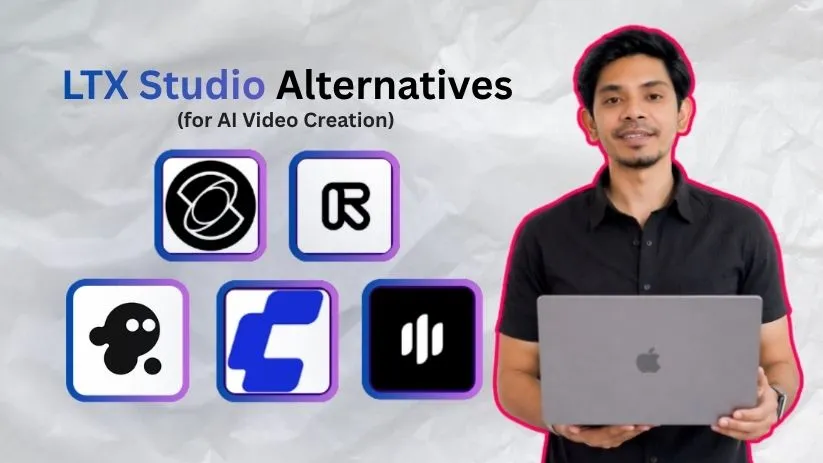
LTX Studio is a strong default for AI video creation, but creators switch when they need more cinematic output, simpler social video workflows, better local control, or a tool that fits their editing style without slowing them down.
This guide is built for three buyer perspectives: people switching from LTX Studio, people comparing before they buy, and creators who need a clear shortlist they can defend before spending time or money on another AI video generator.
I reviewed the top competitor pages, product positioning, and feature claims around the tools below, then compared them using the same decision lens: what helps you create faster, what gives you more control, and what actually fits your video workflow.
Let’s dive in.
TL;DR — Top 6 LTX Studio Alternatives in 2026
⚡ TL;DR
1. OTOY Studio — Best Overall
A strong pick for creators who want access to multiple AI video models like Kling, Seedance, Veo, and LTX in one browser-based workspace. Best for filmmakers, creative teams, and creators who want cinematic video generation, 3D tools, and flexible AI workflows without managing multiple subscriptions.
2. Kling AI — Best Overall
A strong pick for creators who want cinematic AI clips with realistic motion, smooth camera movement, and polished visual quality. Best for short films, concept videos, trailers, and creators who care more about the final look than a full production workspace.
3. Runway
Great for professional AI video editing, VFX-style workflows, and creative control. It’s a better fit for editors, filmmakers, and studios that want text-to-video, image-to-video, video editing tools, and more control over the final output.
4. InVideo AI
Best for marketing videos, faceless YouTube content, social media clips, and quick promo videos. You can start with a simple prompt and generate a video with scripts, voiceovers, stock footage, captions, and music.
5. ComfyUI
Best for power users who want a free, open-source, local AI video workflow. It gives you deep control over models, nodes, prompts, and custom pipelines, but it does take more technical setup.
6. Morphic
A good choice for creative teams that want an all-in-one AI workspace with a canvas, Copilot, timeline editing, and collaboration features. It’s useful if you want brainstorming, generation, and editing in one connected place.
Quick Comparison Table: Best LTX Studio Alternatives
| Tool | Best For | Main Strength | Weakness vs LTX Studio | Free Plan / Trial | Best User |
| OTOY Studio | Multi-model AI video and 3D production | Multiple AI models, shared credits, and node-based canvas | Less guided storyboard workflow | Yes – 100 credits/month | Filmmakers, creative teams |
| Kling AI | Cinematic AI clips | Realistic motion and camera feel | Less complete studio workflow | Check current plan | Filmmakers, creators |
| Runway | Professional AI video + VFX | Video editing, generation, and visual control | Can get expensive at scale | Check current plan | Editors, studios |
| InVideo AI | Marketing, social, and faceless videos | Prompt-to-video, scripts, voiceover, and stock footage | Less cinematic shot control | Yes / limited | Marketers, YouTubers |
| ComfyUI | Local and open-source workflows | Node-based control and custom models | Technical setup | Free / open source | Power users |
| Morphic | All-in-one AI creative workspace | Canvas, Copilot, timeline, and collaboration | Newer and less universal than Runway | Check current plan | Creative teams |
The simple way to look at it is this: Kling AI is great if you care most about cinematic visuals, Runway is better for professional AI video editing, InVideo AI is the easiest pick for social and marketing videos, ComfyUI gives you the most control if you don’t mind a technical setup, and Morphic works well if your team wants a more connected creative workspace.
Cost Comparison Table for 5 LTX Studio Alternatives
| Tool | Starting price (monthly) | Credits / usage at starting price | Cost for 1,000 credits | Correct cost per credit |
| OTOY Studio | $21/month (billed annually) | 2,000 credits | $10.50 | $0.0105 |
| Kling AI | $6.99/month | 660 credits | $10.59 | $0.0106 |
| Runway | $12/user/month | 625 credits | $19.20 | $0.0192 |
| InVideo AI | $17/month | 75 credits | $226.67 | $0.2267 |
| ComfyUI | Free / local setup | No credit system | N/A | N/A |
| Morphic | $0/month | Up to 20 free credits | N/A on free plan | N/A on free plan |
Note: Pricing is retained as provided. Credit values are not directly equivalent across platforms, as generation costs and usage vary by AI model and tool.
6 Best LTX Studio Alternatives
I have shared a detailed review of the 5 best tools that stand out as strong LTX Studio alternatives.
You will see what each one does well, where it falls short, and which AI video generator is most likely to fit your workflow the best.
Let’s get into the details!
1. OTOY Studio
G2 Rating: Not enough verified user reviews available yet
Best For: Filmmakers, AI video creators, artists, and creative teams that want multiple AI video models, 3D generation, and flexible creative workflows in one browser-based workspace.
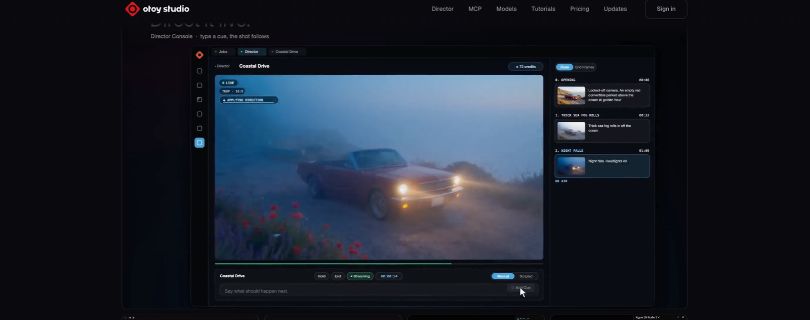
OTOY Studio is one of the strongest LTX Studio alternatives if your main goal is accessing multiple AI video generation models without switching between different platforms.
Built by the team behind OctaneRender, OTOY Studio brings AI video, image, audio, and 3D generation together in a node-based creative workspace that runs directly in your browser.
While LTX Studio focuses more on storyboarding, scene planning, and structured production workflows, OTOY Studio gives you more flexibility in choosing AI models and building your own creative workflows.
You can access popular AI video models like Kling, Seedance, Google Veo, and LTX using a single credit balance instead of paying for separate subscriptions.
The reason I’m putting OTOY Studio at the top of this list is simple: you are not locked into a single AI video model. You can experiment with different models, compare their results, and choose the one that works best for each shot.
It is especially useful for short films, cinematic ads, product visuals, VFX projects, and creators who want to combine AI video generation with 3D workflows.
What Makes OTOY Studio a Better Alternative Than LTX Studio?
The biggest difference between OTOY Studio and LTX Studio comes down to workflow flexibility and model choice.
LTX Studio is better when you want a guided, storyboard-first creative workspace. But OTOY Studio is often a better fit when you want to experiment with multiple AI models and build custom generation workflows.
For example, you can generate an image, connect it to different video models, compare their outputs, and pass the best result into an upscaling or video editing workflow — all within the same canvas.
Another advantage is its 3D capabilities. You can generate 3D assets, reconstruct environments using Gaussian splats, and use 3D scenes as visual references for AI video generation.
Here is where OTOY Studio stands out:
Key Features
- Access to multiple AI video models, including Kling, Seedance, Veo, and LTX
- Text-to-video, image-to-video, and reference-to-video generation
- Browser-based node canvas for building reusable creative workflows
- Single credit balance across different AI models
- AI image, video, audio, and 3D generation in one workspace
- 3D asset generation and Gaussian splat reconstruction
- Video compositing, timeline editing, and upscaling tools
- Free plan with access to all available AI models
Limitations
- The node-based interface may take some time for beginners to learn
- Less guided script-to-storyboard workflow than LTX Studio
- Premium video models can consume credits quickly
- Does not offer the same local and open-source customization as ComfyUI
- Public third-party user reviews are still limited
- Creators who only use one AI video model may find its standalone platform more economical
User Reviews
Public user review data for OTOY Studio is still limited, so there isn’t enough verified feedback to give it a reliable G2 rating.
However, the platform comes from the team behind OctaneRender, an established name in 3D rendering and visual effects.
OTOY Studio is also listed on software discovery platforms like AlternativeTo, where its browser-based node canvas and multi-model creative workflow are highlighted.
For now, it is better to test OTOY Studio directly using its free plan rather than rely heavily on third-party reviews.
Pricing
OTOY Studio has a free plan that includes 100 credits per month, access to all available AI models, and up to five active workflows. You don’t need a credit card to get started.
Its Essential plan starts at $21 per month when billed annually, or $29 per month when billed monthly, and includes 2,000 monthly credits.
Here is a quick breakdown of OTOY Studio’s pricing:
| Plan | Price (billed annually) | Monthly credits |
| Free | $0/month | 100 |
| Essential | $21/month | 2,000 |
| Pro | $107/month | 10,000 |
| Ultra | $225/month | 20,000 |
Paid plans also offer discounts on generation costs, depending on the plan and billing cycle.
The main thing to watch is credit usage. Since different AI video models consume different numbers of credits, your actual video generation costs will depend on the model, video length, resolution, and generation settings you choose.
So if you regularly switch between AI video generators like Kling, Seedance, Veo, and LTX, OTOY Studio can be a practical way to manage your creative workflow without maintaining multiple subscriptions.
But if you only use one AI video model, it is worth comparing the costs before committing to a paid plan.
2. Kling AI

G2 Rating: ⭐ 4.7/5
Best For: Filmmakers, creators, and brands that want cinematic AI clips with realistic motion, strong image-to-video results, and smooth camera movement.
Kling AI is one of the strongest LTX Studio alternatives if your main goal is creating cinematic AI video clips that look polished without building a full production workflow from scratch.
While LTX Studio focuses more on storyboarding, scene planning, and production-style workflows, Kling AI leans harder into the actual video generation side.
You can use it to turn text prompts or images into high-quality video clips, which makes it useful for short films, product teasers, music videos, ads, visual concepts, and social media content.
The reason I’m putting Kling AI at the top of this list is simple: it gives creators the kind of realistic motion and camera feel that many people expect from a modern text-to-video AI tool.
If you already have a script or visual idea in mind and just want to generate strong-looking shots quickly, Kling AI can feel more direct than LTX Studio.
What Makes Kling AI a Better Alternative Than LTX Studio?
The biggest difference between Kling AI and LTX Studio comes down to output quality and speed.
LTX Studio is better when you want a storyboard-first creative workspace. But Kling AI is often a better fit when you want to quickly generate cinematic clips from a prompt or reference image.
It works especially well for creators who don’t want to spend too much time planning scenes inside a full AI video production suite.
Here is where Kling AI stands out:
Key Features
- Text-to-video generation for creating clips from written prompts
- Image-to-video generation for animating still visuals
- Strong realistic motion compared to many basic AI video tools
- Useful for cinematic shots, trailers, ads, product visuals, and creative experiments
- Simple enough for creators who don’t want a complex editing setup
- Supports video and image generation in one creative platform
- Good option for testing visual ideas before moving into a full editor
Limitations
- It is not a full studio-style workspace like LTX Studio
- Storyboarding and production planning features are more limited
- You may still need another editor for final video assembly
- Prompt results can vary, so you may need multiple generations to get the exact shot
- Not the best choice if your main need is script breakdown, shot planning, or team collaboration
User Reviews
Users on G2 highlight Kling AI’s fast creative video generation and simple interface. One reviewer said they liked how quickly it produced video-style outputs from prompts without needing complex editing skills. Another reviewer mentioned that Kling AI gave them good video generation results across different genres and could create talking characters when the prompt was clear.
“Kling AI was interesting to use for generating creative visual content from prompts, and I liked how quickly it could produce video-style outputs without requiring complex editing skills.”
Pricing
Kling AI pricing can change based on credits, plans, and model access, so it’s better to check the current plan before buying.
It does offer a free way to start, which is helpful if you want to test the AI video quality before paying.
If you’re comparing it with LTX Studio, the main thing to watch is credit usage. AI video generation can burn credits quickly when you are testing different prompts, camera movements, and image-to-video outputs.
So yes, Kling AI is a strong choice for cinematic AI video generation, but you should test a few clips first before moving your full workflow over to it.
Want the deeper breakdown of Kling’s credit system before choosing it?
Read: Kling Pricing Explained
Not fully sold on Kling? Explore other tools here:
Best Kling Alternatives
3. Runway
G2 Rating: ⭐ 3.8/5
Best For: Editors, filmmakers, studios, and creative teams that want professional AI video generation, editing tools, and VFX-style control.
Runway is one of the most popular LTX Studio competitors for serious AI video creation.
You can use it for text-to-video, image-to-video, video editing, generative visuals, lip sync, upscaling, and creative experiments that feel closer to a professional video editing workflow.
Compared to LTX Studio, Runway feels less like a storyboard planning tool and more like an AI video editing and generation suite.
That makes it a better choice if you already know how you want your final video to look and you need more control over the actual visual output.
When I look at Runway as an LTX Studio alternative, I see it as the better pick for people who are already comfortable editing videos and want AI tools to speed up the process.
It’s especially useful for music videos, ads, cinematic social clips, concept scenes, VFX-style edits, and visual experiments.
What Makes Runway a Better Alternative Than LTX Studio?
Runway gives you more professional AI video editing flexibility.
LTX Studio is great if you want to organize a story, plan scenes, and move through a structured production workflow. Runway is better when you care about generating, editing, refining, and experimenting with the actual footage.
It also gives you access to multiple creative tools in one place, including video generation, video editing, image generation, audio tools, and third-party models on paid plans. Runway’s Standard plan lists access to generative video tools, video editing, upscale options, watermark removal, unlimited video editor projects, and monthly credits.
Key Features
- Text-to-video and image-to-video generation
- AI video editing tools for more creative control
- Lip sync and performance-based features
- Upscaling and export options for cleaner output
- Useful for cinematic clips, ads, social videos, music videos, and experimental edits
- Good fit for editors who want AI inside their creative workflow
- Paid plans include monthly credits and access to more AI tools
Limitations
- It can get expensive if you generate a lot of video
- Credits can run out quickly during trial-and-error prompting
- Some users say prompt results don’t always match expectations
- It may feel more editing-focused than storyboard-focused
- Beginners may need time to understand which tool or model to use
Still deciding between the two strongest cinematic picks?
Read my full comparison: Runway vs Kling
User Reviews
Runway has mixed but useful feedback on G2. Many users like the simple interface, AI video generation, and editing flexibility. One reviewer said the UI and UX are straightforward and that new users without an AI background could understand the setup. Other users complained about credits, cost, and inconsistent results, which is worth keeping in mind if you plan to generate a lot of test videos.
“I like Runway’s specific model that lets me copy-paste live video expressions to an AI video, making it more natural and authentic. The UI and UX are pretty straightforward, so it’s easy to understand.”
Pricing
Runway has a free plan with 125 one-time credits. Its Standard plan starts at $12 per user per month when billed annually and includes 625 monthly credits. Runway says those 625 credits equal 25 seconds of Gen-4.5, 52 seconds of Gen-4, or 125 seconds of Gen-4 Turbo video.
The Pro plan starts at $28 per user per month when billed annually and includes 2,250 monthly credits.
So if you only need occasional AI video clips, the Standard plan may be enough to test it.
But if you are creating client videos, ads, or lots of variations, Runway can become costly faster than you expect.
Want to compare more tools like Runway?
Read: Top Runway Alternatives
4. InVideo AI
G2 Rating: ⭐ 4.5/5
Best For: Marketers, YouTubers, social media managers, educators, and creators who want fast prompt-to-video content without building every shot manually.
InVideo AI is a very different kind of LTX Studio alternative.
It is not trying to be the most cinematic AI video generator. Instead, it is built for people who want to turn an idea, script, or prompt into a complete video quickly.
That means it can generate a script, add visuals, include stock footage, create voiceovers, add music, and help you edit the final video without starting from a blank timeline.
This makes InVideo AI a better fit for marketing videos, faceless YouTube content, Instagram Reels, TikTok videos, explainers, product promos, and short-form video creation.
If LTX Studio feels too production-heavy for your needs, InVideo AI is the simpler option.
What Makes InVideo AI a Better Alternative Than LTX Studio?
The biggest advantage of InVideo AI is speed.
LTX Studio is better when you want to plan visual scenes and build a more cinematic production. InVideo AI is better when you want a finished marketing or social video from a prompt.
You don’t need to manually create every scene, generate every visual, record a voiceover, and edit everything from scratch.
InVideo’s pricing page says paid plans include access to 200+ image, video, audio, and music models, access to its v4 agent that can create up to 30 minutes of video from a single prompt, and access to stock providers like iStock and Storyblocks.
Key Features
- Prompt-to-video workflow for fast video creation
- Script generation for explainers, ads, and YouTube videos
- AI voiceovers and text-to-speech options
- Stock footage and media library access
- Subtitles, music, transitions, and editing tools
- Useful for faceless video creation and social media content
- Good option for beginners who don’t want a complex AI video editor
Limitations
- Less cinematic shot control than LTX Studio or Runway
- Not ideal for filmmakers who want deep scene-level direction
- AI-generated videos may still need manual editing before publishing
- Credit limits can be frustrating if you create many variations
- Some users report performance or pricing concerns
User Reviews
InVideo has a 4.5/5 rating on G2 from 171 reviews. Users often praise its ease of use, templates, media resources, and quick video creation for beginners. One user said they could put in a script and InVideo created the entire video with voiceover, graphics, music, sound effects, AI content, and stock content. Another user said it helped them create short TikTok videos faster.
“With InVideo, I literally threw in my script and it created the ENTIRE video, including V/O, graphics, music, sound effects, AI content and stock content.”
Pricing
InVideo AI has a free plan, but serious creators will likely need a paid plan.
Its Plus plan starts at $17 per month when billed yearly and includes 75 credits per month. InVideo also says paid plans include access to multiple AI models, stock providers, and on-demand credit top-ups.
If you create a few marketing videos per month, this can be a practical option.
But if you want to generate lots of long videos, test multiple versions, or use premium models often, you should check how quickly your credits get used before committing.
Before you choose a paid plan, check the full cost breakdown here:
InVideo AI Pricing Explained
5. ComfyUI
G2 Rating: ⭐ 4.5/5
Best For: Power users, AI artists, developers, and creators who want a local, open-source AI video workflow with full control over models, nodes, prompts, and generation settings.
ComfyUI is not a simple plug-and-play LTX Studio alternative.
It is better for people who want to build their own AI video workflow instead of using a ready-made studio interface.
With ComfyUI, you can connect nodes, use open-source models, build custom pipelines, and run AI generation locally on your own machine. The official ComfyUI GitHub says it supports image, video, 3D, and audio workflows through a modular node graph interface, including video models like LTX-Video, Hunyuan Video, Wan, Mochi, and Stable Video Diffusion.
That makes it a strong option if you want deep creative control, but it is not the best choice if you want a clean storyboard-first tool like LTX Studio.
What Makes ComfyUI a Better Alternative Than LTX Studio?
ComfyUI gives you more control than LTX Studio.
LTX Studio is better for creators who want a structured cinematic workflow with scripts, scenes, and visual planning. ComfyUI is better for technical users who want to control every part of the generation process.
You can choose the model, change parameters, connect custom nodes, build repeatable workflows, and avoid being fully locked into one commercial AI video platform.
Here is where ComfyUI stands out:
Key Features
- Free and open-source local AI workflow
- Node-based interface for building custom pipelines
- Supports image, video, audio, and 3D generation workflows
- Works with open-source models like LTX-Video, Wan, Hunyuan Video, Flux, and more
- Lets you run workflows locally instead of relying only on cloud credits
- Good for repeatable workflows, model testing, and advanced experiments
- Strong community ecosystem with custom nodes and extensions
Limitations
- It has a much steeper learning curve than LTX Studio
- Setup can be technical, especially for beginners
- You may need a strong GPU for smooth local video generation
- It does not give you a polished storyboard or production-planning workspace by default
- Workflows can break when custom nodes, dependencies, or models change
User Reviews
ComfyUI has limited G2 review volume, but the available reviews show the same pattern: users like the control and free local generation, but they also mention complexity. One G2 reviewer liked that ComfyUI lets them control the GenAI process and use it repeatedly without worrying about credits, while another said package installation can sometimes make the software unresponsive.
“Full Control Over the GenAI Process.”
Pricing
ComfyUI Local is free and open source. The official Comfy download page says the local version is “free forever,” with no feature gates, trial periods, or pro tier for core functionality.
But “free” does not mean zero cost for everyone.
You may still need a good GPU, enough storage for models, and time to learn the workflow. The official ComfyUI page also notes that a dedicated GPU is strongly recommended for local use, and users without strong hardware can use Comfy Cloud instead.
So if you want the cheapest LTX Studio alternative and you are comfortable with technical setup, ComfyUI is hard to beat.
But if you want something simple, guided, and beginner-friendly, it may feel overwhelming.
6. Morphic
G2 Rating: Not enough AI video-specific reviews yet
Best For: Creative teams, filmmakers, and storytellers who want an all-in-one AI creative workspace with Canvas, Copilot, Compose, timeline-style assembly, and collaboration features.
Morphic is one of the closest LTX Studio alternatives if you want a connected creative workspace instead of a single-purpose video generator.
It gives you a place to brainstorm ideas, generate visuals, animate scenes, and assemble moments into a story. Morphic’s official website describes its workflow around Canvas, Copilot, and Compose, with tools for generating images, adding motion, editing with prompts, reusing characters and styles, and tying scenes together with sound.
This makes Morphic interesting for creators who like LTX Studio’s storytelling angle but want a more flexible AI creative canvas.
It is not as widely established as Runway yet, but it is worth watching if your workflow includes storyboarding, concepting, character consistency, and collaborative creative planning.
What Makes Morphic a Better Alternative Than LTX Studio?
Morphic feels more like an AI-native creative workspace.
LTX Studio is strong for cinematic planning and AI video production, but Morphic gives teams a broader space for ideation, generation, animation, and assembly.
The biggest advantage is that you are not only generating clips. You can start with a prompt, explore ideas on a canvas, work with Copilot, build scenes in Compose, and keep characters or styles more consistent across a project.
Here is where Morphic stands out:
Key Features
- Canvas for visual brainstorming and creative planning
- Copilot for prompt-based creative assistance
- Compose for turning moments into stories
- AI image, video, and audio generation in one workspace
- Character and style consistency features
- Object selection, segmentation, upscaling, and prompt-guided editing
- Useful for teams that want a shared AI creative environment
Limitations
- Less proven and less universal than Runway
- Public user review data for Morphic’s AI video product is still limited
- Free credits may not be enough for serious testing
- Some collaboration and watermark-free features are tied to paid plans
- Pricing and credit usage should be checked before moving a full workflow over
User Reviews
Public review data for Morphic’s current AI video product is still thin. The G2 seller page for Morphic’s AI video listing shows 0 verified reviews, while Slashdot’s Morphic Studio page also says there are no user reviews yet. So for now, it is better to judge Morphic by testing the product directly rather than relying heavily on third-party review volume.
Pricing
Morphic has a free plan with up to 20 one-time credits and no credit card required. Its official free-plan guide says those credits can be used across image, video, and audio generation, but they do not renew monthly.
For paid usage, Morphic’s own comparison page lists Standard at $29/month, Pro at $49/month, and Pro Max at $175/month, with yearly billing available at a lower monthly equivalent. It also says team features include pooled credits, shared Canvas, live collaboration, and usage tracking.
So yes, Morphic is a strong LTX Studio alternative if you want a modern AI creative workspace.
But if your main priority is the most proven AI video editor, Runway is still safer. If your main priority is deep local control, ComfyUI is stronger.
Other LTX Studio Alternatives Worth Mentioning
The five tools above are the main ones I’d compare seriously against LTX Studio, but there are a few more AI video tools worth knowing about.
These may not be the best overall picks for every creator, but they can make sense if you have a very specific workflow.
- Pika — A good option for quick, playful, short AI video clips. It works well if you want to experiment with fun text-to-video or image-to-video ideas without building a full production workflow.
(If you’re choosing between Pika’s simpler workflow and Runway’s stronger editing control, read: Runway vs Pika) - Shai — Better for script-to-storyboard workflows and filmmaker pre-production. If your main need is turning scripts into visual scenes before production, Shai is worth checking out.
- Drawstory — A useful choice for storyboard-first workflows, character consistency, and pitch decks. It’s especially helpful for creators who need to present a visual idea before making the final video.
- Topview AI — Strong for ecommerce ads, product videos, URL-to-video, AI avatars, captions, and viral hooks. It’s more marketing-focused than cinematic, so it fits brands and ad teams better than filmmakers.
- Crreo — A solid option for creators who want longer AI videos with voiceovers, subtitles, characters, music, and editing in one workflow. It’s a better fit for content creators than teams looking for advanced cinematic control.
If Crreo sounds useful, you can compare similar tools here:
Best Crreo AI Alternatives
Which LTX Studio Alternative Should You Choose?
The best LTX Studio alternative depends on what you’re actually trying to make.
Below table will help you choose the right tool you need on the basis of what you want to make:
| Choose this | If you want |
| Kling AI | The most cinematic-looking short clips |
| Runway | Pro AI video generation and editing control |
| InVideo AI | Marketing, YouTube, faceless, and social videos |
| ComfyUI | Local, open-source, technical control |
| Morphic | All-in-one creative workspace and team workflow |
| Shai / Drawstory | Storyboards, pre-production, and pitch decks |
| Topview AI | Ecommerce ads and URL-to-video |
| Crreo | Longer creator videos with voices and subtitles |
LTX Studio vs Alternatives: Feature-by-Feature Comparison
Here’s a deeper feature comparison of LTX Studio, Kling AI, Runway, InVideo AI, ComfyUI, and Morphic. This table should help you quickly see which tool fits your workflow better, whether you care about cinematic video generation, storyboarding, social videos, local control, or team collaboration.
| Feature | LTX Studio | Kling AI | Runway | InVideo AI | ComfyUI | Morphic |
| Text-to-video | Yes | Yes | Yes | Yes | Yes, through models/workflows | Yes |
| Image-to-video | Yes | Yes | Yes | Yes | Yes, through models/workflows | Yes |
| Script-to-video | Strong | Basic prompt-based use | Limited / manual workflow | Strong | Possible, but manual | Good with Copilot + Compose |
| Storyboard workflow | Strong dynamic storyboard | Limited | Limited | Basic scene flow | No built-in storyboard | Good visual canvas workflow |
| Character consistency | Strong with AI Characters / Elements | Moderate | Good with visual references | Limited / avatar-based use | Possible with custom workflows | Strong with custom Models |
| Timeline editor | Yes | Limited | Yes | Yes | No traditional timeline | Yes, with Compose |
| AI voiceover | Yes | Available through sound tools | Yes, with tools like Lip Sync / TTS workflows | Yes | Possible with audio nodes/models | Yes, speech/music/SFX |
| Captions/subtitles | Yes | Limited / not core focus | Available through editing workflow | Yes | Possible, but manual | Possible with audio/video workflow |
| Long-form video support | Better for structured projects | Better for short clips | Better for short/pro clips | Strong for longer creator videos | Depends on hardware/workflow | Better for assembled projects |
| Local/open-source option | No full local studio option | No | No | No | Yes | No |
| Team collaboration | Yes | Limited | Team plans available | Team/enterprise options | Manual/self-managed | Strong live collaboration |
| Best use case | Storyboard-first AI video production | Cinematic short clips | Professional AI video + VFX | Marketing, YouTube, and faceless videos | Local AI video workflows | Creative workspace for teams |
My Final Verdict
LTX Studio is still a strong choice if you want a storyboard-first AI video production workflow. But it’s not always the best fit for every creator, especially if you need faster social videos, deeper editing control, local generation, or more cinematic short clips.
If I had to narrow it down, here’s how I’d choose:
- Choose Kling AI for cinematic AI clips and realistic motion.
- Choose Runway for professional AI video editing and VFX-style control.
- Choose InVideo AI for marketing videos, YouTube content, and faceless videos.
- Choose ComfyUI if you want a free, local, open-source AI video workflow.
- Choose Morphic if your team needs an all-in-one creative workspace.
FAQs About LTX Studio Alternatives
What is the best LTX Studio alternative overall?
OTOY Studio is the best overall pick if you want access to multiple AI video models like Kling, Seedance, Veo, and LTX in one workspace. For professional video editing and VFX control, Runway is another strong choice.
Is there a free LTX Studio alternative?
Yes. ComfyUI is the best free and open-source LTX Studio alternative.
It’s best if you want:
- Local AI video generation
- Full workflow control
- Custom models and nodes
- No monthly software fee
What is the best LTX Studio alternative for beginners?
InVideo AI is the easiest option for beginners. You can start with a prompt, and it can help create scripts, voiceovers, stock footage, captions, and music.
What is the best LTX Studio alternative for filmmakers?
Runway and Kling AI are the strongest options for filmmakers.
- Kling AI is better for cinematic short clips.
- Runway is better for editing, VFX, and creative control.
What is the best LTX Studio alternative for faceless YouTube videos?
InVideo AI is the best pick for faceless YouTube videos because it helps with scripts, voiceovers, visuals, captions, and editing in one workflow.
What is the best open-source LTX Studio alternative?
ComfyUI is the best open-source option. It’s powerful, flexible, and great for technical users, but it takes more setup than a normal browser-based AI video tool.
Is Runway better than LTX Studio?
Runway is better if you want professional AI video generation, editing tools, and VFX-style control. LTX Studio is better if you want a storyboard-first production workflow.
Is Kling AI better than LTX Studio?
Kling AI is better for generating realistic cinematic clips quickly. LTX Studio is better for planning scenes, building storyboards, and managing a full creative project.
What is the best LTX Studio alternative for ads?
For ads, choose based on your style:
- Topview AI for ecommerce and product ads
- InVideo AI for social media ads
- Runway for high-end cinematic ads
- Morphic for team-based creative planning
What is the best LTX Studio alternative for storyboards?
Shai and Drawstory are strong options for storyboards, pre-production, pitch decks, and visual scene planning.
Can ComfyUI replace LTX Studio?
Only for technical users. ComfyUI can replace parts of LTX Studio if you want local AI video generation, custom workflows, and open-source control. But it does not give you the same polished studio-style interface.
Which LTX Studio alternative is best for social media videos?
InVideo AI is the best option for social media videos because it’s built for fast content creation, captions, voiceovers, stock footage, and short-form video formats.
Which LTX Studio alternative is best for teams?
Morphic is a good choice for creative teams because it offers a shared workspace for brainstorming, generating visuals, editing, and collaborating on video ideas.
Is LTX Studio still worth using?
Yes, LTX Studio is still worth using if you want an AI video production platform with storyboards, characters, scenes, and editing in one place. But if you only need quick clips, ads, or local control, an alternative may fit better.