Runway and Pika are two of the most talked-about AI video generators right now.
If you are reading this, you have probably tried one, watched a few demo clips, or want to figure out which one actually fits your creative workflow.
I tested Runway and Pika using the same prompts, image-to-video inputs, character shots, social video ideas, and camera movement scenes.
My quick verdict: Runway is better when quality, realism, and control matter. Pika is better when speed, fun effects, and short-form social content matter.
Here’s the simplest way to look at it:
| Need | Winner |
| Realistic cinematic video | Runway |
| Fast social clips | Pika |
| Beginner-friendly workflow | Pika |
| Editing control | Runway |
| Facial realism | Runway |
| Fun effects and transformations | Pika |
| Professional/client work | Runway |
| Budget experimentation | Pika |
In this Runway vs. Pika comparison, I will walk you through what each tool does well, where they fall short, and which one makes more sense for your setup.
Here’s what I will cover:
- AI video generation quality
- Image-to-video and motion control
- Creative effects and editing workflow
- Pricing and overall value
So, let’s get started.
Quick verdict: Runway vs Pika
- Choose Runway if you need cinematic realism, better prompt control, polished shots, character consistency, editing tools, and client-ready output.
- Choose Pika if you want fast, simple, fun, social-first clips with creative effects and an easier workflow.
- Use both if you create social campaigns: use Pika for quick ideas and creative testing, then use Runway for the final hero shots.
Runway vs Pika: Quick Side-by-Side Comparison
Here’s the quick side-by-side view before we get into the deeper tests. If you only want the broad answer, Runway feels stronger for polished, realistic video work. Pika feels better for fast ideas, playful effects, and short-form social content.
| Feature | Runway | Pika | Winner |
| Overall realism | More cinematic and controlled | More stylized and playful | Runway |
| Speed | Slower but more polished | Faster for quick ideas | Pika |
| Ease of use | More tools, steeper learning curve | Simple and beginner-friendly | Pika |
| Editing control | Stronger toolset | Lighter control | Runway |
| Camera movement | Better for precise direction | Good for simple motion | Runway |
| Facial expressions | Better, but still needs short clips | More prone to distortion | Runway |
| Creative effects | Strong, but more production-oriented | Strong viral/fun effects | Pika |
| Social content | Good but slower | Better for fast Reels/TikTok ideas | Pika |
| Professional workflow | Better for filmmakers and agencies | Better for rapid ideation | Runway |
| Pricing value | Better for serious production | Better for casual volume | Depends |
How I tested Runway and Pika
I didn’t want this to be another “Runway is for pros, Pika is for beginners” comparison.
That’s true in a broad sense, but it doesn’t help much when you’re actually sitting there trying to make a video that looks good.
So I tested both tools with the same prompts, same image inputs, and the same basic creative goals. I looked at how each one handled realistic people, product shots, camera movement, social-style clips, and scenes where AI video usually starts to break.
Test setup
For Runway, I tested Gen-4.5 where quality and realism mattered most, and Gen-4 where the workflow or feature set was more relevant.
For Pika, I tested Pika 2.5 where available, especially for quick generations, creative effects, and social-first video ideas.
To keep the comparison fair, I used:
- The same text prompts in both tools
- The same input images for image-to-video tests
- The same aspect ratios: 16:9, 9:16, and 1:1
- The same scoring categories for every test
- Multiple generations instead of judging each tool from one lucky or unlucky result
I also tested the tools the way most creators actually use them. Not in a perfect lab. Not with one over-polished demo prompt. I wanted to see which tool gave me usable clips faster, which one needed more retries, and which one I’d trust for real work.
Scoring criteria
I scored each category out of 10. A higher score means the tool performed better in that specific area.
| Category | What I looked for |
| Prompt adherence | Did it follow the prompt? |
| Motion quality | Did movement feel natural? |
| Facial consistency | Did faces warp or drift? |
| Hands/body realism | Did limbs stay believable? |
| Camera control | Could I direct the shot? |
| Style accuracy | Did it match the intended look? |
| Speed | How fast did I get usable output? |
| Credit value | How much did a usable clip cost? |
| Beginner experience | How easy was it to get started? |
| Final usability | Would I publish it or send it to a client? |
This scoring helped me avoid the usual trap with AI video tools: getting impressed by one beautiful clip and ignoring the five strange ones it took to get there.
Prompts I used
Here are the exact prompt types I used during the comparison.
Realistic human close-up
Close-up portrait of a woman in soft window light. She slowly smiles, blinks naturally, and looks slightly away from camera. Cinematic, shallow depth of field.
Fast action scene
A skateboarder jumps over a puddle in a neon-lit street at night. Camera follows from low angle, realistic splash, handheld motion.
Product ad
Luxury perfume bottle on wet black stone. Slow push-in, mist moving in the background, reflections stay stable.
Social media hook
A coffee cup suddenly inflates like a balloon and floats above a desk. Fun, surreal, vertical video.
Character consistency
Same young man walking through a rainy alley, looking over his shoulder, holding a red umbrella. Keep face and clothing consistent.
Complex physics
A glass of water tips over on a wooden table. Water spills naturally and the glass rolls slightly.
Text/logo challenge
A storefront sign reading “MOON CAFE” glows at night while rain falls.
These prompts gave me a good mix of what creators usually care about: realism, motion, faces, products, weird social effects, and whether the tool can keep a scene from falling apart.
Runway Vs. Pika Feature Comparison
I’m not here to throw a lazy “Runway is better than Pika” answer at you.
Because honestly, both tools can be useful.
It depends on what you’re trying to make, how much control you need, and whether you care more about polished cinematic output or fast creative experimentation.
So let’s walk through the main features one by one and see how Runway and Pika compare in real creative workflows.
Here’s what I’ll cover:
- AI video quality comparison
- Text-to-video generation comparison
- Image-to-video comparison
- Motion and camera control comparison
- Creative effects comparison
- Editing workflow comparison
- Speed and ease of use comparison
- Best use cases comparison
AI Video Quality Comparison: Runway or Pika?
When it comes to AI video tools, quality is usually the first thing people care about.
And I get it.
Nobody wants to spend credits generating a clip that looks great for one second and then suddenly melts into weird hands, warped faces, or shaky background objects.
That’s why this Runway vs Pika comparison really starts with output quality.
Runway
Runway feels more serious from the first few generations.
The videos usually look more cinematic, more controlled, and more useful for professional edits.
When I tested realistic scenes, Runway handled lighting, depth, camera movement, and subject consistency better. The clips had that polished “this could go into a brand video” feeling more often.
It was especially stronger in scenes like:
- Realistic human close-ups
- Product ad shots
- Cinematic camera moves
- Fashion or lifestyle visuals
- Short film-style clips
- Brand and agency content
The biggest difference is stability.
Runway usually keeps the scene together better. Faces stay more natural, backgrounds drift less, and the motion feels more intentional.
It’s still AI video, so it’s not perfect. You can still get odd hands, strange teeth, or a face that changes slightly between frames.
But compared to Pika, Runway gave me more clips that felt usable without heavy fixing.
Pika

Pika takes a different route.
It feels more playful, faster, and more experimental.
The clips can look great, especially when you’re making stylized videos, social hooks, surreal effects, or fun short-form content. It’s the kind of tool where you type a weird idea and get something entertaining back quickly.
But when the scene gets complex, Pika can struggle more.
For example, if the prompt includes realistic facial expressions, fast body movement, or detailed physics, the output can start to bend in strange ways.
You may notice:
- Faces changing slightly during motion
- Hands or limbs looking unstable
- Backgrounds shifting when they should stay still
- Objects morphing during complex movement
- Stylized results when you asked for realism
That doesn’t mean Pika is bad.
It just means Pika is better when you want quick, creative, social-first clips instead of clean production-ready shots.
Verdict:
Runway wins for overall AI video quality.
It gives you more realistic, stable, and polished results, especially when the goal is cinematic video, client work, or content that needs to look clean.
Pika is still very useful, but it shines more when speed, creativity, and playful effects matter more than perfect realism.
If I had to create a polished product ad, brand video, or cinematic scene, I’d choose Runway.
If I wanted to test 10 fun social ideas in an afternoon, I’d open Pika first.
Text-to-Video Generation Comparison
Text-to-video is the feature most people try first.
You type a prompt, hit generate, and hope the tool understands what you meant.
Sounds simple.
But this is where you quickly see the difference between a tool that follows direction and a tool that just gives you something visually interesting.
Runway
Runway is better when your prompt has a clear shot idea.
For example, if you describe a product scene with lighting, camera movement, mood, and subject behavior, Runway usually respects more of those details.
A prompt like this works well:
A luxury perfume bottle on wet black stone. Slow push-in, mist moving in the background, reflections stay stable. Cinematic lighting, premium product ad.
Runway is more likely to understand that this should feel like a controlled product commercial.
The camera move feels slower. The lighting feels more intentional. The subject usually stays closer to what you asked for.
This makes Runway stronger for creators who think in shots.
If you use words like “slow push-in,” “wide angle,” “handheld,” “cinematic lighting,” or “shallow depth of field,” Runway tends to respond better.
But there’s a trade-off.
Runway can feel slower, and you may need to adjust your prompt a few times to get the exact result you want.
It rewards patience.
Pika
Pika is better when your prompt is simple, fun, or built for quick visual impact.
A prompt like this fits Pika well:
A coffee cup suddenly inflates like a balloon and floats above a desk. Fun, surreal, vertical video.
Pika understands playful ideas quickly.
It’s good at giving you something eye-catching without making you think too much about camera language or production details.
That makes it great for:
- TikTok ideas
- Instagram Reels
- YouTube Shorts
- Meme-style videos
- Surreal transformations
- Quick creative hooks
- Fast concept testing
The downside is that Pika can be less precise.
Sometimes it captures the vibe of your prompt but misses smaller details. It may give you a fun result, but not always the exact result you pictured.
That’s fine for social content.
Not so fine if you’re trying to match a storyboard.
Verdict:
Runway wins if you need better prompt control and more polished text-to-video output.
Pika wins if you want to move fast and generate fun ideas without overthinking the prompt.
For structured creative work, Runway feels more dependable.
For quick social experiments, Pika feels easier and more fun.
Image-to-Video Comparison
Image-to-video is where things get interesting.
Because in many real workflows, you don’t start from a blank prompt.
You start with an image.
Maybe it came from Midjourney, Flux, Leonardo, Firefly, or a product photoshoot. Then you use an AI video tool to add motion.
So the real question is simple:
Can the tool animate the image without ruining it?
Runway
Runway is stronger when you want the original image to stay stable.
When I used the same image inputs, Runway usually preserved the subject, lighting, and composition better.
This matters a lot for professional work.
If you have a product bottle, a fashion model, a branded visual, or a character design, you don’t want the tool to “get creative” and change the whole thing.
You want motion.
Not chaos.
Runway was better at keeping:
- Faces closer to the original image
- Product shapes more stable
- Backgrounds less distracting
- Clothing and colors more consistent
- Camera movement more controlled
- The original art direction intact
For image-to-video, that control makes a big difference.
Especially if you’re working with brand assets or client-approved visuals.
Pika
Pika is more willing to push the image.
Sometimes that’s a good thing.
If you give Pika a fun image and ask it to animate something weird, it can create a more energetic result. It doesn’t feel as cautious. It tries to make the scene move.
That can be great for social content.
For example, if you upload an image of a sneaker and ask it to explode into colorful smoke, Pika may give you something bold and scroll-stopping.
But this same creativity can become a problem when you need control.
The image may shift more than expected. Faces may drift. Objects may change shape. Backgrounds can start moving even when they should stay locked.
Pika is fun, but it is not always careful.
Verdict:
Runway wins for image-to-video when consistency matters.
It does a better job preserving the original image while adding motion.
Pika is better when you want playful animation, bold movement, or social-first visual experiments.
If the input image is important and needs to stay accurate, use Runway.
If the image is just a starting point for a fun idea, Pika can be the better playground.
Motion and Camera Control Comparison
Motion can make or break an AI video.
A still image with tiny movement can look boring.
Too much movement can look fake.
The sweet spot is controlled motion that feels like a real camera operator was behind the shot.
That’s where Runway and Pika feel very different.
Runway
Runway gives you better control over the feel of a shot.
It understands camera language more naturally. When I asked for slow push-ins, handheld motion, tracking shots, or subtle subject movement, Runway usually gave me something closer to the brief.
This is useful if you create content like:
- Commercials
- Music videos
- Short films
- Product ads
- Fashion campaigns
- YouTube B-roll
- Cinematic brand content
Runway feels more built for people who care about shot design.
You can guide the scene with more intention. The result may not be perfect every time, but the tool gives you a better starting point for polished editing.
The motion also tends to feel smoother.
Not always, but often enough to matter.
Pika
Pika handles simple movement well.
If you want something to float, pop, spin, inflate, transform, or move in a fun way, Pika can be really enjoyable to use.
It’s less about cinematic camera control and more about quick visual energy.
That makes it strong for short-form content where the viewer only needs to be entertained for a few seconds.
But when you ask for precise movement, Pika can feel less reliable.
For example, a “slow camera dolly toward a person while they naturally smile” may turn into a scene where the face shifts, the background moves oddly, or the camera motion feels more artificial than intended.
Pika can create movement fast.
Runway controls movement better.
Verdict:
Runway wins for motion and camera control.
It gives you better results when you want a shot to feel directed, cinematic, and intentional.
Pika is better for simple, playful motion where exact camera behavior matters less.
If you think like a filmmaker, Runway will feel more useful.
If you think like a social creator testing hooks, Pika will feel faster.
Creative Effects Comparison
Creative effects are where Pika starts to feel really different from Runway.
Because not every creator wants a cinematic shot.
Sometimes you want a coffee cup to inflate like a balloon, a sneaker to explode into smoke, or a selfie to turn into something weird enough to stop someone mid-scroll.
That’s where this part of the Runway vs Pika comparison gets interesting.
Runway
Runway can create strong visual effects, but it usually approaches them in a more polished, production-style way.
It feels better when the effect needs to sit inside a serious video.
For example:
- A product reveal
- A fashion campaign
- A surreal brand ad
- A cinematic transformation
- A music video shot
- A controlled video-to-video effect
Runway gives you more control over how the final shot feels.
If you want a scene to look expensive, dramatic, or carefully directed, Runway is usually the safer choice.
But it is not always the fastest tool for playful effects.
You may need to spend more time adjusting prompts, testing motion, and refining the output before it feels right.
That’s fine for client work.
But for quick social ideas, it can feel a little heavy.
Pika
Pika is built for fun.
This is one of its biggest strengths.
It makes creative effects feel easy and approachable, especially if you’re creating TikTok videos, Instagram Reels, YouTube Shorts, memes, or visual hooks.
Pika is especially strong for effects like:
- Object transformations
- Surreal animations
- Funny visual changes
- Inflating, squishing, melting, or morphing objects
- Quick image-to-video effects
- Short social clips
- Fast creative testing
This is where features like Pikaffects, Pikaswaps, Pikadditions, Pikatwists, and Pikascenes make Pika feel more playful.
You don’t always need a perfect cinematic prompt.
You can start with a simple idea and get something entertaining quickly.
The trade-off is control.
Pika may give you a fun clip, but it may not always give you a clean, production-ready shot. The effect can look great for social media, but less reliable for a polished ad or brand campaign.
Verdict:
Pika wins for creative effects.
It is faster, simpler, and more fun when the goal is to make scroll-stopping short-form content.
Runway is better when the effect needs to look polished, controlled, and connected to a professional edit.
So if you’re making a serious brand video, use Runway.
If you’re making a wild social hook, Pika is the easier place to start.
Editing Workflow Comparison
AI video generation is only one part of the process.
The real question is what happens after the clip is generated.
Can you refine it?
Can you control it?
Can you fit it into a bigger project?
This is where Runway feels much more like a full creative workspace, while Pika feels more like a quick generation tool.
Runway
Runway gives you a stronger editing workflow.
It feels built for people who want to create, adjust, and polish video inside one platform.
You can generate clips, test variations, work with image-to-video, use video-to-video, adjust motion, and build toward a more finished result.
That matters if you’re creating:
- Client videos
- Ad concepts
- Product visuals
- Short films
- Music videos
- YouTube B-roll
- Branded social campaigns
Runway feels closer to a production tool.
Not a full replacement for Premiere Pro, After Effects, or DaVinci Resolve, but closer to the creative process those tools support.
The biggest advantage is control.
You can be more intentional with your shots, your edits, and the way clips fit together.
But that also means Runway takes more time to learn.
There are more tools, more settings, and more ways to tweak the result. If you only want a quick clip, that can feel like extra work.
Pika
Pika keeps things lighter.
It is much easier to open, prompt, generate, and download something quickly.
That makes it great for creators who don’t want to manage a heavy editing workflow.
You can move from idea to clip fast.
This is useful when you’re:
- Testing video hooks
- Creating social posts
- Making quick variations
- Trying funny effects
- Animating images
- Building simple short clips
Pika’s workflow feels less intimidating.
You don’t need to think like an editor or filmmaker to get started.
But once you want more control, the limits show up.
If you want detailed shot planning, precise motion, a polished multi-clip workflow, or more serious production control, Runway gives you more room to work.
Verdict:
Runway wins for editing workflow.
It gives you more control and fits better into serious video production.
Pika wins for speed and simplicity.
If you want to make something quick, Pika feels easier.
If you want to shape something carefully, Runway gives you more tools.
Speed and Ease of Use Comparison
Speed matters more than people admit.
Because sometimes the “best” AI video tool is not the one with the highest quality.
It is the one that gets you to a usable result before you lose patience.
This is where Pika has a clear advantage for beginners and fast-moving creators.
Runway
Runway is not hard to use, but it does feel more serious.
You can start generating videos without being an expert, but to get the best results, you need to spend time learning how prompts, camera direction, motion, image inputs, and settings work together.
That’s not a bad thing.
It just means Runway rewards people who are willing to slow down and direct the shot properly.
The workflow is better when you already have a clear idea.
For example:
- “I need a cinematic product shot.”
- “I need a realistic character close-up.”
- “I need a slow camera push-in.”
- “I need something that can fit into a client edit.”
Runway works best when you treat it like a creative tool, not a toy.
But if you’re brand new, it can feel like there’s more to learn.
You may also spend more time generating variations because you’re chasing a cleaner final output.
Pika
Pika is easier to jump into.
The whole experience feels more casual.
You type an idea, pick your format, generate, and see what happens.
That makes Pika great for beginners, social media creators, and anyone who wants quick results without learning a more detailed production workflow.
Pika is especially easy for:
- Simple text-to-video prompts
- Quick image animation
- Short vertical clips
- Fun effects
- Social media experiments
- Testing several ideas quickly
The best part is that Pika does not make you feel like you need to be a filmmaker.
You can be a marketer, meme page owner, creator, designer, student, or small business owner and still get something useful.
The downside is that easier does not always mean better.
When you need exact control, Pika can feel too simple.
Verdict:
Pika wins for speed and ease of use.
It is faster to learn, easier to test, and better for quick creative work.
Runway takes more effort, but it gives you more control once you know what you’re doing.
If you want fast clips, choose Pika.
If you want better control, choose Runway.
Best Use Cases Comparison
This is where the comparison becomes simple.
Runway and Pika are not trying to solve the exact same problem.
They overlap, yes.
But they feel built for different kinds of creators.
Runway
Runway is best when you need quality, control, and a more polished final result.
It is the better choice for people who think in scenes, shots, camera movement, and final edits.
Runway is a better fit for:
- Filmmakers
- Agencies
- Brand teams
- Product marketers
- YouTubers creating cinematic B-roll
- Music video creators
- Designers creating polished motion concepts
- Creators making client-facing work
The tool works best when you already know what you want.
If you can describe the shot clearly, Runway gives you a stronger chance of getting something usable.
It is not always the fastest option.
But it is the one I would trust more when the final output needs to look clean.
Pika
Pika is best when you want to move fast.
It is the better choice for creators who want to test ideas, make social clips, and play with effects without getting buried in settings.
Pika is a better fit for:
- TikTok creators
- Instagram Reels creators
- YouTube Shorts creators
- Meme pages
- Solo creators
- Beginners
- Social media managers
- Marketers testing quick visual ideas
Pika is also great when you don’t know exactly what you want yet.
You can throw ideas at it, see what works, and build from there.
That makes it useful for brainstorming.
Sometimes the first few outputs won’t be perfect, but they can spark better ideas.
Verdict:
Runway is better for polished, professional, cinematic work.
Pika is better for fast, playful, social-first content.
If you need one tool for serious video production, choose Runway.
If you need one tool for quick creative experiments and short-form content, choose Pika.
And if you create campaigns for brands or social media, the best workflow may be using both.
Use Pika to test ideas fast.
Then use Runway to create the final hero shots.
Runway vs Pika Pricing and Credit Value Explained
Pricing is one of the trickiest parts of this Runway vs Pika comparison.
Because with AI video tools, you are not just paying for a monthly plan.
You are paying for attempts.
And that matters a lot.
A tool can look affordable on paper, but if you need five or ten generations to get one usable clip, the real cost becomes much higher.
So instead of only asking, “Which one is cheaper?” the better question is:
Which tool gives you more usable videos for the money?
Runway Pricing
Runway feels priced like a serious creative platform.
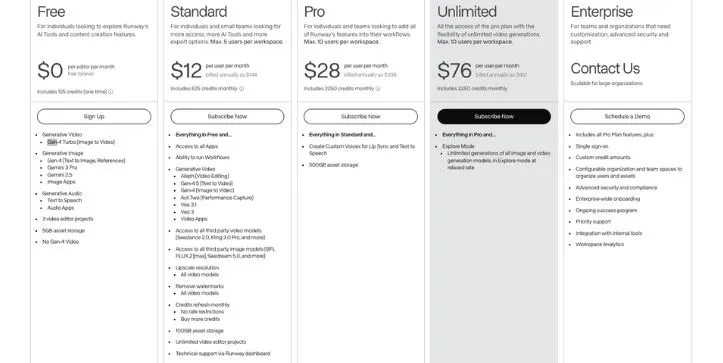
The Free plan gives you 125 one-time credits, which is enough to test the platform, but not enough for a full production workflow. Runway’s paid plans start with Standard at $12 per user/month when billed annually, followed by Pro at $28 per user/month and Unlimited at $76 per user/month when billed annually.
Here’s the basic pricing structure:
- Free: 125 one-time credits
- Standard: $12/user/month billed annually
- Pro: $28/user/month billed annually
- Unlimited: $76/user/month billed annually
Gen-4.5 access starts from the Standard plan. Runway’s official pricing page currently shows that Standard includes 625 monthly credits, equal to 25 seconds of Gen-4.5 output. That works out to around 25 credits per second for Gen-4.5, based on the official credit example.
That tells you something important.
Runway is not really built for random, unlimited experimentation on the cheapest plan.
It makes more sense when you are creating fewer clips, but you need those clips to look polished.
Runway is better value when you are making:
- Client videos
- Product ads
- Brand visuals
- Cinematic B-roll
- Music video shots
- Polished YouTube visuals
- Commercial social campaigns
The main thing to watch is credit burn.
If you are testing lots of prompts, changing camera movements, and generating multiple versions of the same shot, credits can disappear quickly.
But if quality matters more than volume, Runway can still be worth it.
Because one usable, polished clip is often more valuable than ten messy ones.
Pika Pricing

Pika feels more accessible for creators who want to experiment.
Its pricing is built around monthly video credits, and the plans are easier to understand if your goal is to generate lots of short clips.
Pika currently lists four main plans: Basic, Standard, Pro, and Fancy. Basic includes 80 monthly video credits, Standard includes 700 monthly video credits, Pro includes 2,300 monthly video credits, and Fancy includes 6,000 monthly video credits.
Here’s the simple breakdown:
- Basic: 80 monthly video credits
- Standard: 700 monthly video credits
- Pro: 2,300 monthly video credits
- Fancy: 6,000 monthly video credits
Pika also gives access to different features depending on your plan.
For example, Basic includes access to Pika 2.5 at 480p only, while Standard, Pro, and Fancy include Pika 2.5 at all resolutions, along with features like Pikaframes, Pikascenes, Pikadditions, Pikaswaps, Pikatwists, and all Pikaffects.
This makes Pika feel better for fast creative testing.
You can try more ideas, generate quick social videos, and experiment with effects without treating every prompt like a serious production decision.
Pika is better value when you are making:
- TikToks
- Instagram Reels
- YouTube Shorts
- Meme videos
- Fun visual hooks
- Creative effects
- Fast concept tests
- Social ad variations
But there is a trade-off.
Pika may give you more room to experiment, but not every output will be production-ready.
If you need realism, clean motion, stable faces, or client-facing polish, you may still need more retries.
So Pika can feel cheaper for experimentation, but Runway can feel more valuable when the final output has to look professional.
Want to understand Pika costs before you choose a plan?
Pika AI Pricing Explained
Which Is Better Value?
The answer depends on what kind of creator you are.
If you only compare monthly price and credit count, Pika looks more flexible for beginners and social creators.
But if you compare usable final output, Runway can be the better value for serious video work.
Here’s how I would break it down:
| User Type | Better Value |
| Beginner experimenting | Pika |
| TikTok/Reels creator | Pika |
| Filmmaker | Runway |
| Agency/client work | Runway |
| High-volume concept testing | Pika |
| Polished ads/trailers | Runway |
For beginners, Pika makes more sense.
You get a simpler workflow, more room to test ideas, and less pressure to make every generation perfect.
For social media creators, Pika is also the better starting point.
If your goal is to create hooks, effects, transformations, memes, or quick vertical videos, Pika gives you a faster path from idea to output.
But for filmmakers, agencies, product marketers, and brand teams, Runway is usually the better value.
Not because it is cheaper.
Because it gives you a better chance of creating something polished enough to actually use.
So my pricing verdict is simple:
Choose Pika if you want more experimentation for the money.
Choose Runway if you want better production value from each usable clip.
If you are testing ideas, Pika is the smarter spend.
If you are delivering final work, Runway is easier to justify.
My Final Winner: Runway or Pika?
So, after comparing Runway and Pika across quality, control, speed, ease of use, pricing, and real creative workflows, here’s my honest answer.
I would choose Runway if I had to deliver polished, realistic, client-ready video.
And I would choose Pika if I needed fast, fun, social-first clips or wanted to test a lot of ideas quickly.
That’s the simplest way to look at this comparison.
Runway feels like the stronger production tool.
It gives you better realism, more control, stronger camera movement, and a more professional workflow. If I were creating a product ad, cinematic B-roll, a brand video, or a serious creative project, Runway would be my first choice.
Pika feels like the faster creative playground.
It is easier to use, more beginner-friendly, and better for quick social ideas. If I were making TikToks, Instagram Reels, YouTube Shorts, memes, visual hooks, or fun effects, I would probably start with Pika.
The honest answer is that Runway and Pika are not direct replacements for each other.
They overlap, but they are not built for the exact same kind of creator.
Runway is better when the final video needs to look clean.
Pika is better when the idea needs to move fast.
Here’s my final breakdown:
| Final Category | Winner |
| Quality | Runway |
| Control | Runway |
| Speed | Pika |
| Ease of use | Pika |
| Social creativity | Pika |
| Professional work | Runway |
| Value for beginners | Pika |
| Overall winner | Runway for quality, Pika for speed |
If I had to pick only one overall winner, I would give it to Runway.
Not because Pika is bad.
Pika is actually the better choice for a lot of creators, especially beginners and social media users.
But Runway wins because its best outputs feel more polished, more realistic, and more useful for serious video production.
That said, the smarter answer is not always choosing one forever.
If your workflow allows it, use both.
Use Pika when you want to brainstorm ideas, test hooks, and create fast social clips.
Then use Runway when you want to turn the strongest ideas into cleaner, more cinematic final shots.
So my final verdict is simple:
Choose Runway if you care more about quality, realism, and control.
Choose Pika if you care more about speed, simplicity, and creative experimentation.
Want to compare Runway with other AI video generators?
Top 5 Runway Alternatives I Tested & Ranked in 2026Want to see how Pika compares to other tools?
Best Pika Alternatives
FAQ
Is Runway better than Pika?
Runway is better than Pika if your main goal is quality, realism, and professional control.
It usually gives you more polished results, especially for cinematic shots, product videos, brand content, and realistic human scenes.
But that does not mean Runway is better for everyone.
Pika is better if you care more about speed, simplicity, and fun creative effects.
So the simple answer is:
- Choose Runway for polished, realistic, professional videos.
- Choose Pika for fast, playful, social-first videos.
Is Pika better than Runway for beginners?
Yes, Pika is usually better for beginners.
The workflow feels simpler, faster, and less intimidating. You can type a prompt, try an effect, animate an image, and get a quick result without learning too many controls.
Runway is not extremely difficult, but it feels more like a professional creative tool.
That means there is more to learn if you want to get the best results.
If you are just starting with AI video generation, Pika is the easier first step.
Which is better for TikTok, Instagram Reels, and YouTube Shorts?
Pika is usually better for TikTok, Instagram Reels, and YouTube Shorts.
That’s because short-form content often needs speed, hooks, effects, and quick visual ideas more than perfect cinematic realism.
Pika works well for:
- Viral-style effects
- Funny transformations
- Quick visual hooks
- Meme-style videos
- Short vertical clips
- Fast content testing
Runway can also create short-form videos, but it feels better when the clip needs to look more polished or cinematic.
Which is better for realistic AI videos?
Runway is better for realistic AI videos.
It usually handles lighting, camera movement, subject consistency, and cinematic detail better than Pika.
This is especially important if you are creating:
- Realistic people
- Product ads
- Brand videos
- Fashion shots
- Cinematic scenes
- Commercial-style visuals
Pika can create realistic clips too, but it is more likely to produce morphing, warping, or stylized results when the scene gets complex.
Which is better for image-to-video?
Runway is better for image-to-video when you want to preserve the original image.
If you upload a product shot, character image, fashion visual, or branded asset, Runway is usually better at keeping the subject stable while adding motion.
Pika is better when you want to use the image as a starting point for something more playful.
For example:
- If you want a product image to stay accurate, use Runway.
- If you want an image to transform, inflate, melt, swap, or become a fun social clip, use Pika.
Which is better for text-to-video?
Runway is better for detailed text-to-video prompts.
It usually follows cinematic prompts more carefully, especially when you include camera movement, lighting, mood, and shot direction.
Pika is better for simple and creative prompts.
If your prompt is fun, weird, or social-first, Pika can generate something entertaining very quickly.
So the winner depends on the prompt:
- Detailed cinematic prompt: Runway
- Simple creative prompt: Pika
- Social media hook prompt: Pika
- Product or brand prompt: Runway
Which tool has better camera control?
Runway has better camera control.
It is stronger when you want a shot to feel directed, intentional, and cinematic.
For example, Runway is better for prompts like:
- Slow push-in
- Handheld camera movement
- Tracking shot
- Cinematic close-up
- Wide establishing shot
- Smooth product reveal
Pika can create movement quickly, but it is not as reliable when you need exact camera behavior.
Which handles faces and facial expressions better?
Runway usually handles faces and facial expressions better than Pika.
That said, both tools can still struggle with realistic human faces.
You may still see issues like:
- Teeth changing shape
- Eyes drifting
- Smiles looking unnatural
- Skin texture shifting
- Faces changing during motion
For realistic faces, keep the clip short and the motion subtle.
A simple blink, slight smile, or small head movement usually works better than asking for a long emotional performance.
Which is cheaper, Runway or Pika?
Pika usually feels more affordable for casual creators and beginners.
It gives you more room to test ideas, especially if you are making short social clips or creative effects.
Runway is more expensive, but it can be better value if you need professional output.
The real question is not only which tool costs less.
The better question is:
Which tool gives you more usable clips for your workflow?
If you want to experiment a lot, Pika is better value.
If you want polished final videos, Runway can be worth the higher cost.
Can I use Runway and Pika together?
Yes, and this may actually be the smartest workflow.
Runway and Pika are not direct replacements, so using both can make sense.
A simple workflow would be:
- Use Pika to test quick ideas and social hooks.
- Pick the concepts that look promising.
- Use Runway to create cleaner, more cinematic final shots.
- Edit everything together in CapCut, Premiere Pro, DaVinci Resolve, or another editor.
This works especially well for creators, agencies, and social media teams that need both speed and quality.
Is Runway good for professional video work?
Yes, Runway is better suited for professional video work than Pika.
It is a stronger choice for:
- Agencies
- Filmmakers
- Brand teams
- Product marketers
- YouTubers
- Music video creators
- Creative directors
- Commercial video creators
Runway gives you more control and more polished results, which matters when the final output needs to look clean.
It is still not perfect, but it is the tool I would trust more for client-facing work.
Is Pika good for professional video work?
Pika can be useful in professional workflows, but mainly for ideation and social content.
I would not treat Pika as the first choice for polished client videos or cinematic production.
But I would use it for:
- Brainstorming ideas
- Testing hooks
- Creating social variations
- Making fun effects
- Producing quick concept clips
- Exploring visual directions
Pika is great when speed matters more than precision.
For final professional shots, Runway is usually safer.
Which one is better for product videos?
Runway is better for product videos.
Product videos need stable objects, clean reflections, controlled camera movement, and consistent lighting. Runway usually handles those details better.
Pika can still be useful if you want a fun product transformation or a surreal social ad.
But for polished product ads, I would choose Runway.
Which one is better for ads?
Runway is better for polished ads.
If you are creating a product ad, brand campaign, launch video, or cinematic commercial-style clip, Runway gives you more control and a better final look.
Pika is better for quick social ads where the goal is to test many hooks quickly.
So I would split it like this:
- Polished brand ad: Runway
- Fast TikTok-style ad: Pika
- Product hero shot: Runway
- Weird scroll-stopping hook: Pika
Which one is better for YouTube videos?
Runway is better for cinematic YouTube visuals, while Pika is better for quick cutaways and creative hooks.
Use Runway if you need:
- B-roll
- Cinematic scenes
- Story shots
- Product visuals
- Realistic AI clips
Use Pika if you need:
- Short visual jokes
- Fast transitions
- Social-style clips
- Quick creative effects
- Experimental inserts
For serious YouTube production, Runway is the stronger main tool.
Which one is better for memes and viral effects?
Pika is better for memes and viral effects.
It feels more playful and easier to use for weird, funny, and unexpected visual ideas.
Pika is stronger for:
- Object transformations
- Funny animations
- Surreal effects
- Fast visual hooks
- Social experiments
- Meme-style clips
Runway can create creative effects too, but Pika feels more natural for this kind of content.
Can Runway and Pika make long videos?
Both tools are better for short clips.
AI video still works best when you create short shots and edit them together into a longer video.
Instead of trying to generate one long perfect scene, a better workflow is:
- Generate multiple short clips.
- Keep each shot simple.
- Use quick cuts to hide artifacts.
- Edit the final sequence in a video editor.
- Add music, voiceover, captions, and transitions afterward.
This gives you a much better result than forcing one long AI-generated video.
Why do AI videos from Runway or Pika sometimes look weird?
AI videos can look weird because the model is trying to predict motion frame by frame.
That becomes difficult when the scene includes faces, hands, fast movement, reflections, text, or complex physics.
Common problems include:
- Warped hands
- Changing faces
- Floating objects
- Melting backgrounds
- Unnatural smiles
- Broken text
- Objects changing shape
This is not only a Runway or Pika issue.
It is still a common limitation of AI video generation in general.
How do I get better results from Runway or Pika?
The best way to get better results is to keep your prompts focused.
Do not ask for too many things in one clip.
Use simple shot direction and clear visual language.
For better results:
- Keep clips short.
- Use one main subject.
- Describe the camera movement clearly.
- Avoid too many actions in one prompt.
- Use image-to-video when you need consistency.
- Generate multiple versions and choose the best one.
- Edit clips together instead of expecting one perfect output.
This matters for both Runway and Pika.
Which one should I use if I am a social media manager?
Use Pika if your main job is creating fast social content.
It is better for testing ideas quickly and making simple visual hooks for platforms like TikTok, Instagram Reels, and YouTube Shorts.
But if you also create polished brand content, you may want Runway too.
A good social media workflow could be:
- Pika for fast hooks and experiments.
- Runway for polished campaign visuals.
- CapCut or Premiere Pro for final editing.
Which one should I use if I am an agency?
Use Runway if you are an agency creating client-facing work.
It gives you better control, better realism, and more polished results.
Pika can still be useful for internal ideation.
For example, your team can use Pika to test ten different creative directions quickly, then use Runway to build the strongest idea into a cleaner final concept.
So for agencies, the best answer may be:
Runway for final work.
Pika for brainstorming.
What is the biggest difference between Runway and Pika?
The biggest difference is the type of creator each tool feels built for.
Runway feels built for creators who want control and quality.
Pika feels built for creators who want speed and creative play.
In simple terms:
- Runway is the better production tool.
- Pika is the better creative playground.
That is the core difference.
Should I choose Runway or Pika?
Choose Runway if you care more about:
- Realism
- Cinematic quality
- Camera control
- Professional workflow
- Client-ready output
Choose Pika if you care more about:
- Speed
- Simplicity
- Fun effects
- Social content
- Beginner-friendly generation
If I had to simplify the whole comparison into one sentence, it would be this:
Runway is better for quality, while Pika is better for speed.