“When it comes to creating realistic AI videos, choosing the right video generator can make all the difference.”
Kling and Hailuo are two of the most talked-about AI video tools right now.
But which one is the better fit for your creative workflow?
Well, to help you decide, in this in-depth comparison, I’ll break down Kling vs Hailuo in terms of:
- Video quality
- Motion realism
- Prompt accuracy
- Image-to-video performance
- Pricing and credit value
- Best use cases
And much more!
But that’s not all… I’ll also show you where each tool works best, so you don’t waste time testing the wrong one.
(Because… why settle for random AI clips when you can create videos that actually look usable?)
Let me help you choose the right AI video generator for your next project!
Kling Vs. Hailuo? A Quick 30-Second Breakdown
Are you in a hurry to create your next AI video?
Well, no worries — I’ve got your back!
Here’s a quick breakdown of Kling and Hailuo to help you pick your winner.
P.S. — I’ve compared them across the things that actually matter for AI video creation, so you can confidently choose the right tool for your workflow — no wasting credits on the wrong platform.
Let’s get into it!
| Features | Kling AI | Hailuo AI |
| Best For | Cinematic videos, camera movement, social clips | Realistic physics, product shots, emotional scenes |
| Text-to-Video | ✅ | ✅ |
| Image-to-Video | ✅ | ✅ |
| Motion Realism | ✅ Strong for action and dynamic movement | ✅ Strong for natural movement and subtle details |
| Prompt Accuracy | Good, but may take creative liberties | Often better with detailed prompts |
| Camera Control | ✅ Stronger for cinematic shots | More limited for complex camera movement |
| Product Videos | Good for lifestyle-style ads | ✅ Better for realistic product shots |
| Social Media Videos | ✅ Better for TikTok, Reels, and Shorts | Good, but less social-first |
| Lip Sync / Audio Features | ✅ Stronger | More limited |
| Beginner-Friendly | Good, but advanced settings can take time | ✅ Easier for quick testing |
| Pricing Value | Can get expensive with high-quality generations | Often better for fast testing and multiple variations |
| Best Choice If You Want | Dynamic, cinematic AI videos | Realistic, natural-looking AI videos |
Kling Vs. Hailuo Feature Comparison
In the previous section, I shared a quick overview of how Kling and Hailuo stack up against each other.
Now, it’s time to compare them properly — feature by feature.
I’ve compared the core features that every good AI video generator should have, including:
- Video quality
- Motion realism
- Prompt accuracy
- Image-to-video performance
- Text-to-video generation
- Camera control
- Lip sync and audio features
- Pricing and credit value
- Best use cases
P.S. — I’ve also highlighted where each tool works better, so you can pick the right one based on your actual content needs.
Keep reading!
Which Tool Has the Best Video Quality?
First, I decided to compare the most important thing: output quality.
Because let’s be honest — if the final AI video looks weird, blurry, or too “AI-generated,” nothing else really matters.
Let’s see who comes out as a winner.
| Feature | Kling AI | Hailuo AI |
| Text-to-Video | ✅ | ✅ |
| Image-to-Video | ✅ | ✅ |
| Video Realism | Strong for cinematic and dynamic scenes | Strong for natural and realistic scenes |
| Human Movement | Good for action, dance, and full-body motion | Good for subtle body language and emotional scenes |
| Product Shots | Good for lifestyle-style scenes | Better for close-up product realism |
| Cinematic Look | ✅ Stronger | ✅ Good |
| Natural Details | Good | ✅ Stronger |
| Best Output Style | Dynamic, polished, social-ready videos | Realistic, grounded, natural-looking videos |
Kling AI

Kling is the better choice if you want your videos to feel cinematic.
It does a great job with scenes that need energy, camera movement, and visual drama. Think of a person walking through a neon-lit street, a dancer moving in slow motion, or a product reveal with a smooth camera push-in.
Kling supports creative video generation features like video generation, image generation, sound generation, and effects through its creative studio, which makes it feel more like a full AI video creation platform than just a basic text-to-video tool.
With Kling, you can create videos for:
- Instagram Reels
- TikTok videos
- YouTube Shorts
- Cinematic AI scenes
- Music video clips
- Action shots
- AI character videos
- Social media ads
The biggest strength of Kling is that it understands “video language” quite well.
By that, I mean prompts like:
- Slow camera push-in
- Wide-angle shot
- Tracking shot
- Dramatic lighting
- Fast action movement
- Cinematic close-up
So, if you’re someone who wants AI videos that feel more like short films, ads, or polished social content, Kling can be SUPER useful.
Hailuo AI
Hailuo takes a slightly different approach.
Instead of focusing only on big camera movements and dramatic shots, it often performs better when you want the scene to feel natural.
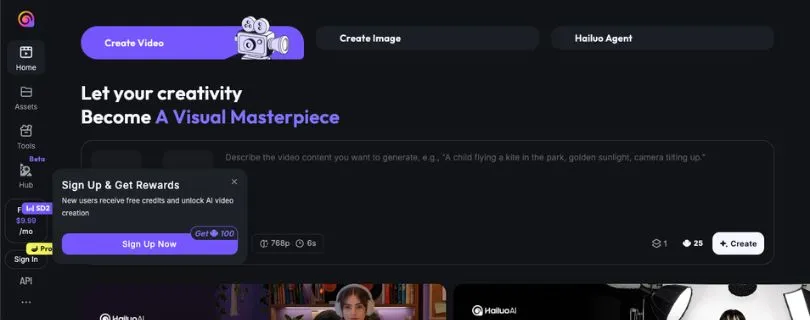
Hailuo supports text-to-video and image-to-video generation, so you can either describe a scene from scratch or upload an image and turn it into a moving clip.
I’d say Hailuo feels stronger when you’re creating videos that need:
- Realistic human expressions
- Product close-ups
- Natural body movement
- Fabric movement
- Food and drink shots
- Emotional character scenes
- Soft cinematic scenes
- Realistic object behavior
For example, if you want a perfume bottle sitting on a table with soft light, slow steam, and subtle camera movement, Hailuo will usually give you a more grounded result.
It may not always feel as flashy as Kling, but that’s not a bad thing.
Sometimes, you don’t need flashy.
You need believable.
Winner?
When it comes to overall video quality, I’d call this one a tie — but for different users.
Kling is better if you want cinematic, energetic, and social-media-ready videos.
Hailuo is better if you want realistic, natural, and emotionally believable videos.
So, the winner depends on what you’re trying to create.
If your goal is to make TikTok videos, Reels, Shorts, or action-heavy clips, Kling has the edge.
But if your goal is to create product videos, emotional scenes, or realistic AI clips that don’t scream “AI,” Hailuo is the better pick.
Which Tool Offers the Best Motion Realism?
The next feature I wanted to test and compare was motion realism.
This matters a lot because AI video tools can make beautiful frames, but the moment the subject starts moving, things can fall apart.
You may see strange hands, floating objects, broken walking patterns, or camera movement that doesn’t make sense.
So, I’m putting Kling vs Hailuo to the test — let’s see who handles motion better!
| Feature | Kling AI | Hailuo AI |
| Fast Action Scenes | ✅ Stronger | Good, but less dynamic |
| Camera Movement | ✅ Better | More controlled and simple |
| Realistic Physics | Good | ✅ Stronger |
| Facial Expressions | Good | ✅ Better for subtle emotion |
| Dancing / Full-Body Motion | ✅ Stronger | Good |
| Product Movement | Good | ✅ Stronger |
| Fabric / Liquid / Smoke Motion | Good | ✅ Better |
| Best For | Action, camera motion, social clips | Realism, detail, natural movement |
Kling AI
Kling is great when your video needs movement.
Not just a little movement — I’m talking about dynamic, camera-heavy movement.
It works well for scenes like:
- A person running through a street
- A dancer performing in front of a camera
- A camera flying through a futuristic city
- A car driving through a mountain road
- A dramatic product reveal
- A character turning toward the camera
Kling’s biggest advantage is that it can make scenes feel alive.
You can guide the camera, add motion, and create shots that feel more exciting than a basic AI clip.
This makes it especially useful for creators who make short-form videos, music-style edits, AI influencer content, or cinematic social media clips.
But here’s the catch.
When the scene gets too complex, Kling can sometimes take creative freedom. That means it may add movement you didn’t ask for or slightly change the subject while trying to make the video more dramatic.
So, yes — Kling is powerful.
But you may need a few tries to get the exact result you want.
Hailuo AI
Hailuo is not always as dramatic as Kling, but it often feels more controlled.
That’s especially helpful when you need realistic motion instead of big movement.
Hailuo works well for scenes like:
- A model slowly turning toward the camera
- A drink being poured into a glass
- A dress moving in the wind
- A person smiling naturally
- A product rotating slowly
- Steam rising from coffee
- A close-up emotional scene
MiniMax says Hailuo 2.3 improves dynamic expression, physical actions, stylized output, character micro-expressions, and response to motion instructions. It also offers a faster mode for creators who need quicker batch-style creation.
This is where Hailuo becomes really useful.
It doesn’t just move things for the sake of movement. It usually handles small details better, especially when the prompt is clear.
And for product videos, that matters a lot.
A bottle shouldn’t bend.
A watch shouldn’t melt.
A face shouldn’t randomly change between frames.
Hailuo tends to keep these details more natural, especially in slower scenes.
Winner?
For motion realism, Hailuo wins.
But wait — let me explain.
If we’re talking about cinematic motion, fast camera movement, or action-heavy videos, Kling is better.
But if we’re talking about realistic physics, natural movement, and believable details, Hailuo takes the lead.
So, here’s the simple answer:
Choose Kling if you want movement that feels exciting.
Choose Hailuo if you want movement that feels real.
Which Tool Offers the Best Prompt Accuracy?
Another feature I wanted to compare in the Kling vs Hailuo battle was prompt accuracy.
Because with AI video tools, your prompt is everything.
You can write the perfect idea in your head, but if the tool doesn’t understand it properly, the final video can look completely different.
So, I decided to look at how both tools respond to detailed prompts.
Let’s see what happens next!
| Feature | Kling AI | Hailuo AI |
| Simple Prompts | ✅ | ✅ |
| Detailed Prompts | Good | ✅ Stronger |
| Camera-Based Prompts | ✅ Stronger | Good |
| Emotion-Based Prompts | Good | ✅ Stronger |
| Product-Based Prompts | Good | ✅ Better |
| Creative Freedom | Higher | More controlled |
| Best Prompt Style | Cinematic and camera-focused | Detailed and realistic |
Kling AI
Kling works really well when your prompt sounds like a film direction.
For example, Kling understands prompts like:
- “A slow cinematic dolly shot of a woman walking through Tokyo at night”
- “Camera pans around a futuristic sports car under neon lights”
- “A dramatic close-up of a singer on stage with flashing lights”
- “A wide-angle shot of a robot walking through a desert”
That’s where Kling feels strong.
It understands camera movement, shot direction, mood, and scene energy.
So, if you know how to describe a video like a director, Kling can give you some really impressive results.
But Kling can also get a little too creative sometimes.
For example, if your prompt says “a man standing still beside a car,” Kling may still add extra camera movement, body movement, or background activity to make the scene look more cinematic.
Sometimes that’s helpful.
Sometimes it’s annoying.
Hailuo AI
Hailuo feels better when you give it a detailed, specific prompt.
It works especially well when you describe:
- What the subject is doing
- How the object should move
- What emotion the person should show
- What the lighting should feel like
- What should stay still
- What details matter most
For example, Hailuo is a good fit for prompts like:
- “A close-up of a coffee cup on a wooden table, with steam rising slowly”
- “A woman smiles softly while looking out of a rainy window”
- “A perfume bottle stays centered while soft fabric moves behind it”
- “A golden watch rotates slowly under warm studio lighting”
Hailuo’s strength is that it usually respects the scene more.
It may not always create the most dramatic video, but it often gives you something closer to what you asked for.
And that’s a big deal if you’re creating product videos, brand visuals, or client work.
Winner?
For prompt accuracy, Hailuo wins.
It usually performs better when you need the final video to follow your instructions closely.
That said, Kling is still the better choice if your prompt includes camera movement, cinematic framing, or action direction.
So, I’d break it down like this:
- Use Kling for cinematic prompts.
- Use Hailuo for detailed realistic prompts.
- Use Kling when you want the tool to add visual energy.
- Use Hailuo when you want the tool to stay closer to your idea.
Which Tool Offers the Best Image-to-Video Performance?
The next feature I wanted to compare was image-to-video generation.
And honestly, this is one of the most useful features in both tools.
Why?
Because not everyone wants to start from a blank prompt.
Sometimes, you already have a product photo, a character image, a fashion shot, a logo concept, or an AI-generated image — and you just want to bring it to life.
So, I tested how Kling and Hailuo handle image-to-video generation.
Let’s see which one performs better!
| Feature | Kling AI | Hailuo AI |
| Image-to-Video Generation | ✅ | ✅ |
| Product Image Animation | Good | ✅ Better |
| Character Animation | ✅ Stronger for dynamic movement | ✅ Better for subtle expressions |
| Camera Movement from Image | ✅ Stronger | Good |
| Subject Consistency | Good | ✅ Stronger in slower scenes |
| Social Media Clips | ✅ Better | Good |
| Realistic Object Motion | Good | ✅ Better |
| Best For | Dynamic image animation | Natural and realistic image animation |
Kling AI
Kling does a great job when you want to turn a still image into a more dynamic video.
For example, if you upload an image of a person, a car, a fashion model, or a cinematic scene, Kling can add strong movement and make the clip feel more alive.
It works well when you want things like:
- Camera zoom-ins
- Slow push-in shots
- Character movement
- Hair and clothing movement
- Product reveal shots
- Social media-style motion
- Action-based animation
This makes Kling really helpful for creators who want to animate AI images for TikTok, Instagram Reels, YouTube Shorts, or cinematic edits.
I especially liked how Kling handles camera motion.
You can take a simple image and make it feel like a moving scene instead of just a still picture with tiny motion added.
But there’s one thing you should know.
When Kling adds more movement, it can sometimes change the original image slightly.
A face may shift.
A product shape may change.
Background details may move in a weird way.
So, if your image has to stay extremely accurate, you may need to generate a few versions before getting the right one.
Hailuo AI
Hailuo is a strong choice when you want your image-to-video result to look more natural.
It may not always create dramatic camera movement like Kling, but it usually does a better job of keeping the subject stable.
This is useful when you’re working with:
- Product photos
- Portrait images
- Fashion images
- Food photos
- Beauty product shots
- Jewelry images
- Emotional character scenes
- Close-up visuals
For example, if you upload a product image and want soft fabric moving in the background, light reflections, slow smoke, or a gentle camera movement, Hailuo usually handles that kind of scene really well.
It feels more controlled.
And for product videos, that’s a big advantage.
Because if you’re animating a perfume bottle, a shoe, a watch, or a skincare product, you don’t want the object to randomly bend, melt, or change shape.
You want it to stay clean and believable.
That’s where Hailuo feels more reliable.
Winner?
For image-to-video, Hailuo wins if your main goal is realism and consistency.
It’s better for product images, close-ups, subtle movement, and natural-looking animation.
But Kling is still the better option if you want stronger camera movement, cinematic motion, or social media-style clips.
So, here’s the simple answer:
Choose Kling if you want your image to feel more dynamic.
Choose Hailuo if you want your image to stay more realistic.
Which Tool Offers the Best Text-to-Video Generation?
Text-to-video is where things get really interesting.
This is the feature most people think of when they hear “AI video generator.”
You type an idea, describe the scene, and the tool creates a video from scratch.
Sounds simple, right?
Well… not always.
The real question is: which tool understands your idea better and turns it into a usable video?
Let’s compare.
| Feature | Kling AI | Hailuo AI |
| Text-to-Video Generation | ✅ | ✅ |
| Simple Scene Creation | ✅ | ✅ |
| Detailed Prompt Handling | Good | ✅ Better |
| Cinematic Scene Creation | ✅ Stronger | Good |
| Product Ad Creation | Good | ✅ Stronger |
| Social Video Creation | ✅ Better | Good |
| Emotional Scene Creation | Good | ✅ Better |
| Best For | Cinematic and action-based prompts | Realistic and detailed prompts |
Kling AI
Kling is a great text-to-video tool if you want your prompt to feel cinematic.
It works especially well when your prompt includes camera movement, lighting, subject action, and scene direction.
For example, you can use Kling for:
- A cinematic city scene
- A fashion video
- A car commercial-style clip
- A dance video
- A fantasy scene
- A music video clip
- A social media ad
- A dramatic action shot
Kling does a nice job of adding visual energy to the video.
Even a simple prompt can come out looking more polished because Kling often adds movement, lighting, and cinematic framing on its own.
That’s great when you want something eye-catching.
But again, this can be a double-edged sword.
Sometimes Kling may add too much movement or change parts of the scene to make it look more dramatic.
So, if you want full control over every small detail, you may need to keep your prompt very clear.
Hailuo AI
Hailuo feels better when your text prompt is detailed and realistic.
It works well when you describe exactly what you want to happen in the scene.
For example, you can use Hailuo for:
- A product video
- A close-up emotional scene
- A person sitting near a window
- A drink being poured into a glass
- A model wearing a flowing dress
- A skincare product shot
- A cinematic food video
- A calm lifestyle scene
Hailuo is especially useful when the scene depends on natural movement and small details.
If your prompt says that steam should rise slowly from a cup, fabric should move gently, or a person should smile softly, Hailuo usually handles that kind of direction well.
This makes it a better fit for creators, marketers, and small businesses that want realistic AI videos for ads, product pages, or brand content.
Winner?
For text-to-video, I’d call this one a tie.
But again, it depends on your use case.
Kling is better for cinematic, social, and action-based text-to-video prompts.
Hailuo is better for realistic, product-focused, and detail-heavy text-to-video prompts.
So, if you want a dramatic shot, go with Kling.
If you want a controlled, realistic scene, go with Hailuo.
Which Tool Offers the Best Camera Control?
Camera control is one of those features that can completely change the final result.
A basic AI video can look okay.
But once you add the right camera movement, it starts to feel like an actual video.
That’s why I wanted to compare how Kling and Hailuo handle camera direction.
| Feature | Kling AI | Hailuo AI |
| Camera Movement | ✅ Stronger | Good |
| Cinematic Shot Control | ✅ Better | More limited |
| Zoom / Push-In Shots | ✅ | ✅ |
| Tracking Shots | ✅ Stronger | Limited |
| Action Camera Movement | ✅ Better | Good |
| Stable Product Shots | Good | ✅ Better |
| Best For | Cinematic and dynamic camera work | Simple, natural camera movement |
Kling AI
Kling clearly has the advantage when it comes to camera control.
It understands camera-focused prompts better, especially if you use words like:
- Dolly shot
- Tracking shot
- Camera pans left
- Slow zoom-in
- Wide-angle shot
- Close-up shot
- Orbit shot
- Handheld camera movement
This makes Kling feel more flexible for creators who want their AI videos to look more like real filmed content.
For example, if you’re making a fashion video, you can ask for a slow tracking shot.
If you’re making a car video, you can ask for a low-angle camera movement.
If you’re making a cinematic character scene, you can ask the camera to slowly move closer to the subject.
That kind of control is where Kling shines.
Hailuo AI
Hailuo can still handle simple camera movement.
You can ask for a slow zoom, gentle camera movement, or a calm cinematic shot.
But it doesn’t feel as strong as Kling when the prompt needs complex camera direction.
And that’s not always a bad thing.
For some videos, especially product shots, too much camera movement can actually ruin the output.
Hailuo works better when the camera stays simple and lets the subject do the work.
For example:
- A slow product rotation
- A gentle close-up
- A soft camera push-in
- A stable food shot
- A calm portrait scene
This makes Hailuo better for videos where stability matters more than drama.
Winner?
Kling wins for camera control.
No surprise here.
If you want cinematic movement, dynamic angles, tracking shots, or camera-heavy social videos, Kling is the better choice.
Hailuo is better when you want simple, stable, natural camera movement.
Which Tool Offers the Best Lip Sync and Audio Features?
Now let’s talk about lip sync and audio.
This feature matters if you want to create AI spokesperson videos, character videos, talking avatars, music clips, or social media videos with voice.
Not every AI video generator handles this well.
So, let’s see how Kling and Hailuo compare.
| Feature | Kling AI | Hailuo AI |
| Lip Sync Features | ✅ Stronger | Limited |
| Audio-Based Video Workflow | ✅ Better | More limited |
| Talking Character Videos | ✅ Better | Good, but not the main strength |
| Music / Social Clips | ✅ Stronger | Good |
| Emotional Silent Scenes | Good | ✅ Better |
| Best For | Talking videos and audio-based clips | Silent realistic scenes |
Kling AI
Kling is the stronger option if your videos need lip sync or audio-based scenes.
It’s more suitable for:
- AI talking avatars
- Short spokesperson videos
- Character dialogue clips
- AI influencer content
- Music-style edits
- Voice-based social videos
- YouTube Shorts with talking characters
This gives Kling a clear advantage for creators who want more than just silent visuals.
If you’re building content for TikTok, Reels, or Shorts, lip sync and audio support can save a lot of editing time.
Instead of generating a silent clip and syncing everything manually, you can keep more of the workflow inside the tool.
That’s a real time-saver.
Hailuo AI
Hailuo is not really the tool I’d choose first for lip sync or audio-heavy videos.
It can create expressive characters and emotional scenes, but its biggest strength is not talking videos.
Where Hailuo feels better is in silent or lightly animated scenes where the emotion comes from body language, facial expression, lighting, and movement.
For example:
- A person smiling softly
- A model looking into the camera
- A character standing in the rain
- A product shown with soft lighting
- A calm cinematic scene with no dialogue
So, if you don’t need lip sync, Hailuo can still create beautiful videos.
But if your character needs to speak clearly, Kling is the better pick.
Winner?
Kling wins for lip sync and audio features.
It’s simply more useful for creators who want talking characters, social videos, and audio-based AI clips.
Hailuo is better when you want expressive visuals without needing speech.
Which Tool Offers Better Pricing and Credit Value?
Now let’s talk about pricing.
Because let’s be real — AI video generation can get expensive fast.
You don’t always get the perfect output on the first try.
Sometimes you need five, ten, or even more generations before you get a video you’d actually use.
So, pricing and credit value matter a lot.
| Feature | Kling AI | Hailuo AI |
| Free Access | ✅ | ✅ |
| Credit-Based Usage | ✅ | ✅ |
| High-Quality Generation Cost | Can get expensive | Usually better for testing |
| Fast Testing | Good | ✅ Better |
| Best Value For | Advanced creators and cinematic videos | Beginners, marketers, and frequent testing |
| Best For Paid Use | Social videos, advanced controls, lip sync | Product videos, realistic clips, batch variations |
Kling AI
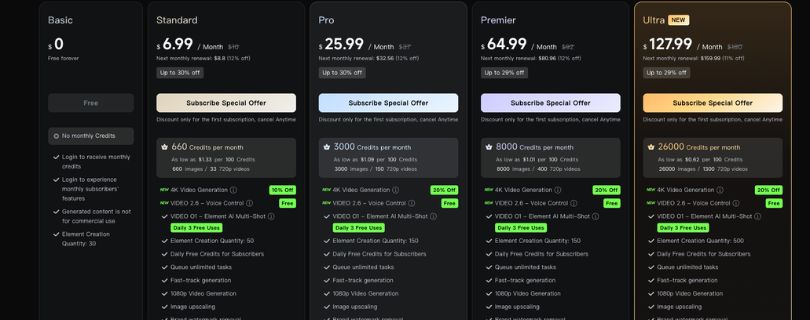
Kling gives you powerful features, but those features can cost more depending on how you use the platform.
If you’re generating higher-quality videos, longer clips, or videos with advanced controls, your credits may run out quickly.
This is especially important if you’re a beginner.
Because when you’re still learning how to write prompts, you’ll probably create a lot of test videos.
And not every test will be usable.
That means Kling can become expensive if you keep experimenting without a clear prompt strategy.
Still, the value is there if you know what you’re doing.
If you need cinematic videos, lip sync, camera control, and social-media-ready content, Kling can be worth it.
Also Read:
Kling Pricing Explained
Hailuo AI
Hailuo usually feels more comfortable for testing.
It’s a good option if you want to create multiple versions of the same idea and compare outputs without feeling too stressed about wasting credits.
This makes it useful for:
- Beginners
- Small businesses
- Product marketers
- Social media creators
- Designers testing visual ideas
- Agencies creating multiple ad concepts
Hailuo’s value becomes clear when you need realistic outputs and fast creative testing.
For example, if you’re testing five different product video ideas, Hailuo may feel easier and more practical.
You can try different prompts, adjust the scene, and pick the best result without jumping straight into a complex workflow.
Winner?
For pricing and credit value, Hailuo wins for most beginners and frequent testers.
It feels more practical when you need to test many ideas quickly.
But Kling can still offer better value for advanced creators who need stronger camera control, lip sync, and cinematic video generation.
So, here’s how I’d put it:
Choose Kling if you want advanced video creation features.
Choose Hailuo if you want better value for testing and realistic video generation.
Which Tool Is Best for Different Use Cases?
At this point, we’ve compared the main features.
Now, let’s make things even simpler.
Because the “best” AI video generator really depends on what you’re creating.
A YouTuber, product marketer, designer, and agency owner may all need different things.
So, here’s how Kling and Hailuo compare by use case.
| Use Case | Better Choice | Why |
| TikTok Videos | Kling AI | Better motion, camera control, and social-style output |
| Instagram Reels | Kling AI | Stronger for vertical, dynamic clips |
| YouTube Shorts | Kling AI | Better for eye-catching movement and audio-based videos |
| Product Videos | Hailuo AI | Better realism, object stability, and natural details |
| Fashion Videos | Tie | Kling for movement, Hailuo for fabric realism |
| AI Character Videos | Kling AI | Better for talking characters and dynamic scenes |
| Emotional Scenes | Hailuo AI | Better subtle expressions and natural pacing |
| Cinematic Shots | Kling AI | Stronger camera direction and dramatic visuals |
| Product Ads | Hailuo AI | Better product consistency and realistic motion |
| Beginner Testing | Hailuo AI | Easier for quick experiments and prompt testing |
Kling AI
Kling is best for creators who want their videos to feel bold, cinematic, and social-ready.
You should choose Kling if you want to create:
- TikTok videos
- Instagram Reels
- YouTube Shorts
- Music video clips
- AI influencer videos
- Talking character videos
- Action scenes
- Dance videos
- Cinematic ads
- Fast-moving visual content
If your content needs motion, energy, and camera movement, Kling is the safer pick.
Hailuo AI
Hailuo is best for creators who want their videos to feel realistic, natural, and controlled.
You should choose Hailuo if you want to create:
- Product videos
- Ecommerce ads
- Food and drink videos
- Beauty product clips
- Fashion visuals
- Emotional character scenes
- Realistic image-to-video clips
- Calm cinematic shots
- Brand videos
- Multiple prompt variations
If your content needs believable details and realistic movement, Hailuo is the better choice.
Winner?
There’s no single winner for every use case.
Kling is better for social media creators, video editors, AI influencer creators, and anyone who wants cinematic movement.
Hailuo is better for marketers, product video creators, small businesses, and anyone who wants realistic AI videos with fewer strange movements.
Final Winner: Kling or Hailuo?
So, after comparing Kling vs Hailuo feature by feature, here’s my final take.
Kling is the better choice if you care about:
- Cinematic camera movement
- Social media videos
- Lip sync
- Talking characters
- Dynamic action scenes
- Reels, Shorts, and TikTok-style content
- Advanced creative control
Hailuo is the better choice if you care about:
- Realistic physics
- Product videos
- Prompt accuracy
- Natural human movement
- Emotional scenes
- Image-to-video consistency
- Fast testing and better credit value
So, who wins?
If I had to pick one for social media and cinematic content, I’d choose Kling.
But if I had to pick one for realistic product videos, emotional scenes, and everyday prompt testing, I’d choose Hailuo.
And honestly?
If you’re serious about AI video creation, using both tools makes the most sense.
Use Hailuo when you need realism.
Use Kling when you need movement.
That way, you’re not forcing one tool to do everything — and your final videos will look much better.
Also Read:
Best Kling Alternatives
Best Hailuo AI Alternatives
FAQs About Kling vs Hailuo
Is Kling better than Hailuo?
Kling is better than Hailuo if you want cinematic camera movement, social media videos, action scenes, lip sync, and dynamic AI video clips.
It’s a strong choice for creators making TikTok videos, Instagram Reels, YouTube Shorts, music-style edits, AI influencer videos, and cinematic scenes.
But that doesn’t mean Kling is better for everything.
If your goal is realistic physics, product videos, natural expressions, subtle motion, or image-to-video clips that stay close to the original image, Hailuo can be the better option.
So, the simple answer is this:
Choose Kling for movement and cinematic control.
Choose Hailuo for realism and prompt accuracy.
Is Hailuo better than Kling?
Hailuo can be better than Kling when you want realistic, natural-looking AI videos.
It usually performs well with product shots, emotional scenes, close-up portraits, fabric movement, food videos, beauty product clips, and slower cinematic scenes.
For example, if you want a perfume bottle on a table with soft light and gentle fabric movement in the background, Hailuo is often the safer pick.
But if you want a fast-moving action scene, talking character, or social video with strong camera movement, Kling will usually give you better results.
Which is better for image-to-video, Kling or Hailuo?
Hailuo is usually better for image-to-video if you care about realism and subject consistency.
It’s a good choice for:
- Product images
- Portraits
- Fashion photos
- Food images
- Beauty product shots
- Jewelry visuals
- Calm cinematic scenes
Kling is better if you want to add more dynamic movement to your image.
It works well for:
- Camera zoom-ins
- Action-style animation
- Social media clips
- Character movement
- Cinematic camera motion
- AI influencer-style videos
So, if you want your image to stay stable and realistic, go with Hailuo.
If you want the image to feel more energetic and cinematic, go with Kling.
Which is better for text-to-video, Kling or Hailuo?
For text-to-video, both tools are good, but they work better for different prompt styles.
Kling is better when your prompt includes cinematic direction, such as:
- Slow camera push-in
- Tracking shot
- Wide-angle shot
- Dramatic lighting
- Fast movement
- Action scene
- Close-up shot
Hailuo is better when your prompt includes realistic details, such as:
- Steam rising slowly from coffee
- Fabric moving gently in the wind
- A person smiling softly
- A product staying centered
- Water pouring into a glass
- Natural body movement
So, if your prompt feels like a movie scene, Kling is a strong pick.
If your prompt needs realism and control, Hailuo is better.
Which AI video generator is better for beginners?
Hailuo is usually easier for beginners.
You can write a simple prompt, test ideas quickly, and get realistic results without learning too many advanced controls.
Kling is also beginner-friendly, but it gives you more creative control. That’s great once you know what you’re doing, but it can feel a little more complex if you’re new to AI video generation.
If you’re just starting out, Hailuo may feel easier.
If you want to grow into more advanced cinematic video creation, Kling gives you more room to experiment.
Which is better for TikTok, Reels, and YouTube Shorts?
Kling is the better choice for TikTok videos, Instagram Reels, and YouTube Shorts.
Why?
Because these platforms need videos that grab attention fast.
Kling is stronger for:
- Fast movement
- Dynamic camera shots
- Vertical-style social clips
- AI character videos
- Music video edits
- Talking avatar-style content
- Eye-catching transitions
Hailuo can still create social media videos, especially product or lifestyle clips, but Kling feels more built for creators who want bold, scroll-stopping AI videos.
Which is better for product videos and ads?
Hailuo is usually better for product videos and ads.
Product videos need stability.
The product should not bend, melt, change shape, or move in a strange way. Hailuo tends to handle object consistency and realistic motion better, especially in slower scenes.
It works well for:
- Skincare product videos
- Perfume bottle shots
- Food and drink ads
- Jewelry videos
- Fashion visuals
- Ecommerce product clips
- Shopify product videos
- Instagram ad creatives
Kling is still useful if you want a more cinematic lifestyle ad with strong camera movement.
But for clean product realism, Hailuo is the better pick.
Which tool has better motion realism?
Hailuo usually has better motion realism when you’re talking about natural movement and physical details.
It’s stronger for things like:
- Fabric movement
- Hair movement
- Steam
- Water
- Product stability
- Facial expressions
- Slow emotional movement
Kling is better for motion that feels exciting.
It’s stronger for:
- Dance scenes
- Action shots
- Camera movement
- Tracking shots
- Fast-paced social videos
- Cinematic movement
So, Hailuo wins for realistic motion.
Kling wins for dramatic motion.
Which tool has better camera control?
Kling has better camera control.
It understands camera-based prompts better, especially when you use words like:
- Dolly shot
- Tracking shot
- Camera pans left
- Slow zoom-in
- Orbit shot
- Close-up shot
- Wide-angle shot
- Handheld camera movement
This makes Kling better for cinematic videos, short films, music clips, social ads, and action scenes.
Hailuo can handle simple camera movement, but it’s better when you keep the camera stable and let the subject or object move naturally.
Which tool follows prompts better?
Hailuo usually follows detailed prompts better.
If you describe the subject, lighting, emotion, movement, background, and object behavior clearly, Hailuo often gives you a result that stays closer to your idea.
Kling also follows prompts well, but it sometimes adds its own creative touch. That can make the video look more cinematic, but it can also change details you wanted to keep fixed.
So, use Hailuo when accuracy matters.
Use Kling when you want the tool to add more cinematic energy.
Which is better for AI character videos?
Kling is better for AI character videos if the character needs to move, talk, perform, or appear in a social-style video.
It’s a better fit for:
- AI influencers
- Talking avatars
- Character dialogue
- Music-style character videos
- Short-form creator content
- Cinematic character scenes
Hailuo is better if the character video is emotional, slow, and realistic.
For example, a person looking out of a rainy window, smiling softly, or showing subtle facial emotion may look better in Hailuo.
Which is better for lip sync?
Kling is better for lip sync and audio-based video creation.
If you want to create a talking character, AI spokesperson, voice-based short video, or social media clip with speech, Kling is the better choice.
Hailuo is better for silent visual scenes where the emotion comes from facial expression, lighting, body movement, and atmosphere.
Which is cheaper, Kling or Hailuo?
Hailuo often feels more budget-friendly for testing multiple ideas.
That matters because AI video generation usually takes a few tries. You may need to test different prompts, scenes, camera movements, and styles before getting a usable result.
Kling can offer strong value if you need advanced features like camera control, lip sync, and cinematic movement, but it may feel more expensive if you generate a lot of high-quality clips.
So, if you’re testing ideas often, Hailuo may feel better.
If you need advanced creative control, Kling can still be worth it.
Which one should I use for YouTube videos?
It depends on the type of YouTube video you want to create.
Choose Kling for:
- YouTube Shorts
- Faceless video clips
- AI character scenes
- Cinematic B-roll
- Music video clips
- Talking avatar content
- High-energy visual scenes
Choose Hailuo for:
- Product B-roll
- Calm storytelling scenes
- Realistic visual clips
- Emotional cinematic scenes
- Food, fashion, or lifestyle visuals
- Brand-style videos
For long YouTube videos, you may still need a video editor like CapCut, Premiere Pro, DaVinci Resolve, or Descript to stitch everything together.
Can I use Kling and Hailuo together?
Yes, and honestly, that may be the smartest workflow.
Use Hailuo when you need realistic shots.
Use Kling when you need movement and cinematic energy.
For example, you can use Hailuo to create a realistic product shot, then use Kling for a dramatic lifestyle scene or social media-style transition.
This way, you’re not forcing one tool to do everything.
You’re using each tool where it performs best.
Which one gives more realistic human faces?
Hailuo is often better for subtle facial expressions and emotional close-ups.
It works well when the scene needs a natural smile, soft eye movement, or calm human emotion.
Kling can also create strong human videos, especially when the person is moving, talking, dancing, or appearing in a cinematic scene.
So, for emotional realism, choose Hailuo.
For dynamic character movement, choose Kling.
Which one is better for anime or stylized videos?
Both Kling and Hailuo can create stylized videos, but Kling may be better if you want more dynamic anime-style movement, action, camera motion, or dramatic scene changes.
Hailuo can work well for softer stylized scenes, character expressions, and controlled animation-style clips.
If your anime video needs energy, choose Kling.
If it needs a clean and stable emotional moment, try Hailuo.
Which one is better for client work?
Hailuo is safer for client work when accuracy and realism matter.
For example, product videos, ecommerce visuals, beauty ads, and brand clips often need the subject to stay consistent. Hailuo usually feels more reliable for that.
Kling is better for client work when the project needs a cinematic look, social media motion, talking characters, or more advanced camera direction.
If you’re working with clients, test both before final delivery.
AI video tools can produce great results, but they still need review, editing, and sometimes multiple generations.
Does Kling or Hailuo create longer videos?
Kling is generally better if your workflow needs longer or more advanced video creation.
It gives you stronger creative control and works better for building cinematic or social-style video sequences.
Hailuo is better for short, realistic clips and fast testing.
For longer content, you’ll usually create multiple short clips and combine them in a video editor.
That’s the most practical workflow right now.
Which one is better for marketers?
Hailuo is better for marketers who need realistic product videos, ecommerce ads, product demos, beauty visuals, fashion clips, or food and drink content.
Kling is better for marketers who need attention-grabbing social videos, AI spokesperson clips, TikTok ads, Reels, Shorts, or cinematic brand videos.
So, for product realism, choose Hailuo.
For social attention, choose Kling.
Which one is better overall: Kling or Hailuo?
Overall, Kling is better for creators who want cinematic AI videos with strong motion, camera control, lip sync, and social media appeal.
Hailuo is better for creators who want realistic AI videos with strong prompt accuracy, natural motion, product stability, and better testing value.
Here’s the easiest way to decide:
Use Kling if you want videos that feel dynamic.
Use Hailuo if you want videos that feel real.