

I spent weeks testing HailuoAI to see how well it works for AI video creation. This HailuoAI review is my honest breakdown of what it does best, where it frustrates users, and whether it’s worth paying for in 2026.
Quick verdict
HailuoAI is impressive for creating short, cinematic AI videos from text prompts and images. However, it’s not ideal for users who need full control, long videos, or a risk-free paid plan. Once you start testing more detailed scenes, you may run into prompt mistakes, inconsistent motion, short clip limits, and wasted credits from bad generations. If you need dependable long-form video editing, HailuoAI is not the best option.
What is HailuoAI?
HailuoAI is an AI-powered video generator for creating short clips from text and images. It can turn a written prompt into a moving scene, animate a still image, and create cinematic-looking shots for social media videos, ad concepts, storyboards, and creative experiments.
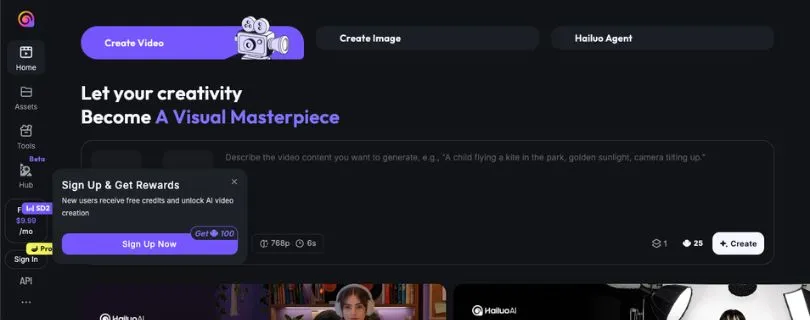
It isn’t a full video editor like Runway or CapCut. HailuoAI works best when you give it a clear prompt, a simple scene, and a short visual idea. For deeper control, better character consistency, or longer storytelling, you’ll still need another editing tool or a more advanced AI video platform.
You Might Like Visiting These Pages:
I Tested Luma Dream Machine and Here’s What i Found
Runway Gen-4: My Honest Review
Key features of HailuoAI
HailuoAI packs several creative video tools into one platform. It focuses on short AI video generation, simple prompting, image animation, and cinematic-looking results for creators who want quick visual content.
Here are its key features:
- Text-to-video generation: HailuoAI lets you type a prompt and turn it into a short video clip. You can describe the subject, action, setting, lighting, camera movement, and mood. It works best with simple scenes, such as a person walking through a rainy street, a product floating in soft studio light, or a cinematic landscape shot.
- Image-to-video generation: You can upload a still image and ask HailuoAI to animate it. This is useful for turning portraits, product shots, concept art, or social media visuals into short moving clips. The image-to-video quality is usually better when the image is clean, focused, and not too crowded.
- Cinematic camera movement: HailuoAI can create smooth-looking motion such as slow zooms, pans, push-ins, and tracking shots. This makes it useful for short film-style clips, AI ad creative ideas, YouTube Shorts, TikTok hooks, and mood-based storytelling.
- Fast video creation: One of HailuoAI’s biggest strengths is speed. You can test a text-to-video workflow quickly without setting up a full editing project. For creators who need quick visual concepts, this makes the tool feel easy to experiment with.
- Prompt-based creative control: Instead of editing on a timeline, you guide HailuoAI through written prompts. You can control the style, lighting, atmosphere, camera angle, and scene details with text. However, complex prompts may need several retries before the result looks right.
- Short video clips: HailuoAI is mainly designed for short clips, not long-form videos. This works well for social media video creation, storyboarding, visual hooks, and concept testing, but it can feel limiting if you want a complete edited video with multiple scenes.
- Beginner-friendly interface: The platform is easy to start using. You do not need advanced editing skills to generate your first clip. Most users can type a prompt, choose a mode, and create a video within minutes.
- Creative use cases: HailuoAI works well for creators, marketers, small businesses, and AI filmmakers who need short cinematic clips, product visuals, ad concepts, background footage, or quick storytelling experiments.
HailuoAI reviews: What real users are saying
I dug through Trustpilot reviews, Reddit threads, and hands-on HailuoAI reviews to see what real users are saying. The pattern is pretty clear. People like the speed and cinematic video quality, but they’re much more divided when it comes to credits, pricing, failed generations, cancellation, and customer support.
Pros
- Fast video generation: Many reviewers praise HailuoAI for its quick text-to-video workflow. In hands-on tests, users often mention that it can turn a prompt into a short cinematic clip faster than many older AI video tools. That speed makes it useful for testing social media video ideas, ad concepts, and quick visual experiments.
- Cinematic-looking output: HailuoAI gets a lot of attention for its realistic lighting, smooth motion, and film-style visuals. Reviews from sites like Pollo AI and Techpoint Africa highlight its ability to create polished short clips from simple prompts and images.
- Good for image-to-video clips: Users like that HailuoAI can animate still images and turn them into short moving shots. This works especially well for clean portraits, product visuals, concept art, and mood-based scenes where you only need subtle camera movement.
- Easy for beginners: HailuoAI doesn’t feel like a traditional editing app. You don’t need a timeline, layers, keyframes, or advanced editing knowledge to get started. You type a prompt, upload an image if needed, and wait for the clip.
Cons
- Billing and subscription complaints: This is the biggest red flag. On Trustpilot, many users complain about subscription problems, unexpected charges, payment issues, and weak customer service. Even if the creative tool works well, these reviews make the paid plan feel risky.
- Credit system frustrates users: Several Reddit users complain about changes to free credits, daily credits, and plan value. In one Reddit thread, a user said they were moving to Kling after Hailuo removed unlimited access, increased pricing, and reduced credits.
- Failed generations can waste credits: Like most AI video generators, HailuoAI doesn’t always follow the prompt perfectly. If the motion looks wrong, the character changes, or the scene ignores part of your instruction, you may need to regenerate. That gets annoying when every attempt costs credits.
- Short clip limits: HailuoAI is better for short cinematic clips than full videos. This is fine for TikTok hooks, YouTube Shorts intros, product teasers, or AI ad creative tests, but it’s not ideal if you want a complete video with multiple scenes and consistent characters.
- Customer support concerns: User complaints around refunds, cancellation, and support replies come up often in public reviews. That doesn’t mean every user will have a bad experience, but I wouldn’t treat HailuoAI like a “set it and forget it” subscription. Test the free version first, check the payment terms carefully, and avoid committing to a long plan until you’re sure.
My personal take on HailuoAI
I tested HailuoAI with a mix of text-to-video and image-to-video prompts to see how well it handles short cinematic clips, social media ideas, and simple AI ad creative concepts, and here’s what I found.
What impressed me: HailuoAI can create surprisingly polished clips when the prompt is simple and visual. I got the best results with scenes like a person walking through neon rain, a product shot with soft studio lighting, and a slow cinematic push-in on a portrait. The lighting, mood, and camera movement often looked better than I expected from such a quick AI video generator.
What frustrated me: HailuoAI is not something I’d trust for complex storytelling yet. When I asked for more detailed actions, multiple subjects, or very specific movement, the results became less predictable. Sometimes the scene looked great but ignored part of the prompt. Other times the motion felt strange, the character changed slightly, or the clip needed another generation to feel usable.
My experience matched a lot of user feedback around its inconsistency. HailuoAI is fun and fast when you use it for short visual ideas, but you need patience, spare credits, and realistic expectations before using it for serious creator or marketing work.
Is HailuoAI right for you?
HailuoAI is great when you need fast, cinematic short clips, and it quickly becomes frustrating when you expect full video-editing control or long-form storytelling.
Who will love it
- Creators making short-form content who need quick AI video clips for TikTok, Instagram Reels, YouTube Shorts, intros, hooks, and visual experiments.
- Marketers and small businesses that want to test AI ad creative ideas, product visuals, mood shots, and campaign concepts without hiring a full video team.
- AI filmmakers and visual storytellers who enjoy experimenting with text-to-video prompts, image-to-video quality, camera movement, lighting, and cinematic scene ideas.
Who should avoid it
- Users who need long videos or full editing control because HailuoAI is mainly built for short clips, not complete timeline-based editing.
- Creators who need perfect character consistency across multiple scenes, since faces, clothing, motion, and details can shift between generations.
- Anyone uncomfortable with subscription and credit risks because user reviews mention billing complaints, failed generations, wasted credits, and customer support issues.
My Final Verdict
HailuoAI is one of those tools that can impress you quickly, especially when you give it a simple visual idea. For short cinematic clips, image-to-video experiments, social media hooks, and quick AI ad creative concepts, it can produce results that look polished with very little effort.
But I wouldn’t call it a complete video creation tool. It still struggles with complex prompts, longer scenes, character consistency, and precise creative control. You may need to regenerate clips several times before getting something usable, and that matters when credits are limited.
My biggest caution is the paid experience. The tool itself has real creative value, but public user reviews around billing, cancellations, refunds, and customer support make me hesitant to recommend jumping straight into a subscription.
So, my honest take is simple: try HailuoAI for free if you want fast AI video clips, but don’t pay for it blindly. It’s best for creators who like experimenting with short cinematic visuals, not for users who need reliable long-form video production or a stress-free subscription experience.
FAQ
Is HailuoAI free?
HailuoAI usually offers a free way to test the platform, but free access can be limited by credits, video length, queue speed, watermark rules, or daily usage limits. I’d treat the free plan as a testing area, not a full production plan.
Is HailuoAI good?
Yes, HailuoAI is good for short cinematic AI videos, especially when your prompt is simple and visual. It works well for social media clips, mood shots, product concepts, and quick creative experiments. It’s less reliable when you need complex action, long scenes, or the same character across multiple clips.
Is HailuoAI legit?
HailuoAI appears to be a real AI video generator, and its output can be impressive. That said, many users have raised concerns about billing, cancellations, refunds, and customer support, so I’d be careful before paying for a subscription.
Is HailuoAI safe to use?
For basic creative testing, HailuoAI is safe enough to try like any other online AI tool. The bigger concern is the paid plan experience. Before subscribing, check the billing terms, renewal date, cancellation process, and refund policy.
What is HailuoAI used for?
HailuoAI is used to create short AI-generated videos from text prompts or images. Creators use it for TikTok clips, YouTube Shorts, Instagram Reels, AI ad creative ideas, product visuals, storyboards, mood scenes, and cinematic experiments.
How does HailuoAI work?
You type a prompt or upload an image, then HailuoAI generates a short video based on your instructions. A strong prompt usually includes the subject, action, location, camera movement, lighting, style, and mood.
Does HailuoAI support text-to-video?
Yes. HailuoAI supports text-to-video generation, which means you can describe a scene in words and turn it into a short video clip. Simple prompts usually work better than long, complicated ones.
Does HailuoAI support image-to-video?
Yes. HailuoAI can animate still images into short video clips. The image-to-video quality is usually better when the uploaded image is clear, focused, and easy for the AI to understand.
How long are HailuoAI videos?
HailuoAI mainly creates short clips. Depending on the model, plan, and current platform limits, clips are usually only a few seconds long. It’s better for short-form content and visual tests than long-form video production.
Is HailuoAI good for YouTube Shorts?
Yes, HailuoAI can be useful for YouTube Shorts if you need quick cinematic shots, visual hooks, intros, or background clips. You’ll still need another editing tool if you want subtitles, voiceover, music, scene sequencing, or final polishing.
Is HailuoAI good for TikTok and Instagram Reels?
Yes, it can work well for TikTok and Instagram Reels, especially if you’re creating short visual scenes, product teasers, fantasy clips, or AI-generated hooks. Just don’t expect it to replace a full social media video creation tool.
Can HailuoAI make realistic videos?
HailuoAI can create realistic-looking videos, especially with good lighting, simple motion, and clear prompts. However, realism drops when scenes become too busy, actions get too specific, or characters need to stay identical across multiple generations.
Why does HailuoAI not follow my prompt?
Like most AI video generators, HailuoAI can struggle when a prompt includes too many details at once. If it ignores your instruction, simplify the prompt, focus on one subject and one action, and add camera movement separately.
Does HailuoAI waste credits on failed videos?
It can feel that way. If a clip comes out wrong, you may need to regenerate it, and that can use more credits. This is one reason I recommend testing prompts carefully before using HailuoAI for serious work.
Can I cancel HailuoAI subscription?
You should be able to cancel through your account or billing settings, but many users have complained about cancellation and billing problems. Before subscribing, check the cancellation process and keep screenshots of your plan details.
Is HailuoAI better than Kling AI?
HailuoAI may feel faster and easier for quick cinematic clips. Kling AI may be stronger for realistic motion, prompt control, and more serious AI video workflows. The better choice depends on whether you care more about speed or control.
Is HailuoAI better than Runway?
HailuoAI is easier for quick short clips, while Runway feels more like a full creative video platform. If you need editing tools, advanced controls, and a more professional workflow, Runway is usually the stronger option.
What are the best HailuoAI alternatives?
Some popular HailuoAI alternatives include Kling AI, Runway, Pika, Luma, Sora-style video tools, and other AI video generators. For editing after generation, tools like CapCut, Descript, Premiere Pro, and Canva can also be useful.
Who should use HailuoAI?
HailuoAI is best for creators, marketers, small businesses, and AI filmmakers who want fast short-form AI videos, cinematic clips, product visuals, storyboards, or social media video ideas.
Who should avoid HailuoAI?
Avoid HailuoAI if you need long videos, exact prompt control, perfect character consistency, dependable customer support, or a subscription you can trust without checking the billing details carefully.



