Pollo AI makes it easy to try multiple AI video and image models from one platform. But the convenience comes with a tradeoff: credits can go quickly when a video needs several attempts before it looks right.
This Pollo AI review explains what the platform does well, where it struggles, and whether paying for it makes sense for your AI video workflow.
Quick verdict
Best for: Pollo AI is best for creators and marketers who want to generate short AI videos, animate images, and experiment with different AI models from one dashboard.
Falls short for: Creators who need predictable generation costs, precise editing control, or consistent characters and product details across multiple clips.
Bottom line: Pollo AI makes testing different AI video generators convenient. But if you generate heavily, retries and credit usage can make the workflow more expensive than it first appears.
Still comparing AI video tools before paying for Pollo? See the strongest options here: Top Pollo AI Alternatives & Competitors 2026
What is Pollo AI?
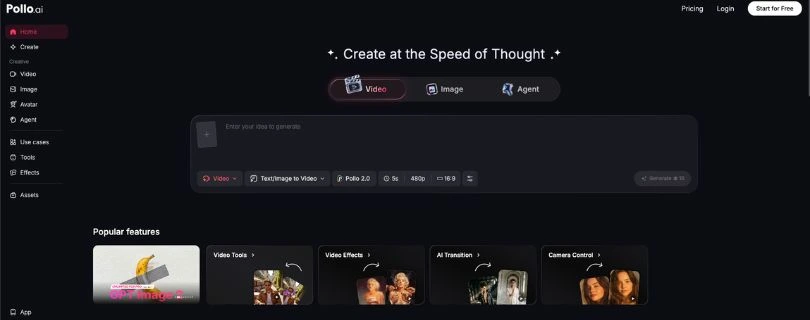
Pollo AI is an all-in-one AI platform for creating videos, images, avatars, ads, audio, and product visuals. Its biggest advantage is that you can access multiple AI models without switching between separate platforms.
For video generation, Pollo supports text-to-video, image-to-video, reference-to-video, video-to-video, motion tools, and AI editing. Its current model selection includes options such as Kling AI, Runway, Vidu AI, Hailuo, Luma Dream Machine, Veo, Sora, and PixVerse.
So instead of being one AI video model, Pollo AI works more like a hub for trying different generation engines depending on the style and output you need.
Key features of Pollo AI
Below are the main features of Pollo AI:
- Multi-model AI generation: You can switch between different video models instead of relying on one engine for every prompt. This makes comparing styles and outputs much easier.
- Text-to-video: Describe your scene, select a model and settings, and Pollo AI turns the prompt into a short video clip.
- Image-to-video: Upload an existing image and animate it with motion instructions. This is useful for portraits, product shots, social posts, and cinematic visuals.
- AI marketing and UGC tools: Pollo includes tools for UGC-style ads, product videos, talking avatars, and social advertising content.
- Image and editing tools: You can generate images, upscale visuals, remove backgrounds or objects, edit photos, and use supporting tools without leaving the platform.
The main appeal is convenience. You are not just getting a Pollo AI video generator; you are getting several creation workflows inside one account.
Pollo AI pricing
Pollo AI uses a credit-based pricing system. How many credits you spend depends on the model you choose, video length, number of outputs, and resolution.
At the time of writing, the pricing starts like this:
| Plan | Monthly price | Watermark | Best for |
| Free | $0 | Yes | Testing Pollo AI |
| Lite | $15 | No | Casual creators |
| Pro | $29 | No | Regular creators |
| Master | $79 | No | Higher-volume use |
Capterra currently lists the Lite plan at $15 per month and Pro at $29 per month. AI-tool pricing changes frequently, so check the live Pollo AI pricing page before subscribing.
The bigger issue is what happens to your Pollo AI credits. Unused subscription credits do not roll over to the next billing cycle. Pro subscribers can purchase additional credits, while separately purchased add-on credits do not expire.
That matters if you generate inconsistently or need several attempts to get one usable video.
Wondering whether using one dedicated video model gives you better value? Read my Runway vs Kling comparison before choosing.
Pollo AI reviews
Most Pollo AI reviews I checked praise the platform for its ease of use, model selection, and fast content creation. The complaints tend to appear when users need more consistency or spend credits on generations they cannot use.
Capterra currently rates Pollo AI highly for ease of use, while recent reviews still mention inconsistent prompt following and character consistency as areas that could improve.
What users like
- Easy to get started: Users like that the interface does not require much technical knowledge. You choose a model, enter a prompt, adjust your settings, and generate.
- Lots of models in one account: This is Pollo AI’s biggest advantage. You can test different AI video engines without maintaining a separate workflow for every platform.
- Fast, polished results: Users regularly praise the generation speed and visual quality, particularly for short videos, images, and social content.
What frustrates users
- Credits can disappear quickly: AI video still involves trial and error. If the first result is unusable, generating another version means spending more credits.
- Character consistency varies: Faces, characters, and prompt details can change between generations, particularly when the scene becomes more complicated.
- Experimenting can get expensive: Access to many models is useful, but testing several engines and variations can consume your allowance faster than expected.
- Results still need checking: Pollo can produce impressive clips, but complex motion and detailed prompts may still take several attempts to get right.
If consistent characters and realistic motion matter more than having every model in one place, read my Vidu vs Kling comparison before deciding.
Pollo AI image-to-video performance
Pollo AI image-to-video works best when the source image is clear and the requested motion is relatively simple. Subtle camera movement, facial motion, product animation, and atmospheric effects are easier to control than complicated scenes.
The advantage is that you can try another model when one result misses the prompt. For example, PixVerse AI may handle a particular effect differently from Kling, Vidu, or another model available inside Pollo.
But switching models does not remove the usual AI video problems. Complex movement can distort subjects, change facial details, or require several generations before you get something usable.
That is where Pollo AI credits become important. Having many models available is useful, but every extra attempt affects how much the final usable video actually costs.
Still testing different image-to-video tools? Compare more options in my best PixVerse alternatives guide.
Is Pollo AI right for you?
Pollo AI is a good fit if you want one place to experiment with different AI image and video models without learning a separate platform for each one.
Who might find it useful
- Social media creators: Useful for Reels, Shorts, TikToks, animated images, and quick visual experiments.
- Marketers and ecommerce brands: Good for testing product clips, UGC-style ads, and creative concepts.
- AI creators comparing models: You can test different engines without constantly moving between separate websites and subscriptions.
Who should skip it
- Heavy-volume creators: Credit-based generation can become harder to predict when videos require repeated attempts. You may want to compare alternatives and their costs, including my Pika AI pricing breakdown.
- Professional video editors: Pollo is built more around generation than detailed frame-level editing and production control.
- Creators needing strict consistency: Repeated characters, products, or complicated scenes can still change between generations.
Need more control over your final video? See the best Runway alternatives before choosing a platform.
The best Pollo AI alternative: Runway
Runway is the stronger option if you care more about creative control and a focused video workflow than accessing many different generation models from one dashboard.
Pollo AI wins on variety. Runway makes more sense for creators who want to build their workflow around one dedicated AI video platform.
Kling is another strong option for realistic motion, while Hailuo AI is worth considering for short cinematic clips. Luma Dream Machine is another alternative, although its credit costs are worth checking in my Luma Dream Machine pricing guide.
If Kling looks closer to what you need, compare it with the best Kling AI alternatives before subscribing.
Still considering Hailuo? Check my best Hailuo AI alternatives to see how it compares with other AI video generators.
Final verdict
Pollo AI is useful because it puts many popular AI image and video models in one convenient interface.
For casual creators and marketers, that variety makes experimentation easier. But this Pollo AI review also shows the main tradeoff: credits and repeated generations can become expensive when consistency matters.
So, is Pollo AI worth it? Yes, if you value convenience and model variety more than predictable generation costs and advanced editing control.
Frequently Asked Questions
Is Pollo AI free?
Yes. The Pollo AI free plan lets you test the platform, although free generations have limits and may include watermarks.
How much does Pollo AI cost?
Pollo AI pricing starts with a free plan, while paid plans begin around $15 per month. Always check current pricing before subscribing.
Do Pollo AI credits roll over?
No. Unused subscription credits generally do not carry over into the next billing period.
Is Pollo AI good for image-to-video?
Yes. Pollo AI image-to-video is particularly useful for animating portraits, products, and simple scenes using different generation models.
Is Pollo AI worth it?
Pollo AI is worth considering if you regularly experiment with multiple AI models. Heavy users should compare credit costs before committing to a paid plan.