

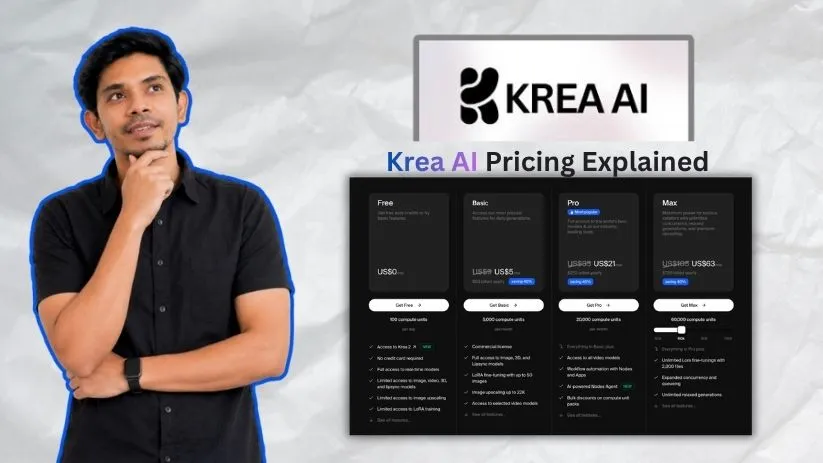
Krea AI has quickly become one of the most talked-about AI creative platforms for generating images, videos, 3D visuals, and real-time designs in 2026.
With access to dozens of AI models, real-time image generation, upscaling, video tools, and LoRA training, it’s easy to see why creators, designers, marketers, and agencies are using it for faster visual content creation.
But when you start looking at Krea AI pricing, one question comes up, “What are you actually paying for?”
Because the monthly subscription is only part of the cost.
Krea AI uses a compute unit-based pricing model, where credits, model limits, generation quality, video usage, upscaling, and plan restrictions can all affect your real cost once you start creating at scale.
I broke down every Krea AI pricing plan, explained how compute units work, highlighted where users can run into limits, and outlined where the costs start adding up so you know exactly what to expect before upgrading.
Here’s the full breakdown.
Krea AI Pricing at a Glance
Here’s a quick look at Krea AI pricing before we break down each plan in detail.
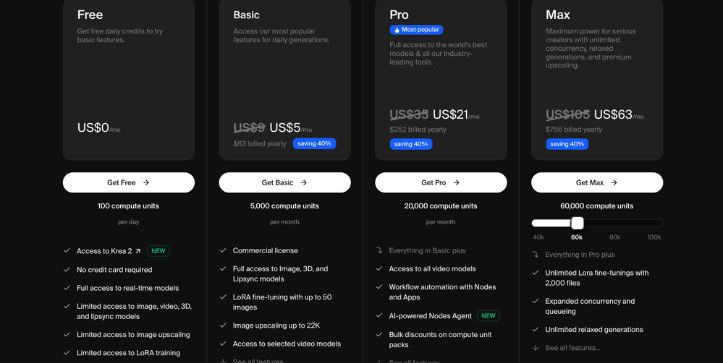
| Plan | Monthly price | Annual price | Compute units | Best for | Key limits / unlocks |
| Free | $0 | $0 | 100 compute units/day | Testing Krea | Limited model access, basic upscaling, limited video, 3D, lipsync, and LoRA access |
| Basic | $9/month | $63/year | 5,000 compute units/month | Beginners and casual creators | Commercial license, full image/3D/lipsync access, LoRA training with up to 50 images, selected video models |
| Pro | $35/month | $252/year | 20,000 compute units/month | Regular creators and designers | All video models, Nodes, Apps, AI-powered Nodes Agent, higher upscaling, bulk compute discounts |
| Max | $105/month | $756/year | 60,000 compute units/month | Heavy daily users | Unlimited relaxed generations, unlimited LoRA fine-tuning, unlimited concurrency, premium upscaling up to 22K |
| Business | $200/month | $1,920/year | 80,000 compute units/month | Teams and agencies | Up to 50 seats, shared workspace controls, private Node Apps, analytics, roles, permissions, model access controls |
| Enterprise | Custom | Custom | Custom compute | Large organizations | SLA, analytics API, custom terms, SSO, spend limits, audit logs, Slack support, custom compute packages |
The monthly price is only half the story. Krea’s real cost depends on how quickly your tasks consume compute units.
For example, simple image generation may not burn through your allowance too fast, but video generation, high-resolution upscaling, LoRA training, and repeated prompt testing can use credits much faster. So before choosing a plan, don’t just ask, “How much does Krea AI cost?” Ask, “How often will I use the heavier tools?”
Also Read:
Top Krea AI Alternatives
Krea AI pricing plans breakdown
Krea AI pricing looks simple at first, with plans ranging from free to custom enterprise pricing. But the real cost depends on how often you generate, which models you use, and how quickly your compute units disappear.
Light image generation may feel affordable, especially if you’re just testing prompts or creating social media visuals. But once you start using video models, high-resolution upscaling, LoRA training, or repeated variations, those compute units can run out much faster than expected.
Free plan: $0/month
The Free plan is made for testing Krea, not serious production. You get 100 compute units per day, which is enough to explore the real-time canvas and try basic AI generation tools, but it won’t stretch far if you’re creating videos or polishing client-ready visuals.
What’s included:
- 100 compute units per day
- No credit card required
- Full access to real-time models
- Limited access to image, video, 3D, and lipsync models
- Basic image upscaling up to 2K
- Limited access to LoRA training
- Community-level access for casual experimentation
Best for:
Creators, designers, students, and curious users who want to test Krea AI before paying.
Pros:
- No financial risk to start.
- Good for learning how Krea’s real-time AI image generation works.
- Daily compute units refresh, so you can keep testing without subscribing.
Cons:
- 100 daily units can disappear quickly once you start experimenting.
- Limited access to advanced image, video, 3D, upscaling, and LoRA tools.
- Not the best option for commercial work or serious content production.
Basic plan: $9/month, or $63/year
Basic is the first paid Krea AI pricing plan and the most affordable option for people who want more than casual testing. It gives you 5,000 compute units per month and unlocks commercial usage, which matters if you’re creating visuals for clients, ads, products, thumbnails, or social media content.
What’s included:
- 5,000 compute units per month
- Commercial license
- Access to Krea 2
- Full access to Image, 3D, and Lipsync models
- Access to models like Krea-1 and Nano Banana Pro
- LoRA fine-tuning with up to 50 images
- Upscale and enhance images up to 4K
- Access to selected video models
Best for:
Beginners, casual creators, freelancers, and small business owners who mainly create images and only need light video access.
Pros:
- Affordable entry point for paid Krea access.
- Commercial license makes it usable for marketing, client work, and brand content.
- 5,000 monthly compute units are enough for light image generation and testing.
Cons:
- Selected video access means you don’t get every video model.
- 5,000 units may feel tight if you generate a lot of variations.
- No monthly credit rollover on individual plans, so unused units can be wasted.
Pro plan: $35/month, or $252/year
Pro is the plan most regular creators will probably look at first. It gives you 20,000 compute units per month and unlocks all video models, which makes it a better fit if you’re using Krea AI for YouTube visuals, ad creatives, short-form video ideas, product content, or design workflows.
What’s included:
- Everything in Basic
- 20,000 compute units per month
- Full access to all video models
- Access to models like Veo3, Sora, Kling, and more
- Workflow automation with Nodes and Apps
- AI-powered Nodes Agent
- Bulk discounts on compute unit packs
- Upscale and enhance images up to 8K
Best for:
Regular creators, designers, marketers, YouTubers, and agencies that need stronger image and video generation tools.
Pros:
- Much better monthly compute allowance than Basic.
- All video models are unlocked, which is a big upgrade if video matters to your workflow.
- Nodes and Apps help you build repeatable creative workflows instead of doing everything manually.
Cons:
- Still uses a compute unit system, so heavy usage can go fast.
- Video generation and high-quality upscaling can make the plan feel smaller than it looks.
- It may be too much if you only need occasional AI images.
Max plan: $105/month, or $756/year
Max is built for people who use Krea AI often, not once in a while. You get 60,000 compute units per month, higher upscaling limits, unlimited relaxed generations, unlimited concurrency, and unlimited LoRA fine-tunings.
What’s included:
- Everything in Pro
- 60,000 compute units per month
- Unlimited LoRA fine-tunings with up to 2,000 files
- Unlimited concurrency
- Unlimited relaxed generations
- Continued generation with in-house image models after compute units run out
- Upscale and enhance images up to 22K
- Access to premium video enhancers
Best for:
Heavy daily users, agencies, AI artists, content teams, and creators who generate lots of variations or work on bigger campaigns.
Pros:
- Much more breathing room for daily creative work.
- Unlimited relaxed generations are helpful when you want to keep experimenting.
- Higher upscaling makes it better for polished visuals, posters, product images, and professional design work.
Cons:
- Expensive for casual creators.
- You still need to understand compute usage, especially for video and premium tools.
- Overkill if you only create a few images or social posts each week.
Business plan: $200/month, or $1,920/year
Business is where Krea AI pricing shifts from individual creators to teams. It starts with 80,000 compute units per month and includes team-focused features like shared workspaces, roles, permissions, model controls, and private Node Apps.
What’s included:
- Everything in Max
- 80,000 compute units per month
- Up to 50 seats included
- Business Terms of Service
- Shared workspace access
- Private Node Apps for your team
- LoRA training with up to 20,000 images
- Unlimited relaxed generations
- Custom user roles and permissions
- Fine-grained controls for model access
- Usage analytics and centralized team management
Best for:
Agencies, marketing teams, design teams, studios, and growing businesses that need shared access without paying per seat.
Pros:
- Up to 50 seats are included, so teams don’t have to pay separately for every user.
- Shared compute makes billing easier for agencies and internal creative teams.
- Roles, permissions, and model controls help manage usage and avoid messy team workflows.
Cons:
- Too expensive for solo users.
- The shared compute pool can still run out if the whole team uses heavy video or upscaling tools.
- Smaller teams may not need the workspace controls enough to justify the price.
Enterprise plan: Custom pricing
Enterprise is for larger companies that need custom security, support, billing, analytics, and usage controls. It’s less about getting a bigger personal plan and more about fitting Krea into a company’s internal creative workflow.
What’s included:
- Everything in Business
- Custom pricing
- Custom Terms of Service
- Priority support with SLA
- Analytics API
- Per-member spend limits
- Slack Connect support
- Custom compute packages
- Audit logs
- Enterprise-level workspace controls
- Custom onboarding and support options
Best for:
Large organizations, enterprise creative teams, agencies with strict client requirements, and companies that need advanced admin, legal, and security controls.
Pros:
- Custom compute packages can match larger team usage.
- Per-member spend limits help prevent surprise overuse.
- Priority support and custom terms make it easier for larger companies to adopt Krea safely.
Cons:
- You need to contact sales.
- Pricing is not publicly fixed.
- It only makes sense if your team has serious volume, security, or admin requirements.
Do Krea Compute Units Roll Over?
Krea compute units don’t roll over the same way on every plan. This is one of the small pricing details that can make a big difference, especially if you’re choosing between Basic, Pro, and Max.
For individual users, Krea’s monthly compute units reset at the end of the billing cycle. So if you pay for Basic, Pro, or Max and don’t use all your units, the leftover amount does not carry into the next month.
The Free plan works differently. It gives you daily compute units, which refill every day. But those daily units don’t stack up if you skip a day. They’re there for testing, experimenting, and light use, not for building a large saved-up balance.
| Plan type | How compute units reset | Do unused units roll over? | What it means in real life |
| Free | Daily | No | Your free daily allowance refreshes, but unused units don’t stack up |
| Basic | Monthly | No | Leftover monthly units expire at the end of the billing cycle |
| Pro | Monthly | No | Good for regular use, but you still need to use your allowance within the month |
| Max | Monthly | No | Higher allowance, but unused individual-plan units still reset |
| Business | Monthly or annual billing | Usually yes | Unused units may roll over depending on the billing setup |
| Enterprise | Custom | Usually yes | Rollover can be customized based on the company agreement |
| Compute packs | One-time purchase | No refresh | Extra units expire after a fixed period |
Here’s the simple version:
- Free credits refill daily.
- Basic, Pro, and Max compute units reset monthly.
- Individual plan units do not roll over.
- Business and Enterprise plans can support rollover.
- Compute packs are separate from your normal plan.
- Purchased compute packs expire after a fixed period.
This matters because Krea AI pricing can look more flexible than it actually is for solo users. If you’re on Pro and only use half your 20,000 compute units, you don’t get to save the rest for a bigger project next month.
That doesn’t mean Pro or Max are bad deals. It just means you should pick a plan based on your normal monthly usage, not based on the idea that unused compute will build up over time.
A good way to think about it:
| If you use Krea like this | Better choice |
| You test prompts once in a while | Free |
| You create light image content every week | Basic |
| You create visuals, videos, and upscales often | Pro |
| You use Krea almost every day for client or brand work | Max |
| Your team shares one creative workspace | Business |
| Your company needs custom controls and billing | Enterprise |
If you’re an individual creator, don’t buy a higher Krea AI pricing tier just because you think unused credits will carry forward. Choose based on realistic monthly usage. If you only create a few AI images per week, Basic may be enough. If you’re using video models, upscaling, and repeated variations every few days, Pro or Max will probably make more sense.
What Happens If You Run Out of Krea Compute Units?
Running out of Krea compute units doesn’t always mean you have to upgrade right away. You have a few options depending on your plan, how urgent your project is, and whether you keep hitting the same limit every month.
| Situation | What you can do | Best if |
| You’re on the Free plan | Wait for the daily reset | You’re only testing Krea casually |
| You’re on Basic, Pro, or Max | Wait for the next monthly reset | You’re near the end of your billing cycle |
| You need more units now | Buy a compute pack | You have a one-time project or busy week |
| You run out every month | Upgrade your plan | Your normal usage is higher than your current plan allows |
| You’re on Business | Buy more compute or adjust the team plan | Your team has a temporary usage spike |
| You’re on Enterprise | Use custom billing or auto top-up options | Your company needs uninterrupted usage |
For Free users, the easiest option is to wait. Your daily compute allowance refreshes, so if you’re just exploring Krea’s real-time AI image generator or testing a few prompts, waiting until the next day may be enough.
For paid users, you can wait until your monthly allowance resets. This works if you only ran out because of one unusually busy project, like a batch of product images, YouTube thumbnails, ad creatives, or AI video tests.
But if you need more units right away, Krea lets paid users buy extra compute packs. These are helpful when you’re in the middle of a project and don’t want to upgrade your whole subscription just to finish a few more generations.
You can also upgrade your plan if running out becomes normal.
For example:
- If you run out on Basic because you keep testing AI video models, Pro is probably a better fit.
- If you run out on Pro because you generate daily client visuals and upscale a lot of images, Max may be easier to manage.
- If multiple people on your team are using the same workspace, Business may be cleaner than separate individual accounts.
- If your company needs strict usage controls, Enterprise is the safer route.
Before upgrading, check what actually used your compute units.
The biggest credit drains are usually:
- AI video generation
- High-resolution image upscaling
- Premium image models
- LoRA training
- Repeated prompt testing
- Batch creation for ads, products, or social media
- Running multiple workflow apps or Nodes
This is where Krea pricing can feel tricky. You may not be using the platform “a lot,” but if the tasks you run are heavy, your units can disappear quickly.
Before upgrading, check which tasks consumed the most units. If video or upscaling is the cause, Pro or Max may be more cost-effective than repeated top-ups.
Krea Compute Packs Explained
Krea compute packs are one-time add-ons that give you extra compute units without changing your monthly subscription.
They’re useful when you run out of credits mid-cycle and still need to keep working. Instead of jumping from Basic to Pro, or Pro to Max, you can buy extra units for a short-term project.
This is helpful if your usage goes up for a few days, but not every month.
| Compute pack detail | How it works |
| Type | One-time add-on |
| Purpose | Gives you extra compute units |
| Best for | Temporary spikes in usage |
| Plan change required? | No |
| Refreshes monthly? | No |
| Expiration | Expires after a fixed period |
| Good for steady usage? | Not usually |
Compute packs make the most sense for short bursts of work.
For example, they can help when you’re:
- Creating a batch of product visuals for a launch
- Testing several AI video ideas for a campaign
- Upscaling images for a client project
- Generating multiple ad creatives
- Making social media content in bulk
- Training a LoRA for a brand style or character
- Finishing a project before your monthly reset
The main benefit is flexibility. You don’t have to permanently move to a more expensive Krea AI plan just because one project needs more credits.
But there’s a catch: compute packs are not meant to replace the right subscription tier. They expire after 90 days, so buying too many can lead to wasted credits if you don’t use them in time.
Here’s a simple comparison:
| Use case | Better option |
| One big project this month | Compute pack |
| Occasional content batch | Compute pack |
| Rare AI video experiment | Compute pack |
| Running out every month | Upgrade plan |
| Daily client work | Pro or Max |
| Team-wide usage | Business |
| Large company workflow | Enterprise |
Compute packs are best for occasional campaign spikes. Upgrade your plan if you need extra compute every month.
A good rule of thumb: if you buy a compute pack once in a while, that’s normal. If you’re buying one almost every billing cycle, your current plan is probably too small.
Krea App Pricing vs Krea API Pricing
Krea’s web app pricing and Krea API pricing are connected to the same platform, but they are not always handled the same way. This is an important section because a lot of Krea AI pricing explainers only talk about the normal app plans and skip the API side completely.
The web app is what most creators use. It’s the browser-based Krea workspace where you generate images, make videos, upscale visuals, train LoRAs, use real-time tools, and experiment with different AI models.
The API is for developers and teams that want to connect Krea’s image, video, or enhancement models to another app, website, automation, or internal workflow.
| Area | Krea web app | Krea API |
| Best for | Creators, designers, marketers, freelancers, agencies | Developers, product teams, automation workflows |
| Main use | Creating inside Krea’s interface | Generating through code or another system |
| Billing style | Subscription compute units | Separate API balance for direct API-token usage |
| Usage control | Managed inside the app | Managed through API balance, keys, and workspace settings |
| Best workflow | Manual creative work | Automated or programmatic generation |
| Technical skill needed | Low | Medium to high |
| Good for teams? | Yes, especially Business and Enterprise | Yes, especially for product and engineering teams |
For most users, the normal Krea app plans are easier to understand. You pick Free, Basic, Pro, Max, Business, or Enterprise, then use your compute units inside the Krea workspace.
This is the better option if you’re:
- Creating AI images for social media
- Designing YouTube thumbnails
- Making ad visuals
- Upscaling product photos
- Testing AI video ideas
- Training custom styles manually
- Using Krea as a creative tool, not a developer platform
Krea API pricing is different because it’s built for programmatic usage. Direct API calls made with an API token use a separate USD API balance. That means developers need to plan API costs separately from normal app usage.
The API is a better fit if you’re:
- Building an app with AI image generation
- Adding AI video generation to a product
- Creating automated design workflows
- Generating visuals at scale
- Connecting Krea to internal tools
- Running production pipelines
- Building client-facing AI features
Here’s where it gets interesting: Krea’s API documentation also mentions that some MCP or account-connected flows may use compute units instead of the separate API balance. So if you’re using the API seriously, don’t guess. Check the billing setup for your exact workflow before scaling.
The simplest way to decide:
| If you want to… | Use this |
| Create visuals inside Krea | Web app plan |
| Make images, videos, and edits manually | Web app plan |
| Use Krea for client creative work | Basic, Pro, Max, or Business |
| Build Krea into your own app | API |
| Generate content automatically | API |
| Control usage through a workspace | Business or Enterprise |
| Manage production billing separately | API balance |
Do not assume your Krea subscription automatically covers every API production workflow in the same way. If you’re building an app, automating creative work, or generating content programmatically, review Krea API billing separately before you scale.
Krea AI Pricing Compared With Alternatives
Krea AI is not the only tool in the AI image and video space, and honestly, that’s why its pricing needs a little context.
Some tools are better for pure image quality. Some are stronger for AI video. Some are easier for beginners. Others give advanced users more control, but also require more setup and patience.
Krea’s main advantage is that it bundles many creative AI models into one browser-based workspace. You can generate images, create videos, upscale visuals, train LoRAs, use real-time generation, test different models, and build creative workflows without jumping between too many tools.
But that doesn’t automatically make it the best choice for everyone.
If you only need one specialized workflow, like premium image generation or advanced AI video, a focused alternative may give you better value.
| Tool | Best for | Pricing model | Where Krea is better | Where the alternative may be better |
| Krea AI | Mixed AI image, video, 3D, upscaling, real-time creation, and LoRA workflows | Compute unit-based subscription plans | Better if you want many creative tools and models in one browser workspace | May feel confusing if you only want simple fixed-output pricing |
| Midjourney | High-quality AI image generation and artistic visuals | Subscription plans with usage limits | Krea offers a broader creative toolkit, including video, upscaling, 3D, lipsync, and real-time tools | Midjourney may be better if image style, quality, and community workflows matter most |
| Leonardo AI | AI image generation, model options, character work, and creative assets | Token-based plans | Krea feels more flexible if you want image, video, upscaling, and workflow tools together | Leonardo may be better if you mainly want image generation with lots of model and asset options |
| Runway | AI video generation, editing, and creative video production | Credit-based plans | Krea may be better if you want video plus image generation, 3D, upscaling, and LoRA in one place | Runway may be better if video editing and AI filmmaking are your main focus |
| Kling / Luma / Veo access | AI video generation and cinematic clips | Usually credit, subscription, or per-generation based | Krea is helpful if you want access to multiple creative models from one workspace | Dedicated video tools may be better if you only care about video quality, motion, or cinematic output |
| Stable Diffusion / ComfyUI | Local control, custom workflows, advanced image and video pipelines | Free/open-source software, but hardware or cloud GPU costs may apply | Krea is much easier for beginners and doesn’t require local setup | ComfyUI is better if you want deep technical control, custom nodes, local models, and self-hosted workflows |
| Adobe Firefly | Brand-safe creative AI inside Adobe’s design ecosystem | Generative credit-based plans and Adobe subscriptions | Krea may feel more experimental and model-flexible for creators testing different visual styles | Firefly is better if you already use Photoshop, Illustrator, Express, or need Adobe’s commercial-friendly ecosystem |
| Canva AI | Simple AI design, social media graphics, templates, and beginner-friendly content creation | Free and paid Canva plans with AI usage allowances | Krea is stronger for AI image/video experimentation and advanced visual generation | Canva is easier if you need quick posts, presentations, brand kits, templates, and non-technical design tools |
The easiest way to think about it is this:
- Choose Krea if you want one creative AI workspace for images, videos, upscaling, 3D, LoRA training, and real-time generation.
- Choose Midjourney if your main goal is beautiful AI images.
- Choose Runway, Kling, Luma, or Veo-based tools if your main focus is AI video.
- Choose Leonardo AI if you want a strong AI image generator with lots of model and asset options.
- Choose ComfyUI if you want full control and don’t mind technical setup.
- Choose Adobe Firefly if you already work inside Adobe apps and care about brand-safe commercial workflows.
- Choose Canva AI if you want fast, simple designs without learning a complex creative tool.
Krea’s pricing makes the most sense when you use more than one part of the platform. For example, if you’re generating social visuals, upscaling product images, testing short video ideas, and training custom styles, Krea can feel like a flexible all-in-one tool.
But if you only need one thing, like AI video clips or polished image generation, you may get more value from a tool that is built mainly for that job.
That’s the real tradeoff with Krea AI pricing. You’re not just paying for one generator. You’re paying for access to a larger creative workspace. Whether that’s worth it depends on how many of those tools you’ll actually use.
Final Recommendation
Krea AI pricing is worth considering if you want one platform for image generation, video creation, upscaling, LoRA training, real-time design, and creative model testing.
But don’t choose a plan only by looking at the monthly price. The better question is how often you’ll use heavier tools like AI video generation, high-resolution upscaling, premium models, and repeated prompt variations.
Here’s the quick plan recommendation:
| User type | Recommended Krea plan | Why |
| Just exploring Krea | Free | You can test the interface and basic tools without paying |
| Beginner or casual creator | Basic | It gives you more monthly compute and commercial usage at a lower cost |
| Freelancer or small business owner | Basic or Pro | Basic works for light image use, while Pro is better for regular creative work |
| Designer, marketer, or content creator | Pro | You get more compute, all video models, better upscaling, Nodes, and Apps |
| AI video creator | Pro or Max | Video usually uses more compute than basic image generation |
| Heavy daily creator | Max | Better for frequent generation, larger projects, and serious production workflows |
| Agency or creative team | Business | Shared workspace, team roles, permissions, analytics, and 50 seats make it easier to manage |
| Large organization | Enterprise | Best for custom terms, security, support, spend limits, and advanced admin needs |
| Developer or product team | API pricing | API usage should be planned separately from normal app usage |
Start with Free if you’re just exploring. It’s the safest way to understand how Krea works before spending money.
Choose Basic if you need commercial image generation on a budget. This plan makes sense for creators, freelancers, and small business owners who mainly need AI images, light visual editing, and occasional experiments.
Choose Pro if you create regularly or need video models. For most serious creators, Pro is the sweet spot because it gives you a bigger compute allowance and unlocks the tools that make Krea feel more complete.
Choose Max if Krea is part of your daily professional workflow. If you’re generating client visuals, campaign assets, AI videos, product images, or lots of variations every day, Max gives you more breathing room.
Choose Business if you manage a team. The value here is not just more compute units. It’s shared workspace access, roles, permissions, analytics, and easier billing for agencies or internal creative teams.
And if you’re building with Krea programmatically, review API pricing separately. Don’t assume your normal Krea subscription automatically covers every production API workflow.
FAQs About Krea AI Pricing
Is Krea AI free?
Yes, Krea AI has a Free plan. It gives you daily compute units so you can test the platform without paying.
The Free plan is best for exploration, not serious production.
How much does Krea AI cost?
Krea AI has Free, Basic, Pro, Max, Business, and Enterprise plans.
The paid plans start with Basic, while Business and Enterprise are designed for teams, agencies, and larger companies that need more usage control.
What are Krea compute units?
Krea compute units are the credits used to run tasks inside Krea.
They are used for things like:
- Image generation
- Video generation
- Upscaling
- Editing
- LoRA training
- 3D generation
- Lipsync tools
Why does Krea use compute units instead of fixed image limits?
Krea uses compute units because different tasks require different amounts of processing power.
A simple image generation may use fewer units, while video generation, premium models, or high-resolution upscaling can use more.
Does Krea AI pricing include video generation?
Yes, Krea includes AI video tools, but access depends on your plan.
Basic includes selected video models, while Pro and higher plans unlock all video models.
Which Krea AI plan is best for beginners?
The Free plan is best if you only want to test Krea.
Basic is better if you’re ready to create usable images, want commercial rights, and don’t need every advanced video model.
Which Krea plan is best for creators?
Pro is usually the best fit for regular creators.
It gives you more compute units than Basic, unlocks all video models, and includes workflow tools like Nodes and Apps.
Is Krea AI worth paying for?
Krea is worth paying for if you use multiple creative tools, not just one.
It makes more sense if you need AI images, video generation, upscaling, LoRA training, and real-time design in one workspace.
Is the Krea Free plan enough?
The Free plan is enough for testing, learning, and casual experimentation.
It is not ideal if you want to create client work, run frequent generations, make videos, or rely on Krea for daily content creation.
Do Krea compute units roll over?
For individual plans like Basic, Pro, and Max, monthly compute units usually reset at the end of the billing cycle.
Business and Enterprise plans may support rollover depending on the billing setup.
What happens if I run out of Krea compute units?
You can wait for your reset, buy extra compute packs, or upgrade your plan.
Free users can wait for the daily reset, while paid users can wait for the next monthly billing cycle.
Can I buy more Krea compute units?
Yes, Krea offers compute packs as one-time add-ons.
These are useful when you need extra compute for a project but don’t want to permanently upgrade your plan.
Do Krea compute packs expire?
Yes, compute packs expire after a fixed period.
They’re best for short-term usage spikes, not for replacing your normal monthly plan.
Why did Krea use my credits so fast?
Your compute units may run out faster if you use heavier tools.
Common credit-heavy tasks include:
- AI video generation
- High-resolution upscaling
- Premium image models
- LoRA training
- Repeated prompt testing
- Batch content creation
Does Krea AI include commercial rights?
Paid Krea plans include commercial usage rights.
If you plan to use Krea visuals for clients, ads, products, thumbnails, or business content, check the plan details before relying on the Free plan.
Is Krea better than Midjourney?
Krea is better if you want a broader creative workspace with image, video, 3D, upscaling, real-time generation, and LoRA tools.
Midjourney may be better if your main priority is high-quality artistic image generation.
Is Krea better than Runway?
Krea is better if you want image and video tools together in one workspace.
Runway may be better if your main focus is AI video production and editing.
Is Krea better than Canva AI?
Krea is stronger for AI image and video experimentation.
Canva AI is easier for beginners who need templates, social posts, presentations, brand kits, and quick designs.
Is Krea better than ComfyUI?
Krea is easier to use because it runs in the browser and doesn’t require technical setup.
ComfyUI is better for advanced users who want deep workflow control, local models, custom nodes, and self-hosted AI generation.
Does Krea API pricing work the same as normal app pricing?
Not always. Krea’s app plans and API usage can be billed differently depending on how you access the platform.
If you’re building an app, automation, or production workflow, review the API pricing and billing rules separately.
Can I cancel Krea AI anytime?
Krea subscriptions are managed through your account billing settings.
Before subscribing, check the latest cancellation and renewal terms on Krea’s pricing or account page so you know how your plan renews.
Is Krea AI good for agencies?
Yes, Krea can work well for agencies that create a lot of visuals, ads, videos, product images, and campaign concepts.
The Business plan is usually a better fit than individual plans because it includes shared workspace features, roles, permissions, analytics, and team controls.
What is the cheapest paid Krea AI plan?
Basic is the cheapest paid Krea AI plan.
It’s best for users who want commercial usage and more monthly compute than the Free plan, without jumping straight to Pro.
Should I choose Basic or Pro?
Choose Basic if you mostly create AI images and use Krea lightly.
Choose Pro if you create regularly, need all video models, use upscaling often, or want workflow tools like Nodes and Apps.
Should I choose Pro or Max?
Choose Pro if you create often but still have moderate usage.
Choose Max if Krea is part of your daily workflow and you regularly generate videos, upscaled images, LoRAs, or large batches of visuals.
What is the biggest hidden cost in Krea AI pricing?
The biggest hidden cost is heavy compute usage.
Video generation, premium models, high-resolution upscaling, and repeated testing can use credits faster than beginners expect.
Can I use Krea AI for YouTube thumbnails?
Yes, Krea can be useful for YouTube thumbnails, especially if you want AI-generated visuals, background ideas, image edits, and upscaled assets.
Basic may be enough for light thumbnail work, while Pro is better if you create content regularly.
Can I use Krea AI for product images?
Yes, Krea can help create, enhance, and upscale product-style visuals.
For serious e-commerce or client work, a paid plan is usually better because you get commercial usage and more compute.
What is the best Krea plan for AI video?
Pro is the better starting point for AI video because it unlocks all video models.
Max is better if you create AI videos often or need more room for daily production work.
Is Krea AI pricing predictable?
Krea pricing is predictable at the subscription level, but usage can feel less predictable because tasks consume different amounts of compute.
If you use mostly light image generation, costs are easier to manage. If you use video and upscaling, you’ll need to watch your usage more closely.



