

If you’re comparing Hailuo AI pricing right now, the plans probably look simple at first glance.
A free plan. Several paid tiers. Monthly credits that increase as you upgrade.
But here’s what the pricing page won’t always make obvious upfront.
Hailuo AI pricing is credit-driven, not just subscription-based.
So your real cost depends on how many videos you generate, what resolution you choose, and how many attempts it takes to get a usable result.
I went through Hailuo AI’s plans, credit system, free limits, watermark rules, and commercial use details to see where the cost actually adds up.
This breakdown covers Hailuo AI pricing clearly — so you know what you’re paying for before you choose a plan.
How Much Does Hailuo AI Cost? Quick Overview
Before getting into the details, here’s a quick look at Hailuo AI’s native monthly plans side by side.
| Plan | Monthly Price | Monthly Credits | Best For |
| Free Trial | $0 | Around 200 trial credits | Testing the platform and trying a few prompts |
| Standard | $9.99/month | 1,000 credits | Casual creators making short AI videos |
| Pro | $34.99/month | 4,500 credits | Regular creators who need more generations |
| Master | $79.99/month | 10,500 credits | Freelancers, agencies, and small content teams |
| Ultra | $124.99/month | 12,000 credits | Heavy users who want more model access |
| Max | $199.99/month | 20,000 credits | Studios and high-volume AI video workflows |
At first, the pricing looks like a normal monthly subscription.
You pick a plan, pay the monthly fee, and get a set number of credits to use for video generation.
But Hailuo AI’s real cost is not only the subscription price. It depends on how quickly you use those credits.
If you generate short 768p clips, your credits will last longer. If you create 1080p videos, test multiple prompts, or make several versions before choosing the final clip, your credits can disappear much faster.
Let me walk you through each Hailuo AI plan so you know what you’re actually getting.
Hailuo AI Pricing Plans — Full Breakdown
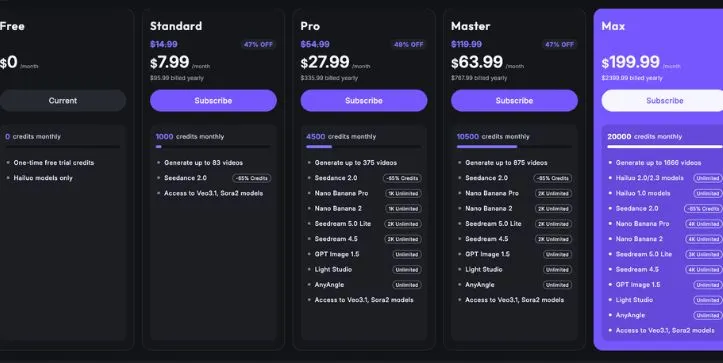
Hailuo AI pricing is built around monthly plans, but the plan price is only one part of the story.
Each paid plan gives you a monthly credit allowance. Those credits are what you spend when you generate AI videos. So even if a plan looks affordable, the real value depends on how many clips you create, how often you regenerate, and whether you’re making quick drafts or polished 1080p videos.
Here’s the full breakdown of Hailuo AI’s free and paid plans.
1. Free Plan
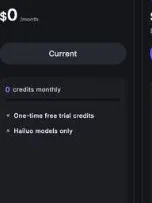
Hailuo AI’s free plan gives you basic access to the platform. It’s useful if you want to test the interface, try a few prompts, and see how Hailuo handles text-to-video or image-to-video generation.
Hailuo AI free plan breakdown
✅ What you get:
- Basic access to Hailuo AI video generation
- Free trial or welcome credits for testing
- Sequential queue access
- Ability to submit a small number of video tasks
- Watermarked video downloads
- A simple way to test prompt quality before paying
❌ Where it falls short:
The free plan is not built for serious content production.
Your videos include a watermark, which makes them harder to use for YouTube, TikTok, Instagram Reels, ads, client work, or brand campaigns.
You also get lower queue priority than paid users. That means your generations may take longer, especially when the platform is busy.
The biggest limit is credits. Free credits are enough for testing, but not enough for a real AI video workflow. If you need to create multiple versions, test camera movements, fix bad outputs, or export clean videos, you’ll hit the limits pretty quickly.
Commercial use is another area to be careful with. Hailuo’s paid terms clearly mention commercial usage rights for content generated and downloaded under paid plans. So if you’re planning to use videos for business, client work, or monetized content, the free plan is better treated as a trial, not a production plan.
My take:
The free plan is good if you just want to see whether Hailuo AI fits your style. Use it to test prompts, check motion quality, and understand the platform. But don’t expect it to handle real content work.
2. Standard Plan — $14.99/month
The Standard plan is Hailuo AI’s entry-level paid plan. This is where the tool starts becoming more useful for casual creators who want clean exports and a little more room to create.
Hailuo AI Standard plan breakdown
✅ What you get:
- 1,000 credits per month
- Access to paid video generation features
- Queue priority compared with free users
- Watermark-free downloads
- Commercial use rights for paid generated and downloaded content
- Access to the newer Hailuo model lineup
- Better workflow for casual short-form video creation
❌ Where it falls short:
1,000 credits can sound like a lot until you start experimenting.
AI video generation usually takes more than one attempt. You may write a prompt, generate a clip, dislike the camera movement, adjust the prompt, generate again, and repeat that process a few times before getting something usable.
That’s where Standard can feel tight.
It works for light use, but it’s not ideal if you’re creating daily short-form videos, client ads, product clips, or multiple 1080p exports. Your subscription credits also expire monthly, so unused credits don’t roll over into the next month.
There’s no real buffer here. If you burn through your credits early, you’ll either wait for the next cycle or buy extra credits.
My take:
The Standard plan makes sense for casual creators who need watermark-free AI videos but don’t generate a lot every week. If you’re testing Hailuo AI for social media content, this is a reasonable first paid plan. Just keep an eye on credit usage.
3. Pro Plan — $54.99/month
The Pro plan is a better fit for creators who use Hailuo AI more regularly. If Standard feels too small, Pro gives you a much larger credit pool without jumping straight into agency-level pricing.
Hailuo AI Pro plan breakdown
✅ What you get:
- 4,500 credits per month
- Watermark-free downloads
- Commercial use rights
- Priority video generation
- More room for prompt testing and revisions
- Better fit for regular short-form content creation
- Paid-user queue benefits
- More practical monthly allowance for creators and freelancers
❌ Where it falls short:
Pro gives you more breathing room, but it’s still credit-based.
If you create AI videos every day, especially in higher resolution, those 4,500 credits can still go faster than expected. The issue is not just the number of final videos you publish. It’s the number of attempts it takes to get those final videos.
For example, if one usable clip takes four or five generations, your real cost per finished video is much higher than it looks at first glance.
Pro also doesn’t remove the need to manage credits carefully. If you treat it like an unlimited AI video generator, you may run into the same problem many creators complain about: the plan feels generous at the start of the month, then suddenly tight by the middle.
My take:
The Pro plan is probably the most practical option for active solo creators, YouTubers, TikTok creators, social media managers, and freelancers. It gives you enough credits to create regularly, but you still need a clear workflow so you’re not wasting credits on vague prompts.
If you’re also considering Kling for similar AI video work, read Kling Pricing Explained before upgrading.
4. Master Plan — $119.99/month
The Master plan is where Hailuo AI starts moving from casual creator use into heavier production. It gives you a bigger monthly credit allowance and makes more sense for people creating videos for clients, campaigns, or frequent publishing schedules.
Hailuo AI Master plan breakdown
✅ What you get:
- 10,000 credits per month
- Watermark-free downloads
- Commercial use rights
- Priority generation
- More room for testing, revisions, and batch production
- Better fit for freelancers, agencies, and small content teams
- Useful for repeated short-form video workflows
- More flexibility for 1080p exports and prompt variations
❌ Where it falls short:
The price jump is noticeable.
At $119.99 per month, Master only makes sense if you’re creating enough videos to justify the extra credits. If you only make a few clips each month, Standard or Pro will probably be easier to justify.
The other issue is rollover. Monthly subscription credits expire, so this plan rewards consistent usage. If you have a busy month, it can be helpful. If you have a quiet month, unused credits may go to waste.
Master is also not the same as unlimited generation. You still have a fixed credit pool, and high-resolution videos or repeated failed attempts can eat into that pool quickly.
My take:
The Master plan works best for creators or small teams that already know they’ll use Hailuo AI every month. If you’re producing client videos, ad creatives, product clips, or regular social content, this plan gives you more space to work. If your usage is unpredictable, be careful.
Need a more production-focused AI video workflow? Compare LTX Studio Pricing Explained before picking a high-volume plan.
5. Ultra Plan — $124.99/month
The Ultra plan is interesting because it sits very close to Master in price, but it gives you extra benefits that matter for heavier Hailuo users.
Hailuo AI Ultra plan breakdown
✅ What you get:
- 12,000 credits per month
- Watermark-free downloads
- Commercial use rights
- Priority generation
- Benefits connected to legacy unlimited access
- More credits than Master
- Useful for heavy creators and production teams
- Better value if your workflow benefits from older Hailuo model access
❌ Where it falls short:
Ultra is not automatically the best plan for everyone.
The extra value depends on how you use Hailuo AI. If you only care about newer model generations, the legacy/unlimited side may not matter much to you. If your workflow depends on older model access, then Ultra becomes much more attractive.
You still need to understand what counts against credits and what doesn’t. Otherwise, it’s easy to assume the plan is more “unlimited” than it really is.
And while Ultra gives you more credits than Master, it’s still a serious monthly subscription. If you’re not creating videos often, you may be paying for capacity you don’t fully use.
My take:
Ultra is best for heavy users who understand Hailuo’s model differences and know they’ll use the extra access. For many creators, Pro or Master will be easier to understand. But for high-volume users, Ultra can be a smart upgrade.
6. Max Plan — $199.99/month
The Max plan is Hailuo AI’s highest native subscription tier. This is the plan for people who generate AI videos at scale and need the biggest monthly allowance.
Hailuo AI Max plan breakdown
✅ What you get:
- 20,000 credits per month
- Watermark-free downloads
- Commercial use rights
- Priority generation
- High-volume AI video workflow support
- Relax Mode benefits after credits run out
- Access to premium Hailuo model usage benefits
- Best fit for studios, agencies, and serious production teams
❌ Where it falls short:
The price is the obvious one.
At $199.99 per month, Max is not a casual creator plan. It only makes sense if you’re producing a lot of videos or if AI video is part of your business workflow.
You should also pay attention to how Relax Mode works. It can help extend usage after your main credits are gone, but it doesn’t mean every generation will always behave the same as credit-based priority generation.
Another thing to watch is account usage. If you’re running a studio or agency, don’t assume one account can be shared freely across a whole team. Hailuo’s terms include account-use restrictions, so teams should be careful about how they manage access.
My take:
The Max plan is for serious volume. If you’re creating AI videos for multiple clients, running ad creative tests, building short-form video batches, or producing content every day, it can make sense. If you’re still experimenting, it’s too much plan too soon.
What About the Legacy Unlimited Plan?
Hailuo also mentions a legacy Unlimited plan at $94.99/month, but it was only available for purchase before June 18, 2025.
That plan is important to know about because you may still see it mentioned in older pricing guides, Reddit posts, or comparison articles. But if you’re a new user today, you should not treat it as a normal plan you can still buy.
The legacy Unlimited plan was mainly tied to unlimited monthly credits for older Hailuo model usage. Newer paid tiers like Ultra and Max now handle high-volume usage differently.
My take:
If you see someone talking about the $94.99 Unlimited plan, check the date of that content. It may be outdated or only relevant to existing users who subscribed before the cutoff.
How Hailuo AI’s Credit System Actually Works
This is the part of Hailuo AI pricing that catches most creators off guard. The monthly fee is just your entry ticket. The credit system is what decides how many AI videos you can actually generate inside the platform.
Here’s how credits usually get consumed:
| Action | Credit Cost |
| Generate a 6-second 768p video | Around 25 credits |
| Generate a 10-second 768p video | Around 50 credits |
| Generate a 6-second 1080p video | Around 80 credits |
| Buy extra credits | $1 for 70 credits |
| Failed or review-rejected generation | Credits are usually refunded |
Now, let’s do some math that actually matters.
On the Standard plan with 1,000 credits per month:
- If you only generate 6-second 768p videos → you get about 40 videos per month
- If you only generate 6-second 1080p videos → you get about 12 videos per month
- In real use, most creators do a mix — so the usable number usually lands somewhere in between
On the Pro plan with 4,500 credits per month:
- 6-second 768p videos only → about 180 videos per month
- 6-second 1080p videos only → about 56 videos per month
- If each usable video takes 4 attempts, that could mean closer to 14 finished 1080p clips
The biggest catch with Hailuo AI pricing?
Subscription credits do not roll over. Whatever credits remain at the end of your monthly billing cycle expire.
So if you have a slow month and barely use the platform, that unused value is gone. And if you have a busy month creating client videos, YouTube Shorts, TikTok clips, product ads, or Instagram Reels, you may run out early and need to buy extra credits.
That’s why the real cost of Hailuo AI is not just “Which plan can I afford?” It’s “How many usable videos can I create before my credits run out?”
Hidden Costs in Hailuo AI Pricing You Should Know
The sticker price is only the beginning. Here are the extra costs and limits that can quietly change what you actually spend on Hailuo AI.
Monthly Credits Expire
Hailuo AI’s subscription credits do not roll over. They’re valid for one month, then they expire at the end of your billing cycle.
Here’s what that means in practice:
| Plan | Monthly Credits | What Happens If You Don’t Use Them? |
| Standard | 1,000 credits | Unused credits expire |
| Pro | 4,500 credits | Unused credits expire |
| Master | 10,000 credits | Unused credits expire |
| Ultra | 12,000 credits | Unused credits expire |
| Max | 20,000 credits | Unused credits expire |
So if you pay for Pro and only use half your credits in a slow month, the leftover credits don’t carry into next month.
That makes Hailuo AI better for creators with consistent video output. If your usage jumps up and down, you may end up wasting credits some months and buying extra credits in others.
Extra Credits Can Add Up
When you run out of credits, Hailuo lets you buy more. Purchased credits cost $1 for 70 credits, which works out to about $0.014 per credit.
That sounds small, but it adds up once you start regenerating clips.
| Extra Credits | Cost | Approx. 6-Second 768p Videos | Approx. 6-Second 1080p Videos |
| 700 credits | $10 | Around 28 videos | Around 8 videos |
| 3,500 credits | $50 | Around 140 videos | Around 43 videos |
| 7,000 credits | $100 | Around 280 videos | Around 87 videos |
| 14,000 credits | $200 | Around 560 videos | Around 175 videos |
The real issue is not one generation. It’s the testing.
If one 1080p clip takes five attempts before it looks right, you may burn around 400 credits on one usable video. At the purchased credit rate, that’s roughly $5.71 in credits for a single final clip.
For creators making YouTube Shorts, TikTok videos, product ads, or client content, that can change the math quickly.
Failed Prompts Are the Real Budget Killer
Hailuo AI does refund credits when a generation fails or doesn’t pass the review process. That part is helpful.
But bad outputs are different.
If the video technically generates, but the motion looks awkward, the face changes, the camera movement feels wrong, or the result just doesn’t match your prompt, those credits are usually still spent.
That’s where most creators lose money.
| Scenario | Credit Impact |
| 1 clean 768p test video | Around 25 credits |
| 4 attempts for one usable 768p clip | Around 100 credits |
| 1 clean 1080p video | Around 80 credits |
| 5 attempts for one usable 1080p clip | Around 400 credits |
So when you calculate Hailuo AI pricing, don’t only count final videos. Count the attempts it takes to get those final videos.
A plan that looks like it can create 50 videos may feel more like 10 to 15 usable videos once you include prompt testing and revisions.
Still comparing retry costs across AI video tools? Check my Vidu vs Kling comparison for another real-world credit breakdown.
Taxes and VAT May Increase the Final Price
The plan price you see is not always the final amount you pay.
Hailuo AI says sales tax or VAT may apply based on your billing location. The final amount is calculated during checkout.
So a $54.99/month Pro plan may cost more after tax, depending on your country or region.
This matters more for agencies, freelancers, and business users who need clean invoices. If you’re buying Hailuo AI for work, check the final checkout amount before you add it to your monthly tool budget.
Refunds Are Limited
Hailuo’s cancellation policy is another thing to watch.
You can cancel your paid service during the billing cycle, but the cancellation takes effect at the start of the next billing cycle. Payments already made are not refunded.
That means if you subscribe, test the tool for a few days, and decide it’s not for you, you should not expect a partial refund for the unused part of the month.
For casual users, this makes the free plan more important. Test the tool first. See how many attempts your prompts usually need. Then upgrade when you’re sure the workflow fits.
Account Sharing Is Not a Shortcut
If you’re thinking about using one Hailuo AI account across a whole team, be careful.
Hailuo’s terms restrict third-party account access and shared login use. The platform may also limit devices or concurrent sessions under one account.
That means a studio, agency, or content team should not treat Max as a simple “one account for everyone” plan.
Real-world scenario: A small agency on the Max plan may pay $199.99/month for 20,000 credits, then still need to manage who uses the account, how credits are spent, and whether extra credits are needed during busy client months.
The hidden cost is not just money. It’s credit control.
How to Save Credits on Hailuo AI
Hailuo AI credits can run out quickly if you generate every idea at full quality. The trick is to treat your first few generations like drafts, not final exports.
Test Prompts at Lower Resolution First
Start with 768p drafts before moving to 1080p.
This helps you test the idea, camera movement, subject, and scene without spending more credits than needed. Once the motion looks right, then export the cleaner version.
Use Image-to-Video for More Control
Text-to-video is useful, but it can be unpredictable.
If you already have a strong image, use image-to-video instead. A good starting image gives Hailuo AI a clearer visual direction, which can reduce failed attempts and weird results.
This is especially helpful for product shots, character scenes, fashion clips, thumbnails, and branded visuals.
Write More Specific Prompts
Vague prompts usually lead to vague videos.
A better Hailuo AI prompt should include:
- Subject
- Action
- Camera movement
- Scene
- Lighting
- Style
- Duration goal
For example, don’t just describe what you want. Describe how the camera should move, what the subject is doing, and what the final clip should feel like.
Avoid Burning Credits on Vague Prompts
Weak prompts waste credits because they give the AI too much room to guess.
Examples of weak prompts:
- “Make this cinematic”
- “Create a cool video”
- “Animate this image”
A stronger prompt would be:
“Slow dolly-in shot of a futuristic motorcycle parked under neon rain, reflections on wet pavement, cinematic lighting, shallow depth of field.”
That prompt gives Hailuo AI a subject, mood, scene, lighting, and camera direction. Much better.
Track Cost Per Usable Clip
Don’t only track how many videos you generate. Track how many videos you actually keep.
Use a simple note like this:
- Credits spent
- Attempts made
- Final clips kept
- Real cost per usable video
This shows you the real cost of Hailuo AI. A clip that takes five attempts is not one video cost. It’s five generations worth of credits.
Hailuo AI Pricing vs Alternatives
Hailuo AI is not the only AI video generator for creators. Here’s how it compares with a few popular options.
Hailuo AI vs Kling
Kling is strong for cinematic motion, realistic scenes, and human subject quality. It’s a good choice if you care most about polished movement and dramatic visuals.
Hailuo AI is usually easier to approach for quick short-form video creation. It works well for creators testing text-to-video and image-to-video ideas without building a complex workflow.
Choose Hailuo if you want fast creator-friendly video generation. Choose Kling if motion realism is your main priority.
Want to see how Hailuo compares with Kling on quality, credits, and real use? Read my Kling vs Hailuo comparison.
Hailuo AI vs Runway
Runway feels more like a professional AI video workspace.
It gives you more editing tools, stronger workflow control, and a broader creative ecosystem. That makes it better for filmmakers, video editors, and teams that want more than simple generation.
Hailuo AI is simpler. It’s better if you mainly want to generate short AI clips without learning a full editing platform.
Choose Hailuo for quick AI video creation. Choose Runway if you want more control and editing depth.
If Hailuo still feels too limited, compare the Best Hailuo AI Alternatives before paying.
Hailuo AI vs Veo
Veo is Google’s high-end AI video model, and its biggest strength is realism. Veo 3 also supports native audio, which makes it more advanced for scenes that need sound, dialogue, or a more complete video feel.
The downside is access. Veo is tied to Google’s AI ecosystem and may not feel as simple or flexible for every creator.
Hailuo AI is easier to understand as a direct AI video generator with clear monthly plans and credits.
Choose Veo for realism and audio-capable video. Choose Hailuo for simpler short-form video workflows.
Hailuo AI vs Open-Source Options
Open-source AI video tools can be cheaper if you already have the hardware and technical skills.
The trade-off is setup time. You may need a powerful GPU, model downloads, local installation, and manual tweaking. That’s not ideal if you just want to create videos quickly.
Hailuo AI costs more over time, but it removes most of the setup work.
Choose open-source if you want control, privacy, and lower long-term cost. Choose Hailuo if you want a ready-to-use AI video maker without technical setup.
My Final Thoughts
Hailuo AI pricing is not hard to understand once you stop looking at it like a normal monthly subscription.
The real question is not just, “How much is the plan?” It’s, “How many usable videos can I create with the credits I get?”
That’s where most creators need to be careful.
If you only want to test text-to-video or image-to-video prompts, the free plan is enough to get a feel for the platform. But if you want clean exports, commercial use, faster queues, and watermark-free videos, you’ll need a paid plan.
For most solo creators, the Pro plan is the safest middle ground. It gives you more breathing room than Standard without jumping straight into studio-level pricing.
Standard is fine for light use. Master and Ultra make more sense for freelancers, agencies, and small teams. Max is only worth it if you’re producing AI videos at serious volume.
My advice is simple: don’t choose based on the monthly price alone.
Estimate how many final videos you need each month, then multiply that by how many attempts each video usually takes. That number will tell you which Hailuo AI plan actually fits your workflow.
FAQ’s
How much does Hailuo AI cost?
Hailuo AI has a free plan and several paid plans. Depending on the pricing page, region, or offer, paid plans may start around the entry-level creator tier and go up to high-volume plans near $199.99/month.
The safest move is to check your own Hailuo AI dashboard before paying, because public pricing pages and promotional offers can differ.
Is Hailuo AI free?
Yes, Hailuo AI offers free access for testing.
The free plan is best for trying prompts, checking video quality, and learning how the platform works. It’s not the best choice for client work, brand videos, or serious content production.
Why do different websites show different Hailuo AI prices?
Different websites may show different Hailuo AI prices because of:
- Promotional pricing
- Older pricing pages
- Regional pricing differences
- Billing page changes
- Plan restructuring over time
Use pricing guides for comparison, but always trust the final checkout page before subscribing.
How do Hailuo AI credits work?
Credits are the currency you use to generate AI videos inside Hailuo AI.
Your plan gives you a monthly credit allowance. Every video generation uses credits based on things like duration, resolution, model, and settings.
How many credits does one Hailuo AI video use?
It depends on the video type.
A short 768p video usually costs fewer credits than a 1080p video. Longer videos, higher-quality exports, and newer models can cost more.
That’s why it’s smart to test ideas at a lower resolution before creating final versions.
Do Hailuo AI credits roll over?
Subscription credits usually do not roll over.
If you don’t use your monthly credits before the billing cycle ends, they expire. This is one of the biggest things to watch before choosing a larger plan.
Can I buy extra Hailuo AI credits?
Yes, Hailuo AI allows users to buy extra credits when they run out.
This helps during busy months, but it can also raise your real monthly cost if you rely on top-ups too often.
Does Hailuo AI remove watermarks on paid plans?
Yes, paid Hailuo AI plans generally allow watermark-free downloads.
The free plan is better for testing because free outputs may include a watermark, which is not ideal for professional videos, ads, or client projects.
Can I use Hailuo AI videos commercially?
Paid plans generally include commercial usage rights for videos generated and downloaded under the paid service.
If you’re using Hailuo AI for client work, YouTube monetization, ads, or brand campaigns, check the latest terms before publishing.
Which Hailuo AI plan is best for beginners?
The free plan is best if you only want to test the platform.
The Standard plan is better if you want watermark-free videos and commercial rights without spending too much.
Which Hailuo AI plan is best for YouTube Shorts, TikTok, and Reels?
The Pro plan is usually the better fit for active short-form creators.
It gives you more credits than Standard, so you have more room to test prompts, create variations, and produce content regularly.
Is the Hailuo AI Standard plan worth it?
Standard is worth it if you create videos occasionally and don’t need a huge credit pool.
Skip it if you plan to generate videos every day. You may run through the credits too quickly.
Is the Hailuo AI Pro plan worth it?
Yes, Pro is likely the best value for many solo creators and freelancers.
It gives you more room for testing, better output volume, and a more realistic workflow for regular AI video creation.
Is Hailuo AI good for agencies?
Yes, but agencies should be careful with credit usage.
Master, Ultra, or Max can work well for agencies producing client videos, product clips, ad creatives, or social media content. The key is tracking credits per usable final video.
What happens if I run out of Hailuo AI credits?
You’ll either need to wait for your next monthly credit refresh or buy extra credits.
If you run out often, that’s a sign your current plan may be too small for your workflow.
Are failed Hailuo AI generations refunded?
Hailuo AI may refund credits for failed or review-rejected generations.
But if the video generates successfully and you simply don’t like the result, those credits may still be spent. That’s why strong prompts matter.
Is Hailuo AI cheaper than Runway or Kling?
Hailuo AI can feel more affordable for quick short-form video generation, especially if you only need simple text-to-video or image-to-video clips.
Runway may offer more professional editing control. Kling may be stronger for certain motion and realism needs. The best choice depends on whether you care more about price, control, or output quality.
Is Hailuo AI worth paying for?
Hailuo AI is worth paying for if you create short AI videos regularly and need watermark-free commercial exports.
It may not be worth it if you only want to experiment once in a while, need long-form video, or don’t like managing credits.
How can I reduce my Hailuo AI cost?
The easiest way is to waste fewer generations.
Start with 768p drafts, use image-to-video when possible, write specific prompts, and track how many attempts each final clip takes. The fewer failed attempts you make, the cheaper Hailuo AI becomes.



