MagicLight AI pricing looks straightforward at first, but the subscription price only tells part of the story. After going through its current plans, the bigger thing I’d pay attention to is how many credits you receive, how quickly video generation can use them, and whether paying annually makes sense for your workflow.
MagicLight AI pricing plans: At a glance
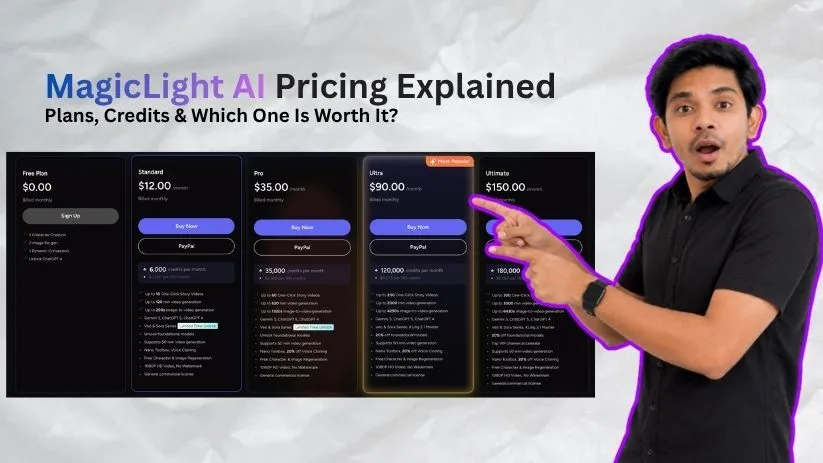
MagicLight AI uses a credit-based subscription model with a free option and four main paid plans. You can pay monthly or choose annual billing, which is currently advertised at a significantly lower effective monthly price.
Here’s the quick breakdown based on the pricing displayed on MagicLight’s main plan cards:
| Plan | Monthly price | Annual effective price | Credits per month | Best for |
| Free | $0 | $0 | Limited free usage | Trying MagicLight |
| Standard | $12 | $6/month | 7,000 | Occasional creators |
| Pro | $35 | $17.50/month | 45,000 | Regular content creators |
| Ultra | $90 | $45/month | 150,000 | High-volume creators |
| Ultimate | $150 | $75/month | 280,000 | Agencies and power users |
One thing worth knowing before you subscribe: MagicLight’s pricing page currently shows slightly different credit figures in different parts of the page. The main pricing cards and the detailed comparison table don’t completely match, so I’d confirm the exact credit allowance at checkout before paying for an annual subscription.
Still comparing AI storytelling tools? Check out my MagicLight AI alternatives guide before choosing a plan.
MagicLight AI pricing plans breakdown
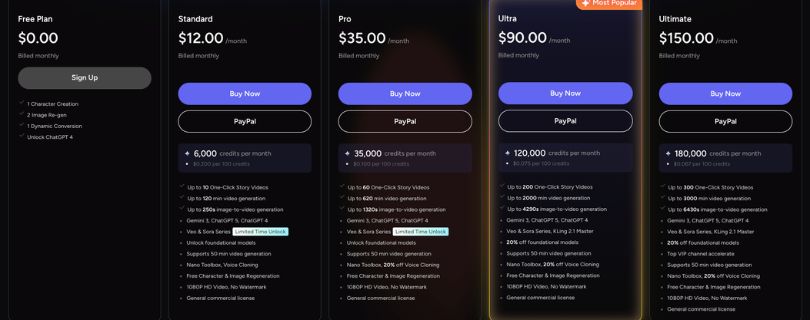
The differences between the MagicLight AI pricing plans aren’t just about video quality. Paid tiers mainly increase your monthly credit allowance, generation volume, and access to higher-volume production features.
For the breakdown below, I’m using the figures shown on MagicLight’s primary pricing cards.
Free plan: $0
MagicLight’s free plan is mainly a way to see whether you like the workflow before spending anything. You can test character creation and some basic generation features without entering a credit card.
What’s included:
- 1 character creation
- 2 image regenerations
- 1 dynamic conversion
- ChatGPT 4 access
- No paid subscription required
Best for: Anyone who wants to test the interface and create a small sample before subscribing.
Pros:
- Costs nothing to start
- Lets you understand the basic workflow
- Useful before committing to annual billing
Cons:
- Very limited generation capacity
- Not enough for regular video production
Some MagicLight pages have also referenced starter credits for new users, but the current main pricing card focuses more on specific free actions than a fixed monthly credit allowance. I’d treat the free plan as a trial rather than something designed for ongoing content creation.
Standard plan: $12/month
The MagicLight AI Standard plan is the first tier that feels suitable for actual content production. It currently costs $12 per month, or around $6 per month when you take the advertised annual offer.
You get about 7,000 credits per month, along with access to HD output and commercial-use features.
What’s included:
- 7,000 monthly credits
- Up to 10 one-click story videos
- Up to 130 minutes of advertised video generation
- Around 290 seconds of image-to-video generation
- 1080p HD export
- No watermark
- Commercial usage rights
- Voice cloning and Nano Toolbox access
Best for: Casual creators, beginners, and people producing a few AI story videos each month.
Pros:
- Cheapest useful paid MagicLight AI subscription
- Large step up from the free plan
- Includes commercial usage and watermark-free exports
- Reasonable option for testing a real publishing workflow
Cons:
- 7,000 credits can disappear quickly if you regenerate scenes repeatedly
- May feel restrictive for frequent long-form video creation
The Standard plan makes the most sense if you’re still figuring out how often you’ll use MagicLight. I wouldn’t jump straight into a higher tier until you know roughly how many credits your typical project consumes.
If you’re also considering prompt-to-video platforms that handle more of the editing process for you, read my InVideo AI pricing explained guide.
Pro plan: $35/month
For most regular creators, the MagicLight AI Pro plan is where the pricing becomes more interesting. It costs $35 per month, while the current annual offer brings the effective rate down to about $17.50 per month.
The biggest difference is the jump to 45,000 monthly credits, which gives you much more breathing room for longer stories, revisions, and repeated generations.
What’s included:
- 45,000 monthly credits
- Up to 80 one-click story videos
- Up to 780 minutes of advertised video generation
- Around 1,680 seconds of image-to-video generation
- 1080p HD exports
- No watermark
- Commercial usage rights
- Discounted voice-cloning usage
Best for: YouTube creators, storytellers, and anyone producing AI videos several times per week.
Pros:
- Much larger credit allowance than Standard
- Better value for regular creators
- More room for revisions and experimentation
- Suitable for an established content schedule
Cons:
- Still uses a credit system, so inefficient generations cost you
- Annual billing only makes sense if you already know you’ll keep using the platform
For me, Pro looks like the most practical middle ground in the MagicLight AI pricing lineup. Standard is easier to test, but Pro gives active creators enough credits that every regeneration doesn’t feel like a major decision.
Comparing MagicLight with more cinematic AI video generators? My Runway pricing explained guide shows what you get when you move toward a more shot-focused workflow.
Ultra plan: $90/month
The MagicLight AI Ultra plan is built for creators who already know they will use the platform heavily. It costs $90 per month, while the current annual offer brings the effective price down to about $45 per month.
You get 150,000 credits per month, which is a major jump from Pro and gives you much more room for long-form videos, repeated scenes, and higher-volume production.
What’s included:
- 150,000 monthly credits
- Up to 250 one-click story videos
- Up to 2,500 minutes of advertised video generation
- Access to premium generation models
- 1080p HD exports
- No watermark
- Commercial usage rights
- 20% discount on selected foundational models
- 20% voice-cloning discount
Best for: High-volume YouTube creators, small content teams, and businesses producing AI videos regularly.
Pros:
- Much larger monthly credit pool
- Better suited to frequent long-form production
- Lower effective credit cost than smaller plans
- Discounts can matter if you use premium models often
Cons:
- Expensive if you aren’t generating consistently
- A large credit allowance doesn’t help much if your workflow still requires lots of failed regenerations
I wouldn’t choose Ultra just because the per-credit value looks better. It makes more sense once you’ve used Standard or Pro long enough to know that your normal production schedule regularly pushes against those limits.
Ultimate plan: $150/month
Ultimate sits at the top of MagicLight’s main pricing cards. It costs $150 per month, or about $75 per month on the currently advertised annual deal, and the main card lists 280,000 monthly credits.
That makes it a plan for production volume rather than casual experimentation.
What’s included:
- 280,000 credits per month on the main pricing card
- Up to 370 one-click story videos
- Up to 3,670 minutes of advertised generation
- 1080p HD output
- No watermark
- Commercial usage rights
- Premium-model access
- VIP acceleration
- Lower effective credit cost at higher usage
Best for: Agencies, studios, and creators running a serious high-volume AI video workflow.
Pros:
- Highest advertised credit allowance
- Better suited to continuous production
- Priority-style processing benefits
- Stronger value per credit for genuine power users
Cons:
- $150 monthly is difficult to justify for most individual creators
- MagicLight’s pricing page currently shows conflicting figures for its highest tier
That last point is worth paying attention to. The main pricing card lists Ultimate with 280,000 credits, while another comparison area on MagicLight’s pricing page has shown a different top-tier name and credit allowance.
If you’re considering the highest plan, I’d verify the exact credits and plan name shown at checkout before paying annually.
Need high-volume AI video generation but want more control over individual shots? Compare the costs in my Runway pricing explained guide first.
How credits work in MagicLight AI
The subscription price is easy to compare, but MagicLight AI credits are what really determine how much usable video you get for your money.
Different generations don’t necessarily consume the same amount. MagicLight says credit usage can vary depending on factors such as the length of your video, its complexity, resolution, and the generation process you choose.
That means 45,000 credits shouldn’t automatically be translated into one fixed number of finished videos.
Why some generations cost more credits
Simple scenes generally require fewer resources than more complex generations. Longer videos, higher-resolution output, premium models, and repeated attempts can all increase how quickly you work through your allowance.
The part I’d watch most closely is regeneration.
A first attempt rarely means a finished scene. If a character looks wrong, movement feels unnatural, or your prompt doesn’t produce the result you expected, another generation means more credit usage.
That’s why the real cost of a project can be higher than the advertised “up to” generation estimates.
If you’re comparing how other dedicated video models handle usage, my Kling pricing explained guide breaks down another popular credit-based option.
You can also see my Hailuo AI pricing explained guide if you’re comparing MagicLight with another AI video generator before subscribing.
What happens when you run low on credits?
The easiest way to protect your monthly allowance is to avoid testing a complicated idea as one large project.
I’d start with a short scene, make sure the character style and motion are going in the right direction, and only then expand it into a longer video.
A few practical ways to stretch your MagicLight AI credits are:
- Test prompts on short scenes first
- Avoid regenerating an entire project for one bad shot
- Finalize character and visual direction early
- Use expensive models only where the quality difference matters
- Keep an eye on the credit cost before confirming a generation
MagicLight also offers additional credit purchasing options through some platforms, but availability and prices can vary. I wouldn’t build a monthly budget around top-ups until you can see the exact cost available in your account.
Monthly vs annual billing
MagicLight currently promotes annual plans at roughly 50% below the normal monthly rate, which makes the yearly prices look much more attractive.
For example, Standard drops from $12 to an effective $6 per month, while Pro drops from $35 to about $17.50 per month.
The catch is simple: you’re committing for a longer period.
I’d use the free plan or pay monthly first. Once you know how many credits a normal project consumes and you’re confident you’ll keep using MagicLight, the annual subscription becomes much easier to justify.
Which MagicLight AI plan should you choose?
The best MagicLight AI pricing plan depends less on the number of features and more on how frequently you generate videos.
Choose Free if you:
- Haven’t tried MagicLight before
- Want to understand the workflow
- Only need a quick test before paying
Choose Standard if you:
- Create videos occasionally
- Want the lowest-cost paid plan
- Are still measuring your normal credit consumption
Choose Pro if you:
- Publish AI videos regularly
- Need more room for revisions
- Create longer story-based content
- Want a better balance between price and credits
For most active individual creators, Pro is the plan I’d look at first. It gives you significantly more breathing room than Standard without making the jump to a $90 monthly subscription.
Choose Ultra or Ultimate if you:
- Generate videos at high volume
- Run multiple projects every month
- Work as a team or agency
- Already know how many credits your workflow consumes
- Can actually use the extra capacity
I wouldn’t start at Ultra or Ultimate simply because their cost per credit is lower. Higher-volume pricing only saves money when you actually use the volume.
Still unsure whether MagicLight gives you enough generation value for the price? Compare it with my Vidu AI pricing explained guide.
Is MagicLight AI worth the cost?
MagicLight can be good value if you want to turn scripts or ideas into longer story-driven videos without assembling every scene, voiceover, and character manually.
Its biggest advantage isn’t necessarily having the cheapest AI generation. It’s having several parts of the storytelling workflow inside one platform.
MagicLight is worth considering if you:
- Create story-based or long-form AI videos
- Need recurring characters across scenes
- Publish YouTube stories, explainers, or similar content
- Prefer an all-in-one generation workflow
- Can test prompts before spending heavily on longer generations
For those users, Pro in particular looks like the strongest balance between monthly cost and usable generation capacity.
Skip MagicLight if you:
- Mainly create short cinematic clips
- Want precise shot-by-shot creative control
- Need highly predictable generation costs
- Frequently regenerate outputs until they’re perfect
- Don’t create enough videos to use a large monthly credit allowance
Credit-based pricing can feel inexpensive when the first result works. It feels very different when a scene needs four or five attempts.
That’s why I’d judge MagicLight based on the cost of a finished usable video, not simply the number of credits advertised on the pricing page.
Not sure MagicLight is the right fit for your workflow? Check my best AI video generator tools guide to compare more options before choosing a subscription.
MagicLight AI alternatives & pricing comparison
MagicLight makes the most sense when you want to turn a story or script into a more complete video workflow. But if you mainly care about cinematic shots, model choice, or tighter production control, other AI video tools may fit better.
Here’s a quick comparison:
| Tool | Starting paid price | Best for | Main advantage |
| MagicLight AI | $12/month | Story-driven videos | Longer all-in-one storytelling workflow |
| Runway | $15/month | Cinematic AI video | More shot-level control |
| Kling AI | From $6.99/month promotional pricing | Realistic AI video clips | Strong dedicated video-generation models |
| LTX Studio | $15/month | Storyboarding and production | More control over scenes and workflows |
| InVideo AI | From $17/month billed annually | Prompt-to-complete video | Combines generation with broader video creation |
Runway’s Standard plan is currently $15 per month, while LTX Studio’s first paid tier starts at $15 monthly. InVideo currently advertises Plus from $17 per month when billed annually, and Kling’s own pricing material shows promotional entry pricing that can change at renewal.
I wouldn’t choose between these tools purely by the lowest subscription price. Their credit systems, generation models, and intended workflows are different enough that the cheaper plan isn’t automatically the cheaper way to finish a video.
If you want more storyboarding and scene control before generation, my LTX Studio pricing explained guide breaks down that option in more detail.
For creators who want to explore another flexible image-and-video workflow, you can also read my Krea AI review.
And if you’re looking for a simpler alternative focused heavily on AI video creation, my Deevid AI review is worth comparing too.
MagicLight AI vs Runway: Which should you choose?
MagicLight AI and Runway can both generate AI video, but I wouldn’t treat them as interchangeable tools.
Choose MagicLight AI if you want:
- Longer story-based videos
- Recurring characters across scenes
- Script-to-video automation
- Voiceovers and storytelling features in one workflow
- Less manual assembly between scenes
Choose Runway if you want:
- More control over individual shots
- Cinematic short-form generations
- More experimentation with camera movement and visual direction
- Access to a broader creative generation workspace
Runway’s current plans also use credits, and its Standard tier includes 625 monthly credits while higher tiers provide larger allowances. That makes credit efficiency important on both platforms, even though the credits themselves aren’t directly comparable.
For me, the decision comes down to workflow rather than price. MagicLight is more appealing if your goal is assembling a complete story, while Runway makes more sense when individual generated shots and creative control matter more.
If Runway sounds closer to the way you create, check out my Runway alternatives guide before deciding.
My bottom line on MagicLight AI pricing
The subscription price isn’t the biggest thing I’d worry about with MagicLight AI pricing. Credit predictability matters more.
Standard is a sensible place to test a real publishing workflow, while Pro looks like the strongest option for creators who generate videos regularly. I would only move to Ultra or Ultimate after knowing how many credits my normal projects actually consume.
The annual discount makes the paid plans look much cheaper, but I wouldn’t lock in a full year immediately. Test MagicLight first, track how often you regenerate scenes, and then decide whether the annual savings justify the commitment.
I’d also double-check the exact credit allowance shown at checkout because MagicLight’s current pricing page has displayed inconsistent figures between its main plan cards and comparison section.
Still comparing long-form and cinematic AI video tools? Read my Luma Dream Machine pricing explained guide before choosing your subscription.
Frequently asked questions
Is MagicLight AI free?
Yes. MagicLight AI has a free option that lets you test parts of the platform before paying. The current pricing card focuses on limited free actions, while some MagicLight pages have also referenced starter credits for new users.
I would treat the free version as a trial rather than a plan for ongoing video production.
How much does MagicLight AI cost per month?
The current MagicLight AI pricing plans start at $12 per month for Standard. Pro costs $35, Ultra costs $90, and Ultimate costs $150 per month.
MagicLight currently advertises lower effective monthly rates when you choose annual billing.
How many credits do you get with MagicLight AI?
The main pricing cards currently list 7,000 credits for Standard, 45,000 for Pro, 150,000 for Ultra, and 280,000 for Ultimate.
Because another area of MagicLight’s pricing page has displayed slightly different numbers, I’d verify the allowance shown during checkout before subscribing.
Does MagicLight AI offer an annual discount?
Yes. MagicLight currently promotes annual billing at roughly 50% below its regular monthly pricing, bringing Standard to an effective $6 per month and Pro to about $17.50 per month.
Since this is presented as promotional pricing, I wouldn’t assume the discount will remain available permanently.
Which MagicLight AI plan is best?
For beginners, I’d start with Free and then move to Standard once you’re ready to publish regularly.
For active creators, Pro is the MagicLight AI plan I’d consider first because its 45,000-credit allowance gives you much more room for revisions without jumping to Ultra’s $90 monthly price.
Ultra and Ultimate make more sense once you’re producing enough content to actually use their larger credit pools.