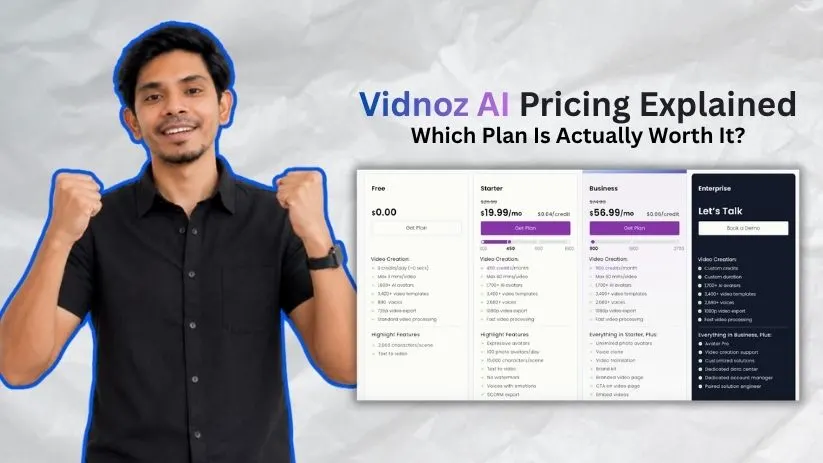
At first glance, Vidnoz AI pricing looks straightforward: use the free plan, pay for Starter or Business, or contact sales for Enterprise.
But the monthly price only tells part of the story. Vidnoz also uses credits, yearly discounts, feature restrictions, and separate add-ons, so what you actually pay depends heavily on how you create videos.
In this guide, I’ll break down the Vidnoz pricing plans, what you get at each level, and where the limits start to matter.
Want to know how Vidnoz performs beyond pricing? Read my complete Vidnoz AI review.
Vidnoz AI pricing plans: At a glance
Vidnoz currently has four main plans: Free, Starter, Business, and Enterprise. The free tier is enough to test the platform, while paid plans increase your credits, export quality, video length, and access to business features.
Here’s the quick version:
| Plan | Price | Video allowance | Best for |
| Free | $0 | Daily credits; max 3 mins/video | Testing Vidnoz |
| Starter | $26.99/month | 450 credits/month, roughly 15 standard video minutes | Solo creators |
| Business | $74.99/month | 900 credits/month, roughly 30 standard video minutes | Teams and businesses |
| Enterprise | Custom | Custom credits and duration | Large organizations |
Starter drops to about $19.99/month when billed yearly, while Business is around $56.99/month annually. Vidnoz currently advertises roughly 25% savings with annual billing, though promotions can change.
One thing worth remembering: those estimated video minutes assume standard generation. Some advanced Vidnoz features consume credits faster, which I’ll explain later.
Not sure Vidnoz is the right tool? Check my Vidnoz AI alternatives before paying for a plan.
Vidnoz AI pricing plans breakdown
The difference between the plans isn’t just how many videos you can make. Resolution, watermark removal, voice tools, branding, collaboration, and advanced avatars also change as you move up.
Free plan: $0/month
The Vidnoz AI free plan is useful if you want to see how its avatars, voices, templates, and editor work before entering a credit card.
You get access to a large portion of Vidnoz’s content library, including 1,800+ AI avatars, 3,200+ templates, and hundreds of voices. Videos can be up to three minutes long and export at 720p.
What’s included:
- Daily video-generation credits
- Up to 3 minutes per video
- 1,800+ AI avatars
- 3,200+ templates
- 890 voices
- 720p exports
- Text-to-video tools
- Standard processing
Best for: Testing Vidnoz, making occasional short videos, and deciding whether the paid features are worth it.
The main downsides are the lower export resolution and Vidnoz branding. If you’re publishing videos for clients or a business, you’ll probably outgrow Free fairly quickly.
If you’re still exploring the category, my guide to the best AI video generator tools gives you a broader look at what’s available.
Starter plan: $26.99/month
Starter is where Vidnoz AI pricing starts making more sense for regular creators.
You get 450 monthly credits, 1080p exports, faster processing, no Vidnoz watermark, and videos up to 60 minutes long. Vidnoz also expands the voice library and raises the script limit to 15,000 characters per scene.
What’s included:
- 450 credits per month
- Up to 60 minutes per video
- 1,900+ AI avatars
- 3,200+ templates
- 2,660+ voices
- 1080p export
- No watermark
- Faster processing
- Emotional voices
- SCORM export
Best for: YouTubers, educators, solo marketers, and creators who regularly publish avatar-led videos.
At $19.99/month on annual billing, Starter is the plan I’d look at first if you mainly need clean 1080p videos without business collaboration features.
For comparison, you can also see how a more premium avatar platform performs in my HeyGen review.
Business plan: $74.99/month
The Vidnoz Business plan isn’t simply Starter with more credits.
You get 900 monthly credits plus features aimed at recurring business production, including voice cloning, video translation, a brand kit, team collaboration, SAML/SSO, branded video pages, and video analytics.
What’s included:
- 900 credits per month
- Everything in Starter
- Unlimited photo avatars
- Voice cloning
- Video translation
- Brand kit
- Team collaboration
- Video analytics
- SAML/SSO
Best for: Agencies, marketing teams, training departments, and businesses producing AI videos regularly.
The jump from $26.99 to $74.99 is significant, so Business makes the most sense when you actually need those team, branding, or localization features—not simply because you want a few extra videos.
If corporate training is your main use case, it’s also worth comparing Vidnoz with my breakdown of Synthesia pricing.
Enterprise plan: Custom pricing
Enterprise takes the same platform and removes most of the fixed limits.
Vidnoz offers custom credits and video duration, along with Avatar Pro, video-creation support, customized solutions, dedicated infrastructure, an account manager, and a paired solution engineer.
Best for: Large companies producing videos at scale or organizations that need custom infrastructure, support, and account management.
There’s no public Vidnoz Enterprise pricing, so you’ll need to contact Vidnoz for a quote.
How Vidnoz AI credits and extra costs work
This is where Vidnoz AI pricing gets a little less straightforward.
Starter includes 450 monthly credits and Business includes 900, but those credits don’t always buy the same amount of video. The feature you use determines how quickly they’re spent.
How Vidnoz AI credits are calculated
For regular Vidnoz AI video generation, one second costs 0.5 credits. That means 450 credits can generate roughly 15 minutes of standard video, while 900 credits gives you around 30 minutes.
Advanced features burn through credits faster:
- Standard video generation: 0.5 credits/second
- Expressive Avatar: 2 credits/second
- Product Avatar: 2 credits/second
- AI Photo Avatar: 2 credits/generation
- AI Script Assistant: 2 credits/generation
- Text-to-video scene generation: 2 credits/scene
So don’t assume the Starter plan always gives you 15 minutes of finished video. An Expressive Avatar consumes credits four times faster than standard generation.
That’s the part of the Vidnoz AI cost I’d pay the most attention to if you plan to use its advanced avatars regularly.
For comparison, you can see how another credit-based video platform handles usage in my Runway pricing guide.
Do unused Vidnoz credits roll over?
No. Subscription credits you don’t use expire at the end of the billing period rather than carrying into the next one.
Deleting a generated video doesn’t refund the credits either. Once those credits have been used for generation, they’re gone.
That makes estimating your monthly output important before choosing between Starter and Business.
Other Vidnoz costs to know about
The subscription isn’t necessarily your final cost.
Vidnoz currently sells Avatar Pro for $299/year and lists Voice Clone as a paid add-on at $9.99/month. These prices are promotional and can change.
Its AI Headshot Generator is also priced separately:
- $14.99 for 40 photos
- $24.99 for 100 photos
- $34.99 for 200 photos
So if you need custom avatars, cloned voices, headshots, or other specialized tools, factor those into your budget instead of looking only at the base Vidnoz pricing plans.
Which Vidnoz AI plan should you choose?
The right plan mostly comes down to how frequently you create videos and whether you need business features.
Choose Free if you:
- Want to test Vidnoz before paying
- Only create occasional short videos
- Don’t mind 720p exports and a watermark
Free is enough for experimentation, but its restrictions make it difficult to recommend for regular professional publishing.
Choose Starter if you:
- Create videos regularly as an individual
- Need 1080p exports without a watermark
- Can work within 450 monthly credits
- Don’t need team collaboration or advanced branding
For most solo users, Vidnoz Starter is the plan I’d start with.
Choose Business if you:
- Need around 900 monthly credits
- Want voice cloning or video translation
- Create branded videos for a company
- Need collaboration, SSO, or analytics
Business makes more sense when those additional features save your team time. Paying nearly three times the Starter price just for more generation capacity is harder to justify.
Choose Enterprise if you:
- Produce AI videos at a much larger scale
- Need custom usage limits or infrastructure
- Want dedicated account and technical support
You’ll need to contact Vidnoz directly for Vidnoz Enterprise pricing.
Is Vidnoz AI worth the cost?
I’d say Vidnoz offers good value when your goal is to produce presenter-led, training, marketing, or explainer videos without filming everything yourself.
Vidnoz is worth it if you:
- Want an affordable entry into AI avatar video
- Produce training or educational content
- Need lots of ready-made avatars and templates
- Create multilingual business videos
- Prefer a simple workflow over advanced editing
Starter is especially competitive for individual creators because it removes the watermark and unlocks 1080p without pushing you immediately into a high-priced business subscription.
Skip Vidnoz if you:
- Mainly want cinematic AI-generated footage
- Need advanced timeline editing
- Want maximum control over visual generation
- Expect heavy use of credit-hungry avatar features
For cinematic AI video, tools built around generative footage may fit better. You can compare one option in my Luma Dream Machine pricing guide.
The key is not asking whether Vidnoz AI pricing is cheap in isolation. It’s whether the plan gives you enough usable video output for the type of content you actually create.
Vidnoz AI alternatives & pricing comparison
Vidnoz isn’t your only option for AI avatar videos. HeyGen, Synthesia, InVideo AI, and VEED all compete for similar users, but their pricing models and strengths are quite different.
Here’s the quick comparison:
| Tool | Starting paid price | Best for | Main advantage |
| Vidnoz AI | $26.99/month | Budget avatar videos | Large avatar and template library |
| HeyGen | $29/month | AI avatars and localization | Digital twins and multilingual tools |
| Synthesia | $29/month | Training and business videos | Enterprise workflows |
| InVideo AI | From $17/month annually | Prompt-to-video creation | Access to multiple AI video models |
| VEED | From $19/month | Editing and social video | AI generation + timeline editing |
HeyGen’s Creator plan currently costs $29/month and includes 600 credits, 1080p exports, voice cloning, and 175+ languages and dialects. Synthesia also starts at $29/month for its Starter plan.
InVideo AI starts around $17/month when billed annually, while VEED lists paid creator plans alongside its free tier.
Vidnoz remains attractive when your priority is getting lots of avatars, templates, and business-video features without immediately moving into a more expensive plan.
If none of these fit, I’ve also compared more options in my Vidnoz AI alternatives guide.
For specific alternatives, you can also check my HeyGen alternatives,Synthesia alternatives, and VEED.io review.
Vidnoz vs HeyGen: Which should you choose?
Vidnoz and HeyGen are probably the two I’d compare first if your main goal is AI presenter videos.
Choose Vidnoz if you care more about lower entry pricing, a large stock avatar library, templates, and affordable training or marketing video production.
Choose HeyGen if custom digital twins, localization, voice cloning, and credit rollover are higher priorities. HeyGen’s $29 Creator plan includes 600 credits and allows unused paid credits to roll over under its current credit-based plans.
The price difference between Vidnoz Starter and HeyGen Creator isn’t huge, so I’d compare the actual avatar style and workflow you prefer before subscribing.
Want a closer look at HeyGen before deciding? Read my complete HeyGen review.
If you prefer prompt-driven video generation rather than talking avatars, my InVideo AI pricing guide is also worth checking.
My bottom line on Vidnoz AI pricing
For me, the Vidnoz AI free plan is the obvious place to start because it lets you test the workflow before committing money.
Starter is the best-value option for most individual users. You get 1080p exports, no watermark, and enough monthly credits for regular short-form or presenter-style content.
Business becomes worthwhile when you specifically need voice cloning, translation, branding, collaboration, analytics, or substantially more monthly generation.
The one thing I’d watch closely is credit usage. Standard generation is relatively inexpensive, but Expressive and Product Avatars can consume credits much faster.
So the real question isn’t simply “How much does Vidnoz AI cost?” It’s how many finished videos your workflow can produce before you need more credits or paid add-ons.
For another lower-cost AI video option, you can compare my DeeVid AI pricing guide.
Frequently asked questions
How much does Vidnoz AI cost per month?
Vidnoz has a free plan, while Starter is around $26.99/month and Business around $74.99/month. Enterprise uses custom pricing.
Annual subscriptions are cheaper, and Vidnoz currently advertises approximately 25% off yearly billing.
Is Vidnoz AI free?
Yes. Vidnoz AI is free to use, and you don’t need a paid subscription just to test its AI video tools.
The Free plan has tighter generation limits, 720p exports, and Vidnoz branding, so paid plans make more sense for professional publishing.
How many credits do you get with Vidnoz?
Starter currently includes 450 monthly credits, while Business includes 900 monthly credits. Vidnoz’s comparison table also lists additional daily free credits for paid users.
At the standard rate of 0.5 credits per second, 450 credits works out to roughly 15 minutes of standard generation.
Do Vidnoz AI credits roll over?
No. Unused subscription credits don’t roll over into the next billing period.
Vidnoz also states that deleting a generated project won’t restore credits you’ve already spent.
Is Vidnoz cheaper if you pay yearly?
Yes. Vidnoz currently promotes its yearly plans at roughly 25% less than monthly billing.
That makes annual billing better value if you’ve already tested the platform and know you’ll use it consistently.
If you’re still comparing before committing for a year, my guide to AI tools for turning blog posts into videos covers several other ways to create AI video content.