Search for an easy online video editor, and VEED.IO shows up quickly.
Creators use it for subtitles. Marketing teams use it for social videos. And VEED now goes far beyond basic editing with AI video generation, avatars, voice tools, dubbing, and automated editing features.
On paper, that sounds like the kind of all-in-one setup that could replace several separate tools.
But user feedback is not nearly as clean.
Alongside people praising VEED for being simple, Reddit users also report bugs, crashes, pricing frustration, and lost work. That made me more interested in the gap between what VEED promises and what users actually experience.
For this VEED.IO review, I looked closely at its editor, subtitle workflow, AI tools, export options, pricing, and current user feedback.
Some of the appeal is justified.
VEED is easy to understand, its subtitle tools are unusually strong, and editing plus AI creation inside one browser workspace is convenient. TechRadar’s 2026 testing also praised its subtitles, avatars, and overall feature set.
But convenience comes with trade-offs, especially around the free plan, AI credits, and whether a browser editor is the right choice for heavier projects.
Here is what you should know before paying for VEED.IO in 2026.
Already comparing editors? Read my 5 Best VEED.IO Alternatives for 2026.
TL;DR: VEED.IO Review at a Glance
| Category | VEED.IO in 2026 |
| What is it? | A browser-based video editor with AI generation, subtitles, avatars, voice, and collaboration tools. |
| Best for | Creators, marketers, social teams, and beginners who want fast online editing. |
| Free plan | Available, but better for testing than regular production because key export and AI limits remain. |
| What it does well | Easy editing, strong auto-subtitles, AI-assisted creation, and no software download. |
| Main drawbacks | AI credits, less editing depth than pro desktop software, and user-reported reliability issues. |
| My verdict | VEED makes the most sense when speed and simplicity matter more than advanced post-production control. |
VEED currently offers a free starting point, while paid access unlocks higher-quality exports and broader AI usage. Its AI video generator also works through credits, with different models consuming different amounts.
In-Depth Review of VEED.IO Features
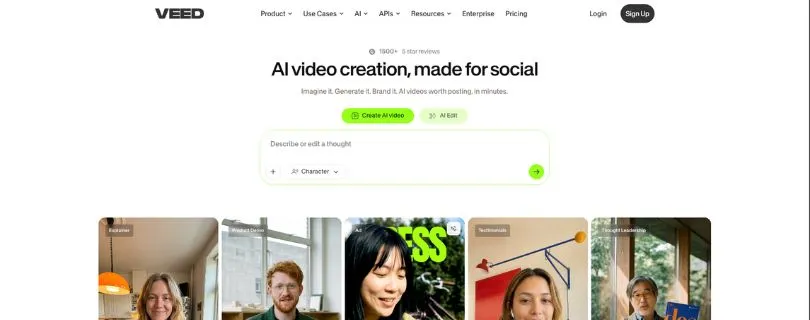
A useful VEED video editor review has to look beyond the AI buttons.
The real question is whether VEED makes everyday editing faster without creating new problems around performance, exports, or limits.
1. Online Video Editor & Ease of Use
VEED runs in the browser, so there is no desktop software to install. Its editor covers trimming, splitting, cropping, arranging clips, adding text and music, subtitles, and timeline editing.
VEED also includes text-based editing and AI-assisted tools for removing filler words, cleaning audio, and adding B-roll.
That is the main strength of the VEED AI video editor: most tools live inside one workflow.
You can start with existing footage, edit it, generate captions, clean the audio, and prepare a social-ready version without jumping between several apps.
The trade-off is depth.
TechRadar found the interface easy to get into, but noted that some controls are tucked behind extra menus. VEED feels designed to help non-editors move quickly rather than give experienced editors maximum control.
My Verdict: VEED is approachable for YouTube, tutorials, marketing, and social content. If you regularly need advanced color work, detailed audio mixing, or complex timelines, a desktop editor gives you more room.
If text-based editing is your priority, compare the options in my Descript alternatives guide.
2. Auto Subtitles, Captions & Translation
Subtitles are one of the strongest reasons to consider VEED.
VEED can generate captions automatically, let you edit their text and timing, animate or style them, highlight spoken words, translate captions, and export subtitle files as SRT, VTT, or TXT. Its current subtitle tools support more than 100 languages and accents.
What makes the workflow useful is that captions are not treated like a separate transcription product.
They sit inside the editor, so you can fix wording and change the design while seeing the result in context.
For short-form video, dynamic captions are especially practical because words can be emphasized without building every animation manually.
My Verdict: In this VEED.IO review, subtitles stand out as one of the platform’s clearest strengths. The workflow is fast and flexible, although accuracy will still depend on audio quality, accents, and background noise.
3. AI Video Generator & AI Models
VEED has moved well beyond basic editing. Its AI workspace can create videos from a prompt, script, or image, then let you continue editing inside the same project.
What makes it different from a single-model generator is choice. VEED currently gives access to multiple AI video models, including Veo, Kling, PixVerse, Hailuo, Seedance, Luma, and others depending on the workflow.
That flexibility is useful because you can switch models depending on the type of video you want to create.
The catch is credits.
AI Credits
Every generation uses AI credits, and the amount changes depending on the model you select. VEED shows the credit cost before you generate, so experimenting with several prompts can burn through an allowance faster than expected.
This matters most on the VEED.IO free plan, where AI generation is better for testing than producing videos every day. TechRadar also found credit consumption to be one of the biggest limitations of the free experience.
My Verdict: VEED’s AI video generator is convenient because generation and editing happen in one place. The downside is that the credit system makes heavy experimentation harder to predict.
Want to compare dedicated generators? See my best AI video generator tools.
4. AI Avatars, Voice, Dubbing & Audio Tools
VEED also bundles several AI presentation and localization tools into the editor.
You can create videos with AI avatars, generate voiceovers from text, clone a voice, clean background noise, and dub existing videos into other languages. Its dubbing workflow can automatically detect the source language, translate the speech, let you choose a voice, and optionally apply lip-sync.
That makes these VEED.IO features useful for training videos, product explainers, and marketing content where recording the same script repeatedly would be slow.
There are limits, though.
VEED’s current help documentation gives Free and Creator users a one-time dubbing trial. Pro includes six hours per year, while Studio includes 12 hours per year.
My Verdict: The avatar and dubbing tools add real value if you regularly localize or repurpose content. If AI presenters are your main use case, I would still compare a specialist platform before subscribing.
For that, read my Synthesia AI review or compare the best HeyGen alternatives.
5. Screen Recording, Brand Kit & Collaboration
VEED is also useful before editing starts.
Its recorder can capture your screen, webcam, and microphone directly in the browser. Once the recording is finished, you can take it into the editor for captions, trimming, audio cleanup, and other changes.
For teams, Brand Kit stores fonts, colors, logos, and other assets. VEED also supports shared workspaces and timestamped comments, which makes review and approval easier than sending new video files back and forth.
One thing to watch is team pricing.
VEED says additional collaborators on paid workspaces can add another charge equal to the current membership fee.
My Verdict: These tools make more sense for marketing and content teams than solo editors. The workflow is convenient, but team costs can grow as you add collaborators.
If your workflow is more design-first than video-first, see my Canva pricing guide.
6. Export Quality, Performance & Reliability
VEED can handle everyday social, tutorial, and marketing exports, while higher paid tiers unlock better output quality. TechRadar’s 2026 VEED review lists 4K export on the Pro tier.
The bigger concern is reliability.
Trustpilot currently gives VEED a 4.2/5 rating, and many recent reviewers praise how easy it is to use. But its review summary also flags bugs, lost progress, unsaved work, and free-plan limitations as recurring complaints.
That does not mean every project will fail.
It does mean I would be more careful with long or deadline-critical projects than with a lightweight social edit.
Browser convenience is great until an upload, save, or export becomes the part slowing you down.
My Verdict: VEED is strongest for fast, relatively simple projects. For long-form or high-stakes editing, reliability matters as much as AI features, so I would keep local copies of important source files and exports.
VEED.IO Pricing in 2026: Is It Good Value?
Pricing is where this VEED.IO review gets a little complicated.
VEED’s public editor page currently says paid plans start at $9/month with annual billing or $19/month when billed monthly. A July 2026 TechRadar review lists the current Creator, Pro, and Studio tiers at $12, $22, and $39 per user/month respectively, so the exact checkout price can depend on the plan and billing option you see.
| Plan | Price* | Export | Best for |
| Free | $0 | 720p + watermark | Testing VEED |
| Creator | ~$12/user/mo | 1080p | Individual creators |
| Pro | ~$22/user/mo | Up to 4K | Regular AI/video work |
| Studio | ~$39/user/mo | Up to 4K | Teams and higher-volume AI use |
*Prices shown from TechRadar’s July 2026 plan breakdown; check VEED’s checkout for your current regional/billing price.
The VEED.IO free plan is useful for learning the editor, but every free export carries a watermark and is limited to 720p. Paid plans remove the watermark, while Pro and above can export up to 4K.
My Verdict: VEED’s pricing makes more sense if you use subtitles, AI tools, and editing together. Paying only for basic cutting and trimming is harder to justify.
If AI-first creation matters more, compare it with What Is InVideo AI? and my InVideo AI pricing breakdown.
What Real Users Say About VEED.IO
VEED currently holds a 4.2/5 TrustScore from roughly 3,760 Trustpilot reviews. Around 70% are five-star, while 15% are one-star.
✅ What Users Consistently Praise
- Easy to learn: Recent reviewers repeatedly describe VEED as simple and intuitive.
- Fast basic editing: Users like being able to create and edit without complicated software.
- Beginner friendly: Even users with little editing experience report getting results quickly.
❌ Where Users Hit Friction
- Bugs and errors during editing.
- Lost or unsaved progress.
- Watermark and free-plan restrictions.
- Complaints around pricing, credits, and subscription policies.
That split matches the rest of my VEED review: simplicity is its biggest advantage, but reliability and limits are the areas I would watch.
Who VEED.IO Is Built For — and Who Should Skip It
VEED makes the most sense for:
- YouTubers and social creators.
- Marketers producing videos quickly.
- Beginners who dislike complex desktop editors.
- Teams working heavily with captions and localized content.
I would look elsewhere if you need advanced post-production, complex long-form timelines, or mostly AI-generated video rather than editing.
For avatar-heavy workflows, also see my best Synthesia alternatives.
Best VEED.IO Alternatives
No VEED.IO pros and cons list is complete without considering what else is available.
CapCut is strong for fast social editing, Descript for transcript-based editing, InVideo AI for prompt-to-video creation, and Kapwing for collaborative browser editing.
Want the full breakdown? Read my 5 Best VEED.IO Alternatives for 2026.
If your starting point is written content, also see my guide to AI tools for turning blog posts into videos.
Final Verdict: Is VEED.IO Worth It in 2026?
So, is VEED.IO worth it?
Yes—if speed matters more to you than advanced editing control.
VEED combines editing, subtitles, AI generation, avatars, dubbing, and team tools in one browser workspace. The subtitle workflow is particularly strong, and beginners should have little trouble getting started.
The compromises are AI-credit limits, a restrictive free plan, and enough reliability complaints that I would be cautious with large, deadline-critical projects.
For quick social, marketing, tutorial, and caption-heavy videos, VEED remains an easy recommendation.
Frequently Asked Questions
1. Is VEED.IO Worth It in 2026?
Yes, especially for creators and marketers who want editing, captions, and AI tools in one browser-based platform.
2. Is VEED.IO Free?
Yes. The free plan supports basic editing and 720p exports, but exported videos include a VEED watermark.
3. Is VEED.IO Safe and Legit?
VEED is an established online video platform used by individuals and businesses worldwide. As with any cloud editor, review its privacy settings before uploading sensitive footage.
4. What Is Better Than VEED.IO?
It depends on the job: Descript suits transcript editing, while InVideo AI is better suited to users primarily interested in generating videos from prompts.