I’ve seen plenty of creators, marketers, and small teams use VEED.IO as their first online video editor, and honestly, it makes sense.
It’s simple, browser-based, and useful for quick edits, subtitles, screen recordings, social media clips, and basic AI video editing.
But here’s the common pattern I’ve noticed among people who start looking for VEED.IO alternatives.
You’re dealing with watermark limits, export restrictions, pricing jumps, slow uploads, subtitle accuracy issues, or editing features that feel too basic once your content workflow grows.
Instead of helping you create videos faster, the tool starts getting in the way.
That’s what pushed me to look for better VEED.IO alternatives.
I compared multiple AI video editing tools, focusing on cleaner exports, stronger captions, easier editing, better collaboration, short-form video creation, and pricing that makes sense for creators and teams.
But only 5 made the cut!
In this blog, you’ll get a detailed breakdown of the 5 best VEED.IO alternatives for 2026 along with each one’s →
- features
- pricing
- limitations
- target users
- User reviews
So, you can pick the right video editing tool for your workflow and create better content without wasting time or money.
Quick Answer: Best VEED.IO Alternatives at a Glance
If you’re in a hurry, here’s the simple version: the best VEED.IO alternative depends on what you’re trying to create.
Some tools are better for quick TikTok and Reels edits. Some are built for podcast-style editing. Others are better when you want AI to turn a script into a video for you.
Here’s a quick breakdown before we get into the full reviews.
| Tool | Best For | Free Plan | Watermark-Free? | Key Strength | Main Limitation |
| CapCut | Free social video editing | Yes | Usually yes on standard exports | Fast TikTok, Reels, and Shorts editing | Some advanced AI assets are paid |
| Descript | Transcript-based editing | Yes | Depends on plan | Edit video like a text document | Less ideal for visual-heavy editing |
| InVideo AI | AI text-to-video generation | Yes | Paid plans for clean exports | Create videos from prompts and scripts | Can become expensive at scale |
| Kapwing | Team browser editing | Yes | Paid for no watermark | Collaboration, subtitles, and resizing | Free plan has limits |
| Submagic | Short-form captions and clips | Trial/free limits vary | Paid plans | Viral captions, b-roll, and hooks | Not a full traditional editor |
If I had to choose by use case, here’s how I’d break it down:
- Best free VEED alternative: CapCut
- Best for transcript editing: Descript
- Best for AI script-to-video: InVideo AI
- Best for team collaboration: Kapwing
- Best for short-form captions: Submagic
- Best specialist mention for transcription: HappyScribe
- Best specialist mention for AI avatars: Synthesia or HeyGen
- Best specialist mention for product demos: Arcade or Loom
So, if you mainly create social media videos, CapCut is the easiest place to start.
If you edit interviews, webinars, or podcasts, Descript will feel much faster.
If you want AI to build videos from prompts, InVideo AI makes more sense.
For teams, Kapwing is the better fit. And if your whole workflow is about captions, hooks, and short-form clips, Submagic is hard to ignore.
Why Look for a VEED.IO Alternative?
VEED.IO is a handy online video editor, especially for quick edits, subtitles, and social media clips. But once your video workflow grows, you may start noticing a few limits.
1. You want exports without a watermark
Many creators search for a VEED alternative because they want clean videos for TikTok, Reels, Shorts, YouTube, ads, or client projects. A watermark can make a video look less professional, especially when you’re publishing branded content.
2. You need better transcript-based editing
If you edit podcasts, webinars, interviews, or talking-head videos, cutting clips on a timeline can get tiring fast. Tools like Descript let you edit by deleting or rearranging transcript text, which feels much faster for speech-heavy videos.
3. You want AI to create the video, not just edit it
There’s a difference between AI video editing and AI video generation. VEED helps you edit existing videos, while tools like InVideo AI can create videos from prompts, scripts, or ideas. That’s useful when you want a first draft without starting from scratch.
4. You need faster short-form repurposing
Creators are turning long videos, podcasts, webinars, livestreams, and interviews into TikToks, Reels, and Shorts. For that, you may need auto-captions, hooks, b-roll, auto-reframing, and clip detection built for short-form content.
5. You work with a team
If you’re creating videos with a team, you’ll need more than basic editing. Shared workspaces, comments, brand assets, templates, permissions, and repeatable workflows can make a big difference.
How We Chose These VEED.IO Alternatives
We compared each tool based on the things that matter most in a real video workflow, not just a long feature list.
Here’s what we looked at:
- Ease of use
- Free plan quality
- Watermark policy
- AI captions and subtitles
- AI video generation
- Transcript editing
- Collaboration features
- Export quality
- Social media resizing
- Pricing and scalability
- Best-fit user type
- Main limitations
No single tool is the best for everyone. The right VEED alternative depends on whether you’re editing social clips, generating videos from prompts, producing subtitles, or collaborating with a team.
Top 5 VEED.IO Alternatives
So here are all the VEED.IO alternatives for easier video editing, AI captions, and short-form content creation:
- CapCut
- Descript
- InVideo AI
- Kapwing
- Submagic
You can read my experience with each of them below:
1. CapCut
Best for: Creators, influencers, social media managers, and small businesses that want a free or low-cost video editor for TikTok, Reels, Shorts, and everyday social videos.
CapCut is one of the easiest VEED.IO alternatives to recommend if your main focus is short-form video editing.
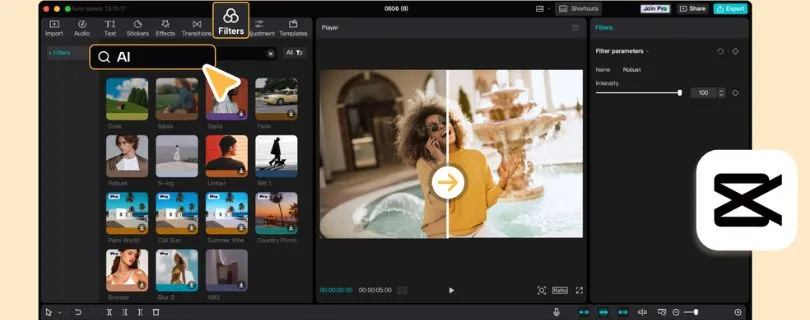
It gives you a clean editing workspace, ready-made templates, auto captions, transitions, effects, filters, background removal, and quick export options. You can use it on mobile, desktop, or web, which makes it flexible for creators who edit wherever they are.
I’m listing it first because it solves one of the biggest reasons people look for a VEED alternative: creating polished social videos without feeling boxed in by watermark limits or basic editing controls.
Video editing options: Mobile editing, desktop editing, web editing, templates, effects, transitions, auto captions, and background removal.
Best use case: TikTok, Instagram Reels, YouTube Shorts, creator videos, social media ads, and quick branded clips.
What Makes CapCut a Better Alternative Than VEED.IO?
CapCut feels faster if you’re creating content for social media every day.
You can trim clips, add captions, use trending effects, change aspect ratios, and export videos without jumping through too many steps. That makes it helpful for creators who don’t want to spend an hour editing a 30-second Reel.
You also get a stronger template library compared to VEED, especially for TikTok-style videos.
That is not all.
You can:
- Create vertical videos for TikTok, Reels, and Shorts.
- Add auto captions without needing a complicated subtitle workflow.
- Use trendy transitions, filters, stickers, and effects.
- Remove backgrounds from videos and images.
- Edit from your phone, desktop, or browser.
- Start with templates instead of building every video from scratch.
I also like that CapCut is beginner-friendly.
You don’t need to be a professional editor to make a video look good. The interface is simple, the tools are easy to find, and most edits can be done with drag-and-drop controls.
However, it is not perfect.
Some advanced AI tools, premium templates, and cloud features may require a paid plan. Also, if you’re working on long-form videos, podcasts, or team-based editing workflows, CapCut may not feel as organized as tools like Descript or Kapwing.
Key Features
- Auto captions for short-form videos.
- Templates for TikTok, Reels, Shorts, and social posts.
- Background remover for videos and images.
- Text-to-speech and voice effects.
- Mobile, desktop, and web editing.
- Filters, stickers, transitions, and motion effects.
- Aspect ratio resizing for different platforms.
- Fast export workflow for social media content.
Limitations
- Some premium templates and AI assets are paid.
- Not the best option for transcript-based editing.
- Collaboration features are limited compared to team-focused tools.
- Pricing and paid features can vary depending on region and device.
Also Read:
Best AI Video Generator Alternatives
User Reviews
Users often like CapCut because it is simple, fast, and useful for making social videos without a steep learning curve.
Many creators mention that templates, auto captions, effects, and mobile editing make it easy to create TikTok-style content quickly. Some users also point out that more features have moved behind paid plans over time.
Pricing
CapCut has a free plan.
CapCut Pro pricing can vary by region, device, and checkout page. In many cases, CapCut Pro is listed around $19.99/month, while some standard or regional plans may appear lower.
So before subscribing, I’d recommend checking the pricing inside your own CapCut account or app store checkout.
2. Descript

Best for: Podcasters, YouTubers, coaches, educators, and creators who edit talking-head videos, interviews, webinars, and screen recordings.
Descript is a strong VEED.IO alternative if your videos are built around spoken content.
Instead of cutting clips manually on a timeline, Descript lets you edit video by editing the transcript. Delete a sentence from the text, and that part gets removed from the video.
This is why it works so well for podcasts, interviews, tutorials, webinars, online courses, and YouTube talking-head videos.
Video editing options: Transcript-based editing, screen recording, captions, filler word removal, audio cleanup, clips, AI voice tools, and video exports.
Best use case: Podcasts, interviews, webinars, tutorials, online courses, and long-form spoken videos.
What Makes Descript a Better Alternative Than VEED.IO?
Descript is better than VEED.IO when your editing workflow depends on words.
If you’re editing a 45-minute interview, cutting every pause and mistake manually can get boring fast. With Descript, you can scan the transcript, remove filler words, clean up mistakes, and turn long videos into clips much faster.
The biggest advantage is that it makes video editing feel like editing a Google Doc.
You can:
- Delete video sections by deleting transcript text.
- Remove filler words like “um” and “uh.”
- Clean audio with Studio Sound.
- Create captions and subtitles.
- Record your screen and camera.
- Generate short clips from longer recordings.
- Use AI voice tools for quick fixes and voiceovers.
This is very helpful if your content includes a lot of talking.
I also found Descript useful for creators who don’t want to learn a traditional editing timeline. You can still make timeline edits when needed, but the transcript-first workflow saves a lot of time.
However, Descript is not the best tool for heavy visual editing.
If your content needs lots of effects, trending templates, transitions, or fast mobile edits, CapCut may feel easier. Descript is built more for clean, professional spoken content than flashy social edits.
Key Features
- Edit video by editing the transcript.
- Automatic transcription.
- Filler word removal.
- Studio Sound for audio cleanup.
- Screen recording.
- Captions and subtitles.
- AI voice and speech tools.
- Clip creation for social media.
- Collaboration options for teams.
Limitations
- Less ideal for visual-heavy social videos.
- The free plan has limited usage.
- Advanced AI features are available on higher plans.
- New users may need time to understand the transcript-based workflow.
User Reviews
Users usually praise Descript for making editing easier, especially for podcasts, tutorials, and social clips made from longer videos.
Many reviewers like the text-based editing workflow, transcription, and audio cleanup. Some users mention that heavier projects or advanced AI features can take time to learn.
Pricing
Descript offers a free plan.
Its paid plans start at $16/person/month when billed annually. If you pay monthly, the Hobbyist plan is $24/person/month.
The Creator plan starts at $24/person/month when billed annually and $35/person/month when paid monthly.
3. InVideo AI
Best for: Marketers, YouTubers, small businesses, and content teams that want to create videos from prompts, scripts, or ideas.
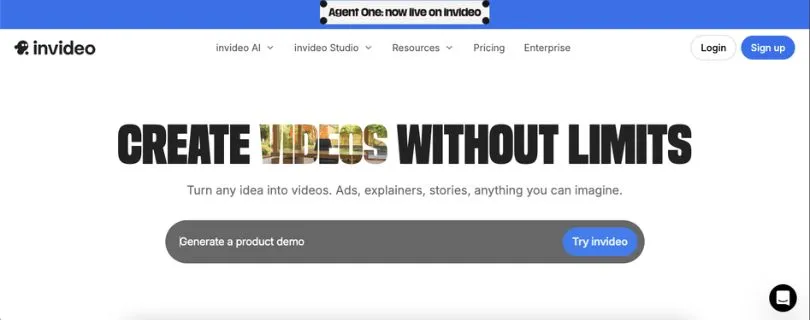
InVideo AI is different from VEED.IO because it focuses more on AI video generation than simple online editing.
With VEED, you usually start with a video and then edit it. With InVideo AI, you can start with a prompt, script, or idea, and the tool helps turn it into a full video draft.
That makes it useful for marketing videos, faceless YouTube videos, product explainers, ads, listicle videos, and social media content.
Video creation options: Text-to-video, script-to-video, AI voiceovers, stock footage, subtitles, prompt-based editing, and AI video generation.
Best use case: AI-generated videos, marketing videos, faceless YouTube content, explainers, and social media ads.
What Makes InVideo AI a Better Alternative Than VEED.IO?
InVideo AI is a better fit if you don’t already have footage ready.
You can type what kind of video you want, and the tool helps build a draft with scenes, visuals, voiceover, captions, and music. This is useful when you need content quickly but don’t want to film everything yourself.
It works well for creators and marketers who want to turn ideas into videos faster.
You can:
- Generate videos from prompts.
- Turn scripts into videos.
- Create faceless YouTube videos.
- Add AI voiceovers.
- Use stock footage and media assets.
- Create videos for ads, explainers, and social posts.
- Make quick changes using prompts instead of manual edits.
I found this especially useful for content ideas that start as text.
For example, if you have a blog post, product description, YouTube script, or ad idea, InVideo AI can help you turn it into a video much faster than building everything scene by scene.
However, the AI output still needs review.
You may need to adjust visuals, rewrite parts of the script, change stock clips, or fix pacing. So it is not a magic button, but it can save a lot of time on the first draft.
Key Features
- AI text-to-video generation.
- Script-to-video workflow.
- AI voiceovers.
- Stock video, image, audio, and music access.
- Prompt-based video editing.
- AI subtitles.
- Templates for marketing and social videos.
- Useful for faceless video creation.
Limitations
- AI-generated videos still need manual review.
- Credit-based pricing can get expensive with heavy use.
- Some outputs may feel generic without extra editing.
- Not the best choice if you only need simple trimming and captions.
Still comparing options?
Read: Best InVideo AI Alternatives
User Reviews
Users often like InVideo because it helps beginners create videos quickly, especially for marketing, social media, and template-based content.
Many reviewers praise its ease of use and large media library. Some users mention that performance, customization, or AI output quality can vary depending on the project.
Pricing
InVideo AI has a free plan.
Its paid plans start from $17/month when billed annually. Higher plans are available for users who need more credits, more AI generations, and heavier video creation workflows.
Since InVideo AI uses credits for video creation and generative models, the total cost can increase if you create a lot of videos every month.
Also Read:
InVideo AI Pricing Explained
4. Kapwing
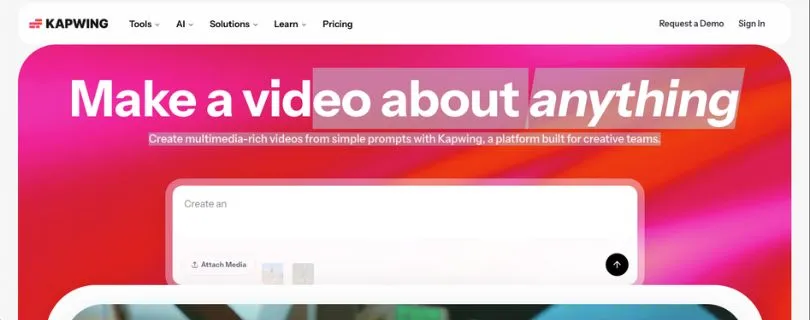
Best for: Marketing teams, agencies, educators, and creators who want a browser-based video editor with collaboration, subtitles, resizing, and brand assets.
Kapwing is one of the closest VEED.IO alternatives if you still want an online video editor that works directly in your browser.
It gives you tools for trimming videos, adding subtitles, resizing clips, recording screens, translating captions, creating social media videos, and working with teammates in a shared workspace.
I’m including it because it feels familiar if you already like VEED’s browser-based workflow but want stronger team collaboration and content repurposing features.
Video editing options: Browser editing, subtitles, translations, resizing, screen recording, brand kit, templates, and collaborative workspaces.
Best use case: Team video editing, social media resizing, subtitle workflows, marketing videos, and repurposed content.
What Makes Kapwing a Better Alternative Than VEED.IO?
Kapwing is a better fit when video creation is not a solo job.
If you work with teammates, clients, editors, or content managers, you’ll probably care about shared workspaces, brand assets, project access, and repeatable editing workflows.
That is where Kapwing feels useful.
You can:
- Edit videos directly in your browser.
- Add auto subtitles and translations.
- Resize videos for TikTok, Reels, Shorts, LinkedIn, and YouTube.
- Use a brand kit to keep fonts, colors, and logos consistent.
- Record your screen and camera.
- Work with teammates in a shared workspace.
- Export different content versions from the same project.
I also like Kapwing for teams that make a lot of social content from one source video.
For example, you can take one webinar, tutorial, or talking-head video and turn it into multiple vertical clips, square posts, and captioned videos without starting over every time.
However, the free plan has clear limits.
Free exports include a watermark, and you’ll need a paid plan if you want cleaner exports, longer videos, better quality, and more room to work. So if your main goal is a free no-watermark VEED alternative, CapCut may be a better starting point.
Key Features
- Browser-based video editor.
- Auto subtitles and caption editing.
- Subtitle translation.
- Video resizing for social platforms.
- Screen and camera recording.
- Brand kit and custom fonts.
- Shared workspace for teams.
- Templates for social media content.
- 4K exports on paid plans.
Limitations
- Free exports include a Kapwing watermark.
- Free plan has video length and quality limits.
- Can become expensive for larger teams.
- Not as strong as Descript for transcript-based editing.
- Not as trend-focused as CapCut for TikTok-style edits.
User Reviews
Users often like Kapwing because it is easy to use, especially for quick edits, auto subtitles, and short-form content.
Many reviewers mention that the drag-and-drop editor, browser workflow, and subtitle tools save time. Some users also mention limitations around free exports, upload limits, or performance with larger projects.
Pricing
Kapwing has a free plan.
The free plan includes basic editing, but exports come with a watermark.
Kapwing’s Pro plan starts at $16/member/month when billed annually. If you pay monthly, it costs $24/member/month.
The Business plan starts at $50/member/month when billed annually, or $64/member/month when paid monthly.
So, Kapwing makes the most sense if you want a collaborative online video editor and you’re ready to pay for watermark-free exports.
5. Submagic

Best for: Short-form creators, coaches, agencies, personal brands, and social media teams that want AI captions, hooks, b-roll, and faster Reels, TikToks, and Shorts.
Submagic is not trying to be a full traditional video editor.
It is built for one main job: turning short-form videos into more engaging clips with AI captions, hooks, b-roll, silence removal, and social-ready edits.
That makes it a strong VEED.IO alternative if your main goal is short-form content creation, not detailed timeline editing.
Video editing options: AI captions, caption templates, b-roll, hook titles, silence removal, bad-take removal, clean audio, caption translation, and short-form exports.
Best use case: TikTok videos, Instagram Reels, YouTube Shorts, podcast clips, talking-head clips, and creator content.
What Makes Submagic a Better Alternative Than VEED.IO?
Submagic is better than VEED.IO when captions are the center of your workflow.
If you publish talking-head videos, podcast clips, coaching videos, or personal brand content, captions are not just text on the screen. They help people follow the video, stop scrolling, and understand your message without sound.
Submagic leans into that.
You can:
- Generate AI captions quickly.
- Use animated caption styles.
- Add AI hook titles.
- Add b-roll to make clips less boring.
- Remove silences and bad takes.
- Clean audio.
- Translate captions.
- Create branded short-form videos faster.
I found Submagic more focused than VEED for creators who want “ready-to-post” short videos.
Instead of giving you a broad video editor with lots of general tools, it focuses on the things short-form creators actually use every day: captions, pacing, hooks, b-roll, and clean exports.
However, this also means Submagic has limits.
If you need a full editor for long YouTube videos, detailed timeline work, design-heavy content, or team-based video projects, it may feel too narrow. It works best when your videos are short, speech-driven, and made for social platforms.
Key Features
- AI auto captions.
- Caption templates and styles.
- AI hook titles.
- AI b-roll and stock media.
- Silence removal.
- Bad-take removal.
- Clean audio.
- Caption translation.
- Brand kit on higher plans.
- Short-form video exports.
Limitations
- Not a full traditional video editor.
- Free plan includes a Submagic watermark.
- Video limits depend on the plan.
- Some advanced features are available only on higher plans.
- Better for short clips than long-form editing.
User Reviews
Users often like Submagic because it saves time when adding captions and turning raw clips into polished short-form videos.
Many reviewers mention that the caption styles, simple interface, and b-roll tools make it easier to create Reels, TikToks, and Shorts. Some users also mention occasional export delays or limits depending on the plan.
Pricing
Submagic has a free plan.
The free plan lets you try the tool, but it includes a Submagic watermark and has monthly video limits.
Submagic’s paid plans start at $12/member/month when billed annually for the Starter plan.
The Pro plan starts at $23/member/month when billed annually, and the Business + API plan starts at $41/member/month when billed annually.
If you want Magic Clips, it is available as an add-on starting at $12/member/month.
So, Submagic is worth considering if your main focus is short-form videos with strong captions, hooks, b-roll, and faster editing.
Other VEED.IO Alternatives Worth Mentioning
The five tools above are the strongest VEED.IO alternatives for most creators and teams. But a few other tools are still worth knowing, especially if your workflow is more specific.
HappyScribe — Best for Professional Subtitles and Transcription
HappyScribe is a better fit if subtitles and transcripts are your main priority.
It is useful for creators, educators, podcasters, and businesses that need accurate transcripts, subtitle files, multilingual subtitles, and human transcription options. If you care more about clean SRT files and translation workflows than full video editing, HappyScribe makes sense.
Quso.ai / Vidyo.ai — Best for Long-Form to Short-Form Repurposing
Quso.ai and Vidyo.ai are built for creators who want to turn long videos into short clips.
They are useful if you regularly repurpose podcasts, webinars, interviews, livestreams, or YouTube videos into TikToks, Reels, and Shorts. These tools can help with clip selection, captions, resizing, and short-form formatting.
Canva Video — Best for Design-First Teams
Canva Video is a good option if your team already uses Canva for thumbnails, presentations, social posts, brand kits, and marketing graphics.
It is not the most advanced video editor, but it works well for simple design-led videos, branded social content, promos, and quick visual edits.
Also Read:
Canva Pricing ExplainedWant more design-first options?
Read: Best Canva Alternatives
Clipchamp — Best Simple Microsoft-Friendly Editor
Clipchamp is a solid choice for Windows and Microsoft users who want a simple video editor without a steep learning curve.
It is useful for basic trimming, captions, screen recording, templates, and browser-based editing. If you want something simple and familiar, Clipchamp is easy to start with.
Synthesia or HeyGen — Best for AI Avatar Videos
Synthesia and HeyGen are better options if you want to create videos without filming yourself.
They are useful for training videos, onboarding content, sales enablement, tutorials, internal updates, and corporate explainers. You can add a script, choose an AI avatar, and generate a presenter-style video.
Loom — Best for Quick Screen Recordings
Loom is not a full VEED.IO replacement, but it is great for fast screen recordings.
It works well for internal updates, product walkthroughs, client feedback, async team communication, and quick tutorials. If your main need is recording and sharing your screen fast, Loom keeps things simple.
VEED.IO vs Alternatives: Which One Should You Choose?
The right VEED.IO alternative depends on what you actually create. Here’s the easiest way to decide:
| If you need… | Choose |
| Free social editing | CapCut |
| Transcript-based editing | Descript |
| AI-generated videos from prompts | InVideo AI |
| Team editing and collaboration | Kapwing |
| Viral captions and short-form clips | Submagic |
| Professional subtitle files | HappyScribe |
| AI avatar videos | Synthesia or HeyGen |
| Quick screen recordings | Loom |
| Simple design-led videos | Canva |
My Final Recommendation
I would say…
If you want the closest free alternative to VEED for social videos, choose CapCut.
If you edit podcasts, interviews, webinars, or talking-head videos, Descript will save you more time.
If you want AI to generate videos from scripts or prompts, InVideo AI is the better pick.
If your team needs a collaborative browser editor, Kapwing makes more sense.
And if your priority is viral captions, hooks, b-roll, and short-form clips, Submagic is the one I’d look at first.
VEED.IO is still useful for simple browser-based editing, captions, and quick social content. But the best alternative depends on the job you need the video tool to do.
FAQs About VEED.IO Alternatives
What is the best VEED.IO alternative?
The best VEED.IO alternative depends on what you need.
For most creators, CapCut is the best free option for social videos. Descript is better for podcast and transcript-based editing, while InVideo AI is better if you want to generate videos from prompts.
What is the best free VEED.IO alternative?
CapCut is the best free VEED.IO alternative for most social media creators.
It works well for TikTok, Instagram Reels, YouTube Shorts, and quick creator-style videos. You get templates, captions, effects, resizing, and fast exports without needing a heavy editing setup.
Is there a VEED.IO alternative without watermark?
Yes, CapCut is usually the strongest option if you want a free video editor without a watermark on standard exports.
Just keep in mind that some templates, effects, stock assets, and AI features may still be part of paid plans depending on your region or device.
Which VEED.IO alternative is best for subtitles?
If you want simple subtitles inside a video editor, Kapwing and Descript are both good choices.
If subtitles are your main focus, HappyScribe is better because it is built for transcripts, subtitle files, translations, and more professional caption workflows.
Which VEED.IO alternative is best for AI captions?
Submagic is one of the best VEED.IO alternatives for AI captions, especially for short-form videos.
It is useful if you create:
- TikTok videos
- Instagram Reels
- YouTube Shorts
- Podcast clips
- Talking-head videos
- Personal brand content
What is the best VEED.IO alternative for YouTube videos?
Descript is a great choice for YouTube videos that include talking, tutorials, interviews, or screen recordings.
If you make faceless YouTube videos from scripts, InVideo AI may be a better fit because it can help create videos from prompts, stock footage, voiceovers, and text.
What is the best VEED.IO alternative for TikTok and Reels?
CapCut is the easiest choice for TikTok, Reels, and Shorts.
It has templates, mobile editing, effects, captions, transitions, and social-first editing tools. If captions and hooks matter more than full editing, Submagic is also a strong option.
Is CapCut better than VEED.IO?
CapCut is better if you mainly create social media videos and want fast edits, templates, effects, and mobile-friendly editing.
VEED.IO may still feel better if you prefer a simple browser-based editor for subtitles, trimming, screen recordings, and quick online edits.
Is Descript better than VEED.IO?
Descript is better for editing spoken videos.
If you edit podcasts, interviews, webinars, tutorials, or talking-head videos, Descript’s transcript-based editing can save a lot of time. Instead of cutting clips manually, you can remove parts by editing the text.
VEED.IO is better for quick, simple edits where you don’t need a transcript-first workflow.
What is the best AI video generator like VEED.IO?
InVideo AI is a better choice if you want AI to create videos from scripts, prompts, or ideas.
VEED.IO is more of an online video editor with AI features. InVideo AI is more useful when you want the tool to help build the first draft of the video for you.
Which VEED.IO alternative is best for teams?
Kapwing is one of the best VEED.IO alternatives for teams.
It gives you browser-based editing, shared workspaces, brand assets, subtitles, resizing, and collaboration features. This is helpful when multiple people need to edit, review, and publish videos together.
What is the best VEED.IO alternative for podcast clips?
Descript and Submagic are both strong options, but they solve different problems.
Choose Descript if you want to edit the podcast by transcript and clean up the full recording.
Choose Submagic if you already have clips and want better captions, hooks, b-roll, and short-form formatting.
Can I use Canva instead of VEED.IO?
Yes, Canva can work as a VEED.IO alternative if your videos are design-first.
It is useful for branded videos, social posts, presentations, thumbnails, simple promos, and marketing content. But if you need deeper video editing, transcript editing, or advanced captions, tools like Descript, Kapwing, or Submagic may be better.
What is the best VEED.IO alternative for AI avatar videos?
Synthesia and HeyGen are better choices for AI avatar videos.
They are useful for training videos, onboarding content, sales videos, explainer videos, and corporate updates where you want a presenter-style video without filming a real person.
What should I use instead of VEED.IO for screen recording?
Loom is the better choice if your main need is quick screen recording.
It works well for walkthroughs, team updates, feedback, product demos, and async communication. VEED.IO can help with editing, but Loom is faster when you just want to record and share.
Are VEED.IO alternatives better than VEED.IO?
Some are better for specific jobs, but not every tool is better overall.
CapCut is better for free social editing. Descript is better for transcript-based editing. InVideo AI is better for prompt-to-video creation. Kapwing is better for team workflows. Submagic is better for short-form captions.
VEED.IO is still a good option if you want a simple all-in-one browser editor.
Which VEED.IO alternative should beginners use?
CapCut is the easiest starting point for most beginners who create social videos.
If you’re editing talking-head videos, Descript may be easier because you can edit by changing the transcript. If you work with a team, Kapwing keeps the workflow simple without needing to install software.
What is the closest alternative to VEED.IO?
Kapwing is probably the closest alternative to VEED.IO because both are browser-based video editors.
Both tools help with subtitles, resizing, trimming, templates, and social media videos. Kapwing may feel stronger for teams, while VEED.IO may feel simpler for solo users who want quick edits.