Synthesia makes it easy to turn a script into a presenter-led video. But the workflow becomes less straightforward when you need more expressive avatars, better lip-syncing, interactive training, detailed screen recordings, or a complete video editor.
That is where the alternatives start to separate themselves.
I compared the leading Synthesia competitors across avatar quality, video creation, localization, training features, editing control, and pricing. Rather than filling this list with five tools that do roughly the same thing, I selected platforms suited to different production workflows.
HeyGen is the strongest all-round option for marketing and multilingual avatar videos. Colossyan is better equipped for workplace training, while D-ID offers an inexpensive way to animate photos and create conversational avatars. Camtasia and VEED are stronger when traditional video editing matters as much as AI generation.
Want a closer look at Synthesia before comparing alternatives?
Read my full Synthesia AI review.
Best Synthesia Alternatives: At a Glance
The right alternative depends on what you create. A marketing team, an instructional designer, and a software trainer will not benefit from the same set of features.
| Alternative | Best for | Starting price | Key advantage over Synthesia |
| HeyGen | Marketing, sales, and localization | Free; Creator from $29/month | Expressive avatars and flexible localization |
| Colossyan | Corporate training and e-learning | Free; Professional from $59/month annually | Course authoring, quizzes, branching, and SCORM |
| D-ID | Talking photos and conversational avatars | Lite from $4.70/month annually | Low entry price and interactive visual agents |
| Camtasia | Software tutorials and technical training | Starter from $39/year; full editing from $179.88/year | Screen recording and detailed timeline editing |
| VEED | Editing and repurposing existing footage | Free; Lite from $9/month annually | Browser-based editing, captions, and social formats |
These prices come from the platforms’ current official pricing information. Colossyan’s free Starter plan includes video and course creation, while its $59 Professional plan introduces features such as watermark removal and SCORM exports. D-ID’s annual Lite plan is currently listed at $4.70 per month. Camtasia’s $39 Starter tier includes a watermarked editor, so most serious video creators will need its Essentials plan or higher.
1. HeyGen: Best for Realistic AI Avatars and Marketing Videos
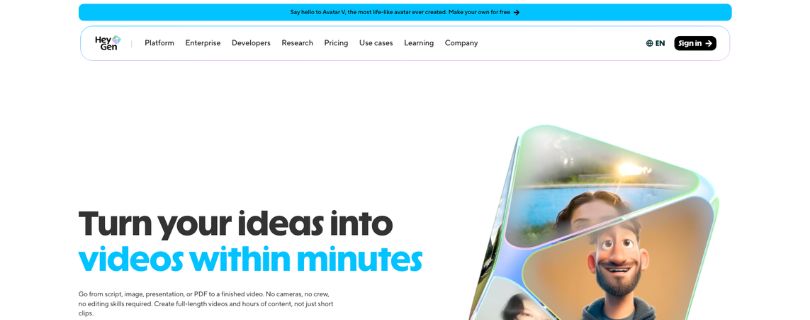
What does it do? HeyGen creates presenter-led videos from scripts, prompts, photos, and recorded footage. It also provides custom avatars, voice cloning, AI dubbing, video translation, and browser-based editing tools.
Who is it for? It is best suited to marketers, sales teams, agencies, creators, and businesses producing promotional or educational videos for audiences in multiple regions.
HeyGen is the closest direct Synthesia competitor on this list. Both platforms let you select an avatar, add a script, choose a voice, arrange scenes, and generate a polished presenter video without recording an actor.
The difference is in how creative the presenter can become.
HeyGen can animate a single photograph with synchronized speech, facial expressions, and hand gestures. You are not restricted to conventional corporate presenters either. Avatar IV can work with stylized characters, illustrations, anime-inspired designs, and other nontraditional personas.
That flexibility matters for marketing.
A corporate training video usually benefits from a calm, consistent presenter. A social advertisement or product launch may need more energy, visual variety, and a character that looks noticeably different from every other AI spokesperson.
HeyGen also lets you create a digital version of yourself from photos or recorded footage. Its Digital Twin system is designed to retain details such as expressions, pauses, delivery style, body language, and gestures across future videos.
The motion controls are what make this especially useful.
Instead of accepting the avatar’s default performance, you can provide instructions for expressions, posture, gaze, and gestures. You might ask the presenter to sound confident, lean forward, wave, point, or use a warmer facial expression during a specific scene.
This does not mean every generated movement will look indistinguishable from recorded footage. Longer videos can still expose repeated gestures, unnatural pauses, or moments where the avatar’s expression does not perfectly match the script.
But HeyGen gives you more ways to direct the performance.
Localization is another major strength. HeyGen’s video translator supports more than 175 languages and dialects, with options for cloned voices and synchronized lip movement. A single video can also be translated into multiple languages and delivered through a multilingual player.
Synthesia is already strong in this area, offering AI presenters and voiceovers in more than 160 languages. HeyGen’s advantage is not simply the larger language figure. It is the combination of translation, voice preservation, lip-syncing, and creator-oriented avatar controls in the same workflow.
That combination makes it particularly useful for product announcements, localized advertisements, sales outreach, social content, and personalized customer messages.
The pricing structure is also easier for individual creators to enter.
HeyGen offers a free plan with up to three short videos per month. Creator costs $29 per month, or $24 per month with annual billing, while Pro costs $49 per month. Synthesia’s current self-serve plans start at $29 per month for Starter, but its Creator plan costs $89 per month.
Want to see exactly what Synthesia costs across plans?
Read my full Synthesia pricing breakdown.
The lower price does not automatically make HeyGen the better value. Its newer avatar models, translations, and other premium generation features consume credits, so two videos of the same duration may not have the same effective cost.
That is the part I would examine most carefully before subscribing.
A plan may allow videos of up to 30 minutes, but that does not mean you can repeatedly generate 30-minute Avatar IV projects without considering credit usage. Revisions, translations, premium models, and alternate versions can use the allowance faster than expected. HeyGen moved its self-serve plans to a credit-based structure in 2026.
For occasional marketing videos, the allowance may be more than enough. Agencies producing several versions for multiple clients will need to estimate monthly generation more carefully.
Where It Beats Synthesia
- More flexible avatar creation: HeyGen can create presenters from photographs, recorded footage, custom characters, illustrations, and stylized images. Its newer avatar engines also provide controls for facial expressions, body movement, gestures, and gaze.
- Marketing-focused localization: Its translation workflow combines support for more than 175 languages and dialects with voice preservation and synchronized lip movement, making it useful for regional campaigns and multilingual sales content.
- More accessible creator tiers: HeyGen offers Creator and Pro plans at $29 and $49 per month respectively, giving individual creators an additional paid step before reaching its team-focused Business plan.
Pros
- Expressive and customizable avatars
- Strong multilingual video tools
- Photo and video-based digital twins
- Useful free plan
- Creator-focused pricing options
Cons
- Credit usage can be difficult to predict
- Premium avatar models consume more resources
- Advanced team controls require higher plans
- Some movements can still look AI-generated
Pricing
HeyGen currently offers the following self-serve plans:
- Free: $0, with up to three short videos per month
- Creator: $29 per month or $24 per month annually
- Pro: $49 per month
- Business: $149 per month, plus $20 for each additional seat
- Enterprise: Custom pricing
Creator includes 600 monthly credits, videos of up to 30 minutes, 1080p exports, and watermark removal. Pro increases the allowance to 1,000 credits and adds 4K exports. Business includes 1,500 credits, videos of up to 60 minutes, and additional collaboration features.
Bottom Line
HeyGen is the best Synthesia alternative for marketers, agencies, and creators who want realistic avatars without being limited to a traditional corporate presentation style.
Its digital twins, talking-photo tools, motion controls, and localization features give you more creative freedom than most direct competitors. The main limitation is its credit system, which requires closer monitoring as production volume increases.
Still comparing HeyGen with other AI video tools?
Check out the best HeyGen alternatives before deciding.
2. Colossyan: Best for Training and E-Learning
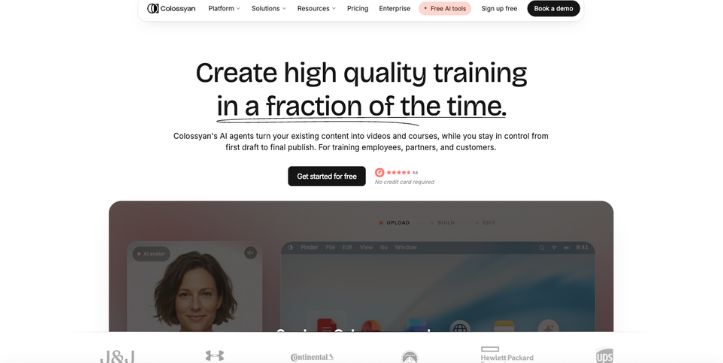
What does it do? Colossyan turns scripts, presentations, PDFs, and documents into avatar-led videos and structured learning courses. It also supports quizzes, branching scenarios, translations, interactive videos, and LMS publishing.
Who is it for? It is designed for learning and development teams, HR departments, instructional designers, compliance trainers, and businesses maintaining large employee-training libraries.
Colossyan looks like a direct Synthesia competitor at first. You choose an avatar, enter a script, organize the content into scenes, and generate a presenter-led video.
The difference becomes clearer when the video needs to teach something.
Instead of stopping at a finished MP4, Colossyan lets you organize videos into courses, add knowledge checks, create different learning paths, and export the result to a learning management system.
That makes it more useful for employee onboarding, compliance programs, sales enablement, product education, and other training that must be completed and measured.
You can start with an existing PowerPoint or PDF rather than rebuilding every lesson manually. Colossyan can convert the source material into scenes, after which you can adjust the narration, presenter, layout, and supporting media.
The course workflow is what stood out most.
A standard avatar video delivers information in one direction. Colossyan can pause the lesson for a question, test whether the learner understood it, or send the learner down a different path based on an answer.
For example, a customer-service course could present a difficult conversation and ask the learner how they would respond. Their answer could lead to a successful resolution, additional guidance, or a second scenario.
That is more valuable than adding a quiz at the end.
The branching becomes part of the learning experience rather than a separate assessment. Colossyan supports interactive videos, branching scenarios, quizzes, assessment generation, and course-level authoring within the same platform.
You can also place multiple avatars in one scene.
This works well for role-playing conversations, manager-and-employee examples, sales objections, and compliance scenarios. A dialogue is often easier to follow than having one presenter explain both sides of an interaction.
Localization is handled across the wider project. Colossyan supports more than 120 languages and can translate narration, on-screen text, and interactive elements within the same workflow.
That matters when a course includes more than video.
Translating the presenter is useful, but an international training program also needs localized questions, buttons, captions, and branching choices. Otherwise, the course still requires substantial manual work after the video has been translated.
Publishing is another significant advantage.
The Professional plan includes five SCORM exports per month for videos and courses. Colossyan supports SCORM 1.2 and SCORM 2004, allowing compatible learning platforms to track completion, progress, and assessment results.
Synthesia can also support enterprise training workflows. However, Colossyan puts course creation, interactivity, and limited SCORM exporting into a standard paid plan rather than positioning them entirely around a custom enterprise agreement.
The compromise is focus.
Colossyan is less compelling when the goal is a fast social advertisement, a highly stylized marketing video, or a creator-led personal brand. Its strongest features are built around structured learning rather than creative experimentation.
The usage limits also require attention.
The free Starter plan includes 20 monthly minutes with Colossyan’s NEO model, while Professional includes 30 NEO minutes and 10 NEO2 minutes. Interactive videos, automatic translations, and SCORM exports have separate monthly allowances.
That structure is manageable for a small training team, but a large course library can quickly involve several different limits.
Where It Beats Synthesia
- Complete course creation: Colossyan can combine videos, lessons, assessments, and supporting content into a structured course rather than producing only standalone presenter videos.
- Interactive learning: Quizzes, knowledge checks, and branching scenarios let learners make decisions and receive different content based on their responses.
- SCORM on a self-serve plan: Professional includes five monthly SCORM exports, making LMS publishing accessible without immediately moving to Enterprise.
Pros
- Built specifically for training teams
- Interactive quizzes and branching
- Course-level content organization
- More than 120 supported languages
- SCORM and LMS support
Cons
- Less flexible for creative marketing videos
- Several features have separate usage limits
- Professional costs more than entry-level avatar tools
- Analytics require Enterprise
Pricing
Colossyan currently offers three plans:
- Starter: Free, with 20 NEO video minutes per month
- Professional: $59 per month with annual billing
- Additional Professional editor: $30 per month
- Enterprise: Custom pricing
Professional adds watermark removal, 30 NEO minutes, 10 NEO2 minutes, 15 interactive videos, 20 automatic translations, and five SCORM exports per month.
Bottom Line
Colossyan is the best Synthesia alternative for teams building complete training programs rather than individual avatar videos.
Its course authoring, quizzes, branching scenarios, multilingual content, and SCORM exports cover more of the learning workflow. Marketing teams may prefer HeyGen, but instructional designers will find Colossyan better aligned with how training is created and delivered.
3. D-ID: Best Budget Alternative for Talking Photos
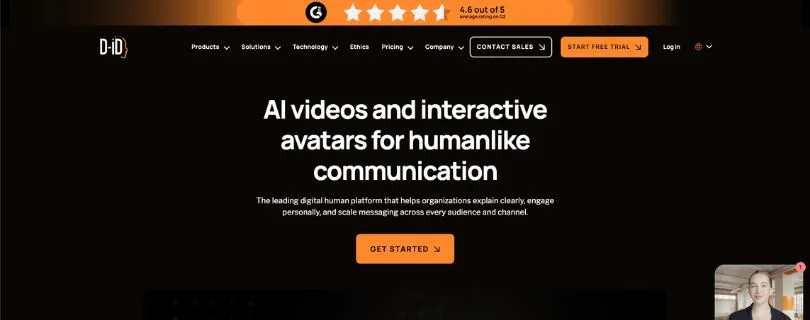
What does it do? D-ID converts scripts, audio, photographs, and generated portraits into talking-avatar videos. It also provides multilingual video creation, APIs, voice cloning, and real-time visual agents.
Who is it for? It suits beginners, developers, educators, small teams, and businesses experimenting with affordable personalized videos or conversational avatars.
D-ID has a simpler starting point than most Synthesia competitors.
Upload an image, add a script or audio recording, select a voice, and the platform animates the face into a speaking presenter. You can use a stock avatar, create a portrait, or provide an image you already own.
This makes D-ID particularly useful when you do not need a complete virtual studio.
A small business might animate a company spokesperson for a short welcome message. An educator could create a historical character, while a developer could add a speaking assistant to an application.
The photo-to-video process is the main attraction.
Synthesia generally centers its workflow around prepared AI presenters and custom avatars. D-ID makes an ordinary still image the starting point, which gives you more freedom over the presenter’s appearance.
The results depend heavily on the source image.
A clear, front-facing portrait usually gives the animation a better foundation. Unusual angles, obscured facial features, or low-resolution images can make the movement less convincing.
D-ID also provides basic control over the presentation.
You can select a voice, enter or upload narration, position the presenter, adjust the layout, and choose an expression such as happy, serious, surprised, or neutral. Its Studio supports 119 languages, while the broader platform advertises video and real-time interaction in more than 120 languages.
However, D-ID is not as strong as Synthesia for detailed multi-scene production.
It can generate presenter-led content quickly, but the editing environment is not the main reason to choose it. Teams that need templates, complex layouts, extensive collaboration, or tightly managed brand production may find Synthesia more complete.
D-ID becomes more distinctive when you move beyond prerecorded video.
Its Visual Agents combine an animated avatar with a language model and knowledge sources. The agent can listen to a user, respond in real time, and appear inside a website, application, training system, or customer-support workflow.
This changes the role of the avatar.
Instead of delivering the same script to every viewer, it can answer questions, explain a product, qualify a lead, guide someone through a form, or act as a virtual tutor.
The setup can be handled without code by selecting an avatar, voice, behavior, and knowledge source. Developers can go further by connecting language models, APIs, customer systems, and external workflows.
That makes D-ID more than a low-cost Synthesia substitute.
It is also an option for businesses exploring conversational interfaces with a visible human-like presenter.
The biggest limitations appear in the lower plans.
Lite output includes D-ID branding, and the Lite plan is limited to personal rather than commercial use. Commercial usage begins with Pro and higher plans.
Usage is also calculated in short time increments.
D-ID rounds generated video to the nearest 15 seconds, and unused monthly minutes do not carry over. A 70-second video therefore consumes 75 seconds from the allowance.
That is easy to understand, but repeated previews and revisions can still consume more capacity than the final video length suggests.
Where It Beats Synthesia
- Affordable entry point: D-ID’s Lite plan starts at $4.70 per month with annual billing, making it inexpensive for personal experiments and occasional talking-avatar videos.
- Photo-to-video creation: You can animate an existing portrait instead of relying entirely on a prepared stock-avatar library.
- Real-time visual agents: D-ID can create interactive avatars that answer questions, use uploaded knowledge, trigger actions, and communicate through websites or applications.
Pros
- Low starting price
- Fast talking-photo workflow
- More than 120 supported languages
- No-code and API options
- Real-time conversational avatars
Cons
- Lite videos include D-ID branding
- Lite is limited to personal use
- Unused minutes do not carry over
- Less control over complex video layouts
Pricing
D-ID offers a 14-day trial followed by Lite, Pro, Advanced, and Enterprise plans.
- Lite: $4.70 per month, billed as $56 annually
- Pro: Paid commercial-use plan
- Advanced: Higher limits and additional controls
- Enterprise: Custom pricing
- API plans: Sold separately
Plan allowances vary by package. D-ID measures generated video in 15-second intervals, and Lite, Pro, and Advanced each offer multiple usage packages.
Bottom Line
D-ID is the best budget Synthesia alternative for turning still images into talking presenters and experimenting with interactive visual agents.
It is less suitable for complex corporate video production, and its cheapest plan cannot be used commercially. For simple portrait animation or developer-led avatar experiences, however, D-ID offers capabilities that Synthesia does not emphasize.
4. Camtasia: Best for Software Tutorials and Screen-Recorded Training
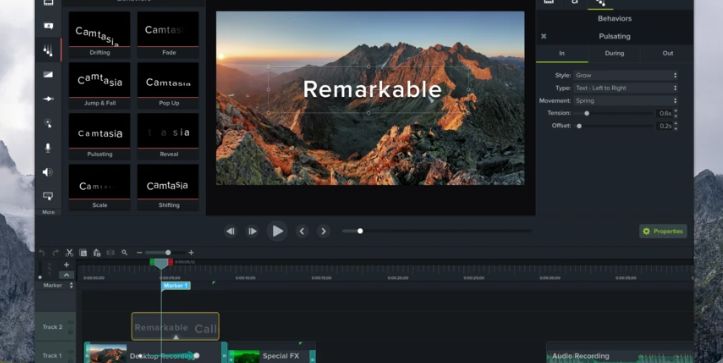
What does it do? Camtasia records your screen, camera, microphone, system audio, cursor movements, and keystrokes. You can then edit each element inside a multitrack video editor.
Who is it for? It is best for software trainers, educators, customer-success teams, and businesses creating product demonstrations, technical tutorials, or process documentation.
Camtasia approaches video creation differently from Synthesia.
Instead of beginning with an avatar and script, it usually begins with something happening on your screen. You record the process, then use the editor to make each step easier to follow.
That makes it particularly effective for software tutorials.
A presenter can explain where to click, but viewers often need to see the actual interface. Camtasia records screens at up to 4K and 60 frames per second while separately capturing camera, microphone, system audio, and mouse data.
The separate mouse data is more useful than it initially sounds.
After recording, you can change the cursor size, replace its appearance, smooth its movement, adjust its path, or emphasize individual clicks. You do not have to repeat the demonstration because the cursor moved too quickly.
The multitrack editor provides similar control over the rest of the video.
Screen footage, webcam recordings, narration, music, annotations, and supporting images can appear on separate tracks. You can trim one element without changing everything around it.
This is where Camtasia has a clearer advantage over an avatar-first workflow.
Synthesia now includes an AI screen recorder that transcribes narration, removes pauses, and converts recordings into editable scenes. Camtasia goes further when you need detailed cursor editing, layered media, callouts, transitions, and timeline-level adjustments.
Text-based editing speeds up the slower parts of that process.
Camtasia transcribes recorded speech and lets you edit the video by changing its transcript. Its audio tools can also remove filler words, background noise, and unwanted pauses.
This works well for technical training.
You can record a complete workflow naturally, remove mistakes afterward, and add zooms or annotations where the interface requires additional explanation. The result feels recorded rather than generated, while remaining easier to update.
Camtasia also supports quizzes and SCORM exports.
Interactive questions can be placed inside a video, and the finished package can be uploaded to a compatible learning management system. This makes Camtasia useful for tutorials that require completion or assessment tracking.
AI presenters are available, although they are not Camtasia’s main strength.
The Pro plan includes avatar generation, script translation, audio dubbing, and generated titles or chapters. TechSmith currently lists 49 avatar styles, while its voice tools provide more than 200 voiceover options on qualifying plans.
The trade-off is production time.
Creating a polished Camtasia tutorial usually involves more decisions than generating a Synthesia video. You may need to record the workflow, clean the timeline, position annotations, adjust the cursor, and review every transition.
It is also primarily a desktop editing workflow.
That provides more control, but it is less convenient for teams that prefer to create everything inside a lightweight browser editor. The computer must also meet Camtasia’s Windows or macOS requirements.
Where It Beats Synthesia
- Detailed screen demonstrations: Camtasia captures screen activity, camera footage, system audio, keystrokes, and mouse data as editable elements, making it easier to explain precise software workflows.
- Greater post-recording control: You can edit cursor paths, layer multiple tracks, add callouts, control animations, and make precise timeline adjustments after the recording is complete.
- Flexible training exports: Camtasia supports interactive quizzes and SCORM packages for teams that need to deliver screen-based lessons through an LMS.
Pros
- Excellent screen-recording tools
- Editable cursor movements
- Detailed multitrack editor
- Text-based video editing
- Quizzes and SCORM exports
Cons
- Longer production process
- Steeper learning curve than Synthesia
- Desktop software requires installation
- AI avatars require the Pro plan
Pricing
Camtasia currently offers four annual individual plans:
- Starter: $39 per year, with watermarked Camtasia Editor exports
- Essentials: $179.88 per year
- Create: $249 per year
- Pro: $599 per year
Essentials adds watermark-free editing, cursor controls, quizzes, and SCORM exports. Create introduces AI scripting and voiceovers, while Pro adds AI avatars, translation, dubbing, collaboration, and premium assets.
Bottom Line
Camtasia is the better Synthesia alternative when viewers need to see every click, menu, and workflow step.
It requires more manual editing, but the additional control makes it better suited to software tutorials, technical training, product demonstrations, and lessons built around real screen activity.
5. VEED: Best for Editing and Repurposing Existing Videos
[Insert a screenshot of VEED’s browser-based timeline or subtitle editor here.]
What does it do? VEED combines recording, timeline editing, AI video generation, avatars, subtitles, translation, dubbing, audio cleanup, and social-media tools inside a browser-based workspace.
Who is it for? It suits marketers, creators, podcasters, and small teams that need to edit existing footage or turn one recording into several pieces of content.
VEED is the broadest video-production platform on this list.
It can generate avatar videos, but that is only one part of the workflow. You can also upload recordings, arrange clips, add music, create captions, clean audio, and prepare different versions for social platforms.
That distinction matters if you already have footage.
Synthesia is strongest when the presenter and narration are generated inside the platform. VEED is more useful when your starting point is a webinar, interview, podcast, product recording, or existing marketing video.
The editing interface runs inside a web browser.
You can trim, crop, resize, split, and rearrange footage without installing desktop software. Text-based editing also lets you shorten a recording by deleting words from its transcript.
VEED’s automatic editing tools handle several repetitive tasks.
They can add subtitles, clean background noise, remove silences and filler words, insert supporting footage, and correct eye contact. These tools are particularly useful when polishing unscripted interviews or webcam recordings.
Captions are one of its strongest features.
VEED can generate styled subtitles, highlight words, adjust timing, and translate transcripts into more than 125 languages. The translated text remains editable before export.
This makes content repurposing easier.
A recorded webinar can become a full-length captioned video, several vertical clips, a translated version, and shorter social posts without rebuilding the original project from the beginning.
The editor also supports different aspect ratios.
You can prepare landscape content for YouTube, square versions for feeds, and vertical clips for TikTok, Instagram Reels, or YouTube Shorts. Text, captions, and supporting media can be repositioned for each layout.
VEED includes AI avatars for videos that do not require filming.
You select a presenter, enter a script, generate the delivery, and continue editing the result on the same timeline. It also offers talking photos, lip-syncing, voice cloning, and AI-generated video from text or images.
The avatars are useful, but they are not the primary reason to choose VEED over Synthesia.
Synthesia provides a more focused enterprise avatar workflow. VEED’s advantage is that generated presenters can be combined with recordings, stock footage, captions, music, B-roll, and traditional edits without leaving the platform.
That flexibility is valuable for marketing teams.
One project might include a recorded customer testimonial, an AI-generated introduction, product footage, animated captions, and several short social clips. VEED can manage those elements within one browser workflow.
The compromise is feature depth.
VEED covers many stages of video production, but specialist platforms may perform individual tasks better. HeyGen offers more avatar-focused controls, while Camtasia provides more precise screen and cursor editing.
AI usage also depends on the subscription.
The free plan allows basic editing and 720p exports, but exported videos contain a watermark. Paid plans unlock higher resolutions, watermark removal, and larger allowances for AI tools.
Where It Beats Synthesia
- Complete editing workflow: VEED combines generated content with uploaded recordings, multiple clips, music, captions, effects, and supporting media inside a traditional timeline.
- Content repurposing: Long recordings can be shortened, captioned, resized, translated, and converted into platform-specific clips without recreating the original video.
- Social-media production: Its browser editor supports short-form layouts, animated captions, audio cleanup, B-roll, and other tools commonly required for regular social publishing.
Pros
- Full browser-based editor
- Strong captioning tools
- More than 125 translation options
- Useful content-repurposing features
- Avatars and traditional editing combined
Cons
- Avatars are not its main specialization
- Free exports contain a watermark
- AI tools have plan-based limits
- Advanced projects can make the interface feel crowded
Pricing
VEED offers a free plan with basic editing, watermarked 720p exports, and limited access to AI features.
Paid plans currently start at approximately $9 per month with annual billing or $19 with monthly billing. Available plan names, AI allowances, and prices may vary by region.
Bottom Line
VEED is the best Synthesia alternative for teams that already have footage and need to edit, caption, translate, resize, or repurpose it.
Its avatars are useful additions rather than the central product. Choose VEED when a flexible editing workflow matters more than producing every video around an AI presenter.
Not sure VEED is the right fit for your workflow?
Check my guide to the best VEED.io alternatives before choosing a plan.
How I Evaluated These Synthesia Alternatives
I evaluated each platform based on the work it can complete beyond generating a presenter from a script.
The comparison focused on avatar quality, editing control, localization, training capabilities, pricing, and how easily each tool fits into an existing video-production workflow.
- Avatar quality: I compared facial movement, lip-syncing, gestures, voice delivery, custom-avatar options, and how natural presenters appear during longer scenes.
- Creation experience: I looked at how quickly users can move from a script or source document to a finished video, including scene creation, previews, revisions, and exports.
- Localization: I considered supported languages, translation workflows, voice cloning, subtitle control, and whether translated speech remains synchronized with the presenter.
- Training and editing tools: I compared quizzes, branching, SCORM exports, screen recording, captions, timeline editing, and support for existing footage.
- Pricing predictability: I examined free-plan limitations, watermarks, monthly credits, video-minute allowances, export quality, and the cost of adding collaborators.
These criteria produced a more useful comparison than avatar quantity alone.
HeyGen and Synthesia are close competitors for presenter-led videos, but Camtasia solves a different problem. Similarly, Colossyan’s value becomes clearer when the final deliverable is an interactive course rather than a standard MP4.
Which Synthesia Alternative Should You Choose?
There is no single replacement that improves every part of Synthesia. The right choice depends on what you produce and what happens after the video is generated.
- Choose HeyGen if you need realistic marketing avatars, digital twins, voice cloning, and multilingual localization. Its Creator plan includes 175-plus languages and dialects, while premium features use monthly credits.
- Choose Colossyan if you create onboarding, compliance, or employee-training programs. Its Professional plan combines AI video with interactive content, course authoring, and SCORM exports.
- Choose D-ID if you want to animate photographs or add a conversational avatar to a website or application. It supports video creation and real-time interaction across more than 120 languages.
- Choose Camtasia if your videos must demonstrate real software workflows. It records screen, camera, audio, and mouse data separately, then provides detailed editing and SCORM-compatible publishing.
- Choose VEED if you already have webinars, interviews, podcasts, or product footage to edit. It combines AI avatars with a browser-based video-production and post-editing workflow.
- Stick with Synthesia if you want a business-focused platform for creating, localizing, managing, and publishing avatar videos at scale. Its plans provide progressively larger avatar libraries, with Enterprise offering the widest selection.
Start by identifying the part of Synthesia that is limiting you.
Moving to another avatar generator will not solve a screen-recording problem. Similarly, buying a full video editor will add unnecessary complexity if you only need to convert scripts into localized presenter videos.
Still comparing AI video platforms? See my full roundup of the best AI video generator tools to explore more options.
What Is the Best Synthesia Alternative?
HeyGen is the best overall Synthesia alternative for most marketers, creators, agencies, and small businesses.
It provides the closest like-for-like workflow while offering flexible digital avatars, voice cloning, multilingual production, and creator-focused plans. Its main drawback is that premium features rely on credits, making heavy usage harder to estimate.
Colossyan is the better choice for workplace learning.
Its course authoring, interactive activities, and SCORM support make it more suitable for structured training. Instead of treating every lesson as an individual video, teams can build a connected learning experience.
The other alternatives are more specialized.
D-ID is strongest for talking photos and conversational agents. Camtasia is better for technical demonstrations, while VEED offers the most balanced combination of conventional editing, AI generation, captions, and content repurposing.
The easiest way to decide is to recreate the same short project in two platforms.
Use the same script, presenter style, language, and supporting visuals. The differences in editing speed, avatar quality, revision control, and usage limits will become clearer than they are on a feature table.
Frequently Asked Questions
What is the best Synthesia alternative overall?
HeyGen is the strongest overall alternative for users who still want an avatar-first video generator.
It offers custom digital twins, stock avatars, voice cloning, translation, and creator-oriented pricing. Colossyan is a better alternative when the primary goal is employee training or e-learning.
What is the best free alternative to Synthesia?
HeyGen offers one of the most practical free options for testing short avatar videos. Its free allowance varies by region but can include up to three one-minute videos, stock avatars, and basic language support.
Colossyan also has a free Starter plan for exploring AI video and course creation. VEED can be tried without payment, although its free editing and AI allowances are more restricted.
Free plans are best treated as product trials. Watermarks, shorter video limits, lower resolutions, and restricted commercial rights can prevent them from supporting regular business production.
Which Synthesia competitor has the most realistic avatars?
HeyGen is the strongest option on this list when avatar expressiveness and creative control are the priorities.
Its platform supports stock avatars, custom digital twins, photo avatars, and premium avatar-generation models. However, realism also depends on the source material, selected voice, script pacing, and generation model.
Synthesia may still be preferable when consistency, business presentation, and controlled enterprise production matter more than expressive delivery.
What is the cheapest Synthesia alternative?
D-ID is among the least expensive paid options for generating talking avatars, although its entry pricing and plan conditions can change.
Its lower tiers are designed for lighter usage, while commercial rights, branding removal, and larger generation allowances may require an upgraded plan. D-ID also rounds generated video usage into short time increments.
The lowest subscription price is not always the lowest production cost. Compare watermarks, credits, commercial-use rights, and revision allowances before choosing a plan.
Which Synthesia alternative is best for training videos?
Colossyan is the best option for complete training courses.
It supports interactive content, structured course creation, multilingual production, and SCORM exports on its Professional plan. These features are useful for onboarding, compliance, product education, and employee development.
Camtasia is better when the training is built around software demonstrations. Its recorder captures real screen activity and provides precise control over cursor movements, narration, callouts, and timeline edits.
Is HeyGen better than Synthesia?
HeyGen is better for some workflows, but it is not a universal upgrade.
Choose HeyGen for creator-focused avatar production, digital twins, marketing videos, and flexible localization. Choose Synthesia when your priority is a controlled business-video platform with established content-management and enterprise workflows.
For workplace training, Colossyan may be better than both because its strongest differentiators are course authoring, interactivity, and LMS publishing rather than avatar generation alone.