Descript pricing looks straightforward until you start comparing Media Minutes, AI Credits, export quality, and what happens when you need more usage. Plans range from free to $65 per person per month, but the right choice depends less on the sticker price and more on how much content you actually produce.
If you want to know how the editor performs beyond pricing, read my full Descript review.
Descript pricing plans: At a glance
Descript currently has five plans: Free, Hobbyist, Creator, Business, and Enterprise. Paid plans get cheaper with annual billing, while Enterprise uses custom pricing based on the team’s usage and requirements.
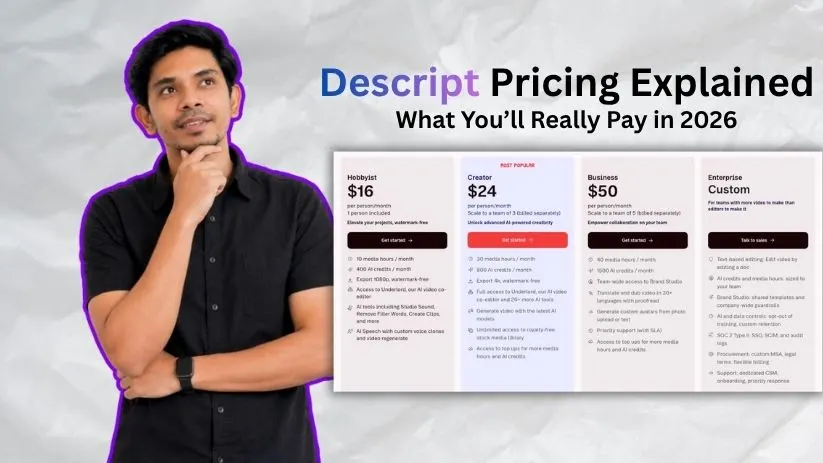
| Plan | Price | Included usage | Best for |
| Free | $0 | 1 media hour/month + 100 one-time AI credits | Trying Descript |
| Hobbyist | $16/month annually or $24 monthly | 10 media hours + 400 AI credits/month | Solo creators |
| Creator | $24/month annually or $35 monthly | 30 media hours + 800 AI credits/month | Regular creators and podcasters |
| Business | $50/month annually or $65 monthly | 40 media hours + 1,500 AI credits/month | Content and marketing teams |
| Enterprise | Custom | Usage sized to your team | Larger organizations |
For most people publishing content regularly, the Creator plan is where Descript pricing starts to feel balanced. Hobbyist is cheaper, but Creator gives you much more media usage, 4K export, advanced AI tools, and access to top-ups.
Descript pricing plans breakdown
The biggest difference between Descript pricing plans isn’t simply the feature list. Each upgrade increases the amount of media you can process and the number of AI-powered edits you can make each month.
Free plan: $0/month
The Descript free plan is mainly a testing ground. You get the core text-based editor, one Media Hour each month, and 100 AI Credits as a one-time allowance rather than a balance that refreshes monthly.
What’s included:
- 1 Media Hour per month
- 100 one-time AI Credits
- Unlimited projects
- Multi-language transcription
- Dynamic captions
- Limited access to Underlord and AI tools
- Video export up to 720p
- Descript watermark on video exports
Best for: Trying Descript with a short podcast, interview, screen recording, or video before paying.
Pros:
- No credit card needed to start
- Lets you test the main editing workflow
- Useful for occasional small projects
Cons:
- Only one Media Hour per month
- AI Credits don’t replenish monthly
- 720p and watermarked video exports
If you’re deciding whether Descript’s text-based editing actually suits you, the Free plan gives you enough room to find out without committing to a subscription.
Hobbyist plan: $16/month annually or $24 monthly
The Descript Hobbyist plan is the first realistic option for someone creating content every month. It increases the allowance to 10 Media Hours and 400 AI Credits while removing the export watermark and raising video quality to 1080p.
What’s included:
- 10 Media Hours per month
- 400 AI Credits per month
- 1080p watermark-free exports
- Underlord AI co-editor
- Studio Sound
- Remove Filler Words
- Create Clips
- AI Speech with custom voice clones
- Video Regenerate
Best for: Solo podcasters, YouTubers, coaches, and creators with a relatively light monthly workload.
Pros:
- Much more practical than the Free plan
- Watermark-free 1080p exporting
- Includes the AI tools most solo creators will use regularly
Cons:
- 10 hours can disappear quickly with long recordings
- No access to usage top-ups
Hobbyist makes sense when your workload is predictable. If you regularly edit longer podcasts or multiple videos each week, you’ll probably outgrow its usage allowance before you outgrow its features.
If you’re also considering a more traditional browser-based video editor, my VEED.io review covers another option aimed at creators.
Creator plan: $24/month annually or $35 monthly
Creator is Descript’s most popular plan and the one I’d look at first for consistent content production. You get 30 Media Hours, 800 monthly AI Credits, 4K exports, and broader access to Descript’s generative AI features.
What’s included:
- 30 Media Hours per month
- 800 AI Credits per month
- 4K watermark-free exports
- Full access to Underlord
- 20+ additional AI tools
- AI video generation
- Unlimited royalty-free stock media
- Access to Media Minute and AI Credit top-ups
- Support for teams of up to three Editors, billed separately
Best for: Podcasters, YouTubers, marketers, and creators publishing several pieces of content every month.
Pros:
- Three times the Media Hours of Hobbyist
- 4K exports
- Better access to advanced AI features
- Ability to buy extra usage without immediately changing plans
Cons:
- AI-heavy workflows can still require paid top-ups
- Additional Editor seats increase the total subscription cost
Creator is probably the sweet spot in Descript pricing for someone using the platform as part of a real production workflow rather than occasionally editing a clip.
For creators turning one piece of content into several formats, you can also see my guide to AI tools for turning blog posts into videos.
Business plan: $50/month annually or $65 monthly
The Business plan is aimed less at individual creators and more at teams that need consistent branding, localization, and higher AI usage. Each Editor gets 40 Media Hours and 1,500 AI Credits, with support for teams of up to five Editors billed separately.
What’s included:
- 40 Media Hours per month
- 1,500 AI Credits per month
- 4K watermark-free exports
- Team-wide Brand Studio
- Video translation and dubbing in 30+ languages
- Custom AI avatars
- Priority support with an SLA
- Media Minute and AI Credit top-ups
Best for: Marketing teams, agencies, businesses, and organizations producing video collaboratively.
Pros:
- Significantly higher AI allowance
- Strong branding and localization tools
- Better support for team workflows
Cons:
- 50–65 is charged per person
- Expensive if you don’t need the team-specific features
The jump from Creator to Business is substantial, so I wouldn’t upgrade simply for another 10 Media Hours. The value is really in Brand Studio, dubbing, custom avatars, and team-focused features.
If AI avatars are important to your workflow, compare Descript with my HeyGen review and Synthesia pricing guide.
Enterprise plan: Custom pricing
Descript Enterprise removes the fixed public price and builds the plan around the organization. Media Hours and AI Credits can be sized to the team, while security, administration, legal, and support options become much more extensive.
What’s included:
- Custom Media Minutes and AI Credits
- Brand Studio
- AI and data controls
- Option to opt out of AI training
- Custom data-retention controls
- SOC 2 Type II controls
- SSO and SCIM
- Audit logs
- Custom legal terms and billing
- Dedicated customer success and onboarding
Best for: Larger organizations with security, procurement, compliance, and centralized brand-management requirements.
Pros:
- Usage can be tailored to the team
- Stronger security and administrative controls
- Dedicated onboarding and support
Cons:
- No public Descript cost
- Requires contacting sales for a quote
Enterprise only makes sense when those organizational controls matter. For most individuals and small teams, Creator or Business gives you a much clearer idea of what you’ll spend each month.
How Media Minutes and AI Credits work in Descript
This is where Descript pricing gets a little less straightforward. Your subscription gives you two separate usage allowances: Media Minutes for the content you bring into Descript and AI Credits for AI-powered editing tools.
These allowances are pooled across your Descript Drive. Adding another paid Editor seat also adds that seat’s Media Minutes and AI Credits to the shared pool.
What counts as Media Minutes?
Media Minutes are consumed when you upload or record audio and video in Descript. They measure the source media you process rather than the length of your finished export.
Media Minutes are used when you:
- Upload an audio or video file
- Record inside a Descript project
- Record through Descript Rooms
- Add still images, which count as one second each
A one-hour Rooms recording uses 60 Media Minutes even if five people participate, so Descript doesn’t multiply the usage by the number of speakers.
Unused monthly Media Minutes don’t roll over. That makes estimating your raw recording time important when choosing between Descript pricing plans.
What uses Descript AI Credits?
Descript AI Credits pay for AI-powered actions rather than basic editing. Tools such as Studio Sound, Remove Filler Words, Eye Contact, Green Screen, AI Speech, avatars, and generative video can all draw from your balance.
Even chatting with Underlord uses a small number of AI Credits.
Some actions are relatively predictable because their cost depends on the amount of media being processed. Underlord is harder to budget because credit consumption can change depending on the task, media length, and AI model it decides to use.
That’s the part of the Descript cost I’d watch most closely if AI does a large share of your editing. Unused monthly AI Credits don’t roll over either.
If you’re comparing credit-based creative tools, my Runway pricing breakdown shows how another major AI video platform handles usage limits.
How Descript top-ups work
Running out of your allowance doesn’t always mean you need a more expensive subscription. Creator and Business users can purchase Descript top ups for temporary increases in usage.
Current options include:
- 350 AI Credits for $35
- 1,000 AI Credits for $80
- 3,000 AI Credits for $180
- 8,000 AI Credits for $400
- 5 Media Hours for $25
- 20 Media Hours for $80
- 50 Media Hours for $150
Top-ups are shared across the Drive and remain available for up to 12 months. Descript uses your normal monthly allowance first, then starts drawing from the purchased balance.
My rule: use a top-up when one unusually large project pushes you over the limit. If you’re buying extra Media Minutes or AI Credits almost every month, moving to a higher plan will usually make more sense.
Which Descript plan should you choose?
The best Descript plan depends more on how frequently you produce content than on how many features look useful. Here’s the simplest way I’d narrow it down.
Choose Free if you:
- Want to test Descript before paying
- Have one small project to edit
- Don’t need watermark-free HD exports
Choose Hobbyist if you:
- Create content on your own
- Stay within about 10 Media Hours per month
- Need watermark-free 1080p exports
- Use AI tools moderately
Hobbyist works well when your workload is small and predictable. Its biggest limitation is that you can’t purchase additional usage when you hit the monthly cap.
Choose Creator if you:
- Publish podcasts or videos regularly
- Need 4K exports
- Use Descript AI Credits frequently
- Need 30 Media Hours per month
- Want the option to purchase top-ups
For most regular individual creators, Creator is the Descript pricing plan I’d start with. The jump from Hobbyist buys considerably more usage without moving into team-focused Business pricing.
Choose Business if you:
- Have several people producing content
- Need Brand Studio for consistent assets
- Translate or dub content regularly
- Need custom AI avatars
- Want priority support
- Need a larger AI Credit allowance
Business becomes worthwhile when you’re paying for its team and brand features, not simply because you need another few hours of media processing.
Choose Enterprise if you:
- Need SSO or SCIM
- Have strict security requirements
- Need custom data-retention controls
- Want usage tailored to a larger organization
- Need dedicated onboarding and account support
Enterprise is less about unlocking another editing feature and more about giving larger organizations the administration, security, and purchasing controls they require.
Is Descript worth the cost?
Descript makes the most sense when transcription, audio cleanup, captions, AI editing, and video editing would otherwise require several separate tools. The text-based workflow is especially useful for spoken content because changing a recording can feel much closer to editing a document.
The value gets harder to justify when you consistently exceed your Media Minutes or burn through AI Credits and need top-ups on top of the subscription.
Descript is worth it if you:
- Edit podcasts, interviews, tutorials, or talking-head videos
- Prefer editing from a transcript instead of a traditional timeline
- Regularly use transcription, captions, and audio cleanup together
- Want AI tools built into the same editing workflow
- Repurpose long-form recordings into shorter content
Skip Descript if you:
- Mainly need inexpensive transcription
- Need advanced visual effects or detailed timeline control
- Process very large amounts of raw footage every month
- Want AI to generate most of your video from a prompt
For that last use case, tools built around AI video generation may be a better fit. You can compare one option in my InVideo AI pricing guide.
And if Descript itself feels too restrictive, I’ll compare the main alternatives next—but you can also see my full guide to the best Descript alternatives.
Descript alternatives & pricing comparison
Descript isn’t your only option for AI-assisted video creation. The better choice depends on whether you mainly edit spoken content, create social videos, generate videos from prompts, or build presenter-led videos with AI avatars.
For a fair comparison, the table below uses the lowest paid annual plan currently advertised by each platform. Descript starts at $16 per person/month annually, VEED at $9/month annually, InVideo AI at $17/month annually, and Synthesia Starter at $18/month annually.
| Tool | Paid plans from | Best for | Key advantage |
| Descript | $16/month | Podcasts and spoken-word video | Edit audio and video like a document |
| VEED | $9/month | Browser-based and social video editing | Fast all-in-one online workflow |
| InVideo AI | $17/month | Prompt-to-video creation | Generates videos using multiple AI models |
| Synthesia | $18/month | Training and presenter videos | Large library of AI avatars |
VEED is worth considering if you care more about quick browser-based editing and social content than podcast-style workflows. If neither tool feels right, see my guide to the best VEED.io alternatives.
Synthesia takes a different approach, focusing heavily on avatar-led business, training, and presentation videos. You can compare more options in my guide to Synthesia alternatives.
InVideo AI makes more sense when you want AI to generate much of the video from prompts rather than primarily edit existing recordings. I also compared other tools in my InVideo AI alternatives guide.
Descript vs VEED: Which should you choose?
Descript and VEED overlap more than they used to. Both offer browser-friendly video editing, captions, AI tools, audio cleanup, and text-based editing, but they still feel suited to different workflows.
Descript is better for: Podcasts, interviews, tutorials, screen recordings, and other projects where the spoken words drive the edit. Its transcript-first workflow and audio tools make cutting dialogue especially convenient.
VEED is better for: Creators who want an all-in-one online editor for social videos, captions, visual edits, AI generation, and quick content repurposing without installing editing software.
Use both if: Descript saves you time cleaning and restructuring long-form dialogue, while VEED handles the more visual or social-first versions you publish afterward.
My bottom line on Descript pricing
The subscription price is only one part of the Descript cost. Media Minutes determine how much source footage you can process, while AI Credits determine how aggressively you can use the platform’s AI features.
For occasional editing, Hobbyist should be enough. For someone publishing consistently, Creator is the Descript pricing plan I’d pick first because 30 Media Hours, 800 AI Credits, 4K exports, and top-up access give you more room before usage becomes frustrating.
Business makes more sense when Brand Studio, higher AI limits, localization, custom avatars, or team workflows are genuinely valuable. I wouldn’t pay 50–65 per person simply for another 10 Media Hours.
If video generation matters more to you than transcript-based editing, compare my best AI video generator tools before deciding.
Frequently asked questions
How much does Descript cost per month?
Descript pricing starts at $0. Hobbyist costs $16/month annually or $24 monthly, Creator costs $24 annually or $35 monthly, and Business costs $50 annually or $65 monthly per person. Enterprise pricing is custom.
Is there a free version of Descript?
Yes. The Descript free plan includes 60 Media Minutes each month and 100 one-time AI Credits, making it useful for testing the editor before upgrading to a paid plan.
What are Descript Media Minutes?
Media Minutes measure the audio and video you upload or record in Descript. A 60-minute recording normally consumes 60 Media Minutes, and unused monthly minutes don’t roll over.
Do Descript AI Credits roll over?
No. Unused monthly Descript AI Credits expire rather than rolling into the next month. Purchased top-up credits are different: they can carry forward for up to 12 months from purchase.
Can you buy more Media Minutes or AI Credits?
Yes, but Descript top ups are currently available only on the Creator and Business plans. Purchased usage is shared across the Drive, used after the normal monthly allowance, and expires after 12 months.