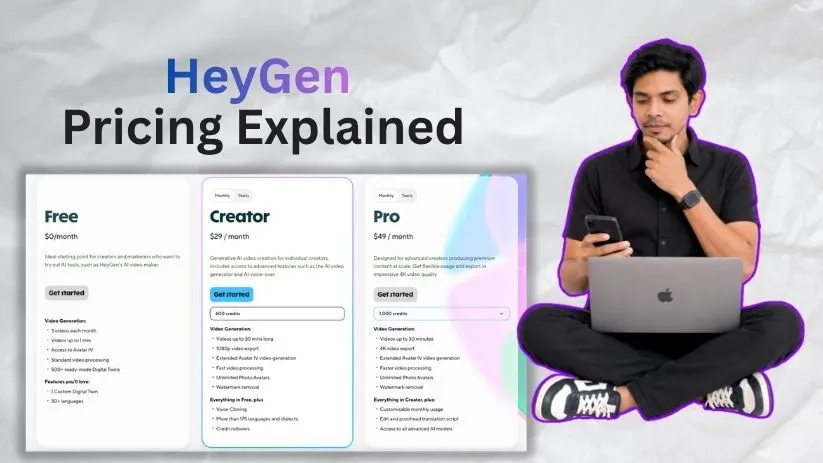
HeyGen pricing looks simple at first, but the credit system makes the real cost a little harder to judge. Plans now range from a free tier to Creator, Pro, Business, and Enterprise, with credits controlling access to more resource-heavy AI video features.
I went through the current plans to see what you actually get, where the limits appear, and which subscription makes sense before you start paying more than you need to.
Want to know how HeyGen performs beyond its pricing? Read my HeyGen review for a closer look at its avatars, video quality, features, and overall value.
HeyGen pricing plans: At a glance
HeyGen combines monthly subscriptions with credits. The higher your plan, the more credits, export quality, collaboration features, and advanced AI tools you unlock.
Here’s the quick version of the current HeyGen pricing plans:
| Plan | Price | Best for | Key features |
| Free | $0 | Testing HeyGen | Up to 3 videos/month, 1-minute videos, basic exports |
| Creator | $29/month | Solo creators | 600 credits, 1080p, videos up to 30 minutes |
| Pro | From $49/month | High-volume creators | 1,000+ credits, 4K exports, advanced AI models |
| Business | $149/month | Teams | 1,500 shared credits, 4K, collaboration and SSO |
| Enterprise | Custom | Large organizations | Custom usage, security and admin controls |
The important number isn’t always the monthly subscription price. HeyGen credits are what determine how much you can use premium avatar models, translation tools, Video Agent, and other advanced features.
Not sure HeyGen is the right platform? See my best HeyGen alternatives before choosing a paid plan.
HeyGen pricing plans breakdown
The difference between HeyGen plans becomes clearer once you look beyond the monthly price. The Free and Creator plans are aimed mainly at individuals, while Pro introduces heavier credit usage and Business adds features designed specifically for teams.
Free plan: $0/month
The HeyGen free plan is mainly a testing ground. You can create up to three videos per month in supported regions, with each video limited to around one minute.
What’s included:
- Limited monthly video generation
- Videos up to 1 minute
- Access to stock AI avatars
- One custom Digital Twin
- Multiple languages
- Basic video exports
Best for: Anyone who wants to test HeyGen’s avatars, voices, and workflow before entering a paid subscription.
Pros:
- No credit card commitment
- Enough access to judge avatar quality
- Useful for occasional experiments
Cons:
- Very limited monthly output
- Short video-length limit
- Not practical for regular content production
If you’re still testing different platforms rather than committing to one, my roundup of the best AI video generator tools gives you a broader comparison.
Creator plan: $29/month
The HeyGen Creator plan is where the service starts becoming practical for regular users. It costs $29 per month, or roughly $24 per month when you choose annual billing.
You get 600 credits per month, videos up to 30 minutes, 1080p exports, watermark removal, voice cloning, a large stock avatar library, and access to HeyGen’s multilingual video tools.
Best for: Solo creators, marketers, educators, and small-business owners producing avatar videos regularly.
Pros:
- Reasonable starting price
- 600 monthly credits
- Watermark-free 1080p exports
- Much longer videos than the Free plan
- Voice cloning and custom avatar features
Cons:
- No 4K export
- Heavy use of premium AI models can burn through credits quickly
- You may need Pro once monthly usage grows
Creator is probably the most sensible starting point for an individual who already knows they will use HeyGen regularly rather than just experiment with it.
If price is your biggest concern, you may also want to compare it with my Vidnoz AI review before upgrading.
Pro plan: Starting at $49/month
The HeyGen Pro plan starts at $49 per month with 1,000 credits. Unlike Creator, you can select higher Pro tiers as your usage grows, all the way up to 100,000 monthly credits.
What’s included:
- 1,000–100,000 credits per month
- Videos up to 30 minutes
- 4K video exports
- One Custom Digital Twin
- Translation-script editing
- Access to advanced AI models, including Seedance 2.0
Best for: Individual creators producing a higher volume of premium AI videos or regularly using credit-heavy features.
Pros:
- Flexible credit tiers
- 4K video quality
- Access to advanced generation models
Cons:
- Costs rise quickly at higher credit tiers
- No one-time credit packs
If you mainly create training or corporate presenter videos, it is also worth checking my Synthesia pricing guide before choosing Pro.
Business plan: $149/month
The HeyGen Business plan costs $149 per month for the first seat and includes 1,500 shared credits. Additional team members cost $20 per seat, but adding seats does not increase your credit allowance.
You also get videos up to 60 minutes, 4K exports, five Custom Digital Twins, workspace collaboration, SAML/SSO, centralized billing, SCORM exports, LMS integrations, and interactive video tools.
Best for: Marketing, learning and development, and communications teams that need multiple users working inside the same workspace.
Pros:
- Strong collaboration features
- 4K and longer videos
- Flexible credit top-ups
- Business security and LMS tools
Cons:
- Much larger jump in monthly cost
- 1,500 credits are shared across the team
Business users can buy additional credits for $5 per 100 credits, or $0.05 per credit, and enable auto-reload when the balance gets low.
For a closer comparison of corporate AI video platforms, read my Synthesia review.
Enterprise plan: Custom pricing
Enterprise removes the fixed self-service pricing structure and builds the package around your organization’s usage and security requirements.
It can include custom credit terms, no standard maximum video duration, multi-workspace management, SAML/SSO, SCIM provisioning, enterprise security, priority support, and dedicated onboarding.
Best for: Large organizations that need advanced governance, security, procurement, and customized usage limits.
If enterprise avatar platforms are what you’re comparing, my guide to Synthesia alternatives covers several other options.
How HeyGen credits and extra costs work
This is where HeyGen pricing gets more complicated. Credits are used across premium video generation, translations, avatars, AI assets, and Video Agent, but different features consume them at very different rates.
How many HeyGen credits does a video use?
Current examples include:
- Avatar III Video Look: 4 credits/minute
- Avatar IV Video Look: 31 credits/minute
- Avatar V: 48 credits/minute
- Video Translation: 4–10 credits/minute
- Video Agent: 40–120 credits/minute
That means Creator’s 600 credits could produce only about 19 minutes of Avatar IV Video Look if you spent the entire allowance on that feature.
So don’t judge the HeyGen cost purely by how many credits a plan includes. What you create has a major impact on how quickly those credits disappear.
Do unused HeyGen credits roll over?
Yes. Monthly subscribers can roll eligible unused credits into one additional billing cycle, while annual subscribers can accumulate unused credits until their annual renewal date.
If you cancel your paid subscription and return to Free, your remaining unused credits will not carry over.
Can you buy extra HeyGen credits?
It depends on your plan.
- Creator: Upgrade to Pro when you need more credits.
- Pro: Move to a higher Pro credit tier.
- Business: Buy 100-credit blocks for $5 or use auto-reload.
HeyGen also sells additional Video Avatar slots separately, so your final monthly cost can increase beyond the base subscription.
And if you’re planning automated video workflows, remember that integrations and API-style workflows can create their own usage considerations. You can learn more about automation in my guide to what n8n is.
Which HeyGen plan should you choose?
The best HeyGen plan depends less on how many videos you make and more on which AI features you use. Premium avatars, translations, and advanced generation models can consume credits much faster than basic videos.
Choose Free if you:
- Want to test HeyGen before paying.
- Only need a few short videos.
- Don’t mind basic export limits.
Choose Creator if you:
- Create AI avatar videos on your own.
- Need 1080p exports without a watermark.
- Can stay within 600 monthly credits.
For more ways to turn existing content into video, see my guide to AI tools for turning blog posts into videos.
Choose Pro if you:
- Need 4K exports.
- Regularly exceed Creator’s credit allowance.
- Use advanced AI models frequently.
Choose Business if you:
- Have several people creating videos.
- Need SSO, collaboration, SCORM, or LMS integrations.
- Want the option to purchase extra credits.
Choose Enterprise if you:
- Need advanced security and user management.
- Manage several workspaces.
- Want custom usage and support terms.
Is HeyGen worth the cost?
For the right use case, yes. HeyGen makes the most sense when AI presenters, Digital Twins, voice cloning, and multilingual localization can replace repeated filming or manual translation work.
HeyGen is worth it if you:
- Regularly create presenter-style videos.
- Need multilingual video localization.
- Produce training, sales, or onboarding content.
- Want a reusable digital version of yourself or a spokesperson.
Skip HeyGen if you:
- Mainly want cinematic text-to-video clips.
- Need large volumes of simple social videos.
- Prefer predictable usage without a credit system.
If editing flexibility matters more than AI avatars, my VEED review covers a more traditional browser-based AI video workflow.
HeyGen alternatives & pricing comparison
HeyGen is strong at realistic avatars and localization, but it isn’t automatically the best choice for every type of AI video. These alternatives approach video creation from slightly different angles.
| Tool | Starting price | Best for | Key advantage |
| Synthesia | Free; Starter $29/mo | Training and corporate video | Strong L&D workflow |
| Vidnoz AI | Free | Budget-conscious avatar videos | Large avatar and template library |
| VEED | Free | Editing and social video | Full browser video editor |
| InVideo AI | From $17/mo annually | Prompt-to-video creation | Broad generative model access |
If you’re considering VEED, you can also compare my best VEED alternatives. For prompt-based generation, my InVideo AI pricing guide explains its credit system in more detail.
And if a lower-cost avatar platform is your priority, see my Vidnoz AI alternatives comparison.
HeyGen vs Synthesia: Which should you choose?
HeyGen is the better fit if you care most about Digital Twins, flexible avatar creation, multilingual localization, and creator-focused AI video tools.
Synthesia leans more heavily toward structured corporate training and learning workflows, with features built around teams, guest collaboration, branded videos, and enterprise L&D.
For individuals and marketers, I’d lean toward HeyGen. For larger training departments, Synthesia deserves a closer comparison.
My bottom line on HeyGen pricing
HeyGen’s starting prices are reasonable, but the monthly subscription only tells part of the story. How quickly you consume credits matters more than the headline price.
Creator is the logical starting point for most serious solo users. Pro makes sense once 600 credits or 1080p exports become limiting.
Business is harder to justify unless you genuinely need team collaboration, security features, or flexible credit top-ups.
Frequently asked questions
Is HeyGen free?
Yes. HeyGen has a free plan for testing its AI avatars and video workflow, although video length and monthly generation limits are much tighter than on paid plans.
How much does HeyGen cost per month?
HeyGen pricing starts at $0. Creator costs $29 per month, Pro starts at $49 per month, Business starts at $149 per month, and Enterprise uses custom pricing.
Do HeyGen credits roll over?
Yes. Eligible unused credits on monthly plans can roll into one additional billing cycle. Annual-plan credits can accumulate until the annual renewal date.
Is the HeyGen API included with a paid subscription?
No. HeyGen API pricing is separate from Creator, Pro, and Business subscriptions. The API currently uses its own pay-as-you-go credit model, so standard subscription credits don’t pay for API usage.