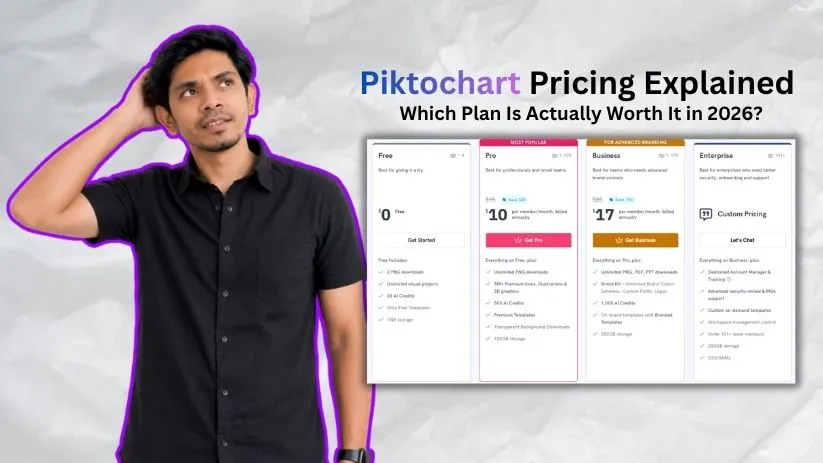
Piktochart pricing looks simple at first: there’s a Free plan, two main paid plans, and special options for larger organizations, educators, and nonprofits. But the real difference isn’t just the monthly price. It comes down to AI credits, download formats, branding tools, and how often you create visuals.
For most people, the decision is really between Free, Pro, and Business. Here’s what each Piktochart plan costs and where the upgrade actually starts making sense.
Also Read: What Is Piktochart? A Deep Dive Into the AI-Powered Visual Design Tool
Piktochart pricing plans: At a glance
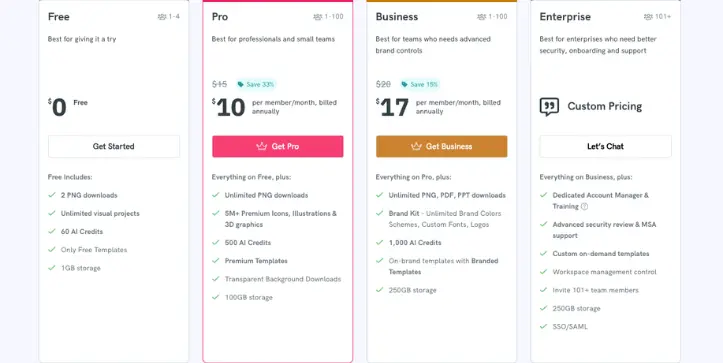
Piktochart has a usable free tier, while paid plans start at $10 per member per month when billed annually. Business costs $17 per member monthly on annual billing, while Enterprise pricing is customized for larger teams.
| Plan | Price | Best for | Key features |
| Free | $0 | Testing Piktochart and occasional visuals | 60 AI credits, 2 PNG downloads |
| Pro | $10/member/month annually or $15 monthly | Freelancers and regular creators | 500 AI credits, unlimited PNG downloads, premium assets |
| Business | $17/member/month annually or $20 monthly | Marketing and brand teams | 1,000 AI credits, PDF/PPT exports, advanced Brand Kit |
| Enterprise | Custom | Organizations with 101+ users | SSO, onboarding, security controls |
| Education | $39.99/member/year | Students and educators | 250 AI credits and discounted paid features |
| Nonprofit | $60/member/year | Eligible nonprofits | 250 AI credits and discounted paid features |
The annual plans offer the better value, but remember that Piktochart pricing is per member. A $17 Business plan can therefore become considerably more expensive once you start adding multiple people to the workspace.
Piktochart pricing plans breakdown
The biggest mistake would be choosing a plan based only on its AI credit allowance. Downloads and export formats matter just as much, especially if you create reports, presentations, infographics, or branded client work.
Free plan: $0/month
The Piktochart Free plan is good enough to find out whether you actually like the editor before paying. You get 60 AI credits each month, unlimited visual projects, free templates, 1GB of storage, and up to four workspace members.
What’s included:
- 60 monthly AI credits
- Unlimited visual projects
- 2 PNG downloads
- Access to free templates
- 1GB cloud storage
- Up to 4 workspace members
Best for: people testing Piktochart, students, and anyone who only needs to create visuals occasionally.
Pros:
- No subscription required
- Unlimited visual projects
- Enough AI credits to experiment with its AI features
Cons:
- Only 2 downloads
- PNG export only
- Fewer premium templates and assets
The two-download restriction is the real catch. You can build as many projects as you want, but the Free plan starts feeling restrictive as soon as you need to regularly export finished work.
If free design software is your priority, you may also want to compare it with the options in myCanva Pricing Explained guide.
Pro plan: $10 per member/month
Piktochart Pro costs $10 per member per month when billed annually, which works out to $120 per year. If you prefer monthly billing, the price increases to $15 per member.
This is where Piktochart becomes much more practical for regular creators.
What’s included:
- 500 AI credits per month
- Unlimited PNG downloads
- Premium templates
- Access to millions of premium graphics
- Transparent background exports
- 100GB storage
- Unlimited visual folders
Best for: freelancers, content creators, marketers, and small teams producing visual content regularly.
Pros:
- Much higher AI allowance
- Removes the Free plan’s download restriction
- Large premium template and asset library
- Reasonable annual price for individual users
Cons:
- PDF and PowerPoint exports aren’t included
- Advanced brand controls require Business
- Pricing increases with every additional member
Pro is probably the sweet spot for individual users. But there’s an important limitation: paying for Pro still doesn’t unlock some features businesses might consider basic, particularly PDF/PPT exports and advanced brand management.
Business plan: $17 per member/month
Piktochart Business costs $17 per member per month on annual billing, or $20 when paying month to month. That makes it only $7 more than annual Pro pricing, but the upgrade is much more about professional workflow than extra AI credits.
What’s included:
- 1,000 AI credits per member
- Unlimited PNG downloads
- PDF and PowerPoint exports
- Unlimited brand colors
- Custom fonts and logos
- Branded templates
- 250GB storage
- More advanced team branding controls
Best for: marketing departments, agencies, communication teams, and businesses that need everyone creating content under the same brand guidelines.
Pros:
- Twice the AI credits of Pro
- PDF and PowerPoint exporting
- Much stronger Brand Kit features
- Better fit for collaborative business use
Cons:
- Per-member pricing becomes expensive for larger teams
- Many individuals won’t need the extra branding features
For me, the biggest reason to move from Pro to Business isn’t the jump from 500 to 1,000 AI credits. It’s the ability to export in more professional formats and keep team designs consistently on-brand.
If you’re deciding between Piktochart and another business-focused visual tool, my Piktochart vs Visme comparison goes deeper into where each platform is stronger.
Enterprise plan: Custom pricing
Enterprise is designed for organizations with more than 100 users rather than freelancers or ordinary small teams. Pricing isn’t publicly fixed because the final cost depends on team size and organizational requirements.
You get features such as SSO/SAML authentication, dedicated onboarding, security reviews, workspace administration, custom templates, and account management.
Best for: universities, enterprises, government teams, and larger organizations where security and centralized administration matter more than getting the lowest possible price per seat.
Education, Campus and Nonprofit plans
Piktochart also offers discounted pricing for organizations that don’t fit neatly into its standard commercial plans.
The Education plan costs $39.99 per member per year, while eligible nonprofits can get Piktochart for around $60 per member per year. Both include 250 monthly AI credits along with additional export and branding features.
Piktochart also offers a Campus plan with custom pricing for institutions that need thousands of seats.
These special plans can be considerably cheaper than paying for Pro or Business individually, so students, teachers, universities, and nonprofit organizations should check eligibility before buying a standard subscription.
How Piktochart AI credits work
Piktochart AI credits are shared across its AI tools, and how quickly you use them depends heavily on what you’re creating. A simple prompt costs very little, while AI image and video generation can burn through your monthly allowance much faster.
Free users get 60 credits per month, Pro members get 500, and Business members get 1,000. Education and nonprofit accounts receive 250 credits per member.
One useful detail for teams is that credits are pooled across the workspace. For example, a Pro workspace with three paid seats gets 1,500 AI credits per month, and anyone in that workspace can use them.
How fast do Piktochart AI credits run out?
Not every AI action costs the same:
- Topic prompt: 1 credit
- AI summarizer: 3 credits
- Text-to-image generation: 6 credits
- Pikto AI Studio image generation: 25 credits
- AI video generation: 250 credits
That means 500 Pro credits can go a long way if you’re mainly summarizing content or generating occasional images. But if AI video becomes part of your workflow, the same allowance can disappear surprisingly quickly.
Related: See the AI graphic design generator tools I recommend for creating visuals faster.
Can you buy more Piktochart AI credits?
Yes. You don’t necessarily need to upgrade your Piktochart pricing plan just because you’ve exhausted your AI allowance.
Additional prepaid packs currently start at $20 for 2,000 credits, with larger packages going up to 25,000 credits for $200. You can also stack multiple packs if you need more.
That’s useful for someone who only has an occasional month of heavy AI usage. Paying for extra credits may make more sense than moving to a higher subscription purely for the larger monthly allowance.
Do unused Piktochart credits roll over?
Your normal monthly subscription credits do not roll over. They reset at the beginning of your next billing cycle.
Purchased credits work differently. Prepaid AI credits don’t expire, so any unused balance remains available until you need it.
Which Piktochart plan should you choose?
The best Piktochart plan isn’t automatically the one with the most AI credits. I would choose based on how often you export content and whether you need professional branding or additional file formats.
Choose Free if you:
- Mainly want to test Piktochart
- Create visuals only occasionally
- Can work with PNG exports
- Don’t expect to download more than two finished designs
Choose Pro if you:
- Regularly create infographics and graphics
- Want unlimited PNG downloads
- Need premium templates and visual assets
- Can work without PDF or PowerPoint exports
For most solo users, Pro offers the best balance between Piktochart cost and everyday features.
Choose Business if you:
- Need PDF or PowerPoint exports
- Work with brand colors, logos, and custom fonts
- Want 1,000 AI credits per member
- Need multiple people creating consistent branded content
Business makes more sense when Piktochart becomes part of an actual company workflow rather than an occasional design tool.
Choose Enterprise if you:
- Have more than 100 users
- Need SSO/SAML
- Require centralized workspace management
- Want onboarding, security reviews, and dedicated support
Piktochart confirms that paid subscriptions are priced per member/seat, so team size matters when comparing the real monthly cost.
Is Piktochart worth the cost?
I think Piktochart pricing is reasonable if your work revolves around infographics, reports, presentations, and data-heavy visual content. Pro is affordable for regular individual use, while Business becomes more attractive when branding and professional exports actually matter.
Piktochart is worth it if you:
- Create infographics or reports regularly
- Want AI to speed up visual creation
- Prefer templates over designing from scratch
- Need an easier alternative to professional design software
- Can justify Business for brand-controlled team content
Skip Piktochart if you:
- Mainly create social media graphics
- Need advanced photo or vector editing
- Want a much broader creative toolkit
- Don’t want to pay for Business just to access PDF/PPT exports and advanced branding
If you fall into that second group, I’d compare a few Canva alternatives before committing to a paid Piktochart plan.
Piktochart alternatives & pricing comparison
Piktochart isn’t the only option if you need infographics, reports, presentations, or marketing visuals. The better choice depends on whether you care most about data visualization, social content, interactive presentations, or general-purpose design.
| Tool | Starting price | Best for | Key advantage |
| Piktochart | Free; Pro from $10/month annually | Infographics and business visuals | Simple visual communication |
| Canva | Free + paid plans | General-purpose design | Huge template and content ecosystem |
| Visme | Free; Starter from $12.25/month annually | Presentations and business content | Interactive content and analytics |
| Adobe Express | Free + paid Premium plan | Social and marketing content | Adobe ecosystem and creative assets |
| Venngage | Free; Premium from $10/month annually | Infographics and data storytelling | Strong infographic templates |
Visme currently starts at $12.25 per person per month when billed annually, while Venngage Premium starts at $10 per month with annual billing.
Piktochart Pro therefore remains competitively priced at $10 per member per month annually, especially if your main goal is creating reports, infographics, and presentation-style visuals rather than managing a broader creative workflow.
Want more choices? Read my Piktochart Alternatives and Competitors guide for a deeper comparison of the tools I’d consider before subscribing.
You can also compare Visme Pricing Explained if interactive presentations and business content are important to you, or explore my Best Visme Alternatives guide if neither tool feels like the right fit.
If you’re considering Adobe’s option, start with What Is Adobe Express? and then check my Best Adobe Express Alternatives comparison.
Piktochart vs Visme: Which should you choose?
Piktochart and Visme overlap heavily, but I wouldn’t choose them for exactly the same type of work.
Piktochart Pro starts at $10 per member/month annually, while Visme Starter currently costs $12.25 per person/month annually. Visme’s Pro plan jumps to $24.75 per person/month and adds features such as Brand Kit, analytics, integrations, and additional export formats.
Piktochart is better for: straightforward infographics, reports, visual documents, and teams that want a simpler entry price.
Visme is better for: interactive presentations, animations, analytics, advanced business content, and projects that need more publishing formats.
If price and simplicity matter most, I’d lean toward Piktochart. If interactivity and deeper presentation features matter more, Visme is easier to justify.
Related: See my Piktochart vs Visme comparison for the full feature-by-feature breakdown.
You may also find Visme vs Canva and Adobe Express vs Visme useful if you’re comparing several visual design platforms at once.
My bottom line on Piktochart pricing
For most individual users, Piktochart Pro offers the best value. At $10 per member/month annually, it removes the Free plan’s biggest limitation—restricted downloads—while giving you 500 AI credits, premium templates, and significantly more storage.
Business makes sense when you actually need PDF and PowerPoint exports, stronger Brand Kit controls, or 1,000 monthly AI credits. Otherwise, paying the extra $7 per member every month may not give an individual creator much additional value.
Free is useful for testing Piktochart, but its two-download limit means I wouldn’t rely on it for regular production work.
If you’re still deciding between broader design platforms, my Canva vs Adobe Express comparison is another useful place to continue.
Frequently asked questions
How much does Piktochart cost per month?
Piktochart has a free plan. Pro costs $10 per member/month when billed annually or $15 monthly, while Business costs $17 annually or $20 on monthly billing. Enterprise pricing is customized.
Is Piktochart really free?
Yes. The Piktochart Free plan doesn’t expire and lets you create unlimited projects. However, you only get two download credits, 60 monthly AI credits, limited templates, and PNG exporting.
Is Piktochart Pro worth it?
For regular individual use, I think so. Pro is the biggest practical upgrade because it gives you unlimited PNG downloads, 500 AI credits, premium templates and assets, and 100GB of storage without forcing you into Business pricing.
Does Piktochart charge per user?
Yes. Piktochart pricing is per member or seat. If you add more members to a paid workspace, each additional seat is charged at the applicable plan rate.
Do Piktochart AI credits roll over?
No. Monthly subscription AI credits reset each billing cycle and don’t roll over. However, additional prepaid credits you purchase separately do not expire and remain available until you use them.