Pixlr pricing looks simple at first: there’s a free option and four paid plans starting at just a few dollars per month. But once AI credits, annual discounts, generation limits, and the newer Ultra plans enter the picture, choosing the right plan gets less obvious.
The bigger question isn’t simply how much Pixlr costs. It’s whether you actually need to pay for more AI credits or whether Pixlr’s cheaper plans already cover your editing workflow.
Pixlr has also changed its pricing structure over time, which is why some third-party pricing pages still show older plans. The prices below follow Pixlr’s current pricing page.
If you’re still deciding whether Pixlr is the right editor for you, I’ve also compared the best Pixlr alternatives for free editing, AI tools, and more advanced workflows.
Pixlr pricing plans: At a glance
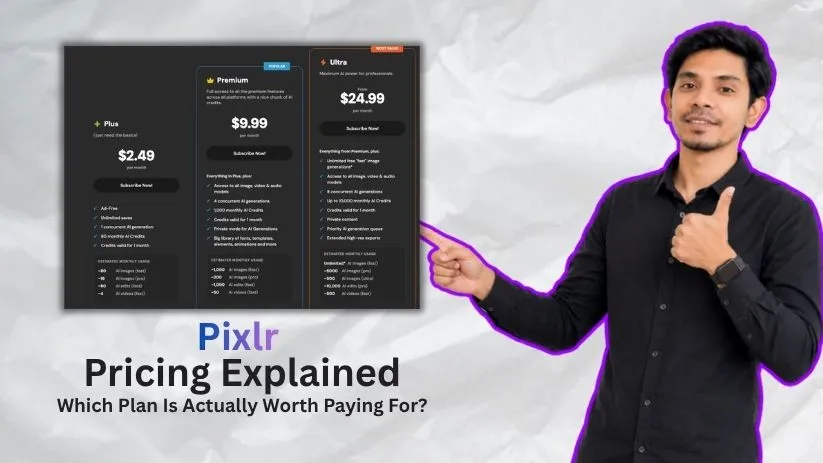
Pixlr currently has a free option plus Plus, Premium, Ultra, and Ultra MAX subscriptions. Paying yearly lowers the effective monthly price, while the biggest difference between the paid tiers is how many AI credits and generations you get.
| Plan | Monthly price | Yearly rate | AI credits | Best for |
| Free | $0 | $0 | Limited | Occasional editing |
| Plus | $2.49/month | $1.99/month | 80/month | Casual creators |
| Premium | $9.99/month | $7.99/month | 1,000/month | Frequent creators |
| Ultra | $24.99/month | $19.99/month | 5,000/month | Heavy AI users |
| Ultra MAX | $49.99/month | $39.99/month | 10,000/month | High-volume AI workflows |
For most people comparing Pixlr pricing plans, Premium sits in the most useful middle ground. Plus is cheap if you mainly want an ad-free editor, while Ultra becomes more interesting when AI generation is part of your regular workflow.
Pixlr pricing plans breakdown
The cheapest Pixlr subscription isn’t automatically the best value. The right plan depends on whether you’re mainly editing existing images or regularly using Pixlr’s AI generation tools.
Free plan: $0
Pixlr’s free plan gives you a way to use its core editing tools without paying upfront. It’s best suited to occasional edits, testing the interface, or people who don’t mind ads and usage restrictions.
What’s included:
- Access to Pixlr’s basic editing tools
- Browser-based photo editing
- Limited AI functionality
- Free access with ads and restrictions
Best for: Beginners and occasional users who want to try Pixlr before paying.
Pros:
- No subscription required
- Enough for simple edits and testing
Cons:
- Ads and usage limits
- Limited AI access compared with paid plans
If you want a free browser editor with stronger PSD and layer-focused editing, you may also want to look at these Photopea alternatives.
Plus plan: $2.49/month
Pixlr Plus costs $2.49 per month, or about $1.99 per month when billed yearly. It is the cheapest paid Pixlr subscription and mainly removes the restrictions that make the free version inconvenient for regular use.
What’s included:
- Ad-free editing
- Unlimited saves
- 80 AI credits per month
- One concurrent AI generation
- Access to Pixlr’s editing tools
Best for: Casual creators who edit regularly but use AI features only occasionally.
Pros:
- Very low monthly cost
- Removes ads and save restrictions
- Enough AI credits for light usage
Cons:
- 80 credits can disappear quickly with frequent AI generation
- Only one concurrent AI job
If your work is more focused on social posts, templates, and branded graphics than photo editing, it’s also worth comparing Canva pricing.
Premium plan: $9.99/month
Pixlr Premium costs $9.99 per month, dropping to about $7.99 per month with annual billing. This is where the Pixlr cost starts to make more sense for people using both traditional editing and AI features frequently.
You get 1,000 AI credits per month, four concurrent AI generations, access to Pixlr’s image, video, and audio models, private AI generations, and a larger collection of creative assets.
What’s included:
- Everything in Plus
- 1,000 monthly AI credits
- Four concurrent AI generations
- Image, video, and audio AI models
- Private AI generations
- Additional fonts, templates, elements, and animations
Best for: Frequent creators who want Pixlr’s full editing and AI toolkit without paying for the much heavier Ultra plans.
Pros:
- Much larger AI allowance than Plus
- Better balance between price and features
- Suitable for regular content creation
Cons:
- Significant price jump from Plus
- Heavy AI users can still run through 1,000 credits
For creators mainly interested in AI-generated visuals rather than traditional photo editing, my Adobe Firefly review is also worth comparing before choosing a subscription.
Ultra plan: $24.99/month
Pixlr Ultra costs $24.99 per month, or about $19.99 per month with yearly billing. This is where Pixlr pricing shifts from general photo editing toward people who use AI generation as a serious part of their workflow.
The regular Ultra plan includes 5,000 AI credits per month, along with unlimited fast image generations subject to Pixlr’s fair-use limits.
What’s included:
- Everything included with Premium
- 5,000 monthly AI credits
- Unlimited fast AI image generations
- Eight concurrent AI generations
- Priority AI generation queue
- Private AI content
- Extended high-resolution exports
- Access to image, video, and audio AI models
Best for: Professionals and heavy AI users who generate or edit images regularly and need faster processing.
Pros:
- Large jump in monthly AI capacity
- Faster queues and more simultaneous generations
- Unlimited fast image generation adds value for high-volume users
Cons:
- Big price jump from Premium
- Overkill if you mostly use Pixlr for normal photo editing
If AI image generation matters more to you than Pixlr’s traditional editing tools, compare the cost with Leonardo AI pricing before upgrading.
Ultra MAX plan: $49.99/month
Ultra MAX is Pixlr’s highest-priced option at $49.99 per month, or around $39.99 per month when billed yearly. It keeps the Ultra feature set but doubles the regular Ultra credit allowance from 5,000 to 10,000 AI credits per month.
What’s included:
- Everything in Ultra
- 10,000 monthly AI credits
- Eight concurrent AI generations
- Priority generation
- Unlimited fast image generations
- High-resolution exports
Best for: High-volume creators and professionals who regularly burn through thousands of AI credits.
Pros:
- Pixlr’s largest AI credit allowance
- Built for demanding generation workflows
Cons:
- Expensive for occasional users
- Little reason to pay this much if AI isn’t central to your workflow
Heavy AI-image users should also compare Pixlr’s credit system with Krea AI pricing before committing to the most expensive plan.
How Pixlr AI credits work
Understanding Pixlr AI credits is more important than simply comparing subscription prices. Traditional editing doesn’t necessarily create the same cost pressure as generating AI images, videos, or other AI content.
Monthly subscription credits are refreshed when your subscription renews. If you have unused monthly credits left at renewal, they don’t simply stack on top of the next month’s allowance.
Annual subscriptions work differently: Pixlr lists a yearly credit allocation that remains valid for the year.
Do Pixlr AI credits roll over?
Not in the usual sense on monthly subscriptions.
For example, if a Premium subscriber still has credits remaining when the monthly plan renews, the subscription balance resets to the new monthly allowance rather than carrying the unused amount forward.
That means buying a larger Pixlr subscription only makes sense if you’re actually using a meaningful portion of the included credits.
Can you buy more Pixlr AI credits?
Yes. Pixlr also sells separate AI Credit Packs that can top up your account when your subscription allowance isn’t enough.
These purchased credits are different from subscription credits because Pixlr says Credit Pack credits do not expire. If you have both types, your subscription credits are used first and the purchased credits are used afterward.
This is useful if you only occasionally have a high-usage month and don’t want to permanently upgrade your Pixlr plan.
How far do Pixlr AI credits go?
Credit usage depends on what you’re generating. More demanding AI models and video generation can consume your allowance much faster than basic AI edits.
Pixlr estimates that Premium’s 1,000-credit monthly allowance can cover roughly:
- 1,000 fast AI images
- 200 pro AI images
- 1,000 fast AI edits
- 50 fast AI videos
Those figures are useful as estimates rather than guarantees because your actual Pixlr cost depends on which AI models and generation modes you use.
Which Pixlr plan should you choose?
The easiest way to choose between Pixlr pricing plans is to ignore the longest feature list and focus on how often you edit and how heavily you use AI.
Choose Free if you:
- Only edit images occasionally
- Want to test Pixlr before subscribing
- Don’t mind ads and usage restrictions
The free version is enough to decide whether Pixlr’s workflow suits you before spending anything.
Choose Plus if you:
- Want to remove ads
- Need unlimited saves
- Use AI only occasionally
- Want the cheapest paid Pixlr subscription
At $2.49 monthly, Plus makes the most sense when your priority is smoother everyday editing rather than high-volume AI creation.
Choose Premium if you:
- Edit or create content regularly
- Need substantially more AI credits
- Want private AI generations
- Use Pixlr’s image, video, and audio models
For most regular users, Premium is the strongest balance between Pixlr cost and features. The jump from 80 to 1,000 monthly AI credits is much more meaningful than the difference between Free and Plus for anyone using AI regularly.
Choose Ultra or Ultra MAX if you:
- Generate AI content at high volume
- Regularly use AI image or video models
- Need several concurrent generations
- Want priority queues and higher-resolution exports
Ultra is where I’d start for genuinely AI-heavy work. Ultra MAX only becomes worthwhile when 5,000 monthly credits still aren’t enough for your normal workload.
Is Pixlr worth the cost?
Pixlr is worth paying for if you want a browser-based editor that combines traditional photo editing with AI generation without the price or complexity of a full professional creative suite.
For casual editing, though, the free plan may already be enough. The value of the paid plans really depends on how often you use Pixlr’s AI tools.
Pixlr is worth it if you:
- Want photo editing and AI tools in one place
- Prefer working in a browser instead of installing heavy software
- Regularly create social graphics, product images, or marketing content
- Want a simpler alternative to professional editing software
If you’re comparing Pixlr with more advanced tools, myAdobe Photoshop review explains what you gain by moving to a professional editor.
Skip Pixlr if you:
- Need advanced RAW or professional photo workflows
- Rarely use AI and can manage with a free editor
- Primarily need digital painting or illustration tools
For drawing and illustration rather than quick photo editing, my Krita review is a more relevant comparison.
Pixlr alternatives & pricing comparison
Pixlr sits somewhere between a traditional photo editor and an AI creative tool. That makes the best alternative depend more on what you’re creating than on price alone.
| Tool | Starting option | Best for | Main advantage |
| Pixlr | Free + paid | Quick editing + AI | Easy balance of editing and AI |
| Photopea | Free | Browser-based PSD editing | Advanced manual controls |
| GIMP | Free | Desktop photo editing | Completely free and open source |
| Canva | Free + paid | Social and branded graphics | Templates and design workflow |
| Photoshop | Paid | Professional photo editing | Advanced editing capabilities |
If you’re mainly looking for a free desktop editor, I’ve also compared the best GIMP alternatives.
For a deeper breakdown of Pixlr’s direct competitors, see my guide to the best Pixlr alternatives.
Pixlr vs Photoshop vs Canva: Which should you choose?
Choose Pixlr if you want quick browser-based photo editing with AI generation built into the same workflow.
Choose Canva if your priority is templates, social posts, presentations, and branded marketing graphics. You can also compare the best Canva alternatives if templates matter more than advanced image editing.
Choose Photoshop if detailed retouching, compositing, RAW editing, and professional image control matter more than simplicity. My Adobe Photoshop pricing guide breaks down what that upgrade actually costs.
My bottom line on Pixlr pricing
Pixlr pricing starts cheaply, but the plan you need depends heavily on AI usage.
Plus is the easy upgrade if you mainly want an ad-free editor. Premium offers the best balance for most frequent creators because 1,000 monthly AI credits gives you much more room without jumping into professional-level pricing.
Ultra makes sense once AI generation becomes a regular part of your work. Ultra MAX is harder to justify unless you’re genuinely consuming thousands of credits every month.
In short, don’t choose a Pixlr subscription based on the longest feature list. Choose it based on how many AI generations you realistically expect to make.
Frequently asked questions
Is Pixlr free?
Yes. Pixlr offers a free version that lets you use its core editing tools without a subscription, although ads, AI access, saves, and other features are more limited than on paid plans.
How much does Pixlr Premium cost?
Pixlr Premium costs $9.99 per month, or about $7.99 per month when billed annually. It includes 1,000 monthly AI credits and significantly more AI functionality than Plus.
Do Pixlr AI credits expire?
Subscription credits follow your plan’s billing period rather than accumulating indefinitely. Separately purchased Pixlr AI Credit Packs are different and can remain available until you use them.
Can you cancel a Pixlr subscription?
Yes. You can cancel your Pixlr subscription from your account’s subscription settings. Your paid features normally remain available until the end of the billing period you’ve already paid for.