When it comes to AI video generators, they love to make big promises like
“turn text into cinema,” “create realistic videos in minutes,” or “replace your editing team.”
But honestly, many of them still need a lot of trial and error.
So, if Kling AI is what you have shortlisted for your video creation workflow,
This review will be of big help to you.
I reviewed Kling AI’s features, pricing, output quality, creator use cases, and real user feedback
to see how it performs when it comes to text-to-video generation, image animation, motion control, character consistency, ease of use, and whether it justifies the cost (or not).
In this review, you will find:
- My experience of its main features
- What Kling AI does well
- Where it falls short
- Real user reviews and common complaints
By the end, you will know if Kling AI fits your video creation goals.
And I will also share a few alternatives worth considering
If you are looking for something more flexible, affordable, or beginner-friendly 😉
Kling AI Review 2026: Quick Verdict
Here’s my quick rating breakdown:
| Category | Rating | Notes |
| Video realism | 4.5/5 | Strong cinematic output, especially for people, products, and lifestyle shots |
| Ease of use | 4/5 | Beginner-friendly, but good prompts matter |
| Character consistency | 4/5 | Better than many competitors, but not flawless across long sequences |
| Audio/lip-sync | 3.5–4/5 | Useful, but still needs checking for dialogue-heavy clips |
| Pricing/value | 4/5 | Good entry point, but credits can disappear quickly |
| Editing workflow | 3/5 | Strong generator, weak full editing pipeline |
| Overall | 4/5 | Best for social content, product visuals, short ads, and AI video experiments |
The best way to look at Kling AI is this:
It’s a strong AI video generator, not a full video production studio.
If you want to create short-form videos, AI product visuals, faceless video clips, YouTube B-roll, or scroll-stopping social media content, Kling AI is absolutely worth testing.
But if you’re expecting a complete AI video editing software with timeline editing, advanced cuts, captions, transitions, and full post-production control, you’ll probably still need another tool alongside it.
Kling AI is worth trying if you need realistic short-form AI video, but it is not a complete replacement for a video editor.
What Is Kling AI?
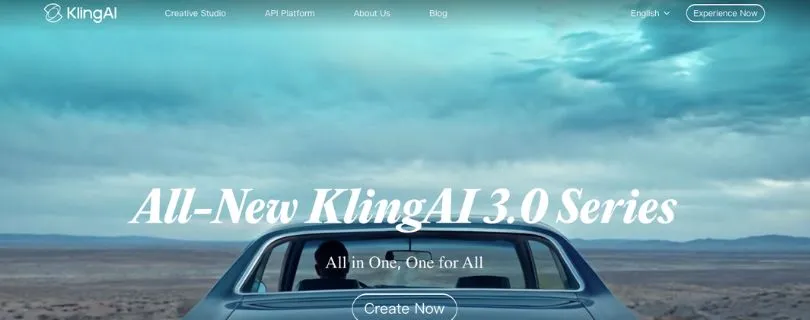
Kling AI is an AI video generator that lets you create videos from text prompts, images, and reference visuals.
In simple words, you describe the scene you want, or upload an image, and Kling AI turns it into a moving video. This makes it useful for creators who want to make social media clips, short ads, product videos, cinematic B-roll, animations, concept videos, or storyboard scenes without shooting everything manually.
Kling AI is developed by Kuaishou, a major Chinese technology company known for short-form video and content platforms.
The tool works in your browser, so you don’t need to install heavy editing software to start creating. You can log in, choose a video mode, enter your prompt, adjust the settings, and generate a clip.
Who Owns Kling AI?
Kling AI is owned and developed by Kuaishou.
That matters because ownership affects things like platform reliability, data handling, commercial usage terms, pricing stability, and how often the product gets updated. When you’re using an AI video tool for client work, ads, or brand content, it’s always worth checking who runs the platform and what rights you get over the videos you create.
What Can You Create With Kling AI?
You can use Kling AI to create:
- TikTok, Instagram Reels, and YouTube Shorts clips
- Product videos
- Cinematic B-roll
- AI avatars or talking characters
- Animated images
- Short ads
- Storyboard scenes
- Music video-style visuals
- Educational explainer clips
- Concept art videos
So, if your goal is to create short, realistic AI videos faster, Kling AI gives you a pretty strong starting point.
What Real Users Are Saying About Kling AI?
Quick TLDR of User Reviews
✅ Great for: Realistic video quality, image-to-video, character consistency, smooth motion
❌ Weak on: Credit usage, customer support, failed generations, pricing clarity, long-form consistency
User feedback around Kling AI is very mixed.
On platforms like Product Hunt and G2, users are mostly positive. They like the output quality, simple interface, image-to-video results, and the fact that Kling can create impressive short clips without complex editing skills.
But on Reddit and Trustpilot, the tone is very different.
Many users complain about credits, failed generations, poor support, subscription confusion, and videos not following prompts properly.
So yes, Kling AI can create some really good AI videos.
But the user experience is not perfect, especially if you’re paying and expecting every generation to be usable.
Here’s a quick snapshot:
- G2 – 4.7⭐/5, but only 3 reviews
- Product Hunt – 4.9⭐/5, based on 19 reviews
- Trustpilot – 1.3⭐/5, based on 297 reviews
But numbers don’t tell the full story.
What’s Happening on Reddit
Reddit gives a more unfiltered view of Kling AI.
Some users love it for short-form content and character consistency. One Reddit user said:
“Then I tried Kling AI, and honestly, I was blown away. The character consistency is what really got me.”
Another user who claimed to use Kling AI for six months wrote:
“I have been very happy using Kling Ai as the interface is easy to use for text to video plus I have grown multiple viral YouTube shorts channels, Tiktok accounts and an instagram account using the videos I have generated with Kling Ai.”
But not every Reddit review is positive.
A lot of complaints revolve around failed prompts, support problems, and credits getting used up too quickly.
One user wrote:
“I paid for Standard and half of my videos had no motion or didn’t follow the prompt, I reported it, emailed them, asked for credit reimbursement for still ‘videos’, never heard back from them.”
Another user complained about the support experience:
“No response in chatbot, no response in email I found in their terms of service etc.”
And credit expiry is another common frustration:
“I have pro subscription for a full year… January first, credits expired and were removed from my account.”
User Reviews From Trustpilot
If you only look at G2 or Product Hunt, Kling AI looks very strong.
But Trustpilot tells a rougher story.
Most of the negative reviews focus on three things:
- Credits being used even when results are poor
- Subscription or billing complaints
- Slow or missing customer support
- Confusing free credits and paid credit rules
- Generations failing or not following prompts
One Trustpilot reviewer said they got decent results, but only after using most of their credits, and added that “customer support never replied.”
Another reviewer said Kling AI performs well for camera motion, but even that positive review sits among many complaints about pricing and support.
So the pattern is clear:
People like Kling AI’s video quality when it works.
They get frustrated when it burns credits, fails prompts, or support doesn’t respond quickly.
User Reviews From G2
G2 reviews are much more positive, but the sample size is very small.
Kling AI currently has only a few G2 reviews, so I wouldn’t treat the score as the full picture.
Still, the feedback there is useful.
One G2 reviewer liked that Kling AI could create video-style outputs quickly without needing complex editing skills.
Another reviewer said they mainly use it for video generation and liked that it can create talking characters when the prompt is well defined.
A third reviewer praised the video reference replacement and lip-sync feature for animation projects.
So, G2 users mostly praise the creative side of Kling AI.
Reddit and Trustpilot users focus more on the practical pain points — credits, support, subscriptions, and failed generations.
That’s why my view is simple:
Kling AI is a strong AI video generator if you care about realistic short-form output, image-to-video clips, and character-based videos.
But if you’re planning to use it for serious client work, paid ads, or daily content production, test it carefully before buying a bigger plan.
Kling AI Features: My Experience and Functionality Breakdown
If you want a serious, in-depth review of Kling AI, I suggest you grab a coffee — because there’s quite a lot to unpack here.
That said, I’ve kept this section simple and easy to follow, so you’ll get a clear idea of what Kling AI actually brings to the table — and where it still feels limited.
Kling AI is not just a basic text-to-video AI tool anymore.
It has grown into a full creative video generation platform where you can create short clips, animate images, control camera movement, generate character-based scenes, and build video ideas without opening a traditional editing suite.
I will share my experience with these Kling AI features below:
- Text-to-Video Generation
- Image-to-Video Generation
- Motion Control
- Character and Object Consistency
- Lip Sync and AI Audio
- Video Extension
- Prompt Control and Negative Prompts
- Export Quality and Aspect Ratios
- Editing Workflow
1. Text-to-Video Generation
The core feature of Kling AI is text-to-video generation.
This is where you type a prompt, describe the scene you want, and Kling AI turns that idea into a short video clip.
For example, you can write something like:
“A cinematic close-up of a woman walking through a neon-lit street at night, rain falling, slow camera movement, realistic lighting, dramatic mood.”
And Kling AI will try to create that scene for you.
What stood out to me
What I liked here is that Kling AI understands cinematic language better than many basic AI video generators.
You can mention things like:
- Close-up shot
- Drone view
- Slow camera push-in
- Handheld camera
- Soft lighting
- Product ad style
- Documentary look
- Realistic skin texture
And it usually gives you something close to the idea.
Of course, the better your prompt, the better your result.
If your prompt is too vague, Kling AI may generate a nice-looking clip, but it may not match exactly what you imagined.
What could be better
Text-to-video still needs patience.
Sometimes the movement looks odd, the subject changes slightly, or the scene misses small details from your prompt.
This is especially true when you ask for too many things in one scene.
My take
Kling AI’s text-to-video feature is great for short-form video creation, AI B-roll, product scenes, social media clips, and visual experiments.
But don’t expect perfect results from one prompt.
You’ll usually need a few tries to get something publishable.
2. Image-to-Video Generation
Image-to-video is where Kling AI becomes much more useful for creators.
Instead of asking the AI to create everything from scratch, you upload an image and ask Kling AI to animate it.
This is helpful because the tool already has a visual reference to follow.
Why this matters
If you’re a marketer, designer, YouTuber, or social media creator, this feature can save a lot of time.
You can upload:
- A product photo
- An AI-generated character
- A fashion image
- A food shot
- A car image
- A real estate image
- A concept art scene
- A thumbnail-style visual
Then you can ask Kling AI to add movement.
For example, you can make a product slowly rotate, add camera zoom, animate a person’s face, create background motion, or turn a static design into a short video.
What I liked
Image-to-video usually gives you more control than plain text-to-video.
Because the starting image is already fixed, the output often feels more consistent.
This is especially useful if you care about brand visuals, product appearance, or character design.
What could be better
The animation is not always clean.
Sometimes the image bends, objects shift weirdly, or the subject changes slightly while moving.
This can be annoying if you’re working with product images where accuracy matters.
My take
If you’re new to Kling AI, start with image-to-video.
It’s easier to control, more beginner-friendly, and usually gives better results than starting from a blank text prompt.
3. Motion Control
Motion control is one of the most useful Kling AI features if you want your videos to feel more intentional.
Instead of getting random movement, you can guide how the subject or camera should move.
You can ask for things like:
- Slow zoom in
- Camera pan
- Camera orbit
- Tracking shot
- Push-in shot
- Pull-back shot
- Head movement
- Walking motion
- Product rotation
Why it’s useful
A lot of AI videos look good for the first second, then feel strange because the motion doesn’t match the scene.
Motion control helps reduce that problem.
For example, if you’re creating a product ad, you can tell Kling AI to use a slow camera push-in instead of random movement.
If you’re creating cinematic B-roll, you can ask for a smooth tracking shot or a gentle handheld camera feel.
What I liked
Kling AI handles simple camera instructions quite well.
Slow, clean movement usually works better than fast action.
So if you want polished-looking videos, simple camera direction is your friend.
What could be better
Fast movement can still break things.
If you ask for a person running, jumping, fighting, dancing, or interacting with multiple objects, the results may become less stable.
My take
Motion control is one of the main reasons Kling AI feels more advanced than a basic AI video maker.
Just keep the movement simple if you want cleaner results.
4. Character and Object Consistency
Character consistency is a big deal in AI video.
Anyone can create one cool clip.
The real challenge is keeping the same person, outfit, face, product, or object consistent across multiple scenes.
Kling AI does a better job here than many older AI video tools, especially when you use reference images.
What it helps with
This feature is useful if you want to create:
- AI influencers
- Talking characters
- Brand mascots
- Story-based videos
- Product demos
- Character scenes
- Short ads with the same subject
- Multi-shot social media clips
You can use reference visuals to help Kling AI understand what the character or object should look like.
What I liked
When the scene is simple, Kling AI can keep the subject fairly consistent.
This is helpful if you’re creating a faceless video channel, AI avatar content, or product-based video content.
It gives you more control than just hoping the AI remembers your character from one prompt to the next.
What could be better
Consistency is still not perfect.
Faces may shift slightly.
Clothing details can change.
A product may look different from one shot to another.
If you’re creating a long story with the same character, you’ll still need to check every clip carefully.
My take
Kling AI is good for short character-based clips, but I wouldn’t fully trust it for long films or complex multi-scene storytelling yet.
For short social videos, though, it’s very useful.
5. Lip Sync and AI Audio
Kling AI also includes audio-related features, depending on the version and plan available in your account.
This can include lip sync, dialogue, sound effects, or audio that matches the scene.
This is helpful because video without sound often feels unfinished.
Why this matters
If you’re creating talking characters, AI avatars, explainer videos, or short ads, lip sync can save a lot of editing time.
Instead of generating a silent clip and then using another tool for voice and syncing, you can keep more of the workflow inside Kling AI.
What I liked
For simple talking-head style clips, lip sync can be useful.
It’s especially helpful for:
- Short explainer videos
- AI avatar clips
- Character intros
- Social media ads
- Product explainers
- Educational videos
When it works, it makes the video feel more complete.
What could be better
Dialogue-heavy clips still need checking.
The mouth movement may not always match perfectly.
Emotional delivery can feel flat.
Multiple speakers can get messy.
Also, AI-generated sound may not always match the mood you want.
My take
Kling AI’s audio and lip-sync features are useful, but I’d still review everything before publishing.
For serious brand videos, I’d polish the final audio in another tool.
6. Video Extension
Video extension lets you continue a generated clip instead of starting from scratch every time.
This is useful when you like a video but want it to last longer.
For example, you may generate a 5-second scene and then extend it to continue the same action.
Why it’s useful
This feature helps when you’re building:
- Longer social clips
- Story scenes
- Cinematic B-roll
- Product reveals
- Short ads
- Music video-style visuals
Instead of creating separate disconnected clips, you can build from an existing one.
What I liked
When the original clip is strong, extension can help you create a smoother sequence.
It feels much better than generating random clips and trying to stitch them together later.
What could be better
The longer a video gets, the more likely it is to drift.
The character may change.
The background may shift.
The motion may become strange.
Small visual errors can build up over time.
My take
Video extension is great for creating longer clips, but don’t push it too far.
For best results, generate short sections, pick the cleanest ones, and edit them together manually.
7. Prompt Control and Negative Prompts
Prompts matter a lot in Kling AI.
A weak prompt usually gives you a generic result.
A clear prompt gives Kling AI much better direction.
This is where many beginners struggle.
They type something simple like “make a product video,” then wonder why the output doesn’t look like a real ad.
What to include in a good prompt
A strong Kling AI prompt should include:
- Main subject
- Action
- Location
- Lighting
- Camera movement
- Mood
- Visual style
- Aspect ratio
- Things to avoid
For example:
“A luxury watch on a black marble table, slow camera orbit, soft golden studio lighting, cinematic product commercial, shallow depth of field, no text, no extra hands, no distorted logo.”
That kind of prompt gives Kling AI much more to work with.
What I liked
Kling AI responds well to specific visual instructions.
Camera language, lighting style, and mood words can make a big difference.
This is helpful if you want videos that feel more like ads, trailers, or polished social content.
What could be better
Prompt accuracy is still not 100%.
Sometimes Kling AI ignores parts of the prompt.
Sometimes it adds objects you didn’t ask for.
And sometimes it struggles with exact text, logos, or branded product details.
My take
Prompting is not optional with Kling AI.
If you want better results, you need to write better prompts.
Simple idea, but it makes a big difference.
8. Export Quality and Aspect Ratios
Kling AI is built for creators who need videos for different platforms.
So export quality and aspect ratio matter a lot.
After all, a video made for YouTube Shorts needs a different layout than a video made for a website banner or product ad.
What you can use it for
Kling AI can be useful for:
- Vertical videos for TikTok, Reels, and Shorts
- Horizontal videos for YouTube
- Square videos for social posts
- Product clips for ads
- Background videos for landing pages
- Cinematic clips for edits
What I liked
The output can look very polished when the prompt is simple and the scene is not too crowded.
Kling AI does especially well with cinematic lighting, close-up shots, people, landscapes, product visuals, and lifestyle-style scenes.
For social media, that’s more than enough in many cases.
What could be better
The final quality may depend on your plan, settings, credits, and the version available to you.
Also, if you’re on a free or lower plan, you may face limits like watermarks, lower resolution, fewer credits, or slower generation.
So always check the export settings before you commit to a paid plan.
My take
Kling AI’s export quality is strong for short-form content.
But if you need client-ready videos, ads, or brand campaigns, test the exact plan first so you know what quality you’re actually getting.
9. Editing Workflow
This is where you need to set the right expectations.
Kling AI is a video generator.
It is not a full video editor.
That means it can create clips, but it won’t replace tools like Premiere Pro, CapCut, Descript, Final Cut Pro, or full editing features inside platforms like Runway.
What you can do
Kling AI helps you create the raw video clips.
You can use those clips for:
- Social media videos
- AI B-roll
- Product visuals
- Ad concepts
- Storyboard scenes
- Creative experiments
- YouTube Shorts
- Music video visuals
But after that, you’ll probably need another tool to finish the video.
What you still need outside Kling AI
For a polished final video, you may still need to:
- Trim clips
- Add captions
- Add background music
- Add transitions
- Add your logo
- Fix colors
- Add voiceover
- Arrange multiple scenes
- Export in final platform format
What I liked
Kling AI is strong at creating the visual base.
If you already use CapCut, Premiere Pro, Canva, or another video editor, Kling AI can fit nicely into your workflow.
You generate the clips in Kling, then polish everything elsewhere.
What could be better
I wish Kling AI had stronger built-in editing tools.
Even basic timeline editing, captions, trimming, and scene arrangement would make it much more useful for creators who want an all-in-one AI video creation tool.
My take
Kling AI is best used as a clip generator, not a complete editing platform.
If you treat it like a creative engine for generating realistic AI video clips, you’ll probably enjoy it.
If you expect it to handle your full editing workflow from start to finish, you may feel limited.
Kling AI vs Runway vs Sora vs Veo vs Hailuo
Kling AI is not the only AI video generator worth talking about in 2026.
So i took few and compared them with each other.
Here’s a simple comparison:
| Tool | Best for | Strength | Weakness |
| Kling AI | Social clips, product videos, character consistency | Good balance of realism, price, and usability | Limited editing workflow |
| Runway | Professional creative control | Editing tools and polished workflow | Can be expensive |
| Sora | High-end cinematic generation | Strong world simulation and realism | Access, pricing, and workflow may vary |
| Google Veo | Premium realism and audio | Strong quality benchmark | May be less flexible for everyday creators |
| Hailuo | Human motion and physics-style clips | Good movement and prompt response | Less complete editing workflow |
When Kling AI Is Better
Kling AI is a better choice when you want a practical AI video generator for everyday content creation.
It works especially well if your goal is to create short clips quickly instead of building a full film-style production.
Use Kling AI when:
- You care about creator-friendly pricing
- You need lots of short clips
- You need consistent characters
- You want social media videos
- You want to animate still images
For example, if you’re creating Instagram Reels, TikTok videos, YouTube Shorts, product visuals, AI avatar clips, or faceless video content, Kling AI can be a very useful tool.
Its image-to-video workflow is one of the biggest reasons creators like it.
You can start with a product photo, AI-generated character, portrait, fashion image, food shot, or concept design, then turn that still image into a moving clip.
That’s helpful because you don’t always want the AI to create everything from scratch.
Sometimes, you already have the image.
You just want to bring it to life.
Kling AI is also useful if you care about character consistency. It’s not perfect, but it does a better job than many basic AI video tools when you use good references and keep your scenes simple.
So, if you’re building a recurring AI character, a brand mascot, or a short story-style video, Kling AI gives you a decent amount of control.
It’s also less intimidating than tools made for professional studios.
You can log in, write a prompt, upload an image, choose your settings, and generate a video without dealing with a complex editing dashboard.
That makes it a good AI video generator for beginners who still want realistic results.
When You Should Choose Another Tool
Kling AI is good, but it’s not the best choice for every workflow.
You may want to choose another AI video tool if you need more editing control, longer scene consistency, or a more professional production setup.
Choose another tool when:
- You need advanced editing
- You need professional post-production control
- You need maximum physical realism
- You need long-form consistency
- You need enterprise-level workflow controls
Runway is usually the better option if you want a more complete creative workflow.
It gives you stronger editing-style tools, more control over assets, and a more polished workspace for professional video projects.
So, if you’re working on brand campaigns, film concepts, music videos, or visual effects experiments, Runway may feel more flexible.
Sora is better if your main goal is high-end cinematic video generation.
It’s the kind of tool people look at when they want realistic scenes, detailed motion, and more advanced world-building from a prompt.
The downside is that access, pricing, and workflow can vary, so it may not be the easiest option for everyday creators.
Google Veo is also more of a premium AI video model.
It’s strong for realistic video, native audio, and polished output quality. But for solo creators, small businesses, or social media teams, it may not always feel as simple or flexible as a tool like Kling AI.
Want a deeper side-by-side before choosing? Read my full Kling vs Veo comparison.
Hailuo is worth considering if you care about human motion, quick image-to-video clips, and fun social-style generations.
It’s good for fast experiments and motion-heavy clips, but like Kling AI, it’s not a full editing suite.
So, my take is simple:
If you want a balanced AI video maker for short-form content, Kling AI is a strong option.
If you want professional editing control, look at Runway.
If you want premium cinematic generation, look at Sora or Veo.
And if you want quick motion-based clips from text or images, Hailuo is also worth testing.
For most creators, Kling AI is not about replacing every video tool.
It’s about creating better raw video clips faster, then finishing them in your favorite editor.
Still comparing Kling with other AI video generators? Start with my full Runway vs Kling and Kling vs Hailuo comparisons.
Kling AI Pricing and Free Credits Explained
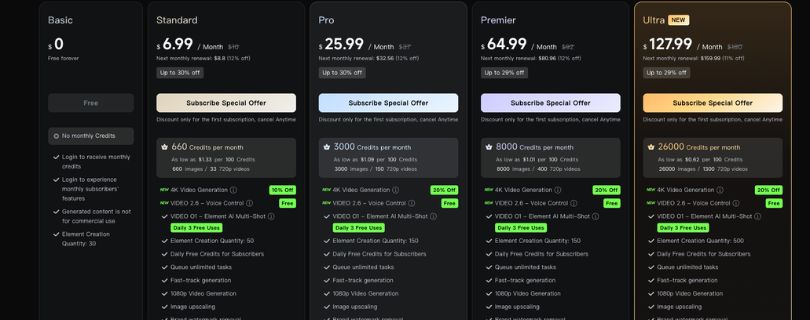
Kling AI uses a credit-based pricing system, which means you spend credits every time you generate a video, image, or use certain premium features.
So instead of looking only at the monthly price, you also need to check how many credits you get, how fast those credits run out, and whether the plan gives you access to features like watermark removal, professional mode, video extension, and higher-quality exports.
Here’s a simple pricing snapshot:
| Plan | Monthly cost | Credits | Best for | Watermark | Commercial use |
| Free | $0/month | Daily login credits | Testing only | Usually yes | Usually no |
| Standard | $6.99/month | 660 credits/month | Light creators | Usually no | Usually yes |
| Pro | $25.99/month | 3,000 credits/month | Regular creators | Usually no | Usually yes |
| Premier | $64.99/month | 8,000 credits/month | Heavy creators | Usually no | Usually yes |
| Ultra | $127.99/month | 26,000 credits/month | Agencies and high-volume teams | Usually no | Usually yes |
One thing to keep in mind:
Kling AI pricing can vary because of promotions, renewal pricing, yearly billing discounts, and regional changes. So before you subscribe, check the live pricing page inside your Kling AI account.
Are Kling AI Free Credits Enough?
Kling AI free credits are enough to test the interface and generate a few clips.
That’s it.
They’re useful if you want to understand how text-to-video, image-to-video, prompts, and motion settings work.
But they’re not enough for regular content production.
If you want to create daily TikTok videos, Instagram Reels, YouTube Shorts, product visuals, AI B-roll, or ad creatives, the free credits will run out quickly.
So, treat the free plan like a trial, not a serious content creation setup.
Why Kling AI Credits Run Out Fast
Kling AI credits can disappear faster than expected, especially when you’re still testing prompts.
There are a few reasons for this:
- Longer videos cost more credits
- Higher-quality generations cost more
- Professional mode can use more credits
- Failed generations may still waste time, even if credits are refunded in some cases
- Regenerating clips is very common with AI video tools
And honestly, regeneration is where most creators burn credits.
You may generate one clip, like the lighting, but hate the hand movement.
Then you try again.
The second one may fix the hands but change the face.
Then you try again.
That trial-and-error process is normal with AI video generation, but it does affect the real cost.
Is Kling AI Expensive?
Kling AI can be affordable compared with some premium AI video generators, especially if you only need short clips, image animations, product videos, or social media content.
But the real cost depends on how many usable videos you get from each batch of credits.
For example, if you generate 10 videos and only 2 are good enough to publish, your actual cost per usable video is much higher.
That’s why I wouldn’t judge Kling AI only by the monthly plan price.
Look at the full workflow:
How many credits do you get?
How many clips can you generate?
How many outputs are actually usable?
Do you need professional mode?
Are watermarks removed?
Can you use the videos commercially?
My take?
Kling AI pricing can make sense for creators, marketers, YouTubers, and small teams if you use it carefully.
But if you keep generating without testing prompts first, the credits can run out fast.
Before choosing a paid plan, check my full Kling Pricing Explained breakdown so you understand how credits, plans, and real costs actually work.
Is Kling AI Worth It in 2026? Final Verdict
Yes, Kling AI is worth it in 2026 if you need realistic short-form videos, image animations, social media clips, product visuals, AI B-roll, or character-based video content.
It’s especially useful for creators who want to turn ideas into video clips quickly without shooting footage or learning complex editing software.
But it’s not for everyone.
Kling AI is not worth it if you expect perfect results on the first try, full timeline editing, advanced post-production tools, or long cinematic scenes that stay consistent without manual cleanup.
Here’s my simple recommendation:
| User type | Recommendation |
| Beginner | Try the free plan first |
| Social creator | Worth testing |
| Marketer | Good for product and lifestyle clips |
| Filmmaker | Useful for storyboarding and B-roll |
| Agency | Test carefully before client work |
| Enterprise | Review data and licensing terms first |
My final take?
Kling AI is one of the strongest AI video generators for creators in 2026 because it gives you a nice mix of realistic visuals, image-to-video tools, character consistency, and accessible pricing.
Its biggest weakness is that it still behaves more like a clip generator than a complete editing platform.
The best workflow is simple:
Generate your clips in Kling AI, then polish them in CapCut, Premiere Pro, Final Cut Pro, Descript, or any editor you already use.
So, here’s the verdict:
Kling AI is a strong buy for creators who can tolerate trial-and-error. It is a weak fit for users who need predictable, production-ready output every time.
Still not sure if Kling is the right AI video tool for you? Check my tested list of Best Kling Alternatives before you decide.
Kling AI FAQs
What is Kling AI?
Kling AI is an AI video generator that can turn text prompts, images, and reference visuals into short video clips.
You can use it to create social media videos, product clips, cinematic B-roll, AI character videos, animated images, and short ad-style content without shooting everything manually.
Who owns Kling AI?
Kling AI is developed by Kuaishou, a major Chinese technology company known for short-form video and content platforms.
This matters because when you use any AI video tool for business, client work, or paid ads, you should always check the company behind it, the usage rights, and the commercial terms.
Is Kling AI free?
Yes, Kling AI usually offers a free option or free credits so users can test the platform.
But the free plan is limited. You may get fewer generations, slower processing, lower export options, or watermarked videos depending on the current plan rules.
So, the free version is good for testing, not for serious daily content creation.
How much does Kling AI cost?
Kling AI uses a credit-based pricing system.
That means every video generation uses credits, and higher-quality or longer videos may use more credits.
Before buying a paid plan, check the latest pricing page because credit limits, plan names, and available features can change.
Is Kling AI good for beginners?
Yes, Kling AI is beginner-friendly.
You don’t need advanced editing skills to start. You can type a prompt, upload an image, choose a mode, and generate a video.
That said, better prompts still make a big difference. If your prompt is too vague, your output may look nice but not match what you wanted.
Can Kling AI make videos from text?
Yes, Kling AI can generate videos from text prompts.
You describe the subject, action, scene, camera movement, lighting, and style, and the tool creates a video based on that description.
For example, you can ask it to create a cinematic product shot, a fashion video, a travel scene, or a short social media clip.
Can Kling AI animate images?
Yes, image-to-video is one of Kling AI’s most useful features.
You can upload a still image and turn it into a moving video. This works well for product photos, portraits, AI-generated characters, food shots, fashion images, real estate visuals, and concept art.
If you’re new to AI video generation, image-to-video is usually easier to control than text-to-video.
Does Kling AI support lip sync?
Kling AI does offer lip-sync features in supported versions and plans.
This can be helpful for AI avatars, talking characters, short explainers, product videos, and social media clips.
But you should still check the final result carefully because lip sync can sometimes feel slightly off, especially with longer dialogue or emotional speech.
Does Kling AI generate audio?
Kling AI has audio-related features depending on the version and plan available in your account.
This may include dialogue, sound effects, background audio, or lip-sync support.
Still, for professional videos, you may want to polish the audio separately in another tool.
Can I use Kling AI videos commercially?
You may be able to use Kling AI videos commercially, but you should check the latest terms before using them for ads, client work, YouTube monetization, or brand campaigns.
This is especially important if you upload client assets, product images, logos, or faces.
Is Kling AI safe to use?
Kling AI is a real AI video platform, but like any AI tool, you should use it carefully.
Avoid uploading private client files, confidential product designs, sensitive personal images, or anything you don’t want processed by a third-party platform unless the terms clearly allow it.
Is Kling AI better than Runway?
Kling AI can be better than Runway if your main goal is to create realistic short clips, animate images, or make social media videos quickly.
Runway is usually better if you need stronger editing tools, more creative control, and a more complete professional workflow.
So, Kling AI is better for fast clip generation.
Runway is better for editing-heavy projects.
If Runway feels too expensive or advanced, you can also check my tested list of Best Runway Alternatives.
Is Kling AI better than Sora?
Kling AI is more practical for many everyday creators because it’s easier to access and use for short-form content.
Sora is known for high-end cinematic generation, but access, pricing, and workflow may vary.
If you want quick product clips, social videos, AI B-roll, or image animation, Kling AI may be the easier option.
If you want premium cinematic scenes, Sora may be stronger.
Is Kling AI better than Hailuo?
Kling AI and Hailuo are both useful AI video generators, but they feel slightly different.
Kling AI is strong for realistic short clips, image-to-video, product visuals, and character-based videos.
Hailuo can be good for motion-heavy clips, quick experiments, and human movement.
The better choice depends on what kind of videos you create most often.
Before switching from Kling to Hailuo, read my full HailuoAI Review to see where it works well and where it falls short.
Why does Kling AI sometimes fail?
Kling AI can fail when the prompt is too complex, the scene has too many characters, the motion is too fast, or the request needs exact details like readable text, logos, hands, or brand-specific products.
AI video generation is still not perfect.
Even good tools may need multiple attempts before you get a usable clip.
How do I get better results from Kling AI?
Use clear, specific prompts.
Mention the subject, action, camera movement, lighting, mood, style, and what you don’t want in the video.
For better results, keep the scene simple and use reference images whenever possible.
A prompt like “cinematic product ad of a luxury watch, slow camera orbit, soft studio lighting, black marble table, shallow depth of field, no text, no extra hands” will usually work better than “make a cool watch video.”
Can Kling AI make long videos?
Kling AI is better for short clips than long videos.
You can extend clips, but longer videos may start to drift. Characters can change, backgrounds can shift, and motion can become less stable.
For longer videos, it’s better to generate short clips in Kling AI and then edit them together in CapCut, Premiere Pro, Final Cut Pro, or another video editor.
Does Kling AI have a watermark?
Free or lower-tier plans may include watermarks depending on the current plan rules.
Paid plans may offer cleaner exports, but you should check the latest pricing and download options before subscribing.
Why are my Kling AI credits running out so fast?
Credits can run out quickly because every generation costs credits.
Longer videos, higher-quality settings, professional modes, and repeated regenerations can use more credits.
This is why it’s smart to test prompts in cheaper settings first before using higher-quality generation.
Can Kling AI replace a video editor?
No, Kling AI should not be seen as a full video editor.
It’s mainly a video generation tool.
You can use it to create clips, but you’ll still need another editor for trimming, captions, transitions, voiceovers, music, scene arrangement, and final export.
What are the best Kling AI alternatives?
Some popular Kling AI alternatives include Runway, Sora, Google Veo, Hailuo, Pika, Luma AI, and PixVerse.
Runway is good for editing control.
Sora and Veo are better for premium cinematic generation.
Hailuo, Pika, and PixVerse can be useful for quick AI video experiments and social media clips.
Is Kling AI worth paying for?
Kling AI is worth paying for if you regularly create short-form videos, product visuals, AI character clips, image animations, or social media content.
But if you only want to test AI video generation casually, start with the free plan first.
The paid plan makes more sense once you know how often you’ll use it and how many usable clips you can get from your credits.
Who should use Kling AI?
Kling AI is best for content creators, YouTubers, TikTok creators, social media managers, marketers, designers, small businesses, AI video creators, and agencies testing short-form video ideas.
It’s especially useful if you want to create realistic video clips without filming everything yourself.
Who should avoid Kling AI?
You may want to skip Kling AI if you need perfect output every time, long-form storytelling, advanced editing tools, exact logo accuracy, or enterprise-level workflow control.
It’s powerful, but it still needs trial and error.
What is the best use case for Kling AI?
The best use case for Kling AI is creating realistic short-form video clips.
It works well for product videos, social media posts, AI B-roll, animated images, short ads, character clips, and creative video concepts.
For full videos, the best workflow is to generate clips in Kling AI and finish the final edit in a dedicated video editor.