If you’re comparing Visme and Gamma, you’re not just looking for features.
You’re looking for RESULTS:
- AI-generated presentations that don’t feel generic.
- Clean, branded designs that match your business.
- Better charts, reports, infographics, and visual content.
- Easy sharing, exporting, and collaboration with your team.
While Gamma’s speed and AI-first workflow can be tempting, it doesn’t offer the same level of design control, data visualization, and branding flexibility that Visme provides.
To find the “One” that fits your needs, I have compared both platforms based on features, pricing, AI capabilities, design control, and use cases.
By the end of this blog, you’ll be able to choose the platform that fits your presentation goals, team size, and creative workflow.
So keep reading!
P.S. I’ve also included another tool called Beautiful.ai. Based on your goals and use case, it could actually be a much better fit than Visme or Gamma.
Visme vs Gamma: Quick Verdict
| Need | Better Choice |
| Fast AI-generated first draft | Gamma |
| Branded business presentations | Visme |
| Data-heavy reports | Visme |
| Web-native, scrollable decks | Gamma |
| Infographics and visual documents | Visme |
| Simple async sharing | Gamma |
| Deep layout control | Visme |
| Beginner-friendly AI workflow | Gamma |
| Marketing and sales content library | Visme |
| Modern card-style storytelling | Gamma |
If you want to create a clean presentation quickly from a prompt, Gamma is the better pick. It feels faster, lighter, and easier when you just need to turn an idea into a decent-looking deck.
But if you care more about brand control, data visuals, reports, infographics, and polished business content, Visme gives you more room to work. It takes a little more effort, but the extra control is worth it for teams that need more than a quick AI-generated presentation.
What Is Visme?
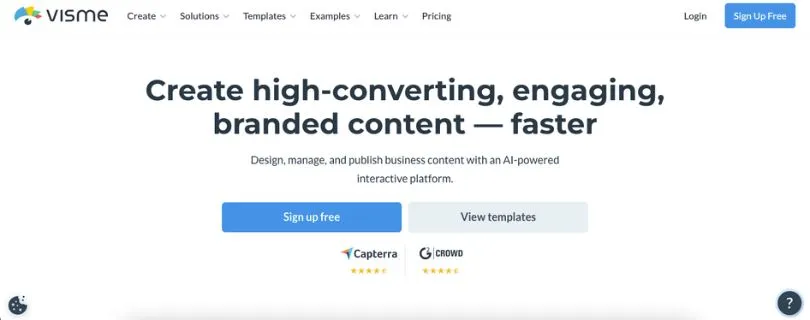
Visme is an all-in-one visual communication platform for creating presentations, infographics, reports, documents, social graphics, videos, charts, and branded content.
Its biggest strength is control. You get templates, brand kits, charts, animations, interactive elements, asset libraries, and team collaboration features. So if you’re creating polished business content, data-heavy reports, or branded marketing visuals, Visme gives you more tools to shape the final result.
What Is Gamma?
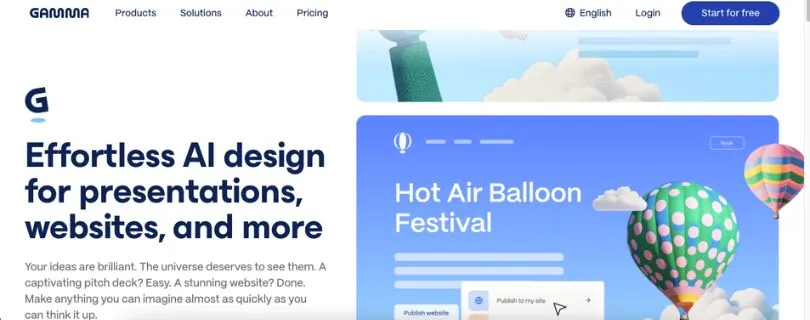
Gamma is an AI-first tool for creating presentations, documents, websites, and social content.
Its main strength is speed. You can start with a simple prompt, generate a working presentation, and then refine the content instead of building every slide manually. It’s best for quick decks, modern card-style storytelling, async sharing, and users who want a clean first draft without spending too much time on design.
Visme vs Gamma: Feature-by-Feature Comparison
To help you get a better idea of which platform suits your needs, I have compared both Visme and Gamma across key features:
- AI presentation generation
- Ease of use and learning curve
- Design control and customization
- Templates and visual assets
- Data visualization, charts, and reports
- Interactivity and web sharing
- PowerPoint, PDF, and Google Slides exports
- Collaboration and team workflow
- Branding and brand kits
- Pricing and free plans
This breakdown will help you understand the tools better, so read them one by one.
1. Visme vs Gamma: Which One Is Better for AI Presentation Generation?
Both Visme and Gamma offer AI features, but they don’t approach presentation creation in the same way.
Gamma is built around AI from the start. You type a prompt, choose a direction, and Gamma generates a working deck with content, structure, and design already in place.
Visme also has AI tools, but its main strength is not just generating a quick deck. It works more like a full design workspace where AI helps you create, edit, and improve content.
Here’s a quick comparison:
| Comparison | Visme | Gamma |
| Prompt-to-deck generation | ✅ | ✅ |
| AI-assisted design | ✅ | ✅ |
| AI image generation | ✅ | ✅ |
| Full design editor | ✅ | Limited |
| Best for quick first drafts | Good | Better |
| Best for controlled final designs | Better | Good |
Gamma’s AI Presentation Generation
Gamma feels faster when you want to go from idea to presentation without building each slide manually.
You can enter a simple prompt like:
“Create a 10-slide pitch deck for a marketing analytics startup.”
Gamma will create a clean, modern deck with sections, copy, visuals, and a card-based layout. From there, you can edit the text, add more cards, change the theme, and polish the flow.
This is where Gamma makes the most sense.
If your biggest problem is staring at a blank slide, Gamma solves that quickly. It gives you a usable first draft in minutes.
Visme’s AI Presentation Generation
Visme also helps with AI-generated content and design, but it feels more like an AI design software review tool than a pure prompt-to-presentation generator.
You can use AI to create presentation drafts, write copy, generate visuals, and speed up parts of the creative process. But once the draft is ready, Visme gives you more room to manually adjust the design.
You can move elements around, use charts, add icons, apply brand colors, work with animations, and build something more polished.
So, Visme is better when AI is just one part of your workflow, not the whole workflow.
The Winner:
The winner depends on what you need.
If you want the fastest AI-generated first draft, Gamma is the better choice.
If you want AI help but still need deeper control over layout, visuals, charts, and branding, Visme is the stronger option.
So the winner for AI-first generation is Gamma.
But for AI-assisted design control, Visme wins.
2. Visme vs Gamma: Which Tool Is Easier to Use?
Ease of use is one of the biggest differences between Visme and Gamma.
Gamma feels lighter. You can start with a prompt, get a deck, and edit it without learning too many menus.
Visme gives you more tools, but that also means there’s more to learn.
Here’s how they compare:
| Comparison | Visme | Gamma |
| Beginner-friendly interface | Good | Better |
| Fast setup | Good | Better |
| Learning curve | Medium | Low |
| Manual design flexibility | Better | Limited |
| Best for non-designers | Good | Better |
| Best for power users | Better | Good |
Gamma’s Ease of Use
Gamma is easier to start with.
The interface feels clean, and the card-based format keeps things simple. Instead of designing every slide from scratch, you mostly edit sections, rewrite text, adjust themes, and rearrange content.
This is why many users like Gamma for quick presentations, startup updates, internal decks, and web-native storytelling.
It doesn’t feel like a traditional slide editor, which can be a good thing if you hate fighting with layouts.
Visme’s Ease of Use
Visme is still user-friendly, but it has more going on.
You get templates, charts, brand kits, icons, photos, animations, interactive elements, documents, infographics, videos, and more. That makes Visme more powerful, but also slightly heavier for beginners.
If you only want a quick AI presentation, Visme may feel like too much at first.
But if you’re creating branded content often, the learning curve pays off.
People comparing these tools often ask whether Gamma is truly better or just recommended more often. From a practical workflow point of view, Gamma usually feels more intuitive at the start, while Visme becomes more valuable when you need reports, charts, and brand-heavy content.
The Winner:
Gamma wins for beginners.
It’s easier to open, prompt, edit, and share.
Visme wins for users who are willing to spend more time learning a richer creative platform.
So, if you want speed and simplicity, pick Gamma. If you want more creative control, pick Visme.
3. Visme vs Gamma: Which Tool Offers Better Design Control?
This is where Visme starts to pull ahead.
Gamma gives you clean automation. Visme gives you more traditional design control.
If you care about spacing, layout, colors, fonts, icons, charts, and every tiny visual detail, Visme gives you more freedom.
Here’s the comparison:
| Comparison | Visme | Gamma |
| Font customization | ✅ | ✅ |
| Color customization | ✅ | ✅ |
| Drag-and-drop editing | ✅ | Limited |
| Manual layout control | Better | Limited |
| Reusable templates | ✅ | ✅ |
| Brand assets | Better | Good |
| Fine design adjustments | Better | Limited |
Visme’s Design Control
Visme works more like a complete visual design editor.
You can drag and drop elements, adjust spacing, resize objects, change typography, add icons, place charts, use animations, and create more structured designs.
This is useful when you’re building a polished sales deck, investor report, training presentation, or marketing asset that needs to match your brand.
You’re not locked into one fixed format.
You can take a template and make it feel like your own.
Gamma’s Design Control
Gamma takes a different route.
It helps you create cleaner designs by reducing how much manual control you need. The layouts look modern, the cards are easy to move, and the overall flow feels smooth.
But if you want pixel-level control, Gamma can feel limiting.
You can adjust themes and layouts, but you don’t get the same level of detailed editing that Visme offers.
That’s not always a bad thing. For quick decks, less control can actually save time.
The Winner:
Visme is the clear winner for design control and customization.
Gamma is great when you want automation to handle the layout for you.
But if you want to manually shape the final design, Visme gives you more flexibility.
4. Visme vs Gamma: Which Has Better Templates and Visual Assets?
Templates matter a lot when you’re creating presentations regularly.
A good template can save hours, especially if you’re building business decks, reports, social media graphics, proposals, or training content.
Here’s how Visme and Gamma compare:
| Comparison | Visme | Gamma |
| Presentation templates | ✅ | ✅ |
| Infographic templates | ✅ | Limited |
| Report templates | ✅ | Limited |
| Proposal templates | ✅ | Limited |
| Social media templates | ✅ | Good |
| Video templates | ✅ | Limited |
| Asset library | Better | Good |
Visme’s Templates and Assets
Visme has a much deeper template and asset library.
You’ll find templates for presentations, infographics, documents, charts, reports, proposals, ebooks, one-pagers, videos, social media graphics, and more.
This makes Visme useful beyond presentations.
For example, you can create a pitch deck, then use the same brand style to create a one-page report, Instagram post, infographic, or internal training document.
That’s where Visme feels more like a full creative content platform.
Gamma’s Templates and Assets
Gamma’s template system is more focused on speed and structure.
You get modern themes, layouts, and AI-generated formats that help your deck look clean without much effort.
It’s not trying to be a Canva alternative for design teams or a full visual asset library.
It’s more focused on helping you create a good-looking presentation, document, or web page quickly.
The Winner:
Visme wins for templates and visual assets.
Gamma has enough design options for quick decks, but Visme gives you a wider creative library for business, marketing, education, and sales content.
5. Visme vs Gamma: Which One Is Better for Data Visualization, Charts, and Reports?
This is one of the most important sections in the Visme vs Gamma comparison.
If your presentation includes charts, survey results, business metrics, dashboards, or report-style pages, the difference becomes clear.
Visme is stronger for data-heavy content.
Here’s the comparison:
| Comparison | Visme | Gamma |
| Charts and graphs | Better | Basic |
| Infographics | Better | Limited |
| Business reports | Better | Good |
| Dashboards | Better | Limited |
| Survey results | Better | Basic |
| Data-heavy presentations | Better | Limited |
| Visual storytelling with numbers | Better | Good |
Visme’s Data Visualization
Visme is built for visual communication, and that shows in its chart and report features.
You can create charts, graphs, infographics, dashboards, data widgets, and visual reports. This makes it a strong choice for marketers, educators, consultants, and business teams that need to explain numbers clearly.
For example, if you’re creating a quarterly marketing report, Visme gives you better tools to present campaign performance, traffic numbers, conversion rates, and survey results.
It feels more prepared for serious business visuals.
Gamma’s Data Visualization
Gamma can include charts and visuals, but complex data visualization is not its strongest area.
It’s better for storytelling, summaries, and clean narrative decks.
If your content is mostly text, ideas, strategy, and light visuals, Gamma works well.
But if your deck depends on charts, tables, dashboards, or detailed report pages, you may feel boxed in.
The Winner:
Visme wins for data visualization, charts, and reports.
Gamma can handle simple visuals, but Visme is the better choice for data-heavy presentations and business reports.
6. Visme vs Gamma: Which Tool Is Better for Interactivity and Web Sharing?
Both tools support interactive content, but they do it differently.
Visme focuses more on interactive design elements.
Gamma focuses more on web-native sharing and scrollable presentation experiences.
Here’s how they compare:
| Comparison | Visme | Gamma |
| Clickable elements | ✅ | ✅ |
| Hotspots | ✅ | Limited |
| Hover effects | ✅ | Limited |
| Embedded content | ✅ | ✅ |
| Scrollable web decks | Good | Better |
| Async sharing | Good | Better |
| Interactive designed assets | Better | Good |
Visme’s Interactivity
Visme gives you interactive elements like hotspots, clickable menus, hover effects, animated objects, embedded media, and interactive charts.
This is useful when you’re creating training content, product explainers, reports, educational material, or marketing presentations where the viewer needs to click through different parts of the design.
Visme feels stronger when interactivity is part of the design itself.
Gamma’s Web Sharing
Gamma is better when you want a clean web-native experience.
Its card-based format works well for scrollable decks, async updates, internal docs, product explainers, and presentations that people can view in a browser.
You can share a Gamma deck with a link, and it feels more like a modern web page than a traditional slide file.
This is great for remote teams and fast-moving projects.
The Winner:
This one is a tie.
Gamma wins for web-native decks and async sharing.
Visme wins for interactive designed assets with hotspots, animations, and clickable visual elements.
So the better choice depends on the format you want your audience to experience.
7. Visme vs Gamma: Which Has Better PowerPoint, PDF, and Google Slides Exports?
Exports are easy to ignore until they become a problem.
If your team works in PowerPoint, PDF, or Google Slides, you need to know how well the design holds up after export.
This is where you should test both tools before choosing one.
Here’s the comparison:
| Comparison | Visme | Gamma |
| PDF export | ✅ | ✅ |
| PPTX export | ✅ | ✅ |
| PNG export | ✅ | ✅ |
| Google Slides export | Limited / depends on workflow | ✅ |
| Best for web sharing | Good | Better |
| Best for designed files | Better | Good |
| Needs export testing | ✅ | ✅ |
Visme’s Export Options
Visme is a better fit when you’re creating polished files that need to be shared as PDFs, reports, images, or presentation files.
Because Visme gives you more control over layout and visual elements, it can be better for final designed assets.
That said, any design-heavy tool can run into formatting issues when you export to PowerPoint.
Fonts, spacing, animations, and interactive elements may not always transfer exactly the way you expect.
So don’t just check whether export exists.
Check whether the exported file still looks good.
Gamma’s Export Options
Gamma supports exports like PDF, PPTX, PNG, and Google Slides, which makes it more flexible than many people expect.
This is helpful if you want to start in Gamma, then hand off the deck to someone who works in PowerPoint or Google Slides.
But here’s the catch.
Gamma’s card-based, web-first design may not always translate perfectly into a traditional slide format. The cleaner your deck is, the better your export will usually look.
The Winner:
I wouldn’t declare a blind winner here.
Both tools can export, but the real question is export quality.
Before paying for either platform, create one test deck using your own logo, fonts, colors, charts, and images. Then export it to PPTX and PDF.
If the design stays intact, you’re good.
If not, you’ll know before your team builds a full workflow around it.
8. Visme vs Gamma: Which Tool Is Better for Collaboration and Team Workflow?
If you’re working alone, collaboration may not matter much.
But if you’re part of a marketing team, sales team, agency, or education department, it becomes a big deal.
You need shared assets, comments, permissions, reusable templates, and a workflow that doesn’t slow everyone down.
Here’s how both tools compare:
| Comparison | Visme | Gamma |
| Team collaboration | ✅ | ✅ |
| Comments | ✅ | ✅ |
| Shared workspaces | ✅ | ✅ |
| Brand asset sharing | Better | Good |
| Workspace templates | ✅ | ✅ |
| Team libraries | Better | Good |
| Best for structured teams | Better | Good |
| Best for quick co-creation | Good | Better |
Visme’s Team Workflow
Visme is better for teams that need structure.
You can work with brand assets, reusable templates, shared folders, team libraries, and approval-style workflows. This helps when multiple people are creating content and everything still needs to look consistent.
For example, a marketing team can create branded templates for reports, social posts, presentations, and sales collateral.
Then everyone can use the same visual system instead of starting from scratch.
Gamma’s Team Workflow
Gamma is better for quick collaboration.
It works well when you want to create a deck quickly, share it with teammates, get feedback, and publish it as a link.
This is useful for async updates, internal strategy decks, product notes, and fast team presentations.
It feels less heavy than Visme, which is a plus if you don’t need a strict content system.
The Winner:
Visme wins for structured brand and team content systems.
Gamma wins for lightweight collaboration and quick co-creation.
If your team creates lots of branded assets, Visme is the better fit.
If your team needs fast shared decks and internal docs, Gamma feels easier.
9. Visme vs Gamma: Which Tool Is Better for Branding and Brand Kits?
Branding is where Visme has a clear advantage.
If your presentations need to match your company’s colors, fonts, logo, icons, and visual style, you’ll want deeper brand controls.
Here’s the comparison:
| Comparison | Visme | Gamma |
| Brand kits | Better | Available on higher plans |
| Custom fonts | ✅ | Available on higher plans |
| Logo management | ✅ | ✅ |
| Brand templates | Better | Good |
| Reusable assets | Better | Good |
| Best for brand-heavy teams | Better | Good |
Visme’s Branding Features
Visme is strong for brand-controlled content.
You can set up brand kits, use custom colors, manage logos, apply fonts, and create branded templates for different content types.
This is helpful for teams that don’t want every deck to look different depending on who made it.
If you’re a marketer, agency, consultant, or business owner, Visme makes it easier to keep everything consistent.
Gamma’s Branding Features
Gamma also offers branding options, but some of the better controls sit on higher plans.
You can customize themes, add brand elements, use custom fonts on certain plans, and remove Gamma branding depending on your subscription.
For simple branding, Gamma is fine.
But for deeper brand systems, Visme gives you more control.
The Winner:
Visme wins for branding and brand kits.
Gamma is good for clean, modern decks, but Visme is better when brand consistency matters across presentations, reports, documents, and marketing visuals.
10. Visme vs Gamma: Which One Has Better Pricing and Free Plans?
Pricing is tricky because both tools can change their plans, limits, and features over time.
So before you choose, check the latest pricing pages for both Visme and Gamma.
That said, here’s the general pricing logic:
| Tool | Free Plan | Paid Plan Logic | Watch Out For |
| Gamma | Yes | AI usage, branding removal, premium models, analytics, API, custom domains | Credit limits, branding, advanced features |
| Visme | Yes | Starter, Pro, team, and enterprise-style tiers | Export limits, storage, premium templates, advanced features |
Gamma’s Pricing
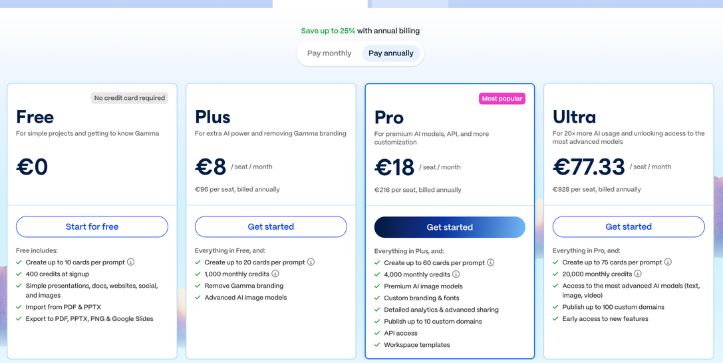
Gamma is attractive if you want to test AI presentation generation without much friction.
Its free plan is useful for trying the platform and seeing whether the prompt-to-deck workflow fits your needs.
As you move into paid plans, you typically get more room for AI usage, more cards per prompt, branding removal, premium AI models, analytics, API access, workspace templates, and custom domains.
This makes Gamma a good option for creators, founders, educators, and small teams who want fast presentation creation without building everything manually.
Want the full breakdown of Gamma’s credits and plan limits?
Gamma Pricing Explained
Visme’s Pricing
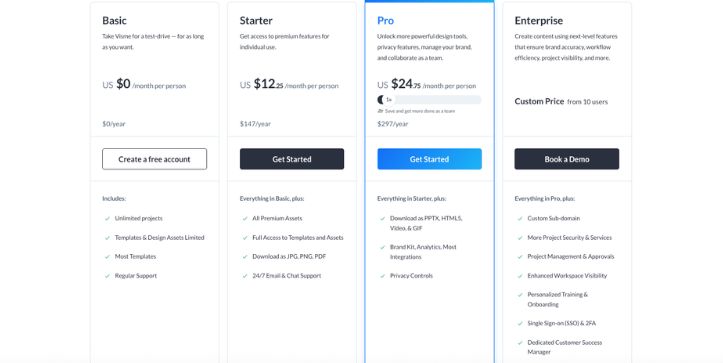
Visme’s pricing makes more sense when you look at it as a broader visual content platform.
You’re not just paying for presentations.
You’re paying for templates, brand kits, charts, reports, documents, infographics, videos, collaboration tools, and export options.
That can be worth it if your team creates different types of visual content every week.
But if you only need a quick AI deck once in a while, Visme may feel like more tool than you need.
Before you choose, review Visme’s plans in detail:
Visme Pricing Explained
The Winner:
Gamma wins for low-friction AI experimentation.
It’s easier to try when your main goal is fast AI-generated presentations.
Visme wins for teams that need a broader content creation suite.
If you’re creating presentations, reports, infographics, social graphics, and branded business content, Visme gives you more long-term value.
Pros and Cons of Visme
Visme Pros
- Gives you more design control over layouts, fonts, colors, spacing, and visual elements.
- Offers strong templates for presentations, infographics, reports, documents, social graphics, and more.
- Works better for data visualization, charts, dashboards, survey results, and report-style content.
- Helps you create more than presentations, including infographics, branded documents, videos, and marketing assets.
- Includes brand kits and branded assets to keep your content consistent.
- Supports interactive elements like hotspots, animations, clickable links, and embedded media.
- Works well for teams creating business, sales, marketing, and educational content.
Want to compare Visme with more design tools?
Best Visme Alternatives
Visme Cons
- Has a higher learning curve than Gamma.
- Can feel heavier if you only need a quick AI-generated deck.
- May take more time to edit because there are more design options.
- Some advanced features may require higher-tier plans.
- Some users in online discussions have complained about billing or subscription experiences, so it’s smart to review the cancellation terms before subscribing.
Pros and Cons of Gamma
Gamma Pros
- Generates presentations very quickly from a simple prompt.
- Uses a modern card-based format that feels clean and easy to follow.
- Works well for first drafts, internal decks, pitch ideas, and quick storytelling.
- Makes async sharing simple with web-native presentation links.
- Offers a clean browser-based experience that feels lighter than traditional slide tools.
- Handles embedded content well for interactive, web-style decks.
- Has a beginner-friendly workflow that doesn’t require much design experience.
- Useful for teams that need fast internal updates, product explainers, or startup-style decks.
Gamma Cons
- Gives you less granular design control than Visme.
- Not the best choice for complex charts, dashboards, or data-heavy reports.
- The card-based format may feel unfamiliar if your team is used to PowerPoint.
- May need cleanup when exporting to traditional slide formats.
- Advanced features like deeper branding, analytics, API access, and custom domains depend on higher plans.
Visme vs Gamma for Different Use Cases
For Startups
Gamma is better for fast pitch draft creation. You can turn a rough idea into a clean deck quickly.
Visme is better when your investor deck needs detailed charts, branded visuals, financial slides, and supporting reports.
For Marketers
Gamma works well for campaign ideas, strategy decks, content plans, and async updates.
Visme is better for branded assets, infographics, social graphics, lead magnets, marketing reports, and campaign visuals.
For Sales Teams
Gamma is useful for quick proposals, product story decks, and internal sales updates.
Visme is better for polished sales enablement content, branded collateral, reusable templates, analytics-style reports, and client-facing decks.
For Educators
Gamma is great for quick lessons, explainers, and simple teaching decks.
Visme is better for interactive learning materials, infographics, classroom visuals, and student assignments.
For Consultants
Gamma helps you create rapid first drafts and structure your ideas faster.
Visme is better for polished client deliverables, charts, report-style decks, and branded consulting presentations.
For Data-Heavy Presentations
Visme wins.
It gives you stronger tools for charts, graphs, reports, dashboards, and visualizing complex information.
For Quick AI Presentations
Gamma wins.
It’s faster when you want to go from prompt to a clean first draft without designing every slide manually.
My Final Verdict
If you want speed, simplicity, and a clean AI-generated first draft, choose Gamma. It’s the better option for quick presentations, internal updates, async sharing, and modern card-style decks.
If you want more control, better branding, stronger data visualization, and a wider content creation toolkit, choose Visme. It’s the better fit for business reports, infographics, sales materials, marketing assets, and polished client-facing presentations.
So, the simple answer is this:
Gamma is better for fast AI presentations. Visme is better for branded, data-heavy, and highly customized visual content.
FAQs About Visme vs Gamma
1. Is Visme better than Gamma?
Visme is better if you need more design control, branding, charts, reports, infographics, and business visuals.
Gamma is better if you want fast AI-generated presentations with less manual design work.
2. Is Gamma better than Visme for AI presentations?
Yes, Gamma is better for quick AI presentation generation.
You can start with a prompt and get a clean first draft much faster than building everything slide by slide.
3. Which is easier to use, Visme or Gamma?
Gamma is easier for beginners.
Visme is still user-friendly, but it has more tools, templates, charts, and design options, so it takes more time to learn.
4. Which tool is better for business presentations?
It depends on the type of business presentation.
- Choose Gamma for quick internal decks and async updates.
- Choose Visme for polished client-facing decks, branded reports, and data-heavy presentations.
5. Which is better for pitch decks, Visme or Gamma?
Gamma is better for creating a quick pitch deck draft.
Visme is better when you want to polish the pitch deck with custom branding, charts, financial visuals, and a more controlled layout.
6. Can Gamma replace Visme?
Not completely.
Gamma can replace Visme if you only need fast presentations and web-style decks. But if you create infographics, reports, social graphics, charts, or branded assets, Visme offers more flexibility.
7. Can Visme replace Gamma?
Yes, but only if speed is not your main priority.
Visme can create presentations and has AI features, but Gamma feels faster when you want to generate a deck from a simple prompt.
8. Which tool is better for data visualization?
Visme is better for data visualization.
It gives you stronger tools for charts, graphs, reports, dashboards, survey results, and infographic-style content.
9. Which tool is better for non-designers?
Gamma is better if you’re a non-designer and want something quick.
Visme is also beginner-friendly, but it gives you more design options, which can feel overwhelming at first.
10. Which one is better for marketing teams?
Visme is usually better for marketing teams.
It helps you create presentations, infographics, social graphics, reports, lead magnets, and branded campaign visuals from one platform.
11. Which one is better for startups?
Gamma is better for early-stage startups that need quick pitch decks, product explainers, or investor story drafts.
Visme is better when the startup needs polished investor materials, branded reports, and detailed charts.
12. Does Gamma export to PowerPoint?
Yes, Gamma supports presentation exports, including PowerPoint-style workflows.
Still, you should test the export before using it for important decks because web-first layouts may need cleanup in traditional slide formats.
13. Does Visme export to PowerPoint?
Yes, Visme supports presentation exports.
But like any design-heavy platform, you should check whether fonts, spacing, charts, and animations stay clean after export.
14. Which has better templates, Visme or Gamma?
Visme has better and more varied templates.
Gamma has modern themes and AI-generated layouts, but Visme offers templates for presentations, reports, infographics, documents, social graphics, proposals, and more.
15. Is Visme or Gamma better for teams?
Visme is better for structured teams that need brand kits, shared assets, reusable templates, and business content workflows.
Gamma is better for lightweight team collaboration, quick deck creation, and async sharing.
16. Which tool is cheaper, Visme or Gamma?
Both tools have free and paid plans, but pricing changes often.
Gamma is usually easier to try for AI presentations, while Visme can offer more value if your team creates many types of visual content.
17. Should I use Visme or Gamma for client presentations?
Use Visme for polished client presentations that need branding, charts, reports, and detailed design control.
Use Gamma if you need to create a quick client-facing draft or a clean web-based presentation link.
18. What is the main difference between Visme and Gamma?
The main difference is simple:
- Gamma is built for speed and AI-first presentation creation.
- Visme is built for design control, branding, data visualization, and multi-format visual content.
19. Is Gamma good for professional presentations?
Yes, Gamma can create professional-looking presentations quickly.
But for strict brand guidelines, complex charts, or final client deliverables, you may need extra editing or a tool like Visme.
20. Is Visme worth it over Gamma?
Visme is worth it if you need more than quick AI decks.
It makes more sense for teams creating branded presentations, reports, infographics, documents, and marketing visuals on a regular basis.