

Visme AI is quickly becoming one of the most talked about AI design tools in 2026. Whether you’re a marketing lead building campaign assets, a startup founder preparing pitch decks, or an educator trying to make engaging visuals without design skills, Visme AI promises a bold solution: describe your content, and get a complete, branded visual in minutes.
But beyond the buzz, what exactly is Visme AI, how does it work, what’s new in its latest rollout, and does it actually deliver on ease and creativity at scale?
This in-depth guide unpacks Visme AI’s core capabilities, key use cases, pricing structure, and real-world performance so you can decide if it’s the right fit for your content creation workflow.
What Is Visme?
Visme AI is a generative design and content creation assistant built into the Visme platform. It allows users to create professional grade visuals from simple text prompts, removing the need for manual design or technical skills. Unlike typical design tools that rely only on templates and drag and drop interfaces, Visme AI starts with a single prompt and builds complete presentations, infographics, reports, and other visual content styled to match your brand.
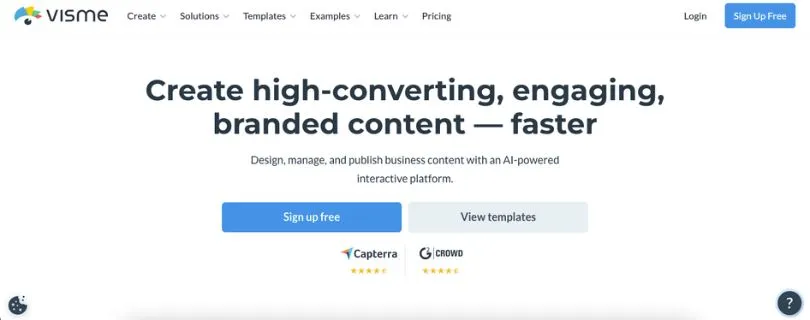
When you enter a command like “Create a marketing presentation for a new product launch,” Visme AI generates:
- A structured slide deck layout
- Pre written text with a consistent brand tone
- Relevant images and icons
- Optional text to speech or voiceover elements
- Fully editable content inside the Visme editor
This text to design workflow is why Visme AI is widely used by marketers, educators, business teams, and creators who want to scale visual content creation without design bottlenecks.
Key highlights based on the platform capabilities:
- No complex design process since everything starts with a simple prompt
- AI powered creation for presentations, infographics, documents, videos, and graphics
- Built in brand wizard to apply colors, fonts, and logos automatically
- AI image and text generation to speed up content creation
- Supports collaboration, real time editing, and sharing
- Integrated with Visme tools for exporting, embedding, and performance tracking
Visme AI focuses on reducing creative effort and turnaround time, helping teams move from idea to polished visual content quickly while staying consistent with their brand.
How Visme AI Works (Step-by-Step)
This section breaks down the typical Visme AI workflow, showing how users go from idea to finished design using simple prompts.
Step 1: Describe your content
After logging into Visme, you’ll see a prompt area that asks what you want to create:
“Ask Visme AI to design a…”
You might type something like:
“Create a five-slide investor pitch deck with charts, team profiles, and market analysis.”
Visme AI interprets the request and builds a layout plan tailored to your input.
Step 2: Generate your visual
Visme AI automatically creates:
- A structured slide deck with titles and suggested layouts
- Pre-filled text for each slide
- Branded fonts, color palette, and icons
- AI-generated visuals or image suggestions
- Optional voiceover and animation presets
Everything appears in Visme’s live editor, ready to fine-tune.
Step 3: Refine with AI tools
You can continue by asking:
- “Rewrite this slide in a more casual tone”
- “Add data visualization for market share”
- “Replace image with a more professional version”
- “Summarize this paragraph into one sentence”
Visme applies your changes instantly, using its built-in AI tools for writing, editing, and visual enhancement.
Step 4: Export or share
Once you’re done, you can:
- Download as PDF, PPTX, or video
- Share online via a link
- Embed into websites
- Invite team members to collaborate
- Track engagement with built-in analytics
This seamless mix of AI automation and manual editing makes Visme AI a powerful solution for anyone creating branded content at scale.
Use Cases for Visme AI
Great fit for:
✔ Marketers creating campaign presentations and social media graphics
✔ Startup teams building pitch decks and investor updates
✔ Educators designing lesson plans, worksheets, and teaching aids
✔ Business professionals preparing reports, proposals, and dashboards
✔ Content creators who need branded visuals without a design team
Not ideal for:
✖ Users needing pixel-level design customization
✖ Advanced animation or motion design workflows
✖ Projects requiring full control over code or export format
✖ Enterprise teams with strict on-premise design tool policies
Limitations of Visme AI
1. Advanced features are locked behind paid plans
This is one of the most common concerns mentioned in reviews and user discussions.
Many AI powered features such as higher quality exports, advanced branding controls, and extended AI usage are limited to paid plans. While the free tier is useful for testing, teams creating content regularly may need to upgrade sooner than expected.
Bottom line: Visme AI is accessible at entry level, but serious or frequent use requires a paid subscription.
2. AI output still needs human refinement
Visme AI speeds up creation, but it does not replace review and editing.
- Generated copy may feel generic and need tone adjustments
- Visual layouts sometimes require manual spacing or alignment fixes
- Data driven content still depends on accurate user input
For professional or client facing work, human review remains essential.
3. Limited control for highly custom design work
While Visme AI is flexible, it does not offer complete freedom for advanced designers.
- Not ideal for pixel perfect design requirements
- Advanced motion graphics are limited
- Custom animations and micro interactions have constraints
Design heavy teams may still rely on tools like Figma or Adobe for final polish.
4. Learning curve for feature rich workflows
Visme AI is powerful, but the platform includes many tools beyond AI.
- New users may feel overwhelmed by options
- Some features require exploration to use efficiently
- Best results come after understanding the editor and AI tools together
This is not a blocker, but it does mean Visme AI rewards users who invest time learning the platform.
Visme Pricing (Updated for April 2026)
Here’s a breakdown of Visme’s current pricing plans in US dollars, giving you clear insight into what features and capabilities come with each tier. Pricing varies depending on whether you choose monthly or annual billing, with yearly plans offering significant savings.
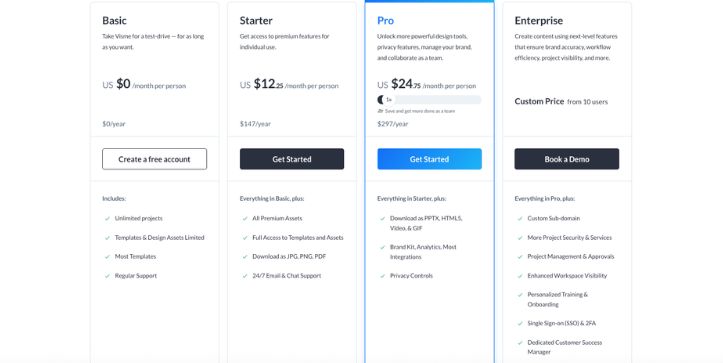
Basic Plan – $0/month
- Free forever
- Access to core content creation tools
- Limited storage and templates
- Basic AI credits included
- Great for trying out Visme and testing basic features before upgrading
Perfect for beginners, students, or anyone who wants to explore the platform and create simple visuals without cost.
Starter Plan – $12.25/month (billed annually) or $29/month
- Unlimited projects
- Access to full template and asset library
- Download as JPG, PNG, PDF
- No Visme branding on exports
- Increased storage and AI credits
This plan suits individual creators and professionals who need more flexibility and export options than the free plan.
Pro Plan – $24.75/month (billed annually) or $59/month
- Everything in Starter
- Extended media library (millions of photos, videos, audio)
- Brand Kit and advanced collaboration tools
- More AI credits for image generation and content creation
- Enhanced analytics and privacy controls
The Pro tier is ideal for small teams and business users who produce branded visuals regularly and want deeper control over design and sharing.
Enterprise – Custom Pricing
- Tailored for large organizations
- Single sign on (SSO) and advanced security options
- Unlimited AI credits (in most setups)
- Custom integrations and priority support
- Dedicated account management
Enterprise plans are best for organizations that need high volume usage, advanced security, and centralized brand control.
Pricing Summary
Visme offers an accessible free tier and scalable paid plans with more advanced features and creative power as you move up. The Starter and Pro plans balance affordability with capability, while Enterprise delivers full control and customization for larger teams.
Visme AI Alternatives (2026 state)
If Visme AI doesn’t fully meet your needs or you’re exploring other AI-powered design tools, here are three standout alternatives in 2026 worth considering.
1. InVideo – best for video-first content creators
If your primary focus is on turning scripts or ideas into short videos, promos, or social content, InVideo offers:
- AI script-to-video generator
- Massive template library for YouTube, Instagram, and ads
- Voiceovers, transitions, and dynamic text
- Branding and media asset controls
- Collaboration features for teams
InVideo is great for marketers, content creators, and social media teams who want quick, professional video output from simple inputs.
Also Read:
InVideo AI Pricing Explained
2. Adobe Express – best for professional-grade graphic design with AI help
Adobe Express is for users who want tighter integration with the Adobe ecosystem and more granular design tools, Adobe Express brings:
- AI text-to-image and design suggestion tools
- Deep template customization
- Access to Adobe Fonts, Stock, and cloud sync
- Animation and motion graphics features
- Brand management and shared libraries
It’s ideal for freelancers, agencies, and creative teams already familiar with Adobe tools who want speed plus polish.
Also Read:
Best Adobe Express Competitors and Alternatives
Adobe Express Pricing Explained
3. Domo AI – best for data-driven storytelling and dashboards
If your goal is to visualize and present business data through AI-enhanced infographics or dashboards, Domo AI is a strong option:
- AI-generated visuals based on live data sets
- Automated insights and visual storytelling prompts
- Dashboard building with drag-and-drop
- Integration with major data platforms
- Enterprise-level control and sharing
Domo AI is suited for analysts, executives, and teams building reports or visual insights for strategic presentations.
Also Read:
Domo AI Alternatives to Explore in 2026
Is Visme AI Worth It?
Visme AI shines when you need to create visual content quickly:
- A pitch deck for investors
- A branded presentation for clients
- A report or proposal with visuals and charts
- A social media post or infographic
- An internal training document
- A quick mockup for team feedback
If your project involves light to medium design needs, and you value speed and brand consistency, Visme AI is an excellent creative assistant.
But Visme may fall short when:
- You need pixel-perfect control over layout and styling
- You require advanced animation or interactivity
- You want full freedom to code or export visuals for custom workflows
- You’re working on a highly complex design system
- You need offline design capabilities or tight software integration
Visme AI is best suited for teams and individuals who want high-quality visual output without a steep learning curve or the need to hire a designer. For design-heavy or code-driven use cases, pairing Visme with more specialized tools may be a better fit.
FAQ
Can Visme AI create complete presentations from a prompt?
Yes, Visme AI can generate full slide decks with layouts, text, visuals, and branding from a single input prompt.
Does Visme AI support collaboration?
Yes, Visme allows real-time collaboration with team members on shared projects, including editing, commenting, and feedback.
Is Visme AI beginner-friendly?
Yes, Visme AI is designed for non-designers and professionals alike. It simplifies content creation with prompts and easy editing tools.
Is Visme AI free?
There is a free plan with limited features. For full access to AI capabilities and export options, you’ll need a paid plan.
Can Visme AI design more than just presentations?
Yes, Visme AI can create infographics, documents, videos, social media graphics, and branded content across multiple formats.



