With AI presentation tools popping up everywhere, choosing the right one can shape how smoothly your workday runs and how much you end up spending. I put this guide together to break down Gamma’s pricing, what you actually get at each tier, and when the platform makes the most sense so you can decide if it fits your workflow and your wallet.
What is Gamma?
Gamma is an AI driven presentation and document creation tool that helps you turn rough ideas into polished slides, webpages, and visual narratives with almost no design effort. You type out what you want to create, and Gamma handles the layout, styling, and structure so you can focus on your message instead of formatting. It’s built for people who want clean, professional output without spending hours tweaking visuals.
Gamma pricing explained: Plans, pricing and credits
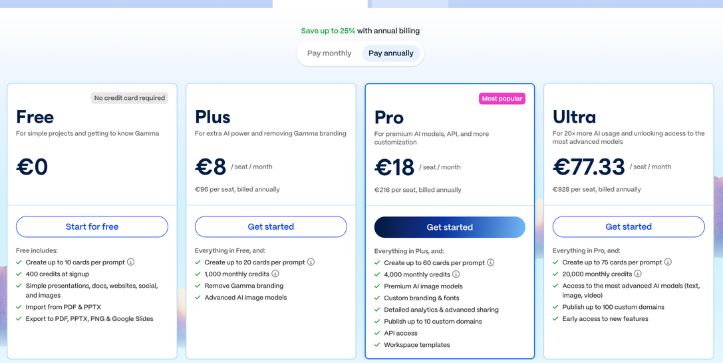
Gamma’s pricing structure isn’t just one number you pay and forget. It’s built around a monthly or annual subscription that gets you access to the platform features, and within each plan you get a set of AI credits and capabilities tied to how much AI generation you can do. On top of that, team plans give you centralized billing and workspace controls that individual plans don’t.
Let’s unpack all the subscription plans first.
Individual Plans — Monthly Billing (USD)
| Feature | Free | Plus | Pro | Ultra |
| Price per user / month | $0 | $8 | $18 | $100 |
| Cards per prompt | Up to 10 | Up to 20 | Up to 60 | Up to 75 |
| AI Credits | Starter credits | 1,000 / month | 4,000 / month | 20,000 / month |
| Remove Gamma branding | No | Yes | Yes | Yes |
| Advanced AI models | Basic | Advanced | Premium | Most advanced (text, image, video) |
| Custom domains | — | — | Up to 10 | Up to 100 |
| API access | — | — | Yes | Yes |
| Early access + features | — | — | Yes | Yes |
What this means: The Free plan is great for testing the basics with limited cards and starter credits. Plus unlocks bigger projects and better image models. Pro moves into serious creative territory with custom branding, analytics, and APIs, while Ultra is built for power users who need the most advanced AI and scalability.
Individual Plans — Annual Billing (USD)
| Feature | Free | Plus (Annual) | Pro (Annual) | Ultra (Annual) |
| Price per user / month (billed annually) | $0 | ~$6.50* | ~$15* | ~$90* |
| Cards per prompt | Up to 10 | Up to 20 | Up to 60 | Up to 75 |
| AI Credits | Starter credits | 1,000 / month | 4,000 / month | 20,000 / month |
| Branding removal | No | Yes | Yes | Yes |
| Advanced models & features | Basic | Advanced | Premium + API | Full suite + 100 domains |
Annual pricing typically saves you around 20–30% compared to monthly. Actual billed rates vary when you check out on Gamma.
Team Plans — Monthly Billing (per seat, USD)
| Feature | Team Plus | Team Pro | Team Ultra |
| Price per seat / month | ~$20 | ~$35 | ~$120 |
| Centralized billing | Yes | Yes | Yes |
| Shared team workspace | Yes | Yes | Yes |
| Custom company theme | Yes | Yes | Yes |
| Monthly credits per seat | ~3,000 | ~6,000 | ~20,000 |
| Admin controls | Basic | Advanced | Advanced |
| SSO & security features | — | — | Yes |
| Custom domains | ~10 | ~10 | ~100 |
Team plans unlock collaboration features like shared folders, admin controls, and centralized billing that individual plans don’t include.
Team Plans — Annual Billing (per seat, USD)
| Feature | Team Plus (Annual) | Team Pro (Annual) | Team Ultra (Annual) |
| Price per seat / month (billed annually) | ~$16 | ~$28 | ~$100 |
| Monthly credits per seat | ~3,000 | ~6,000 | ~20,000 |
| Admin & team controls | Yes | Yes | Yes |
| SSO & enterprise security | — | — | Yes |
| Custom domains included | ~10 | ~10 | ~100 |
Annual billing typically gives you a discount compared to paying month to month. It’s often worth it if your team is using Gamma regularly.
The Gamma credit system explained
Gamma uses a credit system to power everything you create with its AI, and this is where things start to get a little more nuanced. Every time you ask the AI to generate a deck, redesign a layout, build more cards, or produce images, you spend credits. It’s not a flat “one action equals one credit” setup either. Gamma runs on a usage based model, so the credit cost shifts depending on how heavy the request is.
Small tweaks barely move the needle. Asking the AI to adjust a headline or refine a single card uses only a tiny slice of your credits. But when you tell Gamma to generate a full presentation from scratch, create a batch of images, or restructure an entire document, the cost climbs quickly. That difference is important because it affects how long your monthly credit pool lasts.
Here’s a simple example of how credit usage might look inside Gamma:
| User action | Approx. credits |
| Change a line of text | Very low |
| Adjust layout on one card | Low |
| Generate a new image | Medium |
| Create a 10 card deck | Higher |
| Build a 60 card presentation | Much higher |
The upside is that tiny edits don’t punish your balance. The tradeoff is you need to keep an eye on how many full AI generations you run because they use the most credits. If you’re deep in a project and firing off multiple “regenerate this entire deck” prompts, you might burn through your allowance faster than expected.
Credit rollovers and daily credits
Gamma keeps things interesting by giving users more than one way to earn or lose credits, depending on how active they are. It’s helpful once you get the hang of it, but it can also make tracking your balance a little tricky.
Here’s how it works:
- Paid plans usually offer monthly credit allowances, and when you don’t use all of them, a portion may roll into the next month as long as your subscription stays active.
- Free users start with limited starter credits, which help you test the AI without paying.
- Credits tied to daily usage or starter bonuses don’t roll over, so you need to use them before they disappear.
- Larger AI generations always draw more from your pool, which means planning your credit usage becomes part of working smoothly inside Gamma.
Optimal use cases for each pricing plan
Free plan: Perfect when you’re just getting to know Gamma and want to play around with its AI without pulling out your card. Great for students, hobbyists, or anyone curious about how the platform thinks and designs.
Plus plan: A solid fit for solo creators who make presentations here and there and want clean exports without the Gamma watermark. If you build decks for work or school and don’t need huge credit volumes, this tier feels comfortable.
Pro plan: Best for freelancers, content creators, and small teams who produce presentations often and need more credits, better models, and features like API access or custom domains. It’s built for people who want consistency and speed.
Ultra plan: Tailored for heavy users and growing teams that need the most advanced AI, big credit pools, priority features, and the flexibility to create at scale. This is the tier for anyone treating Gamma as a core part of their workflow.
Comparative Analysis: Gamma Pricing vs. Competitors
To give you a clearer sense of where Gamma sits in the market, here’s how its pricing and feature set compare with three popular alternatives: Canva, Beautiful.ai, and Tome.
| Feature / Tool | Gamma | Canva | Beautiful.ai | Tome |
| Pricing | Free; Paid plans from $8/month | Free; From $14.99/month | From $12/month | Free; From $10/month |
| Core features | AI generated presentations, documents, images, and cards | Design tools, templates, brand kits, team workflows | AI assisted slide generation, smart templates | AI narrative decks, story based presentations |
| Best for | Creators wanting fast, AI built decks with minimal design work | Designers or teams needing broader design flexibility | Business teams producing polished slide decks | Storytellers, founders, and creators who prefer narrative-first presentations |
| Export quality | Strong visuals, fast generation | Very high, with rich formats | Presentation focused, business polished | Clean, minimal exports |
| Collaboration | Team workspaces and shared libraries | Advanced team collaboration, brand kits | Team collaboration and analytics | Shared workspaces |
| Customization | Themes, custom domains (higher tiers), API on Pro | Deep design control, large asset library | Smart templates with limited deep control | Clean layouts with fewer customization layers |
Is Gamma pricing worth it for your project?
If your workflow relies on cranking out decks quickly without fussing over design details, Gamma’s pricing can make a lot of sense. The AI does the heavy lifting, so you spend less time tweaking layouts and more time communicating what matters. For solo creators or small teams that produce presentations regularly, the jump from free to a paid tier often feels like a real upgrade in both speed and quality.
On the other hand, if you only build slides once in a while or you need deep, manual design control, a basic plan might feel more than you actually use. In that case, stick with the free plan and pay attention to how many credits you burn. For frequent use and more advanced features, spending a bit more for higher tiers usually pays off in reduced effort and faster output.
FAQs about Gamma pricing
How do Gamma’s credits work?
Credits are used every time you generate slides, rewrite content, or create images. Bigger requests consume more credits, so your balance changes based on how heavily you use the AI.
Does the Free plan give enough credits to build full presentations?
You can create small decks on the Free plan, but you’ll hit the limits quickly. It’s meant for testing the workflow rather than producing full projects.
Can I buy extra credits without upgrading my plan?
Yes, Gamma lets you purchase additional credits if you run out. This is helpful during busy months when you don’t want to commit to a higher tier.
Are Team plans worth it for small groups?
Team plans make sense if you need shared workspaces, central billing, and consistent credit access. They keep everyone on the same page without juggling separate accounts.
Do unused credits roll over each month?
Some credits can roll into the next month, but only up to a limit set by your plan. Daily or bonus credits usually don’t roll over.
Does Gamma charge extra for advanced AI models?
Higher tier plans unlock better models at no extra fee, but using those models tends to consume more credits per request.
Is Gamma cheaper than other presentation tools?
It depends on how often you create decks. For frequent AI assisted work, Gamma can be cost effective. For occasional use, the Free or Plus tier may be enough.