

Picking between Visme and Canva?
Canva promises easy design, a huge template library, and fast content creation.
But is it really the best choice for every team?
Visme claims stronger presentations, better infographics, interactive content, and more business-focused design features.
But does it actually hold up when you’re creating real marketing assets, reports, social media graphics, and branded presentations?
And which one is the better fit for you and your team?
So, I compared Visme and Canva across the areas that matter most.
I looked at ease of use, templates, AI tools, brand kits, presentations, infographics, exports, pricing, and collaboration.
Keep reading to find out which design platform stands out for you in 2026!
Visme vs Canva: Quick Feature Breakdown
In a hurry?
I put together what we concluded in this blog.
You can compare and choose the best design tool for your team, content workflow, and creative projects!
| Feature | Visme | Canva | Who Wins? |
| Best For | Businesses, marketers, educators, and teams creating presentations, infographics, reports, proposals, and interactive content | Creators, small businesses, marketers, educators, and teams creating social media graphics, videos, posters, documents, and quick branded designs | Canva for everyday design, Visme for business content |
| Pricing | Free plan available, but full downloads and premium assets are limited; paid plans are better for serious use | More useful free plan; Canva Pro gives strong value for individuals, creators, and small teams | Canva |
| Ease of Use | Clean editor, but the dashboard feels more structured and takes a little time to learn | Very beginner-friendly drag-and-drop editor; faster for non-designers and quick edits | Canva |
| Templates | Strong business templates for presentations, infographics, reports, charts, proposals, and training content | Much larger template library for social posts, videos, thumbnails, flyers, resumes, websites, and marketing assets | Canva |
| Presentations | More professional presentation tools, interactive slides, charts, animations, and branded deck options | Great for quick slide decks, classroom presentations, pitch decks, and simple visual storytelling | Visme |
| Infographics & Data Visualization | Better chart tools, data widgets, maps, reports, and interactive infographics | Good for simple infographic templates and visual summaries, but less advanced for data-heavy content | Visme |
| AI Tools | AI helps with presentations, documents, layouts, and business content creation | Canva Magic Studio feels smoother for text, images, layouts, videos, and everyday creative workflows | Canva |
| Brand Kit Features | Strong brand control for teams, including fonts, colors, logos, templates, and business assets | Easy brand kit setup for creators and teams; great for fast branded social media content | Tie |
| Video & Animation | Good for animated presentations, explainers, and business visuals | Better for social media video creation, reels, ads, subtitles, and quick video edits | Canva |
| Export Options | Supports common formats plus strong business-friendly options like PPTX and HTML5 export | Supports PNG, JPG, PDF, MP4, GIF, PPTX, print options, and easy sharing | Visme for HTML5, Canva for daily exports |
| Collaboration | Good for teams working on reports, decks, and branded business content | Easier for team comments, shared folders, templates, and fast creative collaboration | Canva |
| Forms & Interactive Content | Built for interactive content, lead capture forms, surveys, quizzes, and embedded business assets | Offers simple interactive and form-style options, but it is not as strong for lead capture workflows | Visme |
| Integrations | Useful integrations for business and marketing workflows, but the ecosystem is smaller | Larger app marketplace with more content, productivity, social, AI, and design integrations | Canva |
| Mobile App | Works for reviewing and light edits, but desktop feels stronger | Better mobile app for creating, editing, and publishing on the go | Canva |
| Reporting & Analytics | Offers analytics for published content, forms, and interactive assets | Basic content insights depending on plan and use case, but less focused on interactive content tracking | Visme |
Also Read:
Best Canva Alternatives
Our Top 5Visme alternatives: Which one is best for your brand?
Visme vs Canva: Full Side-By-Side Comparison of Features
Had a quick glance at what Visme and Canva are best at?
Now, let’s take a deeper look at how they stack up against each other.
Below are the ten tests I ran Visme and Canva against:
- Visme vs Canva: Pricing and Cost Efficiency
- Visme vs Canva: Ease of Use and Setup
- Visme vs Canva: Templates and Design Assets
- Visme vs Canva: AI Design Tools
- Visme vs Canva: Presentations and Slide Decks
- Visme vs Canva: Infographics and Data Visualization
- Visme vs Canva: Brand Kit and Team Collaboration
- Visme vs Canva: Video, Animation, and Social Media Content
- Visme vs Canva: Export Options and Publishing
- Visme vs Canva: Integrations, Forms, and Analytics
1. Visme vs Canva: Pricing and Cost Efficiency
First, let’s weigh both Visme and Canva’s pricing.
Top five things you might want to evaluate:
- What is the monthly and yearly cost?
- What do I actually get in the free plan?
- Are important features locked behind higher plans?
- Does the pricing make sense for individuals, teams, or agencies?
- And, will I outgrow the plan too quickly?
Visme: Pricing and Cost Efficiency
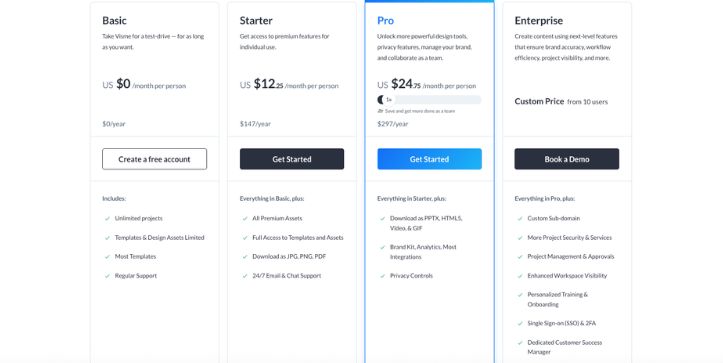
Visme does offer a free plan, but I’d treat it more like a trial than a full working plan.
You can create projects, test the editor, explore templates, and get a feel for how Visme handles presentations, infographics, reports, and interactive content.
But once you want serious downloads, more storage, premium templates, brand kit features, analytics, or advanced export formats, you’ll need a paid plan.
Coming to its pricing, Visme’s Starter plan is commonly listed at $29/month or $12.25/month when billed yearly, while the Pro plan is listed at $59/month or $24.75/month when billed yearly. The Pro plan includes stronger business features like unlimited forms, premium templates, a large photo library, and more advanced creative assets.
What I liked is that Visme’s paid plans feel built for business content.
You’re not just paying for pretty templates.
You’re paying for better presentations, infographics, charts, reports, forms, analytics, and branded content workflows.
That said, the free plan feels limited if you’re trying to use Visme for regular client work, social media content, or team projects.
Pros
- Strong value for business presentations, infographics, and reports
- Good option if you need charts, forms, data widgets, and interactive content
- Pro plan includes more serious export options and brand features
- Better suited for teams creating professional business content
- Useful for marketers, educators, sales teams, and internal communication teams
Cons
- Free plan is not as practical for everyday publishing
- Starter plan can feel limited if you need brand kit, analytics, or advanced exports
- More expensive than Canva for casual creators and small social media teams
- Not the best value if you only need simple posts, thumbnails, flyers, or quick designs
- Some advanced business features sit behind higher plans
My take
Visme’s pricing makes sense if you’re creating business-heavy content.
Think pitch decks, internal reports, client proposals, training documents, lead capture forms, and data-rich infographics.
But if your main work is Instagram posts, YouTube thumbnails, short videos, posters, or basic marketing graphics, Visme may feel like you’re paying for features you won’t use every day.
For teams that care about interactive content, branded reports, and presentation quality, Visme can justify the cost.
For casual design work, it feels less cost-efficient.
Also Read:
Visme Pricing Explained
Canva: Pricing and Cost Efficiency
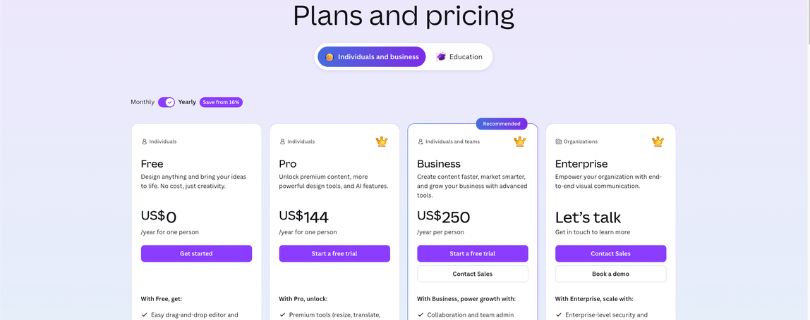
Canva’s pricing feels easier to understand for most users.
You get a genuinely useful free plan, and that’s one of Canva’s biggest advantages.
I could create social media graphics, presentations, documents, posters, thumbnails, and simple marketing assets without feeling blocked every few minutes.
Of course, premium templates, Pro assets, background remover, Magic Resize, stronger AI features, and more brand kit options need a paid plan.
But the free version still gives you enough room to create and export real designs.
Canva Pro is commonly listed around $12.99/month or $120/year, while Canva Teams is commonly listed around $10/user/month or $100/user/year with a three-user minimum.
That makes Canva especially attractive for creators, freelancers, small businesses, educators, and marketing teams that need a fast AI graphic design tool for marketers or a simple social media video creation tool.
What stood out to me is how much Canva includes before you feel forced to upgrade.
You can design quickly, export easily, and collaborate without needing a long setup.
Pros
- More useful free plan than Visme
- Better value for everyday design work
- Great for social media graphics, videos, posters, flyers, thumbnails, and documents
- Canva Pro gives strong value for solo creators and small businesses
- Canva Teams works well for simple team collaboration and brand kit features
- Easier to justify if your team creates a lot of quick marketing content
Cons
- Teams pricing can add up if you have multiple users
- Advanced brand controls and enterprise features may require higher plans
- Popular templates can make designs look similar if you don’t customize them well
- Less focused on interactive reports, data visualization, and HTML5-style business content
- Not as strong as Visme for serious infographics and presentation-heavy workflows
Also Read:
How much is Canva Pro? – Updated pricing
My take
Canva wins on pricing for most people.
It gives you more practical value on the free plan, and Canva Pro is easier to recommend for creators, small businesses, and marketing teams.
If your team needs to produce content every day, Canva feels lighter, faster, and cheaper in real use.
But Canva is not always the better investment.
If your work depends on professional presentations, interactive content, detailed infographics, forms, reports, or business dashboards, Visme gives you tools that Canva doesn’t fully replace.
So, the better value depends on your workflow.
Canva is more cost-efficient for everyday design.
Visme is more cost-efficient for business communication and data-heavy visual content.
| Aspect | Visme | Canva | Which is Better? |
| Free Plan | Good for testing the platform, but limited for serious downloads and publishing | More practical for real design work, exports, and daily use | Canva |
| Starting Paid Plan | Starter is commonly listed at $29/month or $12.25/month yearly | Pro is commonly listed around $12.99/month or $120/year | Canva |
| Best Value For | Business presentations, infographics, reports, forms, and interactive content | Social media graphics, videos, documents, posters, thumbnails, and quick marketing assets | Depends |
| Team Pricing | Better for structured business content teams | Better for fast creative collaboration and brand templates | Canva |
| Advanced Features | Stronger for analytics, forms, charts, and interactive business assets | Stronger for AI design, templates, mobile editing, and everyday content creation | Tie |
| Long-Term Value | Better if your team creates professional business content regularly | Better if your team creates high-volume marketing and social content | Canva for most users, Visme for business teams |
2. Visme vs Canva: Ease of Use and Setup
For the second test, I looked at how quickly you can start creating inside both tools.
Because let’s be honest.
A design tool can have hundreds of features, but if it takes too long to find the right button, most teams won’t use it properly.
Here’s what I checked:
- How fast can I create my first design?
- Is the editor easy for beginners?
- Can I find templates, assets, text, and brand tools without hunting?
- Does the workflow feel smooth for everyday design tasks?
- How much learning curve is involved?
Visme: Ease of Use and Setup
When I first opened Visme, it felt more like a business content platform than a casual design app.
The dashboard is organized around project types like presentations, documents, infographics, charts, forms, social graphics, and videos.
That structure is helpful if you already know what you want to create.
For example, if I’m building a sales presentation or a marketing report, Visme points me in the right direction quickly.
But compared to Canva, the editor takes a little more time to understand.
Visme gives you a lot of sections: graphics, data, media, apps, charts, photos, videos, and interactive elements.
That’s useful, but it can also feel slightly heavier if all you want is a quick Instagram post or YouTube thumbnail.
Once I got used to the layout, though, Visme felt controlled and professional.
It’s not hard.
It’s just more structured.
Pros
- Clean dashboard organized by business content type
- Good workflow for presentations, reports, infographics, and charts
- Helpful for users who create professional documents and branded assets
- Editor gives more control over data visuals and interactive elements
- Better structure for teams creating repeatable business content
Cons
- Slightly steeper learning curve than Canva
- Can feel slower for quick social media design tasks
- Some tools are tucked into separate menus
- Not as playful or instantly familiar for beginners
- Better on desktop than mobile
My take
Visme is easy enough once you understand the layout.
But it feels like a tool built for people who create serious business visuals.
If you’re making a company report, pitch deck, webinar slide, infographic, or training document, the structure works in your favor.
If you’re trying to make five quick social posts before lunch, Canva feels faster.
Canva: Ease of Use and Setup
Canva is one of the easiest design tools to start using.
That’s still its biggest strength.
The editor feels familiar almost immediately.
You pick a template, drag elements around, change the text, drop in your logo, and export.
I didn’t feel like I needed a tutorial to create a decent design.
Canva also does a better job of keeping the interface light.
The search bar is powerful, the template suggestions are useful, and the “Elements” panel makes it easy to find graphics, icons, stickers, photos, videos, frames, and mockups from one place.
For non-designers, this matters a lot.
A small business owner, social media manager, teacher, or creator can open Canva and get something usable within minutes.
That’s why Canva works so well as an AI graphic design tool for marketers and a daily social media content creation tool.
Pros
- Very beginner-friendly editor
- Fast template-based workflow
- Easy drag-and-drop design experience
- Search makes it simple to find templates, graphics, videos, and assets
- Great for non-designers and busy marketing teams
- Mobile app is stronger for quick edits on the go
Cons
- The asset library can feel crowded
- Designs can look generic if you rely too much on popular templates
- Advanced business content tools are not as deep as Visme
- Some team and brand controls feel too simple for larger organizations
- Less structured for data-heavy reports and interactive content
My take
Canva wins this round.
It’s faster, easier, and more forgiving.
For most people, Canva feels like a tool you can figure out by clicking around.
Visme feels more like a platform you learn properly.
That’s not a bad thing.
It just depends on whether your priority is speed or structure.
| Aspect | Visme | Canva | Who Wins? |
| Setup Speed | Easy, but takes more time to understand | Very fast and beginner-friendly | Canva |
| Editor Experience | Structured and business-focused | Simple, visual, and flexible | Canva |
| Learning Curve | Moderate | Very low | Canva |
| Best For | Reports, decks, infographics, business assets | Social posts, videos, documents, quick designs | Canva |
| Desktop Workflow | Strong | Strong | Tie |
| Mobile Workflow | Good for light edits | Better for real editing | Canva |
3. Visme vs Canva: Templates and Design Assets
For the third test, I compared the templates and creative assets inside both tools.
Templates matter because most users don’t start from a blank canvas.
They start with a layout, then customize it.
So I looked at:
- Which tool has more templates?
- Which templates look more professional?
- Which tool is better for social media content?
- Which one is better for business documents?
- How easy is it to customize templates without making them look messy?
Visme: Templates and Design Assets
Visme’s templates feel more professional and business-oriented.
You’ll find strong options for pitch decks, proposals, reports, infographics, training materials, charts, ebooks, forms, and presentations.
The templates don’t feel as trendy as Canva’s.
But that’s not always a weakness.
If I’m creating a quarterly report, investor deck, educational infographic, or sales presentation, I don’t want it to look like a TikTok carousel.
I want it to look polished, clear, and credible.
That’s where Visme does well.
Its design assets also support this business-first approach.
You get icons, illustrations, stock photos, videos, charts, maps, data widgets, animated graphics, and interactive elements.
The chart and data-focused assets are especially useful if you’re creating reports or visual storytelling content.
Pros
- Strong templates for presentations, reports, infographics, and proposals
- More professional style for business users
- Good library of charts, maps, icons, and data widgets
- Better for structured business communication
- Useful for educational and corporate content
Cons
- Smaller template library than Canva
- Fewer trendy social media templates
- Less variety for casual creators
- Some templates feel more corporate than creative
- Not as fast for high-volume social media production
My take
Visme wins when template quality means “professional and business-ready.”
It’s great when you need your content to look polished in a meeting, proposal, report, or presentation.
But if you want sheer variety, Canva has the advantage.
Canva: Templates and Design Assets
Canva’s template library is massive.
This is where Canva really feels hard to beat.
You can find templates for Instagram posts, reels, stories, YouTube thumbnails, LinkedIn posts, pitch decks, resumes, flyers, posters, menus, invitations, ads, websites, worksheets, ebooks, presentations, and more.
It’s also better at following design trends.
If you want modern social media layouts, bold creator-style thumbnails, aesthetic carousel posts, product promos, or quick ad creatives, Canva gives you more options.
The asset library is also bigger.
You get photos, videos, icons, stickers, frames, mockups, music, charts, AI images, illustrations, and design elements.
The only downside is that Canva templates are everywhere.
If you don’t customize them, your design can look like something people have already seen.
Pros
- Huge template library
- Excellent for social media graphics and marketing assets
- Great variety across industries and use cases
- More trendy, creator-friendly designs
- Huge stock photo, video, icon, and element library
- Strong choice for fast AI ad creative generation
Cons
- Popular templates can feel overused
- Some templates look more casual than professional
- Data-heavy templates are not as strong as Visme’s
- Can feel overwhelming because there are so many options
- Business reports and infographics may need more manual refinement
My take
Canva wins for template quantity and variety.
Visme wins for business-style templates.
For most users, Canva’s library will feel more useful day to day.
But for professional presentations, reports, and infographics, I’d rather start in Visme.
| Aspect | Visme | Canva | Who Wins? |
| Template Quantity | Good, but smaller | Massive library | Canva |
| Business Templates | Stronger for reports, decks, proposals | Good, but more general | Visme |
| Social Media Templates | Useful, but limited | Excellent | Canva |
| Infographic Templates | Strong and data-friendly | Good for simple visuals | Visme |
| Asset Library | Strong for business visuals | Larger and more varied | Canva |
| Template Originality | More professional and less overused | More variety, but common templates appear often | Tie |
4. Visme vs Canva: AI Design Tools
For the fourth test, I looked at how both platforms use AI.
AI matters now because creators and marketers are not just designing from scratch.
They’re generating layouts, writing copy, removing backgrounds, creating images, turning ideas into presentations, and speeding up repetitive tasks.
Here’s what I checked:
- Can AI help me start faster?
- Is the output actually useful?
- Does the AI fit naturally into the editor?
- Can it help with copy, images, layouts, and presentations?
- Does it improve the real design workflow?
Visme: AI Design Tools
Visme’s AI tools are useful for business content.
You can use AI to create presentations, documents, social graphics, and other visual assets from prompts.
This helps when you’re staring at a blank page and need a starting point.
For example, if I enter a prompt for a sales deck or business report, Visme can generate a structured first draft.
That’s helpful.
It gives you a layout, some text direction, and a visual starting point.
But Visme’s AI still feels more useful for structure than for creative polish.
You’ll usually need to edit the copy, clean up layouts, adjust spacing, and make the design feel more like your brand.
For presentations and reports, that’s fine.
For fast social media content or AI ad creative generation, Canva feels more natural.
Pros
- Helpful for generating presentations and business documents
- Good starting point for reports, infographics, and structured content
- Useful when you need layout ideas quickly
- Works well for business users who need first drafts
- Can speed up content planning for decks and documents
Cons
- AI output often needs manual polishing
- Not as smooth across the full editor as Canva’s AI tools
- Less exciting for social media videos and creator content
- Image generation and design generation feel less central to the workflow
- Better for structure than final creative quality
My take
Visme’s AI is helpful when you need a business content draft.
It’s especially useful for presentations, reports, and documents.
But I wouldn’t call it the best AI design software review winner for everyday creative production.
It’s practical, not flashy.
Canva: AI Design Tools
Canva’s AI tools feel more built into the everyday design workflow.
Magic Studio brings together tools for writing, image generation, background removal, layout help, resizing, editing, translation, and more.
The big difference is that Canva’s AI feels easy to use while you’re already designing.
For example, I can write social media captions, generate an image, remove a background, resize a design for another platform, and turn a document into a presentation without feeling like I left the editor.
That’s why Canva works so well for creators and marketing teams.
It’s not just an AI tool.
It’s a full creative workspace with AI sprinkled into the places where you actually need help.
For a text-to-video workflow or quick social media video creation, Canva also feels more practical than Visme.
It won’t replace advanced AI video generators, but for simple promos, reels, ads, and branded videos, it gets the job done quickly.
Pros
- AI tools feel more integrated into the editor
- Stronger for everyday creative work
- Great for background removal, image generation, writing, resizing, and quick edits
- Better for social media posts, videos, and ad creatives
- Easier for beginners to use AI without learning complex prompts
- Good option for marketers creating content at scale
Cons
- AI output can still look generic without editing
- Some AI features require paid plans or credits
- Not as deep as dedicated AI image or video platforms
- Generated designs still need brand cleanup
- Not ideal for complex data-heavy business visuals
My take
Canva wins the AI round.
Its AI tools are easier to use, more visible, and more useful for daily content creation.
Visme’s AI helps you build structured business content.
Canva’s AI helps you move faster across almost everything.
| Aspect | Visme | Canva | Who Wins? |
| AI Presentations | Strong for business-style drafts | Good, but more general | Visme |
| AI Writing | Useful for documents and slides | More flexible inside daily workflows | Canva |
| AI Image Tools | Available, but less central | Easier and more integrated | Canva |
| Background Removal | Available on paid plans | Very easy and polished | Canva |
| Social Media AI Workflow | Decent | Stronger and faster | Canva |
| Overall AI Experience | Better for structure | Better for everyday creativity | Canva |
5. Visme vs Canva: Presentations and Slide Decks
For the fifth test, I focused on presentations.
This is one of the biggest areas where Visme and Canva feel different.
I looked at:
- Which tool creates better slide decks?
- Which one feels more professional?
- Can I add charts, animations, and interactive elements?
- How easy is it to present, share, or export?
- Which one works better for business teams?
Visme: Presentations and Slide Decks
Visme feels built for presentations.
Not just pretty slides.
Actual business presentations.
The templates are more professional, the chart tools are stronger, and the interactive features give you more room to create polished decks for sales, training, reporting, webinars, and internal communication.
I liked how Visme handles data-heavy slides.
You can add charts, graphs, maps, icons, animated elements, popups, hover effects, and embedded media.
That makes it a better option if your deck needs to explain numbers, processes, research findings, or a business strategy.
Visme also feels less casual than Canva.
That matters when you’re presenting to clients, executives, investors, or stakeholders.
Pros
- Better for professional business presentations
- Stronger chart and data visualization tools
- Supports interactive and animated slide elements
- Good for sales decks, reports, training, and proposals
- More polished for corporate communication
Cons
- Slightly slower to learn than Canva
- Less ideal for quick casual decks
- Some advanced features require paid plans
- Not as fun or fast for classroom-style slides
- Collaboration feels less instantly simple than Canva
My take
Visme wins for serious presentations.
If I’m building a business deck that needs charts, interactivity, structure, and polish, I’d choose Visme over Canva.
It feels more like a Canva alternative for design teams that care about presentations and business storytelling.
Canva: Presentations and Slide Decks
Canva is also good for presentations.
Actually, it’s great if you need something fast.
You can choose a template, update the copy, add images, use brand colors, and present directly from Canva.
It works well for classroom presentations, startup pitch decks, simple webinars, workshops, portfolio slides, and visual reports that don’t need advanced interactivity.
The design process is faster than Visme.
And because Canva has so many templates, it’s easy to find a style that matches your topic.
But Canva’s presentation tools feel more lightweight.
If your slides need serious charts, controlled branding, interactive content, or detailed business visuals, Visme gives you more depth.
Pros
- Very fast for creating slide decks
- Huge presentation template library
- Easy to customize for beginners
- Good for education, creators, startups, and simple business decks
- Easy presenting and sharing options
Cons
- Less advanced for data-heavy decks
- Interactive features are not as strong as Visme’s
- Templates can look familiar if not customized
- Not as strong for corporate reports or sales enablement content
- Limited compared with Visme for professional business storytelling
My take
Canva is better for quick presentations.
Visme is better for important presentations.
That’s the simplest way to look at it.
If the deck needs to look good fast, use Canva.
If the deck needs to persuade, explain data, or represent your business seriously, use Visme.
| Aspect | Visme | Canva | Who Wins? |
| Business Presentations | Stronger and more professional | Good, but lighter | Visme |
| Quick Slide Creation | Good | Faster | Canva |
| Interactive Slides | Stronger | Basic | Visme |
| Charts and Data | Better | Good for simple charts | Visme |
| Template Variety | Good | Larger | Canva |
| Overall Presentation Quality | Better for serious decks | Better for fast decks | Visme |
6. Visme vs Canva: Infographics and Data Visualization
For the sixth test, I looked at infographics and data visualization.
This is where many design tools start to show their limits.
A good infographic is not just a long graphic with icons.
It needs clear hierarchy, readable charts, clean spacing, and a story that makes data easier to understand.
I evaluated both tools on:
- Chart quality
- Infographic templates
- Data widgets
- Maps and graphs
- Interactive data storytelling
- Ease of editing numbers and visuals
Visme: Infographics and Data Visualization
Visme is stronger for infographics.
This is one of its clearest wins.
The platform gives you more tools for charts, graphs, maps, data widgets, timelines, comparison graphics, process visuals, and interactive infographics.
When I created a data-heavy visual, Visme felt more comfortable than Canva.
It gave me better structure and more control over how information appeared.
That matters if you’re making marketing reports, survey summaries, research visuals, financial snapshots, nonprofit impact reports, or educational explainers.
Visme also works better when the infographic needs to be part of a larger business workflow.
You can turn data into a report, embed the content, publish it online, track engagement, or reuse it inside a presentation.
Pros
- Better chart and graph tools
- Strong infographic templates for business and education
- Good maps, timelines, process visuals, and data widgets
- Supports interactive infographic content
- Better for reports, research summaries, and data storytelling
Cons
- More learning curve than Canva
- Not as fast for simple social-style infographics
- Free plan limitations can block serious exporting
- Designs can feel corporate if you don’t customize them
- Asset variety is smaller than Canva’s
My take
Visme wins this category clearly.
If you care about data visualization, visual storytelling, and professional infographics, Visme is the better tool.
Canva can make simple infographics.
Visme can build better business infographics.
Canva: Infographics and Data Visualization
Canva is still useful for infographics.
It has plenty of infographic templates, icons, charts, illustrations, and layouts.
If you’re making a simple visual summary, checklist, comparison graphic, or social media infographic, Canva is fast and easy.
For example, if I need a LinkedIn carousel about marketing tips or a simple “5-step process” graphic, Canva works beautifully.
But it starts to feel limited when the content becomes more data-heavy.
Charts are easy to create, but not as flexible as Visme’s.
Interactive data storytelling is also not Canva’s strongest area.
Pros
- Fast for simple infographics
- Huge library of icons, illustrations, and templates
- Great for social media-friendly visual summaries
- Easy to customize for beginners
- Good for checklists, timelines, and process graphics
Cons
- Less advanced for charts and data widgets
- Not ideal for complex business reports
- Limited interactive infographic options
- Can feel too template-driven
- Data visualization tools are lighter than Visme’s
My take
Canva is good for simple infographics.
Visme is better for serious ones.
If your infographic is mostly visual tips, Canva is enough.
If your infographic includes real data, research, charts, or reporting, Visme is the smarter choice.
| Aspect | Visme | Canva | Who Wins? |
| Infographic Templates | Strong and professional | Larger, but more general | Tie |
| Chart Tools | Better | Basic to good | Visme |
| Data Widgets | Stronger | Limited | Visme |
| Maps and Reports | Better | More basic | Visme |
| Social Infographics | Good | Faster and trendier | Canva |
| Overall Data Visualization | Stronger | Easier but lighter | Visme |
7. Visme vs Canva: Brand Kit and Team Collaboration
For the seventh test, I compared brand control and team collaboration.
This matters a lot if you’re not designing alone.
A good brand kit helps your team avoid messy colors, random fonts, stretched logos, and off-brand templates.
I looked at:
- Brand kit features
- Template locking and consistency
- Team sharing
- Comments and approvals
- Collaboration for marketing and design teams
- How well each tool supports repeatable branded content
Visme: Brand Kit and Team Collaboration
Visme’s brand tools feel more controlled.
You can add logos, colors, fonts, brand templates, and reusable assets.
For teams creating business content, that’s helpful.
A sales team can reuse approved decks.
A marketing team can keep reports consistent.
An HR team can build training documents without making every slide look different.
Visme also has a Brand Wizard-style workflow that helps pull brand assets and apply them across projects.
That makes it useful for businesses that need content governance, not just design speed.
The collaboration features are solid too.
Team members can comment, share, edit, and work together on projects.
But compared to Canva, the workflow feels a little more formal.
That may be good for controlled teams, but less fun for quick creative collaboration.
Pros
- Strong brand control for business teams
- Good for reusable templates and branded documents
- Useful for sales, HR, marketing, and internal communication teams
- Better for controlled business content workflows
- Helps maintain consistency across reports, decks, and proposals
Cons
- Not as fast or casual as Canva for team creativity
- Some brand features require higher plans
- Collaboration feels more structured than spontaneous
- Less ideal for creator teams producing daily social content
- Setup takes more time
My take
Visme is better when brand control matters more than speed.
It’s especially useful for teams that create formal business assets.
If your team keeps making presentations, reports, or proposals that need to look consistent, Visme has an edge.
Canva: Brand Kit and Team Collaboration
Canva makes team collaboration feel easy.
You can create brand kits, save logos, add colors, upload fonts, create templates, share folders, leave comments, and let team members quickly create on-brand content.
For marketing teams, this is a big win.
A designer can create a branded template, and the rest of the team can reuse it for social posts, ads, presentations, newsletters, and documents.
Canva’s collaboration feels lighter and faster than Visme’s.
It’s better for teams that need to produce a lot of content quickly.
But for larger organizations, Canva’s simplicity can also be a limitation.
If you need strict approval workflows, advanced brand governance, or more controlled business reporting, Visme may feel safer.
Pros
- Easy brand kit setup
- Great for shared templates and folders
- Fast collaboration for marketing teams
- Strong for social media and campaign content
- Beginner-friendly for non-designers
- Good for high-volume branded content creation
Cons
- Brand controls can feel too light for larger teams
- Templates can be edited too freely without proper setup
- Less focused on business reports and formal documents
- Advanced controls may need higher-tier plans
- Easy for teams to create off-brand designs if guidelines are loose
My take
Canva wins for team speed.
Visme wins for brand control.
For most small teams, Canva is easier to adopt.
For business teams that care about consistency across formal assets, Visme may be the better long-term fit.
| Aspect | Visme | Canva | Who Wins? |
| Brand Kit Setup | Strong and controlled | Fast and easy | Tie |
| Team Collaboration | Good for structured teams | Better for fast teamwork | Canva |
| Template Control | Stronger for business assets | Easier for everyday content | Visme |
| Best For | Sales, HR, internal comms, reports | Marketing, creators, social teams | Depends |
| Ease of Adoption | Moderate | Very easy | Canva |
| Brand Governance | Better | Good, but lighter | Visme |
8. Visme vs Canva: Video, Animation, and Social Media Content
For the eighth test, I looked at video and social media workflows.
This is where Canva has become much more than a simple design tool.
I checked:
- Which tool is better for short-form video?
- Can I create animated posts?
- How good is the timeline editor?
- Are templates useful for social media?
- Can the tool support ads, reels, and branded content?
Visme: Video, Animation, and Social Media Content
Visme supports video and animation, but it feels more business-focused.
You can animate objects, create explainer-style visuals, add video clips, build animated presentations, and design content for social platforms.
This works well if your video is part of a presentation, report, course, webinar, or business explainer.
For example, Visme is useful if you want to animate chart elements in a quarterly report or create a branded training video.
But it’s not the tool I’d pick first for reels, TikTok-style edits, YouTube Shorts, or fast ad creatives.
The workflow is capable, but not as quick or creator-friendly as Canva’s.
Pros
- Good animation tools for presentations and business visuals
- Useful for explainers, training content, and animated reports
- Can create branded social media graphics
- Better when animation supports business storytelling
- Works well for professional visual content
Cons
- Video workflow is not as smooth as Canva’s
- Less ideal for reels, shorts, and quick social videos
- Fewer trendy video templates
- Not as strong as dedicated video editors
- Can feel slower for everyday social content creation
My take
Visme is good for animated business content.
But it’s not the best AI video generator for creators or the best social media video creation tool.
Its video tools are useful when they support presentations, training, and reports.
For creator-style video, Canva is stronger.
Canva: Video, Animation, and Social Media Content
Canva is much better for social media content.
It has templates for Instagram Reels, TikTok videos, YouTube Shorts, stories, ads, intros, outros, and product promos.
The timeline editor is simple, the animations are easy to apply, and the video templates are more modern.
You can add subtitles, music, transitions, stock clips, brand elements, and AI-generated assets without needing advanced editing skills.
Canva won’t replace CapCut, Premiere Pro, or DaVinci Resolve for serious editing.
But for marketers, creators, educators, and small businesses, it’s fast and practical.
If I needed to create a quick product promo, event teaser, short ad, or social video, I’d use Canva before Visme.
Pros
- Better for short-form social videos
- Stronger video template library
- Easier timeline editing
- Good for ads, reels, stories, and YouTube content
- Includes music, stock video, animations, and subtitles
- Faster for high-volume social media production
Cons
- Not ideal for advanced video editing
- Timeline controls are still basic compared with dedicated editors
- AI video features are useful but not deeply cinematic
- Export quality depends on source assets and plan limits
- Can produce generic-looking videos if templates are not customized
My take
Canva wins this round easily.
It’s faster, friendlier, and better suited for modern social media workflows.
Visme can animate business content.
Canva can help you publish more content, more often.
| Aspect | Visme | Canva | Who Wins? |
| Social Media Graphics | Good | Excellent | Canva |
| Short-Form Video | Basic to good | Stronger | Canva |
| Animation Tools | Better for business visuals | Better for social content | Tie |
| Video Templates | Limited | Larger and trendier | Canva |
| Timeline Editing | Simple | Easier and more useful | Canva |
| Best For | Explainers and animated presentations | Reels, ads, promos, social videos | Canva |
9. Visme vs Canva: Export Options and Publishing
For the ninth test, I compared how both tools handle downloads, sharing, and publishing.
This is an underrated part of the workflow.
A tool can help you create a great design, but if exporting is painful or limited, it slows everything down.
I looked at:
- File formats
- Download quality
- Presentation exports
- Video exports
- Sharing links
- Interactive publishing
- Print and web options
Visme: Export Options and Publishing
Visme gives you strong export options for business content.
You can export common formats like JPG, PNG, PDF, PPTX, video, and GIF depending on your plan.
The big advantage is HTML5 export and interactive publishing.
That matters if you’re creating interactive presentations, training materials, embedded reports, lead magnets, or web-based visual content.
Visme also lets you publish projects online and track engagement with analytics on certain plans.
This makes it more useful for teams that want to share business content beyond a static PDF.
For example, if I’m sending a sales deck or publishing an interactive report, Visme gives me more control than Canva.
Pros
- Strong export options for business content
- Supports PPTX and interactive publishing
- HTML5 export is a major advantage
- Good for reports, decks, training materials, and embedded content
- Analytics can help track published content performance
Cons
- Free plan export limits are restrictive
- Advanced exports require paid plans
- Not as simple for everyday downloads as Canva
- Less useful for print products
- Some export workflows may take more setup
My take
Visme wins for advanced publishing.
Especially if you need interactive content, HTML5 export, or trackable business assets.
But for everyday downloads, Canva feels easier.
Canva: Export Options and Publishing
Canva makes exporting simple.
You can download PNG, JPG, PDF, MP4, GIF, and other common formats depending on the design type and plan.
You can also share links, present slides, publish simple websites, schedule social content, and order print products.
This is where Canva feels very practical.
For everyday use, it’s hard to beat.
If I’m exporting a social post, PDF flyer, video ad, presentation, or thumbnail, Canva gets me there quickly.
Canva also has stronger print options.
You can design and order business cards, posters, flyers, invitations, and other printed materials directly from the platform.
But for interactive business publishing, Visme has the better feature set.
Pros
- Very easy everyday downloads
- Supports common formats like PNG, JPG, PDF, MP4, and GIF
- Strong sharing and presentation options
- Better print product workflow
- Great for creators, marketers, educators, and small businesses
- Simple publishing for websites and social content
Cons
- No real HTML5-style export advantage like Visme
- Less advanced for interactive reports and presentations
- Export controls can feel basic for business teams
- Some premium assets require paid access
- Not as strong for analytics around published business content
My take
Canva wins for simple exports.
Visme wins for advanced publishing.
If your content ends up on social media, in a PDF, or as a quick video, Canva is easier.
If your content needs to be interactive, embedded, tracked, or presented professionally, Visme has the edge.
| Aspect | Visme | Canva | Who Wins? |
| Everyday Downloads | Good, but plan-dependent | Easier and faster | Canva |
| PDF Export | Strong | Strong | Tie |
| Presentation Export | Strong, especially PPTX | Good | Visme |
| Video Export | Good | Better for social video | Canva |
| HTML5 Export | Yes | No major equivalent | Visme |
| Print Options | Limited | Stronger | Canva |
| Interactive Publishing | Better | Basic | Visme |
10. Visme vs Canva: Integrations, Forms, and Analytics
For the final test, I looked at the features that matter once your design workflow grows beyond simple graphics.
This includes integrations, forms, analytics, and connected workflows.
Here’s what I checked:
- Can the tool connect with other apps?
- Does it support lead capture or forms?
- Can I track how content performs?
- Is it useful for marketing and business teams?
- Does it fit into a larger creative workflow?
Visme: Integrations, Forms, and Analytics
Visme feels stronger when you move into business workflows.
Its form features are a clear advantage.
You can create lead capture forms, surveys, quizzes, registration forms, and interactive content that collects information from viewers.
That’s useful for marketers, educators, agencies, and sales teams.
For example, you could create an interactive lead magnet, embed a form, and track engagement.
That’s something Canva doesn’t handle as deeply.
Visme also offers analytics for published content depending on your plan.
You can see views, engagement, and performance data, which helps if you’re using designs as part of a campaign or internal communication workflow.
Its integrations are useful, but the ecosystem is smaller than Canva’s.
Pros
- Stronger form and lead capture features
- Better for interactive business content
- Analytics for published projects
- Useful for reports, presentations, and embedded content
- Good for marketers who care about engagement tracking
Cons
- Smaller app ecosystem than Canva
- Some analytics and form features require paid plans
- Less useful for casual creators
- Integrations are more business-focused than creator-focused
- Not as broad for social and content apps
My take
Visme wins for forms and analytics.
If you want your design to do more than sit there, Visme is stronger.
It’s better for interactive content, lead capture, and performance tracking.
Canva: Integrations, Forms, and Analytics
Canva has a larger app ecosystem.
You can connect with many tools for content creation, productivity, social publishing, mockups, AI tools, stock assets, cloud storage, and marketing workflows.
This makes Canva more flexible for everyday creative production.
For example, a social media manager can pull in assets, create graphics, resize designs, collaborate with teammates, and publish content without constantly switching tools.
Canva is better for broad creative workflows.
But it’s not as strong as Visme for forms, lead capture, or detailed analytics on interactive business content.
Canva does offer useful sharing, collaboration, and some content insights depending on your plan, but analytics is not its main strength.
Pros
- Larger app and integration ecosystem
- Better for social media and everyday creative workflows
- Good connections with content, productivity, and publishing tools
- Useful for teams producing high-volume marketing content
- Easier for creators and small businesses
Cons
- Weaker for lead capture forms
- Analytics are not as business-content-focused as Visme’s
- Less useful for interactive reports and embedded content
- Some integrations depend on plan or app availability
- Not as strong for content performance tracking
My take
Canva wins for integrations.
Visme wins for forms and analytics.
So this round depends on what you need.
If you want a bigger creative ecosystem, Canva is better.
If you want interactive content that collects leads and tracks engagement, Visme is better.
| Aspect | Visme | Canva | Who Wins? |
| App Integrations | Good, but smaller | Larger ecosystem | Canva |
| Forms | Stronger | Basic | Visme |
| Lead Capture | Better | Limited | Visme |
| Analytics | Better for published business content | More basic | Visme |
| Marketing Workflow | Strong for interactive campaigns | Strong for daily content production | Tie |
| Overall Business Utility | Better for interactive assets | Better for broad creative workflows | Tie |
Final Verdict: Should You Use Visme or Canva?
Use Canva if…
Use Canva if you want the fastest and easiest design tool for everyday content.
It’s the better choice for social media posts, videos, thumbnails, posters, flyers, simple presentations, ads, and quick branded graphics.
If you’re a creator, marketer, educator, freelancer, or small business owner, Canva will probably feel more practical day to day.
Use Visme if…
Use Visme if your work is more business-focused.
It’s better for professional presentations, infographics, reports, proposals, charts, forms, lead magnets, and interactive content.
If your team cares about data visualization, brand control, and polished business communication, Visme makes more sense.
Overall Winner
Canva is the better all-around design tool for most users.
It’s easier, faster, more affordable, and better for daily content creation.
Visme is the better business communication tool for teams that need stronger presentations, infographics, interactive assets, and brand-controlled content.
FAQs About Visme vs Canva
Is Visme better than Canva?
Visme is better than Canva for business presentations, infographics, reports, charts, forms, and interactive content.
Canva is better for everyday design work like social media posts, videos, thumbnails, flyers, posters, and quick branded graphics.
Is Canva better than Visme?
For most users, yes.
Canva is easier to use, has more templates, offers a stronger free plan, and works better for fast content creation.
But Visme is stronger if you need professional business visuals, data visualization, and interactive assets.
Which is easier to use, Visme or Canva?
Canva is easier to use.
Its drag-and-drop editor feels more beginner-friendly, and you can usually create a decent design within minutes.
Visme is still easy, but it has a slightly bigger learning curve because it includes more business-focused tools.
Which is better for presentations, Visme or Canva?
Visme is better for professional presentations.
It gives you stronger tools for charts, animations, interactive slides, branded decks, and business storytelling.
Canva is better if you want to create a simple, good-looking slide deck quickly.
Which is better for infographics, Visme or Canva?
Visme is better for infographics, especially if your design includes charts, reports, data widgets, maps, or research.
Canva is better for simple infographic templates and social media-friendly visual summaries.
Which is cheaper, Visme or Canva?
Canva is usually the cheaper and better-value option for most users.
Its free plan is more practical, and Canva Pro gives creators and small teams a lot of useful features for everyday design work.
Visme can be worth the higher cost if you need business presentations, reports, forms, analytics, and interactive content.
Does Visme have a free plan?
Yes, Visme has a free plan.
But it works better for testing the platform than for serious publishing because downloads, premium assets, storage, and advanced features are limited.
Does Canva have a free plan?
Yes, Canva has a very useful free plan.
You can create and export many types of designs without paying, which makes it a better free option than Visme for most beginners.
Which has better templates, Visme or Canva?
Canva has more templates overall.
It’s better for social media graphics, posters, videos, flyers, presentations, resumes, and everyday marketing content.
Visme has fewer templates, but they feel more professional for business reports, infographics, proposals, and presentations.
Which is better for social media content?
Canva is better for social media content.
It has more templates for Instagram posts, reels, stories, TikTok videos, YouTube thumbnails, LinkedIn posts, ads, and branded campaign content.
Which is better for teams, Visme or Canva?
Canva is better for teams that need to create content quickly and collaborate on social media graphics, videos, ads, and marketing materials.
Visme is better for teams that need stronger brand control, business presentations, reports, forms, and interactive assets.
Which has better AI tools, Visme or Canva?
Canva has better AI tools for everyday creative work.
Its AI features feel more natural inside the design workflow, especially for writing, image generation, resizing, background removal, and quick social content.
Visme’s AI is more useful for creating business documents, presentations, and structured visual content.
Is Visme a good Canva alternative?
Yes, Visme is a good Canva alternative if you need more professional business content.
It’s especially useful for teams creating presentations, infographics, reports, charts, proposals, training materials, and interactive content.
Is Canva a good Visme alternative?
Yes, Canva is a good Visme alternative if you want a simpler and faster design tool.
It’s better for creators, small businesses, educators, and marketers who mostly create social media graphics, videos, posters, thumbnails, and simple presentations.
Can Visme replace Canva?
Visme can replace Canva if your work is focused on business presentations, reports, infographics, branded documents, and interactive content.
But if you create a lot of social media graphics, videos, and quick marketing assets, Canva is still the better everyday tool.
Can Canva replace Visme?
Canva can replace Visme for basic designs, simple presentations, social media graphics, and marketing content.
But it may not fully replace Visme if you need advanced infographics, data visualization, interactive content, forms, HTML5 exports, or detailed business reports.
Is Visme better than Canva for business?
Visme is better for business communication.
It’s a strong choice for sales decks, internal reports, proposals, training materials, charts, forms, and branded presentations.
Canva is better for business marketing content like social posts, ads, flyers, banners, videos, and quick campaign visuals.
Is Canva good for professional designs?
Yes, Canva can create professional designs if you customize the templates properly.
The risk is that many Canva templates are widely used, so your designs can look generic if you only change the text and colors.
Is Visme good for beginners?
Visme is beginner-friendly, but not as beginner-friendly as Canva.
It takes a little more time to learn because it has more tools for charts, presentations, reports, and interactive content.
Which is better for agencies, Visme or Canva?
Canva is better for agencies creating high-volume social media content, ads, client graphics, thumbnails, and quick campaign assets.
Visme is better for agencies creating client reports, proposals, presentations, infographics, and branded business documents.
Which is better for educators, Visme or Canva?
Canva is better for most educators because it’s easier to use and has lots of templates for worksheets, lesson slides, posters, and classroom materials.
Visme is better for educators who create data-heavy presentations, interactive lessons, infographics, or training content.
Which is better for nonprofits, Visme or Canva?
Canva is usually better for nonprofits that need simple, affordable design for social media posts, flyers, event graphics, and donor updates.
Visme is better if the nonprofit creates annual reports, impact reports, infographics, presentations, and data-based storytelling assets.
Which one should I learn first, Visme or Canva?
Learn Canva first if you’re new to design.
It’s faster, easier, and useful for more everyday tasks.
Learn Visme next if you want to create stronger presentations, reports, infographics, and business visuals.



