Synthesia.io is one of the most popular AI video generation platforms.
And at first glance, its pricing looks pretty simple.
But does Synthesia stay affordable when you start creating more AI avatar videos every month?
That is exactly what this breakdown will help you figure out.
In this guide, I will:
- Explain every Synthesia pricing plan in detail
- Show you the credits, video limits, and hidden costs many users miss at first
- Compare Synthesia’s pricing with similar AI video tools
Let’s see whether Synthesia.io delivers solid value for your money!
Still comparing AI video tools before choosing a plan? Check my full Top 5 DeeVid.ai Alternatives in 2026 guide.
How Much Does Synthesia.io Cost? (Quick Overview)
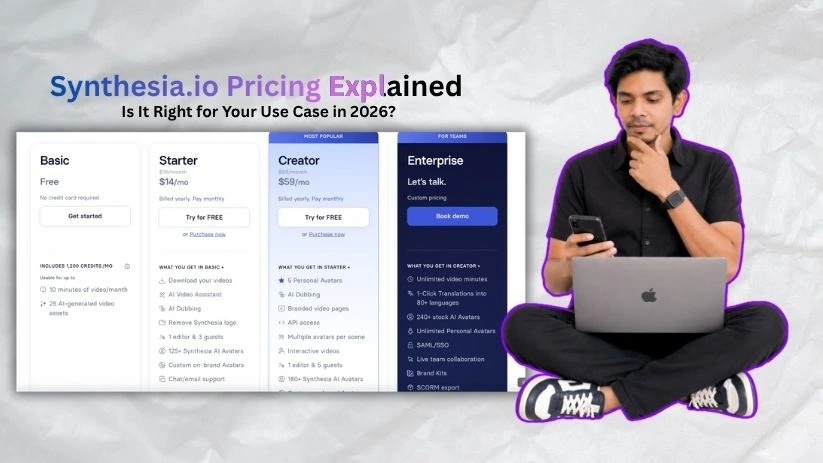
Before diving into the details, here’s a quick look at all four Synthesia.io pricing plans side by side.
| Plan | Monthly Billing | Annual Billing | Credits Included | Best For |
| Basic | $0 | $0 | 1,200/month (10 min/mo) | Testing the platform |
| Starter | $29/mo | $18/mo | 1,200/month or 120 min/year | Solo creators making short videos |
| Creator | $89/mo | $64/mo | 3,600/month or 360 min/year | Frequent creators and small teams |
| Enterprise | Custom | Custom | Unlimited video minutes | Large teams needing scale + security |
If you choose annual billing, you save a good amount on the paid self-serve plans.
That said, Synthesia’s real cost isn’t just the subscription — it’s the credit and video minute usage underneath.
Want to compare another credit-based AI video tool? Read DeeVid AI Pricing Explained.
Let me walk you through each plan so you know exactly what you’re getting.
Synthesia pricing plans breakdown
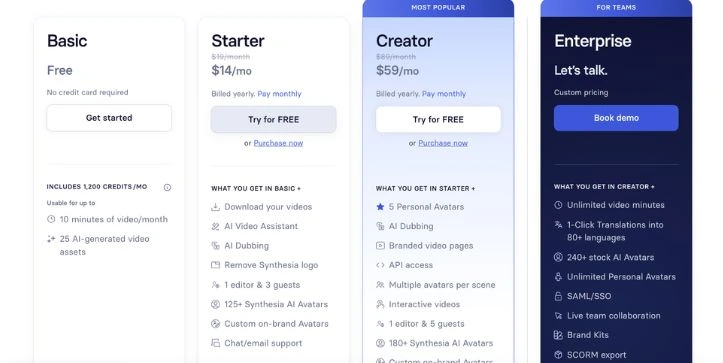
Synthesia’s pricing looks simple on the surface, with four plans ranging from free to custom Enterprise pricing. But what you actually pay depends on how many AI videos you create, how long those videos are, and which features you need.
The big thing to understand is credits. Synthesia uses credits for video generation and other AI features. One minute of generated video uses 120 credits, so your monthly or yearly allowance can disappear faster than expected if you create longer videos, revise scripts often, or use AI dubbing.
Basic plan: $0/month
The Basic plan is made for testing Synthesia, not for serious publishing. You get enough credits to try the AI avatar video creator, play with scripts, and see how the editor feels before paying.
You can create up to 10 minutes of video per month, but the plan is limited compared with the paid tiers. Since downloads and logo removal start on the Starter plan, Basic works best as a trial space rather than a production plan.
What’s included:
- 1,200 credits per month
- Up to 10 minutes of video per month
- 9 AI avatars
- 160+ languages and voices
- 1 editor seat
- No credit card required
- Access to basic AI video creation features
Best for:
Beginners who want to test Synthesia before paying for an AI video generator.
Pros:
- No cost to start.
- Enough credits to create a few short AI avatar videos.
- Good for testing the editor, avatars, voices, and script-to-video workflow.
- No credit card required, which makes it easy to try.
Cons:
- Not ideal for professional videos because download and logo removal are paid-plan features.
- 10 minutes per month can run out quickly if you test multiple versions.
- Only 9 AI avatars, so your presenter options are limited.
- Not a good fit for client work, training libraries, or regular content creation.
Starter plan: Starting at $18/month, billed yearly
Starter is the first paid Synthesia plan and the better choice if you want to create polished AI videos without the free-plan limitations. It costs $29/month on monthly billing or $18/month when billed yearly.
The plan gives you 1,200 credits per month on monthly billing, or 14,500 credits per year on annual billing. In plain English, that means around 10 minutes of video per month or 120 minutes of video per year.
What’s included:
- Everything in the Basic plan
- 1,200 monthly credits or 14,500 yearly credits
- Up to 10 minutes of video per month or 120 minutes per year
- Download your videos
- Remove the Synthesia logo
- AI Video Assistant
- AI Dubbing
- 1 editor and 3 guests
- 125+ Synthesia AI avatars
- Custom on-brand avatars
- Chat and email support
Best for:
Solo creators, freelancers, marketers, educators, and small business owners making short AI videos occasionally.
Pros:
- Affordable entry point for professional AI video creation.
- Video downloads and logo removal make it much more useful than the free plan.
- 125+ avatars give you more presenter variety.
- AI Video Assistant helps you move from script to video faster.
- Guest access is helpful when you need feedback from a client or teammate.
Cons:
- 10 minutes per month is still tight if you publish often.
- Long videos, script edits, and AI dubbing can eat through credits quickly.
- Only 1 editor seat, so it is not built for a busy team.
- If you create weekly training videos or YouTube explainers, you may outgrow it fast.
Still comparing avatar, editing, and pricing options? Read I Tested 5 InVideo Alternatives.
Creator plan: Starting at $64/month, billed yearly
Creator is the plan that makes more sense for people who create AI videos regularly. It costs $89/month on monthly billing or $64/month when billed yearly.
You get 3,600 credits per month on monthly billing, or 44,000 credits per year on annual billing. That works out to around 30 minutes of video per month or 360 minutes per year.
What’s included:
- Everything in the Starter plan
- 3,600 monthly credits or 44,000 yearly credits
- Up to 30 minutes of video per month or 360 minutes per year
- 5 personal avatars
- AI Dubbing
- Branded video pages
- API access
- Multiple avatars per scene
- Interactive videos
- 1 editor and 5 guests
- 180+ Synthesia AI avatars
- Custom on-brand avatars
- Priority chat and email support
Best for:
Regular content creators, small teams, agencies, course creators, and marketers who need more video output each month.
Pros:
- 30 minutes per month gives you more breathing room for regular video creation.
- Personal avatars are useful if you want videos to feel more branded and personal.
- API access helps if you want to connect Synthesia with other content workflows.
- Branded video pages make shared videos look more professional.
- Multiple avatars per scene are useful for interviews, training conversations, and explainer-style content.
Cons:
- The price jump from Starter is noticeable.
- Still only includes 1 editor, so larger teams may feel boxed in.
- Heavy users can still hit the credit limit if they create long videos or use dubbing often.
- Some business features, like SSO and SCORM export, are locked behind Enterprise.
Need a stronger business video tool for training content? Read my Vyond Review 2026.
Enterprise plan: Custom pricing
The Enterprise plan is built for companies that need Synthesia across teams, departments, or large training programs. Pricing is custom, so you’ll need to talk to Synthesia’s sales team.
This plan is less about getting a few more credits and more about scale, security, collaboration, and control. It is the plan to look at if your team needs AI training videos, onboarding content, compliance videos, multilingual localization, or LMS-ready exports.
What’s included:
- Everything in the Creator plan
- Unlimited video minutes
- Custom credits
- 1-click translations into 80+ languages
- 240+ stock AI avatars
- Unlimited personal avatars
- SAML/SSO
- Live team collaboration
- Brand Kits
- SCORM export
- AI Dubbing
- Tailored onboarding
- Implementation services
- Dedicated customer success manager
- Enterprise community
- Academy and certifications
- Custom number of editors and guests
Best for:
Large teams, L&D departments, HR teams, sales enablement teams, compliance teams, and companies that need secure AI video creation at scale.
Pros:
- Unlimited video minutes remove the biggest limit from self-serve plans.
- SAML/SSO helps companies manage secure access.
- SCORM export is useful for learning management systems.
- Brand Kits help teams keep videos consistent across departments.
- Dedicated onboarding and support reduce rollout headaches.
Cons:
- No public price, so you need a sales conversation.
- It may be too much if you only need a few AI avatar videos per month.
- Procurement, approvals, and setup can take longer than signing up for Starter or Creator.
- The value depends heavily on how many teams will actually use it.
Monthly vs Annual Billing: Which Is Cheaper?
Synthesia is cheaper if you choose annual billing, but you’ll need to commit for the full year. Monthly billing costs more, but it gives you more flexibility if you’re still testing the platform.
| Plan | Monthly Billing | Annual Monthly Equivalent | Best Billing Choice |
| Basic | $0/mo | $0/mo | Use it to test Synthesia |
| Starter | $29/mo | $18/mo | Choose annual if 10 minutes/month is enough |
| Creator | $89/mo | $64/mo | Choose annual if you create videos regularly |
| Enterprise | Custom | Custom | Best for larger teams with stable video needs |
Choose monthly if you’re still testing whether Synthesia fits your workflow.
Choose annual if you already know your monthly video volume and want the lower monthly rate.
Avoid annual billing until you’re sure your team can stay within the credit limit.
Real Cost Per Minute: What Synthesia Actually Costs
Synthesia’s sticker price is only part of the story. The better way to judge value is to look at the cost per video minute.
Simple formulas:
Monthly cost ÷ included video minutes = cost per video minute
Annual cost ÷ yearly video allowance = cost per video minute
For example:
- Starter monthly: $29 ÷ 10 minutes = about $2.90 per minute
- Starter annual: $216 ÷ 120 minutes = about $1.80 per minute
- Creator monthly: $89 ÷ 30 minutes = about $2.97 per minute
- Creator annual: $768 ÷ 360 minutes = about $2.13 per minute
This matters because the plans look affordable at first, but teams creating 40–100+ minutes of AI avatar videos per month may outgrow the self-serve plans quickly.
Comparing video pricing before upgrading?Check Vidu AI Pricing Explained.
Hidden Costs and Limitations to Watch
Video minute and credit caps
Each plan comes with a fixed video or credit allowance. If you run out before the month or year resets, your usage is capped unless you upgrade.
Unused credits do not roll over
Unused credits expire at the end of the billing period. So if you only use half your allowance this month, you don’t get to carry the rest into next month.
Studio avatar add-ons
Some higher-end avatar options cost extra. Studio Express-1 Avatars are paid add-ons and can also take time to process, so factor that in if you need a custom presenter.
AI dubbing and lip sync credit usage
AI dubbing can use credits quickly. Dubbing without lip sync uses fewer credits, while dubbing with lip sync uses more. This can matter a lot if you localize videos into several languages.
API usage
API access does not mean unlimited video generation. If you automate video creation through the API, that usage still consumes credits.
Team collaboration and seats
Starter and Creator include one editor with guest access. That works for light collaboration, but larger teams may need Enterprise for more editors, stronger permissions, and live collaboration.
Enterprise paywall
Features like SAML/SSO, SCORM export, Brand Kits, larger team controls, and deeper governance are mainly Enterprise features. If your company needs those, Starter or Creator may not be enough.
Scriptwriting and production time
Synthesia can generate the video, but it doesn’t remove all the work. You still need to write the script, structure the message, review the output, get approvals, and sometimes polish the final video.
Need a more complete AI video workflow?
Read LTX Studio Review 2026.
Synthesia Alternatives to Compare Before Buying
Synthesia is a strong AI avatar video creator, but it is not the best fit for every video workflow. Before choosing a plan, it helps to compare it with a few different types of tools.
AI avatar video tools
These are the closest Synthesia alternatives. They are worth comparing if your main goal is to create talking-head videos, training videos, explainers, or faceless YouTube content.
They may be a better fit if you want different avatar styles, more flexible pricing, stronger personal avatar options, or more creative editing controls.
Still comparing AI avatar video tools?Check
5 Best Vidnoz AI Alternatives.
Product demo video tools
Product demo tools are better if you need to record software walkthroughs, app tutorials, onboarding flows, or interactive product guides.
Synthesia can explain a product, but it does not replace a proper screen recording or product demo tool when the viewer needs to see exactly where to click.
AI dubbing and localization tools
If your main goal is translating existing videos into other languages, a dedicated AI dubbing or localization tool may be more cost-effective.
Synthesia is useful when you want to create and translate AI avatar videos in one place. But if you already have finished videos, a dubbing-focused tool may give you more control over voice, timing, and localization.
Document-to-video tools
These tools are better when you want to turn blog posts, PDFs, training docs, or knowledge base articles into quick videos.
Synthesia can help with script-based videos, but document-to-video platforms may save more time if your content already exists in written form and you want a faster repurposing workflow.
Short-form social video generators
If you mainly create TikToks, Instagram Reels, YouTube Shorts, or quick social ads, a short-form video generator may be a better fit.
Synthesia works well for polished presenter-style content, but it can feel too formal for fast, trend-based social videos that need captions, hooks, cuts, stock footage, and quick variations.
Creating short-form AI videos instead?
Compare options in 5 Top Vidu AI Alternatives.
Traditional video production or editing tools
Traditional video editors are still better when you need full creative control, cinematic visuals, complex edits, real footage, motion graphics, or brand-heavy campaigns.
Synthesia saves time on presenter videos, but it will not replace a full editing setup for advanced creative work.
Need more cinematic AI video control?
Read Top 5 Runway Alternatives.
Final Verdict: Which Synthesia Plan Is Best?
The best Synthesia plan depends on how often you create videos and how serious your workflow is.
Basic is best for testing. Use it if you want to try the platform, explore the editor, and see whether AI avatar videos fit your content style.
Starter is best for light professional use. It makes sense if you create a few short videos each month and need downloads, logo removal, more avatars, and a cleaner final result.
Creator is best for regular creators and small teams. Choose it if you need more video minutes, personal avatars, branded video pages, API access, and better support for ongoing content creation.
Enterprise is best for large organizations. It is the right fit if you need scale, security, LMS features, SCORM export, SSO, localization, stronger governance, and dedicated onboarding.
Before choosing a plan, estimate your monthly video minutes, number of editors, need for custom avatars, translation requirements, and whether you need Enterprise-only features such as SCORM, SSO, and dedicated onboarding.
FAQs
How much does Synthesia.io cost?
Synthesia has a free Basic plan, plus paid Starter, Creator, and Enterprise plans.
Starter costs $29/month or $18/month when billed yearly. Creator costs $89/month or $64/month when billed yearly. Enterprise pricing is custom.
Does Synthesia have a free plan?
Yes, Synthesia has a free Basic plan.
It gives you enough room to test the platform, try AI avatars, and create short videos before paying. It’s best for testing, not serious publishing.
How many video minutes do you get with Synthesia?
The Basic and Starter plans include up to 10 minutes of video per month. Creator gives you up to 30 minutes per month.
Enterprise includes unlimited video minutes, but pricing is custom.
How do Synthesia credits work?
Synthesia uses credits to track video generation and other AI features.
A simple way to understand it:
- 1 second of video = 2 credits
- 1 minute of video = 120 credits
- Longer videos use more credits
Do Synthesia credits roll over?
No, unused Synthesia credits do not roll over.
If you don’t use your credits before the billing period resets, they expire. So it’s better to choose a plan based on your real video needs, not the biggest allowance.
What is the cheapest paid Synthesia plan?
The cheapest paid plan is Starter.
It starts at $18/month when billed yearly, or $29/month if you pay monthly. It’s the best option if you only create a few short AI avatar videos each month.
Is Synthesia Starter enough?
Starter is enough if you create light professional videos and can stay within the 10-minute monthly limit.
It works well for short explainers, basic training videos, internal updates, and simple marketing videos.
What is the difference between Synthesia Starter and Creator?
Starter is better for occasional video creation. Creator is better if you make videos more often.
The main differences are:
- Creator gives more video minutes
- Creator includes more AI avatars
- Creator includes 5 personal avatars
- Creator includes API access
- Creator gives better support for regular content workflows
How much does Synthesia Enterprise cost?
Synthesia Enterprise does not have public fixed pricing.
You need to contact Synthesia’s sales team for a custom quote. The final price usually depends on your team size, video volume, security needs, onboarding, support, and Enterprise features.
Is Synthesia billed monthly or yearly?
Synthesia offers both monthly and annual billing for Starter and Creator plans.
Monthly billing gives you more flexibility. Annual billing gives you a lower monthly equivalent price, but you commit for the year.
Is Synthesia worth the price?
Synthesia is worth it if you need polished AI avatar videos without hiring actors, recording voiceovers, or filming in a studio.
It’s especially useful for training videos, onboarding, product explainers, internal updates, and multilingual business content.
Who should not use Synthesia?
Synthesia may not be the best fit if you need cinematic editing, fast social media clips, heavy motion graphics, or full creative control.
It’s built more for presenter-style AI videos than TikTok-style edits or advanced video production.
Does Synthesia charge extra for custom avatars?
Some avatar options can cost extra.
Personal avatars are included in certain paid plans, but higher-end Studio Avatar options may be paid add-ons. If avatars are a big part of your workflow, check this before choosing a plan.
Does AI dubbing use Synthesia credits?
Yes, AI dubbing can use credits.
This matters if you plan to translate videos into several languages. Dubbing with lip sync can use more credits than simple dubbing, so localization-heavy teams should watch usage closely.
Can I use Synthesia videos for business?
Yes, Synthesia is designed for business video creation.
Teams use it for training, onboarding, product education, sales enablement, marketing videos, and internal communication.
Does Synthesia offer a lifetime deal?
No, Synthesia does not currently work like a lifetime deal tool.
Its pricing is subscription-based, with monthly or annual billing for self-serve plans and custom pricing for Enterprise.
What happens if I run out of Synthesia credits?
If you run out of credits, you’ll need to wait until your allowance resets or move to a higher plan.
This is why it’s smart to estimate your monthly video minutes before paying.
Is Synthesia good for YouTube videos?
Synthesia can work for YouTube explainers, tutorials, educational content, and faceless video creation.
But if your channel depends on fast cuts, trending edits, screen recordings, or entertainment-style visuals, you may need a dedicated video editor alongside it.
Is Synthesia better than hiring a video production team?
For simple presenter-style videos, Synthesia is usually faster and cheaper.
But for brand films, customer stories, event videos, or high-end ads, a real production team will still give you more creative control.
What is the best Synthesia plan for beginners?
Basic is best if you only want to test the platform.
Starter is the better beginner plan if you want to create usable professional videos with downloads, logo removal, and more avatar options.
Which Synthesia plan is best overall?
Creator is the best middle-ground plan for regular users.
It gives you more video minutes, more avatars, personal avatars, API access, and better support without jumping straight into custom Enterprise pricing.