AI video creation is one of the fastest ways to make professional training and explainer videos.
And if you’re looking at Vyond to help you create animated videos faster,
I am not surprised!
- Create videos with AI
- Build animated characters
- Use ready-made business templates
- And turn scripts into polished videos quickly!
All big claims, but is Vyond actually worth it?
I tested Vyond, studied real user reviews, and this is my honest Vyond review for 2026.
You will get:
- My personal experience with Vyond.
- A detailed breakdown of its key features.
- Reviews from real current users.
- An overview of its pricing plans.
Let us get started!
TL;DR: My Experience Using Vyond?
Need a quick rundown? No problem: here is a summary of my experience with Vyond:
Did Vyond Actually Work?
Absolutely!
I used it to create a mix of training videos, explainer videos, and short business animations.
Simple videos were ready in a few hours.
The ready-made templates, animated characters, and text-to-speech tools made the process much faster than building a video from scratch.
Longer videos took more time, especially when I needed custom scenes, brand colors, and smoother transitions.
Note: Vyond is not built for advanced hand-drawn animation or cinematic motion graphics. It works best for business videos, training content, onboarding, and internal communication.
Is It Affordable?
Yes and no: Vyond is affordable for teams, but expensive for solo creators.
For example:
With the Starter plan, you get access to Vyond’s core video creation tools.
That is enough to create professional animated videos for training, marketing, and presentations!
However, the best value comes from higher plans, especially if you need brand controls, team features, AI tools, and collaboration.
Moreover, Vyond is easier to justify when you create videos regularly instead of paying a freelancer or agency for every project.
What Is Vyond and Who Is It For?
Vyond is an easy-to-use animated video creation platform.
It helps you create professional videos for training, marketing, onboarding, sales, and internal communication.
It does this by giving you ready-made templates, animated characters, AI tools, voiceovers, and a drag-and-drop video editor.
Here is how it works:
- You choose a video template or start from a blank canvas.
- You add characters, scenes, props, text, and brand elements.
- You write or upload your script.
- You add voiceover using text-to-speech, recorded audio, or AI voices.
- You export the final video and share it with your team or audience.
And Vyond makes most of this simple, even if you have never edited an animated video before!
The best thing about Vyond is its business-focused workflow.
It is ideal for HR teams, L&D teams, marketers, educators, agencies, and companies that need to create videos regularly.
However, it may not be the best fit for traditional animators or creators who want full artistic control.
You can use Vyond to create polished videos faster than hiring a freelancer for every small project.
Now that you know what Vyond does, let me share my personal experience using it for video creation.
What Are the Key Features of Vyond?
Vyond offers several useful features that help you create animated business videos without starting from scratch.
Here is how they work:
- AI video creation
- Ready-made templates
- Animated character builder
- Text-to-speech and voiceover tools
- Brand and team collaboration features
1. AI Video Creation
This is one of the biggest reasons why Vyond feels faster than many traditional animation tools.
Its AI tools help you turn ideas, prompts, and scripts into video content much quicker.
Here are some of the things Vyond can help you do:
- Generate video drafts from text prompts.
- Create scenes based on your script.
- Add AI avatars for presenter-style videos.
- Turn written content into visual storytelling.
- Speed up the planning and editing process.
In short,
Vyond helps you move from “I need a video” to “I have a working draft” much faster!
You still need to review the output, adjust the scenes, fix the pacing, and make it match your brand.
But compared to building every scene manually, it saves a lot of time.
I used Vyond’s AI features to create a short training-style video, and the first draft was ready quickly.
The Result:
It gave me a solid starting point, but I still had to polish the script, adjust characters, and clean up the final flow.
If you want complete creative control, you may prefer manual editing.
But if you want speed, Vyond’s AI tools are genuinely helpful.
More on the editor in the next section.
2. Ready-Made Templates
This is the part that makes Vyond so beginner-friendly.
You do not need to design every scene from zero.
Vyond gives you templates for:
- Employee training videos
- Onboarding videos
- Explainer videos
- Product demos
- Compliance videos
- Sales enablement videos
- Internal announcements
- Educational content
I liked this because the templates are clearly built for business use cases.
They are not random animated designs that look fun but have no real purpose.
You can pick a template, change the text, replace characters, adjust colors, add your voiceover, and publish the video.
That makes Vyond useful for teams that need videos often but do not have a full-time video editor.
If you are a complete beginner, templates will help you get started faster.
3. Animated Character Builder
Vyond’s character builder is one of its strongest features.
You can create animated characters for different roles, industries, and scenarios.
For example, you can build:
- A trainer explaining a process
- A manager welcoming new employees
- A customer talking to a support agent
- A salesperson presenting a product
- A doctor, teacher, office worker, or retail employee
You can customize the character’s appearance, clothing, expressions, and actions.
This makes your videos feel more human and easier to understand.
The best part?
You can create workplace-style scenes without hiring actors, booking a studio, or recording live footage.
However, the animation style still feels template-based.
So, if you want Pixar-level animation or hand-drawn character movement, Vyond is not that kind of tool.
But for training, onboarding, and explainer videos, the character builder works really well.
4. Text-to-Speech and Voiceover Tools
Vyond also includes voiceover features that make video creation much easier.
You can add audio in different ways:
- Use text-to-speech voices
- Record your own voice
- Upload an audio file
- Sync voiceover with scenes
- Add captions and subtitles
This is useful when you need to create training videos in less time.
Instead of hiring a voice artist for every small update, you can type your script and generate a voiceover inside Vyond.
I found this helpful for quick internal videos, especially when the goal was clarity instead of studio-level narration.
You can also edit the script later and update the voiceover without rebuilding the whole video.
That is a big plus for companies that update training content often.
5. Brand and Team Collaboration Features
Vyond is not just made for one-off video projects.
It is also built for teams that need a repeatable video creation workflow.
You can use it to:
- Add brand colors
- Use approved logos
- Keep videos visually consistent
- Share projects with team members
- Review and edit videos together
- Create content for different departments
This matters a lot for companies.
For example, your HR team may create onboarding videos, your L&D team may create training modules, and your marketing team may create explainer videos.
Without brand controls, every video can start looking different.
Vyond helps keep everything more consistent.
The best part?
Once your team gets used to the workflow, you can create videos much faster than outsourcing every small project.
It is a strong option if you want to scale business video creation without depending on agencies all the time.
What Are the Pricing Plans of Vyond?
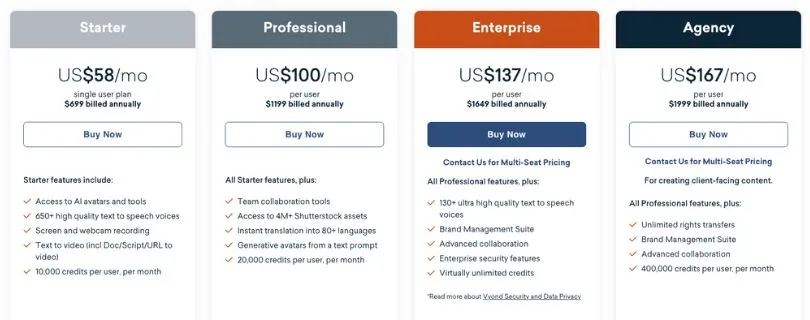
Vyond is not the cheapest animated video maker, but its pricing makes more sense if you create videos regularly.
It has 4 main paid plans.
Vyond Pricing Plan Page
Vyond Pricing Plan
Let me break them down.
1. Starter – $58/Month
- Billed annually at $699
- Single-user plan
- Access to AI avatars and AI tools
- 650+ text-to-speech voices
- Screen and webcam recording
- Text-to-video tools
- 10,000 credits per user/month
2. Professional – $100/Month
- Billed annually at $1,199
- Per-user pricing
- Everything in Starter
- Team collaboration tools
- 4M+ Shutterstock assets
- Translation into 80+ languages
- Generative avatars from text prompts
- 20,000 credits per user/month
3. Enterprise – $137/Month
- Billed annually at $1,649
- Per-user pricing
- Everything in Professional
- Brand Management Suite
- Advanced collaboration
- Enterprise security features
- 130+ ultra high-quality text-to-speech voices
- Virtually unlimited credits
4. Agency – $167/Month
- Billed annually at $1,999
- Per-user pricing
- Built for client-facing content
- Everything in Professional
- Unlimited rights transfers
- Brand Management Suite
- Advanced collaboration
- 400,000 credits per user/month
Vyond also offers monthly pricing for Starter and Professional, but Enterprise and Agency are available only with annual billing. The current prices above are from Vyond’s official pricing page.
What Are the Pricing Plans of Vyond?
Vyond is not the cheapest animated video maker, but its pricing makes more sense if you create videos regularly.
It has 4 main paid plans.
Vyond Pricing Plan Page
Vyond Pricing Plan
Let me break them down.
1. Starter – $58/Month
- Billed annually at $699
- Single-user plan
- Access to AI avatars and AI tools
- 650+ text-to-speech voices
- Screen and webcam recording
- Text-to-video tools
- 10,000 credits per user/month
2. Professional – $100/Month
- Billed annually at $1,199
- Per-user pricing
- Everything in Starter
- Team collaboration tools
- 4M+ Shutterstock assets
- Translation into 80+ languages
- Generative avatars from text prompts
- 20,000 credits per user/month
3. Enterprise – $137/Month
- Billed annually at $1,649
- Per-user pricing
- Everything in Professional
- Brand Management Suite
- Advanced collaboration
- Enterprise security features
- 130+ ultra high-quality text-to-speech voices
- Virtually unlimited credits
4. Agency – $167/Month
- Billed annually at $1,999
- Per-user pricing
- Built for client-facing content
- Everything in Professional
- Unlimited rights transfers
- Brand Management Suite
- Advanced collaboration
- 400,000 credits per user/month
Vyond also offers monthly pricing for Starter and Professional, but Enterprise and Agency are available only with annual billing. The current prices above are from Vyond’s official pricing page.
What Are Users Saying About Vyond?
Vyond has mostly positive user reviews across G2, Capterra, and Software Advice.
Users generally like how easy it is to create training videos, explainer videos, and eLearning content without needing advanced animation skills.
Here is what users are saying about Vyond on G2:
User Review of Vyond on G2
G2 Review of Vyond
Source:https://www.g2.com/products/vyond/reviews
Many G2 users praise Vyond for its simple interface, quick video creation, AI text-to-video feature, and useful eLearning workflow. Some users also mention that longer projects can lag and customization can feel limited.
And here is how Reddit users talk about Vyond:
Reddit Discussion About Vyond Studio
Vyond Studio Feedback – Reddit
Source:https://www.reddit.com/r/animationcareer/comments/1acioun/thoughts_on_vyond_studio/
The Reddit discussion is more mixed. Some users see Vyond as useful for quick business-style videos, while others say it is not the same as traditional animation.
I also checked Trustpilot, where the feedback is much more negative.
Vyond Customer Reviews on Trustpilot
Source:https://www.trustpilot.com/review/vyond.com
Most complaints there are around trial issues, support experience, and AI output not meeting expectations.
Pros and Cons of Using Vyond
Pros
- Very easy to use, even if you have no animation experience.
- Great for creating training, onboarding, and explainer videos.
- Comes with ready-made templates for business use cases.
- Lets you build animated characters without hiring actors.
- Offers AI tools to speed up video creation.
- Includes text-to-speech voices for quick voiceovers.
- Helps teams keep videos consistent with brand controls.
- Good option for companies that create videos regularly.
Cons
- Pricing can feel expensive for solo creators.
- The animation style can look template-based.
- Not ideal for advanced or hand-drawn animation.
- Customization is limited compared to professional animation tools.
Final Verdict: Is Vyond Truly Worth It?
Yes, Vyond is worth it if you create training videos, explainer videos, or internal business content regularly.
It saves time, reduces production costs, and helps non-designers create polished animated videos.
However, it is not the best choice for solo creators on a tight budget or animators who need full creative control.
My verdict: choose Vyond if speed, consistency, and business-friendly video creation matter more than advanced animation freedom.
Vyond Review: FAQs
1. Is Vyond Good for Beginners?
Yes, Vyond is beginner-friendly.
You can use templates, drag-and-drop editing, characters, and text-to-speech to create videos without animation experience.
2. Is Vyond Good for Training Videos?
Yes, this is one of Vyond’s strongest use cases.
It works well for employee onboarding, compliance training, product training, and internal learning content.
3. Can Vyond Create AI Videos?
Yes, Vyond offers AI tools for faster video creation.
You can use AI features to generate video drafts, create avatars, and speed up script-to-video workflows.
4. Is Vyond Free?
No, Vyond does not offer a forever-free plan.
You can test the platform with a free trial before choosing a paid plan.
5. How Much Does Vyond Cost?
Vyond starts at $58/month when billed annually.
Higher plans cost more and include features like team collaboration, brand controls, translation, and advanced AI tools.
6. Is Vyond Better Than Animaker?
Vyond is better for business training, HR, and enterprise video workflows.
Animaker may be better if you want a cheaper tool for simple animated videos.
7. Can I Use Vyond for YouTube Videos?
Yes, you can use Vyond for YouTube videos.
But it works best for explainer-style, educational, or business videos, not highly cinematic animation.
8. What Are the Best Vyond Alternatives?
Some popular Vyond alternatives are Animaker, Powtoon, Synthesia, Canva, Filmora, and Adobe Character Animator.
The best option depends on whether you need animation, AI avatars, video editing, or business templates.