If you’re checking SellerPic pricing right now, the plans may look easy to understand at first.
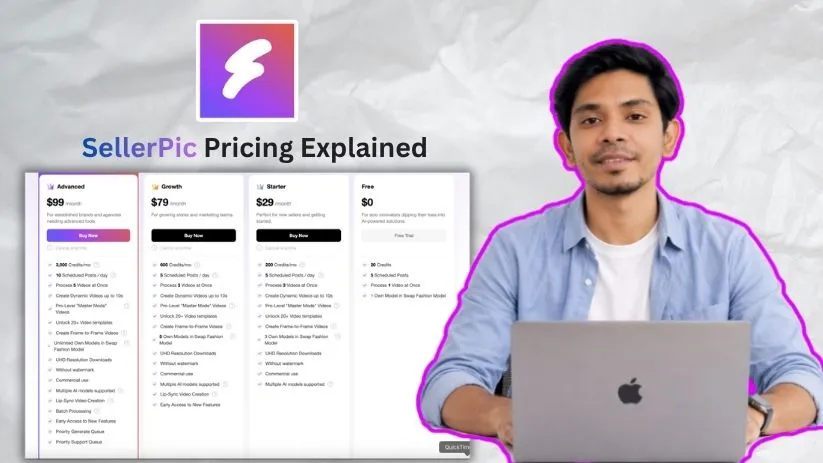
A free plan. Paid plans starting around $29/month. Higher tiers for more credits, videos, and advanced AI tools.
But SellerPic pricing is not just about the monthly subscription.
It runs on a credit-based system, so your real cost depends on how many product images, model swaps, videos, and edits you generate.
I broke down SellerPic’s plans, credits, and feature limits so you can see what you’re actually paying for before choosing a plan.
SellerPic pricing at a glance
SellerPic has one free plan and three main paid plans. On the surface, the pricing looks simple, but the credit limits are where you need to pay attention.
Each plan gives you a monthly credit allowance. Those credits are then used for AI product photos, model swaps, background edits, virtual try-ons, and videos.
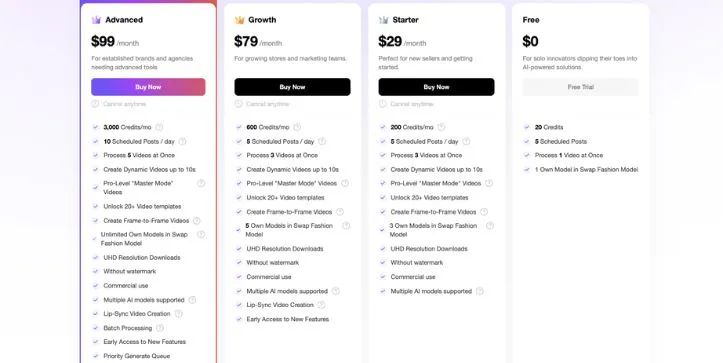
| Plan | Monthly price | Annual / discounted price | Credits | Best for | Key limits |
| Free | $0 | $0 | 20 credits | Testing SellerPic before paying | Basic usage and limited video generation |
| Starter | $29/month | Annual discount varies by source | 200 or 500 credits, depending on source | Solo sellers and small stores | No LipSync and lower model limits |
| Growth | $79/month | Annual discount varies by source | 600 or 1,200 credits, depending on source | Growing Shopify and ecommerce brands | More credits, LipSync access, and better video features |
| Advanced | $99/month | Annual discount available | 3,000 credits | High-volume stores and larger catalogs | Higher upfront cost, but better value per credit |
The main thing to understand is that SellerPic pricing is not just about the plan price. A cheaper plan can become limiting fast if you create a lot of videos or run multiple product image campaigns every month.
Note: Pricing and credit allocations can change. Last checked: May 26, 2026.
SellerPic Pricing Plans — Full Breakdown
1. Free Plan
SellerPic’s free plan gives you a small credit allowance to test the tool before paying. It is useful if you want to see how the AI handles your product photos, model shots, backgrounds, and basic video generation.
✅ What you get:
- 20 credits
- 5 schedules
- 1 concurrent video generation
- Normal Generation Mode
- Access to basic AI product image tools
❌ Where it falls short:
The free plan is only enough for testing.
Since many image tools use 1 credit per image, 20 credits can disappear quickly. And if you use image-to-video, the limit feels even smaller. A standard 5-second video uses 10 credits, so two short videos can use your full free allowance.
Free users also do not get access to pay-as-you-go credit packages, so once the free credits are gone, you’ll need to upgrade.
My take: The Free plan is good for trying SellerPic, not for running real product campaigns.
Quick math on Free:
20 credits = around 20 basic image generations, or just 2 standard 5-second videos.
2. Starter Plan — $29/month
The Starter plan is SellerPic’s first paid plan. It is built for small sellers who mostly need AI product images, model swaps, background edits, and light video creation.
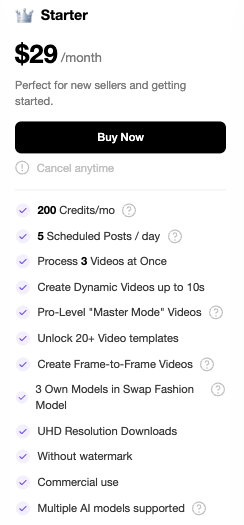
According to the Shopify listing, Starter costs $29/month and includes 200 credits/month. It also shows a discounted annual option at $174/year, though renewal and plan-change pricing may differ.
✅ What you get:
- 200 credits/month
- 5 scheduled posts/day
- Process 3 videos at once
- Dynamic and Master-Mode videos up to 10 seconds
- 20+ video templates
- Frame-to-frame videos
- 3 own models in Swap Fashion Model
- UHD downloads, no watermark, and commercial use
❌ Where it falls short:
Starter looks affordable, but 200 credits is not a lot if you use video often.
For example, 20 standard 5-second videos would use all 200 credits. If you use Master Mode, the credits go even faster because a 10-second Master video uses 75 credits.
There is also a credit mismatch across SellerPic sources. The Shopify listing says Starter includes 200 credits/month, while SellerPic’s Help Center mentions 500 credits/month for subscription plans. So check the final credit amount inside checkout before paying.
My take: Starter is best if you mainly create product images and only make videos occasionally.
Quick math on Starter:
150 product images + 5 standard 5-second videos = 200 credits.
3. Growth Plan — $79/month
The Growth plan is the middle tier and probably the most practical option for ecommerce brands that want both images and videos.
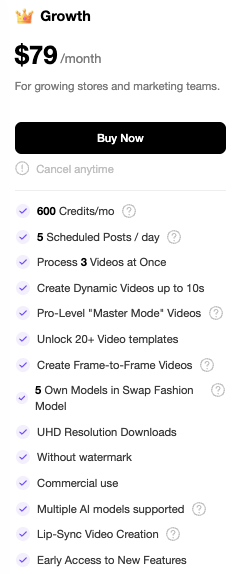
SellerPic lists Growth at $79/month with 600 credits/month. The Shopify listing also shows a discounted annual price at $474/year, with different recovery pricing after the discount period.
✅ What you get:
- 600 credits/month
- 5 scheduled posts/day
- Process 3 frame-to-frame videos at once
- Dynamic and Master-Mode videos up to 10 seconds
- 20+ video templates
- 5 own models in Swap Fashion Model
- UHD downloads, no watermark, and commercial use
- LipSync Video
- Priority access to new features
❌ Where it falls short:
Growth gives you more room, but it still is not unlimited.
If you use LipSync videos, credits drop fast. One LipSync video uses 40 credits, so 10 LipSync videos would use 400 credits. That leaves only 200 credits for images, edits, and other video work.
The same applies to Master videos. A 10-second Master video uses 75 credits, so heavy video creators can burn through 600 credits quickly.
My take: Growth is the best fit for brands that want regular product visuals, short videos, and occasional LipSync content.
Quick math on Growth:
300 product images + 20 standard 10-second videos = 600 credits.
4. Advanced Plan — $99/month
The Advanced plan is made for larger stores, high-volume sellers, and teams that create product visuals often.
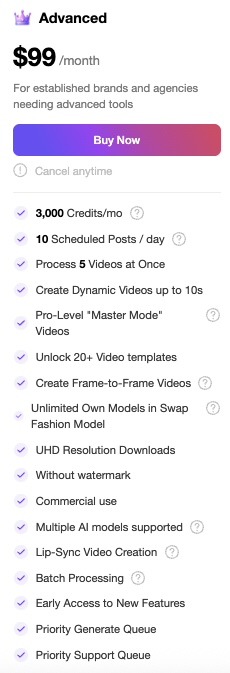
SellerPic lists Advanced at $99/month with 3,000 credits/month. The Shopify listing also shows a discounted annual option, while SellerPic’s subscription terms list separate yearly pricing, so this is another plan where you should confirm the final billing amount before subscribing.
✅ What you get:
- 3,000 credits/month
- 10 scheduled posts/day
- Process 5 videos at once, including LipSync
- Dynamic and Master-Mode videos up to 10 seconds
- 20+ video templates
- Unlimited own models in Swap Fashion
- UHD downloads, no watermark, and commercial use
- Priority support, queue, and new feature access
❌ Where it falls short:
Advanced gives you the best credit volume, but it only makes sense if you actually use it.
If you only need a few product images per month, this plan is probably more than you need. And if your team creates a lot of Master videos, even 3,000 credits can run down faster than expected.
For example, 40 Master 10-second videos would use all 3,000 credits.
My take: Advanced is the strongest value if you manage a large catalog, create frequent video ads, or need SellerPic for ongoing ecommerce content production.
Quick math on Advanced:
1,500 product images + 50 standard 10-second videos = 2,250 credits, leaving 750 credits for extra edits, LipSync, or 4K downloads.
How SellerPic’s credit system works
SellerPic pricing makes more sense once you understand the credit system.
The monthly plan price is only one part of the cost. The other part is how quickly you use credits on product images, model swaps, AI edits, and videos.
What are SellerPic credits?
SellerPic credits are the units you spend when you generate or edit content inside the platform.
So, instead of paying separately for every product photo or video, your plan gives you a monthly credit balance. Each AI action then deducts credits from that balance.
SellerPic says credits are deducted because AI model development and editing come with processing costs. In simple terms, the more images or videos you create, the more credits you use.
This is why two users on the same plan can get very different value.
One seller might use 200 credits to create 200 basic product images. Another seller could spend the same 200 credits on only 20 short videos.
How many credits does each SellerPic feature use?
Here’s the current credit usage listed in SellerPic’s Help Center:
| SellerPic feature | Credit usage |
| Swap Fashion Model | 1 credit/image |
| Virtual Try-On Apparel | 1 credit/image |
| Virtual Try-On Accessories | 1 credit/image |
| Product Spotlight | 1 credit/image |
| Lifestyle Scene | 1 credit/image |
| Instruct Edit | 1 credit/image, with higher cost for some Nano Banana Pro outputs |
| Background Remover | 1 credit/image |
| Image to Video Standard 5s | 10 credits/video |
| Image to Video Standard 10s | 15 credits/video |
| Image to Video Master 5s | 50 credits/video |
| Image to Video Master 10s | 75 credits/video |
| LipSync Video | 40 credits/video |
| 4K Download | 2 credits/image |
The good part is that most image-based tools are fairly predictable. If you are using SellerPic mainly for model swaps, virtual try-ons, background removal, or lifestyle scenes, you can estimate your usage pretty easily.
The expensive part is video.
That is where the credit count starts moving fast.
Why video costs more than images
Most standard image features cost 1 credit per image. But video generation uses far more because it requires more AI processing.
For example:
| Usage example | Credits used |
| 10 standard 5-second videos | 100 credits |
| 10 standard 10-second videos | 150 credits |
| 10 LipSync videos | 400 credits |
| 10 Master 10-second videos | 750 credits |
This is the part many users miss when they only look at the monthly plan price.
A plan with 200 credits may sound enough if you only need product images. But if you start creating videos, those credits can run out quickly.
My take: SellerPic credits are easiest to manage if you mostly create images. If video, LipSync, or Master Mode is part of your workflow, choose your plan based on credit usage — not just the monthly price.
Monthly vs annual pricing: what you should check before subscribing
SellerPic gives you both monthly and yearly billing options, but this is one area where you should slow down before choosing a plan.
The monthly prices are easy to understand. Starter is listed at $29/month, Growth at $79/month, and Advanced at $99/month. But once you look at the annual pricing, renewal pricing, and plan-change discounts, the total cost can feel less straightforward.
Why annual pricing can look confusing
SellerPic’s Shopify listing shows discounted yearly prices for its paid plans.
Starter is listed at $174/year, Growth at $474/year, and Advanced at $594/year. That looks like a big saving compared with paying month to month.
But there is one important detail.
The same listing also mentions recovery pricing after the discount period. For example, Starter can recover to $348/year, Growth to $948/year, and Advanced to $1,188/year. It also mentions separate 20% off pricing when changing plans.
That means the price you see today may not always be the price you pay later.
So before you pick the annual option, check whether the price is a first-year discount, a renewal price, or a plan-change offer.
My take: Annual billing can be a good deal if you already know SellerPic fits your workflow. But if you are still testing image quality, credit usage, and video output, monthly billing is safer at first.
Buyer checklist before paying
Before you subscribe, check these details carefully:
- Confirm whether you are choosing monthly or annual billing
- Check the total amount charged today
- Check the renewal price after the discount period
- See whether your credits reset every month
- Read the refund and cancellation rules
- Confirm what happens if you upgrade or downgrade later
- Screenshot the checkout page before payment
This may sound basic, but it matters with credit-based tools.
You are not just buying access to SellerPic. You are buying a certain amount of AI generation capacity. If the credits reset, expire, or do not roll over the way you expected, your real cost per image or video can change quickly.
How much does SellerPic cost per image or video?
SellerPic’s real cost depends on how you spend your credits.
Static image cost examples
Most standard image tools cost 1 credit per image.
So if your plan has 200 credits, that can mean around 200 standard image generations.
If your plan has 3,000 credits, that can mean around 3,000 standard image generations.
But this number drops if you use 4K downloads, upscaling, videos, LipSync, or Master Mode.
Video cost examples
Video uses credits much faster than images.
| Monthly usage | Approx. credits used |
| 50 standard images | 50 credits |
| 20 standard 5s videos | 200 credits |
| 20 standard 10s videos | 300 credits |
| 10 LipSync videos | 400 credits |
| 10 Master 10s videos | 750 credits |
So if you mainly create images, your credits can last longer. If you create videos often, you may need Growth or Advanced.
SellerPic alternatives and comparison notes
SellerPic is not the only AI product photo tool in this space. But since this article is about SellerPic pricing, the main thing to compare is not just the monthly price.
You also need to compare credits, output quality, model options, video tools, and how much control you get over the final image.
SellerPic vs Photta
Photta positions itself as a cheaper SellerPic alternative. Its comparison page focuses heavily on cost-per-credit, model customization, language support, and overall ROI.
That makes sense if your main concern is price.
But the better choice depends on what you actually need. SellerPic may be more useful if you want a Shopify-friendly workflow, AI product visuals, virtual try-on features, and video generation in one place. Photta may be worth comparing if you care more about credit value and model customization.
SellerPic vs general AI photo tools
SellerPic also competes with broader AI photo and ecommerce content tools like Canva, Phot.AI, Soona, and Botika.
Canva is better for quick design work and simple product graphics. Phot.AI is more of a general AI image editing tool. Soona is stronger for managed product photography and creative services. Botika focuses heavily on AI fashion models.
SellerPic sits somewhere in the middle. It is more focused than Canva, more ecommerce-specific than general AI editors, and more self-serve than a managed photoshoot service.
So when comparing SellerPic alternatives, do not just ask, “Which one is cheaper?”
Ask, “Which tool gives me the product images, model shots, videos, and editing control I need for the least credit waste?”
Still comparing tools before paying? Read my full guide to the best SellerPic alternatives to compare Photta, Photoroom, Canva, Stageflow, and Rawshot.ai.
Final verdict: is SellerPic worth the price?
SellerPic is worth the price if it helps you replace expensive photoshoots or create product visuals faster than your current process.
For ecommerce sellers, the value is strongest when you regularly need model images, product lifestyle shots, virtual try-ons, background edits, or short product videos. In that case, paying for SellerPic can be cheaper and faster than hiring photographers, models, editors, and studio space every time you launch a new product.
But SellerPic may feel expensive if you only need a few edits once in a while.
The reason is simple: credits can run out quickly when you use video, LipSync, Master Mode, or 4K downloads. A plan that looks affordable at first can feel limited if most of your work uses high-credit features.
FAQ
How much does SellerPic cost?
SellerPic has a free plan and paid plans that start around $29/month. Higher plans cost more but include more credits, video features, model options, and priority access.
Does SellerPic have a free plan?
Yes. SellerPic has a free plan with a small credit allowance. It is best for testing the platform, not for ongoing ecommerce content creation.
How many credits do you get with SellerPic?
It depends on the plan. Public sources show different credit numbers for some plans, so always check the final credit amount inside SellerPic before subscribing.
In general:
- Free gives a small trial credit amount
- Starter is for light usage
- Growth gives more room for images and videos
- Advanced gives the highest monthly credit volume
What are SellerPic credits?
SellerPic credits are used when you generate or edit images and videos.
For example, credits may be used for:
- AI product photos
- Model swaps
- Virtual try-ons
- Background edits
- Image-to-video generation
- LipSync videos
- 4K downloads
Why do different sources show different SellerPic credits?
Some public pages show different credit allowances for the same plan. This may happen because of pricing updates, Shopify listing changes, annual discounts, or older help center information.
The safest option is to check the live checkout page before paying.
How many credits does one SellerPic image use?
Most standard image features use 1 credit per image. This includes tools like model swap, virtual try-on, product spotlight, lifestyle scene, and background remover.
How many credits does a SellerPic video use?
Video uses more credits than images.
Typical examples:
- Standard 5-second video: 10 credits
- Standard 10-second video: 15 credits
- Master 5-second video: 50 credits
- Master 10-second video: 75 credits
- LipSync video: 40 credits
Why does video use more credits than images?
Video takes more AI processing than a single image. That is why video, LipSync, and Master Mode can use up your monthly credits much faster.
Do SellerPic credits expire?
SellerPic credit rules can vary by plan and credit type. Subscription credits and extra purchased credits may follow different rules, so check the latest credit policy before buying.
Can you buy extra SellerPic credits?
Paid users may be able to buy extra credits when they run out. Free users may need to upgrade first before using extra credit packages.
Is SellerPic billed monthly or annually?
SellerPic offers monthly and annual billing. Annual pricing can be cheaper, but check the renewal price before subscribing because some discounts may only apply for a limited period.
Which SellerPic plan is best for beginners?
The Free plan is best for testing. The Starter plan is better if you want to create product images regularly but do not need heavy video usage.
Which SellerPic plan is best for Shopify sellers?
For most Shopify sellers, Growth is the safer middle option because it gives more credits and better access to video features. Starter can work if you only need basic product images.
Which SellerPic plan is best for videos?
Growth or Advanced is better for video. Starter can run out quickly if you create multiple videos, especially Master Mode or LipSync videos.
Does SellerPic include commercial use?
Paid plans mention commercial use, no watermark, and UHD downloads. Still, check the current plan details before using outputs in ads, product pages, or paid campaigns.
Is SellerPic worth it for small ecommerce stores?
Yes, if you regularly need product photos, model images, or short videos. It may not be worth it if you only need a few edits once in a while.
Are there hidden costs with SellerPic?
Not exactly hidden costs, but the credit system can make the real cost higher than expected. Videos, LipSync, Master Mode, and 4K downloads can use credits quickly.
What happens if I run out of credits?
You may need to wait for your credits to reset, upgrade your plan, or buy extra credits if your account supports it.
Can I cancel SellerPic anytime?
SellerPic plan terms may depend on where you subscribe, such as directly through SellerPic or through Shopify. Check the cancellation rules before choosing monthly or annual billing.
Is SellerPic cheaper than a photoshoot?
In many cases, yes. SellerPic can be cheaper than hiring a photographer, model, studio, and editor. But the value depends on how many usable images or videos you create from your credits.