I’ve been using Leonardo AI for the past month, and the more I use it, the more it feels like I’m budgeting every image. Watching tokens disappear pushed me to unpack the pricing plans so I could see exactly how tokens work, what each plan includes, and which tier actually makes sense.
How Much Does Leonardo AI Cost? (Quick Overview)
Before diving into the details, here’s a quick look at the main Leonardo AI pricing plans side by side.
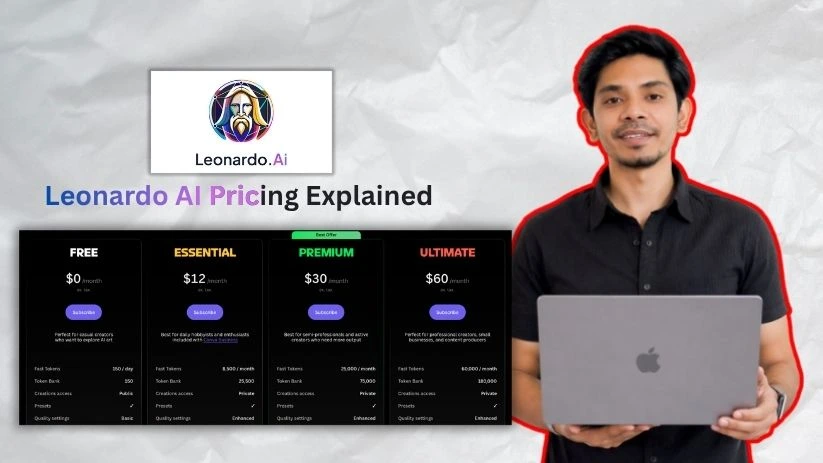
| Plan | Monthly Billing | Annual Billing | Tokens Included | Best For |
| Free | $0 | $0 | 150 fast tokens/day | Testing the platform |
| Essential | $12/mo | $10/mo | 8,500 fast tokens/month | Solo creators and light users |
| Premium | $30/mo | $24/mo | 25,000 fast tokens/month | Designers, marketers, and regular creators |
| Ultimate | $60/mo | $48/mo | 60,000 fast tokens/month | Heavy users, agencies, and video workflows |
If you choose annual billing, you save roughly 20% across the paid plans.
That said, Leonardo AI’s real cost isn’t just the subscription — it’s how quickly you use your tokens on images, upscales, videos, and premium models.
Let me walk you through each plan so you know exactly what you’re getting.
Still comparing tools before paying?
Top Leonardo.ai Alternatives & Competitors
Leonardo AI Pricing Plans — Full Breakdown
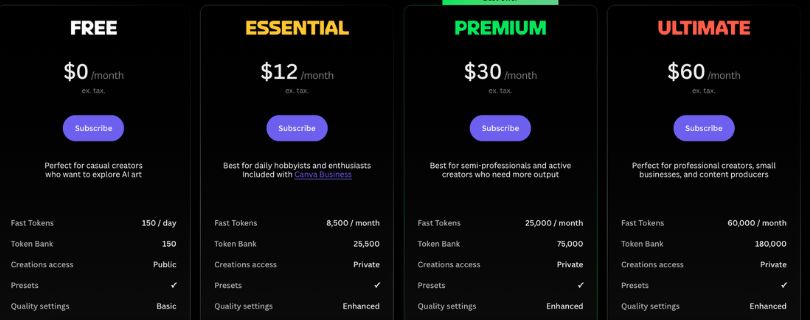
1. Free Plan — $0
Leonardo AI’s Free plan is mainly there to help you test the platform before paying.
You get 150 fast tokens per day, which is enough to explore prompts, test image styles, try a few generations, and understand how the interface works.
For casual testing, it’s useful. For serious content creation, it feels limited pretty quickly.
✅ What you get:
- 150 fast tokens per day
- Access to basic image generation features
- Ability to test Leonardo AI’s models and interface
- Daily token reset
- Commercial-use license for free-tier creations
- Good starting point for beginners who want to experiment before subscribing
❌ Where it falls short:
- The daily token cap feels limited once you start testing multiple prompts or styles.
- Free plan creations are public, so it is not ideal for confidential brand visuals, client work, or private product concepts.
- You do not get the same rollover flexibility, top-up token access, or relaxed generation benefits that paid users get.
- If you use higher-cost features, your daily tokens can run out quickly.
My take:
The Free plan is best for testing Leonardo AI, learning how prompts work, and seeing whether the image quality fits your style.
If you only want to create a few AI images here and there, it may be enough. But if you want private generations, more tokens, or a serious creative workflow, you will probably outgrow it quickly.
2. Essential Plan — $12/month
The Essential plan is the first real paid Leonardo AI plan.
It costs $12/month on monthly billing, or about $10/month if you choose annual billing. You get 8,500 fast tokens per month, which gives you much more room than the Free plan.
This is where Leonardo AI starts to make sense for solo creators and light users.
✅ What you get:
- 8,500 fast tokens per month
- Private generations
- Access to enhanced quality settings
- Token rollover bank up to 25,500 tokens
- Top-up token access
- More room for image generation, background removal, upscaling, and creative testing
- Better fit for personal projects, light marketing visuals, and occasional content creation
❌ Where it falls short:
- Essential is still a light-use plan.
- If you create images every day, 8,500 tokens can disappear faster than expected.
- It does not include relaxed image generation.
- If you experiment with video, third-party models, or frequent upscaling, this plan may feel tight.
- Once your token usage grows, Premium will usually feel more practical.
My take:
The Essential plan is best for solo creators, bloggers, students, small business owners, and casual marketers who want private generations and more monthly tokens without spending too much.
If you create visuals occasionally, this plan is a good starting point. But if Leonardo AI becomes part of your weekly content workflow, Premium will usually feel more comfortable.
3. Premium Plan — $30/month
The Premium plan is the plan most regular creators should look at first.
It costs $30/month on monthly billing, or about $24/month when billed annually. You get 25,000 fast tokens per month, a bigger rollover bank, more personal AI models, and relaxed image generation for selected models.
This is where Leonardo AI starts to feel more practical for serious creative work.
✅ What you get:
- 25,000 fast tokens per month
- Private generations
- Token rollover bank up to 75,000 tokens
- Top-up token access
- Enhanced quality settings
- Up to 20 personal AI models
- Up to 3 simultaneous generations
- Up to 10 generations in the queue
- Unlimited relaxed image generation for selected models
- Better fit for regular social media, ad creatives, thumbnails, and product visuals
❌ Where it falls short:
- Premium is not unlimited for everything.
- Relaxed generation only applies to selected models.
- Relaxed generation usually runs slower than normal fast-token generation.
- Third-party models, video generation, Flow State, upscaling, and heavier creative workflows can still use tokens.
- If you keep buying top-up tokens every month, your real cost can go above the plan price.
My take:
Premium is the sweet spot for most regular Leonardo AI users.
If you create images every week for social media posts, YouTube thumbnails, blog graphics, product concepts, ads, or client visuals, this plan gives you enough room to work without feeling too restricted.
I would start here only if you already know you will use Leonardo AI regularly. If you are still testing the platform, start with Free or Essential first.
4. Ultimate Plan — $60/month
The Ultimate plan is built for heavy creators and higher-volume workflows.
It costs $60/month on monthly billing, or about $48/month when billed annually. You get 60,000 fast tokens per month, a much larger rollover bank, more personal AI models, higher queue limits, and relaxed image and video generation for selected models.
This is the strongest individual plan Leonardo AI offers.
✅ What you get:
- 60,000 fast tokens per month
- Private generations
- Token rollover bank up to 180,000 tokens
- Top-up token access
- Enhanced quality settings
- Up to 50 personal AI models
- Up to 6 simultaneous generations
- Up to 20 generations in the queue
- Unlimited relaxed image generation for selected models
- Unlimited relaxed video generation for selected models
- Better fit for heavy image generation, video workflows, agencies, and serious creators
❌ Where it falls short:
- At $60/month, Ultimate only makes sense if you use Leonardo AI often.
- If you only create a few images per week, this plan is probably more than you need.
- Relaxed generation does not mean every model or feature is unlimited.
- Some advanced models, third-party models, and video workflows can still use tokens.
- Heavy users still need to track token usage carefully.
My take:
Ultimate is best for heavy creators, marketers, agencies, freelancers, and small businesses that create a lot of visuals every month.
If you generate product images, ad creatives, client concepts, campaign visuals, social media batches, and AI videos regularly, Ultimate can make sense.
But if you are a solo creator with moderate usage, Premium is usually the better value.
5. Team Plans — From $72/month
Leonardo AI also offers Team plans for collaborative creative work.
These plans are made for agencies, marketing teams, creative departments, and businesses where multiple people need access to shared tokens, private team generations, and team workflows.
The two main team plans are Team Starter and Team Growth.
✅ What you get:
- Team Starter at $72/month
- Team Growth at $144/month
- Shared token pools
- Private team generations
- Team workspaces
- Higher token bank capacity
- Relaxed image generation for selected models
- Relaxed video generation for selected models
- Ability to train AI models using team tokens
- Better setup for agencies, brands, and collaborative teams
❌ Where it falls short:
- Team pricing can get expensive because it is based on seats.
- Team Starter is shown at $24 per seat.
- Team Growth is shown at $48 per seat.
- The cost increases as more people join the workspace.
- Shared tokens can be used up quickly if multiple team members generate images, videos, upscales, and variations at the same time.
- It may feel unnecessary if only one person is creating images.
My take:
Team plans make sense if multiple people need to create visuals inside the same workspace.
If you are an agency, marketing team, ecommerce brand, or creative department, a team plan is cleaner than managing separate individual accounts.
But if you are a solo creator, freelancer, or beginner, stick with Essential, Premium, or Ultimate instead.
6. Which Leonardo AI Plan Should You Choose?
Here is the simple way I would choose:
- Choose the Free plan if you are just testing Leonardo AI.
- Choose Essential if you are a light user who wants private generations and more tokens.
- Choose Premium if you create visuals every week for content, ads, thumbnails, blogs, or client work.
- Choose Ultimate if you create a lot of images and videos every month.
- Choose Team Starter or Team Growth if multiple people need shared access, private team generations, and collaborative workflows.
How Leonardo AI’s Token System Actually Works
This is the part of Leonardo AI pricing that matters most.
The monthly price gets you into a plan, but tokens decide how much you can actually create. Every time you generate images, upscale visuals, remove backgrounds, test variations, use Flow State, train models, or create videos, your token balance can go down.
So, even if two people are on the same Leonardo AI plan, they may get very different value depending on how they use the tool.
Here’s the basic structure:
| Token Type | How It Works |
| Daily Free Tokens | Included with the Free plan and reset every day |
| Monthly Fast Tokens | Included with paid plans like Essential, Premium, and Ultimate |
| Rollover Tokens | Unused paid-plan tokens that can roll over up to a plan-specific limit |
| Top-Up Tokens | Extra tokens paid users can buy when they run out |
| Relaxed Generation | Slower generation available on selected models for Premium and Ultimate users |
| API Credit | Separate Pay-As-You-Go credit used for Leonardo AI API workflows |
Now, here’s where people get caught off guard.
Leonardo AI is not priced only by the monthly plan. It is priced by how quickly you use tokens.
For example, the Essential plan gives you 8,500 fast tokens per month. That may be enough if you create occasional blog graphics, simple social media visuals, or a few product concepts.
But if you keep regenerating prompts, using higher-quality models, trying different styles, upscaling outputs, testing video, or using Flow State, those tokens can disappear much faster.
That is why the real cost of Leonardo AI depends on a few things:
- How many images you generate
- How many variations you test
- Whether you use image or video generation
- Which models and settings you choose
- How often you upscale or edit images
- Whether you use Flow State or third-party models
- Whether you need top-up tokens during the month
The good thing is that paid plans include rollover tokens.
Essential, Premium, and Ultimate users can roll over unused tokens into a rollover bank, but there is a limit. It is not unlimited token storage.
Here’s the current rollover structure:
| Plan | Monthly Tokens | Max Rollover Bank |
| Essential | 8,500 | 25,500 |
| Premium | 25,000 | 75,000 |
| Ultimate | 60,000 | 180,000 |
That means you can save unused tokens for later, but only up to the maximum rollover limit for your plan.
Top-up tokens are different.
If you are on a paid plan and run out of tokens, you can buy extra top-up tokens. This is useful during busy months, especially if you are working on client visuals, ad creatives, product images, or campaign concepts.
But there is one catch.
Top-up tokens are useful only while you have an active paid subscription. So don’t treat them like permanent free-account credits.
The biggest catch with Leonardo AI pricing?
Tokens can disappear faster than expected when you are experimenting.
AI image generation usually takes a few tries. You may test one prompt, change the style, adjust the image size, try another model, upscale the best version, remove the background, and then generate more variations.
That testing process is where your real cost shows up.
My take: Don’t choose a Leonardo AI plan based only on the monthly price. Choose it based on how often you create, how many variations you test, whether you use video or advanced models, and whether you need casual images or client-ready visuals.
Leonardo AI API Pricing Explained
Leonardo AI’s API pricing works differently from the normal app plans.
Your Free, Essential, Premium, or Ultimate subscription is mainly for using Leonardo inside the web app. The API is for developers who want to connect Leonardo’s image and video generation tools to their own app, website, SaaS product, automation system, or internal workflow.
So if you’re building something like an AI product photo generator, a design automation tool, a social media creative platform, or a custom image generation feature inside your own software, this is where the API comes in.
How Leonardo AI API pricing works
Leonardo’s API uses a Pay-As-You-Go model. That means there’s no fixed monthly API subscription you have to keep paying just to access it.
Instead, you add API credit to your account, and Leonardo deducts from that balance whenever you make API requests.
What you get:
- Pay-As-You-Go API credit
- $5 starting API credit for new API users
- No monthly API commitment for self-serve users
- Access to Leonardo’s latest image and video models
- Usage-based billing depending on the model and features you use
- Manual top-ups when you want to add more balance
- Auto top-ups so your app doesn’t stop running when credit gets low
- Up to 10 concurrent generations on the self-serve API option
- Custom API plans for higher-volume users
Where it gets tricky:
The API is not the same as your regular Leonardo AI subscription.
This is the part that can confuse people. Your monthly Leonardo app tokens and your API credit should not be treated as one shared balance unless Leonardo clearly shows that inside your account.
So, for example, having 25,000 tokens on the Premium plan does not automatically mean you have 25,000 API credits to spend through the API. The API has its own billing setup, its own credit balance, and its own usage tracking.
API costs also depend on what you generate. A basic image request may cost less than a more advanced request using higher resolution, extra outputs, training, video generation, or heavier models.
Best for
Leonardo AI API pricing makes the most sense if you’re not just creating images manually inside the app.
It’s best for:
- Developers
- SaaS tools
- AI image generation apps
- Automated product image workflows
- Social media creative platforms
- Internal marketing automation systems
- Businesses using Leonardo inside a production pipeline
- Teams that need programmatic image or video generation
My take:
The API is useful if Leonardo AI is becoming part of your product, not just your personal creative tool. If you’re a creator making YouTube thumbnails, ad images, or Instagram visuals by hand, stick with the normal app plans. But if you’re building automated creative features for users or clients, the API gives you much more control.
Just keep an eye on API usage. Small tests are cheap to manage, but production traffic can add up quickly once real users start generating images and videos.
Leonardo AI Monthly vs Annual Pricing
Leonardo AI gives you two main ways to pay for the individual plans: monthly billing or annual billing.
Monthly billing is more flexible. Annual billing lowers the effective monthly price, but you’re paying for the year upfront.
Here’s how the current Leonardo AI pricing looks.
| Plan | Monthly Billing | Annual Billing Equivalent | Best For |
| Essential | $12/month | $10/month | Solo creators and light users |
| Premium | $30/month | $24/month | Designers, marketers, and regular creators |
| Ultimate | $60/month | $48/month | Heavy users, agencies, and video workflows |
| Team Starter | $72/month shown, $24/seat | Not clearly separated publicly | Small teams needing shared tokens |
| Team Growth | $144/month shown, $48/seat | Not clearly separated publicly | Larger teams with heavier output needs |
Annual billing can save up to 20% on the paid individual plans.
The Essential plan drops from $12/month to about $10/month when billed yearly. Premium drops from $30/month to $24/month, and Ultimate drops from $60/month to $48/month.
That sounds nice, but I wouldn’t jump straight into annual billing on day one.
Leonardo AI is token-based, so the real question is not just “Which plan is cheaper?” It’s “How quickly will I use the tokens?”
If you’re still testing prompts, comparing Leonardo with Midjourney or Adobe Firefly, or figuring out how often you’ll create images and videos, monthly billing is safer. You can try the tool, track your actual token usage, and upgrade or downgrade without feeling locked in.
Also comparing flexible AI creative platforms before choosing Leonardo?
Krea AI Pricing Explained
Annual billing makes more sense once you know your workflow.
For example, if you’re regularly creating social media posts, product mockups, YouTube thumbnails, ad creatives, AI product photos, or client visuals every week, the annual discount can be worth it. You already know you’ll use the tool enough to justify the upfront payment.
My take:
Start monthly if you’re new to Leonardo AI. Use it for a few weeks and watch how fast your tokens disappear. If you keep hitting your limits and you know Leonardo is part of your regular content workflow, then annual billing becomes the smarter move.
Hidden Costs in Leonardo AI Pricing You Should Know
The sticker price is only the beginning. Leonardo AI looks simple on the surface, but the real cost depends on how quickly you burn through tokens.
Tokens Can Disappear Faster Than Expected
Leonardo AI uses tokens for most generation tasks. That includes images, videos, upscaling, background removal, model features, and other creative tools.
Here’s where token usage can climb:
| Action | Why It Can Cost More |
| Image generation | Cost changes by model, settings, size, and number of outputs |
| Video generation | Usually uses more tokens than basic image generation |
| Upscaling | Extra processing can deduct more tokens |
| Image guidance | Reference images and advanced controls may increase usage |
| Flow State | Tokens are charged when new images appear on screen |
| Third-party models | Often require tokens, even on paid plans |
That means two users on the same Premium plan can get very different value.
A casual creator making simple AI images may stretch 25,000 tokens for a while. But a marketer testing product visuals, ad creatives, YouTube thumbnails, and video clips can burn through the same amount much faster.
Top-Up Tokens Cost Extra
If you run out of tokens on a paid plan, you don’t have to upgrade right away. Leonardo AI lets paid users buy top-up tokens.
That sounds convenient, and it is. But it also means your real monthly cost can go above the plan price.
| Plan | Top-Up Tokens Available? |
| Free | No |
| Essential | Yes |
| Premium | Yes |
| Ultimate | Yes |
Top-up tokens do not expire, which is helpful. The catch is that you need an active paid subscription to use them.
So if you cancel your plan, don’t assume your unused top-up balance will still be useful from a free account.
Rollover Has Limits
Leonardo AI’s rollover bank is a nice feature, but it’s not unlimited storage for unused tokens.
Here’s the current rollover capacity:
| Plan | Monthly Tokens | Max Rollover Bank |
| Essential | 8,500 | 25,500 |
| Premium | 25,000 | 75,000 |
| Ultimate | 60,000 | 180,000 |
That means you can bank up to about 3 months of tokens, depending on your plan.
The catch? Rollover tokens only work while your paid plan stays active. If you cancel your subscription, unused rollover tokens can be lost.
So if you’re planning to cancel, use your saved tokens first.
“Unlimited” Relaxed Generation Has Limits
This is one of the easiest parts of Leonardo AI pricing to misunderstand.
Premium and Ultimate plans include relaxed generation, but it only applies to selected models. It also runs slower than normal fast-token generation, especially when the platform is busy.
| Plan | Relaxed Image Generation | Relaxed Video Generation |
| Essential | No | No |
| Premium | Yes, selected models | No |
| Ultimate | Yes, selected models | Yes, selected models |
The big catch is third-party models.
Tools like GPT-image models, Flux variants, Ideogram, Kling, Sora, Veo, and other non-Leonardo models may still require tokens.
If AI video pricing is part of your comparison, check this too:
Kling Pricing Explained
So “unlimited” does not mean you can generate anything forever without paying attention.
If your workflow depends on premium video models or third-party models, your tokens still matter a lot.
Team Pricing Multiplies by Seat
Leonardo AI team plans are priced for collaboration, not just one person using a bigger token pool.
Here’s the current team pricing:
| Team Plan | Monthly Price | Seat Price | Shared Tokens |
| Team Starter | $72/month | $24/seat | 75,000 |
| Team Growth | $144/month | $48/seat | 180,000 |
This can make sense for agencies, marketing teams, and creative departments. But the price climbs as your team grows.
Quick math:
- 3 seats on Team Starter = $72/month = $864/year
- 3 seats on Team Growth = $144/month = $1,728/year
- 6 seats on Team Growth = around $288/month = $3,456/year
That’s before any extra API usage or top-up tokens.
API Usage Is Separate
Leonardo AI’s API uses Pay-As-You-Go credit. That’s separate from the normal app subscription.
So if you’re building an app, SaaS feature, product image generator, or automated design workflow, don’t assume your Premium or Ultimate tokens cover API usage.
| Usage Type | Billing Method |
| Leonardo web app | Subscription tokens |
| Leonardo API | Pay-As-You-Go API credit |
| High-volume API use | Custom pricing |
This matters for businesses. A few manual generations inside Leonardo may be easy to budget. But once you connect the API to a live product, usage can grow quickly.
Real-world scenario: A small ecommerce tool using Leonardo AI to generate product lifestyle images could start with a small API balance, then suddenly need more credit as customers generate more variations.
My take: Leonardo AI pricing is fair if you understand the token system. But if you use video, third-party models, Flow State, upscaling, team seats, or API workflows, the real cost can climb above the monthly plan price. Track your token usage for a week before committing to a higher tier.
What Leonardo AI Pricing Plan Is Best for You?
The “right” Leonardo AI pricing plan depends on how often you create, what kind of assets you make, and how quickly you burn through tokens. Here’s the practical way to look at it:
Beginner testing AI image generation → The Free plan is enough if you just want to explore the platform, test prompts, and see how Leonardo handles different image styles. You get daily tokens, but you’ll feel the limits quickly if you start experimenting with upscales, video, or premium models.
Solo creator or casual marketer → Essential at $12/month is the better starting point. It gives you a much bigger monthly token pool, private generations, and enough room for light content work. This fits you if you’re creating social posts, blog images, simple product visuals, or occasional YouTube thumbnails.
Regular designer, freelancer, or content creator → Premium at $30/month is the most practical plan for most serious users. You get more tokens, a larger rollover bank, more model training room, and relaxed image generation on selected models once your fast tokens run out. If Leonardo AI is part of your weekly creative workflow, this is usually where the value starts to make sense.
Heavy creator, agency, or video-focused user → Ultimate at $60/month is better if you generate a lot of images and videos every month. The bigger token pool helps with product campaigns, ad creatives, client concepts, social media batches, and video testing. It also gives you relaxed video generation on selected models, which can be useful if you’re producing content at volume.
Small team or creative department → Team Starter or Team Growth makes more sense when multiple people need shared tokens, private team workspaces, and collaborative workflows. If three or more people are using Leonardo for brand visuals, campaign assets, or client work, a team plan is cleaner than juggling separate individual accounts.
Developer or SaaS business → The API plan is the route to take if you’re building Leonardo into your own app, website, product workflow, or automation system. Just remember that API credit is separate from normal app subscription tokens.
If you’re wondering about Leonardo AI relaxed generation specifically, here’s the quick answer — it’s gated by plan tier.
Free and Essential do not get relaxed generation. Premium gets relaxed image generation on selected models. Ultimate gets relaxed image and video generation on selected models. So if “unlimited” generation is part of why you’re upgrading, make sure it applies to the type of content and model you actually plan to use.
Is Leonardo AI Pricing Worth It in 2026?
After breaking down the plans, tokens, rollover limits, top-ups, API credit, and relaxed generation rules, here’s my honest take.
What Leonardo AI does well:
- Strong AI image generation for marketing visuals, social media posts, thumbnails, product concepts, and creative experiments
- Free plan available, so you can test the tool before paying
- Paid plans include larger monthly token pools and private generations
- Premium and Ultimate add relaxed generation, which helps when you run out of fast tokens
- Rollover bank gives paid users more flexibility than tools where unused credits simply vanish every month
- Team plans are useful for agencies, marketing teams, and creative departments
- API access is available for developers building automated image or video workflows
Where Leonardo AI falls short:
- Token usage can feel unpredictable when you use video, upscaling, Flow State, or third-party models
- “Unlimited” relaxed generation does not mean unlimited access to every model or feature
- Free users will hit limits quickly if they create more than a few serious assets per day
- Top-up tokens can push your real monthly cost above the plan price
- API credit is separate from subscription tokens, which can surprise users building production workflows
- Annual billing saves money, but only if you already know you’ll use the tool regularly
- Heavy video workflows can burn through tokens much faster than basic image generation
My take: Leonardo AI is worth paying for if you create visual content often and need more control than a basic free AI image generator gives you.
For most solo creators, Premium is the sweet spot. It gives you enough tokens for regular work, plus relaxed image generation when your fast tokens run out.
Essential is fine if you’re a light user. Ultimate is better if you create a lot of videos, client visuals, campaign assets, or high-volume image batches.
But don’t upgrade just because the plan looks powerful. Use the Free plan first, watch how fast your tokens disappear, and then choose based on your real workflow.
If you only create a few AI images here and there, Free or Essential may be enough. If Leonardo becomes part of your content calendar, product design process, or marketing workflow, Premium or Ultimate starts to make a lot more sense.
FAQs About Leonardo AI Pricing
Is Leonardo AI free?
Yes, Leonardo AI has a Free plan. It gives you 150 fast tokens per day, which is enough for testing prompts, exploring models, and creating a few basic images.
The catch is that Free plan creations are public, and you’ll hit limits quickly if you use video, upscaling, or heavier models.
How much does Leonardo AI cost?
Leonardo AI’s main paid plans start at $12/month for Essential, $30/month for Premium, and $60/month for Ultimate.
There are also Team plans for collaborative work and API Pay-As-You-Go pricing for developers building apps or automated workflows.
What are Leonardo AI tokens?
Tokens are the credits Leonardo AI uses when you create or edit content.
They can be used for things like:
- image generation
- video generation
- upscaling
- background removal
- Flow State
- model training
- advanced generation features
How many tokens do you get with Leonardo AI?
The Free plan gives you 150 fast tokens per day. Essential gives 8,500 fast tokens per month, Premium gives 25,000, and Ultimate gives 60,000.
Team plans include shared token pools, which makes more sense when multiple people are creating from the same workspace.
Which Leonardo AI plan is best for beginners?
The Free plan is best if you’re only testing the platform. You can learn how prompts work without paying upfront.
If you want private generations and more room to create, Essential is the better beginner paid plan.
Which Leonardo AI plan is best for most creators?
Premium is the best fit for most regular creators.
It gives you a bigger token pool, private generations, more room for custom models, and relaxed image generation on selected models after your fast tokens run out.
Is Leonardo AI Premium worth it?
Yes, Premium is worth it if you create AI images every week for social media, ads, blogs, product ideas, or client visuals.
You may want to skip it if you only make a few images per month. In that case, Free or Essential may be enough.
What is the difference between Leonardo AI Free and Essential?
Free is mainly for testing. Essential is for people who want more tokens, private generations, better quality settings, and top-up token access.
The biggest upgrade is privacy. If you’re making brand assets, client work, or marketing visuals, that matters.
What is the difference between Essential and Premium?
Essential is better for light use. Premium is better for creators who generate often and want more breathing room.
With Premium, you get:
- 25,000 monthly fast tokens
- a larger rollover bank
- more personal AI models
- a bigger generation queue
- relaxed image generation on selected models
What is the difference between Premium and Ultimate?
Premium is great for regular image generation. Ultimate is better for heavy image and video workflows.
Ultimate gives you 60,000 monthly fast tokens, higher limits, and relaxed video generation on selected models.
Is Apprentice the same as Essential in Leonardo AI?
Older pricing articles may mention the Apprentice plan. Leonardo’s current pricing page now uses the name Essential for its entry-level paid plan.
When comparing older reviews, match the tier by price, tokens, and features instead of relying only on the old name.
Is Artisan the same as Premium in Leonardo AI?
Older guides often refer to Artisan as the mid-tier creator plan. In the current pricing structure, Premium is the plan most people compare it to.
Check the live pricing page before subscribing because Leonardo has changed plan names and token limits over time.
Is Maestro the same as Ultimate in Leonardo AI?
Maestro was the older high-tier plan name you may still see in reviews and comparison posts.
Today, Ultimate is the top individual plan listed for solo creators who need the largest token pool and stronger video generation support.
Do Leonardo AI tokens roll over?
Paid plans include a rollover token bank, but it has limits. Essential, Premium, and Ultimate each have different rollover capacities.
Free plan tokens reset daily and do not work like a long-term token bank.
What happens when I run out of Leonardo AI tokens?
If you’re on a paid plan, you can buy top-up tokens. Premium and Ultimate users may also use relaxed generation for selected models.
Just remember that third-party models and Flow State can still require tokens even when relaxed generation is available.
Do Leonardo AI top-up tokens expire?
Top-up tokens do not expire, which is helpful if your usage changes from month to month.
The catch is that you need an active paid subscription to use them, so don’t treat them like free-account credits.
Does Leonardo AI have unlimited image generation?
Yes, but only in a limited way.
Premium and Ultimate include unlimited relaxed image generation for selected models. It runs slower than normal fast-token generation and does not apply to every model.
Does Leonardo AI have unlimited video generation?
Ultimate includes relaxed video generation for selected models.
That does not mean every video model is unlimited. Third-party video models can still use tokens, especially advanced models hosted outside Leonardo’s own system.
Why does video use more tokens than images?
Video generation needs much more computing power than a single image. It has to create movement, frames, consistency, and sometimes sound or camera motion.
That’s why video workflows can drain tokens much faster than basic AI image generation.
Are Leonardo AI generations private?
Free plan creations are public. Paid individual plans include private generations.
If you’re creating client visuals, ad concepts, product mockups, or confidential brand assets, a paid plan is the safer choice.
Can I use Leonardo AI images commercially?
Yes, Leonardo AI allows commercial use, but the rights differ between free and paid users.
Paid subscribers get stronger ownership rights, while free users receive a commercial-use license but Leonardo keeps broader rights over free-tier images.
Is Leonardo AI included with Canva Business?
Yes, Leonardo AI Essential is included with Canva Business.
This is useful if you already pay for Canva and want access to Leonardo’s AI image and video tools without buying a separate Essential subscription.
Want to understand Canva’s newer AI features before choosing a plan?
Canva AI 2.0 Explained
Is Leonardo AI API included with paid plans?
No, Leonardo AI API access is separate from normal web app subscriptions.
Your Essential, Premium, or Ultimate tokens should not be treated as API credit unless Leonardo clearly shows that inside your account.
How does Leonardo AI API pricing work?
The API uses Pay-As-You-Go credit. You add credit, then Leonardo deducts usage based on the models and features you use.
It’s best for developers, SaaS tools, automated image generation, product workflows, and businesses using Leonardo inside their own systems.
Can I buy more Leonardo AI tokens?
Yes, paid users can buy top-up tokens when they run out.
This is helpful during busy months, but it also means your real monthly cost can go above the plan price if you generate a lot.
Is Leonardo AI cheaper than Midjourney?
Leonardo AI can be cheaper for some users because it has a Free plan and token-based paid tiers.
But the better deal depends on your workflow. If you use video, upscaling, third-party models, or lots of prompt testing, compare real usage instead of just monthly prices.
Is Leonardo AI good for social media creators?
Yes, it’s useful for creating Instagram posts, YouTube thumbnails, ad creatives, product visuals, storyboards, and short-form video ideas.
Premium is usually the better fit if you create content weekly. Free and Essential are better for testing or lighter use.
Is Leonardo AI good for agencies?
Yes, but agencies should look closely at Team plans or Ultimate.
If multiple people need private generations, shared tokens, and brand-safe workflows, Team Starter or Team Growth is cleaner than managing separate solo accounts.
Should I pay monthly or annually for Leonardo AI?
Start monthly if you’re new. That gives you time to understand how fast you use tokens.
Annual billing can save money, but it only makes sense once Leonardo AI becomes part of your regular content creation workflow.
Is Leonardo AI worth paying for?
Leonardo AI is worth paying for if you create visual content often and need more control, privacy, and token capacity than the Free plan gives you.
For most solo creators, Premium is the sweet spot. Essential works for light use, and Ultimate is better for heavy video or high-volume creative work.