

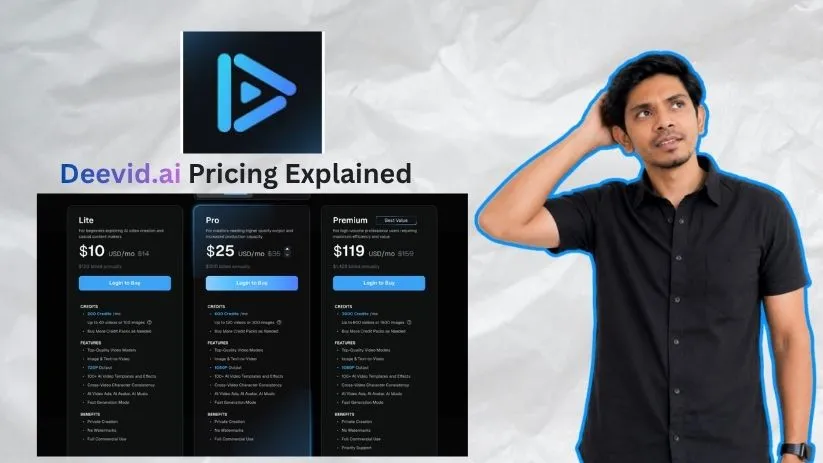
DeeVid AI is a useful AI video generation tool.
And at first glance, its pricing looks pretty simple.
But does DeeVid AI stay affordable once you start creating more videos, testing prompts, and using up credits?
That is exactly what this breakdown will help you figure out.
In this guide, I will:
- Explain every DeeVid AI pricing plan in detail
- Show you how credits, top-ups, and paid features affect the real cost
- Help you decide which DeeVid AI plan gives the best value for your needs
Let’s see whether DeeVid AI is actually worth your money!
How Much Does DeeVid AI Cost? (Quick Overview)
Before diving into the details, here’s a quick look at all DeeVid AI pricing plans side by side.
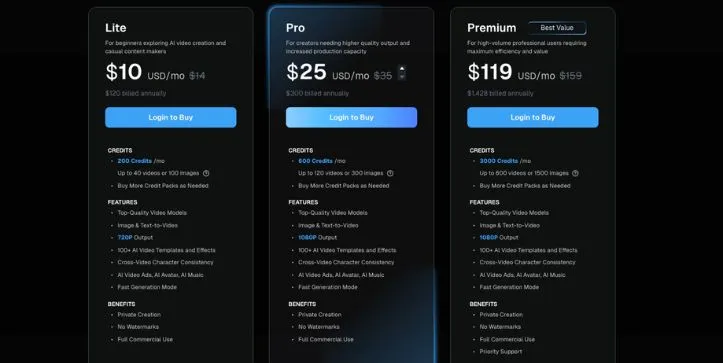
| Plan | Monthly Billing | Annual Billing | Credits Included | Best For |
| Free Trial | $0 | $0 | 20 signup credits | Testing the platform |
| Lite | $14/mo | $10/mo | 200 credits/month | Beginners and casual creators |
| Pro | $35/mo | $25/mo | 600 credits/month | Regular creators needing 1080p videos |
| Premium | $159/mo | $119/mo | 3,000 credits/month | Agencies and high-volume video teams |
If you choose annual billing, you save roughly 25% to 30% across the paid plans.
That said, DeeVid AI’s real cost isn’t just the subscription — it’s how quickly you use your credits while generating videos, testing prompts, and making revisions.
Let me walk you through each plan so you know exactly what you’re getting.
DeeVid AI Pricing Plans — Full Breakdown
1. Free Trial
DeeVid AI gives new users 20 free credits after registration. It’s enough to test the platform, create a few simple AI videos, and see whether the output style fits your content needs.
DeeVid AI free trial pricing plan breakdown
✅ What you get:
- 20 free signup credits
- Enough credits for around 4 basic videos
- Access to core AI video generation features
- Ability to test text-to-video, image-to-video, images, or audio
- A simple way to explore the interface before paying
❌ Where it falls short:
The free trial is useful, but it’s very limited.
With only 20 credits, you won’t have much room for testing multiple prompts, fixing mistakes, or generating different versions of the same video. And with AI video tools, retries are pretty normal. Your first result may look good, or it may need a few rounds before it feels usable.
Free users also get watermarked videos. So while you can test DeeVid AI properly, you probably won’t want to use free exports for client work, paid ads, YouTube content, or polished social media posts.
Think of it as a test drive, not a real production plan.
My take: The free trial is perfect if you want to see how DeeVid AI handles your prompts before spending money. But don’t expect it to support a full content workflow. Use those 20 credits carefully.
2. Lite Plan — $10/mo Annually or $14/mo Monthly
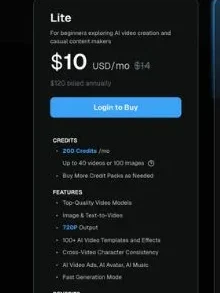
The Lite plan is DeeVid AI’s entry-level paid plan. It’s made for beginners, casual creators, and people who want to create simple AI videos without watermarks.
DeeVid AI Lite Plan in-depth breakdown
✅ What you get:
- 200 credits per month
- Up to 40 videos or 100 images
- 720p output
- Image-to-video and text-to-video generation
- 100+ AI video templates and effects
- Cross-video character consistency
- AI video ads, AI avatar, and AI music tools
- Fast generation mode
- Private creation
- No watermarks
- Full commercial use
- Option to buy more credit packs when needed
❌ Where it falls short:
Lite looks affordable, especially at the annual price. But the main limit is output quality and credit volume.
You only get 720p exports, which may be fine for casual TikToks, Instagram Reels, short tests, or internal content. But if you’re creating videos for clients, YouTube, paid ads, or product pages, 720p can feel a bit limited.
The 200 monthly credits can also disappear faster than expected. DeeVid says this can create up to 40 videos, but that assumes your generations are simple and you don’t need many retries.
If you test five different prompts, try a few styles, fix awkward motion, and regenerate a video because the result feels off, those credits start shrinking quickly.
My take: Lite is a good starting point for beginners and casual creators. It’s affordable, removes watermarks, and includes commercial use. But if you care about 1080p quality or create videos every week, you’ll probably outgrow it.
3. Pro Plan — $25/mo Annually or $35/mo Monthly
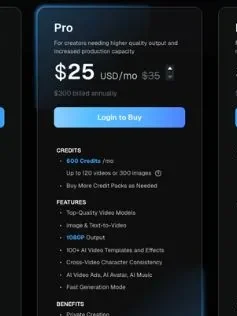
The Pro plan is the better fit for creators who want higher-quality output and more room to experiment. This is where DeeVid AI starts to make more sense for regular content creation.
DeeVid AI Pro Plan breakdown
✅ What you get:
- 600 credits per month
- Up to 120 videos or 300 images
- 1080p output
- Image-to-video and text-to-video generation
- 100+ AI video templates and effects
- Cross-video character consistency
- AI video ads, AI avatar, and AI music tools
- Fast generation mode
- Private creation
- No watermarks
- Full commercial use
- Option to buy more credit packs when needed
❌ Where it falls short:
Pro gives you much better breathing room than Lite, but it still uses the same credit-based system.
That means your actual output depends on how you use DeeVid AI. If you create simple short videos, 600 credits can go a long way. But if you’re testing multiple hooks for ads, creating product videos, using AI avatars, or regenerating clips until they look right, your real number of finished videos may be much lower than the “up to 120 videos” estimate.
Also, Pro does not include priority support. If you’re working on client deadlines or high-volume campaigns, that may matter.
Still, the jump from 720p to 1080p is a big deal. For most creators, marketers, and freelancers, this makes Pro feel much more practical than Lite.
My take: Pro is the safest DeeVid AI plan for regular creators. If you want clean 1080p videos, commercial rights, no watermarks, and enough credits to test ideas properly, this is the plan I’d look at first.
Quick math for a creator on Pro:
$25/month annually = $300/year for 600 credits per month.
If every usable video takes 2–3 attempts, your real output may be closer to 40–60 finished videos instead of the full 120 estimate.
4. Premium Plan — $119/mo Annually or $159/mo Monthly
The Premium plan is built for high-volume users. It’s mainly for agencies, ad teams, e-commerce brands, and creators who need a much larger monthly credit pool.
DeeVid AI Premium Plan breakdown
✅ What you get:
- 3,000 credits per month
- Up to 600 videos or 1,500 images
- 1080p output
- Image-to-video and text-to-video generation
- 100+ AI video templates and effects
- Cross-video character consistency
- AI video ads, AI avatar, and AI music tools
- Fast generation mode
- Private creation
- No watermarks
- Full commercial use
- Priority support
- Option to buy more credit packs when needed
❌ Where it falls short:
Premium gives you a much bigger credit pool, but the price jump is serious.
At $119 per month on annual billing, you’re paying $1,428 upfront for the year. That can make sense if you’re producing a lot of AI videos every month. But if you only create a few videos per week, Premium is probably more than you need.
The other catch is the same one you’ll see across every DeeVid AI plan: credits still control your real usage. Even 3,000 credits can run down quickly if your team creates many ad variations, tests different models, generates product videos in bulk, or repeats clips until the motion and visuals look right.
Priority support is useful, but it only matters if DeeVid AI is already part of your regular workflow.
My take: Premium is best for agencies, ad teams, and serious creators who already know they’ll use DeeVid AI heavily. If you’re still testing the tool, start with Lite or Pro first before locking into this level.
How DeeVid AI’s Credit System Actually Works
This is the part of DeeVid AI pricing that most users should pay close attention to.
The subscription price gets you into the plan. But the credit system decides how much you can actually create.
Here’s how credits are used:
| Action | Credit Usage |
| Generate AI videos | Uses credits |
| Generate AI images | Uses credits |
| Generate AI audio or music | Uses credits |
| Try different models or effects | Uses credits |
| Regenerate outputs or test new prompts | Uses more credits |
Now, let’s do the math in a way that matters.
On the Lite plan with 200 credits per month:
- If your videos are simple, you may get close to 40 videos
- If each finished video takes 2 attempts, that drops closer to 20 usable videos
- If each finished video takes 3 attempts, you may end up with around 13 usable videos
On the Pro plan with 600 credits per month:
- Best case, you may get up to 120 videos
- With 2 attempts per finished video, that becomes around 60 usable videos
- With 3 attempts per finished video, that becomes around 40 usable videos
On the Premium plan with 3,000 credits per month:
- Best case, you may get up to 600 videos
- With 2 attempts per finished video, that becomes around 300 usable videos
- With 3 attempts per finished video, that becomes around 200 usable videos
The biggest thing to remember?
AI video pricing is rarely just about the plan price. It’s about how many usable videos you get after testing prompts, fixing weird outputs, and regenerating clips.
Want another AI video pricing breakdown with credits and real usage costs? Read Pika AI Pricing Explained.
DeeVid AI does let you buy more credits separately when you run out. That’s helpful for busy months. But if you keep buying extra credits every month, it may be a sign that you’re on the wrong plan.
Also, credits are valid for one year from the date of purchase, so don’t stockpile credits unless you know you’ll actually use them.
My take: DeeVid AI pricing is fair if you understand the credit system before buying. Lite is good for light use, Pro is the best middle ground, and Premium only makes sense when you’re producing videos at serious volume.
Real Cost Per Video: What DeeVid AI May Actually Cost
The listed DeeVid AI prices look simple, but the real cost depends on how many credits you spend to get one usable video.
The simple cost-per-video estimate
If every generation comes out right on the first try, DeeVid AI can look very affordable.
| Plan | Monthly Cost | Estimated Videos | Approx. Cost Per Video |
| Lite yearly rate | $10 | Up to 40 | About $0.25 |
| Pro yearly rate | $25 | Up to 120 | About $0.21 |
| Premium yearly rate | $119 | Up to 600 | About $0.20 |
On paper, the cost per video is low. But that’s the best-case version.
The realistic retry-cost estimate
AI video generation often takes more than one attempt. You may need to rewrite the prompt, change the style, fix awkward motion, or regenerate the clip until it looks right.
| Scenario | What Happens | Real Cost Impact |
| 1 attempt works | Best case | Lowest cost |
| 2 attempts needed | Common for prompt refinement | About 2x cost |
| 3+ attempts needed | Common for complex motion, faces, lip sync, or exact brand visuals | 3x+ cost |
So if a Lite plan video costs around $0.25 in the best case, it may feel closer to $0.50 or $0.75 once retries are included.
Why credits run out faster than expected
Credits disappear quickly when you start testing different styles, prompts, models, and video ideas.
This usually happens because:
- Users test too many styles
- Prompt mistakes still cost credits
- Higher-quality models may use more credits
- Longer outputs can cost more
- Revisions are part of the real budget
My take: don’t judge DeeVid AI pricing only by the plan price. Judge it by how many finished videos you can create after testing and retries.
Want to compare DeeVid’s retry costs with another AI video generator?
Check Kling Pricing Explained next.
Monthly vs Yearly Billing: Which Is Better?
DeeVid AI offers lower prices when you choose yearly billing, but that doesn’t mean yearly is always the best choice.
Monthly billing
Monthly billing is best if you’re still testing DeeVid AI or only need it for a short project.
Choose monthly if you want to:
- Test DeeVid AI first
- Use it for a short-term project
- Understand your real credit usage
- Avoid a yearly commitment
Yearly billing
Yearly billing is better once you know DeeVid AI fits your workflow.
Choose yearly if you are:
- Creating videos regularly
- Running predictable content campaigns
- Using DeeVid AI for client or agency work
- Comfortable paying upfront for a lower monthly rate
My recommendation: start with the free trial or one monthly plan first. Once you know the output quality, credit usage, and retry rate, then move to yearly billing if it still makes sense.
Still comparing monthly vs yearly AI video pricing?
Read InVideo AI Pricing Explained before locking into a plan.
Which DeeVid AI Plan Should You Choose?
The best DeeVid AI plan depends on how often you create videos, what quality you need, and how much room you want for retries.
Choose Free Trial if…
Choose the free trial if you only want to test DeeVid AI before paying.
It makes sense if:
- You only want to test the tool
- You are comparing DeeVid AI with other AI video tools
- You do not need watermark-free exports
- You are not ready to publish videos commercially
Choose Lite if…
Choose Lite if you want the cheapest paid DeeVid AI plan with commercial use.
It makes sense if:
- You need commercial rights at the lowest price
- 720p video quality is acceptable
- You create occasional short-form content
- You want to test paid features without spending much
Choose Pro if…
Choose Pro if you create videos regularly and want better output quality.
It makes sense if:
- You need 1080p videos
- You create videos every week
- You make content for clients
- You need more room for retries
- You want the best balance of price and output
Choose Premium if…
Choose Premium if DeeVid AI is part of your regular production workflow.
It makes sense if:
- You run campaigns for multiple clients
- You produce many ad creatives
- You need a large monthly credit pool
- You value priority support
- You already know your monthly usage is high
When DeeVid AI Is Worth the Price
DeeVid AI is worth considering if you create short-form videos and want a faster way to turn prompts, images, or ideas into video content.
It makes sense if:
- You create short-form videos
- You want quick image-to-video or text-to-video generation
- You need marketing clips or product visuals
- You want multiple AI video styles in one workflow
- You are okay with a credit-based pricing model
- You can budget for retries
For creators, marketers, and small teams, DeeVid AI can save time. Just make sure you understand how credits work before choosing a plan.
When DeeVid AI May Not Be Worth It
DeeVid AI may not be the right fit if you need predictable, unlimited video creation.
You may want to skip it if:
- You need long-form video production
- You need unlimited predictable exports
- You dislike credit-based pricing
- You require perfect lip sync
- You need exact character consistency every time
- You cannot afford failed generations or retries
- You want detailed upfront cost control before every render
The tool can be useful, but it’s not ideal for every workflow. If you hate paying for retries, the credit system may feel frustrating.
Not sure DeeVid AI is the right fit for your workflow? Check my guide to the Best DeeVid.ai Alternatives before choosing a plan
DeeVid AI Pricing vs Other AI Video Tools
DeeVid AI uses a credit-based model, which is common in many AI video tools. That makes it flexible, but it also means your real cost depends on usage.
| Pricing Model | Example Tools | Pros | Cons |
| Credit-based | DeeVid AI, some image-to-video tools | Flexible, good for testing | Costs rise with retries |
| Subscription-based | Traditional video editors, some AI editors | Predictable monthly cost | May limit premium AI features |
| Hybrid | AI avatar and video platforms | Good feature access | Often confusing |
The key takeaway: DeeVid AI is not just a subscription tool. It is a subscription plus credit-usage tool, so the plan price is only part of the real cost.
Still comparing AI video tools side by side? Read my Vidu vs Kling comparison to see which workflow fits better.
FAQs About DeeVid AI Pricing
How much does DeeVid AI cost?
DeeVid AI starts with a free trial that gives new users 20 credits.
Paid plans start at $10/month when billed yearly, or $14/month if you pay monthly.
Does DeeVid AI have a free trial?
Yes, DeeVid AI gives new users 20 free credits after registration.
That’s enough to test the tool, create a few simple outputs, and see whether the video quality fits your needs.
How many free videos can I make with DeeVid AI?
DeeVid AI says 20 free credits are roughly enough for about 4 basic videos.
The actual number may change depending on the type of generation, model, video length, and settings you choose.
What are DeeVid AI credits?
Credits are the usage currency inside DeeVid AI.
You spend credits when you generate:
- AI videos
- AI images
- AI audio
- AI music
- Different versions or retries
How much is the DeeVid AI Lite plan?
The Lite plan costs $10/month when billed yearly, or $14/month when billed monthly.
It includes 200 credits per month and supports up to 40 videos or 100 images.
How much is the DeeVid AI Pro plan?
The Pro plan costs $25/month when billed yearly, or $35/month when billed monthly.
It includes 600 credits per month, 1080p output, no watermarks, and commercial use.
How much is the DeeVid AI Premium plan?
The Premium plan costs $119/month when billed yearly, or $159/month when billed monthly.
It includes 3,000 credits per month, 1080p output, no watermarks, commercial use, and priority support.
Which DeeVid AI plan is best for beginners?
The Lite plan is the best starting point for most beginners who want watermark-free videos.
But if you only want to test the tool, start with the free trial first.
Which DeeVid AI plan gives the best value?
For most regular creators, the Pro plan offers the best balance.
You get more credits than Lite, 1080p video quality, commercial use, and more room for retries.
Is DeeVid AI free to use?
Yes, DeeVid AI is free to try, but the free version is limited.
You only get 20 credits, and free videos may include watermarks.
Does DeeVid AI add watermarks?
Yes, videos created by free users can have watermarks.
Once you upgrade to a paid plan, DeeVid AI removes watermarks from generated videos.
Can I use DeeVid AI videos commercially?
Yes, paid DeeVid AI plans include commercial use.
That means you can use generated videos for ads, social media marketing, promotional content, product videos, and client projects.
What happens if I run out of DeeVid AI credits?
If you run out of credits, you can either upgrade your plan or buy extra credit packs.
This is useful if you have a busy month and don’t want to wait for your next billing cycle.
Do DeeVid AI credits roll over?
DeeVid AI says credits are valid for one year from the date of purchase.
Still, it’s better not to buy too many extra credits unless you know you’ll use them.
Can I cancel DeeVid AI anytime?
Yes, you can cancel from your account page.
After cancellation, your subscription continues until the end of the current billing cycle, and you can use remaining credits until they expire.
Does DeeVid AI offer refunds?
DeeVid AI says no refunds or exchanges are permitted.
That’s why it’s smarter to test the free credits first before choosing a paid plan.
Is DeeVid AI monthly or yearly?
DeeVid AI offers both monthly and yearly billing.
Yearly billing gives you a lower effective monthly price, while monthly billing gives you more flexibility.
Should I choose monthly or yearly billing?
Choose monthly billing if you’re still testing DeeVid AI.
Choose yearly billing only after you know the tool fits your workflow and you understand your real credit usage.
Why do some websites show different DeeVid AI prices?
Some websites may show older pricing, monthly pricing, yearly pricing, or third-party summaries.
For the most accurate price, always check the official DeeVid AI pricing page before buying.
Is DeeVid AI worth paying for?
DeeVid AI can be worth it if you create short-form videos, social media ads, product visuals, or quick image-to-video content.
It may not be worth it if you need unlimited exports, long-form editing, or perfect results on the first try.
Why does DeeVid AI pricing feel confusing?
The pricing feels confusing because you are not only paying for a subscription.
You are also working with credits, and those credits can run out faster if you test many prompts, generate retries, or use higher-quality settings.
How many videos can I make with 200 credits?
The Lite plan includes 200 credits, which DeeVid AI estimates as up to 40 videos.
In real use, the number may be lower if you regenerate clips, test multiple styles, or use more credit-heavy features.
How many videos can I make with 600 credits?
The Pro plan includes 600 credits, which DeeVid AI estimates as up to 120 videos.
If each finished video takes 2 or 3 attempts, your real output may be closer to 40–60 usable videos.
Is DeeVid AI good for YouTube videos?
DeeVid AI is better for short clips, visual scenes, ads, and social content than full long-form YouTube production.
For YouTube Shorts, hooks, intros, and faceless video visuals, it can be useful.
Is DeeVid AI good for agencies?
Yes, DeeVid AI can work for agencies that create lots of ad creatives, product clips, or social media videos.
For agency use, the Premium plan makes the most sense because it includes a much larger credit pool and priority support.
Is the DeeVid AI Pro plan better than Lite?
Yes, Pro is better if you need 1080p video quality and more credits.
Lite is cheaper, but it only supports 720p output, which may feel limited for client work or polished marketing content.
Is there a DeeVid AI lifetime deal?
DeeVid AI does not currently show a lifetime deal on its official pricing page.
The available options are free credits, monthly billing, yearly billing, and extra credit packs.
Can I use one DeeVid AI account on multiple devices?
Yes, DeeVid AI says you can use the same membership across computers, web browsers, iOS, and Android apps.
That’s helpful if you create on desktop but review or manage projects from your phone.
What is the biggest hidden cost in DeeVid AI pricing?
The biggest hidden cost is retries.
If your first video does not look right, you may need to regenerate it, and those extra attempts use more credits.



