Finally i got chance to use Lottielab and LottieFiles, i used them for 2 weeks and here is what i found
Lottie tools like Lottielab and LottieFiles promise to make lightweight animation easier for designers, developers, and product teams. But they don’t really solve the same problem once you move past a simple animated icon or loader.
Both platforms work with Lottie animations, and both can help you create, edit, export, or share motion assets. Still, the workflow feels very different once you actually start using them.
Lottielab feels more like a modern animation editor built for creating custom motion from scratch. It’s especially useful if you’re coming from Figma and want a faster way to animate UI elements without opening After Effects.
LottieFiles, on the other hand, feels more like a full Lottie ecosystem. You get a huge animation library, plugins, asset management, testing tools, hosting, and developer handoff features.
From my point of view, this is where the comparison gets interesting. Lottielab is better when you want creative control, while LottieFiles is stronger when you need ready-made assets and a wider production workflow.
In this guide, we’ll break down Lottielab vs LottieFiles feature by feature. We’ll look at animation creation, editing flexibility, Figma support, collaboration, pricing, export options, asset libraries, and who each tool is really built for.
Quick Verdict: Lottielab vs LottieFiles
If you want the quick answer, Lottielab is the better pick for creating custom Lottie animations, especially when you’re starting from a Figma design or building small UI motion from scratch. It feels more focused, more design-friendly, and easier to use when the goal is to make something original.
LottieFiles is the stronger choice when you need a bigger Lottie workflow around your animations. It works better for browsing ready-made assets, managing files across a team, testing animations, hosting them, and handing them off to developers.
| Need | Better Choice | Why |
| Create custom Lottie animations from scratch | Lottielab | More focused animation editor |
| Import Figma designs and animate them | Lottielab | Strong Figma-to-motion workflow |
| Browse a large animation library | LottieFiles | Larger marketplace and community library |
| Manage motion assets across a team | LottieFiles | Workspace, DAM, projects, collections, and CDN |
| Fast UI micro-animations | Lottielab | Simple, design-tool-like workflow |
| Developer handoff and implementation | LottieFiles | CDN, libraries, integrations, and platform tooling |
| AI-assisted animation | Both | Lottielab has Magic Animator; LottieFiles has AI tools like Prompt to Vector and State Machines |
| Best for product designers | Lottielab | Easier creation and editing workflow |
| Best for enterprise motion systems | LottieFiles | Broader governance and asset infrastructure |
What Is Lottie?
Lottie is an open-source vector animation file format used for lightweight motion on websites, mobile apps, onboarding screens, loaders, icons, and product UI. It gives teams a way to ship smooth animations without using heavy video or GIF files.
One thing to clear up early: Lottie is not a company or a product. It’s just the file format. Lottielab and LottieFiles are separate companies that build tools to create, edit, manage, and use Lottie animations.
What Is Lottielab?
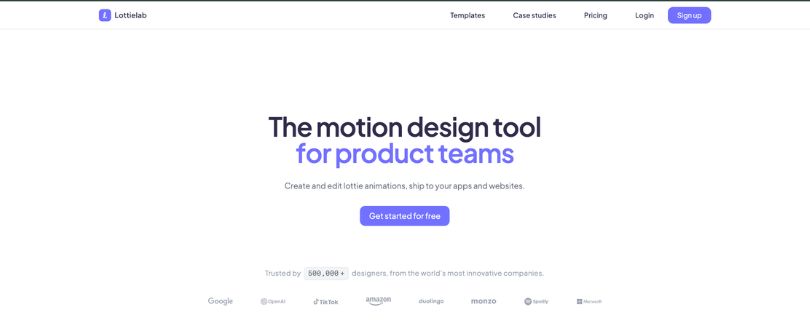
Lottielab is a browser-based motion design tool for creating and editing Lottie animations. It’s built mostly for product teams, UI designers, and marketers who want lightweight animations for websites, apps, onboarding screens, icons, and product UI.
From my experience, Lottielab feels closer to “Figma for motion” than a heavy motion graphics app. You can import a design, animate it in the browser, collaborate with your team, and export it without jumping into After Effects for every small UI animation.
Lottielab also positions itself around fast Lottie creation, optimized file sizes, and shipping animations to iOS, Android, and web.
Lottielab’s main strengths
- Modern browser-based animation editor
- Easy learning curve for designers
- Figma import
- SVG and Lottie file upload
- Export to Lottie, GIF, and MP4
- Real-time team collaboration
- Comments and mentions
- File size optimization
- Lottie hosting and CDN
- Magic Animator for AI-assisted animation
Reddit users often describe Lottielab as a Figma-like motion tool, especially useful for vector-based animation and quick product UI work. Some Product Hunt reviews praise the idea and ease of use, while a few users mention bugs or performance issues, so it’s worth testing with your own files before using it for serious production work.
Pricing:
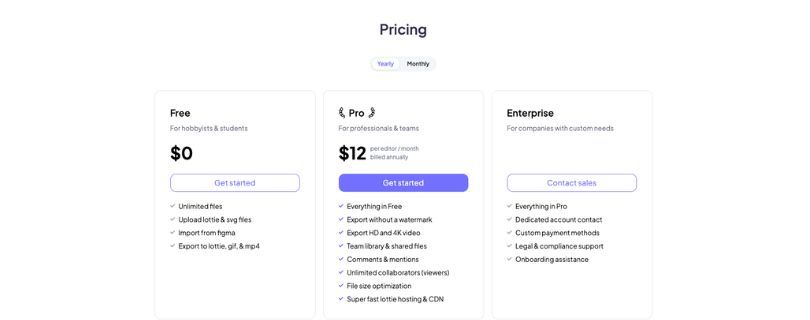
Lottielab keeps its pricing simple with Free, Pro, and Enterprise plans. The official pricing page lists the core plan features, while Lottielab’s own comparison page lists Pro at $18 monthly or $144 yearly.
- Free: $0 with unlimited files, Lottie/SVG upload, Figma import, and export to Lottie, GIF, and MP4.
- Pro: $144/year, or about $12/month when billed annually. It adds watermark-free exports, HD and 4K video export, team libraries, shared files, comments, mentions, unlimited viewer collaborators, file size optimization, and Lottie hosting/CDN.
- Monthly Pro: Lottielab’s comparison page lists monthly pricing at $18/month.
- Enterprise: Custom pricing for companies that need a dedicated account contact, custom payment methods, legal/compliance support, and onboarding help.
Curious what Lottielab really costs? Lottielab Pricing Explained
Where Lottielab fits best
Lottielab works best when you want to create custom Lottie animations quickly.
Use it when your team needs simple, lightweight motion without opening After Effects every time.
- Product UI micro-animations
- Animated icons
- Website animations
- Startup and product team workflows
- Designers moving from Figma into motion
- Teams that want a faster alternative to After Effects for small animation tasks
Potential limitations to discuss honestly
Lottielab is not perfect for every motion workflow.
It’s great for lightweight animation, but advanced users may hit limits with bigger or more complex projects.
- Web-based tools can feel clunky for some advanced motion designers
- It may not replace After Effects for full motion graphics work
- Advanced interactivity may be better handled in Rive or dotLottie state-machine workflows
- Large or complex files should be tested before using them in production
Not fully sold on Lottielab? Explore other options:
Best Lottielab Alternatives
What Is LottieFiles?
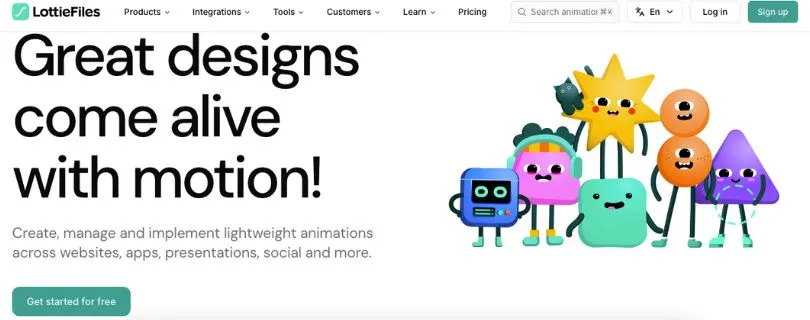
LottieFiles is a broader motion platform for creating, managing, testing, optimizing, and sharing lightweight animations. It’s used across websites, apps, presentations, social media content, product UI, and developer workflows.
Unlike Lottielab, LottieFiles is not just focused on making animations from scratch.
It feels more like a full Lottie workspace where designers can find assets, marketers can use ready-made motion, and developers can grab optimized files, CDN links, or implementation tools.
From a reviewer’s point of view, LottieFiles is strongest when you need more than an editor. It works better when your team needs a library, asset organization, integrations, version control, comments, and developer handoff in one place.
LottieFiles’ main strengths
- Large free and premium animation library
- Lottie marketplace and creator community
- Lottie Creator for making animations
- Lottie Editor for quick edits and color changes
- Figma plugin
- After Effects plugin
- Canva, Webflow, Framer, VS Code, and other integrations
- File size optimization
- Version history
- Frame-by-frame comments
- Animation statuses
- Developer handoff tools
- CDN and asset links
- dotLottie support
- AI tools
- Team workspace and motion asset management
Pricing:
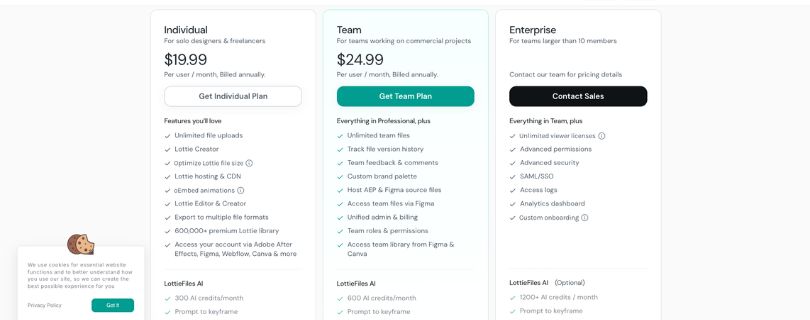
LottieFiles uses a Free, Individual, Team, and Enterprise pricing structure. The paid plans are mainly shown as monthly prices but billed annually, so it’s worth checking the yearly cost before you upgrade.
- Free: Best for beginners who want to explore LottieFiles, test animations, and use basic tools before paying.
- Individual: Starts at $19.99/user/month, billed annually. It includes unlimited file uploads, Lottie Creator, file optimization, Lottie hosting/CDN, oEmbed, multiple export formats, premium Lottie library access, integrations, and 300 AI credits/month.
- Team: Starts at $24.99/user/month, billed annually. It adds unlimited team files, version history, team feedback and comments, brand palettes, source file hosting, team roles, permissions, and 600 AI credits/month.
- Enterprise: Listed for larger teams that need advanced permissions, SSO/SAML, access logs, analytics, custom onboarding, unlimited viewer licenses, procurement support, and optional 1200+ AI credits/month. Pricing may require contacting sales.
Want a clearer breakdown of LottieFiles plans?
LottieFiles Pricing Explained
Where LottieFiles fits best
LottieFiles works best when you need a full ecosystem around Lottie animations.
Use it when you want to find, manage, share, test, host, and hand off animations across a team.
- Finding ready-made animations fast
- Managing a motion asset library
- Working across design, marketing, and development teams
- Teams using After Effects, Figma, Webflow, Canva, Framer, or multiple tools
- Developer handoff and hosted animation delivery
- Enterprises that need governance, versioning, storage, and permissions
Potential limitations to discuss honestly
LottieFiles can feel like too much if you only need a basic animation editor.
Its biggest strengths are library, workflow, and asset management, but not every user needs that full setup.
- Can feel broader and less focused than a simple animation editor
- Paid plans may become expensive for growing teams
- Occasional users may not need the full platform
- Marketplace animations can look generic if you don’t customize them
Want to compare LottieFiles with other tools?
Best LottieFiles Alternatives
Lottielab vs LottieFiles Feature Comparison
Here’s a clear side-by-side comparison of Lottielab vs LottieFiles, based on what each tool is mainly built to do and where it fits best in a real animation workflow.
| Feature | Lottielab | LottieFiles |
| Main purpose | Create and edit custom Lottie animations | Create, manage, find, optimize, host, and ship Lottie animations |
| Best user | Product designers, UI designers, and motion-light teams | Designers, developers, marketers, and enterprise teams |
| Animation library | Templates available | Massive free and premium marketplace/community library |
| Editor | Focused browser-based animation editor | Lottie Creator + Lottie Editor |
| Figma workflow | Strong Figma import and plugin workflow | Figma plugin plus wider platform integrations |
| After Effects workflow | After Effects import supported | Strong After Effects plugin and AEP-related tooling |
| Collaboration | Real-time collaboration and comments | Workspaces, comments, statuses, projects, and collections |
| Developer handoff | Lottie export, hosting, and CDN | CDN, libraries, dotLottie, handoff tools, and integrations |
| AI features | Magic Animator | Prompt to Vector, Prompt to State Machines, Prompt to Theming, and Raster to Vector |
| File optimization | Yes | Yes, including dotLottie optimization |
| Best for custom creation | Strong | Good, but part of a broader ecosystem |
| Best for asset management | Limited compared to LottieFiles | Strong |
| Best for marketplace assets | Not the main strength | Strong |
| Learning curve | Easier for Figma and product designers | Easy for using assets, deeper if you use the full platform |
Ease of Use: Which Tool Is Easier to Learn?
Lottielab feels easier if you want a focused, hands-on animation editor. The layout feels closer to a design tool, so if you already use Figma, the learning curve is not too scary.
LottieFiles feels easier when you don’t want to animate everything yourself. You can search for an existing animation, preview it, tweak it, export it, or share it with your team pretty quickly.
Choose Lottielab for hands-on animation creation
Lottielab is the better fit if you want to build custom motion from scratch.
From my experience, it feels more natural for product designers who want to animate icons, buttons, loaders, or UI details without opening After Effects.
- Easier for Figma users
- Better for custom UI motion
- Cleaner for simple animation work
- Good for learning Lottie animation basics
Choose LottieFiles for finding, editing, and implementing existing animations
LottieFiles is easier if your goal is speed, not deep animation control.
I’d use it when I need a ready-made animation fast, want to test how it looks, or need a quick export or developer handoff.
- Easier for browsing assets
- Better for quick edits
- Good for previews and testing
- Stronger for sharing and implementation workflows
Pricing: Lottielab vs LottieFiles
| Pricing Area | Lottielab | LottieFiles |
| Free plan | Yes, includes unlimited files, Lottie/SVG upload, Figma import, and export to Lottie, GIF, and MP4 | Yes, good for testing basic Lottie tools and exploring the platform |
| Main paid plan | Pro plan for professionals and teams | Individual plan for solo designers and freelancers |
| Starting paid price | $18/month or $144/year, based on Lottielab’s comparison page | Starts at $19.99/user/month, billed annually, based on the main pricing card |
| Team pricing | Pro includes team library, shared files, comments, mentions, and unlimited viewer collaborators | Team starts at $24.99/user/month, billed annually, based on the main pricing card |
| Viewer collaborators | Unlimited viewer collaborators on Pro | Enterprise includes unlimited viewer licenses; paid team seats apply on Team |
| Export features | Watermark-free export, HD and 4K video export, Lottie, GIF, and MP4 | GIF, MP4, WebM, MOV, optimized JSON, and dotLottie exports |
| Collaboration | Comments, mentions, shared files, team library | Team files, version history, feedback, comments, roles, and permissions |
| Hosting/CDN | Included in Pro | Included in paid plans |
| Best value for | Designers and product teams creating custom Lottie animations | Teams that need libraries, plugins, hosting, AI credits, comments, and developer handoff |
| Enterprise | Custom plan with account contact, legal/compliance support, custom payment, and onboarding | Starts from enterprise pricing/contact sales, with SSO, access logs, analytics, advanced permissions, and onboarding |
My view on pricing: Lottielab feels like the better-value option if your main job is creating and exporting custom Lottie animations. It’s simpler, cheaper for small teams, and the unlimited viewer collaborator setup is useful when clients or teammates only need to review work.
LottieFiles costs more, but you’re paying for a wider platform. It makes more sense when your team needs premium assets, CDN links, version history, plugins, AI tools, developer handoff, and motion asset management in one place. For a solo creator making a few animations, it may feel like too much. For a design or product team managing lots of motion files, the higher price can be easier to justify.
Pros and Cons of Lottielab and Lottiefiles
These are very short and clear pros and cons i found.
Lottielab pros
- Easy to learn
- Modern browser UI
- Strong custom animation workflow
- Good for Figma users
- Real-time collaboration
- Good for UI micro-animations
- AI-assisted Magic Animator
- Lightweight exports
Lottielab cons
- Smaller ecosystem than LottieFiles
- Less useful if you mainly need a huge animation library
- May not replace After Effects/Rive for advanced motion work
- Web-only concerns for some users
LottieFiles pros
- Huge library/community
- Strong integrations
- Lottie Creator and Editor
- dotLottie ecosystem
- CDN and developer handoff
- Asset management
- Premium library
- AI features
- Strong for teams and enterprises
LottieFiles cons
- Broader platform can feel heavier than a focused editor
- Paid plans can be expensive for small teams
- Marketplace animations may need customization to avoid a generic look
- Custom creation may not feel as focused as Lottielab for some designers
Final Verdict: Which One Should You Choose?
After comparing both tools, my view is simple: Lottielab is better if you want to create motion, while LottieFiles is better if you want to manage and ship motion.
When I look at the actual workflow, Lottielab feels more focused and hands-on. LottieFiles feels bigger, more complete, and better suited for teams that need a full animation system.
Choose Lottielab if:
- You want to create custom Lottie animations from scratch
- You work heavily in Figma
- You want a fast, modern, browser-based animation editor
- You need UI micro-animations, animated icons, loaders, onboarding motion, or product animations
- Your team cares more about collaborative creation than asset management
- You don’t want to open After Effects for every small animation task
Choose LottieFiles if:
- You want access to a large library of ready-made animations
- You need to manage, share, optimize, host, and deliver animations
- You work across Figma, After Effects, Webflow, Canva, Framer, and developer tools
- You need dotLottie, CDN, developer handoff, versioning, or enterprise asset management
- Your team wants a full motion platform, not just an animation editor
- You want a smoother workflow for storing, reusing, and handing off motion assets
For most product designers, startup teams, and UI-focused creators, I’d start with Lottielab because it feels faster for making original animations.
For larger teams, agencies, developers, and brands managing lots of animation files, LottieFiles is the safer long-term choice because it gives you more structure around the whole Lottie workflow.
FAQs: Lottielab vs LottieFiles
Is Lottielab the same as LottieFiles?
No. Lottie is the animation format, while Lottielab and LottieFiles are separate tools built around that format.
Lottielab focuses more on creating and editing custom animations. LottieFiles focuses more on finding, managing, sharing, and shipping Lottie animations.
Is Lottielab better than LottieFiles?
Lottielab is better if you want to create custom animations from scratch or animate Figma designs.
LottieFiles is better if you need a large animation library, asset management, hosting, CDN links, plugins, and developer handoff.
What is the main difference between Lottielab and LottieFiles?
The main difference is the workflow.
- Lottielab: Better for creating motion
- LottieFiles: Better for managing and delivering motion
Which tool is better for Figma to Lottie?
Lottielab feels stronger for turning Figma designs into custom Lottie animations.
LottieFiles also has Figma support, but I’d use it more when Figma is part of a larger asset library or team workflow.
Which one is easier for beginners?
Lottielab is easier if you want to learn how to animate UI elements yourself.
LottieFiles is easier if you want to search for a ready-made animation, edit it lightly, and export it quickly.
Can Lottielab replace After Effects?
For simple UI animations, animated icons, loaders, and product motion, yes, it can replace After Effects in many daily tasks.
For advanced motion graphics, compositing, complex timelines, and high-end animation work, After Effects is still stronger.
Can LottieFiles replace After Effects?
Not really. LottieFiles is better as a Lottie platform, marketplace, editor, and asset management tool.
If you already create animations in After Effects, LottieFiles works well as part of the export, testing, sharing, and handoff workflow.
Which tool is better for product designers?
Lottielab is the better pick for most product designers.
It feels more direct when you want to animate buttons, icons, empty states, onboarding screens, or small UI interactions.
Which tool is better for developers?
LottieFiles is usually better for developers.
It offers stronger support for hosted assets, CDN links, dotLottie, implementation workflows, and developer-friendly handoff.
Which tool is better for marketing teams?
LottieFiles is better for most marketing teams because it gives quick access to ready-made animations, exports, integrations, and reusable motion assets.
Lottielab is better if the marketing team needs custom branded animations instead of stock-style motion.
Which tool is better for startups?
For early-stage startups, I’d start with Lottielab if the goal is custom product animation.
Use LottieFiles if the team needs a shared animation library, developer links, ready-made assets, and a more organized motion workflow.
Can I use Lottielab and LottieFiles together?
Yes, and this setup can actually make sense.
You can create or edit custom animations in Lottielab, then use LottieFiles to test, host, organize, share, or hand them off to developers.
Does Lottielab have AI animation tools?
Yes. Lottielab has Magic Animator, which is useful for AI-assisted animation and faster design-to-motion workflows.
I’d treat it as a helpful starting point, not a full replacement for creative control.
Does LottieFiles have AI tools?
Yes. LottieFiles includes AI features for things like vectors, theming, state machines, and other motion workflows depending on the plan.
It fits better if you want AI features inside a larger animation platform.
Which one has the better animation library?
LottieFiles wins here.
Its marketplace and community library are much larger, so it’s better when you want to find ready-made loaders, icons, illustrations, and UI animations fast.
Which one is better for custom animations?
Lottielab is better for custom animation work.
It gives you a more focused editor and a smoother path from design to motion, especially if you’re working with Figma-style UI assets.
Which one is better for team collaboration?
It depends on the type of collaboration.
- Lottielab: Better for collaborative creation and feedback
- LottieFiles: Better for team asset management, versioning, comments, hosting, and handoff
Which one is better for enterprise teams?
LottieFiles is usually the better fit for enterprise teams.
It has stronger support for asset management, permissions, versioning, hosted delivery, dotLottie, developer workflows, and larger team operations.
Is Lottielab good for website animations?
Yes. Lottielab works well for website animations, especially animated icons, hero graphics, loaders, scroll-friendly motion, and product UI details.
Just test larger animations before publishing so you know the file size and playback feel right.
Is LottieFiles good for website animations?
Yes. LottieFiles is strong for website animations because you can find assets, optimize files, host animations, and hand them off to developers.
It’s especially useful when you need quick production-ready motion.
Which one is cheaper?
Lottielab generally feels more affordable if you only need to create and export custom animations.
LottieFiles can cost more, but it includes a broader platform with library access, hosting, plugins, team features, AI tools, and asset management.
Which one should I choose as a solo designer?
Choose Lottielab if you want to make your own animations.
Choose LottieFiles if you want quick access to ready-made animations and don’t want to build everything from scratch.
Which one should I choose for a design team?
For a small design team, Lottielab is great when the team mostly creates custom UI motion.
For a larger design team with shared libraries, approvals, developer handoff, and brand motion systems, LottieFiles may be the better long-term fit.
What’s the best LottieFiles alternative?
Lottielab is a strong LottieFiles alternative if your main need is animation creation and editing.
Other alternatives may include Rive, Jitter, After Effects with Bodymovin, or SVGator, depending on whether you need interactivity, motion graphics, or simple web animation.
What’s the best Lottielab alternative?
LottieFiles is a good Lottielab alternative if you need a bigger Lottie platform instead of only a focused editor.
Rive is also worth considering if your project needs advanced interactive animation or state-machine behavior.