Adobe Express and Figma are two of the most talked-about design tools right now.
If you’re reading this, you’ve probably tried one or both and want to figure out which one actually fits your creative workflow.
I spent time creating social media graphics, testing brand kits, building reusable layouts, and comparing how both tools handle everyday design tasks.
I also looked at how each platform supports team collaboration, AI features, templates, and design control during real content creation.
In this Adobe Express vs Figma comparison, I’ll walk you through what each tool does well, where they fall short, and which one makes more sense for your setup.
Here’s what I’ll cover:
- Core design and editing features
- Templates, assets, and brand kits
- Collaboration and workflow management
- Pricing and overall value
So, let’s get started.
Adobe Express vs Figma: Quick Comparison Table
Before we get into the deeper review, here’s the quick version.
Adobe Express is built for fast, polished content creation. It works well when you need social posts, short videos, flyers, thumbnails, or branded assets without spending too much time inside a design file.
Figma is built for deeper design work. It makes more sense when you’re creating websites, apps, prototypes, product screens, or a full design system that your team can reuse again and again.
| Feature | Adobe Express | Figma |
| Best for | Social posts, videos, flyers, and quick branded content | UI/UX design, product design, prototypes, and design systems |
| User type | Marketers, creators, small businesses, and non-designers | Designers, product teams, developers, and startups |
| Learning curve | Low | Moderate to high |
| Templates | Strong template library for everyday content | More limited unless you use Figma Buzz, community files, or custom templates |
| AI tools | Strong Firefly-powered creative AI for images, text effects, and quick edits | Better for design workflows, layout ideas, product concepts, and structured creative work |
| Collaboration | Good for marketing and content teams | Excellent for design, product, and development teams |
| Brand control | Brand kits, locked elements, Adobe Fonts, and reusable assets | Components, variables, shared libraries, styles, and design tokens |
| Social media scheduling | Available inside Adobe Express | Not native in core Figma |
| Prototyping | Not the main focus | One of Figma’s biggest strengths |
| Best overall | Fast content creation | Scalable design systems |
Adobe Express vs Figma: Honest Comparison of Features & Pricing
Now, let’s break down Adobe Express and Figma feature by feature.
I’ll walk you through how both tools perform in real creative workflows, how easy they are to set up, and what their pricing looks like.
You’ll also see where each tool makes more sense for creators, marketers, designers, startups, and growing teams, so by the end, you can decide which one is the right fit for you.
Here’s what I’ll cover:
- Core design and editing features
- Templates and creative assets
- AI design features
- Brand kits and design systems
- Collaboration and team workflow
- Social media content creation
- UI/UX design and prototyping
- Export options and integrations
- Pricing plans
Let’s get started!
1. Adobe Express vs Figma: Core Design and Editing Features
First, I wanted to see which tool feels better for everyday design work.
Not advanced theory. Not feature lists for the sake of feature lists.
I mean the real stuff: creating a post, editing an image, laying out a page, adjusting text, resizing assets, and getting a design ready to publish.
Let’s see who wins.
Adobe Express
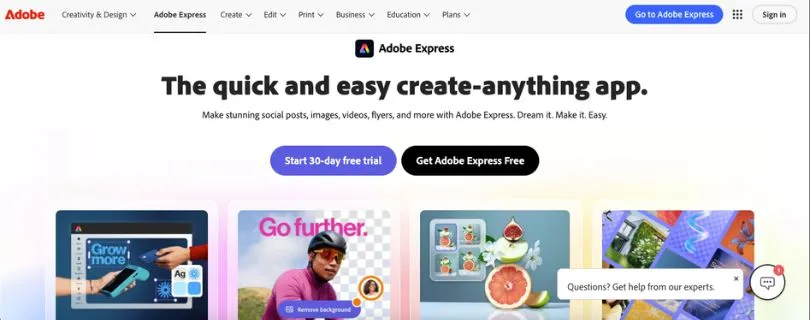
Adobe Express is built around speed.
When you open it, you can start with a template, upload your own image, generate something with AI, or create from a blank canvas. The interface feels simple, especially if you’re used to tools like Canva.
You can create:
- Instagram posts
- Reels covers
- YouTube thumbnails
- Flyers
- Posters
- Logos
- Short videos
- Presentations
- Ads
- Simple branded graphics
Adobe describes Express as an all-in-one design, photo, and video tool for creating social posts, images, videos, flyers, and more. That positioning makes sense once you use it because the whole experience is designed around quick content production.
What I liked most was how fast it feels for simple creative tasks.
Need to remove a background? Easy.
Need to resize a post for another platform? Done in a few clicks.
Need to add text, animation, a logo, and export it for Instagram? Very straightforward.
It’s the kind of AI graphic design tool for marketers that works well when you don’t want to build a design system from scratch. You just want a clean asset that looks good enough to publish today.
That said, Adobe Express can feel limited if you want pixel-level control.
You can move elements, adjust layouts, apply brand styles, and edit visuals, but it doesn’t give you the same deep layout control that Figma does. For example, if you’re building a complex landing page layout or a reusable component system, Adobe Express starts to feel too lightweight.
Figma

Figma is a very different type of tool.
It’s not mainly built for quick flyers or casual content creation. It’s built for structured design work.
You can create:
- Website layouts
- Mobile app screens
- Landing pages
- SaaS dashboards
- Wireframes
- Interactive prototypes
- Design systems
- Product mockups
- Brand templates
- Marketing layouts
Figma positions itself as a collaborative design platform where teams can brainstorm, design, and build products together.
When I worked through layouts in Figma, the biggest difference was control.
You get frames, grids, Auto Layout, components, styles, variables, comments, pages, and shared libraries. That can feel like a lot at first, but once you understand the workflow, it becomes much easier to manage bigger design projects.
For example, if you’re designing a pricing page, you can create reusable cards, buttons, icons, spacing rules, and text styles. Then, when your team changes the primary button style, you don’t have to update every screen manually.
That’s where Figma becomes powerful.
It’s slower than Adobe Express for a simple Instagram post, but much better for serious design work.
Which Tool Offers Better Core Design Features?
Figma wins for advanced design control.
Adobe Express is easier and faster for basic content creation, but Figma gives you more flexibility when the project gets bigger.
If you’re creating quick branded content, Adobe Express feels better.
If you’re designing websites, apps, product screens, or reusable layouts, Figma is the clear winner.
2. Adobe Express vs Figma: Templates and Creative Assets
Templates matter more than people think.
A good template can save 30 minutes. A bad one can make your brand look generic.
So, I tested both tools from the perspective of someone creating social posts, ads, carousels, flyers, and simple marketing visuals.
Adobe Express
Adobe Express has a strong advantage here.
Its template library is one of the main reasons people use it. You can search by format, use case, platform, style, or industry. For example, you can quickly find templates for Instagram stories, YouTube thumbnails, posters, resumes, invitations, business cards, and short-form videos.
Adobe Express Premium also includes access to premium templates, Adobe Fonts, stock photos, icons, animations, and brand features. Adobe’s own material says the Premium plan lets users customize premium templates, add their own colors, fonts, and logos, and apply their look across assets.
This is where Adobe Express feels very beginner-friendly.
You don’t need to understand layout theory. You can pick something close to what you need, swap the copy, add your logo, apply your colors, and publish.
For marketers and small businesses, that’s a big deal.
Let’s say you need five Black Friday sale graphics, three Instagram story slides, and a LinkedIn banner. Adobe Express gets you there quickly because the templates are already made for those formats.
The downside?
Some templates can feel a little “template-like.” If you don’t customize them enough, your designs may look similar to what other people are posting.
Figma
Figma also has templates, but the experience is different.
You’ll find templates through Figma Community, Figma Buzz, UI kits, design files, and third-party creators. Some are excellent. You can find landing page kits, mobile app templates, social media carousel systems, dashboard layouts, pitch decks, and brand guideline files.
But Figma templates usually require more editing skill.
You need to understand frames, layers, components, and layout structure. If a file is well-built, it’s amazing. If it’s messy, editing it can be frustrating.
Figma is better when you want to build your own reusable template system.
For example, a designer can create a full LinkedIn carousel system with reusable title slides, quote slides, stat slides, CTA slides, and image layouts. Then the marketing team can duplicate that file each week and create new posts without breaking the brand.
That’s not as fast as Adobe Express at the start, but it scales better.
Which Tool Offers Better Templates and Assets?
Adobe Express wins for ready-to-use templates and creative assets.
Figma wins if you want custom template systems that your team can reuse over time.
For most non-designers, Adobe Express will feel easier. For design teams, Figma gives more control.
3. Adobe Express vs Figma: AI Design Features
AI is now a major part of creative software.
But not all AI features are equally useful. Some save real time. Others feel like nice demos that don’t fit into your daily workflow.
So, I looked at both tools from a practical angle: image generation, editing help, layout ideas, creative speed, and how well the AI fits into the overall design process.
Adobe Express
Adobe Express has a strong AI advantage for fast creative work.
It uses Adobe’s Firefly-powered creative AI features, which are especially useful for generating images, applying text effects, removing backgrounds, resizing assets, creating variations, and making quick visual edits.
For example, if you’re making a campaign graphic and need a background image, you can generate one inside the Adobe ecosystem instead of jumping to another AI image tool.
That makes Adobe Express useful as an AI ad creative generator or social media video creation tool.
You can start with a simple prompt, generate a visual direction, add text, apply brand colors, and turn it into a post or short video. It’s not always perfect, but it removes a lot of friction from the early creative process.
Adobe also offers Firefly plans with generative credits, and Adobe says Firefly Pro includes creative AI credits along with Adobe Express Premium.
What I liked most is that Adobe Express AI feels built for non-designers.
You don’t need to know advanced prompting or design theory. You can use AI to get unstuck, create a visual, remove a background, or polish a simple asset.
The limitation is control.
If you want AI to help build a structured interface, create product flows, or work inside a complex design system, Adobe Express is not the strongest option.
Figma
Figma’s AI features are more connected to design workflows.
Figma has been adding AI across its products, including Figma Design, Buzz, Slides, FigJam, and other creative areas. Its release notes mention AI image generation and editing across multiple Figma products, including the ability to use references from the canvas.
That matters because Figma AI is not just about making a pretty picture.
It can help with layouts, design ideas, image editing, product concepts, and visual exploration inside the same workspace where your design system already lives.
For example, a product designer can explore layout ideas for a dashboard, refine a hero section, or use AI-generated assets without leaving the design file.
Figma also has newer products like Figma Make, which Figma describes as a way to turn a design file into a live, functional app with AI assistance.
That makes Figma more interesting for product teams and startups.
But for everyday creators, Figma’s AI may feel less direct than Adobe Express. If your goal is to create a TikTok thumbnail, Instagram post, or small business flyer, Adobe Express gets you there faster.
Which Tool Offers Better AI Features?
Adobe Express wins for quick creative AI.
Figma wins for AI inside a deeper design workflow.
If you need AI image generation, text effects, background removal, and fast content creation, Adobe Express makes more sense. If you want AI support while building layouts, product ideas, prototypes, or design systems, Figma is stronger.
4. Adobe Express vs Figma: Brand Kits and Design Systems
This is one of the biggest differences between Adobe Express and Figma.
Both tools help with brand consistency, but they do it in very different ways.
Adobe Express is better for simple brand kits.
Figma is better for full design systems.
Adobe Express
Adobe Express lets you create brand kits with your colors, fonts, logos, and reusable brand assets.
That’s helpful for small businesses, creators, and marketing teams that need to stay on-brand without asking a designer to fix every post.
Adobe says Brand Kits in Express let users access premium templates, Adobe Stock assets, Adobe Fonts, Resize, and brand features through the Premium plan.
This works well in real marketing workflows.
For example, a coffee shop can upload its logo, save its brown and cream color palette, choose brand fonts, and apply those styles to posters, menus, Instagram posts, and event flyers.
That’s exactly where Adobe Express shines.
It gives non-designers guardrails. They can create content without completely destroying the brand.
But Adobe Express brand kits are still fairly simple compared to Figma. They help with consistency, but they don’t give you advanced component logic, variables, responsive layout systems, or design tokens.
Figma
Figma is built for design systems.
You can create shared libraries, components, typography styles, color styles, variables, spacing rules, buttons, cards, navigation bars, icons, and reusable layouts.
Figma’s Professional plan includes team-wide design libraries, and its pricing page highlights unlimited files and advanced prototyping for professional teams.
This becomes very useful when your brand has more moving parts.
Let’s say you run a SaaS company. You need a website, product UI, pricing page, onboarding screens, email graphics, sales decks, help center visuals, and ad creatives. If all of that lives in random files, the brand gets messy fast.
In Figma, you can build one system and reuse it everywhere.
Change a button style once, and the update can flow across the file. Update a color variable, and your whole interface can follow. That kind of control is hard to match in Adobe Express.
Which Tool Offers Better Brand Control?
Figma wins for advanced brand control.
Adobe Express is great for simple brand kits and quick content. But if you care about components, variables, shared libraries, and scalable design systems, Figma is far stronger.
For small teams, Adobe Express may be enough.
For serious design teams, Figma is the better long-term choice.
5. Adobe Express vs Figma: Collaboration and Team Workflow
A design tool isn’t just about what you can create.
It’s also about how easily your team can review, edit, approve, and reuse work.
So, I looked at both tools from a team workflow perspective.
Adobe Express
Adobe Express works well for marketing teams, small businesses, schools, and content teams.
You can share projects, manage brand assets, collaborate on creative files, and keep non-designers working within approved brand styles.
For teams that publish a lot of content, this is useful.
A designer can set up a branded template. A marketer can change the copy. A social media manager can resize it. A founder can review it before publishing.
Nobody needs to open a complex design file.
Adobe also offers Adobe Express for business and enterprise teams with on-brand content creation, collaboration, security, and admin features.
That said, Adobe Express collaboration feels more content-focused than design-focused.
It’s good when people need to create and approve assets. It’s less powerful when designers, developers, product managers, and stakeholders need to work together on a complex product interface.
Figma
Figma is one of the strongest collaboration tools in design.
Multiple people can work in the same file at the same time. Designers can create layouts, product managers can leave comments, developers can inspect designs, and stakeholders can review progress without passing files back and forth.
This is where Figma feels much more mature.
Figma’s Professional plan includes unlimited files, pages, projects, version history, and team features that help everyone stay on the same page.
I also like how feedback happens directly on the canvas.
Instead of sending screenshots in Slack and asking, “Which button do you mean?” someone can click the exact area and leave a comment. That saves a lot of back-and-forth.
For product teams, Figma’s collaboration is a huge advantage.
Which Tool Offers Better Collaboration?
Figma wins for design and product collaboration.
Adobe Express is good for content teams that need quick approvals and branded assets. But Figma is better when multiple people need to work together on structured design projects.
6. Adobe Express vs Figma: Social Media Content Creation
This is where Adobe Express gets a real chance to shine.
Figma can create social media assets, but Adobe Express is much more focused on that workflow.
Adobe Express
Adobe Express is one of the better tools for everyday social media content creation.
You can create Instagram posts, LinkedIn banners, YouTube thumbnails, TikTok-style videos, story graphics, ads, and short branded videos without building everything from scratch.
It also includes a content scheduler. Adobe says Express lets users create, plan, preview, and schedule social media posts across multiple platforms.
That makes a big difference for marketers.
You can design the post, adjust the caption, preview it, and schedule it from the same general workspace. For creators and small businesses, that’s much easier than exporting every file and uploading it manually somewhere else.
The text-to-video workflow is not as advanced as tools like Runway or Pika, but Adobe Express is useful for basic social videos, animated posts, captions, simple edits, and branded clips.
If you want a social media video creation tool that also handles graphics, brand kits, and templates, Adobe Express is a strong option.
Figma
Figma can absolutely be used for social media design.
In fact, many design teams use it for LinkedIn carousels, ad layouts, campaign systems, product launch visuals, and branded templates.
The main advantage is structure.
You can lay out a full carousel on one canvas, compare all slides at once, reuse components, and keep spacing consistent. This is great for product marketing teams that care about polish.
For example, if you’re creating a 10-slide LinkedIn carousel about a SaaS feature launch, Figma gives you better control over hierarchy, alignment, and consistency.
But it’s not as fast for publishing.
You don’t get native social scheduling in core Figma. You also need more setup before non-designers can comfortably use it.
Which Tool Is Better for Social Media Content?
Adobe Express wins for everyday social media creation.
Figma is better for high-control carousel systems and campaign templates, but Adobe Express is faster for creators, marketers, and small businesses that need to publish often.
7. Adobe Express vs Figma: UI/UX Design and Prototyping
This section is pretty straightforward.
If you’re comparing Adobe Express and Figma for UI/UX design, Figma is the better tool by a wide margin.
Adobe Express
Adobe Express is not built for serious UI/UX design.
You can create website graphics, simple mockups, presentation slides, and marketing visuals, but it doesn’t have the structure needed for app or web interface design.
You don’t get the same level of:
- Components
- Auto Layout
- Interactive prototypes
- Variables
- Developer handoff
- Design libraries
- UI kits
- Responsive interface planning
So, if you’re designing a mobile app, SaaS dashboard, website flow, or onboarding experience, Adobe Express will feel limited quickly.
It’s better as a supporting tool for marketing assets, not the main workspace for product design.
Figma
Figma is built for UI/UX design.
You can create wireframes, mockups, interactive prototypes, product flows, design systems, and developer-ready files.
Figma’s prototyping tools let users build and share high-fidelity interactive prototypes without code, which makes it easier to test ideas before development.
Figma also has Dev Mode, which is designed to help developers inspect designs and translate them into code without changing the original design file.
That matters because handoff is where many design projects get messy.
In Figma, developers can inspect spacing, colors, assets, measurements, and design details directly. That makes the designer-to-developer workflow much smoother.
Which Tool Offers Better UI/UX and Prototyping Features?
Figma wins easily.
Adobe Express is not a real UI/UX design tool. Figma is one of the strongest options available for product designers, web designers, app teams, and startups.
8. Adobe Express vs Figma: Export Options and Integrations
Exporting sounds boring until it slows down your workflow.
If a tool makes it hard to download the right file, resize assets, share a design, or move work into another app, it becomes frustrating fast.
Adobe Express
Adobe Express is strong for simple exports.
You can create an asset and download it for social media, print, presentations, or video use. It’s especially useful when you need platform-ready graphics quickly.
The biggest advantage is how well it fits inside the Adobe ecosystem.
If you already use Photoshop, Illustrator, Acrobat, Adobe Stock, Adobe Fonts, or Firefly, Adobe Express feels like a lighter, faster companion tool.
For example, a designer might create a polished illustration in Illustrator, then bring it into Adobe Express so the marketing team can turn it into posts, flyers, and short videos.
That workflow makes sense for teams already paying for Adobe tools.
Figma
Figma gives you more control over structured exports.
You can export frames, icons, components, images, SVGs, PNGs, JPGs, and PDFs. You can also organize files for developers, create reusable assets, and share links instead of sending static downloads.
Figma also benefits from a huge plugin ecosystem.
Designers use plugins for icons, stock images, charts, mockups, accessibility checks, content generation, design tokens, animation handoff, and more.
That makes Figma more flexible, especially for design teams.
But if you’re a non-designer who just wants to export a quick Instagram post, Figma can feel like extra work.
Which Tool Offers Better Exports and Integrations?
It depends on your workflow.
Adobe Express is better for quick content exports and Adobe ecosystem users.
Figma is better for design handoff, developer workflows, plugins, and structured asset management.
9. Adobe Express vs Figma: Pricing Plans
Pricing can change, so always check the official pricing pages before you buy.
But here’s the practical breakdown.
Adobe Express
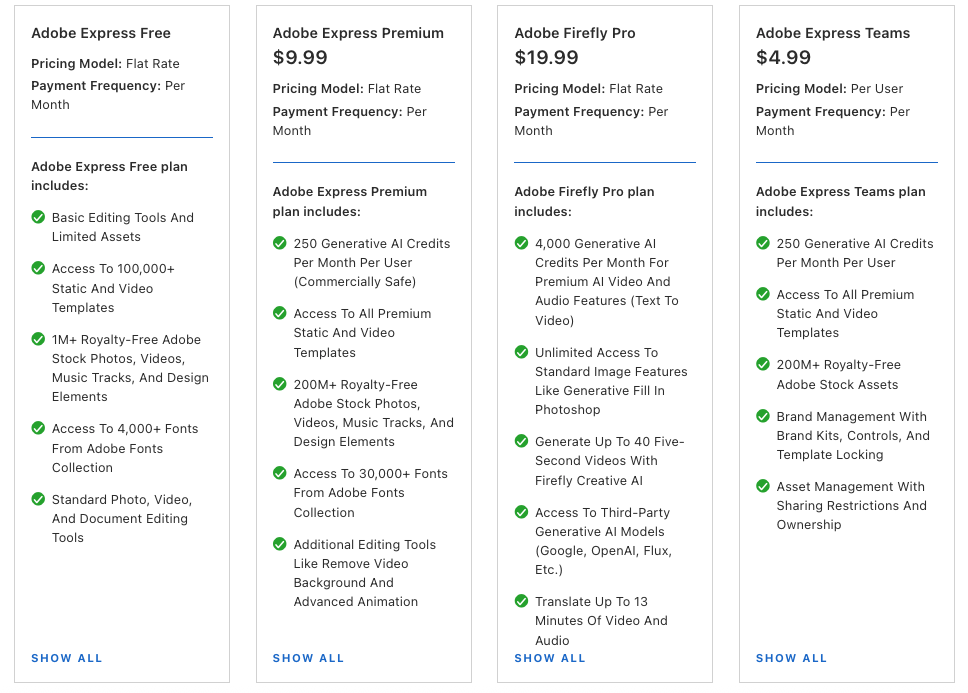
Adobe Express has a free plan and paid plans for individuals, teams, and businesses.
Adobe’s pricing page currently shows Adobe Express Premium options, and Adobe also lists Adobe Express Premium at ₹398.84/month in India on its Creative Cloud plans page.
The Premium plan is usually where Adobe Express starts to feel more useful because you get access to premium templates, brand features, Adobe Fonts, stock assets, resizing tools, and more creative options.
Adobe Express makes the most sense if you want a low-cost design tool for:
- Social media graphics
- Branded marketing assets
- Flyers and posters
- Simple videos
- AI-assisted image creation
- Non-designer content production
If you already have Adobe Creative Cloud, Adobe Express Premium may also be included with some plans, which can make it an easy choice. Adobe says the Premium plan is included with Creative Cloud All Apps and some Single App plans.
Want More Alternatives to Adove Express:
Adobe Express Alternatives: Know Which Tool You Should Choose
Figma
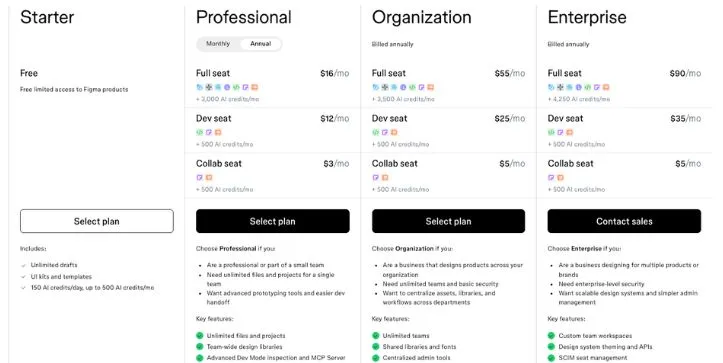
Figma also has a free plan, but teams usually need a paid plan once they start working seriously.
Figma’s pricing page currently lists the Professional plan at $16/monthly or $12/month annually for a full seat, with higher-tier Organization and Enterprise plans priced above that.
The Professional plan includes features like unlimited files and projects, team-wide design libraries, advanced prototyping tools, and Dev Mode inspection.
Figma makes the most sense if you need:
- UI/UX design
- Product design
- Website layouts
- Prototypes
- Design systems
- Developer handoff
- Team collaboration
- Shared libraries
The cost can rise quickly if you need many full seats, but the value is easier to justify for product teams because Figma replaces a lot of scattered design and review workflows.
Which Tool Offers Better Pricing Value?
Adobe Express is better value for creators, marketers, small businesses, and content teams that mainly need fast branded content.
Figma is better value for product teams, startups, agencies, and design teams that need collaboration, prototypes, design systems, and developer handoff.
If you only need social posts and simple videos, Figma is probably overkill.
If you’re building a product or managing a serious design system, Adobe Express is not enough.
Final Verdict: Which One Should You Choose?
Adobe Express and Figma are both strong tools, but they solve different problems.
Adobe Express is better if you want to create polished content quickly. It’s easier to learn, faster for social posts, stronger for ready-made templates, and more practical for marketers, creators, educators, and small businesses.
Figma is better if you need design depth. It gives you stronger layout control, collaboration, prototyping, components, shared libraries, and design systems. For UI/UX designers, product teams, developers, and startups, it’s the better long-term tool.
Here’s the simplest way to decide:
- Choose Adobe Express if you need fast content creation.
- Choose Figma if you need scalable design systems.
- Use both if your team wants designers to build the system in Figma and marketers to produce daily content in Adobe Express.
FAQs: Adobe Express vs Figma
Is Adobe Express better than Figma?
Adobe Express is better if you want to create quick social media posts, flyers, thumbnails, short videos, and branded marketing content.
Figma is better if you need UI/UX design, product mockups, prototypes, design systems, and team collaboration.
So, the better tool depends on your work:
- Choose Adobe Express for fast content creation
- Choose Figma for advanced design control
- Use both if you want Figma for master designs and Adobe Express for daily content production
What is the main difference between Adobe Express and Figma?
The main difference is purpose.
Adobe Express is a simple design and content creation tool. It helps you create finished graphics and videos quickly.
Figma is a professional design platform. It helps teams create interfaces, prototypes, reusable components, and design systems.
In simple words:
- Adobe Express = create and publish fast
- Figma = design, prototype, and scale
Can Adobe Express replace Figma?
Adobe Express can replace Figma only for basic design tasks.
For example, Adobe Express works well for:
- Instagram posts
- Flyers
- Posters
- YouTube thumbnails
- Simple ads
- Short videos
- Branded templates
But it cannot fully replace Figma for:
- UI/UX design
- App design
- Website wireframes
- Interactive prototypes
- Design systems
- Developer handoff
- Reusable components
If you’re doing product or interface design, Figma is still the better choice.
Can Figma replace Adobe Express?
Figma can replace Adobe Express if you’re comfortable designing from scratch or working with reusable templates.
Designers often use Figma for:
- Social media carousels
- Landing page graphics
- Product launch visuals
- Ad layouts
- Brand systems
- Presentation designs
But for non-designers, Figma can feel slower than Adobe Express. Adobe Express gives you ready-made templates, quick resize tools, stock assets, AI features, and social media-friendly formats.
So yes, Figma can replace Adobe Express for design teams, but not always for marketers or beginners.
Which is easier to use, Adobe Express or Figma?
Adobe Express is easier to use.
It has a simple drag-and-drop editor, ready-made templates, quick editing tools, and brand kit features that are easy to understand.
Figma has a bigger learning curve because it includes:
- Frames
- Layers
- Components
- Auto Layout
- Variables
- Prototypes
- Shared libraries
If you’re a beginner, Adobe Express will feel more comfortable. If you’re a designer, Figma gives you more power.
Is Adobe Express good for social media design?
Yes, Adobe Express is very good for social media design.
It works well for creating:
- Instagram posts
- Instagram stories
- LinkedIn graphics
- YouTube thumbnails
- TikTok covers
- Facebook ads
- Pinterest pins
- Short promotional videos
It’s especially useful if you want a social media video creation tool with templates, AI features, brand kits, and quick resizing.
Is Figma good for social media design?
Yes, Figma is good for social media design, especially if you care about layout control and brand consistency.
Figma works well for:
- LinkedIn carousel posts
- Multi-slide Instagram posts
- Product announcement graphics
- Brand campaign templates
- Ad creative systems
- Reusable social media layouts
But Figma does not have native social media scheduling in its core design tool. So, if you want to create and publish fast, Adobe Express is usually easier.
Which tool is better for UI/UX design?
Figma is the clear winner for UI/UX design.
It is built for:
- Website layouts
- Mobile app screens
- Wireframes
- Interactive prototypes
- Design systems
- Developer handoff
- Product design collaboration
Adobe Express is not built for serious UI/UX work. It’s better for marketing graphics, content creation, and simple branded assets.
Which tool is better for beginners?
Adobe Express is better for beginners.
You can start with a template, change the text, add your logo, apply your brand colors, and export the design without learning advanced design rules.
Figma is beginner-friendly compared to older professional design tools, but it still takes more time to learn.
Which tool is better for professional designers?
Figma is better for professional designers.
It gives designers more control over layout, spacing, components, design systems, prototypes, and team collaboration.
Adobe Express is useful for quick production work, but most professional designers will find it too limited for complex design projects.
Which is better for startups, Adobe Express or Figma?
Figma is usually better for startups building a product, app, website, or SaaS platform.
Adobe Express is better for startups that need quick marketing content and do not have a full design team.
A good startup workflow could look like this:
- Use Figma for product design, landing pages, brand systems, and templates
- Use Adobe Express for social media posts, flyers, quick ads, and daily content
This gives you both design control and content speed.
Which is better for marketing teams?
Adobe Express is better for most marketing teams that need to create content quickly.
It works well for:
- Campaign graphics
- Social posts
- Simple videos
- Ads
- Flyers
- Event promotions
- Brand-safe templates
Figma is better when the marketing team works closely with designers and needs reusable campaign systems.
Which is better for design teams?
Figma is better for design teams.
It supports real-time collaboration, shared libraries, comments, version history, components, variables, and developer handoff.
Adobe Express is more useful when design teams want to give marketers simple branded templates they can edit without touching the main design system.
Does Adobe Express have AI features?
Yes, Adobe Express includes AI-powered creative features, mainly powered by Adobe Firefly.
You can use it for tasks like:
- Generating images
- Removing backgrounds
- Creating text effects
- Resizing content
- Making quick design variations
- Editing simple video and graphic assets
It’s a strong option if you want an AI graphic design tool for marketers and creators.
Does Figma have AI features?
Yes, Figma has AI features that support design workflows, layout ideas, image editing, product concepts, and creative exploration.
Figma’s AI features are more useful for people working on structured design projects, such as websites, apps, product flows, and design systems.
Adobe Express feels better for quick AI-generated content. Figma feels better for AI-assisted design work.
Is Adobe Express a Canva alternative?
Yes, Adobe Express is one of the closest Canva alternatives.
It offers templates, brand kits, AI tools, stock assets, fonts, resizing, and simple video creation.
It’s a good Canva alternative for creators, marketers, small businesses, and teams already using Adobe tools.
Is Figma a Canva alternative?
Figma can be a Canva alternative for design teams, but it is not as simple for beginners.
Figma is better when you need:
- Custom design systems
- UI/UX layouts
- Reusable templates
- Precise design control
- Team collaboration
If you want quick drag-and-drop templates, Adobe Express or Canva will feel easier. If you want advanced control, Figma is stronger.
Which is better for brand kits, Adobe Express or Figma?
Adobe Express is better for simple brand kits.
You can save logos, colors, fonts, and branded assets so your team can create content more consistently.
Figma is better for advanced brand systems because it supports:
- Components
- Variables
- Shared libraries
- Text styles
- Color styles
- Design tokens
So, Adobe Express is better for basic brand control. Figma is better for scalable brand consistency.
Which is better for collaboration?
Figma is better for deep collaboration.
Designers, developers, product managers, and stakeholders can work together in the same file, leave comments, inspect designs, and review prototypes.
Adobe Express is better for simple content collaboration, especially when marketers and non-designers need to edit branded templates.
Which is better for agencies?
Figma is better for design agencies working on websites, apps, product design, and brand systems.
Adobe Express is better for agencies creating high-volume social media content, quick ads, local business graphics, and branded templates for clients.
Many agencies can benefit from using both:
- Figma for strategy, systems, and polished design work
- Adobe Express for fast content production and client-editable assets
Which is better for small businesses?
Adobe Express is usually better for small businesses.
It is easier to learn and better suited for everyday content needs like:
- Menus
- Posters
- Flyers
- Instagram posts
- Offers
- Event graphics
- Simple videos
- Business cards
Figma is useful if the business needs a custom website, app, or more advanced brand system.
Is Adobe Express free?
Adobe Express has a free plan, but some features, templates, stock assets, fonts, and brand tools may require a paid plan.
The free plan is useful for testing the tool, but the paid plan makes more sense if you want premium templates, stronger brand kit features, and more creative assets.
Is Figma free?
Figma has a free plan that works well for individuals, beginners, and small projects.
Teams usually move to a paid plan when they need more collaboration features, shared libraries, advanced prototyping, and professional design workflows.
Which is cheaper, Adobe Express or Figma?
Adobe Express is usually cheaper for basic content creation.
Figma can cost more for teams, especially if you need multiple full seats. But it can offer better value for product teams because it supports UI design, prototyping, design systems, and developer handoff.
The better value depends on your use case:
- Adobe Express is better value for creators and marketers
- Figma is better value for product and design teams
Should I use Adobe Express and Figma together?
Yes, using both can be the smartest workflow for growing teams.
Here’s how that setup works:
- Designers create the brand system in Figma
- Designers build master templates in Figma
- Marketers use Adobe Express for daily content
- Social teams create quick posts, videos, and campaign assets
- The brand stays consistent without slowing down production
This is a strong workflow if you want Figma’s design control and Adobe Express’s content creation speed.