

Most “Adobe Express vs Visme” comparisons treat this like a simple design tool matchup.
It’s not.
After working with both, one thing becomes clear fast:
They’re built for different creative workflows.
Adobe Express is built for quick content creation.
Visme is built for visual communication.
Yes, both help you create designs. That’s where the easy comparison ends.
The confusion comes from the category.
Both sit under “graphic design software,” and both offer templates, AI tools, brand kits, and drag-and-drop editing.
But the moment you try to use one for the other’s main job, the differences show up quickly.
This guide cuts through that confusion.
You’ll see what each tool is actually built for, how they perform in real use, and which one makes sense for your design workflow.
TL;DR: Adobe Express vs Visme at a Glance
| Based On | Adobe Express | Visme |
| Built for | Quick designs, social content & short videos | Presentations, infographics & business visuals |
| Main workflow | Fast template-based content creation | Visual communication and branded documents |
| Best templates | Social posts, flyers, posters, videos | Presentations, reports, infographics, proposals |
| AI tools | ✅ Strong creative AI via Adobe Firefly | ✅ AI tools for presentations, documents & design |
| Brand kit | ✅ Good for basic brand assets | ✅ Stronger for team brand control |
| Data visualization | ⚠️ Basic charts and design elements | ✅ Charts, graphs, maps and data widgets |
| Video creation | ✅ Better for short-form social videos | ⚠️ Supports video, but not its main strength |
| Collaboration | ✅ Useful for simple team projects | ✅ Better for marketing and business teams |
| Starting price | Free plan + paid plans available | Free plan + paid plans available |
| Free plan | ✅ Available | ✅ Available |
| Best for | Creators, students, freelancers, small businesses | Marketers, educators, sales teams, design teams |
Also Read:
Top Visme Competitors and Alternatives
Best Adobe Express Alternatives
Adobe Express vs Visme: Full Side-By-Side Comparison of Features
Let’s compare both tools based on what they actually help you create, how they feel in real use, and which one makes more sense for your workflow.
- Adobe Express vs Visme: Pricing and Cost Efficiency
- Adobe Express vs Visme: Templates and Design Variety
- Adobe Express vs Visme: AI Tools and Creative Automation
- Adobe Express vs Visme: Presentations and Business Documents
- Adobe Express vs Visme: Infographics and Data Visualization
- Adobe Express vs Visme: Social Media Graphics and Video Creation
- Adobe Express vs Visme: Brand Kit, Collaboration and Team Use
1. Adobe Express vs Visme: Pricing and Cost Efficiency
Pricing looks simple at first because both tools offer a free plan.
But the real cost depends on what you’re creating.
If you only need quick social posts, flyers, thumbnails, short videos, or basic branded content, Adobe Express can feel like better value. Adobe positions Express as an all-in-one design, photo, and video tool for social posts, videos, flyers, and more.
Visme starts to make more sense when your work involves presentations, reports, branded documents, infographics, proposals, and team content. Its pricing is built around creating on-brand content at scale, with plans for small businesses, teams, education, nonprofits, and enterprise users.
Adobe Express: Pricing and Cost Efficiency
Adobe Express has a free plan, plus paid plans for users who want premium templates, more AI credits, brand tools, and extra creative assets.
It feels cost-efficient when your workflow is fast and content-heavy.
You open the editor, pick a template, adjust the text, swap the image, resize it for Instagram or LinkedIn, and publish. That’s the kind of work Adobe Express handles well.
Pros
The free plan is useful for beginners.
The paid plan gives you access to stronger creative features, especially if you already use Adobe tools.
It’s a good fit for creators, students, freelancers, and small businesses that need a social media video creation tool without paying for a full design suite.
Cons
The value drops if your main work is business reporting, pitch decks, data visuals, or interactive presentations.
You can make polished designs, but Adobe Express doesn’t feel as deep when you need structured documents, charts, or multi-page business content.
My take
Adobe Express is the better low-friction option.
If your design workflow is mostly posts, reels, flyers, YouTube thumbnails, simple ads, and quick brand assets, it gives you a lot without making the process feel heavy.
Visme: Pricing and Cost Efficiency
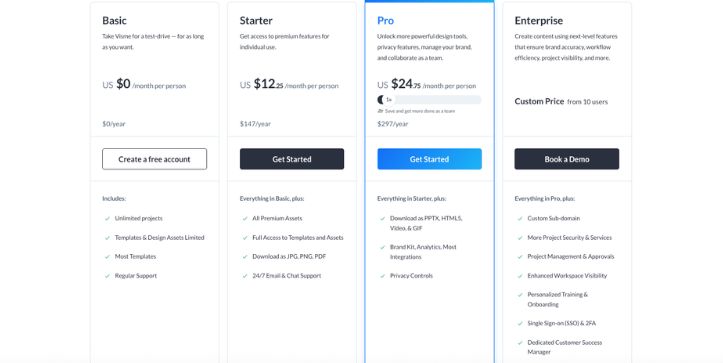
Visme also has a free plan, but the better value shows up when you use it for business content.
The free plan is helpful for testing the editor. Paid plans become more important when you need downloads, premium assets, more storage, brand features, and team tools. Visme’s support page describes its Basic plan as a free way to explore templates and the editor, while paid plans unlock download options, premium assets, and advanced sharing.
Pros
Visme gives better value when you create presentations, reports, infographics, proposals, training material, and marketing documents often.
You’re not just paying for a design editor. You’re paying for a full visual communication workspace.
That matters for teams.
Cons
If you only need simple social graphics, Visme can feel like more tool than you need.
Some of its strongest features sit behind paid plans, so the free version is better for testing than serious long-term use.
My take
Visme is more cost-efficient for business users.
If you’re a marketer, educator, consultant, sales team, or design team creating client-facing content every week, the price makes more sense because the tool replaces several smaller workflows.
This read is for you:
Visme Pricing Explained: Complete Guide
2. Adobe Express vs Visme: Templates and Design Variety
This is where the difference becomes obvious.
Both tools have templates.
But they’re not aiming at the same kind of work.
Adobe Express leans into quick, creator-friendly assets. Visme leans into structured, business-friendly content.
Adobe Express: Templates and Design Variety
Adobe Express is strong when you want to create something fast.
Social posts, posters, flyers, logos, invitations, short videos, ads, and thumbnails are easy to start with. The templates feel modern and lightweight, which is exactly what you want when you’re making daily content.
You can pick a template, change the headline, drop in your product image, apply your brand colors, and export without overthinking the layout.
Pros
The template library is great for quick marketing assets.
It works well for Instagram posts, TikTok graphics, YouTube thumbnails, flyers, and promotional visuals.
The designs feel approachable, so non-designers don’t get stuck staring at a blank canvas.
Cons
The template depth is weaker for serious business formats.
You can create presentations or documents, but it doesn’t feel as purpose-built for reports, pitch decks, proposals, or data-heavy content.
My take
Adobe Express is better for speed.
If your content calendar needs daily graphics and short-form assets, it helps you move fast without needing a designer for every small task.
Visme: Templates and Design Variety
Visme has a broader template library for business communication.
Presentations, infographics, reports, charts, proposals, white papers, training decks, one-pagers, forms, and social graphics all live in one place.
This is where it starts to feel less like a Canva alternative for casual design and more like an AI graphic design tool for marketers, educators, and teams.
Pros
Visme gives you stronger templates for business storytelling.
Pitch decks, marketing reports, case studies, sales enablement content, and infographics feel more natural to build here.
The templates also give you more room for charts, sections, icons, data blocks, and branded layouts.
Cons
Because Visme covers more formats, it can take a little longer to choose the right starting point.
The editor isn’t hard, but the platform has more layers than Adobe Express.
My take
Visme wins for template depth.
If you’re creating content that needs structure, flow, and explanation, Visme gives you better starting points.
3. Adobe Express vs Visme: AI Tools and Creative Automation
Both tools now use AI to speed up content creation.
But again, the AI is pointed in different directions.
Adobe Express feels more creative and visual.
Visme feels more business-focused and document-focused.
Adobe Express: AI Tools and Creative Automation
Adobe Express benefits from Adobe Firefly-powered features.
That makes it useful when you want to generate images, create effects, remove backgrounds, resize designs, rewrite text, or turn rough ideas into polished creative assets.
If you’re testing an AI ad creative generator workflow, Adobe Express feels quick. You can generate a background, add product text, resize the design for multiple channels, and create simple video variations without moving between five tools.
Pros
Adobe Express is strong for visual AI tasks.
Background removal, image generation, text effects, quick design edits, and social-first creative workflows feel natural.
It’s especially useful when you need fast variations for campaigns.
Cons
The AI tools are not as focused on long-form business content.
If you want to build a full presentation, infographic, or report from a prompt, Visme usually feels more aligned with that job.
My take
Adobe Express is better for creative production.
It’s the tool I’d use when I need a quick visual concept, a social ad, a short promotional video, or a polished asset for a campaign.
Visme: AI Tools and Creative Automation
Visme’s AI features are more useful when the output needs structure.
Think AI-generated presentations, documents, images, text, layouts, and business content. It’s not just about making one graphic look nice. It helps you build content that has sections, slides, visuals, and a clear message.
For an AI design software review, this difference matters.
Visme’s AI feels less like “make me a cool image” and more like “help me build a usable business asset.”
Pros
Visme is stronger for AI-assisted presentations, documents, and structured content.
It helps when you need a first draft of a deck, a report layout, or a visual explanation.
That saves time for marketers, educators, consultants, and founders.
Cons
If your priority is pure visual generation or fast creative effects, Adobe Express feels smoother.
Visme’s AI is useful, but it’s not as tightly connected to the Adobe creative ecosystem.
My take
Visme wins for AI business content.
If your goal is to create a presentation, proposal, or infographic faster, Visme’s AI tools fit the workflow better.
4. Adobe Express vs Visme: Presentations and Business Documents
This is not a close category.
Adobe Express can create presentation-style content.
Visme is built for it.
Adobe Express: Presentations and Business Documents
Adobe Express can handle simple slides, one-page documents, flyers, and branded assets.
It works if you need a quick class presentation, a simple product announcement, or a lightweight visual document.
But when the project grows past a few slides, the limits start to show.
You don’t get the same depth around structured slide decks, charts, interactive elements, business layouts, or content blocks.
Pros
Adobe Express is easy for simple visual documents.
It’s fast for posters, announcements, one-page handouts, and quick branded slides.
If you already have assets in Adobe, pulling them into your workflow feels convenient.
Cons
It’s not the best tool for serious presentations.
Pitch decks, training decks, reports, and proposals need more structure than Adobe Express comfortably gives you.
My take
Adobe Express works for lightweight presentation needs.
But I wouldn’t choose it as my main presentation tool for a sales deck, investor deck, or marketing report.
Visme: Presentations and Business Documents
Visme is much stronger here.
This is one of the main reasons people choose it.
You can create slide decks, proposals, reports, ebooks, white papers, training content, and branded documents with more control over layout and storytelling.
It also supports interactive visual content, which helps if you want to share a deck online instead of just exporting a static PDF.
Pros
Visme gives you better tools for professional presentations.
You get stronger layouts, more business templates, charts, icons, animations, interactive elements, and sharing options.
It feels built for people who need to explain ideas clearly.
Cons
There are more options to manage.
If all you need is a quick social graphic, Visme may feel slower than Adobe Express.
My take
Visme wins this section easily.
For presentations and business documents, it’s the more complete tool.
5. Adobe Express vs Visme: Infographics and Data Visualization
This is another category where Visme has the edge.
Adobe Express can make visual designs.
Visme can help you explain information.
That’s a big difference.
Adobe Express: Infographics and Data Visualization
Adobe Express can create simple infographic-style designs using icons, text blocks, shapes, and templates.
If you’re making a basic “5 tips” graphic or a simple educational post for Instagram, it works fine.
But once you need charts, graphs, maps, data widgets, or structured visual storytelling, Adobe Express starts to feel limited.
Pros
Adobe Express is good for lightweight visual explainers.
It’s easy to make list-style graphics, quote cards, comparison posts, and simple educational visuals.
The editor stays clean and beginner-friendly.
Cons
It’s not built for deeper data visualization.
You won’t get the same charting, reporting, or infographic workflow you get in Visme.
My take
Adobe Express is fine for simple infographics.
But if the content depends on data, numbers, comparisons, or layered explanation, I’d move to Visme.
Visme: Infographics and Data Visualization
Visme is one of the stronger tools in this category.
You can build infographics, charts, graphs, maps, timelines, process visuals, comparison graphics, and data-heavy reports without needing a separate chart tool.
This matters for marketers and educators because visual clarity is the whole point.
A good infographic should not just look pretty. It should make the information easier to understand.
Pros
Visme gives you stronger control over charts and data visuals.
It’s better for reports, educational content, business storytelling, and marketing explainers.
You can create visuals that feel polished and useful, not just decorative.
Cons
You may need more time to build the layout well.
Data visualization takes more thought than a simple social post, so the workflow naturally feels a little slower.
My take
Visme is the better infographic tool.
If your content involves data, processes, statistics, reports, or visual explanations, Visme is the safer choice.
6. Adobe Express vs Visme: Social Media Graphics and Video Creation
Adobe Express gets its strongest win here.
Visme can create social content too.
But Adobe Express feels more natural for creators who need fast visuals and short videos.
Adobe Express: Social Media Graphics and Video Creation
Adobe Express is built for quick social media content.
Instagram posts, stories, reels, TikTok videos, YouTube thumbnails, ads, banners, and short promotional clips are easy to create.
The video workflow is especially useful for small teams and solo creators. You can trim clips, add text, use templates, apply brand elements, and export without opening a heavier video editor.
If you need a social media video creation tool that doesn’t feel intimidating, Adobe Express makes sense.
Pros
Adobe Express is faster for social graphics and short videos.
It’s good for creators, students, small businesses, and marketers who need content every week.
The resize and template workflow helps you create versions for different platforms quickly.
Cons
It’s not a full timeline editor.
If you need advanced video editing, layered motion graphics, detailed audio control, or complex animation, you’ll still want a tool like CapCut, Premiere Pro, or After Effects.
My take
Adobe Express wins for social media creation.
It’s simple, quick, and practical for everyday content.
Visme: Social Media Graphics and Video Creation
Visme can create social graphics, animated visuals, and video-style content.
It’s useful when the content is part of a larger brand campaign, especially if you want the same style across presentations, reports, infographics, and social posts.
But it doesn’t feel as video-first as Adobe Express.
The strength is consistency, not quick creator-style editing.
Pros
Visme is good for branded social visuals.
It helps teams keep graphics consistent across platforms, especially when using shared templates and brand assets.
It’s also useful for turning business content into social-friendly visuals.
Cons
The video creation workflow is not its main advantage.
If you’re making reels, TikToks, short promos, or quick video ads every day, Adobe Express feels easier.
My take
Visme works for branded social content.
Adobe Express works better for fast social production.
7. Adobe Express vs Visme: Brand Kit, Collaboration and Team Use
Both tools support brand assets and collaboration.
But Visme feels more serious for team workflows.
Adobe Express is better for quick brand consistency.
Visme is better for managing brand content across a team.
Adobe Express: Brand Kit, Collaboration and Team Use
Adobe Express lets you add brand colors, fonts, logos, and templates so your content stays consistent.
This is helpful for small businesses, creators, and teams that need to keep posts on-brand without hiring a designer for every asset.
It also works well if your team already uses Adobe Creative Cloud.
You can move faster because the design environment feels familiar, and Adobe’s ecosystem gives you access to a wider creative workflow.
Pros
Adobe Express is good for simple brand control.
It helps teams create branded social posts, flyers, ads, and videos quickly.
The learning curve is low, which matters when non-designers need to make content.
Cons
It’s not as strong for managing lots of business content across departments.
Brand governance, structured team workflows, and multi-format business assets are stronger in Visme.
My take
Adobe Express is great for lightweight brand consistency.
It helps small teams create polished content without slowing everything down.
Visme: Brand Kit, Collaboration and Team Use
Visme is stronger for teams that care about brand control.
You can create branded templates, manage assets, collaborate on projects, build presentations, create reports, and keep visual content consistent across departments.
This is where Visme starts to feel like a Canva alternative for design teams, especially teams that create more than social graphics.
Marketing teams can use it for campaign visuals.
Sales teams can use it for decks and proposals.
Educators can use it for training material.
Leadership teams can use it for reports and internal communication.
Pros
Visme gives teams more control over business content.
Brand kits, shared templates, collaboration, interactive content, and document-style workflows make it stronger for companies.
It’s better when multiple people need to create content without breaking brand rules.
Cons
It may feel too much for solo creators who only need quick visuals.
The more powerful workflow comes with more features to learn.
My take
Visme wins for team use.
If brand consistency, collaboration, presentations, documents, and repeatable business content matter to you, Visme is the better long-term tool.
Honest Take
Adobe Express and Visme are both good tools, but they’re not trying to win the same job.
Adobe Express is better when speed matters.
Use it for social posts, short videos, flyers, thumbnails, simple ads, and quick branded content. It’s the tool you open when you need something good-looking today.
Visme is better when clarity matters.
Use it for presentations, infographics, reports, proposals, charts, training content, and branded business materials. It’s the tool you open when the design needs to explain something, persuade someone, or stay consistent across a team.
For creators and small businesses, Adobe Express is usually the easier pick.
For marketers, educators, sales teams, consultants, and design teams, Visme is the stronger all-in-one visual communication platform.
Adobe Express vs Visme: Which One Is Better for Different Users?
Different users need different things from a design tool. Adobe Express and Visme both help you create polished content, but the better choice depends on what you’re actually making.
Best for Students
Winner: Adobe Express for quick projects; Visme for presentations and reports.
Adobe Express is better for fast class projects, posters, flyers, social graphics, and simple videos. It’s easy to open, edit, and export without spending much time learning the tool.
Visme makes more sense when students need a polished presentation, infographic, research report, or visual assignment with charts and structured sections.
Best for Small Businesses
Winner: Tie. Adobe Express for social content; Visme for branded business materials.
Adobe Express is great for small businesses that need Instagram posts, flyers, ads, menus, banners, and short promotional videos.
Visme is better when the business needs proposals, pitch decks, brochures, reports, lead magnets, or branded documents that look more professional and consistent.
Best for Marketers
Winner: Visme.
Visme is the better pick for marketers because it handles more than quick graphics. You can create campaign reports, infographics, presentations, sales decks, branded documents, and visual content for multiple channels.
Adobe Express is still useful for quick social assets, but Visme gives marketers more room to build full campaigns and explain results clearly.
Best for Social Media Creators
Winner: Adobe Express.
Adobe Express is faster for everyday creator content. It works well for Instagram posts, reels, TikTok visuals, YouTube thumbnails, stories, and short promo videos.
The workflow feels light, which matters when you need to create content often and move quickly.
Best for Presentations
Winner: Visme.
Visme is built for presentations. It gives you better slide templates, layouts, charts, icons, animations, and sharing options.
Adobe Express can handle simple slides, but Visme is stronger for pitch decks, business presentations, training decks, and classroom presentations.
Best for Infographics
Winner: Visme.
Visme is the better infographic maker. It gives you templates, charts, maps, icons, timelines, and data widgets that help turn information into clear visuals.
Adobe Express can make simple infographic-style posts, but Visme is stronger when the content needs structure and detail.
Best for Teams
Winner: Visme.
Visme is better for teams that need brand control, shared templates, collaboration, and repeatable content workflows.
It works well for marketing teams, sales teams, education teams, and businesses that create presentations, reports, and branded assets regularly.
Best for Adobe Creative Cloud Users
Winner: Adobe Express.
Adobe Express makes more sense if you already use Adobe tools. It fits naturally into the Adobe ecosystem and works well for users who want quick designs without opening heavier apps like Photoshop or Illustrator.
It’s a good lightweight companion for Adobe Creative Cloud users.
Best for Reports and Data Storytelling
Winner: Visme.
Visme is stronger for reports, charts, business summaries, data visuals, and storytelling with numbers.
If you need to explain performance, present survey results, show trends, or build a visual report, Visme gives you better tools than Adobe Express.
Adobe Express vs Visme: Final Verdict
Adobe Express and Visme are both useful design tools, but they serve different needs.
Choose Adobe Express if you want a fast, beginner-friendly tool for social media posts, short videos, flyers, simple branded content, and Adobe-connected workflows.
Choose Visme if you need a stronger business design platform for presentations, infographics, reports, data visualization, interactive content, team collaboration, and brand consistency.
Overall recommendation: Adobe Express is better for quick creative production. Visme is better for professional visual communication and business content.
Frequently Asked Questions
Is Adobe Express better than Visme?
Adobe Express is better if you mostly create quick social media posts, flyers, short videos, thumbnails, and simple branded designs.
It’s faster, easier for beginners, and a better fit for creators who want to publish content quickly.
Is Visme better than Adobe Express?
Visme is better if you create presentations, infographics, reports, proposals, charts, and business documents.
It gives you more control over structure, data visualization, brand consistency, and team collaboration.
What is the main difference between Adobe Express and Visme?
The main difference is the workflow.
- Adobe Express is built for quick creative production.
- Visme is built for professional visual communication.
Both are design tools, but they solve different problems.
Which is easier to use: Adobe Express or Visme?
Adobe Express is slightly easier for beginners because the workflow is simple and fast.
Visme is also beginner-friendly, but it has more features, especially for presentations, reports, infographics, and team projects.
Which tool is better for social media content?
Adobe Express is better for social media content.
It works well for:
- Instagram posts
- Reels
- TikTok videos
- YouTube thumbnails
- Stories
- Flyers
- Quick ads
Visme can also create social graphics, but Adobe Express feels faster for everyday creator content.
Which tool is better for presentations?
Visme is better for presentations.
It offers stronger slide templates, charts, icons, animations, branded layouts, and sharing options. Adobe Express can create simple presentation-style designs, but Visme is the better choice for pitch decks, training decks, and business presentations.
Which tool is better for infographics?
Visme is better for infographics.
It gives you better tools for:
- Charts
- Graphs
- Maps
- Timelines
- Process visuals
- Data widgets
Adobe Express can make simple infographic-style posts, but Visme is stronger for detailed visual storytelling.
Which is better for small businesses?
It depends on what the business creates.
Choose Adobe Express if you need:
- Social media posts
- Flyers
- Menus
- Posters
- Short promo videos
- Simple ads
Choose Visme if you need:
- Presentations
- Proposals
- Reports
- Brochures
- Infographics
- Branded business documents
Which is better for marketers?
Visme is better for most marketers because it handles more campaign-related content.
You can use it for reports, pitch decks, infographics, sales materials, lead magnets, and branded presentations. Adobe Express is still useful for fast social media visuals and ad creatives.
Which is better for students?
Adobe Express is better for quick school projects, posters, flyers, and simple videos.
Visme is better for presentations, research reports, visual assignments, and infographics.
Which is better for teams?
Visme is better for teams.
It gives teams more control over brand kits, templates, collaboration, and business content. Adobe Express is better for small teams that mainly need quick branded social content.
Which is better for Adobe Creative Cloud users?
Adobe Express is better for Adobe Creative Cloud users.
It fits naturally into the Adobe ecosystem and works well as a lighter tool for quick designs, especially when you don’t want to open Photoshop, Illustrator, or Premiere Pro.
Can Visme replace Adobe Express?
Visme can replace Adobe Express if your main work is presentations, reports, infographics, proposals, and branded business content.
But if you rely on Adobe Express for fast social media videos, creator graphics, and Adobe-connected workflows, you may still prefer Adobe Express.
Can Adobe Express replace Visme?
Adobe Express can replace Visme for simple design needs.
But it is not the best replacement if you need advanced presentations, data visualization, reports, interactive content, or team-based brand control.
Is Adobe Express a Canva alternative?
Yes. Adobe Express is often used as a Canva alternative for quick designs, social posts, flyers, videos, and branded content.
It’s especially useful for people who already like Adobe’s creative tools but want something simpler.
Is Visme a Canva alternative for design teams?
Yes. Visme works well as a Canva alternative for design teams, especially when the team creates presentations, infographics, reports, proposals, and branded business documents.
It’s less focused on casual design and more focused on visual communication.
Which one has better AI tools?
Adobe Express is better for creative AI tasks like image generation, text effects, background removal, and quick visual edits.
Visme is better for AI-assisted business content like presentations, documents, and structured visual assets.
Which tool is better for AI ad creatives?
Adobe Express is usually better for quick AI ad creative generation because it works well for fast visuals, short videos, social ads, and campaign variations.
Visme is better if the ad creative is part of a larger business campaign with reports, pitch decks, and branded marketing material.
Which one should I choose?
Choose Adobe Express if you want speed.
Choose Visme if you want structure.
Adobe Express is better for quick creative content. Visme is better for business visuals, presentations, infographics, and team workflows.



