

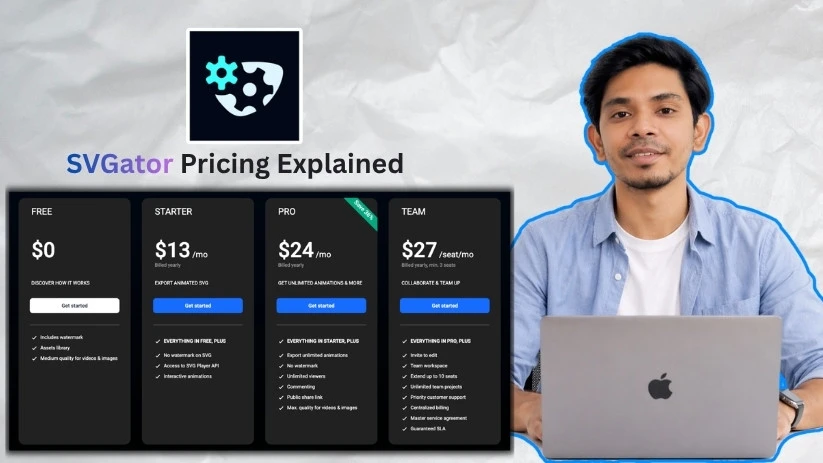
SVGator pricing looks simple until you check what each plan actually unlocks. Watermarks, export formats, video quality, sharing options, and team features all change depending on the tier. I dug into each SVGator plan to show where the limits start and which option makes the most sense for your workflow.
SVGator pricing plans: At a glance
The main things to watch out for with SVGator’s pricing plans are watermarks, export formats, video quality, and whether you need collaboration features like commenting, public links, or team editing.
Here’s a quick overview of what each plan offers:
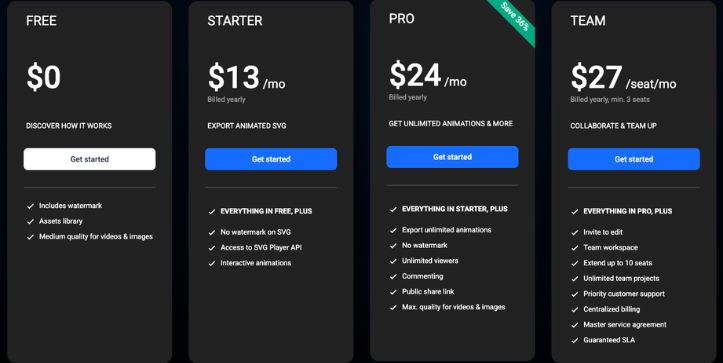
| Plan | Monthly price | Annual price | Best for | Key limits |
| Free | $0/month | $0/month | Testing the editor | Watermarked exports and medium-quality videos/images |
| Starter | $19/month | $13/month | Clean animated SVG exports | No watermark on SVG only; other formats stay watermarked |
| Pro | $38/month | $24/month | Freelancers & professional exports | No team workspace or invite-to-edit access |
| Team | $45/seat/month | $27/seat/month | Teams that need collaboration | Minimum 3 seats; extends up to 10 seats |
SVGator pricing plans breakdown
SVGator’s pricing mostly comes down to three things: whether your exports have a watermark, which file formats you need, and whether you’re working alone or with a team. The plans look simple at first, but the real limits show up when you move beyond basic SVG exports.
The biggest catch is the Starter plan. It removes the watermark from SVG exports, which is great if you’re building animated icons or website graphics. But if you need clean Lottie, GIF, video, or high-quality image exports, you’ll need Pro or Team.
Free plan: $0/month
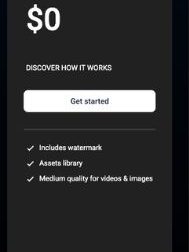
The Free plan works well if you want to test SVGator, learn the editor, or experiment with simple animations before paying. You can explore the animation timeline, assets library, and export options, but your final files won’t be production-ready because exports include a watermark.
What’s included:
- Assets library
- Medium-quality videos and images
- Static SVG import
- PNG, JPEG, GIF, and Lottie import
- Watermarked SVG export
- Watermarked Lottie export
- Watermarked React Native and Flutter export
- Watermarked GIF, PNG, WebP, and video export
- Knowledge base
- Email support
- Tutorials
Best for: Beginners, students, or designers testing SVGator before using it for real projects.
Pros:
- Free forever
- Good for learning the editor
- Lets you test multiple export formats
- Useful for quick animation experiments
Cons:
- Exports include a watermark
- Video and image quality is limited
- Not suitable for client work or production assets
- No clean animated SVG export
Starter plan: $13/month billed annually
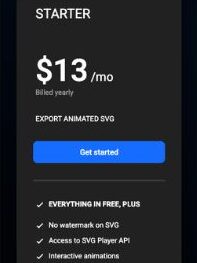
The Starter plan is for one specific use case: exporting animated SVGs without a watermark. If you’re a web designer or developer creating SVG animations for landing pages, icons, loaders, or UI details, this plan can make sense.
But it’s not a full “remove all watermarks” plan. Starter only removes the watermark from SVG exports. Lottie, GIF, video, React Native, Flutter, and animated image exports still stay watermarked, so this tier can feel limited if your workflow needs more than SVG.
What’s included:
- Everything in Free
- No watermark on SVG exports
- SVG export with JS or CSS
- Access to SVG Player API
- Interactive SVG animations
- All animators
- Custom easing functions
- Personal assets library
- Unlimited static export
Best for: Developers and designers who only need clean animated SVG files for websites.
Pros:
- Clean SVG exports at a lower price
- SVG Player API is included
- Good fit for interactive website animations
- Works well for lightweight web graphics
Cons:
- Only SVG exports are watermark-free
- Lottie, GIF, video, React Native, and Flutter exports remain watermarked
- No public share links
- No commenting or collaboration tools
- Limited rendered file storage
Pro plan: $24/month billed annually
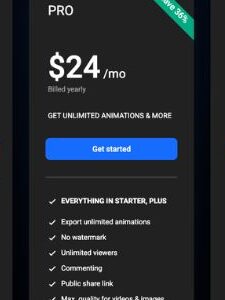
The Pro plan is where SVGator starts to make sense for professional work. You get unlimited animations, no watermark, better export quality, public share links, commenting, and more freedom across formats.
This is the plan I’d point most freelancers, marketers, and solo designers toward. If you’re creating animations for clients, websites, ads, product demos, apps, or social content, Starter will probably feel too narrow. Pro gives you room to export the same animation as SVG, Lottie, GIF, WebP, PNG sequence, or video without dealing with watermarks.
What’s included:
- Everything in Starter
- Export unlimited animations
- No watermark
- Unlimited viewers
- Commenting
- Public share links
- Max-quality videos and images
- Lottie JSON export
- Optimized Lottie JSON export
- React Native export
- Flutter export
- Animated GIF, PNG, WebP, and ZIP export
- Video export in MP4, AVI, MKV, MOV, and WebM
- Up to 4K resolution
- Up to 60 FPS for video
- Total export length up to 2 hours
- 100 GB render storage
Best for: Freelancers, solo creators, marketers, and product teams that need clean exports across multiple formats.
Pros:
- No watermark across export formats
- Unlimited animations
- Public links make client review easier
- Commenting helps with feedback
- Best value for most professional users
- High-quality video and image exports
Cons:
- No invite-to-edit access
- No shared team workspace
- No centralized billing
- Priority support is reserved for Team
Team plan: $27/seat/month billed annually
The Team plan is built for collaboration. It includes everything in Pro, then adds shared workspaces, editing access, team projects, priority support, and billing tools. The catch is that it has a minimum of 3 seats, so your actual starting cost is higher than the per-seat price suggests.
This plan makes sense when more than one person needs to edit animations inside SVGator. If you only need to share files with clients or collect comments, Pro may be enough. But if designers, developers, marketers, or stakeholders need to work inside the same workspace, Team is the better fit.
What’s included:
- Everything in Pro
- Invite to edit
- Team workspace
- Up to 10 seats
- Unlimited team projects
- Priority customer support
- Centralized billing
- Master service agreement
- Guaranteed SLA
- Business continuity and disaster recovery
- GDPR compliance
- ISO 27001 certification
- DPA template
- Role-Based Access Control
- Security review support
Best for: Agencies, design teams, product teams, and companies that need shared editing and managed billing.
Pros:
- Best plan for team collaboration
- Shared workspace keeps projects organized
- Invite-to-edit access is included
- Priority support helps teams move faster
- Centralized billing is useful for businesses
- Security and compliance features are stronger
Cons:
- Minimum 3 seats
- More expensive for solo users
- Overkill if you only need watermark-free exports
- Limited to 10 seats unless you need a larger custom setup
Which SVGator plan should you choose?
Choose Free if you:
- Want to test SVGator before committing
- Are learning how SVG animation works
- Don’t mind watermarked exports
Choose Starter ($13/month, billed annually) if you:
- Need watermark-free animated SVG exports
- Want access to the SVG Player API
- Create interactive SVG animations for websites
- Don’t need clean Lottie, GIF, or video exports
Choose Pro ($24/month, billed annually) if you:
- Need unlimited animations for client or product work
- Want no watermark across export formats
- Need high-quality GIF, WebP, Lottie, or video exports
- Want public share links and commenting
Choose Team ($27/seat/month, billed annually) if you:
- Need multiple people to edit SVGator projects
- Want a shared team workspace
- Need centralized billing and priority support
- Have at least 3 team members using SVGator
Is SVGator worth the cost?
SVGator is worth the cost if you need clean, web-friendly animations and want to export SVG, Lottie, GIF, or video without building animations by hand in code.
Below is how to know if it’s right for you.
SVGator is worth it if you:
- Need animated SVGs for websites or product interfaces.
- Want to create animations without writing JavaScript from scratch.
- Need multiple export formats like SVG, Lottie, GIF, WebP, or MP4.
- Work with clients and need clean, watermark-free files.
Skip SVGator if you:
- Only need one quick animation and don’t mind a watermark.
- Need advanced motion graphics like you’d build in After Effects.
- Want a full design suite instead of a focused SVG animation tool.
SVGator alternatives & pricing comparison
SVGator’s pricing works well if your main goal is creating animated SVGs, interactive SVGs, and clean web animation exports. But watermark rules, format limits, and collaboration features can push some users toward alternatives.
Here’s how the top alternatives stack up:
| Platform | Starting price | Free plan | Export focus | Collaboration | Best for |
| SVGator | $19/month monthly or $13/month annually | Yes, with watermark | SVG, Lottie, GIF, video, React Native, Flutter | Pro has comments; Team adds editing | Animated SVGs and web-friendly exports |
| Rive | $17/month monthly or $9/month annually | Yes, for creating in the editor | Interactive animations for web, mobile, games, Flutter, React Native | Built for shared interactive workflows | App and product animations with runtime control |
| LottieFiles | $19.99/user/month billed annually | Yes | Lottie hosting, animation management, handoff, lightweight web/app animations | Team and enterprise workflows | Managing and shipping Lottie animations |
| LottieLab | Paid Pro plan, billed per editor | Yes | Lottie, GIF, MP4, HD/4K video | Shared files, comments, team library | Designers creating Lottie animations visually |
| Jitter | $19/month reported starting paid price | Yes | GIF, video, WebM, Lottie, 4K exports | Real-time workspace collaboration | Fast motion design for product and marketing teams |
My Final verdict: the best SVGator plan for most users
For most professionals, SVGator Pro is the best value. It removes watermarks across formats, unlocks unlimited animations, adds public sharing and commenting, and gives you max-quality video and image exports.
I suggest you to choose Starter only if you just need watermark-free animated SVGs. Choose Team only if multiple people need to edit projects inside SVGator.
SVGator pricing FAQs
How much does SVGator cost?
SVGator has a Free plan, Starter from $13/month billed annually, Pro from $24/month billed annually, and Team from $27/seat/month billed annually with a 3-seat minimum.
Is SVGator free?
Yes, SVGator has a Free plan. It’s useful for testing the editor and learning the workflow, but exports include a watermark.
Does SVGator Starter remove the watermark?
Starter removes the watermark from SVG exports only. Lottie, GIF, video, React Native, Flutter, and other export formats remain watermarked unless you upgrade to Pro or Team.
Which SVGator plan removes all watermarks?
Pro and Team remove watermarks across export formats, making them better for client work, production websites, app animations, and marketing assets.
Is SVGator Pro worth it?
Yes, SVGator Pro is worth it for most professional users. It includes unlimited animations, no watermark, public share links, commenting, and max-quality video and image exports.
Is SVGator Team worth it?
SVGator Team is worth it when multiple people need to edit projects, use a shared workspace, manage billing in one place, and get priority support.
Does SVGator offer student pricing?
SVGator says it does not currently have an official educational plan, but students and teachers can contact SVGator about education use.
Can SVGator export Lottie files?
Yes, SVGator supports Lottie exports. The key thing to know is that Lottie exports are watermarked on Free and Starter, so you’ll need Pro or Team for clean Lottie files.
Is SVGator good for website animations?
Yes, SVGator is a strong fit for website animations, especially animated SVG icons, logos, preloaders, illustrations, and interactive SVG animations. It’s useful when you want web-friendly motion without writing the animation code by hand.
What is the difference between SVGator Starter and Pro?
Starter is mainly for watermark-free SVG exports. Pro is better if you need clean Lottie, GIF, WebP, PNG sequence, video, public sharing, commenting, and unlimited professional exports.
Does SVGator require coding?
No, SVGator is a no-code SVG animation tool. You can create animations visually, then export files for websites, apps, ads, or other design workflows.
Which SVGator plan is best for freelancers?
Pro is usually the best SVGator plan for freelancers because it removes watermarks across formats and gives you clean files for client delivery. Starter only makes sense if your client work is strictly SVG-based.



