Visme is one of those tools that makes designing feel kind of magical. Whether you’re building a sleek presentation, a social media graphic, or a full-on interactive report, it somehow makes non-designers feel like pros. Drag, drop, tweak a few things, and boom, you’ve got something that looks like it came out of a creative agency.
But then comes the not-so-fun part: figuring out how much it’s actually going to cost.
Designing something eye-catching in a few clicks is one thing. Paying for it, especially if you’re using it regularly for client work, team projects, or long-term content, is a whole different story.
That’s where this guide comes in. We’re going to break down Visme’s pricing, step by step. We’ll go over all the plans, what each one includes (and doesn’t), how the costs stack up monthly vs yearly, and even what kind of deals they offer for students, educators, and nonprofits. By the end, you’ll have a much clearer sense of which plan actually makes sense for you and whether Visme is really worth the spend.
What is Visme?
Visme is a visual content creation tool designed for people who want polished, professional designs without needing a design background. It helps you create presentations, infographics, reports, social media graphics, and even videos from one single dashboard. The platform keeps things simple on the surface, but under the hood, it offers enough flexibility and control to support marketers, educators, small teams, and growing businesses alike.
Also Read:5 Best Visme Alternatives for Smarter Visual Content Creation
Understanding the core Visme pricing model
Let’s start with a clear look at the different subscription plans Visme offers and how they compare.
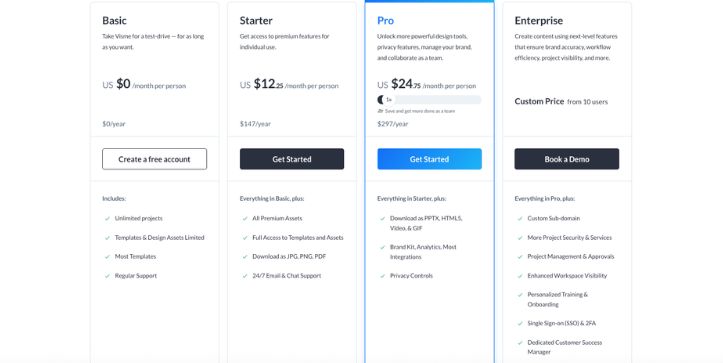
Visme subscription tiers: Free, Starter, Pro, and Visme for Teams
Visme offers a range of subscription plans that cover everyone from casual users just testing the waters to full-scale teams who need collaboration, branding tools, and premium features. Each plan gives you a different level of access to the platform’s tools, storage, downloads, and design options.
Here’s a quick look at how they stack up:
| Feature | Free Plan | Starter Plan | Pro Plan | Visme for Teams |
| Monthly Cost (billed yearly) | $0 | $12.25/month | $24.75/month | Custom pricing |
| Projects | Public only | Public & Private | Public & Private | Public & Private |
| Downloads | JPG only | JPG, PNG, PDF | All formats incl. PPTX, HTML5, video, GIF | All formats incl. advanced export |
| Brand Kit | No | Limited | Full brand kit | Advanced brand controls |
| Storage | 100 MB | 250 MB | 3 GB | Custom |
| AI Features | Limited | Starter-level credits | More credits + smart tools | Custom |
| Team Collaboration | No | No | Limited sharing | Full team collaboration |
| Support | Basic help center | Standard support | Priority support | Dedicated onboarding |
The Free plan is great if you just want to test things out or make something simple like a basic presentation or static graphic. You’re working with limited storage, no private projects, and minimal export options, but it gets your foot in the door.
The Starter plan adds private projects, more download formats, and slightly more storage, which makes it suitable for light personal or freelance use.
The Pro plan is where Visme really opens up. You get access to all download formats, higher storage, enhanced brand features, and priority support. This one is built for creators, marketers, and freelancers who need Visme as part of their regular workflow.
Finally, Visme for Teams is made for businesses and organizations that need multiple users, centralized branding, team collaboration tools, and advanced control over content. Pricing here is customized based on your team’s size and needs.
Visme’s usage details: what you get beyond the subscription
Unlike platforms that tack on surprise fees or metered usage, Visme keeps things fairly straightforward once you pick a plan. There’s no separate backend billing system or credit-based pricing model like some AI tools. What you pay each month (or year) covers access to the features, storage, downloads, and AI credits included in your tier.
That said, there are still a few things to keep an eye on.
For example, AI tools like text-to-design and design suggestions are limited by plan. The Pro plan includes more AI credits than Starter, and team accounts may have access to even more depending on their setup. If you use these tools frequently, you might run into soft limits that prompt you to upgrade or contact support for more capacity.
Also, download formats vary by plan. Free users are limited to basic image exports, while Pro users can export in high-res formats like PowerPoint, HTML5, video, and GIFs. If you need fully editable or animated exports, the Pro tier is where those live.
What You Get with Each Plan
Let’s break down exactly what each Visme plan unlocks so you know what you’re paying for and what you’re not. Whether you’re just dabbling or building content for a business, the features change quite a bit from one tier to the next. Here’s what to expect.
Templates and Asset Access
The Free plan gives you access to a limited selection of templates and design elements. It’s enough to get a feel for the platform, but you’ll quickly hit a wall if you’re trying to create anything custom or brand-specific.
With Starter, you unlock more templates and gain access to premium stock photos and icons, though some of the higher-end assets still remain off-limits.
The Pro plan gives you full access to Visme’s entire library, including thousands of professional templates, premium images, icons, charts, and animated graphics. If you’re designing regularly, this alone can save a ton of time and effort.
Team accounts get everything in Pro plus team templates, shared asset libraries, and centralized brand elements that everyone on the team can use.
Download Options
Downloads are another big difference between plans.
- Free users can only export projects as static JPGs. No transparency, no high-res, no other file formats.
- Starter unlocks PNG and PDF exports, which works well for simple sharing and presentations.
- Pro opens up everything: PowerPoint, HTML5, MP4 video, GIF, and more. If you need fully interactive content or if you’re creating animated visuals, this is where it starts to matter.
- Teams get all export options plus the ability to manage and restrict how content is shared externally.
Storage Limits
Your file storage grows as your plan does:
- Free: 100 MB
- Starter: 250 MB
- Pro: 3 GB
- Teams: Custom storage depending on your setup
If you’re uploading brand assets, video clips, or multiple projects, you’ll want to move out of the free tier pretty quickly.
Branding and Customization
On the Free plan, Visme branding stays on everything you make. There’s no way around it.
Starter lets you remove some of the Visme branding and start adding your own touches. But Pro is where the real brand control starts with custom fonts, color palettes, logos, and more. You can create a full brand kit and apply it across all your designs in one click.
Team plans take this further with advanced brand controls, asset permissions, and shared libraries for everyone on your team.
AI Tools and Credits
Visme’s built-in AI tools, like the “AI Designer” or content suggestions, are super helpful but limited on lower tiers.
- Free users get a small taste, just enough to see what it can do.
- Starter includes a modest number of AI credits for tasks like smart content generation.
- Pro includes more AI usage and often gets access to new features earlier.
- Teams may get expanded AI access depending on the setup.
These tools are still evolving, but they’re already speeding up workflows, especially for things like layout suggestions and text content.
Also Read:
A complete guide to Adobe Express pricing in 2026
Are There Any Hidden Costs With Visme?
Visme doesn’t throw in random surprise charges, but there are a few things that might catch you off guard if you don’t read the fine print. These aren’t exactly hidden fees, but they are limitations and upgrade triggers that can feel like paywalls once you start building serious projects.
Free Plan Limitations
Yes, Visme has a Free plan. No, it’s not enough for most real-world use. You’re limited to public projects only, downloads are restricted to basic JPGs, and everything you make carries Visme’s branding. There’s also very limited access to templates, assets, and AI tools. It’s good for testing things out, but you’ll hit a wall quickly.
Export Restrictions
Downloading your project isn’t always straightforward. If you need file types like PPTX, PDF, video, GIF, or interactive HTML5, those are locked behind paid plans. Pro users get access to everything, but Starter users only get limited formats. Free users? Just static images. So if you’re planning to use Visme for presentations, videos, or embeds, you’ll need to upgrade.
AI Credit Limits
Even on the Pro plan, AI usage isn’t unlimited. You get a set number of AI credits depending on your plan. These are used for features like auto-generating layouts or content suggestions. If you use them frequently, they can run out before your billing cycle resets. There’s no clear pricing for buying extra credits, so you may need to upgrade or wait it out.
Branding and Customization
Removing the Visme logo from your work only becomes an option on paid plans. And full brand control like uploading your own fonts, setting up a brand kit, or applying styles across a team is only available on Pro and Team plans. So if consistent branding matters to you, that’s something to factor in.
Team Features Are Locked Behind Custom Pricing
If you’re looking to collaborate with others, set permissions, or manage brand assets across multiple users, you’ll need to move up to the Visme for Teams plan. But here’s the thing — that plan doesn’t have public pricing. You’ll need to contact sales for a quote, which can make it hard to estimate your actual cost until you’re already in the sales funnel.
Final Thoughts: Is Visme Pricing Worth It for Your Project?
If you’re just experimenting or need a quick design for something simple, the Free plan will get the job done but you’ll feel the limitations fast. For serious projects, especially anything involving branding, advanced exports, or frequent content creation, the Pro plan is where Visme really starts to deliver value.
What makes it worth the cost is how much time and effort it saves. You’re not just paying for templates and downloads. You’re paying for a smoother workflow, sharper designs, and tools that help your work stand out without needing a whole design team. If that’s what your project needs, Visme is absolutely worth it.
Frequently Asked Questions About Visme Pricing
1. Can I use Visme for free, or do I need to pay?
Yes, Visme has a free plan that lets you try out the platform without entering any payment info. It’s great for testing the basics, but if you want features like private projects, more download options, or access to premium templates, you’ll need to upgrade.
2. Is there a limit on how many times I can download or share my Visme projects?
There’s no strict limit, but what you can download and in what format depends on your plan. Free users are limited to basic JPG exports. Pro and Team users can download interactive presentations, videos, PDFs, GIFs, and more. Sharing options are open to everyone, but advanced privacy controls are only available on paid plans.
3. What happens to my content if I cancel my Visme subscription?
If you cancel a paid plan, your account downgrades to the Free plan. You’ll still have access to your existing projects, but features like private sharing, premium downloads, and custom branding will be disabled unless you upgrade again.
4. Can I use Visme for client work or commercial use?
Yes, Visme is designed for professionals, freelancers, and small businesses. The Pro and Team plans are built to support branded content, commercial downloads, and project sharing with clients or collaborators.
5. Can I make my Visme projects private?
Only if you’re on a paid plan. The Free version of Visme only supports public projects. Once you upgrade to Starter or higher, you can create private content and control how it’s shared.
6. How do Visme’s paid plans work?
Paid plans are structured around feature access. The more you pay, the more tools, templates, downloads, and storage you get. You can pay monthly or annually, and annual billing includes a discount. Upgrading also unlocks AI credits, branding tools, and premium export formats.
7. Does Visme charge extra for AI features?
AI features come with your plan, but each tier includes a limited number of credits. These credits are used for things like auto-generating layouts or design suggestions. If you hit your credit limit, you may need to wait for a reset or contact support. There’s no standalone pricing listed for extra credits.
8. How do I upgrade my free Visme account?
Just log into your dashboard, find your current plan status, and click the upgrade option. You’ll be able to choose between monthly or yearly billing and pick the plan that best fits your needs.
9. Is there a free trial of Visme’s paid plans?
Visme doesn’t offer a standard time-limited trial of paid features, but the Free plan gives you a hands-on feel for how things work. If you like what you see, you can upgrade anytime for full access.
10. Can I pause my Visme subscription instead of canceling?
Currently, there’s no official pause option. If you need to step away, you can cancel and come back later. Just keep in mind that you’ll lose access to premium features while on the Free plan.
11. Does Visme offer discounts for students, teachers, or nonprofits?
Yes, Visme offers discounted rates for eligible students, educators, and nonprofit organizations. You can apply directly through their website and once approved, get access to lower pricing on paid plans.
12. How do I sign up for Visme’s education plan?
Head to the Visme for Education page and fill out the application form. Once you’re verified as a student or educator, you’ll get access to a discounted plan built for classroom use and academic projects.
13. We’re a business or team. Can we book a live demo of Visme?
Yes. If you’re exploring Visme for Teams or need a custom setup, you can request a live demo through the site. A product expert will walk you through the features and help you decide which plan fits best.