I spent time digging into Wan AI to see if it actually lives up to the hype — realistic AI video generation, cinematic motion, image-to-video, and native audio from an open-weight model family.
Quick answer? It’s genuinely impressive in the right hands, but it’s also more confusing than most beginner-friendly AI video tools.
Wan AI is essentially a multimodal AI video model suite originally developed by Alibaba’s Tongyi Lab.
You can use it to generate videos from text prompts, animate images, create cinematic camera movement, and in some versions, add synced sound effects or dialogue.
Sounds exciting. But once you start looking at model versions, local setup, hosted platforms, pricing, and alternatives, things get a little messy.
In this Wan AI review, I’ll walk you through:
- What Wan AI actually does (and what it doesn’t)
- Which features matter for creators, marketers, and filmmakers
- How Wan AI pricing works across free, local, and hosted options
- Who Wan AI is best for, and who should probably skip it
- The best Wan AI alternatives worth comparing before you choose
Still comparing Wan AI with other AI video tools? Read my Kling vs Wan AI comparison before choosing
If you’re trying to figure out whether Wan AI is the right AI video generator for your workflow, this guide should save you a lot of trial and error.
Quick Verdict: Is Wan AI Worth Using?
Wan AI is worth using if you want cinematic AI videos, image-to-video generation, prompt testing, or open-weight model access.
I’d rate it 4.3/5 overall.
Its biggest strength is video quality. With a clear prompt, it can create realistic motion, strong lighting, and smooth cinematic shots.
The downside? Wan AI can be confusing for beginners. Different versions, hosted tools, local setups, pricing models, and output limits are not always easy to compare.
It’s also not ideal for long-form videos, full editing workflows, or perfect character consistency. Local use may also require a strong GPU or cloud budget.
Here’s the quick review card:
| Category | Rating | Notes |
| Video realism | 4.5/5 | Strong motion, lighting, and cinematic scene generation |
| Ease of use | 3.5/5 | Simple on hosted tools, but more technical if you run it locally |
| Prompt adherence | 4.4/5 | Works well with detailed scene, camera, and motion prompts |
| Character consistency | 3.8/5 | Getting better, but still not perfect across multiple scenes |
| Pricing/value | 4.2/5 | Open weights can be free, while hosted tools usually use credits |
| Best alternatives | — | Sora, Veo, Kling, Runway, Hailuo, DomoAI, Seedance, and Hunyuan |
What Is Wan AI?
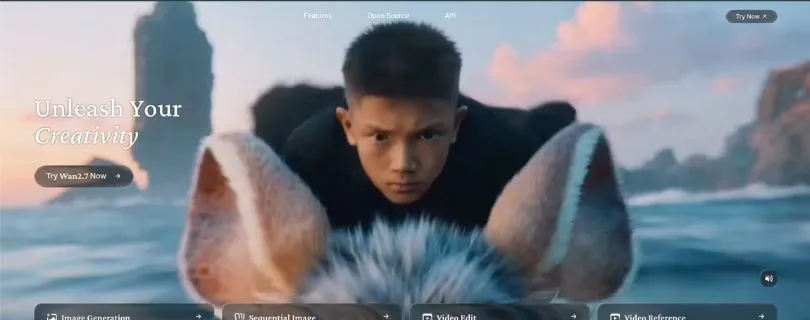
Wan AI is an AI video model family used to create videos from text prompts, images, and other visual inputs. It’s best known for realistic motion, cinematic shots, and open-weight access.
Wan as an AI Model Family
Wan can refer to a group of open-weight AI video generation models. These models are used by developers, researchers, AI video apps, and hosted generation platforms.
You may see names like Wan2.1, Wan2.2, Wan2.5, Wan2.6, Wan2.7, or platform-specific versions. That’s one reason the tool can feel confusing at first.
Wan as a Hosted AI Video Generator
Wan AI can also refer to web tools built around Wan models.
In these tools, you usually enter a prompt, upload an image, choose video length, resolution, and aspect ratio, then spend credits to generate the video.
This is much easier than running Wan locally, but pricing, watermarks, commercial rights, and available model versions can change depending on the provider.
Who Created Wan AI?
Wan AI was originally developed by Alibaba’s Tongyi Lab.
Today, many third-party AI video tools use, host, or reference Wan models, so the experience can vary from one platform to another.
What Real Users Are Saying About Wan AI?
Quick TLDR of User Reviews
✅ Great for: cinematic motion, prompt adherence, open-weight access, local AI video experiments
❌ Weak on: setup difficulty, slow rendering, VRAM requirements, confusing versions, inconsistent image-to-video results
User feedback around Wan AI is mixed, but in a useful way.
On Reddit, creators and developers seem genuinely interested in Wan because it gives them more control than many closed AI video generators. People like the open-weight model access, local generation options, and the fact that strong results are possible with the right workflow.
But the frustration is real too.
Most complaints are not about the idea of Wan AI itself. They’re about the setup process, confusing model versions, hardware limits, long render times, and the amount of trial and error needed to get clean results.
G2 is less helpful here. Wan AI doesn’t have the same deep pool of direct user reviews you’ll find for tools like Runway, Synthesia, Canva, or VEED. G2 mostly shows Wan-related listings with limited review data and points users toward broader AI video generator alternatives.
Here’s a quick snapshot:
- Reddit – Mixed but detailed creator/developer feedback
- G2 – Limited direct Wan AI review data
- Best signal overall – Reddit, ComfyUI communities, GitHub, and hands-on creator workflows
But numbers and listings don’t tell the full story.
What’s Happening on Reddit
Reddit has some of the most useful real-world feedback on Wan AI, especially from people trying to run Wan 2.1 or Wan 2.2 locally.
The biggest issues users mention are:
- Wan can be slow on normal GPUs.
- Local setup can feel confusing.
- Some ComfyUI workflows break or require troubleshooting.
- Image-to-video quality depends heavily on prompting and workflow.
- Different Wan versions make it hard to know which model to use.
- Hosted Wan tools may look better than local setups in some cases.
One user summed up the speed problem pretty clearly:
“It 10-20 minutes waits for 3-5 second mediocre video. In the same process felt like I was burning my GPU.”
Another user ran into local setup problems on a 4070 Super and wrote:
“I’ve spent hours trying to get image-to-video generation running locally on my 4070 Super using WAN 2.1. I’m at the edge of burning out.”
They also added:
“the documentation is either missing, outdated, or assumes you’re running a 4090 hooked into God.”
That’s the main pattern with Wan AI. If you’re technical, patient, and comfortable testing workflows, it can be powerful. If you just want to type one prompt and get a polished video in seconds, it may feel frustrating.
Positive Reddit Feedback
The feedback isn’t all negative.
Some creators really like Wan AI once they find the right workflow. One Reddit user said:
“wan is pretty good and you can generate whatever you want, no censorship, total control. that’s why people use it”
Another creator shared an animation test and wrote:
“Wan 2.1 has been perfect thanks to its awesome prompt adherence!”
They also mentioned that some scenes turned out amazing, especially when using a LoRA style workflow.
This is where Wan AI starts to make sense. It’s not always the easiest AI video generator for beginners, but it can reward people who know how to prompt, test, and tweak settings.
What Users Say About Wan AI vs Kling
A common comparison is Wan AI vs Kling, especially for image-to-video.
One Reddit user said:
“Kling is great at animating a reference image and following the prompt pretty well. Faces are often maintained. It’s costing me a fortune.”
But after trying Wan2.1 workflows, the same user said:
“the results are terrible in comparison.”
Read the Reddit thread comparing Wan2.1 and Kling
A reply in the same thread gives a helpful explanation:
“Wan requires different and much more detailed prompting than Kling. You can’t just slap on the same prompt and expect good results.”
That’s a fair takeaway. Wan AI can produce strong results, but it may need more detailed prompts and a better workflow than beginner-friendly hosted tools.
User Reviews From G2
G2 is not very useful for direct Wan AI reviews right now.
Some Wan-related listings appear with little or no user rating data. For example, G2 shows an Artany listing by “wan ai video generator” with 0 ratings and no available user satisfaction data.
G2’s Wan 2.1 pages are more useful for comparing alternatives than reading direct Wan reviews. The platform commonly points users toward tools like Canva, Simplified, Synthesia, VEED, Camtasia, HeyGen, Creatify AI, and Animaker.
So for now, I wouldn’t rely on G2 alone to judge Wan AI.
Reddit gives a much clearer picture: Wan AI can create impressive AI videos, but it’s not always beginner-friendly. It works best for users who are comfortable experimenting with prompts, model versions, local setups, and GPU-heavy workflows.
Wan AI Features and Functionality Breakdown
If you want a serious review of Wan AI, this is where things start getting interesting — because Wan is not just one simple AI video tool.
It can mean a model family, a local open-weight setup, a hosted AI video generator, or a third-party platform using Wan models in the background.
That said, I’ll keep this simple.
Below, I’ll walk you through the main Wan AI features that matter most for creators, marketers, filmmakers, developers, and anyone testing AI video generation.
I’ll cover:
- Text-to-Video Generation
- Image-to-Video Generation
- Native Audio and Sound Effects
- Cinematic Camera Controls
- Prompt Adherence
- Open-Weight and Local Model Access
- Hosted Web Tool Experience
- Video Editing and Frame Control
- Multilingual Prompting and Text Rendering
1. Text-to-Video Generation
Text-to-video is the main feature most people care about when they first look at Wan AI.
The idea is simple.
You type a prompt, describe the scene you want, and Wan generates a short video from it.
For example, you can write something like:
“A cinematic shot of a luxury sports car driving through rainy Tokyo streets at night, neon reflections on the road, slow camera tracking, realistic lighting.”
And Wan will try to turn that into a moving video clip.
This is where Wan AI can feel impressive.
It’s especially good when your prompt includes clear details like:
- Subject
- Action
- Location
- Lighting
- Camera movement
- Mood
- Visual style
A vague prompt like “make a cool car video” won’t give you the best result.
But if you give Wan more direction, the output usually has better motion, better framing, and a more cinematic feel.
What I liked:
✅ Strong cinematic style
✅ Good movement when the prompt is clear
✅ Useful for concept videos, ads, reels, and storyboarding
✅ Better results when you describe camera and lighting properly
What could be better:
❌ Short clip limits are still a real limitation
❌ Complex scenes may break or feel inconsistent
❌ You may need several retries to get the exact result you want
My take:
Wan AI’s text-to-video feature is one of its biggest strengths. It’s not perfect, but it can create strong short-form video clips if you know how to write a detailed prompt.
2. Image-to-Video Generation
Image-to-video is another major Wan AI feature, and honestly, this is where a lot of creators will find it useful.
Instead of starting from a blank text prompt, you upload an image and ask Wan to animate it.
This can be helpful for:
- Product photos
- AI-generated characters
- Concept art
- Social media visuals
- Fashion shots
- Food images
- Brand creatives
- YouTube thumbnails
- Game environments
Let’s say you have a still image of a sneaker.
You can ask Wan to create a slow rotating product shot with soft studio lighting, subtle camera movement, and a clean background.
That’s useful if you want to turn static visuals into short ads, product teasers, or social media clips without filming anything.
The good part is that image-to-video gives you more control over the subject because the model has a starting visual reference.
But it still has limits.
Faces can change. Hands can look strange. Products may shift shape. Small text or logos may not stay perfect.
What I liked:
✅ Great for animating static visuals
✅ Useful for product marketing and social media content
✅ Gives more control than pure text-to-video
✅ Helpful for turning AI images into short clips
What could be better:
❌ Identity and product details can drift
❌ Logos and text may not stay accurate
❌ Some motion can look unnatural if the prompt is too ambitious
My take:
Image-to-video is one of the most practical Wan AI features for marketers and creators. Just don’t expect perfect brand consistency every time, especially with faces, hands, logos, or detailed products.
3. Native Audio and Sound Effects
Some Wan AI versions and hosted tools support native audio generation, which means the video can include sound effects, background noise, ambience, or even dialogue depending on the platform.
This is a big deal because many AI video generators still create silent clips first, then make you add music or voice later.
With native audio, you can prompt things like:
- Rain sounds
- Footsteps
- City ambience
- Wind
- Engine noise
- Crowd sounds
- Character dialogue
- Product sound effects
For example, if your prompt describes a motorcycle driving through a tunnel, Wan may generate both the video and matching engine sound.
That makes the output feel more complete.
It’s especially helpful for short ads, cinematic scenes, product videos, and social clips where sound adds emotion.
But this feature depends heavily on where you’re using Wan.
Not every Wan setup includes native audio. Some hosted platforms offer it, while local workflows may require extra tools or separate audio generation.
What I liked:
✅ Makes AI videos feel more finished
✅ Useful for ads, short films, and social media clips
✅ Can add ambience without using a separate audio tool
✅ Good for quick concept testing
What could be better:
❌ Audio quality depends on the platform
❌ Dialogue and lip-sync may not always match perfectly
❌ Some Wan versions may not include this feature by default
My take:
Native audio is one of the most exciting parts of Wan AI, but you need to check whether your chosen Wan platform actually supports it. Don’t assume every Wan AI tool includes synced audio.
4. Cinematic Camera Controls
One thing Wan AI does well is understand cinematic camera language.
This matters because AI video generation is not just about what appears in the scene. It’s also about how the camera moves.
You can include camera directions like:
- Slow zoom in
- Dolly shot
- Pan left
- Orbit shot
- Tracking shot
- Handheld camera
- Wide-angle shot
- Close-up shot
- Drone shot
- Macro shot
For creators, this is very useful.
Instead of getting a flat video where the subject barely moves, you can guide the model toward a more professional-looking shot.
For example:
“A close-up cinematic shot of a chef plating pasta, soft warm lighting, shallow depth of field, slow camera push-in, steam rising from the plate.”
That kind of prompt gives Wan a much better creative direction than just saying “chef cooking pasta.”
What I liked:
✅ Strong support for cinematic prompt language
✅ Great for mood videos, trailers, and product shots
✅ Helps make clips look less generic
✅ Useful for filmmakers and content creators
What could be better:
❌ Camera movement may not always follow the prompt exactly
❌ Too many camera instructions can confuse the result
❌ Complex movement may create visual artifacts
My take:
Wan AI works best when you treat the prompt like a mini video brief. Tell it what to show, how to move, and what feeling you want. That’s when the results start looking much better.
5. Prompt Adherence
Prompt adherence means how well the AI follows your instructions.
This is one of the biggest reasons people talk about Wan AI.
In many cases, Wan does a good job understanding detailed prompts, especially when you describe the subject, action, setting, camera movement, and lighting clearly.
For example, if you ask for:
“A golden retriever running through a sunflower field at sunset, handheld camera, warm backlight, playful mood.”
Wan usually understands the core scene pretty well.
But like most AI video generators, it can still struggle when prompts become too crowded.
If you ask for five characters, three actions, multiple camera moves, a logo, readable text, and perfect continuity in one short clip — expect problems.
The trick is to keep each prompt focused.
What I liked:
✅ Good at following detailed visual prompts
✅ Handles mood, lighting, and camera terms well
✅ Works nicely for short single-scene clips
✅ Better results when prompts are structured clearly
What could be better:
❌ Struggles with overloaded prompts
❌ May ignore smaller details
❌ Hard to maintain perfect continuity across multiple clips
My take:
Wan AI has strong prompt adherence, but it’s not magic. You’ll get better results when you write prompts like a director, not like a keyword list.
6. Open-Weight and Local Model Access
This is where Wan AI becomes very different from many closed AI video tools.
Some Wan models are open-weight, which means developers and advanced users can download the model weights and run them locally or on cloud GPUs.
That gives you more control.
You’re not limited to one hosted website. You can test workflows, use tools like ComfyUI, experiment with settings, and build your own AI video pipeline if you know what you’re doing.
This is great for:
- Developers
- AI researchers
- Technical creators
- Agencies with custom workflows
- People who want more control over generation
- Users who don’t want to rely only on closed platforms
But here’s the catch.
Local setup is not beginner-friendly.
You may need to deal with GPU memory, model downloads, Python environments, dependencies, workflow files, ComfyUI nodes, and long render times.
That’s not something every creator wants to handle.
What I liked:
✅ More control than closed AI video platforms
✅ Useful for developers and advanced creators
✅ Can reduce platform lock-in
✅ Good for testing custom workflows
What could be better:
❌ Setup can be technical
❌ Needs strong hardware or cloud GPU access
❌ Render times can be slow
❌ Not ideal for beginners who just want fast results
My take:
Wan AI’s open-weight access is a big advantage, but only if you’re comfortable with technical setup. For beginners, a hosted Wan tool will usually be much easier.
7. Hosted Web Tool Experience
Not everyone wants to install models locally, and that’s why hosted Wan AI tools exist.
These platforms let you use Wan models through a normal web interface.
You usually choose:
- Text-to-video or image-to-video
- Model version
- Video length
- Aspect ratio
- Resolution
- Prompt strength
- Audio options
- Export settings
Then you spend credits to generate the video.
This is much easier than running Wan locally.
You don’t need to worry about GPU setup, installations, or technical errors. You just enter your prompt and wait for the output.
But there’s a trade-off.
Every hosted platform is different.
Some may offer higher resolution. Some may watermark free videos. Some may support native audio. Some may charge more credits for longer clips. Some may use a newer Wan model, while others may use an older one.
So before you buy credits, check what you’re actually getting.
What I liked:
✅ Much easier for beginners
✅ No local hardware required
✅ Faster to test prompts
✅ Good for creators, marketers, and small teams
What could be better:
❌ Pricing can vary a lot
❌ Credits can disappear quickly if you keep retrying
❌ Watermarks may appear on free plans
❌ Model version is not always clearly explained
My take:
Hosted Wan tools are the easiest way to try Wan AI. Just pay close attention to credits, resolution, watermarks, commercial rights, and which Wan model the platform is actually using.
8. Video Editing and Frame Control
Wan AI is not just about generating videos from scratch.
Depending on the version or platform, you may also find editing-style features like video-to-video, first-frame control, last-frame control, or reference-based generation.
These features are helpful because they give you more control over the final clip.
For example, first-and-last-frame control can help you define where the video starts and where it should end.
That’s useful for:
- Product reveals
- Character movement
- Scene transitions
- Before-and-after clips
- Animation tests
- Storyboard shots
Video-to-video can also help you restyle or transform existing footage.
For example, you might take a normal clip and turn it into an anime-style scene, a cinematic fantasy shot, or a more polished visual concept.
But this is also where the workflow can get more complicated.
The more control you want, the more settings, models, references, and retries you may need.
What I liked:
✅ More control than basic prompt-only generation
✅ Useful for transitions and storytelling
✅ Good for creators who want repeatable visual direction
✅ Helpful for product and character animation workflows
What could be better:
❌ Not every Wan platform supports these controls
❌ Can take time to learn
❌ Results may still shift between frames
❌ Advanced workflows may feel technical
My take:
Frame control is very useful if you want more predictable AI videos. It won’t solve every consistency problem, but it gives you a better starting point than a simple text prompt.
9. Multilingual Prompting and Text Rendering
Wan AI also has multilingual support, especially around English and Chinese prompts.
This makes sense because Wan comes from Alibaba’s AI ecosystem, and many of its tools and model resources are built with both English and Chinese users in mind.
For creators, this can be useful if you’re making content for different regions or testing prompts in more than one language.
You may also see claims around text rendering inside videos.
That means the model may be able to generate visible text in a scene, such as signs, labels, posters, or short words.
But I’d be careful here.
AI video tools still struggle with perfect text inside generated visuals. Simple words may work better than long sentences, but brand names, product labels, and readable on-screen copy can still come out wrong.
If your video needs exact text, logos, or legal disclaimers, it’s better to add those later in a proper video editor.
What I liked:
✅ Useful for English and Chinese prompt workflows
✅ Helpful for global creators and marketers
✅ Can sometimes handle short text elements in scenes
✅ Good for experimenting with multilingual content
What could be better:
❌ Text inside video may not be reliable
❌ Logos and brand labels can distort
❌ Long readable text is still risky
My take:
Multilingual support is a nice advantage, but don’t rely on Wan AI for perfect text rendering. Use it for visual generation, then add exact text, captions, logos, and branding in editing software.
Wan AI Pricing: Is Wan AI Free?
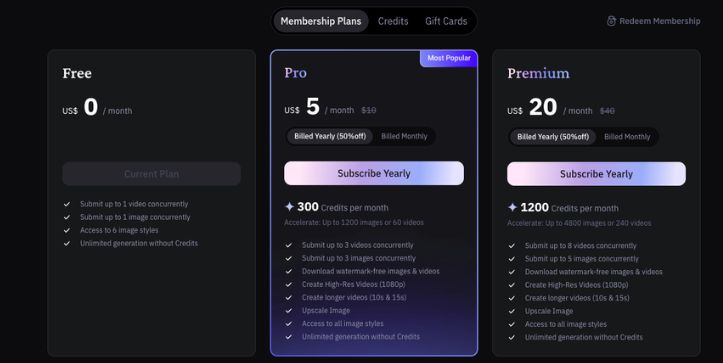
Wan AI pricing can be confusing because there isn’t just one “Wan AI price.”
It depends on how you use it.
You can run some Wan models as open-weight models, use them through a hosted website, access them through an API, or try them inside an AI model aggregator.
So yes, Wan AI can be free in one sense — but not always free in real-world use.
Open-Source / Open-Weight Cost
Some Wan model weights and code are available to download for free.
That’s great if you’re a developer, researcher, or technical creator who wants more control over the AI video generation process.
But “free” does not mean free forever.
If you run Wan locally, you still need the right hardware. That usually means a strong GPU, enough VRAM, storage space, and time to set everything up.
If your computer can’t handle it, you may need to rent a cloud GPU. Depending on the provider and GPU type, that can cost anywhere from around $0.50 to $3+ per hour, and sometimes more for high-end machines.
So the model may be free, but the compute is not.
My take:
Open-weight Wan AI is best if you’re comfortable with technical setup and want full control. For casual creators, local use can feel like too much work.
Hosted Web App Pricing
Most hosted Wan AI platforms use credits.
This means you buy credits or subscribe to a plan, then spend those credits each time you generate a video.
Pricing can vary a lot depending on the platform, but you may see options like:
- Free credits for testing
- One-time credit packs around $10 to $30+
- Monthly plans around $10 to $50+
- Higher-tier plans for faster queues or commercial use
- API pricing around $0.20 per video on some models
- Higher-quality 1080p generations around $0.80 per video
- Some Wan 2.5 API pricing around $0.05 to $0.15 per second, depending on resolution
That’s why two people can both say they’re “using Wan AI” but pay completely different prices.
One person may be running it locally. Another may be using a simple web app. Someone else may be paying per generation through an API.
Also, check the details before buying.
Some platforms charge more for:
- 720p or 1080p output
- Longer videos
- Faster generation
- Native audio
- Watermark removal
- Commercial usage
- Multiple concurrent jobs
Pricing changes often, so always check the current pricing page before you pay.
Curious what Wan AI may actually cost? Read the full Wan AI pricing explained guide before spending credits
My take:
Hosted Wan AI tools are easier for beginners, but credits can disappear quickly if you keep regenerating videos. If you’re testing prompts heavily, the real cost may be higher than the plan price suggests.
| Access Method | Cost Type | Best For | Hidden Cost |
| Local open-weight model | Free weights + hardware/cloud cost | Developers and researchers | GPU, setup, storage, and maintenance |
| Hosted Wan website | Credits or monthly subscription | Beginners, creators, and marketers | Regenerations can consume credits fast |
| API access | Pay per video or per second | Apps and production teams | Scaling costs as usage grows |
| Aggregator platforms | Platform credits | Testing many AI video models | Model prices and limits can change |
What Affects the Real Cost?
The real cost of Wan AI depends on more than the plan price.
A short 480p test clip may be cheap. A longer 1080p video with native audio, faster queue priority, and multiple retries can cost much more.
The biggest pricing factors are:
- Resolution: 1080p usually costs more than 480p or 720p.
- Duration: Longer videos use more credits or cost more per second.
- Model version: Newer or higher-quality Wan models may cost more.
- Audio generation: Native sound, dialogue, or sound effects may increase the cost.
- Number of retries: Bad outputs still use credits on many platforms.
- Queue priority: Faster rendering may be locked behind paid plans.
- Watermark removal: Free plans may include watermarks.
- Commercial rights: Some platforms reserve commercial usage for paid tiers.
The safest way to think about Wan AI pricing is this:
Local Wan AI can be cheap if you already have the hardware. Hosted Wan AI is easier, but you’re paying for convenience, compute, speed, and simplicity.
Wan AI vs Other AI Video Generators
Wan AI is strong, but it’s not the only AI video generator worth considering.
The right tool depends on what you’re trying to create.
If you want open-weight flexibility, Wan AI makes a lot of sense. If you want a polished editing workflow, Runway may feel better. If you want premium realism, Sora or Google Veo may be better options. If you want anime-style transformations, DomoAI can be easier to use.
Here’s a quick comparison:
| Tool | Best For | Strength | Weakness |
| Wan AI | Open-weight cinematic AI video | Strong model flexibility and prompt adherence | Technical setup and version confusion |
| Sora | Premium prompt following and realism | High-quality complex video generation | Access and pricing may depend on plan or region |
| Google Veo | High-end visual quality and native audio | Strong realism, motion, and audio | Premium access and higher cost |
| Kling | Camera control and character motion | Filmmaker-friendly controls | May still require retries |
| Runway | AI video editing workflows | Strong creative editing suite | Subscription and credit cost |
| Hailuo | Stylized AI video and motion | Good creative results | Control can vary by prompt |
| Seedance | Fast API-first video generation | Strong motion and speed | Closed model ecosystem |
| HunyuanVideo | Open-source AI video alternative | Developer flexibility | Requires technical setup |
| DomoAI | Anime and style transformation | Beginner-friendly creative styles | Less open and developer-focused than Wan |
My simple take:
Wan AI is best if you want flexibility and don’t mind experimenting. But if you want the smoothest beginner experience, a more polished tool may save you time.
Best Wan AI Alternatives
Wan AI is worth trying, but it’s smart to compare it with other AI video tools before spending money or building your workflow around it.
Here are the best Wan AI alternatives to consider.
1. Sora
Sora is best for premium cinematic generation and complex prompt following.
It’s a strong option if you care about high-end realism, detailed scenes, and more advanced video generation. For creators who want polished results without managing local models, Sora is one of the biggest names to watch.
Best for:
- Cinematic AI videos
- Complex text-to-video prompts
- Realistic scene generation
- Creative storytelling
You may want to skip it if access, pricing, or usage limits don’t fit your workflow.
2. Google Veo
Google Veo is best for high-end realism, native audio, and production-quality results.
It’s a good fit if you want premium AI video generation tool with strong visual quality and sound support. Veo is especially interesting for teams creating cinematic clips, ads, concept videos, or polished social media content.
Best for:
- Realistic AI videos
- Native audio generation
- High-quality brand content
- Professional creative workflows
The downside is that access and pricing may feel more premium than beginner-friendly tools.
3. Kling
Kling is best for controlled camera movement, character motion, and creator-friendly video generation.
If you want strong image-to-video results, smooth character movement, and more control over motion, Kling is one of the most popular Wan AI alternatives.
If Kling looks like your top pick, check my full Kling AI review before deciding
Best for:
- Image-to-video generation
- Camera movement
- Character animation
- Short-form cinematic clips
It can still take a few retries, but it’s easier for many creators than running Wan locally.
4. Runway
Runway is best for editing existing footage, creative workflows, and production pipelines.
Unlike Wan AI, Runway feels more like a full creative platform. You can generate videos, edit clips, restyle footage, remove backgrounds, expand scenes, and use different AI tools in one place.
Best for:
- AI video editing
- Video-to-video workflows
- Creative agencies
- Social media production
The main downside is the credit-based pricing. If you generate a lot, costs can add up.
5. Hailuo AI
Hailuo AI is best for stylized, expressive, and fast creative video generation.
For a deeper look at fast stylized video generation, read my Hailuo AI review
It’s a good choice if you want quick visual ideas, social content, animated scenes, or creative experiments without getting too technical.
Best for:
- Stylized AI videos
- Fast concept generation
- Short social media clips
- Creative testing
It may not give you the same open-weight flexibility as Wan AI, but it can be easier to use.
6. Seedance
Seedance is best for fast API-first workflows and strong motion quality.
This is a better fit for teams, developers, or platforms that want to generate AI videos at scale through an API instead of using a manual web interface.
Best for:
- Fast video generation
- API workflows
- App integrations
- Production teams
The main tradeoff is that it’s a closed model, so you won’t get the same local control as Wan AI.
7. HunyuanVideo
HunyuanVideo is best for developers who want another open AI video model option.
Like Wan AI, it appeals more to technical users who want to experiment with open models, local workflows, and custom generation pipelines.
Best for:
- Open-source experimentation
- AI research
- Local video generation
- Developer workflows
It’s not the easiest option for beginners, but it’s worth comparing if you care about open video models.
8. DomoAI
DomoAI is best for anime, illustration animation, and easy creative transformations.
If your main goal is to turn videos or images into anime-style clips, animated visuals, or stylized content, DomoAI may feel more beginner-friendly than Wan AI.
Best for:
- Anime-style videos
- Illustration animation
- Social media content
- Easy creative transformations
It’s less open and less technical than Wan AI, but that may actually be a good thing if you just want simple results.
Which One Should You Choose?
| Choose This Tool | If You Want |
| Wan AI | Open-weight flexibility and cinematic AI video control |
| Sora | Premium prompt following and realistic video generation |
| Google Veo | High-end quality, realism, and native audio |
| Kling | Better camera control and image-to-video motion |
| Runway | AI video editing and creative production tools |
| Hailuo AI | Fast stylized videos and creative experiments |
| Seedance | API-first video generation and speed |
| HunyuanVideo | Open-source video model experimentation |
| DomoAI | Anime, art-style videos, and beginner-friendly transformations |
My recommendation?
Choose Wan AI if you want flexibility, open-weight access, and strong cinematic AI video generation.
Choose Sora or Google Veo if you want premium quality and don’t mind platform limits or higher pricing.
Choose Kling if image-to-video and motion control matter most.
Choose Runway if you need editing tools, not just generation.
Need a more complete editing workflow? Read my Runway Gen-4 review to see where it fits better
Choose DomoAI if you want anime or stylized content without a technical setup.
Choose HunyuanVideo if you want to experiment with another open AI video model.
Final Verdict: Should You Use Wan AI?
Wan AI is worth using if you want strong AI video generation with more flexibility than many closed tools.
Its biggest strength is the mix of cinematic output and open-weight access. You can use it through hosted AI video platforms for a simpler experience, or explore local workflows if you want more control over models, prompts, and settings.
That makes Wan AI especially useful for developers, AI creators, filmmakers, marketers, and teams that want to test text-to-video or image-to-video without relying only on premium closed platforms.
But it’s not the easiest tool for everyone.
Beginners may find Wan AI confusing because different platforms use different model versions, pricing systems, credit rules, export limits, and audio options. Local setup can also be technical, especially if you don’t have a strong GPU or cloud budget.
Use Wan AI if:
- You want cinematic short videos.
- You care about open-weight or local deployment.
- You’re seriously testing AI video models.
- You need text-to-video or image-to-video at good value.
- You’re comfortable experimenting with prompts and settings.
Skip or compare alternatives if:
- You need long-form video production.
- You need perfect character consistency.
- You want a polished editing suite.
- You don’t want technical setup.
- You need simple, predictable commercial pricing.
My take?
Wan AI is one of the most interesting AI video model families right now. It’s not always the cleanest or most beginner-friendly option, but if you’re willing to experiment, it can deliver impressive cinematic clips and a level of flexibility that many closed AI video generators don’t offer.
FAQs About Wan AI
What is Wan AI?
Wan AI is an AI video generation model family used to create videos from text prompts, images, and other visual inputs. It’s best known for cinematic motion, realistic scenes, image-to-video generation, and open-weight model access.
Who created Wan AI?
Wan AI was originally developed by Alibaba’s Tongyi Lab. Today, many third-party AI video platforms, APIs, and hosted tools use or reference Wan models, so the experience can vary depending on where you use it.
Is Wan AI free?
Wan AI can be free if you download and run open-weight models yourself. But that does not mean the full experience is free. You may still need a powerful GPU, cloud compute, storage, setup time, or credits if you use a hosted Wan AI website.
Is Wan AI open source?
Some Wan models are available as open-weight models, which means developers can download and run them locally. Always check the exact license for the version you’re using, especially if you plan to use it for commercial projects.
What can Wan AI do?
Wan AI can generate videos from text prompts, animate images, create cinematic camera movement, and support different AI video workflows depending on the model or platform. Some versions and hosted tools may also support audio, dialogue, or sound effects.
Does Wan AI support text-to-video?
Yes. Text-to-video is one of Wan AI’s main features. You write a prompt describing the scene, action, camera movement, lighting, and style, then Wan generates a short video based on that prompt.
Does Wan AI support image-to-video?
Yes. Wan AI can animate still images and turn them into short video clips. This is useful for product shots, AI characters, concept art, social media visuals, thumbnails, and marketing creatives.
Does Wan AI generate audio?
Some Wan AI versions and hosted platforms support native audio, sound effects, ambience, or dialogue. But this is not available everywhere, so you should check the specific Wan tool or API before assuming audio is included.
Can Wan AI create 1080p videos?
Some hosted Wan AI platforms and API providers offer higher-resolution outputs, including 720p or 1080p options. Local model workflows may also support different resolutions depending on the model, settings, and hardware.
How long can Wan AI videos be?
Wan AI is mostly used for short video clips. Exact duration depends on the platform or model version. Some tools may offer a few seconds per generation, while longer videos usually require stitching clips together or using paid credits.
Is Wan AI good for beginners?
Wan AI can be beginner-friendly if you use it through a hosted web app. But local setup is more technical. If you don’t want to deal with GPU requirements, model files, ComfyUI workflows, or cloud setup, a hosted platform is the easier option.
Can I run Wan AI locally?
Yes, some Wan models can be run locally if you have the right hardware and setup. You’ll usually need a strong GPU, enough VRAM, storage space, and some comfort with technical tools. Many users run Wan through workflows like ComfyUI or similar local AI setups.
What GPU do I need for Wan AI?
The GPU requirement depends on the Wan model version and resolution you want to generate. Smaller models may run on consumer GPUs, while larger models and higher-resolution videos need more VRAM or cloud GPU access.
Why is Wan AI slow?
AI video generation is heavy. Wan AI has to generate many frames, motion, lighting, and sometimes audio. If you’re running it locally on limited hardware, render times can be slow. Hosted platforms may be faster, but they usually charge credits.
Is Wan AI better than Kling?
Wan AI is better if you want open-weight flexibility, local workflows, and more model control. Kling may feel easier for creators who want polished image-to-video results, camera controls, and a simpler hosted experience. The better choice depends on your workflow.
Is Wan AI better than Sora?
Wan AI gives you more open-weight flexibility, while Sora is usually positioned as a premium AI video generator for high-quality, complex prompt following. If you want control and local access, Wan is more interesting. If you want polished premium output, Sora may be better.
Is Wan AI better than Google Veo?
Wan AI is better for users who care about open models, local deployment, and experimentation. Google Veo is usually better suited for high-end realism, premium video quality, and native audio workflows. For most beginners, Veo may feel simpler if they have access to it.
Is Wan AI safe to use?
Wan AI is generally safe to use if you download models from trusted sources and use reputable hosted platforms. Be careful with unofficial downloads, unknown websites, and platforms that ask you to upload private client assets, faces, or confidential brand content.
Can I use Wan AI commercially?
Commercial use depends on the model license and the hosted platform’s terms. Some tools may allow commercial use on paid plans, while others may have restrictions. Always check the license and usage rights before using Wan AI videos in ads, client work, or monetized content.
Does Wan AI add watermarks?
It depends on the platform. Local generations usually do not work like standard web-app watermarks, but hosted Wan AI tools may add watermarks on free plans or low-tier exports. Paid plans may remove them.
Why are there so many Wan AI versions?
Wan AI has different model versions and third-party implementations. You may see names like Wan2.1, Wan2.2, Wan2.5, Wan2.6, Wan2.7, or platform-specific versions. That’s why it’s important to check which model a tool is actually using.
What is the difference between Wan2.1, Wan2.2, and Wan2.5?
Wan2.1 is commonly known as an open video foundation model suite. Wan2.2 is often discussed around improved cinematic video generation and text/image-to-video workflows. Wan2.5 is commonly associated with newer hosted/API workflows, including native audio on some platforms.
Why does Wan AI pricing vary so much?
Wan AI pricing varies because people use it in different ways. Local open-weight use may be free except for hardware or cloud costs. Hosted tools may charge credits. APIs may charge per video or per second. Aggregator platforms may have their own pricing rules.
What is the best Wan AI alternative?
The best alternative depends on what you need. Choose Sora or Google Veo for premium realism, Kling for camera control and image-to-video, Runway for AI video editing, DomoAI for anime-style transformations, and HunyuanVideo if you want another open model option.
Is Wan AI worth it?
Wan AI is worth it if you want cinematic short videos, image-to-video generation, open-weight model access, or serious AI video experimentation. It may not be worth it if you need long videos, perfect character consistency, simple pricing, or a full editing suite.
What is the best way to use Wan AI?
The best way to use Wan AI is to start with a hosted platform if you’re a beginner. Once you understand prompting and output quality, you can explore local workflows if you want more control. Keep prompts focused, describe camera movement clearly, and expect a few retries.