GMass is a popular email outreach tool that lets you run cold email campaigns, mail merges, follow-ups, and tracking directly inside Gmail. Its simple setup and range of automation features make it useful for solo users, marketers, recruiters, and sales teams, but GMass pricing in 2026 may not fit every budget.
To help you decide whether it offers good value, this guide breaks down the current GMass annual pricing, plan features, limitations, and best use cases.
We’ll also compare what you get with Standard, Premium, and Professional, look at whether GMass is worth the cost for different team sizes, and explain when alternatives may make more sense.
By the end, you’ll know exactly how much GMass costs and which plan is the best fit for your outreach needs.
Quick Answer: How Much Does GMass Cost?
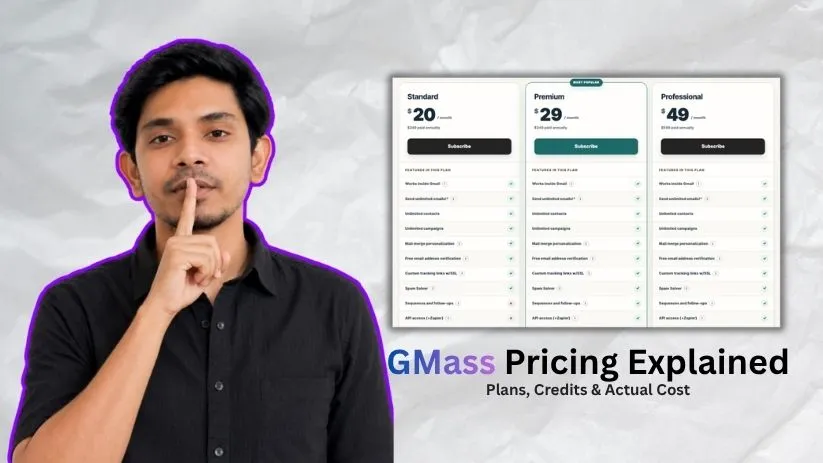
GMass offers three individual plans, plus separate pricing for teams:
- Standard: $249/year, with unlimited contacts and campaigns, mail merge personalization, email verification, custom tracking links, and Spam Solver
- Premium: $349/year, with everything in Standard plus automated sequences, follow-ups, A/B testing, triggered emails, and API/Zapier access
- Professional: $599/year, with everything in Premium plus MultiSend inbox rotation and priority support
- Team Plans: Pricing varies based on the number of users and is designed for larger sales or outreach teams
For most cold email users, Premium offers the best balance of price and features because it includes the automation tools missing from Standard.
GMass mainly focuses on email sending and campaign automation inside Gmail. If your workflow also requires lead enrichment, prospect research, or broader outbound automation, you may need additional tools alongside GMass.
Want a broader outbound and enrichment platform? Check out the best Clay alternatives to compare tools for prospecting, enrichment, and sales automation.
GMass Pricing Plans Compared
GMass has three individual plans: Standard, Premium, and Professional. All three include unlimited contacts and campaigns, but the higher tiers add more automation, integrations, and advanced sending features.
| Plan | Annual Price | Best For |
| Standard | $249/year | Basic mail merge and simple campaigns |
| Premium | $349/year | Cold email and automated follow-ups |
| Professional | $599/year | Advanced outreach and inbox rotation |
1. GMass Standard: $249 Per Year
GMass Standard costs $249 per year when billed annually.
It includes the core features needed to send personalized campaigns from Gmail:
- Unlimited emails
- Unlimited contacts
- Unlimited campaigns
- Mail merge personalization
- Email address verification
- Custom tracking links with SSL
- Spam Solver
- Email support
The main limitation is automation.
Standard does not include sequences and follow-ups, API or Zapier access, A/B testing, triggered emails, Inbox Rotation through MultiSend, or high-priority support.
That makes Standard a good fit for users who mainly need basic mail merge, newsletters, or one-off outreach campaigns.
If you plan to run cold email consistently, though, the lack of automated follow-ups can become restrictive.
Building a prospect list before launching your campaigns? Explore the best D7 Lead Finder alternatives for more lead generation options.
2. GMass Premium: $349 Per Year
GMass Premium costs $349 per year when billed annually.
It includes everything in Standard and adds the automation features that are more useful for ongoing cold outreach, including:
- Sequences and automated follow-ups
- API access
- Zapier integration
- A/B testing
- Triggered emails
These additions make Premium much more practical for users who regularly contact prospects and want to reduce repetitive manual work.
For example, you can build follow-up sequences rather than checking every campaign manually and contacting non-responders one by one.
Premium does not include Inbox Rotation through MultiSend, but many solo marketers, recruiters, founders, and sales professionals may not need that functionality.
For most individual cold email users, Premium is likely the best balance between price and features.
Need prospecting and enrichment tools alongside GMass? See the best Clay alternatives for tools focused on lead research, enrichment, and outbound workflows.
3. GMass Professional: $599 Per Year
GMass Professional costs $599 per year when billed annually.
It includes the Premium feature set and adds:
- Inbox Rotation through MultiSend
- High-priority support
MultiSend allows campaigns to be distributed across multiple sending accounts rather than relying on a single Gmail inbox.
That makes Professional more relevant for agencies, advanced senders, and businesses operating more complex outbound setups.
The upgrade costs $250 more per year than Premium, so it makes the most sense when Inbox Rotation or priority support is genuinely useful to your workflow.
If you do not need either feature, Premium will usually provide better value.
Does GMass Have a Free Plan?
GMass does not offer a permanent free plan.
Instead, new users can test the service before subscribing. GMass currently promotes getting started without a credit card, while its pricing structure centers on paid Individual and Team subscriptions.
The trial experience is useful for checking how GMass works inside Gmail and testing features such as campaign creation, personalization, Google Sheets integration, follow-ups, and tracking.
However, users planning regular outreach will eventually need one of the paid plans.
Is GMass Worth the Price? Verdict by Team Size
GMass can provide good value if Gmail is already central to your outreach workflow. The best plan depends on how many people are sending campaigns and which features they actually need.
| User Type | Best Fit | Verdict |
| Solo beginner | Standard | Good for basic campaigns |
| Solo cold email user | Premium | Best overall value |
| Advanced sender | Professional | Best if MultiSend is required |
| 5 to 10 person team | Team plan | Better per-user pricing |
| 25+ person team | Team plan or alternatives | Compare the entire sales stack |
For solo users, Premium is likely the strongest option because it includes the follow-up and automation tools missing from Standard without the higher price of Professional.
For teams, GMass uses separate annual pricing. GMass confirmed the following 2026 annual Team prices:
| Team Size | Annual Price | Approx. Cost Per User/Month |
| 5 users | $1,750/year | $29.17 |
| 10 users | $2,950/year | $24.58 |
| 25 users | $7,250/year | $24.17 |
| 50 users | $13,500/year | $22.50 |
| 100 users | $22,000/year | $18.33 |
Team subscriptions include the same feature set as the individual Professional plan, including MultiSend, high-priority support, and the other advanced GMass features.
The larger your team becomes, the more important it is to look beyond email sending alone. You may also need prospect data, enrichment, CRM workflows, and broader sales intelligence.
Need more than Gmail-based outreach? Explore the best Cognism alternatives for B2B prospecting, contact data, and sales intelligence tools.
GMass Review and Limitations
GMass is effective for users who want to send personalized campaigns directly from Gmail. Its simple interface, mail merge, scheduling, automated follow-ups, and deliverability features make it especially useful for individuals and small businesses.
Here is a quick comparison of its strengths and limitations:
| Area | GMass Strength | GMass Limitation |
| Email outreach | Personalized mass emails directly from Gmail | Primarily dependent on Gmail |
| Automation | Scheduling, sequences, and automated follow-ups | Limited advanced workflow automation |
| Ease of use | Familiar Gmail-based interface | Less suitable for complex sales operations |
| Analytics | Campaign tracking and basic reporting | No deep CRM-style analytics |
| Multi-channel outreach | Strong email capabilities | No built-in LinkedIn or broader multi-channel outreach |
| Lead generation | Works well with imported prospect lists | No built-in B2B contact database |
| Domain management | Supports Gmail and Google Workspace sending | No built-in domain or mailbox purchasing |
| Deliverability | Includes tools such as Spam Solver | Domain authentication and setup may require separate management |
| Individual pricing | Reasonable annual plans for solo users | Advanced features require Premium or Professional |
| Larger teams | Dedicated Team plans are available | Total cost can increase as team size grows |
Overall, GMass works best when email is your primary outreach channel and Gmail is already central to your workflow. For teams needing built-in prospecting, enrichment, domain management, CRM capabilities, or multi-channel outreach, additional tools may still be necessary.
Final Verdict: Which GMass Plan Should You Choose?
GMass is best for users who want to manage outreach directly inside Gmail without moving to a more complex sales platform.
Choose Standard at $249/year if you mainly need mail merge and simple campaigns.
Choose Premium at $349/year if cold email is a regular part of your workflow. It offers the best balance of price and automation for most users.
Choose Professional at $599/year if you specifically need MultiSend, inbox rotation, or priority support.
For solo users and small teams already working inside Gmail, GMass can offer good value. For teams that also need prospect discovery, enrichment, sales intelligence, or broader workflow automation, a more complete outbound platform may be a better fit.
FAQs
How much does GMass cost per year?
GMass costs $249/year for Standard, $349/year for Premium, and $599/year for Professional when billed annually in USD.
Which GMass plan is best for cold email?
For most cold email users, Premium is the best-value plan because it includes automated follow-ups, sequences, A/B testing, triggered emails, and API/Zapier access.
Does GMass have a free plan?
No. GMass does not offer a permanent free plan. New users can test the platform with a 7-day free trial before choosing a paid subscription.
Is GMass worth it in 2026?
GMass is worth considering if you already use Gmail and mainly need email outreach and automation. If you also need prospect discovery, B2B data, enrichment, or multi-channel outreach, you may need additional tools alongside GMass.