Here’s the intro section in the same structure and rhythm:
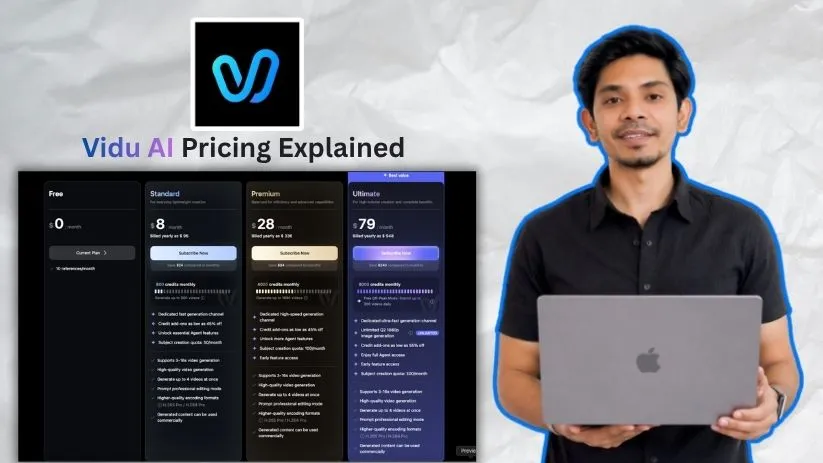
If you’re comparing Vidu AI pricing right now, the plans probably look simple at first glance.
Four main tiers. Starting at free. Paid plans usually range from around $8 to $99 per month, depending on whether you pay monthly or yearly.
But here’s what the pricing page won’t tell you upfront.
Vidu AI pricing is credit-driven, not just subscription-based.
So your real cost depends on how quickly you use credits for video generation, retries, higher-quality outputs, and different AI video modes.
I went through every Vidu AI pricing plan, checked how the credits work, and mapped where creators may end up spending more than expected.
This breakdown covers Vidu’s Free, Standard, Premium, Ultimate, and API pricing — so you know what you’re actually paying for before you upgrade.
Vidu AI pricing at a glance
Vidu AI pricing is easier to understand once you stop looking at it like a normal monthly subscription.
Here’s the quick breakdown:
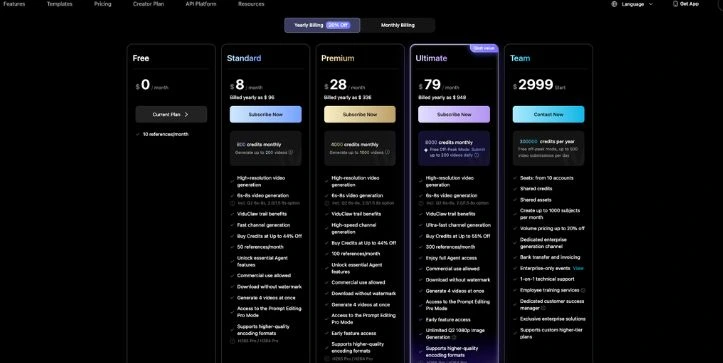
| Plan | Best for | Price angle | Credits / usage | Key benefits |
| Free | Testing Vidu | $0 | Limited credits/references | Good for trying the tool before paying |
| Standard | Casual creators | Around $8/month yearly or $10/month monthly | 800 credits, up to 200 videos | No watermark, commercial use, basic paid creator features |
| Premium | Regular creators | Around $28/month yearly or $35/month monthly | 4,000 credits, up to 1,000 videos | Faster generation, more room for retries, better for frequent use |
| Ultimate | Heavy users | Around $79/month yearly or $99/month monthly | 8,000 credits plus off-peak benefits | Ultra-fast generation, high-volume creation, better for serious workflows |
| Team / Enterprise | Agencies, studios, businesses | Custom or sales-led pricing | Shared or large-scale usage | Team access, support, invoicing, and higher-volume needs |
Vidu’s own blog lists the yearly prices as Standard at $8/month with 800 credits, Premium at $28/month with 4,000 credits, and Ultimate at $79/month with 8,000 credits. It also mentions that yearly billing comes with a discount.
The confusing part is that some review pages and app listings show the monthly prices as $10, $35, and $99 instead. That’s why you’ll often see two different sets of numbers when researching Vidu AI pricing online.
So, the simple way to think about it is this: monthly billing gives you flexibility, yearly billing usually gives you the lower monthly rate, and credits decide how much you can actually create.
Vidu AI Pricing Plans — Full Breakdown
1. Free Plan
Vidu AI’s free plan gives you a simple way to test the platform before paying. It’s useful if you want to see how Vidu handles text-to-video, image-to-video, and reference-to-video prompts without jumping straight into a subscription.
Vidu Free Plan breakdown
✅ What you get:
- Free access to try Vidu’s AI video generation tools
- Ability to test text-to-video and image-to-video creation
- Limited access to reference-based generation
- A small number of free credits or usage limits
- Enough room to explore the interface and test basic prompts
❌ Where it falls short:
The free plan is not built for serious content creation.
Vidu’s own blog notes that the free plan only allows a limited number of videos, which means you’ll hit the ceiling quickly if you’re testing multiple prompts, creating social media clips, or trying to get one polished final video.
You also shouldn’t treat the free plan as a business-ready option. Paid plans are where Vidu clearly starts offering things like commercial use and watermark-free downloads, so the free tier is better for experimenting than publishing client work or branded videos.
My take: If you’re brand new to Vidu AI, start here. Test a few prompts, check the video quality, and see if the style fits your content. But if you want to create TikToks, Reels, YouTube Shorts, product videos, or client-ready clips regularly, the free plan will feel tight fast.
2. Standard Plan — Around $8/month yearly or $10/month monthly
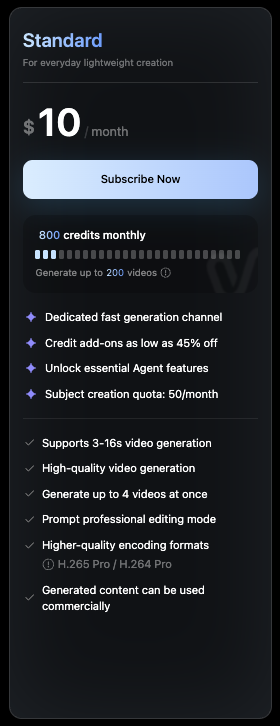
This is the first real paid Vidu AI plan for creators. It gives you enough credits to move beyond casual testing and start creating usable AI videos without a watermark.
Vidu Standard Plan breakdown
✅ What you get:
- 800 credits
- Up to 200 videos
- Around 50 references
- High-resolution video generation
- Commercial use
- Watermark-free downloads
- Prompt Editing Pro Mode
- Better value if you choose yearly billing
Vidu’s official blog lists the Standard plan at $8/month with 800 credits on yearly billing, while review listings commonly show the monthly price around $10/month.
❌ Where it falls short:
800 credits sounds comfortable at first, but AI video generation involves a lot of trial and error.
You may write one prompt, generate a clip, dislike the movement, change the prompt, try again, adjust the style, and then generate another version. That’s normal with AI video tools. The issue is that every retry eats into your monthly credits.
The “up to 200 videos” number is helpful as a rough ceiling, but it doesn’t always match real creator behavior. If you need three or four attempts to get one usable clip, your actual output is much lower.
My take: The Standard plan is best for casual creators, solo marketers, and small business owners who create short videos occasionally. It’s a good fit if you want to animate product images, test AI video ideas, or make a few social clips each month. But if you’re posting daily or experimenting heavily, you’ll probably outgrow it.
3. Premium Plan — Around $28/month yearly or $35/month monthly
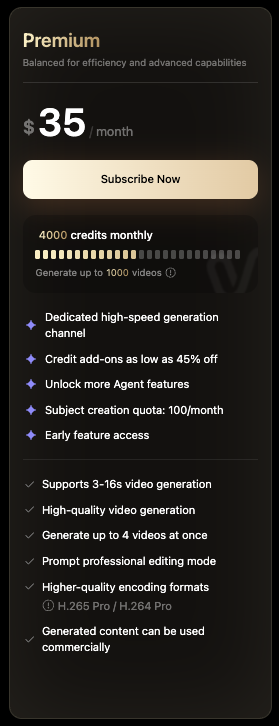
The Premium plan is where Vidu AI starts to make more sense for regular creators. If Standard feels like a starter pack, Premium gives you more breathing room.
Vidu Premium Plan breakdown
✅ What you get:
- 4,000 credits
- Up to 1,000 videos
- More reference usage than Standard
- High-speed generation
- Commercial use
- Watermark-free downloads
- Prompt Editing Pro Mode
- Early feature access
- Better suited for frequent video creation
Vidu’s own blog lists Premium at $28/month with 4,000 credits on yearly billing, while third-party pricing pages commonly show it around $35/month on monthly billing.
❌ Where it falls short:
Premium gives you a much bigger credit pool, but it still doesn’t make credits unlimited.
This matters if you create videos for multiple platforms. A creator making YouTube Shorts, Instagram Reels, TikTok clips, ad concepts, and client variations can burn through generations faster than expected.
There’s also another thing to remember: Vidu is great for generating clips, but it’s not a full timeline-based video editor. One review notes that Vidu uses prompt-based editing instead of a traditional editing timeline, which can feel limiting if you need frame-level control.
My take: Premium is probably the best Vidu AI plan for serious individual creators. It gives you enough credits to test ideas, retry prompts, and create polished clips without stressing over every generation. If you’re using Vidu for weekly content, marketing videos, AI storytelling, or short-form campaigns, this is the plan I’d look at first.
Quick math for a regular creator on Premium:
If you create 20 finished videos per month and each one takes 3 attempts, that’s 60 generations before you even count extra tests, reference clips, or alternate versions.
That’s why Premium feels more realistic than Standard for people who actually publish content, not just test prompts.
4. Ultimate Plan — Around $79/month yearly or $99/month monthly
The Ultimate plan is built for heavy Vidu users. This is the tier for people who already know they’ll be creating a lot of AI videos every month.
Vidu Ultimate Plan breakdown
✅ What you get:
- 8,000 credits
- Higher reference limits
- Ultra-fast generation
- Free off-peak submissions
- Commercial use
- Watermark-free downloads
- Prompt Editing Pro Mode
- Early access to new features
- Better support for high-volume workflows
Vidu’s official blog lists Ultimate at $79/month with 8,000 credits on yearly billing, while review listings commonly show the monthly price around $99/month.
❌ Where it falls short:
Ultimate is powerful, but it can be overkill if you’re not creating videos consistently.
The off-peak feature sounds great, especially if you like batch-generating videos when servers are less busy. But if you only create a few videos per week, you may not use enough of the plan to justify the higher price.
Credits can still run out if you generate high-quality outputs, test complex prompts, or create several versions of the same scene. One review specifically points out that credits can disappear faster than expected when using higher-quality settings or more complex prompts.
My take: Ultimate makes sense for creators, agencies, and production teams that treat AI video as part of their weekly workflow. If you’re making ad variations, character-based scenes, faceless short videos, product animations, or client concepts at scale, this plan gives you more room to work. If you’re only experimenting on weekends, Premium is probably enough.
Quick math for a heavy creator on Ultimate:
If you generate 10 clips per day for testing, drafts, and final outputs, that’s around 300 generations per month.
At that point, the bigger credit pool and faster generation start to matter. You’re not paying just for more credits — you’re paying to avoid slowing down your creative workflow.
5. Team / Enterprise Plan — Custom or higher-tier pricing
The Team or Enterprise option is for studios, agencies, and businesses that need more than one person working inside Vidu.
Vidu Team / Enterprise Plan breakdown
✅ What you get:
- Shared credit pool
- Team-based access
- Role-based collaboration
- Higher-volume usage
- Invoicing support
- Dedicated or priority support
- Better setup for studios, agencies, and business teams
Team pricing is less consistent across public sources. One review lists team plans as starting around $2,999/year with shared credits and role-based collaboration, while another listing mentions Enterprise pricing starting around $1,399 with support, invoicing, training, and custom solutions.
❌ Where it falls short:
This is not the plan most solo creators need.
The main issue is commitment. Once you move into team or enterprise pricing, you’re usually paying for collaboration, account support, and higher usage limits — not just more credits.
So if you’re a freelancer making a few videos for clients, Ultimate may be enough. But if you run an agency with multiple people creating videos, reviewing outputs, and managing client projects, a team setup starts to make more sense.
My take: Team or Enterprise pricing is worth considering only when Vidu becomes part of your business workflow. If multiple people need access, shared credits, invoicing, and support, it can save headaches. But for solo creators, YouTubers, influencers, and small business owners, Standard, Premium, or Ultimate will usually be the better place to start.
6. Vidu API Pricing — Usage-based credits
Vidu also offers API pricing for developers and businesses that want to build video generation into their own apps, tools, or automated workflows.
Vidu API Pricing breakdown
✅ What you get:
- Usage-based credit pricing
- Credits available at $0.005 each
- Ability to buy credits as needed
- Model-based pricing depending on video type, duration, and resolution
- Off-peak pricing for some supported generation types
- Better fit for apps, automation, and large-scale video workflows
Vidu’s API docs say each generation uses credits, and credits are priced at $0.005 per credit. The same docs show that cost changes based on the model, resolution, duration, and whether off-peak pricing is supported.
❌ Where it falls short:
API pricing is flexible, but it’s not the simplest choice for normal creators.
You need to understand how many credits each generation type consumes. A short low-resolution video may cost much less than a longer 1080p reference-to-video generation. That makes API pricing harder to predict unless you already know your expected usage.
It’s also not meant for someone who just wants to log in, type a prompt, and create a few AI videos for Instagram or YouTube.
My take: Use Vidu API pricing if you’re building a product, automating video creation, or generating videos at scale inside another workflow. For regular creators, the normal Vidu subscription plans are easier to understand and manage.
How Vidu AI’s Credit System Actually Works
This is the part of Vidu AI pricing that most creators need to understand before upgrading. The subscription price is just the starting point. The credit system is what decides how many AI videos you can actually create inside Vidu.
Here’s how credits usually get consumed:
| Action | Credit Impact |
| Generate a text-to-video clip | Uses credits based on video settings |
| Turn an image into a video | Uses credits per generation |
| Use reference-to-video features | Can use more credits depending on complexity |
| Generate longer or higher-quality videos | Usually costs more credits |
| Retry, regenerate, or create variations | Uses credits again each time |
Now, let’s do some math that actually matters.
On the Standard plan with 800 credits:
- If you only create simple short clips → Vidu says this can reach up to around 200 videos
- That works out to roughly 4 credits per video in the best-case scenario
- But if you retry prompts, use references, or create higher-quality outputs, your real number will be lower
On the Premium plan with 4,000 credits:
- Simple short clips can reach up to around 1,000 videos
- That gives regular creators much more room for testing
- If you create 20 finished videos per month and each one takes 3 attempts, that’s already around 60 generations
The biggest catch with Vidu AI pricing?
Credits are easy to burn when you’re experimenting.
AI video rarely works perfectly on the first try. You may need to adjust the prompt, fix the camera movement, change the character action, test another style, or regenerate the clip completely.
So if you’re using Vidu for serious content creation, don’t choose a plan based only on the “up to videos” number. Choose based on how many attempts you’ll realistically need to get a video you’d actually publish.
Hidden Costs in Vidu AI Pricing You Should Know
The sticker price is only the beginning. Vidu AI looks affordable at first, but the real cost depends on how you generate, retry, upscale, and use credits each month.
Credits Can Run Out Faster Than Expected
Vidu’s paid plans come with monthly credits, but those credits are not the same as finished videos. A “finished video” usually takes more than one attempt.
Here’s where credits can quietly disappear:
| Action | Why It Can Cost More |
| Regenerating a bad result | Every retry uses more credits |
| Testing different prompts | Each variation counts as another generation |
| Using higher-quality outputs | Better resolution can use more credits |
| Creating multiple versions | Useful for social ads, but burns credits faster |
| Using reference-to-video | More advanced generation can cost more than basic clips |
That means the “up to 200 videos” or “up to 1,000 videos” number is more like a best-case estimate.
In real use, you may generate three or four versions before getting one clip you actually want to post.
Higher Quality Video Costs More
Vidu AI pricing gets more serious when you start using better video settings. On the API side, Vidu clearly shows that pricing changes based on the model, resolution, duration, and whether off-peak pricing is supported. Its API docs say each generation uses credits, and credits cost $0.005 each.
Here’s a simple way to think about it:
| Video Choice | Cost Impact |
| Shorter video | Uses fewer credits |
| Longer video | Uses more credits |
| Lower resolution | Usually cheaper |
| 1080p output | Usually costs more |
| Advanced model or mode | Can increase credit usage |
So if you’re only making quick draft clips, Standard or Premium may feel generous.
But if you’re creating polished 1080p videos for YouTube Shorts, product ads, music visuals, or client campaigns, your credits can drop much faster.
Off-Peak Mode Is Helpful, But Not Always Convenient
Off-peak generation sounds great because it can help you create more without using credits as aggressively. Some listings describe Vidu’s Ultimate plan as including free off-peak submissions, while the official pricing page also references off-peak mode and daily submission limits.
But there’s a practical catch.
Off-peak mode only helps if you’re okay generating videos when the system is less busy. That may work well if you batch content in advance.
It’s less useful if you need a video quickly for a client revision, same-day campaign, trending TikTok idea, or urgent social post.
| Use Case | Off-Peak Mode Fit |
| Batch creating content for next week | Good fit |
| Testing lots of creative ideas | Good fit |
| Last-minute client edits | Not ideal |
| Same-day social media posting | Not always reliable |
| Agency work with deadlines | Helpful, but not enough alone |
So yes, off-peak mode can save credits. But don’t rely on it if your workflow depends on speed.
Monthly vs Yearly Pricing Can Be Confusing
Vidu’s yearly prices look much cheaper than monthly billing. Vidu’s official blog lists Standard at $8/month, Premium at $28/month, and Ultimate at $79/month on yearly billing, with a yearly discount mentioned.
But many review pages and listings show monthly pricing around $10, $35, and $99.
Here’s the simple breakdown:
| Billing Type | What It Means |
| Monthly billing | Costs more per month, easier to cancel |
| Yearly billing | Lower monthly rate, bigger upfront commitment |
| Free plan | Good for testing, not serious publishing |
| Paid plan | Better for watermark-free and commercial work |
The hidden cost here is commitment.
If you pay yearly before testing your real credit usage, you may end up stuck with a plan that’s either too small or more expensive than you needed.
API Pricing Can Add Up Quickly
Vidu API pricing is great for developers, apps, and automation workflows. But it’s not always predictable for beginners.
The API charges by credits, and the final cost depends on the model, resolution, video length, and feature type. For example, Vidu’s API pricing table shows different per-second credit costs for different models and resolutions.
That means two video generations may not cost the same.
| API Factor | Why It Matters |
| Model type | Some models cost more per second |
| Video duration | Longer clips cost more |
| Resolution | 1080p usually costs more than lower quality |
| Off-peak support | Some modes support cheaper off-peak pricing |
| Feature type | Text-to-video, image-to-video, and reference-to-video can differ |
Real-world scenario: If you build an app that lets users generate videos freely, your costs can grow fast unless you set limits.
That’s why API pricing makes sense for developers, but regular creators are usually better off starting with a normal Vidu subscription.
Team Pricing Is Not for Every Creator
Team and Enterprise pricing can make sense for agencies, studios, and larger creative teams. You may get shared credits, team seats, support, invoicing, and higher usage limits.
But if you’re a solo creator, YouTuber, freelancer, influencer, or small business owner, this may be more than you need.
| User Type | Better Fit |
| Beginner testing Vidu | Free |
| Casual creator | Standard |
| Regular content creator | Premium |
| Heavy solo creator | Ultimate |
| Agency or studio | Team / Enterprise |
| Developer or SaaS product | API |
The hidden cost is paying for team features before you actually need them.
My take: Don’t upgrade just because a higher plan looks safer. Start with the plan that matches your real video output, then move up once your credit usage becomes predictable. For most creators, the biggest “extra cost” in Vidu AI isn’t the subscription itself — it’s all the retries, tests, and higher-quality generations needed to get a video that’s actually worth publishing.
What Vidu AI Pricing Plan Is Best for You?
The “right” Vidu AI pricing plan depends on how often you create videos, how many retries you usually need, and whether you’re making content for fun, clients, or a real business workflow. Here’s a practical guide:
Beginner or hobby user testing AI video → The Free plan is fine for exploring the tool. You can test text-to-video, image-to-video, and basic prompt results without paying. But you’ll likely outgrow it quickly once you start experimenting with multiple styles or trying to create videos worth publishing.
Casual creator making a few videos per month → The Standard plan is the safest first paid step. It gives you 800 credits, removes the watermark, and allows commercial use. This works well if you’re creating occasional TikToks, Instagram Reels, YouTube Shorts, product clips, or simple image animations.
Regular creator posting every week → Premium is the better fit. With 4,000 credits, you get more room to test prompts, regenerate weak outputs, and create polished short-form videos without worrying about every single attempt. For most serious solo creators, this is probably the best balance between price and usage.
Heavy creator, marketer, or freelancer handling client work → Ultimate makes more sense if Vidu is part of your weekly workflow. You get 8,000 credits, faster generation, and off-peak benefits. This is helpful if you’re making ad variations, faceless videos, AI storytelling clips, campaign visuals, or multiple versions for clients.
Agency, studio, or business team → Team or Enterprise pricing is worth looking at when multiple people need access. Shared credits, team seats, invoicing, and support can make the workflow easier. But for one-person creators, it’s usually more than you need.
Developer or automation-heavy business → API pricing is the better route if you want to build Vidu video generation into an app, website, internal tool, or automated content system. Just track usage carefully, because API costs depend on credits, model type, resolution, and video length.
If you’re wondering about Vidu AI credits specifically, here’s the quick answer — credits are the real limit behind every plan.
Standard gives you 800 credits, Premium gives you 4,000, and Ultimate gives you 8,000 plus off-peak benefits. So the more videos, retries, references, and high-quality outputs you need, the more you’ll pay.
Still comparing Vidu with other AI video tools? Read my full Vidu vs Kling comparison to see which one fits your workflow better.
Is Vidu AI Pricing Worth It in 2026?
After breaking down every plan, credit limit, and usage-based cost, here’s my honest take.
What Vidu AI does well:
- Free plan available, so you can test the tool before paying
- Affordable entry plan compared with many AI video generators
- Paid plans include watermark-free downloads and commercial use
- Strong for short-form video creation, image-to-video, and reference-based clips
- Premium and Ultimate plans give creators more room to test prompts and regenerate outputs
- API pricing is available for developers, apps, and automated video workflows
- Off-peak generation can be helpful for users who batch-create videos in advance
Where Vidu AI falls short:
- Credits can run out quickly if you test multiple prompts or regenerate often
- “Up to 200 videos” or “up to 1,000 videos” does not always reflect real creator usage
- Monthly and yearly pricing can be confusing because different pages show different rates
- The free plan is useful for testing, but too limited for regular publishing
- Higher-quality videos, longer clips, and advanced modes can cost more credits
- It’s not a full video editor, so you may still need another tool for detailed editing
- API pricing can become hard to predict if you don’t track video length, model type, and resolution
Bottom line: Vidu AI is worth it if you create short AI videos regularly and want a simple way to turn prompts, images, or references into usable clips.
For most casual creators, the Standard plan is a good starting point. But if you’re posting every week, making client videos, or testing lots of ideas, Premium is the safer pick because it gives you more breathing room.
Once you move into daily content creation, ad variations, faceless video workflows, or agency work, Ultimate starts to make more sense.
Just don’t judge Vidu AI pricing by the monthly fee alone. The real cost depends on how many credits you burn through while creating videos you’d actually publish.
Not sure Vidu is the right fit for your workflow? Check my guide to the best Vidu AI alternatives before choosing a plan.
FAQs About Vidu AI Pricing
How much does Vidu AI cost?
Vidu AI has a free plan, plus paid plans. The yearly pricing commonly starts at:
- Standard: around $8/month
- Premium: around $28/month
- Ultimate: around $79/month
Monthly billing is usually higher, with many listings showing around $10, $35, and $99/month. Pricing can change, so it’s always worth checking Vidu’s official pricing page before upgrading.
Is Vidu AI free?
Yes, Vidu AI has a free plan. It gives users a limited number of free credits to test AI video generation. It’s good for trying the tool, but not ideal for regular publishing or client work.
What is the cheapest paid Vidu AI plan?
The cheapest paid plan is usually the Standard plan. It’s listed at around $8/month on yearly billing or around $10/month on monthly billing.
How many credits do you get with Vidu AI?
Vidu’s main paid plans usually include:
- Standard: 800 credits
- Premium: 4,000 credits
- Ultimate: 8,000 credits
These credits control how many videos you can generate each month.
How do Vidu AI credits work?
Vidu uses credits whenever you generate videos. The number of credits used can depend on things like:
- Video length
- Resolution
- AI model or mode
- Text-to-video vs image-to-video
- Regenerations and retries
So your real usage depends on how many attempts it takes to get a video you like.
Does Vidu AI charge per video?
Not exactly. Vidu works on a credit-based system, not a simple “pay per video” system. One video generation may use more or fewer credits depending on the settings and generation type.
How many videos can I make with the Standard plan?
Vidu lists the Standard plan as having 800 credits and the ability to generate up to around 200 videos. In real use, your number may be lower if you retry prompts, use higher-quality settings, or create multiple versions.
Is Vidu Premium worth it?
Yes, Premium is worth it for regular creators. It gives you 4,000 credits, which is much more comfortable if you create videos every week or need room for retries.
Best for:
- YouTubers
- TikTok creators
- Instagram Reel creators
- Freelancers
- Marketers testing video ideas
Is Vidu Ultimate worth it?
Vidu Ultimate is worth it if you create AI videos often. It gives you 8,000 credits, faster generation, and off-peak generation benefits. It’s probably too much for casual users, but useful for agencies, heavy creators, and teams.
Does Vidu AI remove watermarks on paid plans?
Yes, paid plans like Standard are commonly listed with no watermark and commercial use. That makes them better for business videos, client work, ads, and branded content.
Can I use Vidu AI videos commercially?
Yes, Vidu’s paid plans are commonly described as including commercial use. Just make sure you have the rights to any images, characters, logos, music, or brand assets you upload.
What is Vidu AI off-peak mode?
Off-peak mode lets users generate videos during less busy server times. It’s most useful for people who batch-create videos and don’t need instant results. Vidu’s Ultimate plan is commonly listed with unlimited non-peak generation.
What’s the difference between Vidu Standard and Premium?
The main difference is credits and speed.
- Standard: 800 credits, better for casual use
- Premium: 4,000 credits, better for regular creators
- Premium also gives more room for testing, retries, and frequent publishing
What’s the difference between Vidu Premium and Ultimate?
Premium is best for serious solo creators. Ultimate is better for high-volume users.
- Premium: 4,000 credits
- Ultimate: 8,000 credits
- Ultimate: faster generation and off-peak benefits
If you create videos daily, Ultimate makes more sense. If you create weekly, Premium is usually enough.
Does Vidu AI have API pricing?
Yes. Vidu offers API pricing for developers and businesses. API credits are priced at $0.005 per credit, and each generation uses credits based on the model, duration, resolution, and feature type.
Who should use Vidu API pricing?
Vidu API pricing is best for:
- Developers
- SaaS tools
- Automation workflows
- Apps that generate AI videos
- Businesses creating videos at scale
If you’re a normal creator, the regular Vidu subscription plans are easier to manage.
Should I choose monthly or yearly billing?
Choose monthly billing if you’re still testing Vidu. Choose yearly billing only after you know how many credits you actually use each month.
Yearly billing usually gives a lower monthly rate, but it also means a bigger upfront commitment.
Which Vidu AI plan is best for beginners?
The Free plan is best for beginners who only want to test the tool. If you want watermark-free videos and commercial use, start with Standard.
Which Vidu AI plan is best for creators?
For most creators, Premium is the best balance. It gives enough credits for regular video creation without jumping straight to the higher Ultimate price.
Which Vidu AI plan is best for agencies?
Agencies should look at Ultimate, Team, or Enterprise pricing. These plans make more sense when you’re creating multiple videos for clients, testing ad variations, or working with a team.
Why does Vidu AI pricing feel confusing?
Because Vidu pricing has two moving parts:
- The monthly or yearly subscription fee
- The credits you spend while generating videos
The plan price tells you what you pay. The credits decide how much you can actually create.
Can I run out of Vidu credits?
Yes. If you generate lots of videos, retry prompts often, or use advanced settings, you can burn through credits faster than expected.
What happens if I need more Vidu credits?
For regular subscriptions, you may need to upgrade your plan or buy more credits if Vidu offers that option in your account. For API users, credits can be purchased as needed.
Is Vidu AI good value for money?
Yes, Vidu AI can be good value if you create short AI videos regularly. The value is strongest when you use your credits carefully and avoid wasting generations on unclear prompts.
For light use, Standard is enough. For regular content creation, Premium is usually the smarter pick.