If you are trying to create better AI videos, you are probably asking one very practical question.
Which model will actually give me better results?
Kling and Wan are two popular AI video models that are known for text-to-video and image-to-video generation.
But they focus on solving two different creative needs.
Kling is built for cinematic visuals, realistic motion, and polished short clips, while Wan is stronger for structured storytelling, multi-shot scenes, and more flexible creator workflows.
Which makes it difficult to pick any one tool!
In this in-depth comparison, I will break down Kling vs Wan across the factors that directly impact AI video quality and usability, including:
- Text-to-video generation quality
- Image-to-video performance
- Motion control and camera movement
- Prompt understanding and scene accuracy
- Character consistency and visual realism
- Pricing, speed, and real-world usability
PS: I will also show you when it makes sense to use both Kling and Wan together.
This can help you use Wan for planning detailed scenes and Kling for creating polished cinematic shots, instead of forcing one model to do everything.
Let us get into the comparison!
Kling Vs. Wan? A Quick 1 Minute Breakdown
Are you in a hurry to create your next AI video?
Well, no worries — I’ve got your back!
Here’s a quick breakdown of Kling and Wan to help you pick your winner.
P.S. — I’ve also added a winner column, so you can quickly see which AI video model performs better for each use case — no guessing required.
Let’s get into it!
| Features | Kling AI | Wan AI | Winner |
| Best For | Cinematic AI videos and realistic motion | Storytelling, multi-shot scenes, and flexible workflows | Depends on use case |
| Text-to-Video | ✅ Strong | ✅ Strong | Tie |
| Image-to-Video | ✅ More beginner-friendly | ✅ More workflow control | Tie |
| Motion Control | ✅ Strong cinematic motion | ✅ Good action control | Kling AI |
| Camera Movement | ✅ Better for cinematic shots | ✅ Good for structured scenes | Kling AI |
| Multi-Shot Storytelling | ❌ Limited | ✅ Strong | Wan AI |
| Character Consistency | ✅ Good for short clips | ✅ Good with references | Tie |
| Beginner-Friendly | ✅ Easier to use | ❌ More technical | Kling AI |
| Local/Open Workflow | ❌ Limited | ✅ Better support | Wan AI |
| Best Use Case | Social clips, cinematic shots, product visuals | Storyboards, short films, advanced workflows | Depends on workflow |
Kling Vs. Wan AI Feature Comparison
In the previous section, I shared a brief overview of how Kling and Wan AI stack up against each other.
Now, it’s time to break them down — feature by feature.
I’ve compared the core features that every good AI video generator should have, including:
- Text-to-video generation
- Image-to-video performance
- Motion control and camera movement
- Prompt understanding
- Character consistency
- Video realism
- Ease of use
- Pricing and real-world usability
P.S. — I’ve also highlighted which tool makes more sense for different types of creators, so you can choose the right AI video model without wasting credits on endless testing.
Keep reading!
Which Tool Has the Best Text-to-Video Generation?
First, I decided to see which tool is better at creating videos from simple text prompts.
After all, text-to-video is one of the main reasons people use AI video generators in the first place.
You type an idea, add a few visual details, and expect the tool to turn it into a usable video.
Sounds simple, right?
Well, not always.
Some AI video models create beautiful visuals but ignore half the prompt. Some follow the prompt well but produce stiff motion. And some look great in demos but become frustrating when you try to create something specific.
So, I compared Kling and Wan AI to see which one gives better results for text-to-video generation.
| Feature | Kling AI | Wan AI | Winner |
| Text-to-Video Generation | ✅ | ✅ | Tie |
| Cinematic Output | ✅ Strong | ✅ Good | Kling AI |
| Prompt Accuracy | ✅ Good | ✅ Strong | Wan AI |
| Realistic Motion | ✅ Strong | ✅ Good | Kling AI |
| Multi-Scene Understanding | ❌ Limited | ✅ Strong | Wan AI |
| Beginner-Friendly Results | ✅ Strong | ✅ Moderate | Kling AI |
| Best For | Cinematic short clips, social videos, product visuals | Storytelling, structured scenes, advanced workflows | Depends on use case |
Kling AI
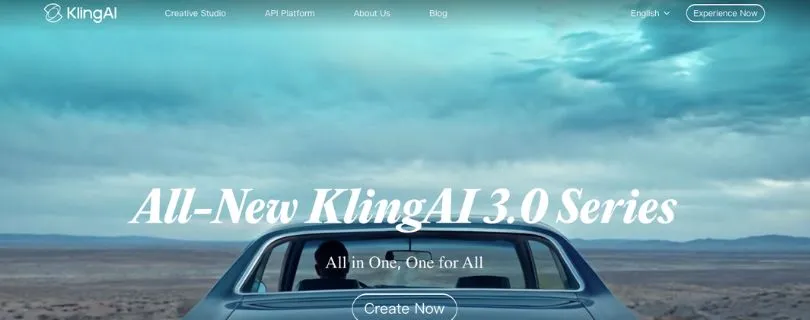
Kling AI Overview
Kling AI is one of the stronger AI video generators if your goal is to create cinematic, polished, and realistic short videos.
With Kling, you can write a prompt and generate scenes that look smooth, dramatic, and visually appealing.
It works especially well for prompts like:
- A luxury car driving through a neon city at night
- A close-up shot of a woman standing in the rain
- A perfume bottle rotating on a reflective surface
- A cinematic drone shot over a mountain landscape
- A fashion model walking through a modern studio
The best part?
Kling usually makes the output look visually rich, even when the prompt is not extremely detailed.
That’s why it feels beginner-friendly.
You don’t always need to write a very technical prompt to get something that looks good. If your idea is simple and visual, Kling can often turn it into a strong AI video.
Where Kling AI Performs Well
Kling performs best when your prompt focuses on one strong scene.
For example, if you ask for a single cinematic shot with clear subject movement and camera direction, Kling usually does a good job.
It handles things like:
- Lighting
- Camera angle
- Smooth movement
- Realistic environments
- Product-style visuals
- Human close-up shots
This makes Kling useful for creators who want to make YouTube Shorts, Instagram Reels, TikTok videos, product ads, mood videos, and cinematic social clips.
So, if you’re looking for an AI video generator that can quickly create polished videos from text, Kling can be SUPER helpful.
Where Kling AI Falls Short
Kling can struggle when the prompt becomes too complex.
For example, if you ask for multiple scenes, several characters, a full story arc, and different camera changes in one prompt, Kling may simplify the idea.
Instead of following every scene step-by-step, it may create one strong-looking shot.
That’s not always bad.
But if your goal is storytelling, ad storyboards, or multi-shot video generation, this can become limiting.
Wan AI
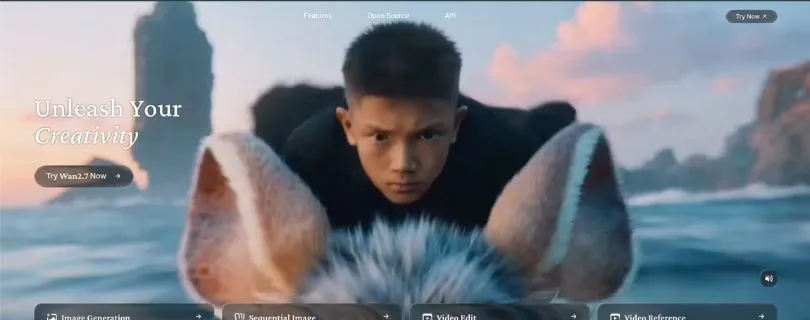
Wan AI Overview
Wan AI takes a slightly different approach.
While Kling feels more focused on cinematic polish, Wan AI feels stronger when you want structure, scene logic, and prompt control.
This makes Wan useful for creators who want to create AI videos with more detailed instructions.
For example, Wan works well for prompts like:
- A product ad with multiple shots
- A character walking through different locations
- A short story with a beginning, middle, and end
- A scene where the camera follows a specific sequence
- A video where actions need to happen in a clear order
In simple words, Wan AI is better when your video idea has more moving parts.
Where Wan AI Performs Well
Wan AI is strong at understanding structured prompts.
You can write your prompt in a more organized way, such as:
- Shot 1: Show the product on a table
- Shot 2: Camera moves closer
- Shot 3: Product lights up
- Shot 4: Final hero shot with dramatic background
This type of prompt often works better with Wan than with Kling.
That’s useful if you’re creating:
- Product ads
- Storyboards
- Short films
- Concept videos
- Brand videos
- YouTube intro scenes
- Multi-scene AI videos
Wan may not always look as polished as Kling in every output, but it gives you more room to guide the video.
Where Wan AI Falls Short
Wan AI may feel less beginner-friendly.
You usually need to spend more time writing a better prompt. If your prompt is too simple, the result may not feel as impressive as Kling.
Also, depending on the platform or workflow you’re using, Wan can feel more technical.
That’s great for advanced users.
But for beginners who just want to type a prompt and get a beautiful video quickly, Kling may feel easier.
Winner?
For text-to-video generation, this one is close.
Kling AI is better if you want cinematic, realistic, and visually polished short videos.
Wan AI is better if you want structured scenes, better prompt control, and multi-shot storytelling.
So, here’s the simple answer:
- Choose Kling AI if you want beautiful videos fast.
- Choose Wan AI if you want better control over how the video unfolds.
If I had to choose one for beginners, I’d pick Kling.
But if I had to choose one for detailed video concepts, I’d pick Wan AI.
Which Tool Offers the Best Image-to-Video Performance?
The next important feature I wanted to test was image-to-video generation.
This is a big one.
Why?
Because many creators don’t start with a text prompt.
Sometimes, you already have a strong image. It could be a product photo, an AI-generated character, a fashion shot, a thumbnail concept, or a brand visual.
Now you just want to animate it.
That’s where image-to-video becomes useful.
So, I compared Kling vs Wan AI to see which tool handles image animation better.
| Feature | Kling AI | Wan AI | Winner |
| Image-to-Video Generation | ✅ | ✅ | Tie |
| Face Consistency | ✅ Strong | ✅ Good | Kling AI |
| Product Image Animation | ✅ Strong | ✅ Good | Kling AI |
| Creative Control | ✅ Good | ✅ Strong | Wan AI |
| Motion Accuracy | ✅ Strong | ✅ Good | Kling AI |
| Workflow Flexibility | ✅ Moderate | ✅ Strong | Wan AI |
| Best For | Portraits, product visuals, cinematic clips | Controlled animation, advanced workflows, structured motion | Depends on workflow |
Kling AI
Kling AI Image-to-Video Overview
Kling is very strong when it comes to turning images into cinematic videos.
You can upload an image and add movement to it, such as:
- A person blinking or turning their head
- Hair moving in the wind
- A camera slowly pushing in
- A product rotating slightly
- Background lights moving
- A cinematic zoom or pan
This is where Kling feels more polished.
The original image usually stays cleaner, especially when the movement is subtle.
That’s important because AI video tools often mess up the image once motion starts.
Faces change. Hands distort. Product shapes bend. Backgrounds melt.
Kling does a better job of keeping the image stable.
Where Kling AI Performs Well
Kling is especially good for:
- Portrait animation
- Fashion photos
- AI influencer clips
- Product visuals
- Cinematic image animation
- Social media videos
- Realistic character movement
For example, if you upload a portrait and ask the subject to slowly smile or turn toward the camera, Kling usually keeps the face more natural.
If you upload a product image and ask for a slow cinematic camera movement, the object usually stays more stable.
That makes Kling a strong choice for marketers, creators, and small business owners who want clean image-to-video results without too much technical setup.
Where Kling AI Falls Short
Kling is not perfect with complex image animation.
If you ask for too much movement, the result can become unstable.
For example, if a still character image suddenly needs to run, dance, jump, or fight, Kling may struggle with body movement.
So, it works best when the animation is smooth and controlled.
Think subtle motion, not extreme action.
Wan AI
Wan AI Image-to-Video Overview
Wan AI also supports image-to-video workflows, and it gives creators more control when they know what they’re doing.
This makes it useful for advanced users who want to control how the image moves, how the scene changes, and how the final output behaves.
Wan AI is especially interesting if you like experimenting with detailed prompts or more technical workflows.
You can use it for:
- Character animation
- Scene expansion
- Product movement
- Storyboard-style animation
- Reference-based video creation
- More controlled AI video workflows
Where Wan AI Performs Well
Wan AI performs well when you give it clear motion instructions.
For example:
- The camera slowly moves from left to right
- The subject turns their head slightly
- The product rises from the table
- The background lights flicker softly
- The character walks forward slowly
Wan can be useful if you want to experiment with different motion styles and scene structures.
It also makes sense for users who want more flexibility instead of just quick results.
So, if you’re building a more advanced AI video workflow, Wan AI can be a strong option.
Where Wan AI Falls Short
Wan AI may require more testing.
The same image can produce different results depending on the prompt, platform settings, and workflow.
Also, if you’re a beginner, Wan may feel less direct than Kling.
You may need to adjust your prompt several times before the output feels right.
That’s why Kling may feel easier for simple image-to-video work, while Wan feels better for creators who want control and don’t mind experimenting.
Winner?
For image-to-video, Kling AI takes the lead.
It is better for realistic portraits, product visuals, and polished image animation.
Wan AI is still powerful, especially for advanced workflows and controlled scene generation.
But if you want the safer option for most image-to-video use cases, Kling is easier to recommend.
Use Kling AI when image quality and stability matter most.
Use Wan AI when you want more workflow control and are comfortable testing different prompts.
Which Tool Offers the Best Motion Control and Camera Movement?
Motion control is where AI video tools either impress you or disappoint you.
A video can look beautiful in the first frame.
But once the subject starts moving, everything can fall apart.
The camera may drift. The face may change. The hands may look strange. The object may bend. Or the video may ignore the motion you asked for.
So, I wanted to compare how Kling and Wan AI handle motion control and camera movement.
| Feature | Kling AI | Wan AI | Winner |
| Camera Movement | ✅ Strong | ✅ Good | Kling AI |
| Human Motion | ✅ Good | ✅ Strong | Wan AI |
| Product Motion | ✅ Strong | ✅ Good | Kling AI |
| Action Scenes | ✅ Good | ✅ Strong | Wan AI |
| Cinematic Movement | ✅ Strong | ✅ Good | Kling AI |
| Scene-to-Scene Motion | ❌ Limited | ✅ Strong | Wan AI |
| Best Overall Motion Control | ✅ Strong for camera | ✅ Strong for action/story flow | Depends on use case |
Kling AI
Kling AI Motion Control Overview
Kling is strong when the movement is cinematic.
It understands camera-style instructions better than many AI video tools.
You can use prompts like:
- Slow zoom in
- Camera orbit around the subject
- Dolly push-in
- Smooth tracking shot
- Close-up cinematic shot
- Wide-angle establishing shot
- Slow pan across the scene
This makes Kling useful when the camera movement itself is part of the video’s style.
For example, if you’re creating a product ad, you may want the camera to slowly move around the product.
If you’re creating a fashion video, you may want a smooth tracking shot.
If you’re creating a cinematic clip, you may want a slow push-in toward the character’s face.
Kling handles these types of shots well.
Where Kling AI Performs Well
Kling is better for:
- Cinematic camera movement
- Smooth product shots
- Close-up portraits
- Premium ad-style videos
- Slow motion scenes
- Realistic environmental movement
- Social media videos with polished motion
The biggest advantage is that Kling often makes the movement feel natural and clean.
It doesn’t always follow every tiny instruction perfectly, but the final result usually looks visually pleasing.
That matters a lot when you’re creating content for public use.
Where Kling AI Falls Short
Kling can struggle when the action becomes too complex.
For example:
- A person doing a fast dance routine
- A fight scene with multiple movements
- A character running and turning quickly
- Several people moving at the same time
- A full story with multiple actions
In these cases, Kling may still create a good-looking clip, but it may not follow the exact movement you wanted.
So, Kling is best when you want controlled cinematic movement, not complex choreography.
Wan AI
Wan AI Motion Control Overview
Wan AI is stronger when the movement is action-based or scene-based.
It can understand more structured movement instructions, especially when you describe actions clearly.
For example:
- The character walks forward, turns left, and looks at the camera
- The dancer spins once and raises both hands
- The product opens, glows, and rotates slowly
- The camera starts wide, moves closer, and ends on the logo
- The scene changes from a street view to a close-up shot
Wan AI feels better when your prompt has a sequence of actions.
This makes it useful for creators who want to guide the movement step by step.
Where Wan AI Performs Well
Wan AI is useful for:
- Multi-step actions
- Human movement
- Story-based motion
- Product demo sequences
- Short ad storyboards
- Character actions
- Scene progression
If Kling feels like a strong cinematographer, Wan feels more like a storyboard assistant.
It may not always create the most polished-looking shot, but it can understand how the scene should move from one step to another.
That’s useful if your video needs more than just a beautiful camera movement.
Where Wan AI Falls Short
Wan AI can sometimes feel less cinematic than Kling.
The movement may follow the prompt, but the final output may not look as polished.
You may also need to write more detailed prompts to get the best results.
For example, instead of saying:
“Create a cinematic product video.”
You may need to write:
“Start with a close-up of the product on a black table. Slowly rotate the camera around it. Add soft studio lighting. End with a front-facing hero shot.”
That extra detail helps Wan perform better.
But yes, it also takes more effort.
Winner?
For motion control, there is no single winner.
Kling AI wins for cinematic camera movement.
Wan AI wins for structured action and scene progression.
So, here’s the easiest way to decide:
- Choose Kling AI if you want smooth camera movement, cinematic shots, and polished product visuals.
- Choose Wan AI if you want action-based movement, story flow, and more structured scene control.
For most social videos and ad-style clips, Kling feels easier.
For storyboards and multi-step movement, Wan AI gives you more control.
Which Tool Offers the Best Prompt Understanding?
Another feature I wanted to compare in the Kling vs Wan AI battle was prompt understanding.
Because with AI video tools, your prompt is basically your director’s brief.
You are telling the model what to create, how the subject should move, what the camera should do, what the scene should look like, and what should not happen.
But here’s the problem.
Not every AI video model understands prompts the same way.
One tool may follow the visual style perfectly but ignore the action. Another may follow the action but create a less polished scene.
So, I tested both tools to see which one offers better prompt understanding and scene accuracy.
Let’s see what happens next!
| Feature | Kling AI | Wan AI | Winner |
| Simple Prompt Understanding | ✅ Strong | ✅ Strong | Tie |
| Complex Prompt Handling | ✅ Good | ✅ Strong | Wan AI |
| Camera Direction Accuracy | ✅ Strong | ✅ Good | Kling AI |
| Multi-Shot Prompt Understanding | ❌ Limited | ✅ Strong | Wan AI |
| Style Interpretation | ✅ Strong | ✅ Good | Kling AI |
| Action Sequence Understanding | ✅ Good | ✅ Strong | Wan AI |
| Best Overall Prompt Control | ✅ Better for cinematic prompts | ✅ Better for structured prompts | Depends on prompt type |
Kling AI
Kling AI Prompt Understanding
Kling understands visual prompts really well.
If your prompt is simple, cinematic, and focused on one main scene, Kling usually gives you a strong result.
For example, Kling works well with prompts like:
- A cinematic close-up of a woman standing under neon lights
- A luxury perfume bottle rotating on a reflective black surface
- A man walking through a rainy cyberpunk street
- A slow camera push-in toward a vintage car at night
- A golden retriever running through a sunny field
You’ll notice a pattern here.
These prompts are visual, clean, and focused.
That’s where Kling shines.
It understands the mood, lighting, camera angle, and overall style better than many AI video generators.
Where Kling AI Performs Well
Kling performs well when your prompt includes:
- A single main subject
- A clear environment
- Cinematic lighting
- Camera movement
- Product-style visuals
- Realistic motion
- A specific visual mood
For example, if you write “slow dolly push-in, shallow depth of field, soft studio lighting,” Kling usually understands that you want a polished, film-like output.
This makes it useful for creators who want AI videos for ads, short-form content, product showcases, music visuals, and cinematic social media clips.
Where Kling AI Falls Short
Kling can become less predictable when your prompt has too many moving parts.
For example, if you ask for:
- Three different scenes
- Multiple characters
- Different camera angles
- A full product ad story
- A character performing several actions in order
Kling may not follow everything exactly.
It may turn the full prompt into one beautiful-looking clip instead of a properly structured sequence.
That’s why Kling is better for cinematic single-scene videos than complex multi-scene storytelling.
Wan AI
Wan AI Prompt Understanding
Wan AI feels stronger when your prompt is detailed and structured.
Instead of giving it one paragraph, you can guide it almost like a mini storyboard.
For example:
- Shot 1: A close-up of the product on a table
- Shot 2: The camera moves around the product
- Shot 3: The product opens and glows
- Shot 4: End with a clean hero shot
This style of prompting works well with Wan AI.
It gives the model a clear order to follow.
That makes Wan useful when you’re creating videos that need a beginning, middle, and end.
Where Wan AI Performs Well
Wan AI performs well when your prompt includes:
- Step-by-step actions
- Scene progression
- Multi-shot structure
- Product ad concepts
- Storytelling instructions
- Character movement details
- More specific creative direction
This is helpful if you are creating:
- Short films
- Brand story videos
- Product demos
- Explainer-style clips
- AI storyboards
- Concept videos
- Multi-shot social ads
Wan AI may not always look as cinematic as Kling at first glance, but it often gives you more control over how the video unfolds.
That’s a big plus if your video idea is not just one beautiful shot.
Where Wan AI Falls Short
Wan AI can feel more demanding.
If your prompt is too short or vague, the result may not look as impressive.
For example, a simple prompt like “a man walking in the rain” may look better in Kling because Kling naturally adds cinematic polish.
With Wan, you’ll usually get better results when you add more structure:
- Who is the subject?
- What should they do?
- What does the camera do?
- How should the scene change?
- What should stay consistent?
So, Wan rewards detailed prompting.
But yes, that also means more work.
Winner?
For prompt understanding, the winner depends on how you write your prompts.
Kling AI is better for cinematic prompts where you want one polished scene.
Wan AI is better for structured prompts where you want the model to follow a sequence of actions.
So, here’s the simple breakdown:
- Choose Kling AI if your prompt is visual, cinematic, and scene-focused.
- Choose Wan AI if your prompt is detailed, structured, and story-focused.
If I had to choose one for better overall prompt control, I’d pick Wan AI.
But if I wanted the best-looking result from a short prompt, I’d pick Kling.
Which Tool Offers Better Character Consistency?
Character consistency is one of the trickiest parts of AI video generation.
You may get a beautiful first frame.
Then the video starts moving.
And suddenly, the character’s face changes, the hands look odd, the outfit shifts, or the person starts looking like someone else.
That’s when a good AI video turns into a failed output.
So, I wanted to compare Kling and Wan AI on character consistency.
This matters especially if you’re creating AI influencer videos, branded characters, storytelling clips, YouTube Shorts, ads, or image-to-video portraits.
Let’s see which tool handles characters better.
| Feature | Kling AI | Wan AI | Winner |
| Face Consistency | ✅ Strong | ✅ Good | Kling AI |
| Outfit Consistency | ✅ Good | ✅ Good | Tie |
| Reference-Based Control | ✅ Good | ✅ Strong | Wan AI |
| Portrait Animation | ✅ Strong | ✅ Good | Kling AI |
| Multi-Shot Character Continuity | ❌ Limited | ✅ Strong | Wan AI |
| Realistic Human Characters | ✅ Strong | ✅ Good | Kling AI |
| Best Overall Character Consistency | ✅ Better for single clips | ✅ Better for structured reference workflows | Depends on use case |
Kling AI
Kling AI Character Consistency
Kling is strong when you want one realistic character to stay stable in a short clip.
This is especially noticeable in close-up and portrait-style generations.
For example, Kling works well for:
- A person slowly turning toward the camera
- A model blinking in a beauty shot
- An AI influencer smiling slightly
- A character standing in a cinematic scene
- A fashion portrait with subtle movement
The face usually stays more natural when the movement is controlled.
That’s a big deal if you’re creating videos where the character’s identity matters.
Where Kling AI Performs Well
Kling performs well for:
- Portrait animation
- AI influencer clips
- Fashion videos
- Beauty shots
- Character close-ups
- Lifestyle videos
- Realistic human scenes
If your goal is to animate a person from an image and keep the face stable, Kling is usually the safer choice.
It works best when the movement is subtle.
Think blinking, smiling, hair movement, slight head turn, or slow camera motion.
Where Kling AI Falls Short
Kling can struggle when the character has to perform complex movement.
For example:
- Dancing
- Fighting
- Running
- Jumping
- Turning quickly
- Interacting with another person
- Moving through multiple scenes
In these cases, the face or body may shift.
So, Kling is better for stable short clips than long character-driven sequences.
Wan AI
Wan AI Character Consistency
Wan AI can be strong for character consistency when you use it with a more structured workflow.
It may not always beat Kling in simple portrait animation, but it becomes useful when you want better control across scenes.
For example, Wan AI can be a good fit for:
- Story videos
- Multi-shot character clips
- Reference-based workflows
- Character-driven scenes
- Product demos with people
- Short film concepts
Wan feels more flexible if you know how to guide it.
Where Wan AI Performs Well
Wan AI performs well when you give it clear character details, such as:
- Same outfit
- Same hairstyle
- Same face
- Same lighting style
- Same camera distance
- Same background mood
You can also describe the character repeatedly across scenes to improve consistency.
This makes Wan useful for creators who want to build short narratives instead of one-off clips.
For example, if you’re making a short story where the same character appears in multiple shots, Wan gives you more room to structure that sequence.
Where Wan AI Falls Short
Wan AI may take more effort.
If you use a simple prompt and expect perfect consistency, you may be disappointed.
You usually need to write more detailed instructions and test different outputs.
Also, for simple portrait animation, Kling often feels cleaner and more realistic.
So, Wan is better for users who want more workflow control, while Kling is better for users who want a polished character clip quickly.
Winner?
For character consistency, it depends on the use case.
Kling AI wins for realistic single-shot character videos and portrait animation.
Wan AI wins when you need character continuity across structured scenes or reference-based workflows.
So, here’s the practical answer:
- Use Kling AI for AI influencer clips, portraits, beauty shots, and realistic short videos.
- Use Wan AI for story videos, multi-shot scenes, and character-based workflows.
If you’re a beginner, Kling is easier.
If you’re building a more advanced story workflow, Wan gives you more control.
Which Tool Creates More Realistic Videos?
Now let’s talk about realism.
Because this is where most people judge an AI video generator almost instantly.
If the lighting looks fake, the movement feels odd, or the face starts changing, the video becomes hard to use.
And if you’re creating videos for ads, YouTube Shorts, brand campaigns, or product promotions, realism matters a lot.
So, I compared Kling vs Wan AI to see which one creates more realistic videos.
| Feature | Kling AI | Wan AI | Winner |
| Visual Realism | ✅ Strong | ✅ Good | Kling AI |
| Lighting Quality | ✅ Strong | ✅ Good | Kling AI |
| Product Realism | ✅ Strong | ✅ Good | Kling AI |
| Human Motion Realism | ✅ Good | ✅ Strong | Wan AI |
| Scene Logic | ✅ Good | ✅ Strong | Wan AI |
| Cinematic Look | ✅ Strong | ✅ Good | Kling AI |
| Best Overall Realism | ✅ Stronger visual realism | ✅ Stronger scene logic | Kling AI |
Kling AI
Kling AI Video Realism
Kling is better when you want the video to look realistic and cinematic.
Its outputs often have stronger lighting, smoother camera movement, and more polished scene composition.
This makes Kling useful for:
- Product ads
- Fashion clips
- Lifestyle videos
- Cinematic social content
- AI influencer videos
- Brand visuals
- Short promotional videos
For example, if you create a prompt for a luxury product commercial, Kling usually gives you a cleaner-looking output.
The shadows, reflections, and camera movement feel more premium.
That’s why Kling is often better for videos where appearance matters more than complex storytelling.
Where Kling AI Performs Well
Kling performs well in realistic scenes like:
- A person walking through a city
- A product placed under studio lighting
- A car driving through a wet street
- A model posing near a window
- A cinematic food or beverage shot
- A close-up human portrait
The output usually feels closer to something you’d actually post or edit into a campaign.
Not perfect, of course.
You may still see AI artifacts, especially with hands, fast movement, and text.
But overall, Kling gives you stronger visual realism.
Where Kling AI Falls Short
Kling’s realism can drop when the scene becomes too complex.
If there are multiple characters, fast actions, or scene transitions, it may create visual glitches.
Also, Kling can sometimes prioritize beauty over accuracy.
That means the clip may look amazing but not follow the prompt perfectly.
Wan AI
Wan AI Video Realism
Wan AI is not weak in realism.
It can create good-looking videos, especially when the prompt is detailed.
But compared to Kling, Wan usually feels more practical for structure and action than pure cinematic polish.
Where Wan stands out is scene logic.
For example, if you ask for a product ad with multiple stages, Wan may understand the flow better:
- Show the product
- Move closer
- Reveal the feature
- End with a final shot
This makes it useful for video ideas where the sequence matters.
Where Wan AI Performs Well
Wan AI performs well for:
- Product demos
- Story-based videos
- Multi-shot concepts
- Human actions
- Scene progression
- Structured ad ideas
- AI storyboard drafts
It may not always look as glossy as Kling, but it can make the video feel more logically connected.
That’s important when your content has a message, not just a visual.
Where Wan AI Falls Short
Wan AI may need more prompt work to reach the same visual polish as Kling.
A vague prompt may produce a decent but average-looking result.
You’ll usually need to guide Wan with clearer details about lighting, subject, camera, and scene flow.
So, if you want the most realistic-looking video with minimal effort, Kling is usually easier.
Winner?
Kling AI wins for video realism.
It gives stronger cinematic quality, better lighting, and more polished visuals.
Wan AI is better for realistic scene flow and structured video ideas, but Kling is stronger when the final video needs to look premium.
So, if your main goal is realistic AI video generation, choose Kling.
If your goal is a realistic story or sequence, Wan AI may be better.
Which Tool Is Easier to Use?
Now comes the part many creators care about most.
Which tool is easier to use?
Because let’s be real.
Not everyone wants to spend hours testing prompts, adjusting settings, and regenerating videos.
Some people just want to type an idea, upload an image, and get a usable video.
So, I compared Kling and Wan AI from a usability point of view.
| Feature | Kling AI | Wan AI | Winner |
| Beginner-Friendly Interface | ✅ Strong | ✅ Moderate | Kling AI |
| Quick Results | ✅ Strong | ✅ Good | Kling AI |
| Prompt Simplicity | ✅ Strong | ✅ Moderate | Kling AI |
| Advanced Workflow Control | ✅ Good | ✅ Strong | Wan AI |
| Local/Open Workflow Flexibility | ❌ Limited | ✅ Strong | Wan AI |
| Best for Beginners | ✅ Strong | ❌ More technical | Kling AI |
| Best for Advanced Users | ✅ Good | ✅ Strong | Wan AI |
Kling AI
Kling AI Ease of Use
Kling is easier for beginners.
You can start with a simple text prompt or image and generate a good-looking video without building a complicated workflow.
That makes it useful for:
- Content creators
- Social media managers
- Small business owners
- Beginner AI video users
- Marketers
- YouTubers
- Short-form video creators
Kling feels more direct.
You add your idea, choose your generation option, and wait for the result.
Of course, better prompts still help.
But Kling often gives you decent output even when your prompt is not perfect.
Where Kling AI Performs Well
Kling works well if you want to create:
- Instagram Reels
- TikTok clips
- YouTube Shorts
- Product videos
- AI avatar-style clips
- Cinematic visuals
- Quick brand content
It is especially useful when you don’t want to manage too many technical settings.
That’s why beginners may feel more comfortable with Kling.
Where Kling AI Falls Short
Kling can feel limited if you want deep control.
For example, if you want to build a complex AI video workflow, test local models, or customize the generation process heavily, Kling may not give you the flexibility you want.
It is better as a polished video generation tool than a fully customizable workflow system.
Wan AI
Wan AI Ease of Use
Wan AI can feel more technical, depending on where and how you use it.
If you’re using Wan through a simple web interface, it may not feel too difficult.
But if you’re using Wan in advanced workflows, such as local setups or node-based tools, the learning curve becomes higher.
That’s not a bad thing.
It just means Wan is better for users who want more control.
Where Wan AI Performs Well
Wan is useful for:
- Advanced creators
- AI workflow builders
- Filmmakers
- Technical users
- Storyboard artists
- Developers
- People who want more control over output
If you enjoy experimenting, Wan can be more rewarding.
You can test different prompt structures, reference workflows, motion styles, and scene instructions.
This gives you more creative freedom.
Where Wan AI Falls Short
Wan is not always the easiest choice for beginners.
You may need to understand:
- Better prompt structure
- Scene-by-scene prompting
- Reference control
- Workflow settings
- Output testing
- Regeneration strategy
That can feel like too much if you just want a quick AI video.
So, Wan is powerful, but not always beginner-friendly.
Winner?
Kling AI wins for ease of use.
It is simpler, faster, and easier for beginners to understand.
Wan AI wins for advanced control, but it takes more effort.
So, here’s the simple answer:
- Choose Kling AI if you want an easy AI video generator for quick, polished results.
- Choose Wan AI if you want more control and don’t mind a steeper learning curve.
Which Tool Offers Better Pricing and Real-World Usability?
Pricing is tricky with AI video tools.
Why?
Because you’re not just paying for one generation.
You’re paying for retries.
And trust me, retries matter.
Even the best AI video generators can create outputs with weird hands, wrong movement, face changes, or scenes that don’t fully match the prompt.
So, the real question is not just:
“Which tool is cheaper?”
The better question is:
“Which tool gives me more usable videos for the money?”
Let’s compare Kling and Wan AI from that angle.
| Feature | Kling AI | Wan AI | Winner |
| Free Trial / Free Credits | ✅ Often available depending on platform | ✅ Often available depending on platform | Tie |
| Cost Per Usable Output | ✅ Good for simple clips | ✅ Good for advanced users | Depends on workflow |
| Cloud Access | ✅ Strong | ✅ Available through platforms | Kling AI |
| Local/Open Workflow | ❌ Limited | ✅ Strong | Wan AI |
| Best for Quick Output | ✅ Strong | ✅ Good | Kling AI |
| Best for Cost Control | ✅ Good | ✅ Strong if used locally | Wan AI |
| Best Overall Value | ✅ For beginners and marketers | ✅ For advanced users and workflow builders | Depends on user type |
Kling AI
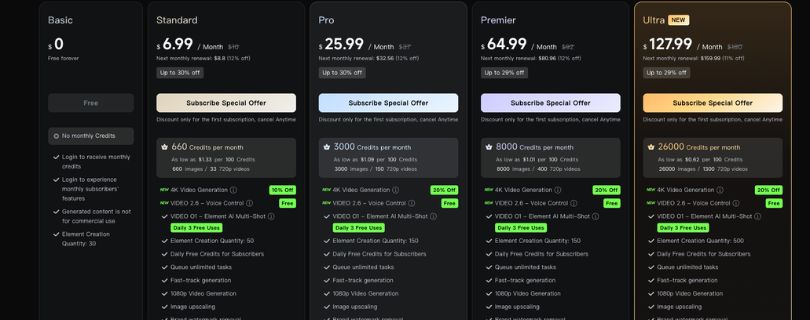
Kling AI Pricing and Usability
Kling is useful if you want fast, polished videos without building a complicated setup.
For many creators, this is worth paying for because it saves time.
You don’t need to manage a local workflow.
You don’t need to set up nodes.
You don’t need to troubleshoot model settings.
You can simply generate videos through a platform and focus on the creative idea.
That makes Kling a practical choice for creators and marketers who value speed.
Where Kling AI Offers Better Value
Kling gives better value when you are creating:
- Short social media clips
- Product visuals
- Brand videos
- AI influencer clips
- Cinematic ads
- Quick marketing videos
- Image-to-video content
If one or two generations give you something usable, Kling feels worth it.
But if you keep regenerating because the prompt is too complex, the cost can add up.
That’s why Kling is best for focused ideas.
Where Kling AI Can Get Expensive
Kling can become expensive when you need:
- Long videos
- Multiple variations
- Complex storytelling
- Many scene changes
- Several character generations
- High-volume content production
If you’re making videos daily, you’ll need to watch your credits carefully.
The cost is not just the subscription.
It’s the number of attempts needed to get a usable output.
Also Read:
Kling Pricing Explained
Wan AI
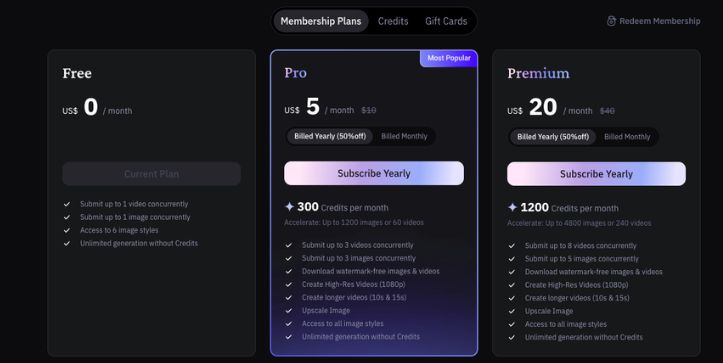
Wan AI Pricing and Usability
Wan AI can be more flexible from a cost point of view, especially for advanced users.
Depending on the platform or setup, you may be able to use Wan through cloud tools, APIs, or more open workflows.
This makes it attractive for creators who want more control over how they generate videos.
If you’re technical, Wan can give you more freedom to test, tweak, and build a repeatable workflow.
Where Wan AI Offers Better Value
Wan AI may offer better value for:
- Advanced AI creators
- Developers
- Filmmakers
- Storyboard workflows
- Local generation users
- High-volume testing
- Custom video workflows
If you know how to guide Wan properly, you can get strong results without relying only on a simple web app experience.
That flexibility can save money in the long run.
Where Wan AI Can Become Difficult
Wan may cost you more time.
And time is also a cost.
If you need to write longer prompts, test different settings, or learn workflow tools, it may not feel cheaper at first.
For beginners, Kling may actually be the better value because it gets them usable videos faster.
So, Wan is cost-effective when you know what you’re doing.
But it can feel slow if you’re just starting out.
Winner?
For pricing and real-world usability, the winner depends on your workflow.
Kling AI is better if you want quick, polished videos and don’t want to deal with technical setup.
Wan AI is better if you want flexibility, workflow control, and potentially better long-term cost control.
So, here’s the practical answer:
- Choose Kling AI if you value speed and simplicity.
- Choose Wan AI if you value control and flexibility.
Final Winner: Kling AI or Wan AI?
After comparing both tools feature by feature, here’s my honest take.
Kling AI is the better choice for creators who want realistic, cinematic, and polished videos without too much setup.
Wan AI is the better choice for creators who want more structure, scene control, and workflow flexibility.
So, there’s no perfect winner for everyone.
It depends on what you’re creating.
| Use Case | Better Tool |
| Cinematic AI videos | Kling AI |
| Product ads | Kling AI |
| Realistic short clips | Kling AI |
| Image-to-video portraits | Kling AI |
| Camera movement | Kling AI |
| Multi-shot storytelling | Wan AI |
| Structured prompts | Wan AI |
| Advanced workflows | Wan AI |
| Local/open workflow flexibility | Wan AI |
| Beginner-friendly video generation | Kling AI |
Choose Kling AI If…
You should choose Kling AI if you want:
- More cinematic videos
- Better visual realism
- Smoother camera movement
- Stronger image-to-video results
- More polished product visuals
- Easier video generation
- Better results from shorter prompts
Kling is a better pick for creators, marketers, small businesses, and agencies that want attractive videos quickly.
It’s especially useful if your content is built around one strong visual idea.
Choose Wan AI If…
You should choose Wan AI if you want:
- Better structured prompts
- Multi-shot storytelling
- More workflow flexibility
- Advanced AI video experimentation
- Better scene progression
- Reference-based workflows
- More control over how the video unfolds
Wan is a better pick for advanced creators, developers, filmmakers, and users who don’t mind testing prompts to get more controlled results.
My Final Verdict
If I had to choose one overall winner, I’d pick Kling AI for most everyday creators.
Why?
Because it performs better in the areas most people notice first:
- Realism
- Visual polish
- Camera movement
- Image-to-video quality
- Beginner-friendliness
- Social media usability
But Wan AI is not behind.
In fact, Wan may be the smarter choice if you care more about structured scenes, multi-shot videos, and advanced control.
So, the final answer is simple:
For polished and cinematic AI videos, go with Kling AI.
For structured storytelling and flexible workflows, go with Wan AI.
Also Read:
Best Kling Alternatives
Runway vs Kling
FAQs About Kling Vs. Wan AI
Is Kling better than Wan AI?
Kling is better if you want cinematic, realistic, and polished AI videos with smooth camera movement.
It works really well for product shots, social media clips, AI influencer videos, and short cinematic scenes.
Wan AI is better if you want structured storytelling, multi-shot scenes, and more control over how the video unfolds.
So, the better tool depends on what you’re creating.
If you want beautiful videos quickly, Kling is the safer choice.
If you want more scene control and advanced workflows, Wan AI makes more sense.
Is Wan AI better than Kling for storytelling?
Yes, Wan AI is usually better for storytelling.
The reason is simple.
Wan AI handles structured prompts better.
For example, if you write your prompt like:
- Shot 1: Show the character entering the room
- Shot 2: Camera moves closer to the product
- Shot 3: The product lights up
- Shot 4: End with a final hero shot
Wan is more likely to understand the scene flow.
Kling can still create beautiful videos, but it often works better for one strong cinematic shot rather than a full multi-scene story.
Which is better for image-to-video, Kling or Wan AI?
Kling is better for most image-to-video use cases.
It usually keeps faces, product shapes, and visual details more stable when turning an image into a video.
This is useful if you want to animate:
- Portraits
- Product photos
- AI influencer images
- Fashion visuals
- Brand images
- Cinematic concept art
Wan AI is still useful for image-to-video, especially if you want more workflow control.
But if you want the easier and more polished option, Kling is usually better.
Which AI video tool is better for beginners?
Kling is better for beginners.
You can write a simple prompt or upload an image and get a good-looking video without learning too many technical settings.
Wan AI may require more prompt testing, scene planning, or workflow knowledge.
So, if you’re new to AI video generation and want quick results, start with Kling.
Once you’re comfortable and want more control, you can try Wan AI.
Which is better for cinematic AI videos?
Kling is better for cinematic AI videos.
It does a good job with:
- Camera movement
- Lighting
- Realistic scenes
- Product shots
- Close-up portraits
- Smooth motion
- Film-like visuals
If your goal is to create AI videos that look polished, premium, and social-media-ready, Kling is the stronger choice.
Wan AI can create good-looking videos too, but Kling usually wins when visual realism and cinematic style matter most.
Which is better for product videos, Kling or Wan AI?
Kling is usually better for polished product videos.
It works well when you want a product to look premium, stable, and realistic.
For example, Kling is a good choice for:
- Perfume ads
- Watch videos
- Skincare product shots
- Tech product reveals
- Luxury brand visuals
- Ecommerce promo clips
Wan AI can be better if your product video needs multiple scenes or a storyboard-style flow.
So, for one clean product shot, choose Kling.
For a multi-shot product ad, Wan AI can be useful.
Which tool has better motion control?
Kling has better camera motion control.
It performs well with prompts like:
- Slow zoom in
- Camera orbit
- Dolly push-in
- Tracking shot
- Wide cinematic shot
- Close-up camera movement
Wan AI is better for action-based movement and scene progression.
So, the answer depends on the type of motion.
For camera movement, Kling wins.
For structured action sequences, Wan AI can be better.
Which tool follows prompts better?
Wan AI follows structured prompts better.
If you give Wan AI a clear step-by-step prompt, it can understand the flow more effectively.
Kling follows visual and cinematic prompts better.
For example, if you write a short prompt asking for a beautiful cinematic scene, Kling may give you a stronger-looking result.
So, use Kling for simple cinematic prompts.
Use Wan AI for detailed, structured prompts.
Is Kling or Wan AI better for AI influencer videos?
Kling is usually better for AI influencer videos.
It works well for realistic portraits, subtle face movement, fashion clips, and lifestyle-style videos.
If you want to animate an AI influencer image and keep the face stable, Kling is the safer option.
Wan AI may be useful if you’re creating a longer story around that character, but for short influencer-style clips, Kling is easier to recommend.
Is Wan AI open source?
Wan AI is often discussed more in open and flexible AI video workflows compared to Kling.
This makes it attractive for advanced users who want more control over their generation process.
Kling is more commonly used as a polished platform-based AI video generator.
So, if you care about open workflows, experimentation, and technical control, Wan AI may be more appealing.
Can I use Kling and Wan AI together?
Yes, and honestly, this can be the smartest approach.
You don’t always have to pick only one.
You can use Wan AI for planning and testing structured scenes, then use Kling to create polished cinematic shots.
For example:
- Use Wan AI for storyboarding.
- Use Kling for final hero shots.
- Use Wan AI for multi-shot ideas.
- Use Kling for product close-ups.
- Use both outputs inside your video editor.
This gives you more creative flexibility instead of forcing one tool to do everything.
Which is better for YouTube Shorts, Kling or Wan AI?
Kling is better for most YouTube Shorts if you want quick, cinematic, and visually attractive clips.
It is especially useful for:
- AI story hooks
- Product visuals
- Fashion clips
- Motivational videos
- Cinematic B-roll
- AI influencer clips
Wan AI can be better if your YouTube Short has a clear story with multiple scenes.
So, for simple visual Shorts, choose Kling.
For story-based Shorts, try Wan AI.
Which is better for TikTok and Instagram Reels?
Kling is usually better for polished TikTok and Instagram Reel-style videos.
It gives you strong visuals quickly, which is useful when you need scroll-stopping content.
Wan AI is better when the Reel needs a structured concept, like a short ad, mini story, or multi-scene sequence.
So, Kling is better for visual impact.
Wan AI is better for planned storytelling.
Does Kling or Wan AI create longer videos?
This depends on the version, platform, and settings you use.
In general, both tools are mainly used for short AI video generation.
If you want longer videos, the better workflow is to create multiple short clips and edit them together.
For example, you can generate:
- One opening shot
- One product shot
- One character shot
- One action shot
- One final scene
Then combine them in CapCut, Premiere Pro, DaVinci Resolve, or any other video editor.
Which tool is better for realistic human movement?
Kling is better for subtle realistic human movement, such as blinking, smiling, walking slowly, or turning slightly.
Wan AI can be better for action sequences if the prompt is detailed.
So, for realistic close-up human videos, Kling wins.
For step-by-step body actions or scene-based movement, Wan AI can perform better.
Why do Kling and Wan AI give different results from the same prompt?
Because both models understand prompts differently.
Kling tends to focus more on cinematic style, realism, and visual polish.
Wan AI tends to respond better to structured instructions, scene order, and action flow.
That’s why using the exact same prompt for both tools is not always fair.
For Kling, write more visually.
For Wan AI, write more structurally.
What is the best prompt style for Kling?
The best Kling prompt style is simple, visual, and cinematic.
A good Kling prompt should include:
- Main subject
- Scene setting
- Camera movement
- Lighting style
- Mood
- Motion details
- What to avoid
Example:
“Cinematic close-up of a luxury perfume bottle on a black reflective surface, slow camera push-in, soft studio lighting, shallow depth of field, premium commercial style, no warped label, no extra objects.”
What is the best prompt style for Wan AI?
The best Wan AI prompt style is structured and step-by-step.
A good Wan prompt should include:
- Scene order
- Character or product details
- Camera direction
- Action sequence
- Visual style
- Consistency instructions
Example:
“Create a 10-second product ad. Shot 1: close-up of the smartwatch on a dark table. Shot 2: camera slowly moves around the watch. Shot 3: screen lights up. Shot 4: final front-facing hero shot with soft blue lighting. Keep the product shape consistent.”
Which tool gives better value for money?
Kling gives better value if you want quick polished videos with fewer workflow steps.
Wan AI gives better value if you’re an advanced user who wants more control and can spend time testing prompts.
The real cost depends on how many retries you need.
If Kling gives you a usable video in two attempts, it feels worth it.
If Wan gives you better control after five tests, it may still be worth it for bigger projects.
So, don’t only compare pricing.
Compare cost per usable video.
Should I choose Kling or Wan AI?
Choose Kling AI if you want:
- Cinematic videos
- Realistic visuals
- Better image-to-video results
- Smooth camera movement
- Product ads
- Beginner-friendly video creation
- Short-form social videos
Choose Wan AI if you want:
- Multi-shot storytelling
- Structured prompts
- Scene-by-scene control
- Advanced workflows
- More creative direction
- Storyboards
- Flexible AI video experiments
If you’re a beginner, start with Kling.
If you’re an advanced creator, try Wan AI.
If you’re serious about AI video creation, use both.