

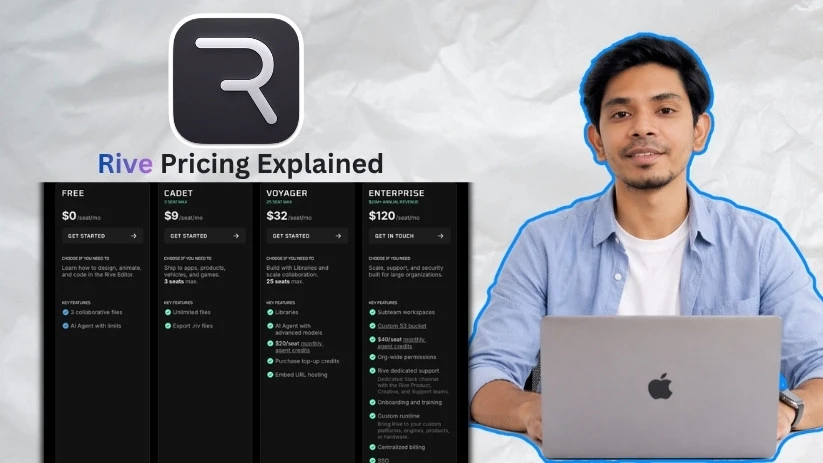
I’ve been looking closely at Rive’s pricing, and the more I study it, the more it feels like the real question isn’t “Is Rive free?” but “When do I actually need to pay?” Seeing plans split between creating for free and paying to ship pushed me to unpack each tier so I could see what Free, Cadet, Voyager, and Enterprise actually include.
Rive pricing plans: At a glance
Rive pricing plans are built around how far you want to take your work. You can explore, design, and animate for free, but you’ll need a paid plan when you’re ready to export .riv files and ship your animations into apps, products, games, or other production environments.
Below is an overview of what you get from each plan:
| Plan | Price | Best for | Key features |
| Free | $0/seat/month | Learning and exploring Rive | 3 collaborative files, limited AI Agent access, 1 project, and unlimited personal files |
| Cadet | $9/seat/month | Solo creators and small teams ready to ship | Unlimited files, unlimited projects, .riv exports, and up to 3 seats |
| Voyager | $32/seat/month | Growing teams that need libraries and collaboration | Libraries, advanced AI Agent models, $20/seat monthly agent credits, top-up credits, and hosted embed links |
| Enterprise | $120/seat/month | Large organizations needing scale, support, and security | Subteam workspaces, custom S3 bucket, $40/seat monthly agent credits, SSO, SOC2 Type II, dedicated Slack, and custom runtime |
Rive pricing plans breakdown
Rive’s pricing looks simple at first, with four tiers going from free to enterprise. But the real difference is not just price. It’s whether you’re learning, exporting production-ready .riv files, managing team libraries, hosting embeds, or rolling Rive out across a larger organization.
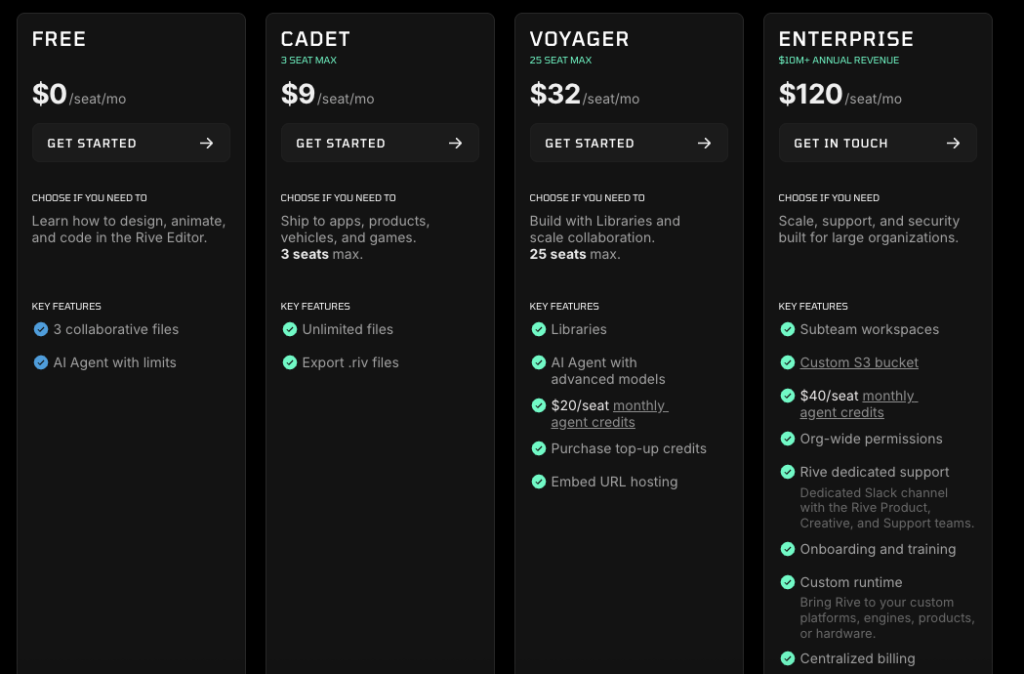
The Free plan lets you explore the editor without paying. Cadet is where shipping starts. Voyager is built for teams that need shared systems and hosted workflows. Enterprise adds the support, security, and custom setup larger companies usually need.
Free plan: $0/seat/month
This plan is built for learning, testing, and getting comfortable inside the Rive Editor. You can design, animate, experiment with state machines, and understand how Rive works before paying for a team plan.
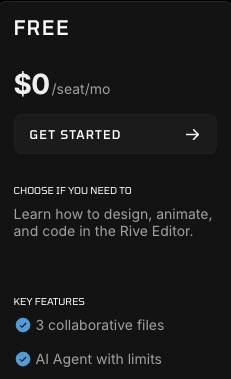
What’s included:
- 3 collaborative files
- 1 project
- Unlimited personal files
- AI Agent with limits
- 10 MB imported asset size
- Community support
- Access to core design, animation, and interactivity features
Best for:
Designers, developers, students, and curious builders who want to learn Rive without spending anything.
Pros:
- No cost to start.
- Good enough for learning the Rive Editor and testing animation ideas.
- You can experiment with state machines, transitions, listeners, and responsive layouts.
- Unlimited personal files give you room to practice.
Cons:
- 3 collaborative files can feel tight once you start working with a team.
- The 10 MB asset limit may get in the way if you import larger files.
- It’s not the best fit for production work because exports are where the paid plans matter.
Cadet plan: $9/seat/month
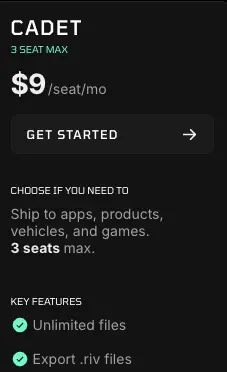
Cadet is the first Rive pricing tier that makes sense for people who are ready to ship. If you want to export .riv files and use your work in apps, products, games, vehicles, or other runtime environments, this is where Rive starts to feel practical.
The plan is capped at 3 seats, so it’s clearly aimed at solo creators and very small teams.
What’s included:
- Unlimited files
- Unlimited projects
- Export .riv files
- 100 MB imported asset size
- Unlimited revision history
- Up to 3 seats
- Rive runtime export support
- Core interactivity, design, animation, import, and export features
Best for:
Freelancers, indie developers, solo designers, small product teams, and anyone who needs to move from learning Rive to shipping real work.
Pros:
- Low monthly price for production use.
- .riv exports let you use Rive animations inside real apps and products.
- Unlimited files and projects remove the biggest Free plan limits.
- The 100 MB asset limit gives you much more room for serious work.
Cons:
- The 3-seat cap makes it easy to outgrow.
- You don’t get Libraries, advanced AI Agent models, or hosted embed links.
- If your team needs shared assets across multiple projects, Cadet may feel too basic.
Voyager plan: $32/seat/month
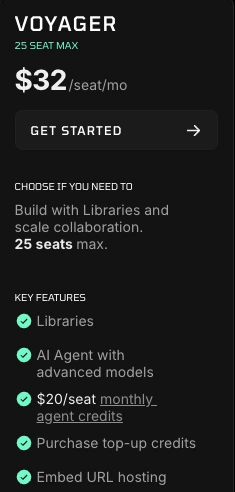
Voyager is the plan for teams that need more than exports. It adds Libraries, hosted embed links, advanced AI Agent models, and monthly agent credits, which makes it better for teams managing reusable design and animation systems.
This is also the plan that starts to make sense when Rive becomes part of your product workflow instead of just a tool one person uses.
What’s included:
- Everything needed to ship Rive work
- Unlimited files
- Unlimited projects
- Libraries
- AI Agent with advanced models
- $20/seat monthly agent credits
- Purchase top-up credits
- Embed URL hosting
- Rive CDN hosting and share links
- Hosted embed links
- Up to 25 seats
Best for:
Growing design teams, product teams, agencies, and developers who need shared libraries, hosted assets, and smoother collaboration.
Pros:
- Libraries help teams reuse components instead of rebuilding the same assets.
- Hosted embed links make it easier to share and publish Rive work.
- Advanced AI Agent models and monthly credits add more room for AI-assisted work.
- The 25-seat cap works better for real product teams than Cadet’s 3-seat limit.
Cons:
- The jump from $9 to $32 per seat/month is noticeable.
- Smaller teams may not need Libraries or hosted embed links right away.
- AI Agent credits and top-ups can make monthly usage harder to estimate if your team uses AI heavily.
Enterprise plan: $120/seat/month
Enterprise is built for larger organizations that need Rive to fit into their security, support, billing, and platform requirements. This is less about basic animation features and more about running Rive at scale across teams.
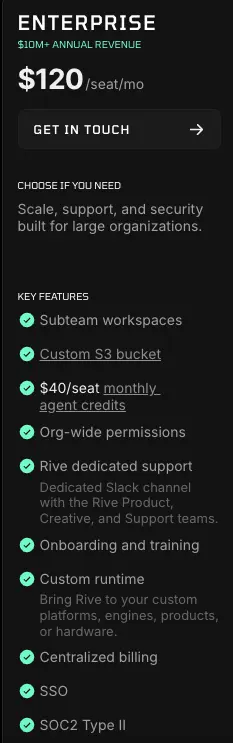
It’s also the plan for companies that need a custom runtime, dedicated support, SSO, SOC2 Type II, or a private infrastructure setup like a custom S3 bucket.
What’s included:
- Subteam workspaces
- Custom S3 bucket
- $40/seat monthly agent credits
- Org-wide permissions
- Rive dedicated support
- Dedicated Slack channel with Rive Product, Creative, and Support teams
- Onboarding and training
- Custom runtime
- Centralized billing
- SSO
- SOC2 Type II
- Custom training
- Custom onboarding
- Dedicated customer success manager with SLA
Best for:
Large companies, enterprise product teams, automotive teams, game studios, and organizations that need security, support, custom runtime work, or strict admin control.
Pros:
- SSO, SOC2 Type II, and org-wide permissions make it easier to meet internal security requirements.
- Dedicated Slack and Rive support can reduce rollout friction for large teams.
- Custom runtime support helps companies bring Rive into custom platforms, engines, products, or hardware.
- Centralized billing and subteam workspaces make account management cleaner.
Cons:
- $120/seat/month is a serious jump from Voyager.
- It’s aimed at organizations with larger budgets and more complex requirements.
- Smaller teams will likely overpay unless they truly need security, support, or custom runtime features.
How AI Agent credits work in Rive
Rive includes AI Agent access on some plans, but the amount you get depends on the tier you choose. The Free plan gives you AI Agent with limits, Voyager includes monthly agent credits, and Enterprise gives larger teams a higher monthly credit allowance.
Here’s how it breaks down:
- Free: AI Agent with limits
- Voyager: $20/seat monthly agent credits
- Enterprise: $40/seat monthly agent credits
- Voyager and Enterprise: Option to purchase top-up credits
The main thing to understand is that AI Agent credits are separate from the core Rive Editor. You can still design, animate, build state machines, and export based on your plan’s feature access. Credits matter when you’re using Rive’s AI-assisted features.
How to top up your AI Agent credits
If your team uses the AI Agent often and runs through the included monthly credits, Rive lets Voyager and Enterprise users purchase top-up credits.
This is helpful when you have a busy production week, a big animation sprint, or a product launch where your team leans more heavily on AI assistance than usual. Instead of upgrading your whole setup just because one month is heavier, you can add more credits when needed.
What happens when you don’t need AI credits?
Not every Rive user will care about AI Agent credits. If you mainly use Rive for manual animation, interactive UI work, or exporting .riv files into apps and games, the credit system may not affect your day-to-day workflow much.
For example, a solo developer on Cadet might care more about unlimited files and .riv exports than AI usage. A product team on Voyager, though, may care more because multiple designers and developers could use AI Agent features across shared projects.
Rive hosting and export pricing explained
Rive pricing is not only about seats. It also changes based on how you want to ship and share your work.
Cadet gives you the key production unlock: exporting .riv files for Rive runtimes. That’s what you need when you want to use Rive animations inside apps, websites, games, products, vehicles, or other runtime environments.
Voyager goes further by adding hosted workflows, including:
- Embed URL hosting
- Rive CDN hosting and share links
- Hosted embed links
- Libraries for reusable team assets
This is where Voyager starts to make sense for teams. You’re not just exporting files anymore. You’re managing shared assets, reusing components, and publishing Rive work in a way that fits a larger product workflow.
Which Rive plan should you choose?
Choose Free if you:
- Want to learn how Rive works before paying
- Are testing the Rive Editor, state machines, and animation tools
- Only need a few collaborative files while exploring
Choose Cadet if you:
- Want to export .riv files and ship production work
- Work solo or with a small team of up to 3 seats
- Need unlimited files and projects without paying for team libraries
Choose Voyager if you:
- Need Libraries for reusable design and animation assets
- Work with a growing team that needs up to 25 seats
- Want hosted embed links, advanced AI Agent models, and monthly agent credits
Choose Enterprise if you:
- Need SSO, SOC2 Type II, centralized billing, and org-wide permissions
- Require dedicated support, onboarding, training, or a dedicated Slack channel
- Have custom runtime, custom platform, or private infrastructure requirements
Is Rive worth the cost?
After comparing Rive’s plans and looking at how the pricing lines up with real design and development workflows, here’s my honest take.
Rive is worth it if you:
- Need to ship interactive animations into apps, websites, games, or products
- Want .riv exports, runtime support, and smaller production-ready animation files
- Work with teams that need reusable assets, Libraries, hosted embeds, or shared animation systems
Skip Rive if you:
- Only need simple one-off animations that a GIF, MP4, or basic Lottie file can handle
- Don’t plan to use interactivity, state machines, or runtime-based animation
- Need a traditional video animation tool rather than a product-focused motion design workflow
Rive Monthly vs Yearly Pricing: What to Check Before Paying
One reason people search for “Rive pricing explained” is that they don’t just want the plan names. They want to know what they’ll actually pay when they upgrade.
Before choosing Free, Cadet, Voyager, or Enterprise, check the billing toggle on Rive’s pricing page. Some SaaS tools show the lowest monthly equivalent when annual billing is selected, which can make the plan look cheaper than the amount you’ll pay month to month.
Also check your seat count before subscribing. Rive charges per seat, so a $32/seat/month Voyager plan becomes a different number once you add several team members. The same goes for Enterprise at $120/seat/month, especially if you’re rolling it out across multiple designers, developers, or product teams.
AI Agent credits are another detail worth checking. Voyager includes $20/seat monthly agent credits, while Enterprise includes $40/seat monthly agent credits. If your team uses the AI Agent heavily, you may need top-up credits, which can change your real monthly cost.
SaaS pricing can change, and third-party pricing pages often lag behind. Before you pay, confirm the final checkout price, billing cycle, renewal terms, included seats, AI Agent credits, and any top-up credit costs directly on Rive’s official pricing page.
Rive Pricing Pros and Cons
Rive’s pricing is fairly easy to understand once you separate the plans by use case. Free is for learning, Cadet is for shipping, Voyager is for scaling collaboration, and Enterprise is for larger teams that need security and support.
Still, there are a few trade-offs worth knowing before you upgrade.
Pros
- Rive has a Free plan, so you can learn the editor, test state machines, and explore animation workflows without paying.
- Cadet starts at $9/seat/month, which keeps the entry price low for creators who are ready to ship.
- Cadet includes unlimited files and .riv exports, making it the first practical plan for production work.
- Voyager adds Libraries, hosted embed links, and team-friendly workflows for growing product and design teams.
- Enterprise includes SSO, SOC2 Type II, dedicated support, centralized billing, org-wide permissions, and custom runtime options.
- Rive supports many runtimes and platforms, including JavaScript, React, Flutter, iOS, Android, Unity, Unreal, and more.
Cons
- The Free plan only includes 3 collaborative files, which can feel limited once you start working with others.
- Cadet has a 3-seat max, so small teams can outgrow it quickly.
- Voyager jumps from $9 to $32 per seat/month, which is a noticeable increase if you only need one or two extra team features.
- AI Agent credits and top-up credits can make the real monthly cost harder to estimate for teams that use AI often.
- Third-party Rive pricing pages may show outdated or inconsistent plan details.
- Enterprise is built for larger organizations, so smaller teams may not need the security, support, and custom infrastructure features that come with it.
Rive alternatives & pricing comparison
If you like Rive’s interactive animation workflow but want a different pricing model, export format, or design experience, a few alternatives are worth checking. Some focus on Lottie and lightweight web animations. Others are better for SVG animation, quick motion graphics, or full creative-suite workflows.
Here’s a side-by-side comparison:
| Tool | Starting price | Best for | Key advantage |
| LottieFiles | $19.99/user/month, billed annually | Teams working heavily with Lottie animations | Strong Lottie workflow, file management, collaboration, and animation handoff features |
| SVGator | $13/month, billed yearly | Designers creating SVG animations for websites | Browser-based SVG animation with interactive animation and SVG Player API access |
| Jitter | Free plan available | Fast motion design and social/product visuals | Simple web-based animation tool with a short learning curve |
| Adobe Animate | Pricing varies by Adobe plan | Traditional 2D animation and legacy animation workflows | Mature timeline-based animation tool for frame-by-frame and vector animation |
You Might Like More Options:
Best Jitter Alternatives and Competitors
Top LottieFiles Alternatives and Competitors
Rive Pricing FAQs
How much does Rive cost?
Rive has four main plans: Free at $0/seat/month, Cadet at $9/seat/month, Voyager at $32/seat/month, and Enterprise at $120/seat/month. The real cost depends on your seat count, billing cycle, and whether your team buys AI Agent top-up credits.
Is Rive free?
Yes, Rive has a Free plan. It lets you explore the Rive Editor, learn the workflow, build personal files, and create up to 3 collaborative files without paying.
What is the cheapest paid Rive plan?
Cadet is the cheapest paid Rive plan at $9/seat/month. It’s the first plan that makes sense when you’re ready to export .riv files and ship Rive work into apps, products, games, or other runtime environments.
Can I use Rive Free for production?
The Free plan is better for learning and testing than production. If you need to export .riv files and ship your work, Cadet is the practical starting point.
What is the difference between Rive Free and Cadet?
Free is mainly for learning Rive. It includes 3 collaborative files, 1 project, unlimited personal files, and limited AI Agent access. Cadet adds unlimited files, unlimited projects, .riv exports, 100 MB imported asset size, and support for shipping production work.
What is the difference between Rive Cadet and Voyager?
Cadet is best for solo creators and small teams that need .riv exports. Voyager is better for growing teams because it adds Libraries, advanced AI Agent models, $20/seat monthly agent credits, hosted embed links, and support for up to 25 seats.
Does Rive charge per user or per project?
Rive prices its paid plans per seat. Free, Cadet, Voyager, and Enterprise are listed as seat-based plans. Projects and files vary by plan, but the subscription price is based on seats.
What are Rive AI Agent credits?
Rive AI Agent credits are included credits for using Rive’s AI-assisted features. Voyager includes $20/seat monthly agent credits, while Enterprise includes $40/seat monthly agent credits. Voyager and Enterprise users can also purchase top-up credits.
Does Rive include .riv export on the Free plan?
No, based on the current pricing details, .riv export is a Cadet feature and above. If exporting .riv files matters to your workflow, Cadet is the lowest plan to consider.
Which Rive plan is best for freelancers?
Cadet is usually the best Rive plan for freelancers because it gives you unlimited files, unlimited projects, and .riv exports at a lower monthly price. Free works for learning, but Cadet makes more sense for client or production work.
Which Rive plan is best for teams?
Voyager is the best fit for most growing teams. It supports up to 25 seats and includes Libraries, hosted embed links, advanced AI Agent models, and monthly agent credits. Larger organizations with security and support needs should look at Enterprise.
Does Rive support Unity, Unreal, Flutter, React, iOS, and Android?
Yes, Rive supports many runtimes and platforms, including Unity, Unreal, Flutter, React, iOS, Android, JavaScript, React Native, C++, and more.
Does Rive offer enterprise features like SSO and SOC2?
Yes, Rive Enterprise includes SSO, SOC2 Type II, centralized billing, org-wide permissions, dedicated support, onboarding, training, custom S3 bucket support, and custom runtime options.
Why do some third-party sites show different Rive prices?
Third-party pricing pages can become outdated when SaaS companies update their plans, billing terms, credits, or feature limits. Always check Rive’s official pricing page before making a final decision.
Is Rive worth the price?
Rive is worth the price if you need interactive animations, state machines, .riv exports, runtime support, team Libraries, or hosted embed workflows. If you only need simple GIFs, videos, or one-off animations, a lighter animation tool may be enough.



