

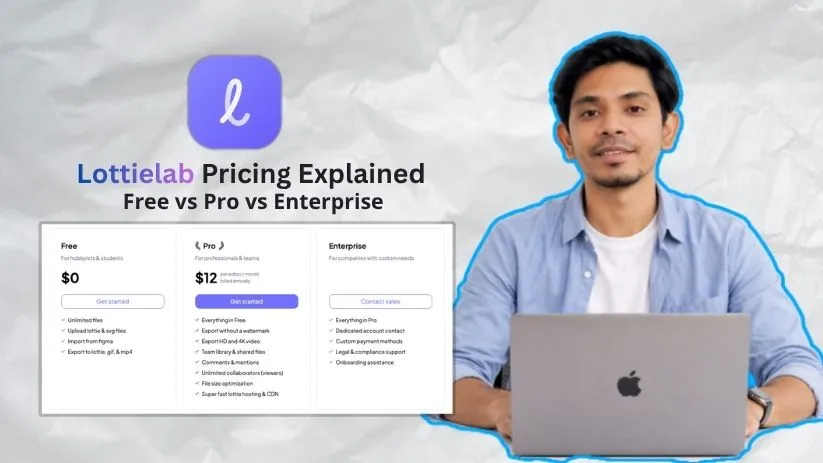
🎯 Quick Answer: How Much Does Lottielab Cost?
Lottielab offers three pricing tiers: Free, Pro, and Enterprise. The Free plan costs $0 and includes unlimited files, Figma import, and exports to Lottie, GIF, and MP4—great for learning or simple projects. The Pro plan costs $12 per editor/month (billed annually) and adds key upgrades like watermark-free exports, HD and 4K video export, team libraries, comments, file optimization, and fast Lottie hosting/CDN. Enterprise pricing is custom and includes dedicated support, compliance help, and onboarding for larger teams.
Best for: designers, freelancers, and product teams who want a clean, web-based animation workflow for apps, websites, and social media content.
Lottielab has quickly become one of the most interesting web-based animation tools for designers, product teams, and creators. It’s the tool that lets you create and edit Lottie animations in a clean, Figma-like workspace without jumping straight into After Effects.
But before you start using it for client work or team projects, you need to understand the pricing. Lottielab’s Free plan is generous for testing, but the Pro plan unlocks the features most professionals care about, including watermark-free exports, HD and 4K video, team libraries, file optimization, and Lottie hosting.
I’ve reviewed Lottielab’s pricing structure, feature limits, and real workflow value. In this guide, I’ll break down every plan, explain what you actually get, point out the limits to watch for, and help you decide whether Free, Pro, or Enterprise is the right fit for your animation work.
Lottielab Pricing Plans at a Glance
Here’s the complete breakdown of Lottielab’s current pricing structure:
| Plan | Price | Billing | Best For | Key Upgrade |
| Free | $0 | Free forever | Hobbyists & students | Unlimited files, Figma import, Lottie/GIF/MP4 export |
| Pro 🏆 | $12/editor/month | Billed annually | Professionals & teams | No watermark, HD/4K export, team library, comments, CDN |
| Enterprise | Custom | Contact sales | Companies with custom needs | Compliance support, onboarding, custom payment methods |
Note: The Pro plan is listed at $12 per editor/month when billed annually. I’d start with the Free plan first, test your Figma import and export workflow, then upgrade to Pro once you need clean client-ready exports without a watermark.
Lottielab Pricing Plans — Full Breakdown
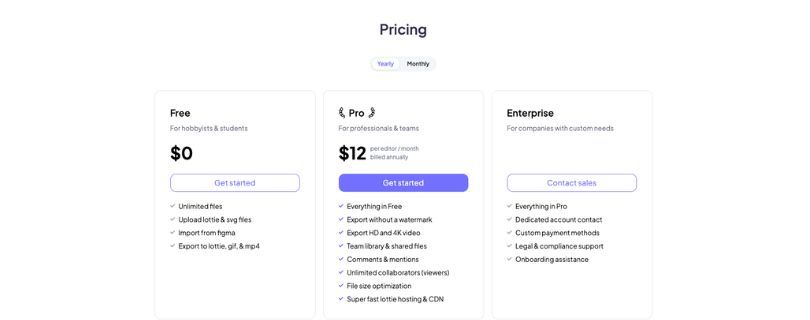
1. Free Plan
Lottielab’s Free plan gives you enough access to test the editor, import design files, and create simple Lottie animations without paying. It’s a good starting point if you’re learning motion design or just want to see how the interface feels.
✅ What you get:
- Unlimited files
- Upload Lottie and SVG files
- Import from Figma
- Export to Lottie, GIF, and MP4
❌ Where it falls short:
The Free plan is useful, but it’s not built for polished client work. The biggest limitation is that you don’t get watermark-free exports, so anything you export may not feel ready for professional use.
You also miss out on HD and 4K video export, team libraries, shared files, comments, mentions, file size optimization, and fast Lottie hosting/CDN.
My take: If you’re a student, hobbyist, or designer testing Lottielab for the first time, the Free plan is a solid place to start. But once you need clean exports for websites, apps, ads, or social media, you’ll probably need Pro.
Lottielab Pricing Plans — Full Breakdown
1. Free Plan
Lottielab’s Free plan gives you enough access to test the editor, import design files, and create simple Lottie animations without paying. It’s a good starting point if you’re learning motion design or just want to see how the interface feels.
✅ What you get:
- Unlimited files
- Upload Lottie and SVG files
- Import from Figma
- Export to Lottie, GIF, and MP4
❌ Where it falls short:
The Free plan is useful, but it’s not built for polished client work. The biggest limitation is that you don’t get watermark-free exports, so anything you export may not feel ready for professional use.
You also miss out on HD and 4K video export, team libraries, shared files, comments, mentions, file size optimization, and fast Lottie hosting/CDN.
My take: If you’re a student, hobbyist, or designer testing Lottielab for the first time, the Free plan is a solid place to start. But once you need clean exports for websites, apps, ads, or social media, you’ll probably need Pro.
write about other plans as well
2. Pro Plan — $12/editor/month
This is where Lottielab starts to make sense for real design work. The Pro plan is built for professionals and teams who need clean exports, better video quality, and smoother collaboration.
✅ What you get:
- Everything in Free
- Export without a watermark
- Export HD and 4K video
- Team library and shared files
- Comments and mentions
- Unlimited collaborators as viewers
- File size optimization
- Fast Lottie hosting and CDN
❌ Where it falls short:
The Pro plan is priced per editor, so costs can grow if you have several people creating or editing animations. It’s also still a browser-based animation tool, so advanced motion designers may still prefer After Effects, Rive, or Cavalry for deeper control.
My take: Pro is the best plan for freelancers, marketers, product designers, and small teams. If you’re exporting animation files for clients, product UI, landing pages, or social media, this is the plan I’d choose.
3. Enterprise Plan — Custom Pricing
The Enterprise plan is for companies that need more control, support, and procurement flexibility. It includes everything in Pro, but adds the kind of admin and business support larger teams usually ask for.
✅ What you get:
- Everything in Pro
- Dedicated account contact
- Custom payment methods
- Legal and compliance support
- Onboarding assistance
❌ Where it falls short:
There’s no public price, so you’ll need to contact sales. That makes it harder to compare quickly against tools like LottieFiles, Rive, or Adobe workflows.
My take: Enterprise only makes sense if your team needs onboarding, compliance review, custom billing, or a dedicated contact. For most individual creators and small teams, Pro will be enough.
Lottielab vs Competitors: Pricing Comparison
How does Lottielab stack up against other Lottie animation and motion design tools?
| Platform | Free Tier | Entry Paid | Pro/Team Tier | Best For |
| Lottielab 🏆 | ✅ Yes | $12/editor/mo | Custom Enterprise | Figma-style Lottie animation |
| LottieFiles | ✅ Yes | $19.99/user/mo | $24.99/user/mo Team | Lottie library, hosting, collaboration |
| Rive | ✅ Yes | $9/seat/mo | $32/seat/mo | Interactive animations and state machines |
| Cavalry | ✅ Yes | Free for individuals | Enterprise via Canva | Advanced 2D motion design |
| Figma | ✅ Yes | Custom/varies | Custom/varies | Web-based design for teams |
Lottielab’s pricing is competitive, especially if you want a simple animation editor rather than a full motion design suite. At $12 per editor/month billed annually, Pro is cheaper than LottieFiles Individual and sits close to Rive’s entry plan, while still giving you useful features like watermark-free export, HD and 4K video export, team libraries, comments, file optimization, and Lottie hosting/CDN.
For most designers, Lottielab is best when the goal is quick Lottie animation for websites, apps, product UI, or social content. Rive is stronger for interactive animation, Cavalry gives deeper motion control, and LottieFiles has the bigger Lottie ecosystem. But for a clean Figma-like workflow, Lottielab offers strong value.
Which Lottielab Plan Should You Choose?
Here’s my recommendation based on common use cases:
| Your Situation | Recommended Plan | Why |
| Just exploring Lottie animation tools | Free | Test the editor without paying |
| Student or hobbyist learning motion design | Free | Unlimited files and basic exports are enough |
| Designer creating animations for client work | Pro 🏆 | Removes watermark and adds HD/4K export |
| Product team making UI animations | Pro | Team library, shared files, and comments help collaboration |
| Marketer creating social media animations | Pro | Clean MP4/GIF exports for campaigns and content |
| Company with legal, billing, or onboarding needs | Enterprise | Custom payment methods, compliance support, and dedicated contact |
For most people reading this, the Pro plan at $12/editor/month billed annually is the sweet spot. It unlocks the features that matter most for professional work, especially watermark-free exports, HD and 4K video, file optimization, team libraries, comments, and Lottie hosting. Start with Free to test the workflow, then upgrade once you’re ready to publish polished animations.
Tips for Maximizing Value on Lottielab
Based on my review of Lottielab’s pricing and workflow, here are a few ways to get more from your plan:
1. Start with the Free Plan First
Don’t upgrade on day one. Use the Free plan to test the editor, import a few Figma designs, upload SVG or Lottie files, and check how the export workflow feels.
2. Upgrade Only When You Need Clean Exports
The Pro plan makes the most sense when you need watermark-free exports for client work, websites, apps, ads, or social media. If you’re only experimenting, Free may be enough.
3. Prepare Your Figma Files Before Importing
Clean up your layers, naming, groups, and SVG assets before bringing designs into Lottielab. A tidy file saves time once you start animating.
4. Use Team Libraries for Reusable Motion Assets
If your team creates buttons, loaders, icons, or product animations often, save them in a shared library. This keeps your motion style consistent and reduces repeat work.
5. Export in the Right Format
Use Lottie for lightweight web and app animations, GIF for quick previews, and MP4 for social media or video content. Choosing the right format helps you avoid extra editing later.
Lottielab Pricing for Specific Use Cases
Creating Website Animations
For simple website animations like icons, loaders, buttons, and hero graphics, the Free plan is enough for testing. But if the animation is going live on a real brand site, Pro is the safer choice because it removes the watermark and adds file optimization.
Best plan: Pro
Making Social Media Motion Graphics
If you’re exporting animations as GIF or MP4 for social content, ads, or short promo clips, Pro makes more sense. You get HD and 4K video export, which matters when the final asset needs to look sharp on Instagram, LinkedIn, YouTube Shorts, or paid ad placements.
Best plan: Pro
Learning Lottie Animation
If you’re a student, hobbyist, or designer just learning how Lottie animation works, start with Free. You still get unlimited files, Figma import, and basic exports to Lottie, GIF, and MP4.
Best plan: Free
Pros and Cons of Lottielab Pricing
✅ Pros
- Generous Free plan for testing
- Unlimited files on the Free plan
- Figma import included
- Exports to Lottie, GIF, and MP4
- Affordable Pro plan at $12/editor/month
- Watermark-free export on Pro
- HD and 4K video export on Pro
- Team libraries, comments, and CDN included
❌ Cons
- Pro pricing is per editor
- Monthly billing costs more than annual
- Enterprise pricing is not publicly listed
- Free plan isn’t suitable for client-ready exports
- Limited for advanced motion design compared to tools like After Effects or Rive
Final Verdict: Is Lottielab Worth the Price?
Lottielab’s pricing is simple and fair for a modern Lottie animation tool. The Free plan is genuinely useful for testing, and the Pro plan gives creators the features they usually need for real projects.
My recommendation:
- Start with the Free plan to test Lottielab’s editor and Figma import workflow
- Upgrade to Pro ($12/editor/month billed annually) when you need watermark-free exports
- Choose Enterprise only if your company needs onboarding, compliance support, or custom billing
For most designers, freelancers, and small teams, the Pro plan offers the best value. At $144/year per editor, it’s a practical price for creating polished Lottie animations for websites, apps, and social media.
FAQs
Is Lottielab free?
Yes. Lottielab has a Free plan with unlimited files, Figma import, and exports to Lottie, GIF, and MP4.
Does Lottielab have a watermark?
Yes, the Free plan has export limits. You need the Pro plan to export without a watermark.
Can I export Lottie files for free?
Yes. The Free plan supports Lottie export, along with GIF and MP4 export.
How much is Lottielab Pro?
Lottielab Pro costs $12 per editor/month when billed annually.
Is Lottielab better than LottieFiles?
Lottielab is better for creating and editing animations. LottieFiles is better for managing, previewing, hosting, and discovering Lottie assets.
Is Lottielab better than Rive?
Lottielab is simpler for Lottie animation. Rive is stronger for interactive animations, state machines, and app/game-style motion.
Can Lottielab replace After Effects?
Not fully. Lottielab is easier for lightweight Lottie work, but After Effects is still better for advanced motion graphics.
Does Lottielab support Figma import?
Yes. Lottielab lets you import designs from Figma.
Can teams collaborate in Lottielab?
Yes. The Pro plan includes team libraries, shared files, comments, mentions, and unlimited viewer collaborators.
Is Lottielab good for commercial projects?
Yes, especially on Pro, because you get watermark-free exports, HD/4K video, file optimization, and hosting/CDN.
Is Lottielab good for beginners?
Yes. The interface feels familiar if you’ve used Figma, so beginners can learn basic motion design without heavy software.
What can I export from Lottielab?
You can export animations as Lottie, GIF, and MP4. Pro also adds HD and 4K video export.
Is Lottielab web-based?
Yes. Lottielab runs in the browser, so you don’t need to install desktop animation software.
Who should use Lottielab?
Lottielab is best for designers, marketers, freelancers, product teams, and creators making animations for apps, websites, and social media.



