With AI video tools popping up everywhere, picking the right platform can shape your creative workflow and your wallet. We put this guide together to break down Genmo’s pricing in a way that actually makes sense, so you can see where each plan shines and when it’s worth upgrading. This is a practical look at how Genmo fits into real creator workflows, what you get for your money, and who each tier is designed for.
What is Genmo?
Genmo is an AI platform that turns text, images, and ideas into dynamic videos that feel polished without requiring a studio setup. Think of it as a creative partner that helps you build animations, concept clips, and visual drafts in minutes. You describe what you want, Genmo handles the heavy lifting, and the result is a fast way to experiment, storyboard, or produce content when you need visuals that keep up with your ideas.
Genmo Pricing Explained: Plans, Pricing and Credits
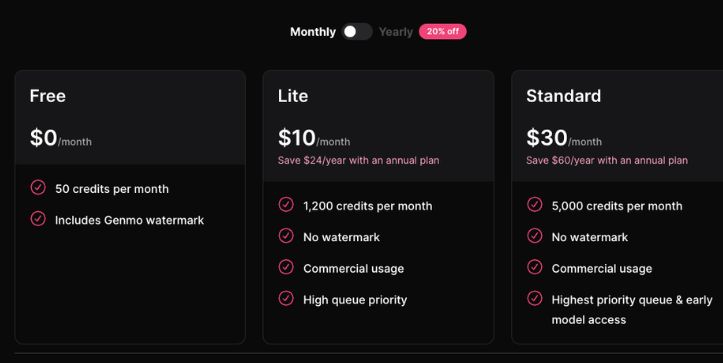
Genmo’s pricing isn’t a simple flat fee you sign up for and forget about. It’s built around two moving parts you’ll want to keep an eye on. The first is your monthly subscription, which unlocks the platform and gives you a set amount of credits to turn prompts into videos. The second is the way those credits get used. Every generation you run pulls from your credit balance, and the cost shifts depending on how complex your request is. A quick test clip barely dents your credits, while a longer or more detailed animation pulls more from your monthly pool.
Let’s walk through the subscription plans first.
Genmo subscription tiers: Free, Lite and Standard
Genmo offers a handful of plans that fit different types of creators. Some people just want to play around and get a feel for AI video. Others are producing content for clients or building full workflows around it. Each plan comes with its own features and a different monthly credit allowance.
Here’s a quick breakdown of how they compare:
| Feature | Free Plan | Lite Plan | Standard Plan |
| Monthly Cost | $0 | Starts around $10 per month | Starts around $30 per month |
| Monthly Credits | Limited monthly credits | Higher credit pool | Highest credit pool |
| Watermark | Yes | No | No |
| Queue Priority | Low | Medium | High |
| Commercial Use | No | Yes | Yes |
| Key Features | Basic generation | Faster processing, watermark-free exports | Priority access, early features, larger credits |
- The Free plan is great if you’re curious and want to experiment without spending anything. You can generate short clips, test the motion quality and get a clear sense of what the AI can handle.
- The Lite plan is the next logical step when you need clean, watermark-free videos and a bigger credit pool that supports regular creative work.
- The Standard plan is made for creators who use Genmo every day. You get faster rendering speeds, the highest credit allowance and the freedom to produce consistent professional content without worrying about running out of resources.
The Genmo credit system explained
This is the part that usually trips people up. On Genmo, every video you generate pulls from your credit balance. Credits are the currency you spend each time you ask the AI to create or refine a clip. But it’s not a simple one-prompt equals one-credit setup. Genmo uses a usage-based credit model, so the cost depends on how much work your request actually requires.
A quick, low-motion test clip might use only a small slice of a credit. Asking for a longer video with detailed motion or more complex visuals pulls more from your monthly pool. This matters because it affects how long your credits last, especially if you’re experimenting a lot or producing content at a steady pace.
To give you a sense of how this feels in practice, here’s an example of how credit usage can vary based on the type of generation:
| User Prompt | Credits Used (Example) |
| “Create a simple 2-second motion test” | Low credit usage |
| “Add smoother motion to this clip” | Medium credit usage |
| “Generate a full scene with character movement” | Higher credit usage |
| “Produce a long, detailed animation sequence” | Highest credit usage |
The nice part is you aren’t getting charged heavily for tiny tweaks, but it does mean you’ll want to keep an eye on your credit balance. Running out mid-project isn’t fun, especially if you’re in the middle of refining a scene or testing multiple variations.
Credit rollovers and daily credits
Genmo keeps things interesting by giving you more than one type of credit to manage. Each one works a little differently, and knowing how they behave can help you stretch your budget and avoid running dry at the wrong moment.
Here’s how it breaks down:
- On paid plans, your unused monthly credits can roll over as long as your subscription stays active. This gives you some breathing room during lighter creative months.
- Free users get a small set of daily credits that refresh every day, but these don’t roll over. If you don’t use them, they disappear.
- This mix of monthly and daily credits adds flexibility, though it also means you’ll want to keep an eye on your balance to figure out when a plan upgrade might make sense.
Also Read:
Top Genmo Alternatives & Competitors for AI Video Creation
Optimal use cases for each pricing plan
Free plan: A solid choice for anyone curious about AI video generation and testing out what Genmo can do before upgrading. Great for experimenting with short clips and learning the workflow.
Lite plan: A comfortable fit for creators who produce videos regularly and need watermark-free exports without jumping into the highest tier. Perfect for solo makers, content creators and small projects.
Standard plan: Best for professionals who rely on Genmo as part of their daily production flow. Ideal for freelancers, studios or anyone needing more credits, faster rendering and consistent output at scale.
Comparative Analysis: Genmo Pricing vs. Competitors
To give you a clearer picture of where Genmo sits in the market, here’s how its pricing and core strengths compare with other well-known AI video tools like Pika Labs, Runway, and Luma AI.
| Feature / Tool | Genmo | Pika Labs | Runway | Luma AI |
| Pricing | Free; from ~$10/month; from ~$30/month | Free; paid tiers vary | Free; paid plans from ~$12/month | Free; paid usage-based tiers |
| Core features | Text-to-video, image-to-video, motion controls, fast iterations | High-quality text-to-video generations | Advanced editing, video-to-video, motion tracking | High-fidelity video generation with longer outputs |
| Best for | Creators who want quick concept videos and frequent iterative testing | Users who prioritize cinematic output and stylized visuals | Professionals needing editing plus generation in one place | Long-form, detailed experimental generations |
| Output control | Multiple styles, adjustable motion, varied clip lengths | Strong stylistic consistency | Robust editing tools plus generation | Smooth motion and longer sequences |
| Commercial use | Allowed on paid plans | Allowed with certain tiers | Allowed on most paid tiers | Allowed with credits |
| Watermark | Present on free plan | Present on free plan | Present on free plan | Present on free plan |
Is Genmo pricing worth it for your project?
If you’re just dabbling or want to see what AI video feels like without paying, the Free plan lets you do that without sweating a subscription. You get a taste of what’s possible and can decide if this kind of creative workflow fits how you like to work. For casual creators and hobbyists, that alone can be enough value.
When you start using Genmo for real projects like client work, social content, pitches or concept tests, the paid tiers start to make sense fast. Clean, watermark-free outputs and a healthy credit supply save you time and frustration. If your workflow depends on regular generation and you value speed and reliability, the pricing lines up well with the value you get.
FAQs About Genmo Pricing
How much does Genmo cost each month?
Genmo offers a Free plan along with paid tiers that start around ten dollars and go up depending on how many credits you need. The main difference is the amount of monthly credits and whether your exports are watermark-free.
Does Genmo charge extra if I run out of credits?
No surprise fees kick in when your credits hit zero. You simply have to wait for your next monthly reset or upgrade your plan if you need more room to work.
Can I use Genmo for commercial projects?
Yes, but only on paid plans. The Free plan is meant for personal exploration, while Lite and Standard give you the permissions needed for client work or published content.
Do unused credits roll over to the next month?
On paid plans, unused monthly credits can carry over as long as your subscription stays active. Daily credits on the Free plan reset every day and don’t roll over.
Is Genmo good for long videos?
Genmo can handle longer clips, but they use more credits. If you plan to generate longer sequences often, choosing a higher-tier plan helps keep the workflow smooth.
Which plan is best for beginners?
The Free plan is ideal for getting your feet wet. It gives you enough room to try the tool, generate short clips and learn what Genmo is capable of before upgrading.
How do monthly and yearly plans compare on Genmo?
Yearly plans typically cost less per month than paying month to month, so you save if you know you’ll use Genmo regularly. If you’re unsure or just starting, monthly keeps you flexible.