When it comes to AI video and design tools, they love to make big promises like
“create stunning videos in minutes,” “no design skills needed,” or “build your brand from one place.”
But honestly, many of them feel limited once you actually start using them.
So, if Renderforest is what you have shortlisted for your content or branding workflow,
This review will be of a big help to you.
I tested Renderforest for 14 days and created multiple projects
to see how it performs when it comes to video quality, AI features, customization, usability, and whether it justifies the cost (or not).
In this review, you will find:
- My experience of its features
- What Renderforest does well
- Where it falls short
- Real G2 and User Reviews
By the end, you will know if Renderforest fits your creative goals.
And I will also share an alternative worth considering
If you are looking for something more flexible and affordable 😉
In-depth Review of Renderforest Features
In this section, we will take a closer look at Renderforest’s main features and see
How they work, where they feel useful, and where they might feel limiting for your content or branding needs.
- Renderforest’s AI Video Generator
- Renderforest’s Video Template Library
- Renderforest’s Logo Maker & Logo Animation Tool
- Renderforest’s Mockup Generator
- Renderforest’s Website Builder
Let’s find out!
1. Renderforest’s AI Video Generator
One of the main reasons people try Renderforest is its AI video generator.
And honestly, this is where the platform feels the most beginner-friendly.
You can create different types of videos, like:
- Text-to-video → Turn a written prompt or script into a video
- Image-to-video → Add motion to static images
- AI animations → Create quick animated clips
- Social videos → Make reels, shorts, ads, and promos
- Explainer videos → Build simple business or product explainers
I started by giving it a simple prompt for a product promo video.
Renderforest quickly turned that idea into a ready-made video structure with scenes, stock visuals, text, and music.
Now, was it perfect?
Not really.
I still had to edit the text, adjust a few visuals, change the music, and clean up the pacing.
But as a starting point, it saved a lot of time.
What I liked most is that you don’t have to stare at a blank timeline.
Renderforest gives you a base video first, and then you can improve it.
This is useful if you’re a marketer, small business owner, YouTuber, or freelancer who needs something polished without opening a complex editor like Premiere Pro.
But once you start editing deeper, you will see some limits 👇
You don’t get the same level of timeline control that advanced video editors offer.
For example, you can’t freely edit every frame, build complex transitions, or fine-tune motion the way you would in professional editing software.
That said, for quick promotional videos, YouTube intros, Instagram reels, brand videos, and simple explainers, it works well.
Note 👇
- AI-generated videos still need manual editing before publishing.
- The final quality depends heavily on the template and prompt you choose.
- Free exports usually come with limitations like watermark or lower resolution.
- If you need advanced editing control, Renderforest may feel restrictive.
2. Renderforest’s Video Template Library
Next, I tested Renderforest’s video templates.
And this is probably the strongest part of the platform.
Renderforest gives you templates for almost every common video type, such as:
- YouTube intros and outros
- Logo animations
- Explainer videos
- Product promos
- Slideshow videos
- Music visualizers
- Social media ads
- Business presentations
- Event videos
- App promos
The template library makes the whole process fast.
You choose a template, add your text, upload your logo or images, change colors, pick music, and export the video.
I tried creating a YouTube intro with one of the logo animation templates.
It looked clean, modern, and ready to use within a few minutes.
But here’s the thing.
Some templates look great, while others feel a bit generic.
You can tell many people have used similar intro styles before, especially in YouTube and startup promo videos.
So, if your goal is to create something quick and decent-looking, Renderforest does the job.
But if you want a fully original brand video that doesn’t look template-based, you may feel boxed in.
The customization options are simple.
You can usually change:
- text
- colors
- images
- logo
- music
- scenes
- font style in some templates
But you cannot always control every small design detail.
That means you may like 80% of a template but still feel annoyed because you can’t adjust one specific animation or layout.
Still, for beginners, this simplicity is also the reason Renderforest feels easy.
You don’t need to understand keyframes, layers, codecs, or animation curves.
You just pick a style and edit the content.
Note 👇
- Templates are great for fast video creation.
- Some templates may feel overused or less flexible.
- Customization depends on the template you choose.
- Best for quick branded videos, not custom motion design projects.
3. Renderforest’s Logo Maker & Logo Animation Tool
Renderforest also includes a logo maker, and I was curious to see how useful it really is.
The process is simple.
You enter your brand name, select your industry, choose a few style preferences, and Renderforest generates logo options for you.
You can then customize things like:
- font
- colors
- icons
- layout
- slogan
- background
For a quick logo draft, it’s helpful.
If you’re launching a small side project, YouTube channel, local business, or test brand, Renderforest can give you a decent starting point.
But I wouldn’t call it a replacement for a professional designer.
Some logo suggestions feel a bit random.
A few looked clean, but others didn’t match the brand style very well.
For example, when I tested a tech-related brand name, some icon suggestions felt more like generic business symbols than something made for a SaaS or developer-focused product.
Where Renderforest becomes more interesting is logo animation.
Once you have a logo, you can animate it using intro templates.
This is useful for:
- YouTube intros
- course videos
- brand promos
- podcast clips
- product demos
- agency presentations
I liked this part more than the logo maker itself.
A static logo can look basic, but when you add a clean animation, it feels more polished.
But again, you’re working inside template boundaries.
So, don’t expect custom animation control like After Effects.
Note 👇
- The logo maker is good for quick ideas, not high-end branding.
- Logo animations are more useful than the logo generator itself.
- Some logo suggestions may feel generic.
- For serious brand identity work, a designer will still do a better job.
4. Renderforest’s Mockup Generator
Another feature I tested was Renderforest’s mockup generator.
And honestly, this one is more useful than I expected.
You can create product and branding mockups for things like:
- t-shirts
- mugs
- packaging
- business cards
- devices
- posters
- books
- app screens
- social media previews
The workflow is very simple.
You pick a mockup, upload your design, adjust placement, and download the final image.
This is helpful if you sell digital products, run an online store, create client presentations, or need visuals for social media.
For example, I uploaded a sample app screen into a device mockup.
Within a minute, I had a clean image I could use for a landing page or product post.
That’s the real value here.
Renderforest helps you make your work look more presentable without needing Photoshop.
But the downside is the same as other parts of the platform.
You don’t get deep editing control.
If you want to change shadows, lighting, camera angle, fabric texture, or tiny design details, you’ll feel limited.
Still, for quick visual assets, it works well.
And if you’re already using Renderforest for videos and branding, having mockups in the same dashboard is convenient.
Note 👇
- Great for quick product and brand mockups.
- Best for social media, portfolios, online stores, and client previews.
- Not ideal for advanced product photography-style editing.
- Some mockups may look template-based if used without customization.
5. Renderforest’s Website Builder
Finally, I tested Renderforest’s website builder.
This feature is easy to miss because most people know Renderforest as a video maker.
But Renderforest also lets you create basic websites using ready-made layouts.
You can build pages for:
- portfolios
- small businesses
- landing pages
- events
- personal brands
- startups
- online services
The editor is simple.
You choose a website template, edit text, add images, change sections, adjust colors, and publish.
For someone who doesn’t want to deal with hosting, WordPress setup, plugins, or code, this can be useful.
But as someone with a technical background, I noticed the limitations quickly.
It’s not built for complex websites.
You won’t get the same flexibility as Webflow, WordPress, Framer, or a custom React/Next.js setup.
So, I would not use Renderforest for a serious SaaS website, large blog, marketplace, or advanced business site.
But for a simple one-page landing page or personal portfolio, it gets the job done.
The biggest benefit is speed.
You can create a basic website, logo, mockups, and promo video from the same platform.
That’s helpful for beginners who want everything in one place.
But if your website is a core part of your business, you may outgrow it fast.
Note 👇
- Good for simple websites and quick landing pages.
- Not ideal for complex websites, blogs, or custom web apps.
- Useful if you want branding, videos, mockups, and a website in one tool.
- Developers and advanced marketers may prefer Webflow, WordPress, Framer, or custom code.
Renderforest Pricing: Is It Worth It?
We have covered Renderforest’s core features,
Now it is time to understand how much it will cost you.
Here’s a breakdown of its pricing tiers…
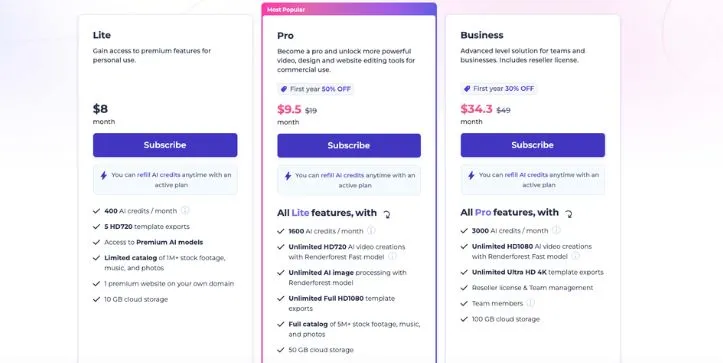
Renderforest Pricing Plans 💰
Lite Plan
- Monthly: $9/mo
- Best for basic HD 720p exports and small projects
Pro Plan
- Monthly: $19/mo
- Regular monthly price shown: $34/mo
- Best for Full HD 1080p exports, larger stock library, and commercial use
Business Plan
- Monthly: $49/mo
- Regular monthly price shown: $59/mo
- Best for 4K exports, teams, reseller license, and higher AI credits
One-Time Project Pricing
- Premium website: $9/monthly
- Premium video: $24 for HD1080
- Premium video: $49 for 4K
- Premium logo: $29 for vector SVG
- Premium mockup: $5 per mockup
Renderforest pricing plans breakdown
PS: Renderforest also has a free plan, which is useful for testing the tool before you upgrade. But free exports usually come with limits like watermarks, lower quality, and fewer premium options.
Renderforest’s paid plans offer good value if you create videos, logos, mockups, graphics, and websites regularly.
But if you only need one video or one logo, the one-time project pricing may make more sense than a monthly subscription.
Get the detailed breakdown of Renderforest’s pricing to see what each plan offers and which plan is suitable for whom.
Renderforest Pros and Cons
Still on the fence about Renderforest?
Let us make your decision a little easier.
Here is a quick look at the pros and cons of using Renderforest 👇🏼
| Pros ✅ | Cons ❌ |
| Easy to use, even if you have no video editing or design experience | Limited customization compared to tools like After Effects, Canva, or Webflow |
| Large library of video templates for intros, promos, explainers, slideshows, and social media content | Some templates can feel generic or overused |
| Built-in AI video tools for faster content creation | AI-generated videos still need manual editing before publishing |
| Includes video maker, logo maker, mockups, designs, and website builder in one platform | Free plan comes with watermarks and export limits |
| Good for small businesses, YouTubers, marketers, educators, and freelancers | Pricing may feel high if you only need one video or logo |
| Supports higher-quality exports on paid plans, including Full HD and 4K | Advanced users may outgrow the platform quickly |
| Browser-based tool, so you do not need to install heavy editing software | Rendering and export speed can vary depending on the project |
Final Verdict: Should You Choose Renderforest in 2026?
Yes, Renderforest is worth choosing in 2026 if you want a simple tool for creating videos, logos, mockups, and basic websites without learning complex software.
It works best for beginners, small businesses, YouTubers, marketers, and freelancers who need polished content quickly.
But if you want deep customization, advanced video editing, or full creative control, Renderforest may feel limiting after a while.
FAQs
1. Is Renderforest Good for Beginners?
Yes, Renderforest is good for beginners because you can create videos, logos, mockups, and simple websites without editing or design experience. However, the templates can feel limiting if you want full creative control.
2. What Are Renderforest’s AI Features?
Here are Renderforest’s main AI features:
- AI Video Generator
- Text-to-Video
- Image-to-Video
- AI Logo Maker
- AI Website Builder
3. What Are Cheaper Renderforest Alternatives in 2026?
Canva, FlexClip, InVideo, and VEED are some Renderforest alternatives worth checking out. Canva is better for general design, while InVideo and FlexClip are more focused on video creation.
4. Does Renderforest Have a Free Plan?
Yes, Renderforest has a free plan, which is useful for testing the platform. However, free exports usually come with watermarks, lower resolution, and limited access to premium templates.