Leonardo AI has grown from a straightforward AI image generator into a much broader creative platform. For this Leonardo AI review, I looked at its current features, pricing, creative controls, and what real users are saying to see where it actually stands.
The short version: Leonardo AI gives you far more control than basic prompt-and-download generators, but that flexibility also brings more settings, more experimentation, and a token system you need to keep an eye on.
Quick verdict
Leonardo AI is worth using if you want high-quality AI images without giving up control over how they are created. Its model library, Image Guidance tools, Realtime Canvas, editing features, and video generation give creators plenty of room to experiment.
The free plan is generous enough to test the platform before paying. However, advanced generations, repeated variations, upscaling, and video can burn through Leonardo AI tokens faster than you might expect.
If you only need the occasional AI image, I would start with the free version. For designers, marketers, and creators producing visuals regularly, the paid plans make much more sense.
What is Leonardo AI?
Leonardo AI is a browser-based generative AI platform for creating and editing images, artwork, marketing visuals, game assets, product concepts, and short AI-generated videos.
What separates the Leonardo AI image generator from simpler tools is the amount of control it gives you. You can choose different AI models, guide images with references, adjust styles, use negative prompts, edit individual areas, upscale results, and even train personal models.
It also includes tools such as Realtime Canvas and Flow State, so you aren’t limited to typing a prompt and waiting for four finished images. You can explore ideas visually and keep refining them inside the same platform.
That makes Leonardo feel less like a single AI generator and more like a small creative workspace built around generative AI.
Curious what you’ll actually pay for Leonardo AI? Read my full breakdown here: Leonardo AI Pricing Explained
Key features of Leonardo AI
Leonardo packs a lot into one platform. Some features are useful immediately, while others make more sense once you become comfortable with the interface.
Here are the Leonardo AI features that stand out most:
- AI image generation and model library: Leonardo gives you access to different models instead of locking every project into one visual style. Models such as Lucid Origin and Phoenix can handle everything from realistic images and illustrations to concept art and stylized designs.
- Image Guidance and creative controls: You can use reference images to influence composition, style, characters, or other visual elements. Negative prompts and additional controls also give you more say over the final result than basic text-to-image tools.
- Realtime Canvas: This is one of Leonardo’s more interesting tools. You can sketch, add shapes, upload an image, and watch AI-generated results change as you work. It feels more interactive than repeatedly rewriting prompts from scratch.
- Flow State: Flow State continuously gives you new visual directions based on your idea. It is useful when you know the general look you want but haven’t settled on a final composition. The downside is that rapid experimentation can increase token usage quickly.
- AI video generation: Leonardo isn’t limited to static images anymore. Its video tools can turn concepts and images into short motion clips, which makes the platform more useful for social content and creative experimentation. If video generation matters more to you than still images, I also compared the best AI video generator tools.
- Editing, upscaling, and personal models: You can make targeted changes to generated images, improve resolution, and train personal AI models on supported paid plans. These tools are especially useful if you’re trying to create a repeatable visual style instead of generating one-off images.
The biggest strength here is choice. You don’t have to leave Leonardo every time you want to generate, edit, upscale, or experiment with a different visual direction.
The tradeoff is that new users have more controls to learn than they would with a very simple AI image generator.
Leonardo AI reviews: What real users are saying
I also checked Leonardo AI reviews on Trustpilot, G2, and Reddit to see whether other users were running into the same strengths and weaknesses that repeatedly show up around the platform.
The overall feedback is positive, particularly around image quality, creative flexibility, and the number of tools available. But pricing, token consumption, and inconsistent results on more demanding prompts still come up as complaints.
Pros
- Strong creative control: Users regularly like having multiple models, reference-image tools, presets, and customization options instead of relying entirely on a single prompt.
- Good image quality: Leonardo can produce impressive realistic and stylized images when the right model and settings are used. This flexibility is one reason it appeals to designers as well as casual AI creators.
- Convenient browser-based workflow: There is no complicated local installation required. Generation, editing, upscaling, model selection, and other tools live inside the same interface, which keeps the workflow relatively straightforward.
Cons
- Tokens can disappear quickly: The Leonardo AI free plan gives you room to experiment, but repeated generations, advanced tools, upscaling, and video can make the token system more noticeable once you start using the platform heavily.
- Results can still be inconsistent: Complex scenes, exact layouts, small details, and tightly controlled compositions may need several attempts. More controls help, but they don’t eliminate the trial-and-error part of AI generation.
- There is a learning curve: Leonardo is easier to access than building your own local generative AI setup, but it isn’t the simplest image generator available. Models, presets, guidance settings, tokens, and editing options can feel like a lot when you first open the platform.
My personal take on Leonardo AI
What stands out most about Leonardo AI is how much control it gives you without forcing you into a complicated local AI setup. You can generate an image, change models, use references, edit specific areas, upscale the result, and continue refining the same idea from one browser-based workspace.
What impressed me: The strongest part of Leonardo is the balance between image quality and creative control. You are not stuck with one model or one style. Features such as Image Guidance, Realtime Canvas, negative prompts, and model selection make it easier to push an image closer to what you originally had in mind.
What frustrated me: That flexibility also makes Leonardo more complicated than simpler AI image generators. You can easily spend time switching models, changing settings, and generating multiple variations before getting the right result. Token consumption also becomes much more noticeable when you start experimenting heavily.
My experience overall: Leonardo makes the most sense once you stop treating it like a basic prompt generator. If you are willing to learn which models and controls work for different jobs, it becomes a much more capable creative tool.
Is Leonardo AI right for you?
Leonardo AI can work for beginners, but I think its biggest advantage goes to people who create visual content regularly and will actually use the extra controls.
Who will love it
- Designers and AI creators: If you want control over styles, references, compositions, models, and editing instead of accepting the first generated result, Leonardo gives you plenty to work with.
- Marketers and freelancers: It can be useful for creating social media graphics, ad concepts, blog images, product visuals, thumbnails, and client creative without moving between several separate AI tools.
- Creators exploring both images and video: Leonardo has expanded beyond the Leonardo AI image generator, making it more useful if you want to experiment with generated images, editing, upscaling, and short AI video from one account.
Who should avoid it
- Casual users: If you only generate a few images occasionally, you may not use enough of Leonardo AI’s features to justify paying for it.
- People who dislike credit systems: Leonardo AI tokens are easy enough to understand once you start using them, but heavy experimentation can make you think twice before clicking Generate again.
- Users wanting maximum simplicity: If your ideal workflow is typing one prompt and immediately choosing an image, some of Leonardo’s additional settings may feel unnecessary.
Still comparing AI image generators? See the strongest options in my guide to Leonardo AI Alternatives & Competitors before choosing a paid plan.
The best Leonardo AI alternative: Midjourney
If Leonardo doesn’t fit your workflow, Midjourney is one of the strongest alternatives to consider, particularly if your priority is polished artistic output without spending as much time adjusting individual generation controls.
Leonardo AI is the better fit when you want more direct control over references, models, editing, Realtime Canvas, and the wider creation workflow. Midjourney is more appealing when you care primarily about generating visually impressive artwork from prompts.
So I wouldn’t call one universally better. The better choice depends on whether you value workflow control or fast visual polish.
If your needs go beyond AI artwork, I also compared the best AI graphic design generator tools for creating marketing and design content.
Final verdict: Is Leonardo AI worth using?
Yes, Leonardo AI is worth using if you regularly create AI visuals and want more control than a basic image generator provides. Its model selection, Image Guidance, editing tools, Realtime Canvas, and broader creative features give you plenty of room to refine your results.
I wouldn’t immediately pay for it, though. Start with Leonardo AI free, see how often you use it and how quickly you consume tokens, then upgrade if it becomes part of your regular creative workflow.
Frequently asked questions
Is Leonardo AI good for beginners?
Yes. Leonardo AI is beginner-friendly enough to start generating images quickly, but there are more models, reference controls, editing options, and settings to learn than with simpler AI generators.
You can ignore most advanced controls at first and learn them as you need them.
Does Leonardo AI own the images you create?
It depends on how you generate them. Paid users can create private generations and, as between the user and Leonardo, retain ownership rights to those private assets. Free-plan generations are public and have different usage conditions.
The simple distinction is:
- Free plan: Generations are public.
- Paid plan: You can enable Private Mode.
- Commercial use: Available under Leonardo’s terms on both free and paid plans.
Are Leonardo AI images private?
Not automatically. Private image generation is a paid-plan feature, and you need to turn on Private Mode when generating content.
Free-plan generations are public, so I wouldn’t use the free tier for confidential client concepts or anything you don’t want visible to other Leonardo users.
Can Leonardo AI create consistent characters?
Yes, although consistency isn’t guaranteed in every generation. Leonardo’s Image Guidance includes Character Reference, which lets you use an existing character image to guide new poses, environments, and styles.
For better results:
- Use a clear character reference.
- Describe the character again in your prompt.
- Keep important visual traits consistent.
- Expect some trial and error between generations.
Can Leonardo AI generate videos?
Yes. Leonardo now includes AI video generation alongside its image tools. Depending on the model, you can also work with starting and ending frames to control how a generated clip begins and finishes.
I still see Leonardo primarily as an image-first creative platform with video tools added on, rather than a replacement for every dedicated AI video generator.
How many images can I make with Leonardo AI for free?
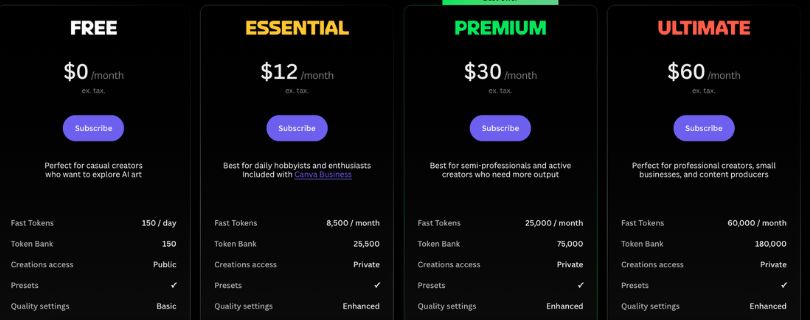
Leonardo currently gives free users 150 tokens every 24 hours, but that doesn’t translate into one fixed number of images. Different models, image sizes, settings, reference images, and video tools have different token costs.
Leonardo shows the token cost before you generate, which is the easiest way to judge how far your daily allowance will go.
What happens when I run out of Leonardo AI tokens?
Free users need to wait for their next daily token reset. Paid users can use rollover tokens or purchase additional top-up tokens, depending on their account.
Some higher paid plans also support slower unlimited or relaxed generations after eligible tokens are exhausted, although this doesn’t apply to every third-party model.
Is Leonardo AI better than ChatGPT for creating images?
It depends on how you prefer to work.
Leonardo AI makes more sense when you want:
- Multiple image models.
- Reference-image controls.
- Character and style guidance.
- Dedicated editing and upscaling tools.
- More granular creative settings.
ChatGPT may feel simpler if you prefer describing changes conversationally instead of managing a larger set of generation controls.
Is Leonardo AI good for product images and marketing?
Yes. Leonardo can be useful for product concepts, ad creatives, social posts, thumbnails, blog graphics, and other marketing visuals.
Its reference-image and editing tools are especially helpful when you need more control than simply asking an AI generator to “make a product photo.” Leonardo currently supports multiple reference images and guided editing workflows.
Is Leonardo AI worth paying for?
For occasional image generation, probably not immediately. The free plan is good enough to find out whether you actually like Leonardo’s workflow.
A paid plan becomes easier to justify when you regularly need:
- More generation capacity.
- Private images.
- Advanced models and features.
- Consistent client or marketing work.
- Fewer interruptions from token limits.
That’s why I’d recommend starting free and upgrading based on actual usage rather than features on paper.